audio TOYOTA PROACE EV 2021 Repair Manual
[x] Cancel search | Manufacturer: TOYOTA, Model Year: 2021, Model line: PROACE EV, Model: TOYOTA PROACE EV 2021Pages: 360, PDF Size: 68.91 MB
Page 309 of 360
309
TOYOTA Pro Touch with navigation system
12
Watching a video
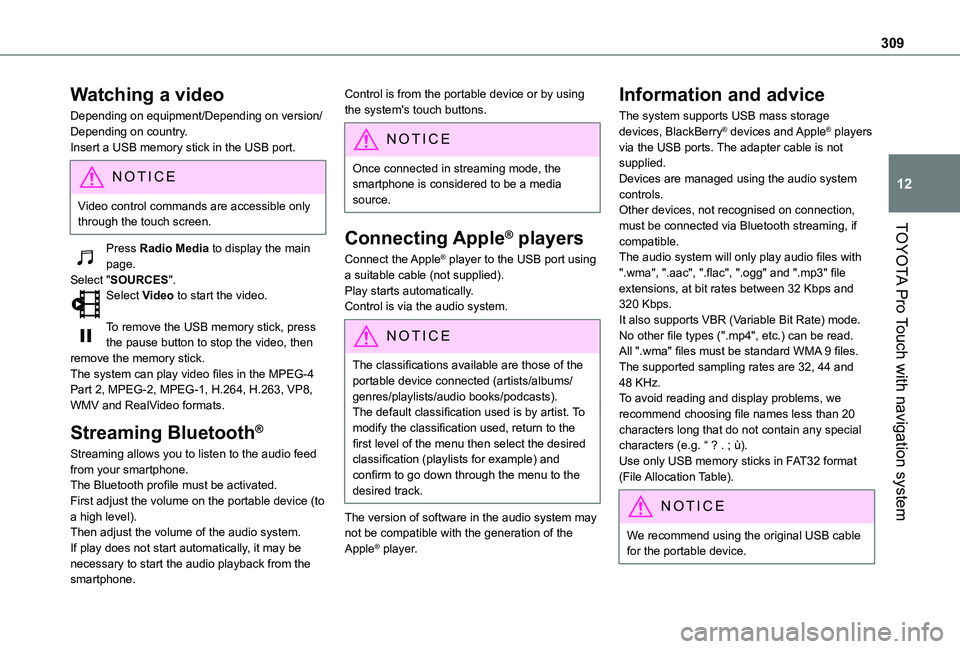
Depending on equipment/Depending on version/Depending on country.Insert a USB memory stick in the USB port.
NOTIC E
Video control commands are accessible only through the touch screen.
Press Radio Media to display the main page.Select "SOURCES".Select Video to start the video.
To remove the USB memory stick, press the pause button to stop the video, then remove the memory stick.The system can play video files in the MPEG-4 Part 2, MPEG-2, MPEG-1, H.264, H.263, VP8, WMV and RealVideo formats.
Streaming Bluetooth®
Streaming allows you to listen to the audio feed from your smartphone.The Bluetooth profile must be activated.First adjust the volume on the portable device (to a high level).Then adjust the volume of the audio system.If play does not start automatically, it may be necessary to start the audio playback from the smartphone.
Control is from the portable device or by using the system's touch buttons.
NOTIC E
Once connected in streaming mode, the smartphone is considered to be a media source.
Connecting Apple® players
Connect the Apple® player to the USB port using a suitable cable (not supplied).Play starts automatically.Control is via the audio system.
NOTIC E
The classifications available are those of the portable device connected (artists/albums/genres/playlists/audio books/podcasts).The default classification used is by artist. To modify the classification used, return to the first level of the menu then select the desired classification (playlists for example) and confirm to go down through the menu to the desired track.
The version of software in the audio system may not be compatible with the generation of the
Apple® player.
Information and advice
The system supports USB mass storage devices, BlackBerry® devices and Apple® players via the USB ports. The adapter cable is not supplied.Devices are managed using the audio system controls.Other devices, not recognised on connection, must be connected via Bluetooth streaming, if compatible.The audio system will only play audio files with ".wma", ".aac", ".flac", ".ogg" and ".mp3" file extensions, at bit rates between 32 Kbps and 320 Kbps.It also supports VBR (Variable Bit Rate) mode.No other file types (".mp4", etc.) can be read.All ".wma" files must be standard WMA 9 files.The supported sampling rates are 32, 44 and 48 KHz.To avoid reading and display problems, we recommend choosing file names less than 20 characters long that do not contain any special
characters (e.g. “ ? . ; ù).Use only USB memory sticks in FAT32 format (File Allocation Table).
NOTIC E
We recommend using the original USB cable for the portable device.
Page 310 of 360
310
Telephone
Pairing a Bluetooth®
telephone
WARNI NG
The services available depend on the network, the SIM card and the compatibility of
the Bluetooth devices used. Consult the telephone user guide and the service provider to check which services are available.
NOTIC E
The Bluetooth function must be activated and the telephone configured as "Visible to all” (in the telphone settings).
To complete the pairing, whichever procedure is used (from the telephone or from the system), ensure that the code is the same in the system and in the telephone.
NOTIC E
If the pairing procedure fails, we recommend deactivating and then reactivating the Bluetooth function on the telephone.
Procedure from the telephone
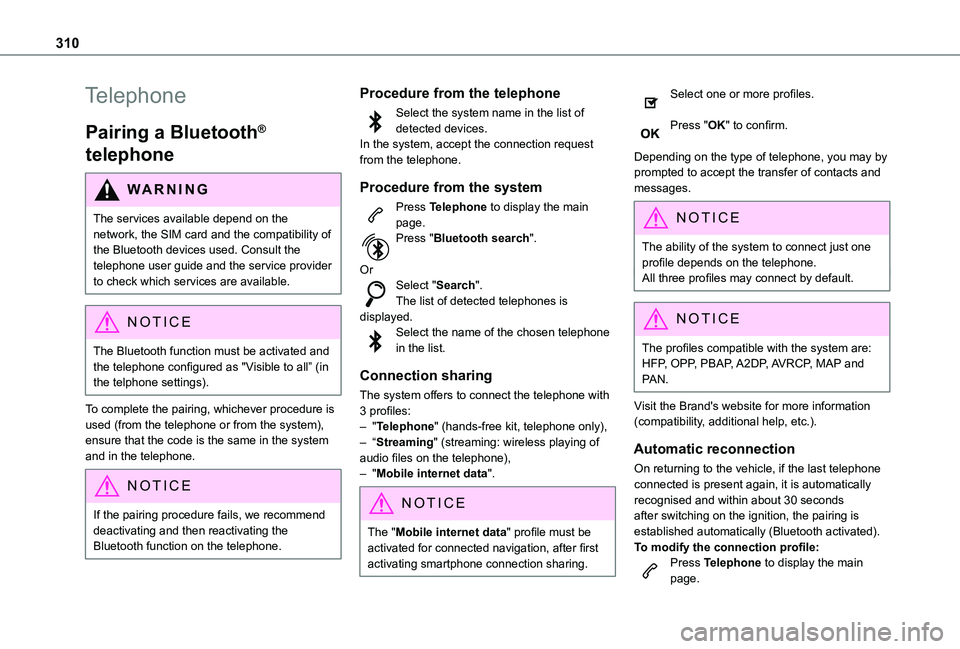
Select the system name in the list of detected devices.In the system, accept the connection request from the telephone.
Procedure from the system
Press Telephone to display the main page.Press "Bluetooth search".
OrSelect "Search".The list of detected telephones is displayed.Select the name of the chosen telephone in the list.
Connection sharing
The system offers to connect the telephone with 3 profiles:– "Telephone" (hands-free kit, telephone only),– “Streaming" (streaming: wireless playing of
audio files on the telephone),– "Mobile internet data".
NOTIC E
The "Mobile internet data" profile must be activated for connected navigation, after first activating smartphone connection sharing.
Select one or more profiles.
Press "OK" to confirm.
Depending on the type of telephone, you may by prompted to accept the transfer of contacts and messages.
NOTIC E
The ability of the system to connect just one profile depends on the telephone.All three profiles may connect by default.
NOTIC E
The profiles compatible with the system are: HFP, OPP, PBAP, A2DP, AVRCP, MAP and PAN.
Visit the Brand's website for more information (compatibility, additional help, etc.).
Automatic reconnection
On returning to the vehicle, if the last telephone connected is present again, it is automatically recognised and within about 30 seconds after switching on the ignition, the pairing is established automatically (Bluetooth activated).
To modify the connection profile:Press Telephone to display the main page.
Page 313 of 360
313
TOYOTA Pro Touch with navigation system
12
Settings
Audio settings
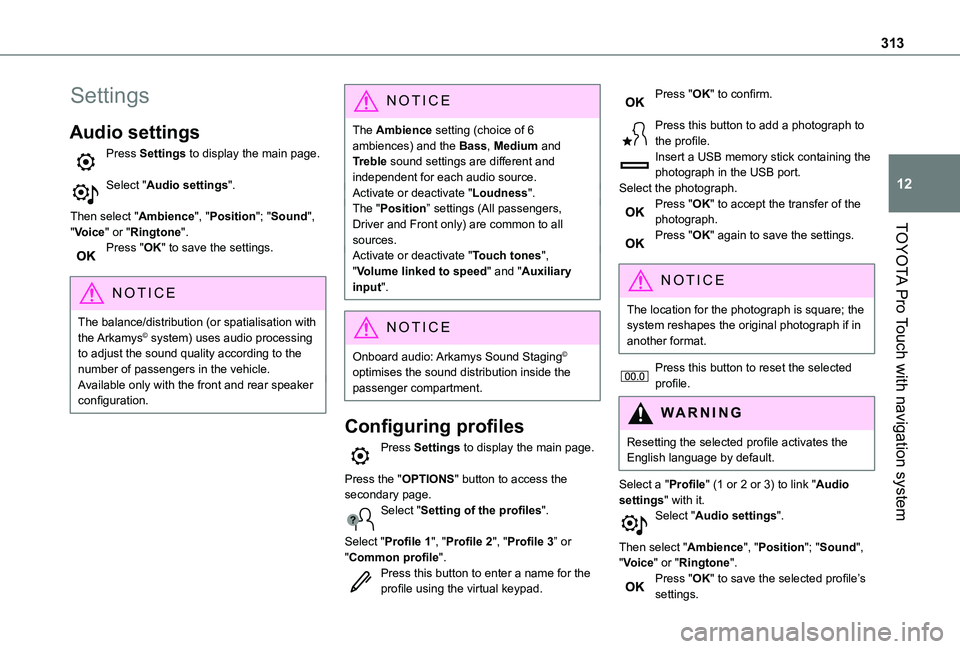
Press Settings to display the main page.
Select "Audio settings".
Then select "Ambience", "Position"; "Sound", "Voice" or "Ringtone".Press "OK" to save the settings.
NOTIC E
The balance/distribution (or spatialisation with the Arkamys© system) uses audio processing to adjust the sound quality according to the number of passengers in the vehicle.Available only with the front and rear speaker configuration.
NOTIC E
The Ambience setting (choice of 6 ambiences) and the Bass, Medium and Treble sound settings are different and independent for each audio source.Activate or deactivate "Loudness".The "Position” settings (All passengers, Driver and Front only) are common to all sources.Activate or deactivate "Touch tones", "Volume linked to speed" and "Auxiliary input".
NOTIC E
Onboard audio: Arkamys Sound Staging© optimises the sound distribution inside the passenger compartment.
Configuring profiles
Press Settings to display the main page.
Press the "OPTIONS" button to access the secondary page.Select "Setting of the profiles".
Select "Profile 1", "Profile 2", "Profile 3” or "Common profile".Press this button to enter a name for the profile using the virtual keypad.
Press "OK" to confirm.
Press this button to add a photograph to the profile.Insert a USB memory stick containing the photograph in the USB port.Select the photograph.Press "OK" to accept the transfer of the photograph.Press "OK" again to save the settings.
NOTIC E
The location for the photograph is square; the system reshapes the original photograph if in another format.
Press this button to reset the selected profile.
WARNI NG
Resetting the selected profile activates the English language by default.
Select a "Profile" (1 or 2 or 3) to link "Audio settings" with it.Select "Audio settings".
Then select "Ambience", "Position"; "Sound", "Voice" or "Ringtone".Press "OK" to save the selected profile’s settings.
Page 316 of 360
316
In certain countries, only major routes (motorways, etc.) are listed for the traffic information.This is perfectly normal. The system is dependent on the traffic information available.The altitude is not displayed.On starting, GPS initialisation may take up to 3 minutes to receive more than 4 satellites correctly.► Wait until the system has started up completely so that there is GPS coverage by at least 4 satellites.Depending on the geographical environment (tunnel, etc.) or the weather, the conditions of reception of the GPS signal may vary.This behaviour is normal. The system is dependent on the GPS signal reception conditions.My navigation is no longer connected.During start-up and in certain geographical areas, the connection may be unavailable.► Check that the online services are activated (settings, contract).
Radio
The reception quality of the tuned radio station gradually deteriorates or the station presets are not working (no sound, 87.5 MHz is displayed, etc.).The vehicle is too far from the selected station’s transmitter, or no transmitter is present in the geographical area.
► Activate the "RDS" function by means of the short-cut menu to enable the system to check whether there is a more powerful transmitter in the geographical area.The aerial is missing or has been damaged (for example while entering a car wash or underground car park).► Have the aerial checked by a dealer.The environment (hills, buildings, tunnels, basement car parks, etc.) is blocking reception, including in RDS mode.This is a perfectly normal phenomenon, and is not indicative of an audio system malfunction.I cannot find some radio stations in the list of stations received.The name of the radio station changes.The station is no longer received or its name has changed in the list.Some radio stations send other information in place of their name (the title of the song for example).The system interprets these details as the station name.
► Press the "Update list" button in the "Radio stations” secondary menu.
Media
Playback of my USB memory stick starts only after a very long wait (around 2 to 3 minutes).Some files supplied with the memory stick may greatly slow down access to reading the memory stick (multiplication by 10 of the cataloguing
time).
► Delete the files supplied with the memory stick and limit the number of sub-folders in the file structure on the memory stick.There may be an extended pause after inserting a USB stick.The system reads a variety of data (folder, title, artist, etc.). This can take from a few seconds to a few minutes.This is perfectly normal.Some characters in information about the currently playing media may not be displayed correctly.The audio system is unable to process certain types of character.► Use standard characters to name tracks and folders.Playback of streaming files does not start.The connected device does not automatically launch playback.► Start playback from the device.Track names and playing times are not displayed on the audio streaming screen.The Bluetooth profile does not allow the transfer
of this information.
Telephone
I cannot connect my Bluetooth telephone.The telephone's Bluetooth function may be switched off or the device may not be visible.► Check that the telephone has Bluetooth switched on.► Check in the telephone settings that it is
"visible to all".
Page 317 of 360
317
TOYOTA Pro Touch with navigation system
12
► Deactivate then reactivate the telephone’s Bluetooth function.The Bluetooth telephone is not compatible with the system.► You can check the compatibility of the telephone on the Brand's website (services).Android Auto and/or CarPlay do not work.Android Auto and CarPlay may not activate if the USB cables are of poor quality.► Use genuine USB cables to ensure compatibility.Android Auto and/or CarPlay do not work.Android Auto and CarPlay are not available in all countries.► Check the Google Android Auto or Apple website to see which countries are supported.The volume of the telephone connected in Bluetooth mode is inaudible.The volume depends on both the system and the telephone.► Increase the volume of the audio system, to maximum if required, and increase the volume of the telephone if necessary.
Ambient noise affects the quality of the telephone call.► Reduce the ambient noise level (close windows, turn down ventilation, slow down, etc.).Some contacts are duplicated in the list.The options for synchronising contacts are: synchronise the contacts on the SIM card, the contacts on the telephone, or both. When both synchronisations are selected, some contacts
may be duplicated.
► Select "Display SIM card contacts" or "Display telephone contacts".The contacts are not listed in alphabetical order.Some telephones offer display options. Depending on the settings chosen, contacts can be transferred in a specific order.► Modify the telephone directory display settings.The system does not receive SMS.Bluetooth mode does not allow SMS text messages to be sent to the system.
Settings
When the treble and bass settings are changed, the ambience is deselected.When the ambience is changed, the treble and bass settings are reset.Selecting an ambience imposes the treble and bass settings, and vice versa.► Modify the treble and bass or ambience settings to obtain the desired musical ambience.When the balance settings are changed, the
distribution is deselected.When the distribution setting is changed, the balance settings are deselected.Selecting a distribution setting imposes the balance settings, and vice versa.► Modify the balance setting or the distribution setting to obtain the desired sound quality.There is a difference in sound quality between audio sources.
To allow for optimal listening quality, the sound settings can be tailored to different audio sources, which can generate audible differences when changing source.► Check that the sound settings are appropriate to the sources listened to. We recommend setting the sound functions (Bass:, Treble:, Balance) to the middle position, setting the musical ambience to "None", setting loudness correction to "Active" in USB mode and "Inactive" in Radio mode.► In all cases, after applying sound settings, adjust the volume level on the portable device (to a high level) first. Then adjust the volume level on the audio system.When the engine is off, the system switches off after several minutes of use.When the engine is switched off, the system's operating time depends on the state of charge of the battery.The switch-off is normal: the system automatically goes into energy economy mode and switches off to maintain an adequate charge
in the battery.► Start the vehicle’s engine to increase the charge of the battery.The date and time cannot be set.Setting of the date and time is only available if the synchronisation with the satellites is deactivated.► Settings menu / Options / Time-Date setting. Select the "Time" tab and deactivate the "GPS
synchronisation" (UTC).
Page 318 of 360
318
A
ABS 11 2Accelerated charging unit (Wallbox) 202Accessories 109, 154Access to the 3rd row 64, 66Access to the spare wheel 234Active Safety Brake 185–187AdBlue® 19, 221AdBlue® tank 222Additive, Diesel 218–219Adjusting head restraints 54Adjusting seat 52–54Adjusting the air distribution 89–90Adjusting the air flow 89–90Adjusting the date 29, 288, 314Adjusting the height and reach of the steering wheel 57Adjusting the lumbar support 52Adjusting the seat angle 52, 54Adjusting the seat belt height 11 7Adjusting the temperature 89–90
Adjusting the time 29, 288, 314Advice on care and maintenance 200, 225Advice on driving 8, 148–149Airbags 120, 122–123, 126Airbags, curtain 122–123Airbags, front 121, 123, 127Airbags, lateral 121, 123Air conditioning 87, 90, 92, 92–93Air conditioning, digital 91Air conditioning, dual-zone automatic 89–90
Air conditioning, manual 88, 91Air intake 89–91Air vents 87Alarm 49–50Android Auto connection 284, 304Anti-lock braking system (ABS) 11 2Anti-pinch 82Antitheft / Immobiliser 31Apple CarPlay connection 284, 304Applications 304Area, loading 32–33, 40–41, 80Armrest, front 55, 75Assistance call 11 0–111Assistance, emergency braking 11 2, 186Audible warning 111Audio streaming (Bluetooth) 270, 282–283, 309
B
Battery 2 11, 246
Battery, 12 V 218, 246–249Battery, ancillaries 246Battery, charging 247–248Battery, remote control 38–39, 95Bench seat, one-piece, fixed 64–65Blind, panoramic roof 82Blind spot monitoring system 191Blind spot sensors 190Blinds, side 82Bluetooth (hands-free) 271, 285–286, 310
Bluetooth (telephone) 285–286, 310–3 11Bodywork 225Bonnet 214–215Boot 48Boot lid 35–36, 38, 48Bottle holder 75Brake discs 220Brake lamps 241, 243Brakes 219–220Braking 165Braking assistance system 11 2Braking, automatic emergency 185–187Braking, dynamic emergency 156–158Brightness 287Bulbs 238Bulbs (changing) 237, 241
C
Capacity, fuel tank 197, 199Cap, fuel filler 197, 199
Care of the bodywork 225CD 269, 282CD, MP3 269, 282Central locking 30, 35, 39Changing a bulb 237, 241, 243Changing a bulb (side-hinged doors) 241Changing a fuse 243–245Changing a wheel 233Changing a wiper blade 107–108Changing the remote control battery 38
Page 319 of 360
319
Alphabetical index
Changing to free-wheeling 250Charge level indicator (Electric) 22Charging cable 203Charging cable (Electric) 202Charging connector (Electric) 201, 207–208, 210Charging flap (Electric) 201, 207–208, 210Charging system (Electric) 5, 9, 27, 199, 215Charging the traction battery (Electric) 21, 199, 207–208, 210Checking the engine oil level 19Checking the levels 216–217Checking tyre pressures (using the kit) 229–232Checks 215, 218–220Checks, routine 218–220Child lock 146–147Child lock on rear windows 147Children 11 9, 128, 134–136, 142, 143, 143–144, 144Children (safety) 146Child seats 11 9, 124–125, 127–128, 131–132, 144
Child seats, conventional 127–128, 131–132Child seats, i-Size 144Child seats, ISOFIX 134–136, 142, 143, 143–144, 144Cleaning (advice) 200, 225–226Closing the boot 48Closing the doors 30, 35, 47Collision Risk Alert 185–186Compressor, tyre inflation 229Configuration, vehicle 26–27
Connected applications 304Connection, Bluetooth 271, 285–286, 305, 310–3 11Connection, Wi-Fi network 305–306Connectivity 304Consumption figures 27Container, AdBlue® 222Control, emergency boot release 38Control, emergency door 30, 37–38Control, heated seats 56Control stalk, lighting 99Control stalk, wipers 105–107Control unit 202–203Courtesy lamp 97Courtesy lamp, front 97–98, 242Courtesy lamp, rear 97–98, 242Courtesy lamps 97–98, 242Cover, load space 79Crew cab, fixed 73–74Crew cab, folding 74Cruise control 173, 175–176, 178–181Cruise control,
adaptive 175–176, 181, 183–185Cruise control by speed limit recognition 175–176Cruise control, dynamic with Stop function 175–176Cup holder 75
D
DAB (Digital Audio Broadcasting) - Digital radio 267, 282, 308Date (setting) 29, 288, 314Daytime running lamps 101, 238–240Deactivating the passenger airbag 121, 126–127Deactivation of DSC (ESC) 11 3Deadlocking 36Deferred charging 27, 209Deferred charging (Electric) 27–28, 201, 207Defrosting 58, 91Demisting 91Demisting, rear 92Demisting, rear screen 92Dimensions 259Dipstick 19, 216Direction indicators 100, 238–239, 241, 243Display, head-up 172–173Domestic charging 203Domestic charging (Electric) 208, 210, 257
Door pockets 76Doors, rear 47Doors, side 43Doors, side-hinged 35–36, 47, 241Driver’s attention warning 188–189Drive selector (Electric) 164, 219Driving 148–149Driving aids camera (warnings) 170Driving aids (recommendations) 170Driving economically 8
Page 321 of 360
321
Alphabetical index
Histogramme, fuel consumption 27–28Horn 111
I
Ignition 153–154, 312Ignition on 154Immobiliser, electronic 150Indicator, AdBlue® range 19Indicator, coolant temperature 18–19Indicator, engine oil level 19Indicator lamps, operation 99Indicators, direction 100Inflating tyres 220, 262Inflating tyres and accessories (using the kit) 229–232Infrared camera 171Instrument panel 10, 171Intelligent Traction Control 11 4Internet browser 301, 304ISOFIX 140, 142, 143, 143–144
J
Jack 233Jump starting 247
K
Key 30–31, 33–35, 37Key, electronic 30, 154Keyless Entry and Starting 30–36, 151, 153–154Key not recognised 154Key with remote control 35Kit, hands-free 271, 285–286, 310Kit, puncture repair 230–232Kit, temporary puncture repair 229–232
L
Labels 6, 63Labels, identification 262Lams with Full LED technology 102Lane Departure Warning System (LDWS) 187–188Leather (care) 226Level, AdBlue® 218
Level, brake fluid 217Level, Diesel additive 218–219Level, engine coolant 18–19, 217Level, engine oil 19, 216Level, headlamp wash 106Level, power steering fluid 217Levels and checks 215–217Level, screenwash fluid 106, 217Lighting 99Lighting, cornering 102
Lighting dimmer 23Lighting, exterior 99Lighting, guide-me home 101Lighting, interior 97, 104Lighting, mood 104Lighting, welcome 101–102Loading 80, 213Loading area fittings 79Load reduction mode 2 11Load restraint 79Locating your vehicle 31Locking 30–31, 35Locking from the inside 39–41Locking the doors 39–40Low fuel level 197, 199Lumbar 52, 56–57
M
Mains socket (domestic network) 202Maintenance (advice) 200, 225
Maintenance, routine 171, 218, 220Manoeuvring aids (recommendations) 170Map reading lamps 97Markings, identification 262Massage function 56Mat 75, 171Memorising a speed 173Menu 284Menu, main 26, 265Menus (audio) 278–279, 293–294
Page 322 of 360
322
Menu short cuts 26Messages 312Messages, quick 312Minimum traction battery charge level (Electric) 22Mirror, rear view 58Mirrors, door 57–58, 92, 190–191Misfuel prevention 199Mobile application 27–28, 96, 209Motor, electric 153, 215, 257Mountings, ISOFIX 132, 140, 142, 143, 143–144MP3 CD 269
N
Navigation 298–300Navigation, connected 301–303Net, cargo 59–61Net, high load retaining 81Number plate lamps 242
O
Obstacle detection 191Oil change 216Oil consumption 216OIl, engine 216On-board tools 228Opening the bonnet 214
Opening the boot 30–31, 48Opening the doors 30–31, 41–42Opening to 180° 47
P
Pads, brake 219–220Paint 225, 262Paint colour code 262Paint, matt 226Panoramic glass sunroof 82Parcel shelf, rear 76Parking brake 155, 219Parking brake, electric 156–158, 219Parking sensors, audible and visual 191Parking sensors, front 192Parking sensors, rear 191Passenger compartment temperature pre-conditioning (Electric) 28, 96Pedestrian horn (Electric) 111, 149Plates, identification 262
Player, Apple® 270, 283, 309Player, MP3 CD 269Player, USB 268, 282, 308Port, USB 78, 268, 282, 284, 303, 308Power 21Power indicator (Electric) 9, 21Power mode 165Pressures, tyres 220, 230, 232, 262Pre-tensioning seat belts 11 9Priming the fuel system 227
Profiles 287, 313Protecting children 121, 124–125, 127–128, 134–136, 142, 143, 143–144, 144Public fast charging station 202, 208Puncture 229–230, 232–233
R
Radar (warnings) 170Radio 265–266, 280, 282, 306–307Radio, digital (Digital Audio Broadcasting - DAB) 267, 282, 308Range, AdBlue 19, 218RDS 280, 307Rear screen, demisting 92Recharging the battery 247–248Recharging the traction battery 203Recharging the traction battery (Electric) 199, 207–208, 210Recirculation, air 89–91Recovery 250
Recovery of the vehicle 250Reduction of electrical load 2 11Regeneration of the particle filter 219Regenerative braking (deceleration by engine braking) 164–165Reinitialisation of the under-inflation detection system 169Reinitialising the remote control 39Reminder, key in ignition 153Reminder, lighting on 100
Page 323 of 360
323
Alphabetical index
Remote control 30–35, 37, 150Remote functions 209Remotely operable functions (Electric) 28, 96Removing a wheel 235–237Removing the mat 75Replacing bulbs 237–238, 241, 243Replacing fuses 243–245Replacing the air filter 219Replacing the oil filter 219Replacing the passenger compartment filter 218Reservoir, screenwash 217Resetting the trip recorder 23Reversing camera 171, 193–194, 196Reversing lamp 241, 243Roof bars 213Running out of fuel (Diesel) 227
S
Safety, children 121, 124–125, 127–128, 134–136, 142, 143, 143–144, 144
Saturation of the particle filter (Diesel) 219Screen, instrument panel 24Screen menu map 284Screen, multifunction (with audio system) 265Screenwash, front 106Screenwash, rear 107SCR (Selective Catalytic Reduction) 21, 221Seat and bench seat, rear, fixed 63, 66–67Seat and bench seat, rear, on rails 63, 68–70Seat angle 52
Seat belts 11 6–11 9, 127Seat belts, rear 11 8Seat, bench front, 2-seat 55, 11 8Seat, rear bench 63Seats, electric 53–54Seats, front 52–54Seats, heated 55–56Seat(s), individual, rear, on rails 70–72, 11 8Seats, rear 64–70, 125Selector, gear 160Sensors (warnings) 171Serial number, vehicle 262Service indicator 18Servicing 18, 218, 220Settings, equipment 26–27Settings, system 287, 314Sidelamps 99, 238, 240–241, 243Side repeater 240Silent vehicle warning sound (Electric) 111, 149Sliding side door, electric 35–36, 41–42, 44Sliding side door, hands-free 45–46Sliding side window 82
Smart Cargo 59–61Smart Entry & Start 30–31, 151, 153–154Smartphone 28Snow chains 168, 2 11–212, 234Snow chains, link 2 11, 234Socket, 12 V accessory 75, 77Socket, 220 V 78Speed limiter 173, 175–178Speed limit recognition 174–175, 177, 180, 183–185
Speedometer 171Sport mode 165Stability control (ESC) 11 2, 11 4–11 6Starting a Diesel engine 197Starting the engine 150, 153Starting the vehicle 151, 154, 159–163Starting using another battery 154, 247Station, radio 265, 280, 306–307Stay, bonnet 215–216Steering mounted controls, audio 264, 277–278, 292Steering wheel, adjustment 57Stickers, customising ~ Stickers, expressive 226Stopping the vehicle 153–154, 160–163Stop & Start 25, 88, 166–167, 197, 214, 218, 249Storage 55, 62, 73–74, 76Storage compartments 76Storage wells 73–74, 76Stowing rings 79Sunshine sensor 87Super-fast charging (Electric) 208, 210, 257Suspension 220
Switching off the engine 150, 152–153Synchronising the remote control 39
T
Table of weights 253Table position 53Table, retractable sliding 83–85Tables, aircraft 76