Low battery TOYOTA PROACE EV 2021 Owners Manual
[x] Cancel search | Manufacturer: TOYOTA, Model Year: 2021, Model line: PROACE EV, Model: TOYOTA PROACE EV 2021Pages: 360, PDF Size: 68.91 MB
Page 12 of 360
12
NOTIC E
For more information on the Indicators, please refer to the corresponding section.
Warning and indicator
lamps
Displayed as symbols, the warning and indicator lamps inform the driver of the occurrence of a malfunction (warning lamps) or of the operating status of a system (operation or deactivation indicator lamps). Certain lamps light up in two ways (fixed or flashing) and/or in several colours.
Associated warnings
The illumination of a lamp may be accompanied by an audible signal and/or a message displayed in a screen.Relating the type of alert to the operating status of the vehicle allows you to determine whether the situation is normal or whether a fault has
occurred: refer to the description of each lamp for further information.
When the ignition is switched on
Certain red or orange warning lamps come on for a few seconds when the ignition is switched on. These warning lamps should go off as soon as the engine is started.For more information on a system or a function, refer to the corresponding section.
Persistent warning lamp
If a red or orange warning lamp comes on, there may be fault which needs further investigation.
If a lamp remains lit
The references (1), (2) and (3) in the warning and indicator lamp description indicate whether you should contact a qualified professional in addition to the immediate recommended actions.(1):You must stop the vehicle.Stop as soon as it is safe to do so and switch off the ignition.(2):Contact any authorized Toyota retailer or Toyota authorized repairer, or any reliable repairer.(3):Go to any authorized Toyota retailer or Toyota authorized repairer, or any reliable repairer.
List of warning and
indicator lamps
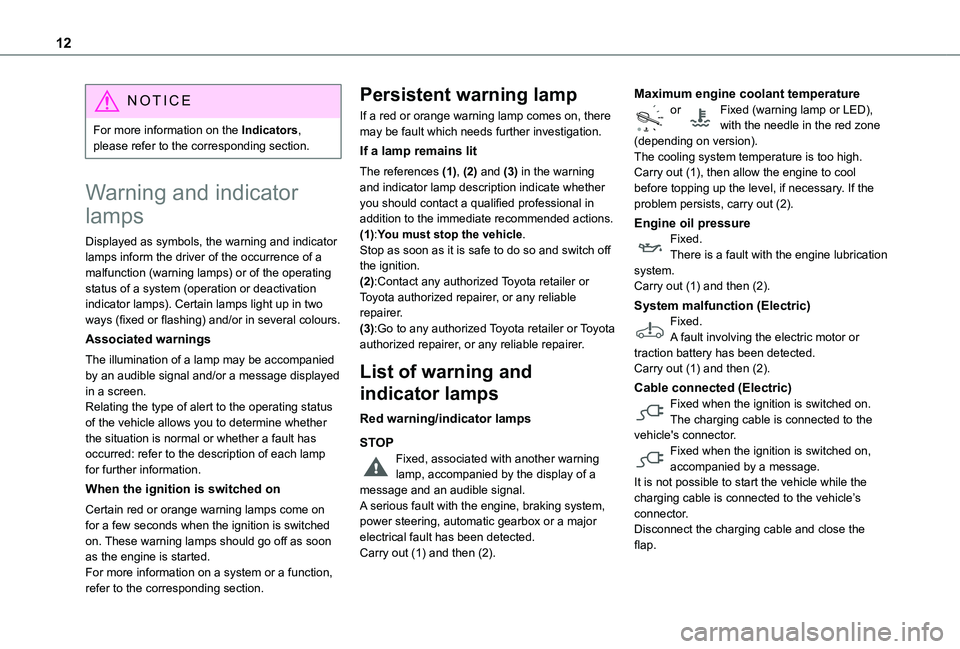
Red warning/indicator lamps
STOP
Fixed, associated with another warning lamp, accompanied by the display of a message and an audible signal.A serious fault with the engine, braking system, power steering, automatic gearbox or a major electrical fault has been detected.Carry out (1) and then (2).
Maximum engine coolant temperatureor Fixed (warning lamp or LED), with the needle in the red zone (depending on version).The cooling system temperature is too high.Carry out (1), then allow the engine to cool before topping up the level, if necessary. If the problem persists, carry out (2).
Engine oil pressureFixed.There is a fault with the engine lubrication system.Carry out (1) and then (2).
System malfunction (Electric)Fixed.A fault involving the electric motor or traction battery has been detected.Carry out (1) and then (2).
Cable connected (Electric)Fixed when the ignition is switched on.The charging cable is connected to the vehicle's connector.
Fixed when the ignition is switched on, accompanied by a message.It is not possible to start the vehicle while the charging cable is connected to the vehicle’s connector.Disconnect the charging cable and close the flap.
Page 16 of 360
16
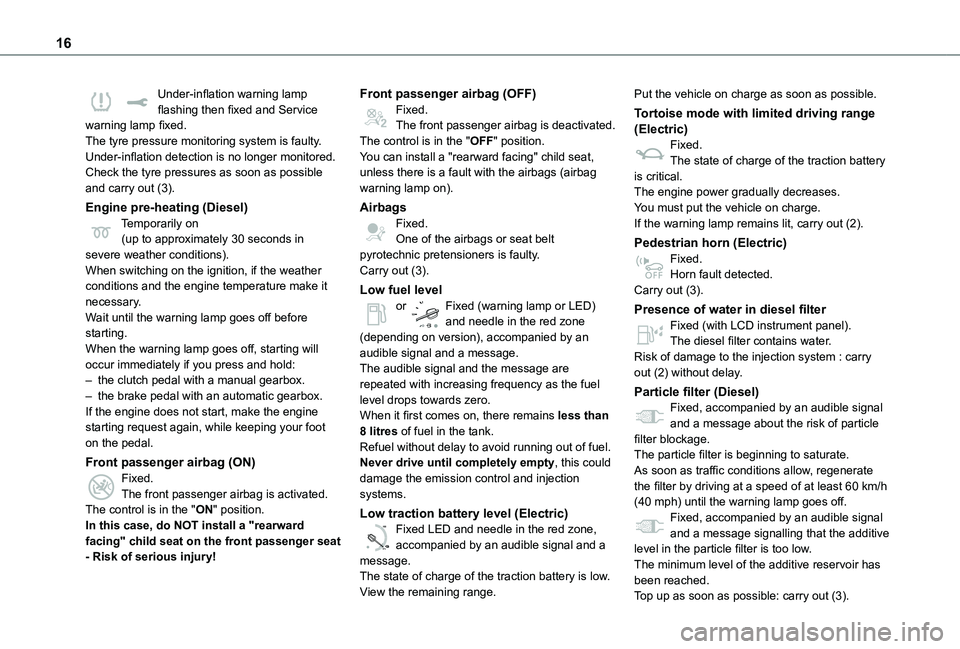
Under-inflation warning lamp flashing then fixed and Service warning lamp fixed.The tyre pressure monitoring system is faulty.Under-inflation detection is no longer monitored.Check the tyre pressures as soon as possible and carry out (3).
Engine pre-heating (Diesel)Temporarily on(up to approximately 30 seconds in severe weather conditions).When switching on the ignition, if the weather conditions and the engine temperature make it necessary.Wait until the warning lamp goes off before starting.When the warning lamp goes off, starting will occur immediately if you press and hold:– the clutch pedal with a manual gearbox.– the brake pedal with an automatic gearbox.If the engine does not start, make the engine starting request again, while keeping your foot on the pedal.
Front passenger airbag (ON)Fixed.The front passenger airbag is activated.The control is in the "ON" position.In this case, do NOT install a "rearward facing" child seat on the front passenger seat - Risk of serious injury!
Front passenger airbag (OFF)Fixed.The front passenger airbag is deactivated.The control is in the "OFF" position.You can install a "rearward facing" child seat, unless there is a fault with the airbags (airbag warning lamp on).
AirbagsFixed.One of the airbags or seat belt pyrotechnic pretensioners is faulty.Carry out (3).
Low fuel levelor Fixed (warning lamp or LED) and needle in the red zone (depending on version), accompanied by an audible signal and a message.The audible signal and the message are repeated with increasing frequency as the fuel level drops towards zero.When it first comes on, there remains less than 8 litres of fuel in the tank.
Refuel without delay to avoid running out of fuel.Never drive until completely empty, this could damage the emission control and injection systems.
Low traction battery level (Electric)
0 %
100
Fixed LED and needle in the red zone, accompanied by an audible signal and a message.The state of charge of the traction battery is low.View the remaining range.
Put the vehicle on charge as soon as possible.
Tortoise mode with limited driving range (Electric)Fixed.The state of charge of the traction battery is critical.The engine power gradually decreases.You must put the vehicle on charge.If the warning lamp remains lit, carry out (2).
Pedestrian horn (Electric)Fixed.Horn fault detected.Carry out (3).
Presence of water in diesel filterFixed (with LCD instrument panel).The diesel filter contains water.Risk of damage to the injection system : carry out (2) without delay.
Particle filter (Diesel)Fixed, accompanied by an audible signal and a message about the risk of particle filter blockage.
The particle filter is beginning to saturate.As soon as traffic conditions allow, regenerate the filter by driving at a speed of at least 60 km/h (40 mph) until the warning lamp goes off.Fixed, accompanied by an audible signal and a message signalling that the additive level in the particle filter is too low.The minimum level of the additive reservoir has been reached.
Top up as soon as possible: carry out (3).
Page 18 of 360
18
Indicators
Service indicator
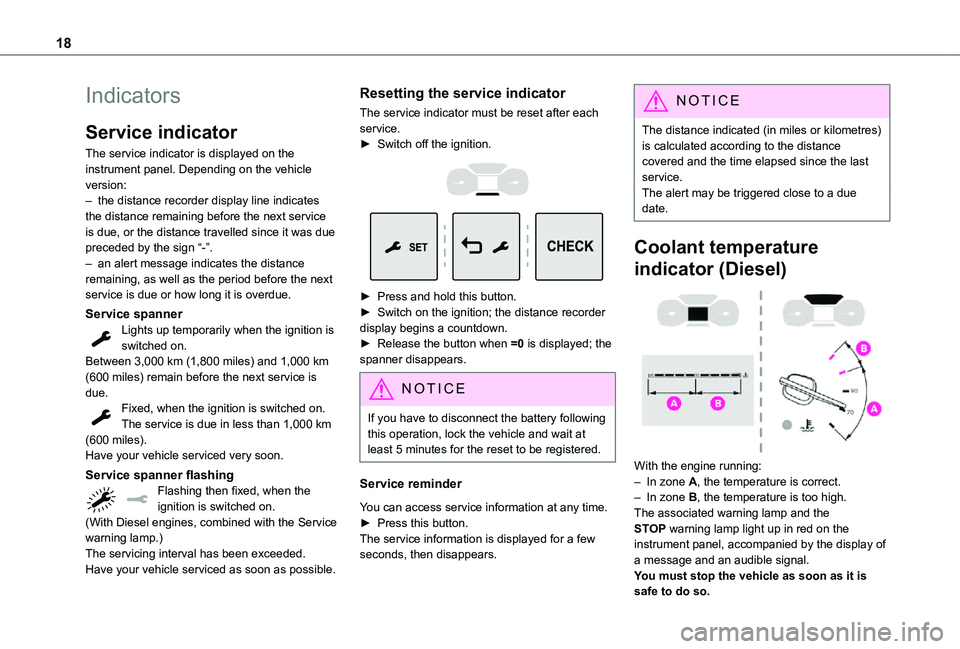
The service indicator is displayed on the instrument panel. Depending on the vehicle version:– the distance recorder display line indicates the distance remaining before the next service is due, or the distance travelled since it was due preceded by the sign “-”.– an alert message indicates the distance remaining, as well as the period before the next service is due or how long it is overdue.
Service spannerLights up temporarily when the ignition is switched on.Between 3,000 km (1,800 miles) and 1,000 km (600 miles) remain before the next service is due.Fixed, when the ignition is switched on.The service is due in less than 1,000 km (600 miles).
Have your vehicle serviced very soon.
Service spanner flashingFlashing then fixed, when the ignition is switched on.(With Diesel engines, combined with the Service warning lamp.)The servicing interval has been exceeded.Have your vehicle serviced as soon as possible.
Resetting the service indicator
The service indicator must be reset after each service.► Switch off the ignition.
► Press and hold this button.► Switch on the ignition; the distance recorder display begins a countdown.► Release the button when =0 is displayed; the spanner disappears.
NOTIC E
If you have to disconnect the battery following this operation, lock the vehicle and wait at least 5 minutes for the reset to be registered.
Service reminder
You can access service information at any time.► Press this button.The service information is displayed for a few
seconds, then disappears.
NOTIC E
The distance indicated (in miles or kilometres) is calculated according to the distance covered and the time elapsed since the last service.The alert may be triggered close to a due date.
Coolant temperature
indicator (Diesel)
With the engine running:– In zone A, the temperature is correct.– In zone B, the temperature is too high. The associated warning lamp and the STOP warning lamp light up in red on the instrument panel, accompanied by the display of a message and an audible signal.You must stop the vehicle as soon as it is safe to do so.
Page 22 of 360
22
NOTIC E
With the ignition off, opening the driver's door activates the indicator, which moves to the "neutral" position.
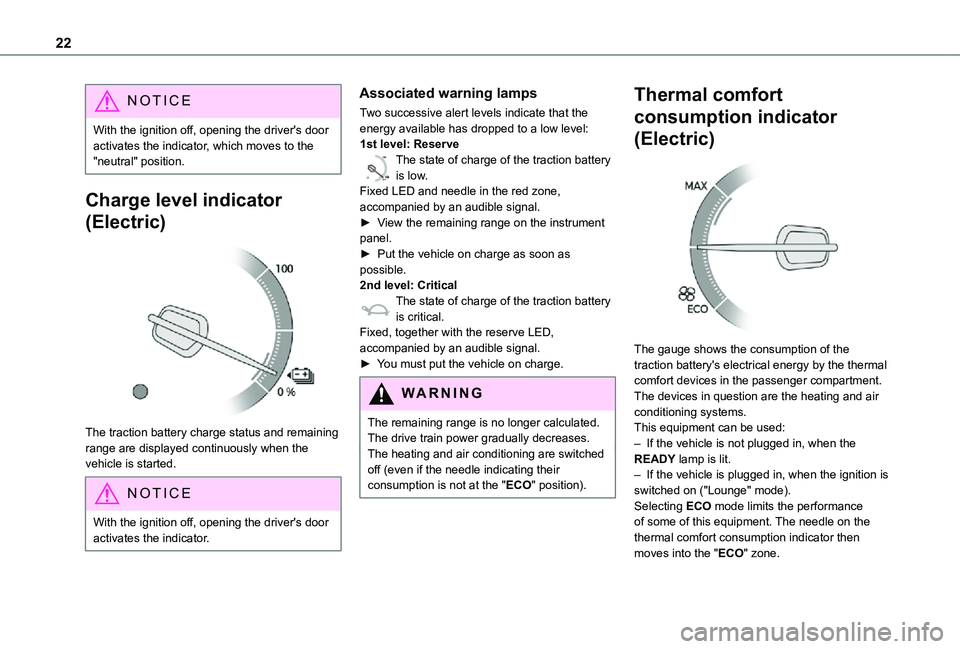
Charge level indicator
(Electric)
The traction battery charge status and remaining range are displayed continuously when the vehicle is started.
NOTIC E
With the ignition off, opening the driver's door activates the indicator.
Associated warning lamps
Two successive alert levels indicate that the energy available has dropped to a low level:1st level: Reserve
0 %
100
The state of charge of the traction battery is low.Fixed LED and needle in the red zone, accompanied by an audible signal.►
View the remaining range on the instrument panel.► Put the vehicle on charge as soon as possible.2nd level: CriticalThe state of charge of the traction battery is critical.Fixed, together with the reserve LED, accompanied by an audible signal.► You must put the vehicle on charge.
WARNI NG
The remaining range is no longer calculated. The drive train power gradually decreases.The heating and air conditioning are switched off (even if the needle indicating their consumption is not at the "ECO" position).
Thermal comfort
consumption indicator
(Electric)
The gauge shows the consumption of the traction battery's electrical energy by the thermal comfort devices in the passenger compartment.The devices in question are the heating and air conditioning systems.This equipment can be used:– If the vehicle is not plugged in, when the READY lamp is lit.– If the vehicle is plugged in, when the ignition is switched on ("Lounge" mode).Selecting ECO mode limits the performance of some of this equipment. The needle on the thermal comfort consumption indicator then
moves into the "ECO" zone.
Page 27 of 360
27
Instruments
1
Main settings for the audio system and touch screen.Audio system on/off.Volume adjustment/mute.
Upper bar
Certain information is displayed permanently in the upper bar of the touch screen:– Time and outside temperature (a blue warning lamp appears if there is a risk of ice).– Reminder of information from the Radio Media and Telephone menus and navigation instructions (depending on equipment).– Notifications.– Access to the Settings.
Energy menu
Depending on version, this is accessible either:– directly, by pressing the button near the touch screen.– via the Applications menu.
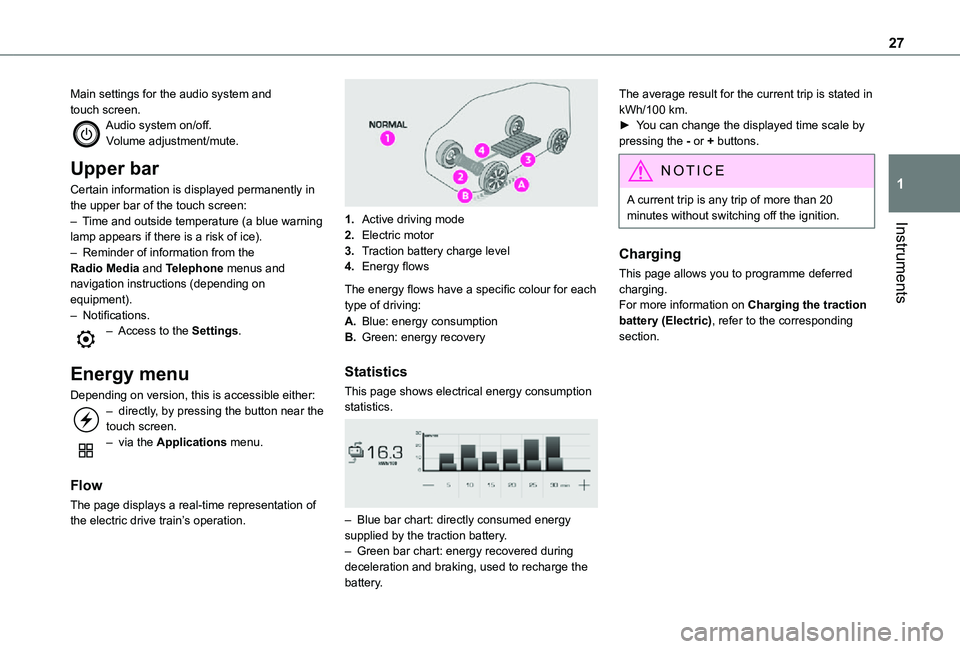
Flow
The page displays a real-time representation of the electric drive train’s operation.
1.Active driving mode
2.Electric motor
3.Traction battery charge level
4.Energy flows
The energy flows have a specific colour for each type of driving:
A.Blue: energy consumption
B.Green: energy recovery
Statistics
This page shows electrical energy consumption statistics.
– Blue bar chart: directly consumed energy supplied by the traction battery.– Green bar chart: energy recovered during deceleration and braking, used to recharge the battery.
The average result for the current trip is stated in kWh/100 km.► You can change the displayed time scale by pressing the - or + buttons.
NOTIC E
A current trip is any trip of more than 20 minutes without switching off the ignition.
Charging
This page allows you to programme deferred charging.For more information on Charging the traction battery (Electric), refer to the corresponding section.
Page 28 of 360
28
Remotely-operable
functions (Electric)
(Available soon)
In addition to all the functions of the MyToyota application that you can access from a smartphone, you can access the following functions:– Battery charge management (Deferred charging).
– Temperature pre-conditioning management.– Consultation of the state of charge and range of the vehicle.
Installation procedure
► Download the MyToyota app from the appropriate online store for your smartphone.► Create an account.► Enter the vehicle’s V.I.N. (code beginning with "VF" on the vehicle registration document).For more information on Identification markings, refer to the corresponding section.
NOTIC E
Network coverageIn order to be able to use the various remotely operable features, ensure that your vehicle is located in an area covered by the mobile network.A lack of network coverage may prevent communication with the vehicle (for example, if it is in an underground car park). In such cases, the application will display a message indicating that the connection with the vehicle could not be established.
Setting the date and time
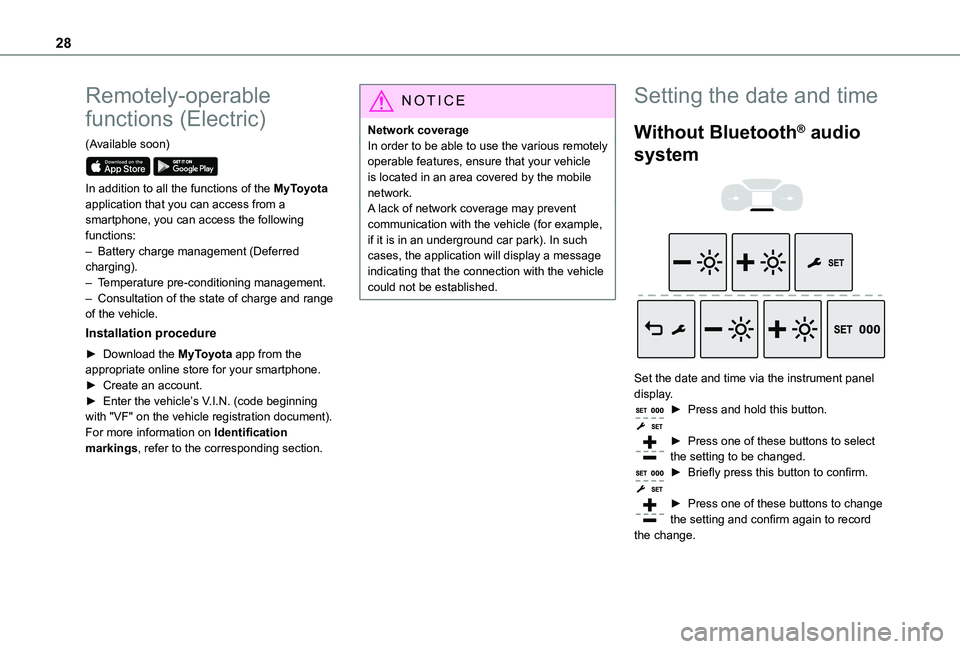
Without Bluetooth® audio
system
Set the date and time via the instrument panel display.► Press and hold this button.
► Press one of these buttons to select the setting to be changed.► Briefly press this button to confirm.
► Press one of these buttons to change the setting and confirm again to record the change.
Page 31 of 360
31
Access
2
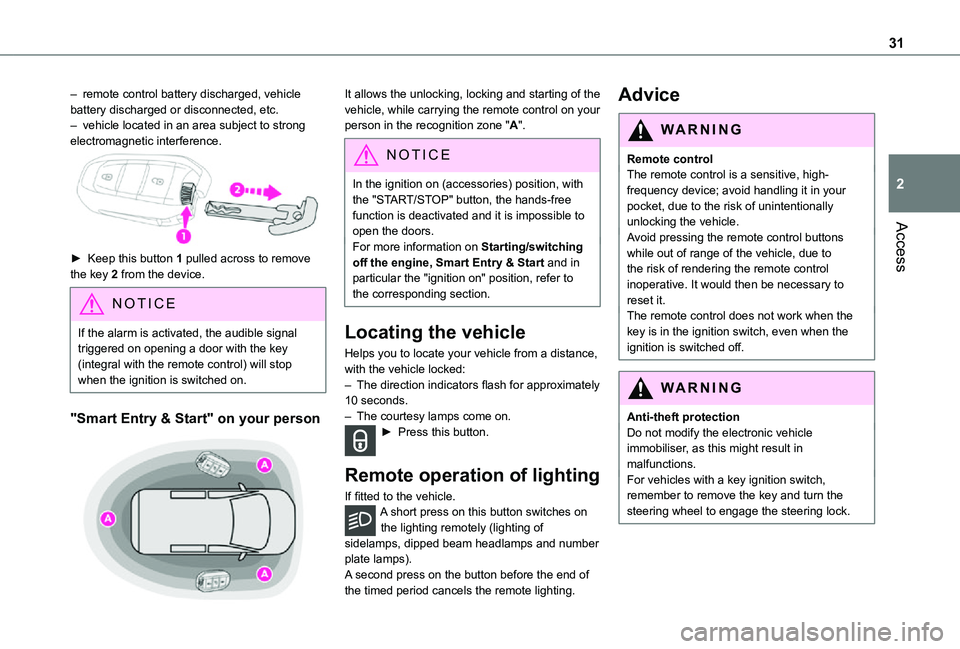
– remote control battery discharged, vehicle battery discharged or disconnected, etc.– vehicle located in an area subject to strong electromagnetic interference.
► Keep this button 1 pulled across to remove the key 2 from the device.
NOTIC E
If the alarm is activated, the audible signal triggered on opening a door with the key (integral with the remote control) will stop when the ignition is switched on.
"Smart Entry & Start" on your person
It allows the unlocking, locking and starting of the vehicle, while carrying the remote control on your person in the recognition zone "A".
NOTIC E
In the ignition on (accessories) position, with the "START/STOP" button, the hands-free function is deactivated and it is impossible to open the doors.
For more information on Starting/switching off the engine, Smart Entry & Start and in particular the "ignition on" position, refer to the corresponding section.
Locating the vehicle
Helps you to locate your vehicle from a distance, with the vehicle locked:– The direction indicators flash for approximately 10 seconds.– The courtesy lamps come on.► Press this button.
Remote operation of lighting
If fitted to the vehicle.A short press on this button switches on the lighting remotely (lighting of sidelamps, dipped beam headlamps and number plate lamps).A second press on the button before the end of the timed period cancels the remote lighting.
Advice
WARNI NG
Remote controlThe remote control is a sensitive, high-frequency device; avoid handling it in your pocket, due to the risk of unintentionally unlocking the vehicle.Avoid pressing the remote control buttons
while out of range of the vehicle, due to the risk of rendering the remote control inoperative. It would then be necessary to reset it.The remote control does not work when the key is in the ignition switch, even when the ignition is switched off.
WARNI NG
Anti-theft protectionDo not modify the electronic vehicle immobiliser, as this might result in malfunctions.For vehicles with a key ignition switch, remember to remove the key and turn the steering wheel to engage the steering lock.
Page 37 of 360
37
Access
2
NOTIC E
If the vehicle is not fitted with an alarm, deadlocking is signalled by fixed lighting of the direction indicators for approximately two seconds.
Back-up procedures
Lost keys, remote control,
electronic key
Go to any authorized Toyota retailer or Toyota authorized repairer, or any reliable repairer with the vehicle's registration certificate, your personal identification documents and if possible, the label bearing the key code.Any authorized Toyota retailer or Toyota authorized repairer, or any reliable repairer will be able to retrieve the key code and the transponder code, enabling a new key to be
ordered.
Complete unlocking/locking
of the vehicle with the key
Use this procedure in the following situations:– Remote control battery discharged.– Remote control malfunction.– Vehicle battery discharged.– Vehicle in an area subject to strong electromagnetic interference.
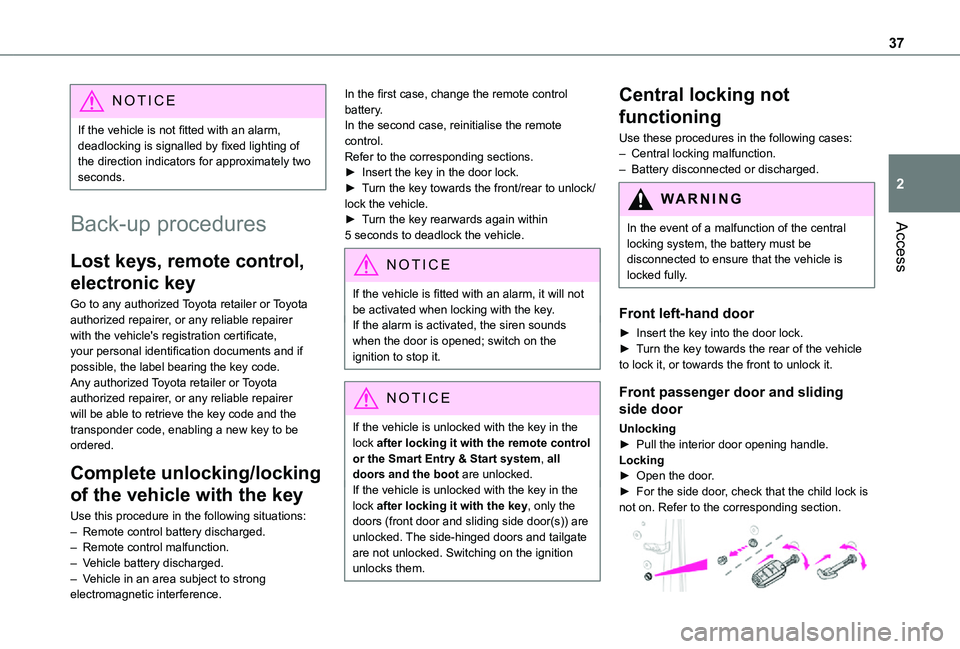
In the first case, change the remote control battery.In the second case, reinitialise the remote control.Refer to the corresponding sections.► Insert the key in the door lock.► Turn the key towards the front/rear to unlock/lock the vehicle.► Turn the key rearwards again within 5 seconds to deadlock the vehicle.
NOTIC E
If the vehicle is fitted with an alarm, it will not be activated when locking with the key.If the alarm is activated, the siren sounds when the door is opened; switch on the ignition to stop it.
NOTIC E
If the vehicle is unlocked with the key in the lock after locking it with the remote control or the Smart Entry & Start system, all doors and the boot are unlocked.If the vehicle is unlocked with the key in the lock after locking it with the key, only the doors (front door and sliding side door(s)) are unlocked. The side-hinged doors and tailgate are not unlocked. Switching on the ignition unlocks them.
Central locking not
functioning
Use these procedures in the following cases:– Central locking malfunction.– Battery disconnected or discharged.
WARNI NG
In the event of a malfunction of the central
locking system, the battery must be disconnected to ensure that the vehicle is locked fully.
Front left-hand door
► Insert the key into the door lock.► Turn the key towards the rear of the vehicle to lock it, or towards the front to unlock it.
Front passenger door and sliding
side door
Unlocking► Pull the interior door opening handle.Locking► Open the door.► For the side door, check that the child lock is not on. Refer to the corresponding section.
Page 39 of 360
39
Access
2
located in the corner, then clip the cover onto the unit.► Reinitialise the remote control.For more information on Reinitialising the remote control, refer to the corresponding section.
EC O
Do not throw remote control batteries away, as they contain metals that are harmful to the environment. Take them to an approved disposal point.
Reinitialising the remote
control
Following replacement of the battery or in the event of a fault, it may be necessary to reinitialise the remote control.
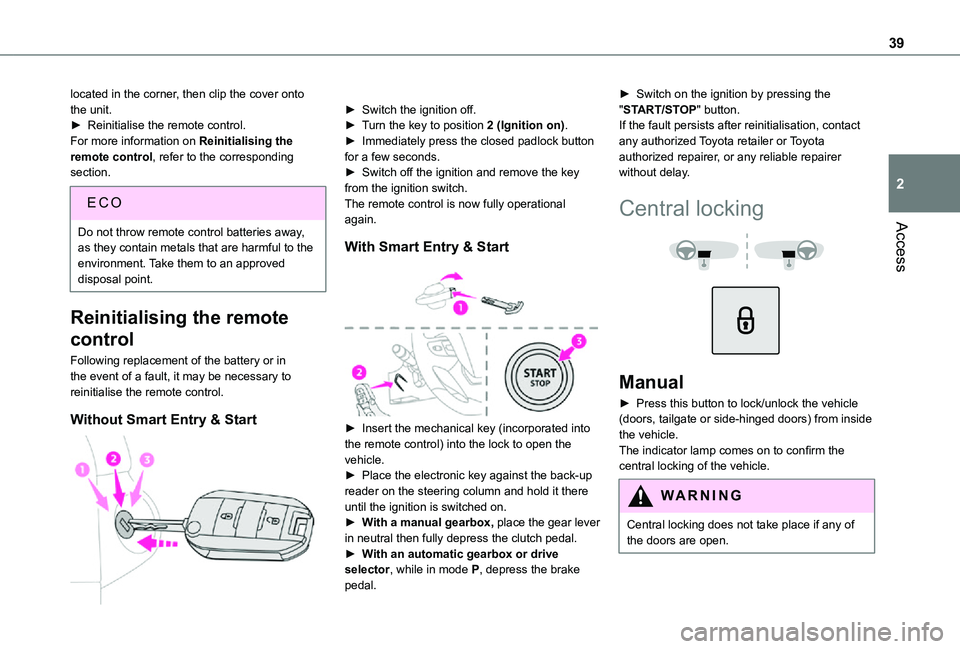
Without Smart Entry & Start
► Switch the ignition off.► Turn the key to position 2 (Ignition on).► Immediately press the closed padlock button for a few seconds.► Switch off the ignition and remove the key from the ignition switch.The remote control is now fully operational again.
With Smart Entry & Start
► Insert the mechanical key (incorporated into the remote control) into the lock to open the
vehicle.► Place the electronic key against the back-up reader on the steering column and hold it there until the ignition is switched on.► With a manual gearbox, place the gear lever in neutral then fully depress the clutch pedal.► With an automatic gearbox or drive selector, while in mode P, depress the brake pedal.
► Switch on the ignition by pressing the "START/STOP" button.If the fault persists after reinitialisation, contact any authorized Toyota retailer or Toyota authorized repairer, or any reliable repairer without delay.
Central locking
Manual
► Press this button to lock/unlock the vehicle (doors, tailgate or side-hinged doors) from inside the vehicle. The indicator lamp comes on to confirm the central locking of the vehicle.
WARNI NG
Central locking does not take place if any of the doors are open.
Page 51 of 360
51
Access
2
Electric windows
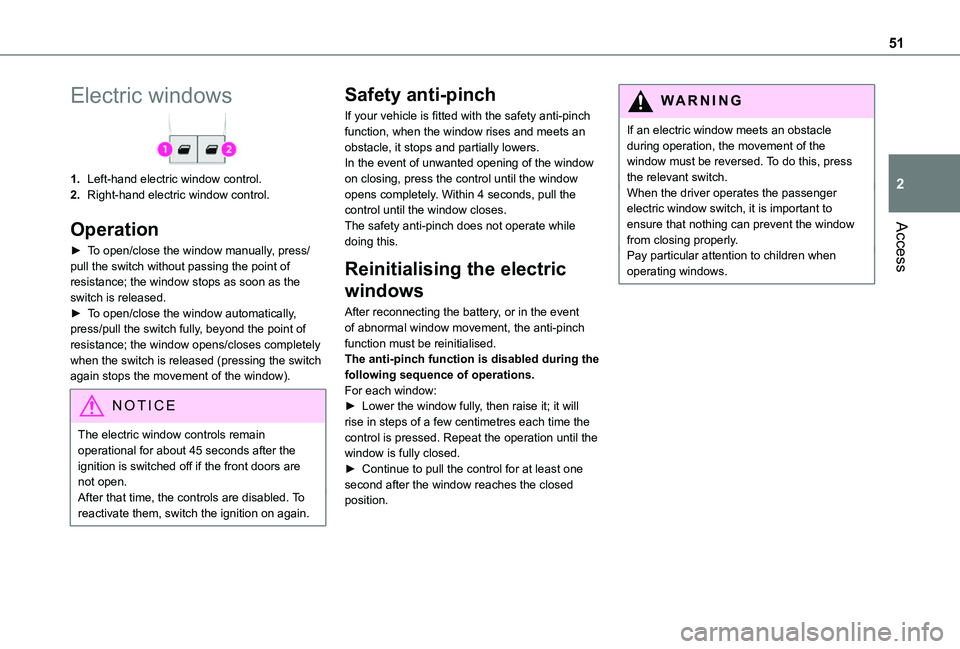
1.Left-hand electric window control.
2.Right-hand electric window control.
Operation
► To open/close the window manually, press/pull the switch without passing the point of resistance; the window stops as soon as the switch is released.► To open/close the window automatically, press/pull the switch fully, beyond the point of resistance; the window opens/closes completely when the switch is released (pressing the switch again stops the movement of the window).
NOTIC E
The electric window controls remain operational for about 45 seconds after the ignition is switched off if the front doors are not open.After that time, the controls are disabled. To reactivate them, switch the ignition on again.
Safety anti-pinch
If your vehicle is fitted with the safety anti-pinch function, when the window rises and meets an obstacle, it stops and partially lowers.In the event of unwanted opening of the window on closing, press the control until the window opens completely. Within 4 seconds, pull the control until the window closes.The safety anti-pinch does not operate while doing this.
Reinitialising the electric
windows
After reconnecting the battery, or in the event of abnormal window movement, the anti-pinch function must be reinitialised.The anti-pinch function is disabled during the following sequence of operations.For each window:► Lower the window fully, then raise it; it will rise in steps of a few centimetres each time the control is pressed. Repeat the operation until the
window is fully closed.► Continue to pull the control for at least one second after the window reaches the closed position.
WARNI NG
If an electric window meets an obstacle during operation, the movement of the window must be reversed. To do this, press the relevant switch.When the driver operates the passenger electric window switch, it is important to ensure that nothing can prevent the window from closing properly.Pay particular attention to children when operating windows.