steering wheel TOYOTA PROACE VERSO 2018 User Guide
[x] Cancel search | Manufacturer: TOYOTA, Model Year: 2018, Model line: PROACE VERSO, Model: TOYOTA PROACE VERSO 2018Pages: 504, PDF Size: 80.57 MB
Page 195 of 504
195
Starting-switching off the engine, manual key, remote control
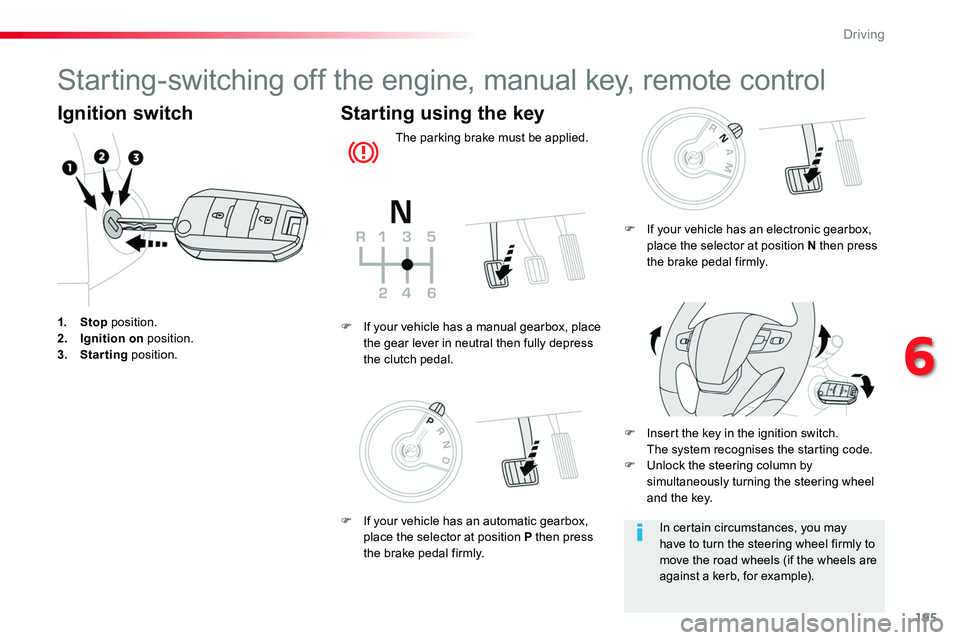
Ignition switch
1. Stop position.2. Ignition on position.3. Starting position.
Starting using the key
The parking brake must be applied.
F Insert the key in the ignition switch. The system recognises the starting code.F Unlock the steering column by simultaneously turning the steering wheel and the key.
F If your vehicle has a manual gearbox, place the gear lever in neutral then fully depress the clutch pedal.
In certain circumstances, you may have to turn the steering wheel firmly to move the road wheels (if the wheels are against a kerb, for example).
F If your vehicle has an electronic gearbox, place the selector at position N then press the brake pedal firmly.
F If your vehicle has an automatic gearbox, place the selector at position P then press the brake pedal firmly.
6
Driving
Page 197 of 504
197
Avoid attaching heavy objects to the key, which would weigh down on its blade in the ignition switch and could cause a malfunction.
Switching off the engine leads to a loss of braking assistance.
Key left in the "Ignition on" position
If the key has been left in the ignition switch at position 2 (Ignition on), the ignition will be switched off automatically after one hour.To switch the ignition back on, turn the key to position 1 (Stop), then back to position 2 (Ignition on).Never switch off the ignition until the vehicle has been brought to a complete stop.
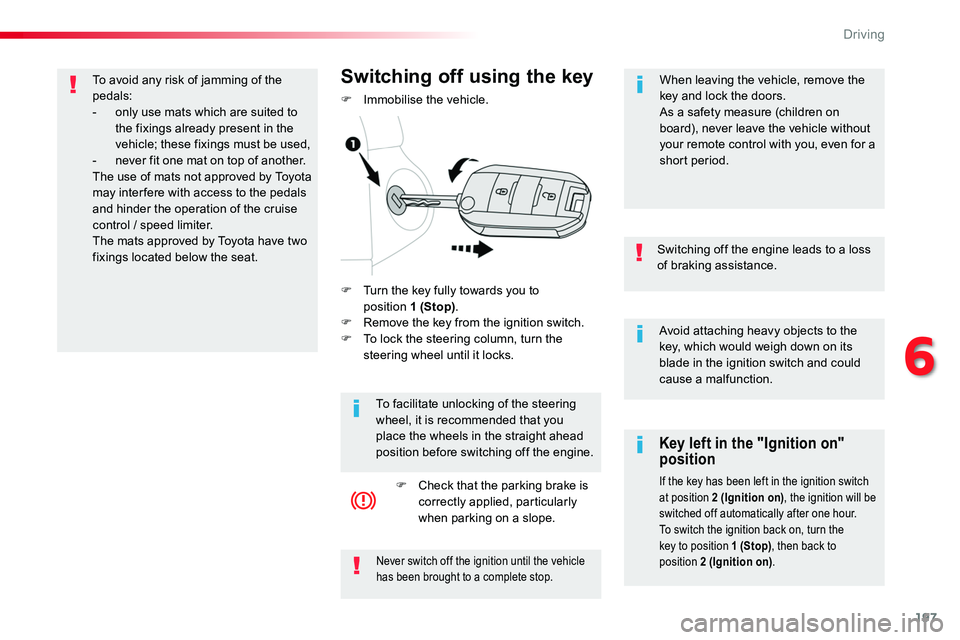
F Turn the key fully towards you to position 1 (Stop).F Remove the key from the ignition switch.F To lock the steering column, turn the steering wheel until it locks.
Switching off using the key
F Immobilise the vehicle.
To facilitate unlocking of the steering wheel, it is recommended that you place the wheels in the straight ahead position before switching off the engine.
F Check that the parking brake is correctly applied, particularly when parking on a slope.
When leaving the vehicle, remove the key and lock the doors.As a safety measure (children on board), never leave the vehicle without your remote control with you, even for a short period.
To avoid any risk of jamming of the pedals:- only use mats which are suited to the fixings already present in the vehicle; these fixings must be used,- never fit one mat on top of another.The use of mats not approved by Toyota may inter fere with access to the pedals and hinder the operation of the cruise
control / speed limiter.The mats approved by Toyota have two fixings located below the seat.
6
Driving
Page 199 of 504
199
The presence in the recognition zone of the remote control of the "Smart Entry & Start System" is essential.Never leave the vehicle with the engine running and with the remote control on your person.If the remote control leaves the recognition zone, a message is displayed.
Move the remote control into the zone to be able to start the engine.
If one of the starting conditions is not met, a message appears in the instrument panel screen. In some circumstances, it is necessary to turn the steering wheel slightly while pressing the "START/STOP" button
to assist unlocking of the steering; a message warns you when this is needed.
If the vehicle is not immobilised, the engine will not stop.
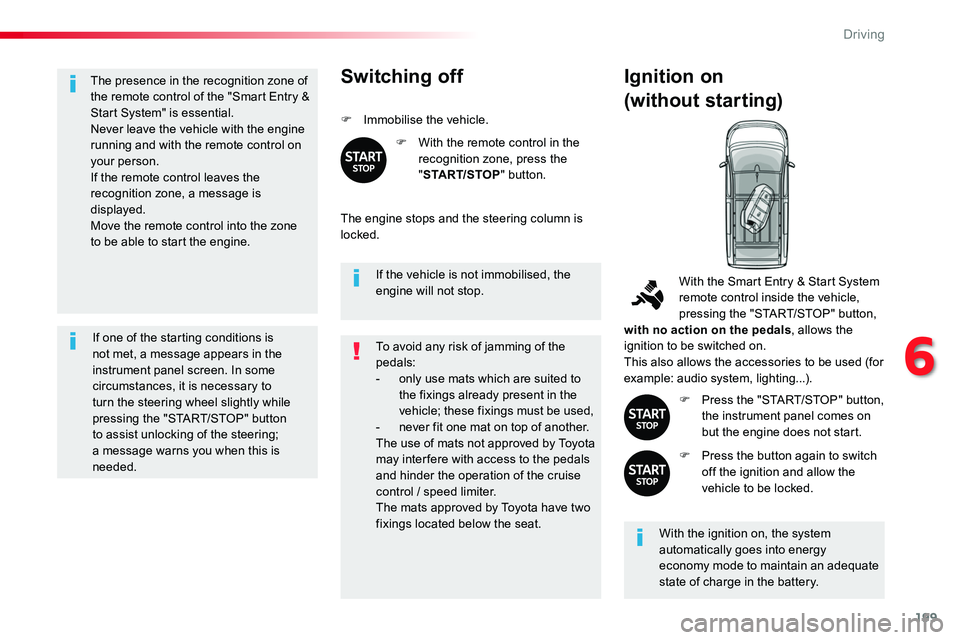
Switching off
F Immobilise the vehicle.
F With the remote control in the recognition zone, press the "START/STOP" button.
The engine stops and the steering column is locked.
Ignition on
(without starting)
With the ignition on, the system automatically goes into energy economy mode to maintain an adequate state of charge in the battery.
With the Smart Entry & Start System remote control inside the vehicle, pressing the "START/STOP" button, with no action on the pedals, allows the ignition to be switched on.This also allows the accessories to be used (for example: audio system, lighting...).
F Press the "START/STOP" button, the instrument panel comes on but the engine does not start.
F Press the button again to switch off the ignition and allow the vehicle to be locked.
To avoid any risk of jamming of the pedals:- only use mats which are suited to the fixings already present in the vehicle; these fixings must be used,- never fit one mat on top of another.The use of mats not approved by Toyota may inter fere with access to the pedals and hinder the operation of the cruise control / speed limiter.The mats approved by Toyota have two fixings located below the seat.
6
Driving
Page 200 of 504
200
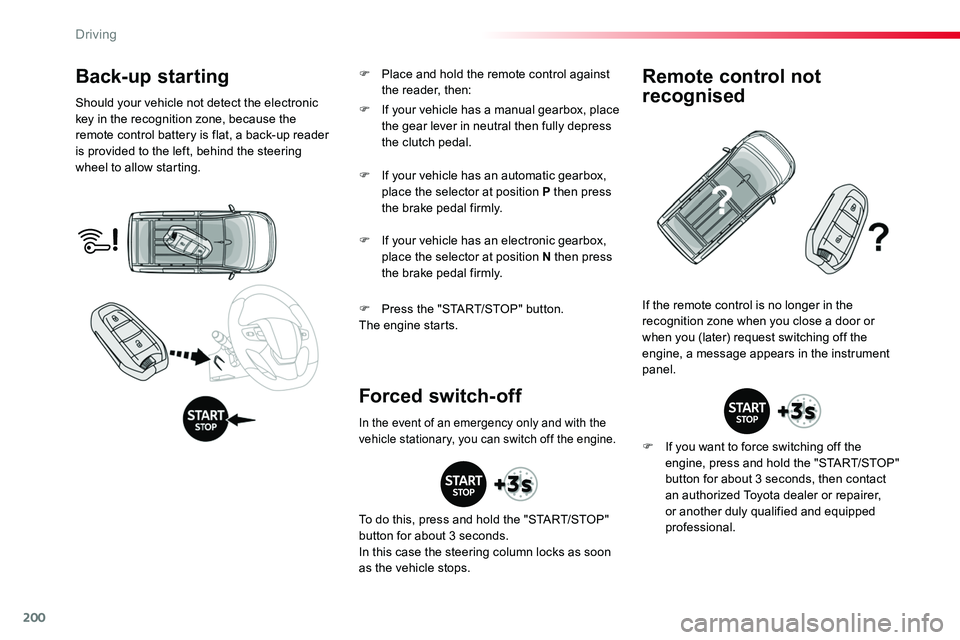
Back-up starting
Should your vehicle not detect the electronic key in the recognition zone, because the remote control battery is flat, a back-up reader is provided to the left, behind the steering wheel to allow starting.
F Press the "START/STOP" button.The engine starts.
If the remote control is no longer in the recognition zone when you close a door or when you (later) request switching off the engine, a message appears in the instrument panel.
Forced switch-off
Remote control not
recognised
F If you want to force switching off the engine, press and hold the "START/STOP" button for about 3 seconds, then contact an authorized Toyota dealer or repairer, or another duly qualified and equipped professional.
F If your vehicle has a manual gearbox, place the gear lever in neutral then fully depress the clutch pedal.
F If your vehicle has an automatic gearbox, place the selector at position P then press the brake pedal firmly.
F If your vehicle has an electronic gearbox, place the selector at position N then press the brake pedal firmly.
In the event of an emergency only and with the vehicle stationary, you can switch off the engine.
To do this, press and hold the "START/STOP" button for about 3 seconds.In this case the steering column locks as soon as the vehicle stops.
F Place and hold the remote control against the reader, then:
Driving
Page 232 of 504
232
Adaptive cruise control ("CRUISE")
This systems allows the vehicle's speed to be maintained at a value set by the driver.In addition it allows (when circumstances permit) an inter-vehicle distance that you have selected to be maintained between your vehicle and the vehicle in front.
In the Driving menu, activate/deactivate "Dynamic cruise control".
The state of the system is memorised on switching off the ignition.
Activation / Deactivation
The cruise control selection thumbwheel must be at the "CRUISE" position, other wise the selection is not taken into account.Activation or deactivation of the system is via the vehicle configuration menu.
With the touch screen
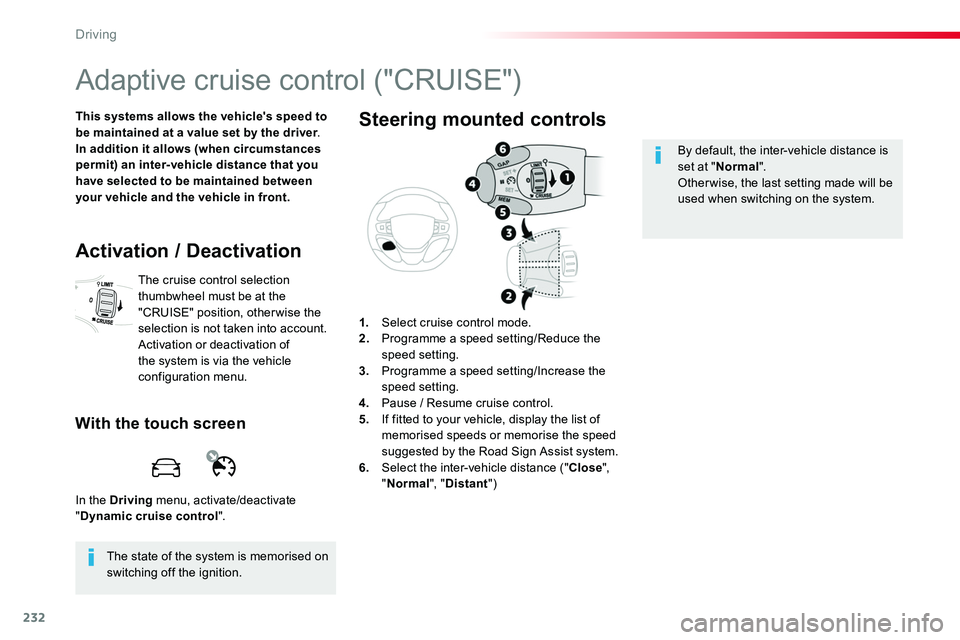
1. Select cruise control mode.2. Programme a speed setting/Reduce the speed setting.3. Programme a speed setting/Increase the speed setting.4. Pause / Resume cruise control.5. If fitted to your vehicle, display the list of
memorised speeds or memorise the speed suggested by the Road Sign Assist system.6. Select the inter-vehicle distance ("Close", "Normal", "Distant")
Steering mounted controls
By default, the inter-vehicle distance is set at "Normal".Other wise, the last setting made will be used when switching on the system.
Driving
Page 242 of 504
242
This system, also called automatic emergency
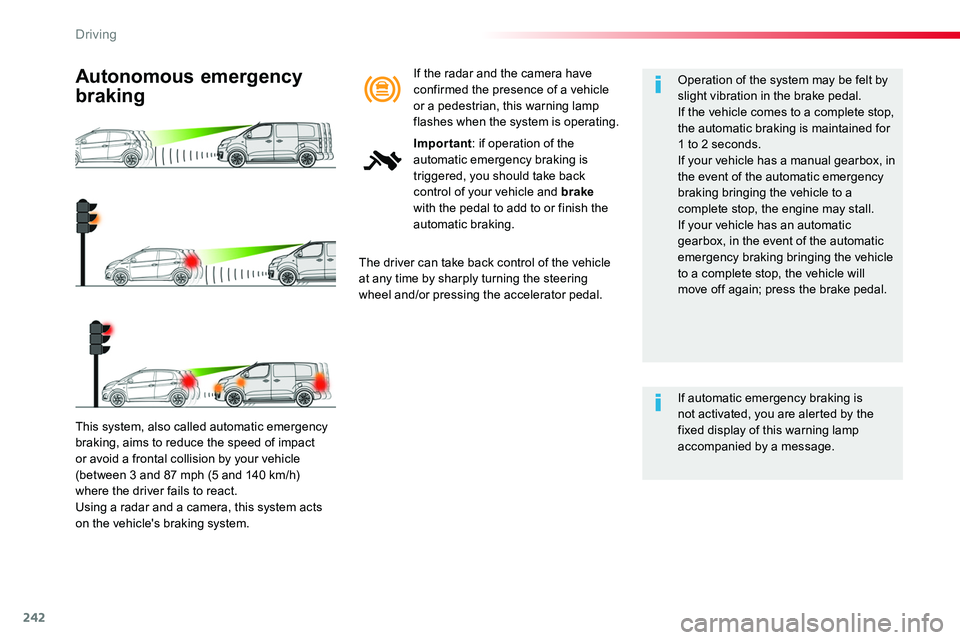
braking, aims to reduce the speed of impact or avoid a frontal collision by your vehicle (between 3 and 87 mph (5 and 140 km/h) where the driver fails to react.Using a radar and a camera, this system acts on the vehicle's braking system.
Autonomous emergency
braking
The driver can take back control of the vehicle at any time by sharply turning the steering wheel and/or pressing the accelerator pedal.
Operation of the system may be felt by slight vibration in the brake pedal.If the vehicle comes to a complete stop, the automatic braking is maintained for 1 to 2 seconds.If your vehicle has a manual gearbox, in the event of the automatic emergency braking bringing the vehicle to a complete stop, the engine may stall.
If your vehicle has an automatic gearbox, in the event of the automatic emergency braking bringing the vehicle to a complete stop, the vehicle will move off again; press the brake pedal.
If automatic emergency braking is not activated, you are alerted by the fixed display of this warning lamp accompanied by a message.
If the radar and the camera have confirmed the presence of a vehicle or a pedestrian, this warning lamp flashes when the system is operating.
Important: if operation of the automatic emergency braking is triggered, you should take back control of your vehicle and brake with the pedal to add to or finish the automatic braking.
Driving
Page 256 of 504
256
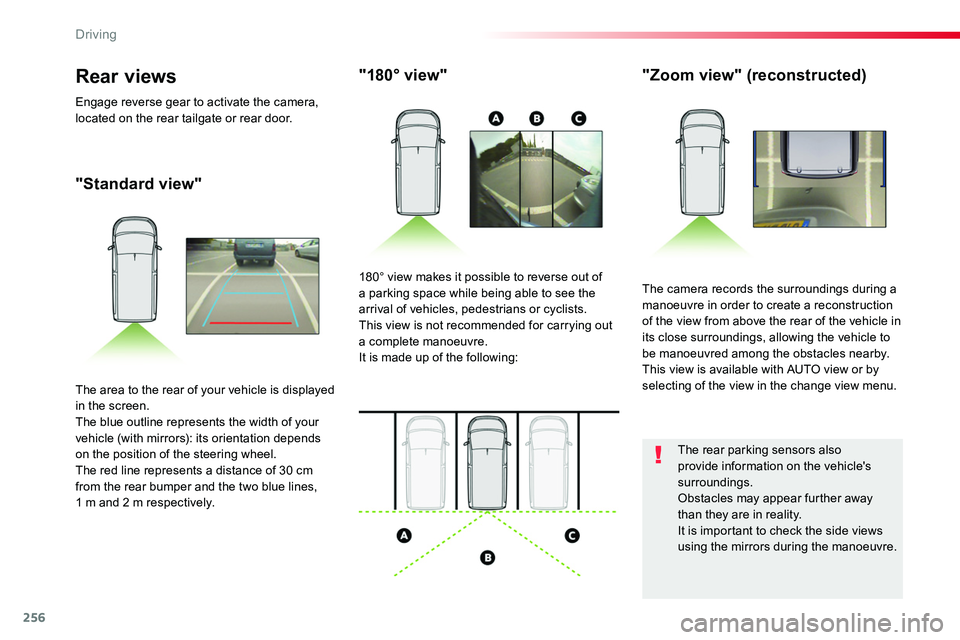
"Standard view"
"180° view""Zoom view" (reconstructed)
The camera records the surroundings during a manoeuvre in order to create a reconstruction of the view from above the rear of the vehicle in its close surroundings, allowing the vehicle to be manoeuvred among the obstacles nearby.This view is available with AUTO view or by selecting of the view in the change view menu.
180° view makes it possible to reverse out of a parking space while being able to see the arrival of vehicles, pedestrians or cyclists.This view is not recommended for carrying out a complete manoeuvre.It is made up of the following:
The area to the rear of your vehicle is displayed in the screen.The blue outline represents the width of your vehicle (with mirrors): its orientation depends on the position of the steering wheel.The red line represents a distance of 30 cm from the rear bumper and the two blue lines, 1 m and 2 m respectively.
Rear views
Engage reverse gear to activate the camera, located on the rear tailgate or rear door.
The rear parking sensors also provide information on the vehicle's surroundings.Obstacles may appear further away than they are in reality.It is important to check the side views using the mirrors during the manoeuvre.
Driving
Page 259 of 504
259
Tyre Pressure WarningReinitialisation
Before reinitialising the system, ensure that the pressures of the four tyres are correct for the use of the vehicle and in line with the recommendations on the tyre pressure label.The tyre pressure warning alert can only be relied on if the reinitialisation of the system has been done with the pressures in the four tyres correctly adjusted.The tyre pressure warning system does not give a warning if a pressure is incorrect at the time of reinitialisation.
This is given by fixed illumination of this warning lamp, accompanied by an audible signal and, depending on equipment, the display of a message.
It is necessary to reinitialise the system every time one or more tyre pressures are adjusted, and after changing one or more wheels.
F Reduce speed immediately, avoid excessive steering movements and sudden braking.F Stop the vehicle as soon as it is safe to do so.
F In the event of a puncture, use the temporary puncture repair kit or the spare wheel (depending on equipment),orF if you have a compressor, such as the one in the temporary puncture repair kit, check the pressures of the four tyres when cold,
orF if it is not possible to make this check immediately, drive carefully at reduced speed.
The loss of pressure detected does not always cause visible bulging of the tyre. Do not satisfy yourself with just a visual check.The alert is maintained until the system is reinitialised.
Initialisation of the system is done with the ignition on and the vehicle stationary.
The new pressure settings registered are considered to be reference values by the system.
6
Driving
Page 286 of 504
286
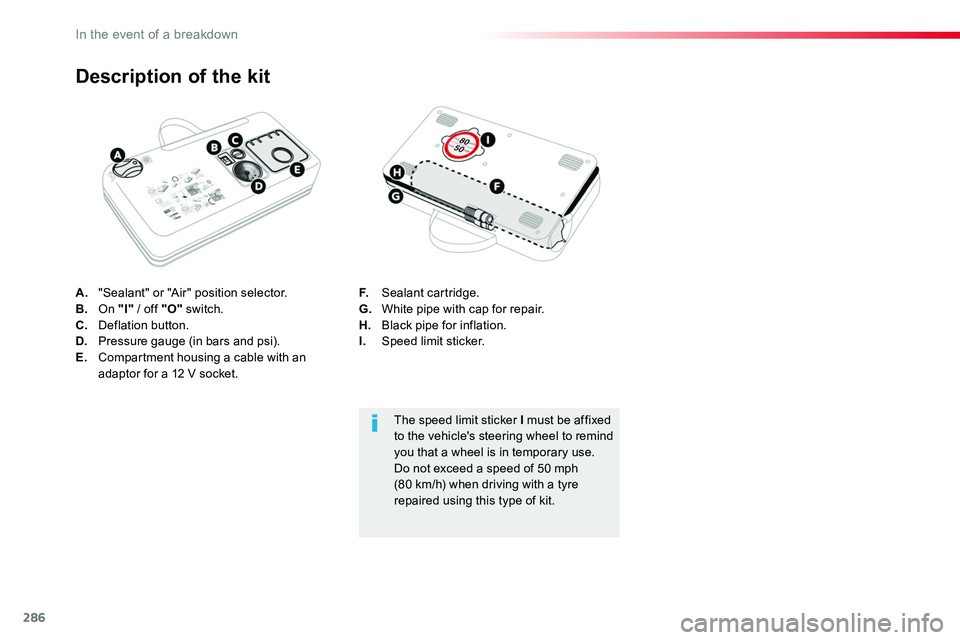
A. "Sealant" or "Air" position selector.B. On "I" / off "O" switch.C. Deflation button.D. Pressure gauge (in bars and psi).E. Compartment housing a cable with an adaptor for a 12 V socket.
Description of the kit
F. Sealant cartridge.G. White pipe with cap for repair.H. Black pipe for inflation.I. Speed limit sticker.
The speed limit sticker I must be affixed to the vehicle's steering wheel to remind you that a wheel is in temporary use.Do not exceed a speed of 50 mph (80 km/h) when driving with a tyre repaired using this type of kit.
In the event of a breakdown
Page 321 of 504
321
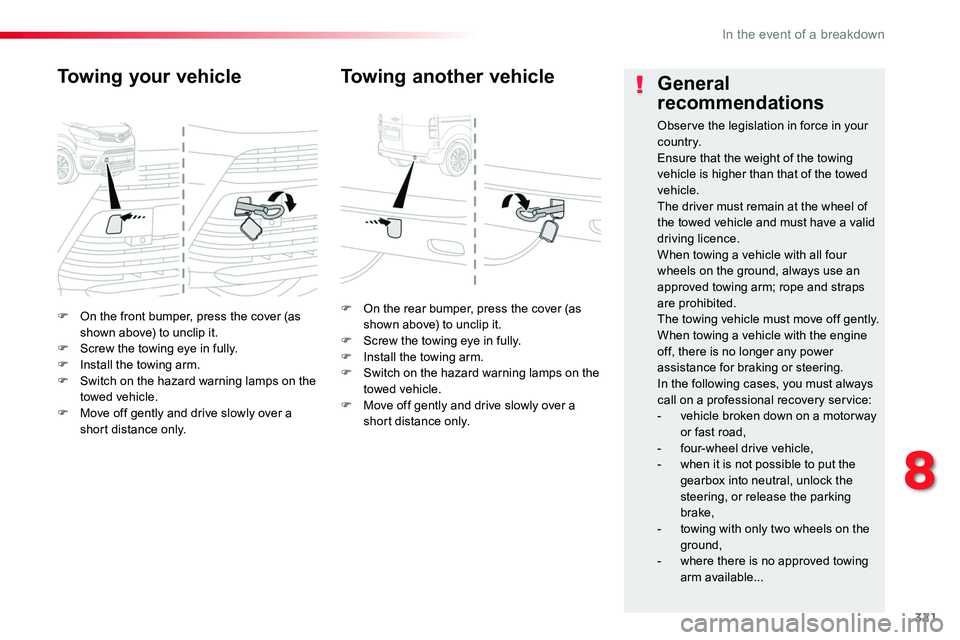
F On the front bumper, press the cover (as shown above) to unclip it.F Screw the towing eye in fully.F Install the towing arm.F Switch on the hazard warning lamps on the towed vehicle.F Move off gently and drive slowly over a short distance only.
Towing your vehicle
F On the rear bumper, press the cover (as shown above) to unclip it.F Screw the towing eye in fully.F Install the towing arm.F Switch on the hazard warning lamps on the towed vehicle.F Move off gently and drive slowly over a short distance only.
Towing another vehicleGeneral
recommendations
Observe the legislation in force in your c o unt r y.Ensure that the weight of the towing vehicle is higher than that of the towed vehicle.The driver must remain at the wheel of the towed vehicle and must have a valid driving licence.When towing a vehicle with all four wheels on the ground, always use an approved towing arm; rope and straps are prohibited.The towing vehicle must move off gently.When towing a vehicle with the engine off, there is no longer any power assistance for braking or steering.In the following cases, you must always call on a professional recovery service:- vehicle broken down on a motor way or fast road,- four-wheel drive vehicle,- when it is not possible to put the gearbox into neutral, unlock the
steering, or release the parking brake,- towing with only two wheels on the
ground,- where there is no approved towing arm available...
8
In the event of a breakdown