reset TOYOTA PROACE VERSO 2018 Owner's Manual
[x] Cancel search | Manufacturer: TOYOTA, Model Year: 2018, Model line: PROACE VERSO, Model: TOYOTA PROACE VERSO 2018Pages: 504, PDF Size: 80.57 MB
Page 422 of 504
422
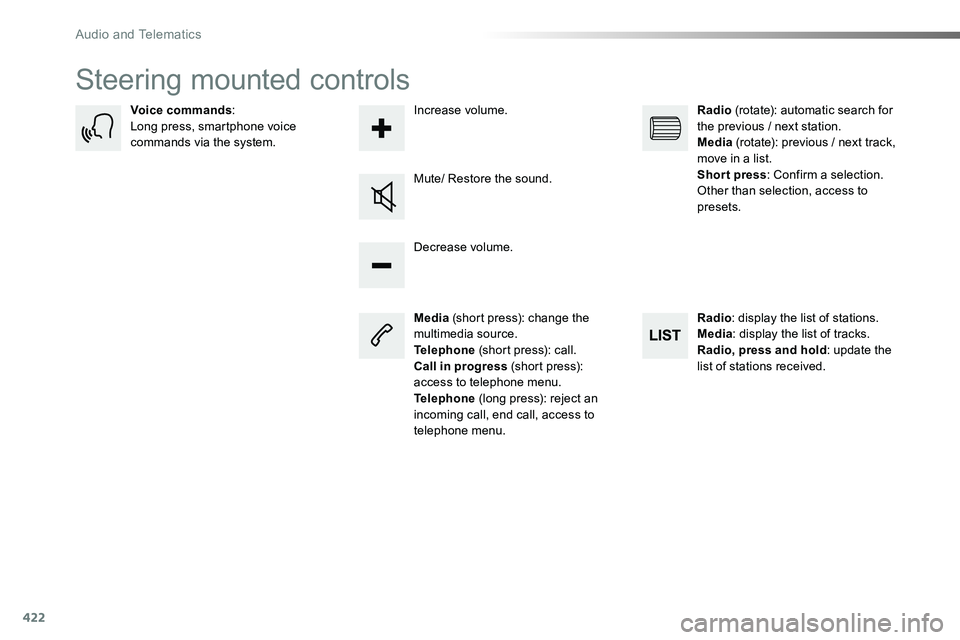
Steering mounted controls
Media (short press): change the multimedia source.Telephone (short press): call.Call in progress (short press): access to telephone menu.Telephone (long press): reject an incoming call, end call, access to telephone menu.
Decrease volume.
Voice commands:Long press, smartphone voice commands via the system.
Mute/ Restore the sound.
Radio (rotate): automatic search for the previous / next station.Media (rotate): previous / next track, move in a list.Short press: Confirm a selection. Other than selection, access to presets.
Radio: display the list of stations.Media: display the list of tracks.Radio, press and hold: update the list of stations received.
Increase volume.
Audio and Telematics
Page 435 of 504
435
3
2
4
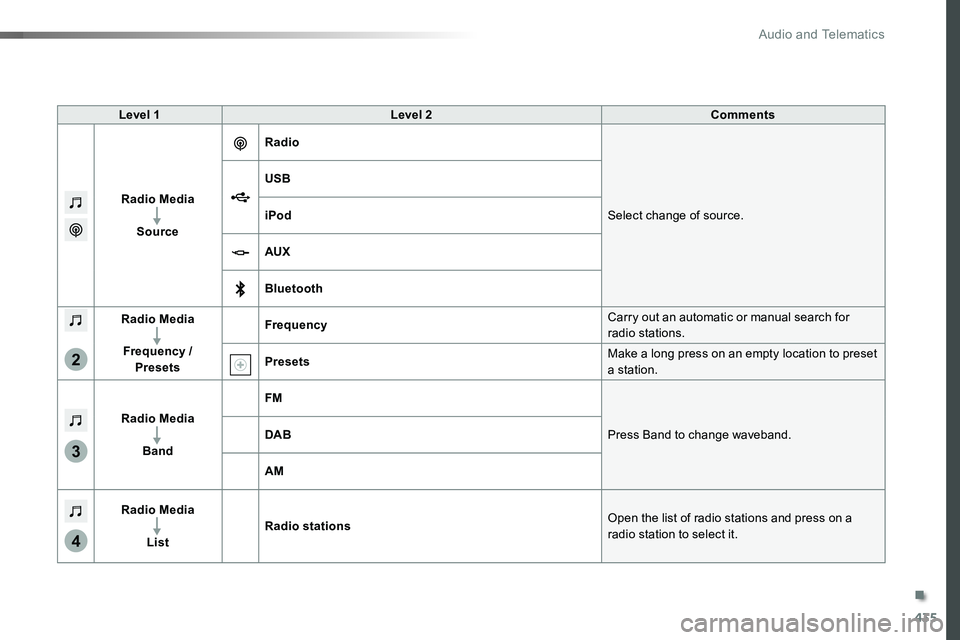
Level 1Level 2Comments
Radio Media
Source
Radio
Select change of source.
USB
iPod
AUX
Bluetooth
Radio Media
Frequency / Presets
FrequencyCarry out an automatic or manual search for radio stations.
PresetsMake a long press on an empty location to preset a station.
Radio Media
Band
FM
Press Band to change waveband.DAB
AM
Radio Media
List
Radio stationsOpen the list of radio stations and press on a
radio station to select it.
.
Audio and Telematics
Page 437 of 504
437
1
1
1
5
12
8
6
13
14
15
9
7
10
11
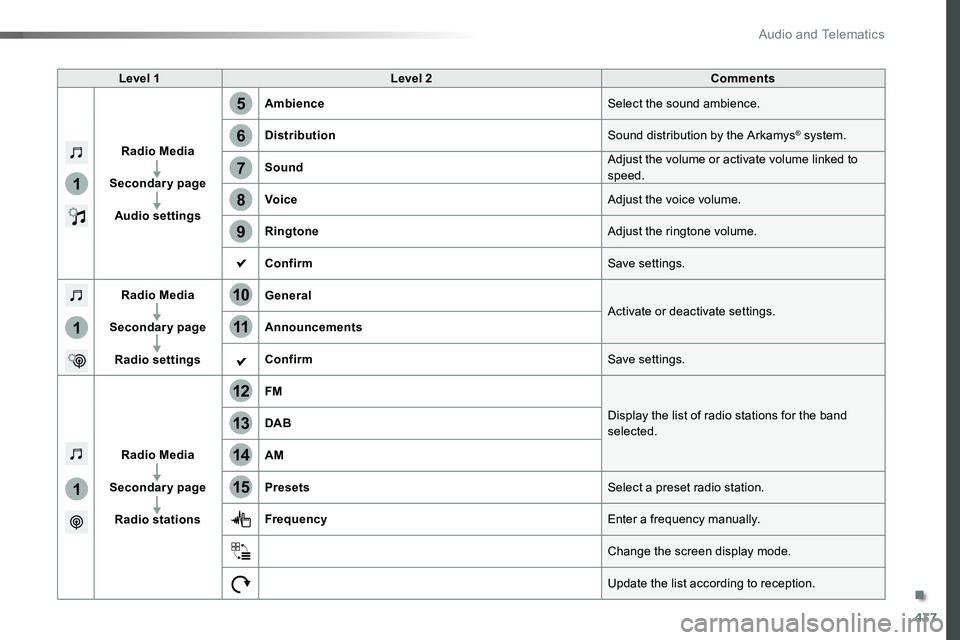
Level 1Level 2Comments
Radio Media
Secondary page
Audio settings
AmbienceSelect the sound ambience.
DistributionSound distribution by the Arkamys® system.
SoundAdjust the volume or activate volume linked to speed.
VoiceAdjust the voice volume.
RingtoneAdjust the ringtone volume.
ConfirmSave settings.
Radio Media
Secondary page
Radio settings
GeneralActivate or deactivate settings.Announcements
ConfirmSave settings.
Radio Media
Secondary page
Radio stations
FM
Display the list of radio stations for the band selected.DAB
AM
PresetsSelect a preset radio station.
FrequencyEnter a frequency manually.
Change the screen display mode.
Update the list according to reception.
.
Audio and Telematics
Page 440 of 504
440
1
2
2
2
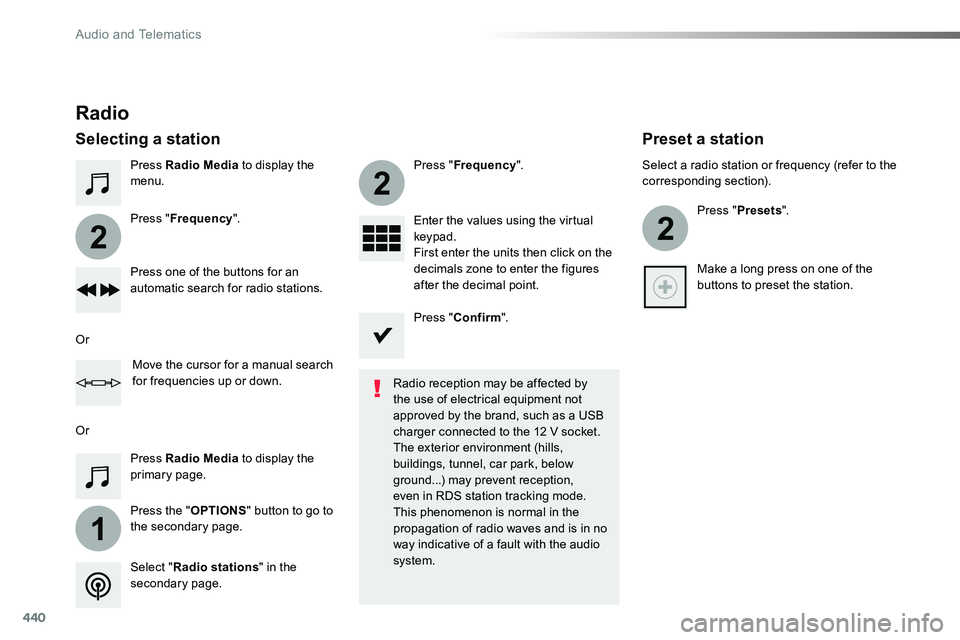
Press Radio Media to display the menu.
Press the "OPTIONS" button to go to the secondary page.
Press "Frequency".
Press "Frequency".
Enter the values using the virtual keypad.First enter the units then click on the decimals zone to enter the figures after the decimal point.Press one of the buttons for an automatic search for radio stations.
Press Radio Media to display the primary page.
Radio
Selecting a station
Radio reception may be affected by the use of electrical equipment not approved by the brand, such as a USB
charger connected to the 12 V socket.The exterior environment (hills, buildings, tunnel, car park, below ground...) may prevent reception, even in RDS station tracking mode. This phenomenon is normal in the propagation of radio waves and is in no way indicative of a fault with the audio system.Select "Radio stations" in the secondary page.
Or
Or
Move the cursor for a manual search for frequencies up or down.
Select a radio station or frequency (refer to the corresponding section).
Press "Presets".
Make a long press on one of the buttons to preset the station.
Preset a station
Press "Confirm".
Audio and Telematics
Page 442 of 504
442
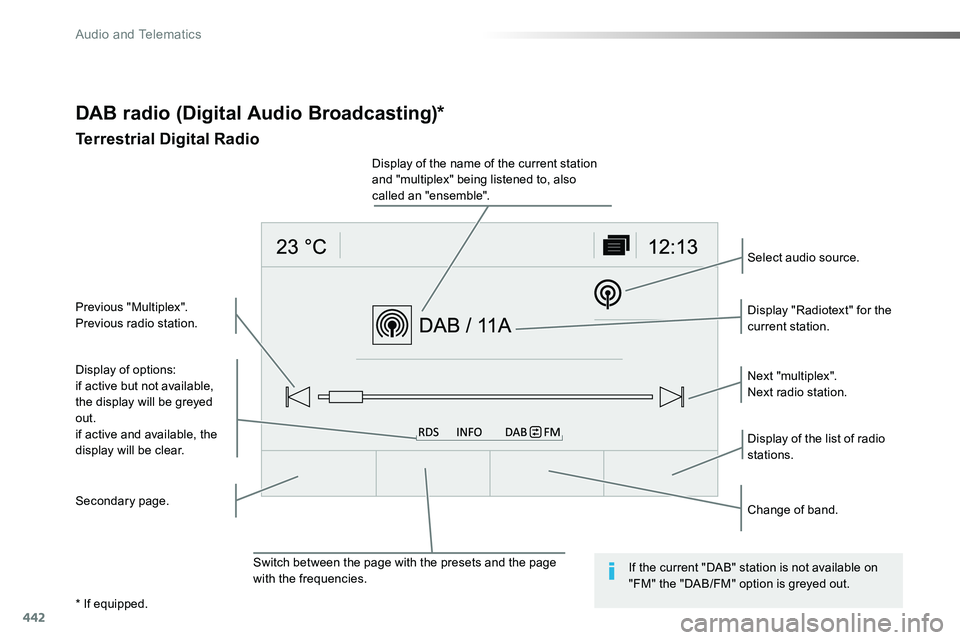
DAB radio (Digital Audio Broadcasting)*
Terrestrial Digital Radio
Display of options:if active but not available, the display will be greyed out.
if active and available, the display will be clear.
Display "Radiotext" for the current station.
Switch between the page with the presets and the page with the frequencies.
Change of band.
Display of the name of the current station and "multiplex" being listened to, also called an "ensemble".
Display of the list of radio stations.
Next "multiplex".Next radio station.
Secondary page.
Select audio source.
Previous "Multiplex".Previous radio station.
If the current "DAB" station is not available on "FM" the "DAB/FM" option is greyed out.
* If equipped.
Audio and Telematics
Page 474 of 504
474
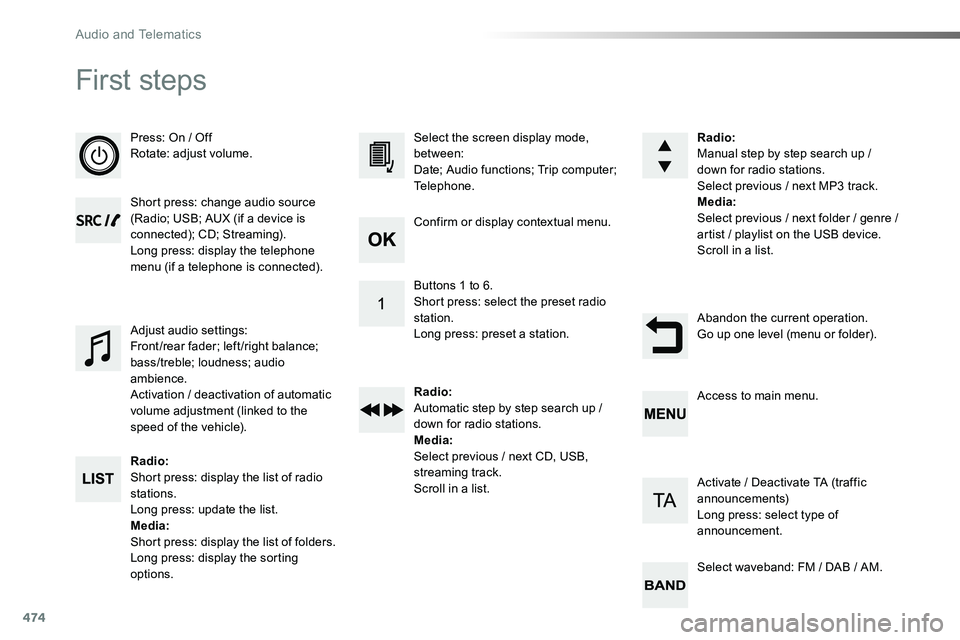
First steps
Press: On / OffRotate: adjust volume.
Short press: change audio source (Radio; USB; AUX (if a device is connected); CD; Streaming).Long press: display the telephone menu (if a telephone is connected).
Radio:Short press: display the list of radio stations.Long press: update the list.Media:Short press: display the list of folders.Long press: display the sorting options.
Select the screen display mode, between:Date; Audio functions; Trip computer; Telephone.
Adjust audio settings:Front /rear fader; left /right balance; bass/treble; loudness; audio ambience.Activation / deactivation of automatic volume adjustment (linked to the speed of the vehicle).
Radio:Manual step by step search up / down for radio stations.Select previous / next MP3 track.Media:Select previous / next folder / genre / artist / playlist on the USB device.Scroll in a list.
Abandon the current operation.Go up one level (menu or folder).
Confirm or display contextual menu.
Buttons 1 to 6.Short press: select the preset radio station.Long press: preset a station.
Radio:Automatic step by step search up / down for radio stations.Media:Select previous / next CD, USB, streaming track.Scroll in a list.
Access to main menu.
Activate / Deactivate TA (traffic announcements)Long press: select type of announcement.
Select waveband: FM / DAB / AM.
Audio and Telematics
Page 475 of 504
475
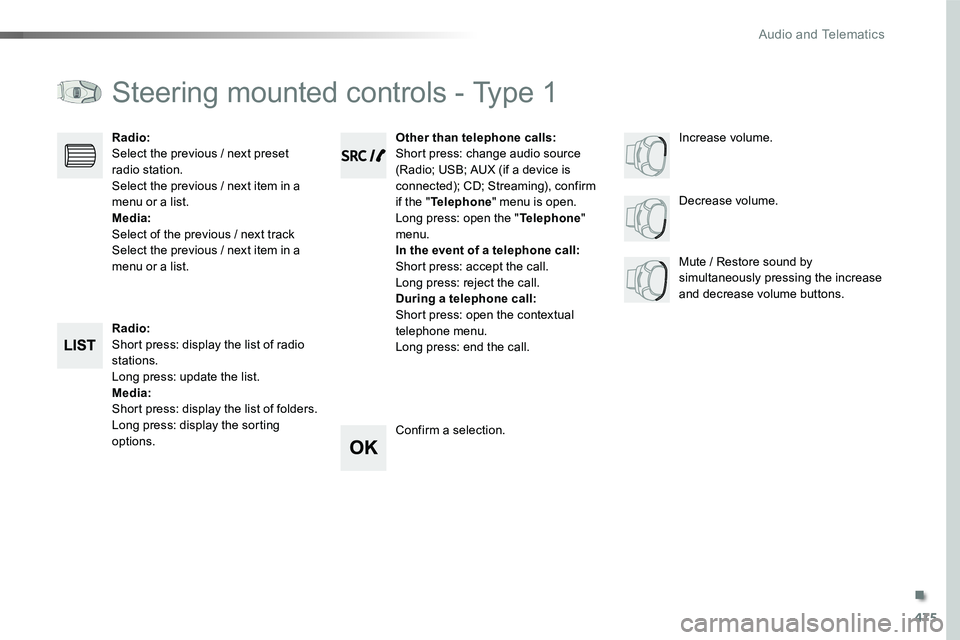
Steering mounted controls - Type 1
Radio:Short press: display the list of radio stations.Long press: update the list.Media:Short press: display the list of folders.Long press: display the sorting options.
Decrease volume.
Radio:Select the previous / next preset radio station.Select the previous / next item in a menu or a list.Media:Select of the previous / next trackSelect the previous / next item in a menu or a list.Mute / Restore sound by simultaneously pressing the increase and decrease volume buttons.
Other than telephone calls:Short press: change audio source (Radio; USB; AUX (if a device is connected); CD; Streaming), confirm if the "Telephone" menu is open.Long press: open the "Telephone" menu.In the event of a telephone call:Short press: accept the call.Long press: reject the call.During a telephone call:Short press: open the contextual telephone menu.Long press: end the call.
Confirm a selection.
Increase volume.
.
Audio and Telematics
Page 476 of 504
476
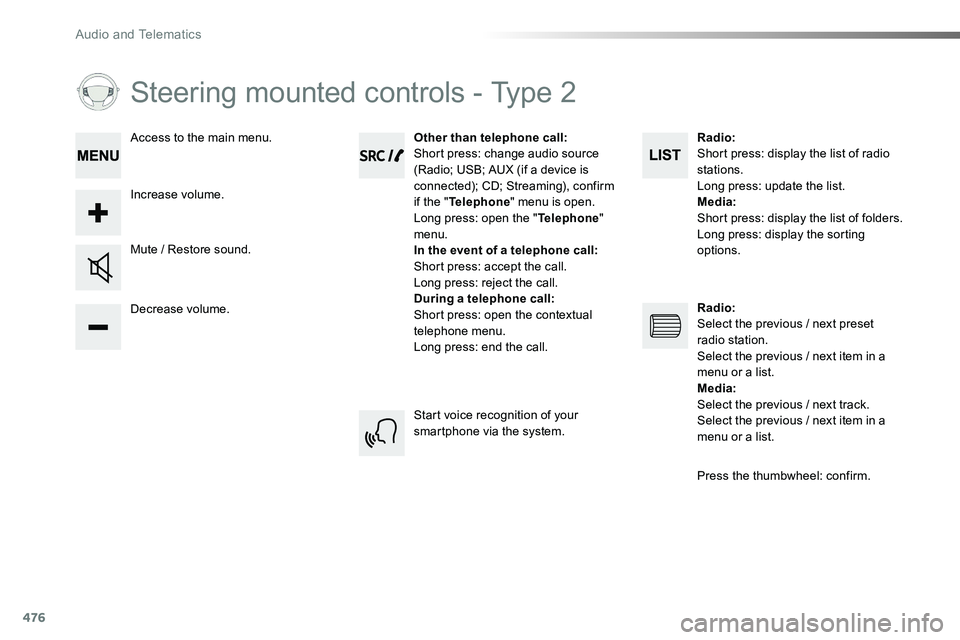
Steering mounted controls - Type 2
Decrease volume.
Mute / Restore sound.
Other than telephone call:Short press: change audio source (Radio; USB; AUX (if a device is connected); CD; Streaming), confirm if the "Telephone" menu is open.Long press: open the "Telephone" menu.In the event of a telephone call:Short press: accept the call.Long press: reject the call.During a telephone call:Short press: open the contextual telephone menu.Long press: end the call.
Increase volume.
Access to the main menu.
Start voice recognition of your smartphone via the system.
Radio:Short press: display the list of radio stations.Long press: update the list.Media:Short press: display the list of folders.Long press: display the sorting options.
Radio:Select the previous / next preset radio station.Select the previous / next item in a menu or a list.Media:Select the previous / next track.Select the previous / next item in a
menu or a list.
Press the thumbwheel: confirm.
Audio and Telematics
Page 480 of 504
480
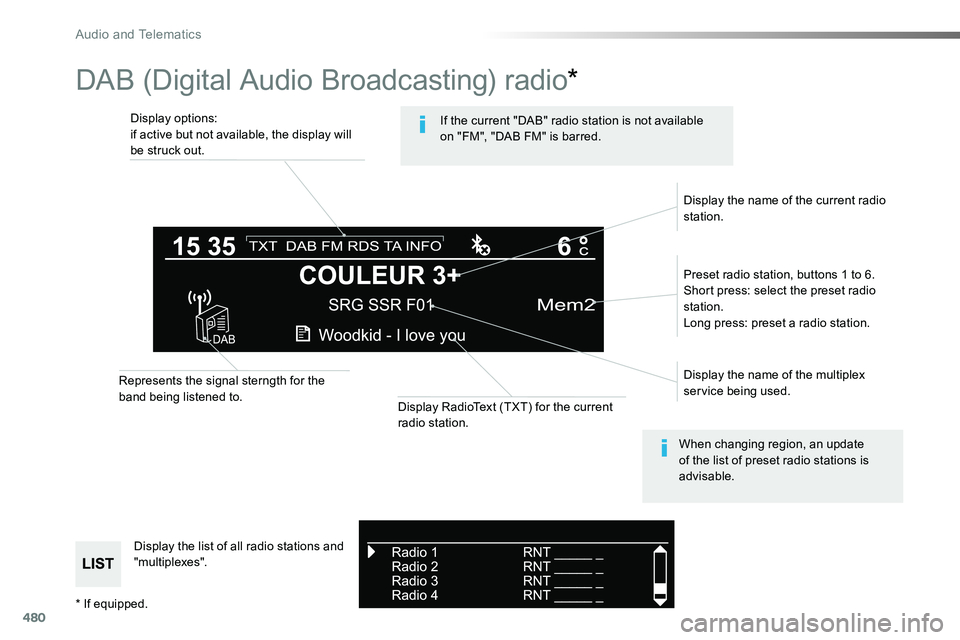
DAB (Digital Audio Broadcasting) radio*
Display options:if active but not available, the display will be struck out.
Preset radio station, buttons 1 to 6.Short press: select the preset radio station.Long press: preset a radio station.
Display the name of the multiplex service being used.
Display the list of all radio stations and "multiplexes".
Represents the signal sterngth for the band being listened to.Display RadioText (TXT) for the current radio station.
Display the name of the current radio station.
If the current "DAB" radio station is not available on "FM", "DAB FM" is barred.
When changing region, an update of the list of preset radio stations is advisable.
* If equipped.
Audio and Telematics
Page 493 of 504
493
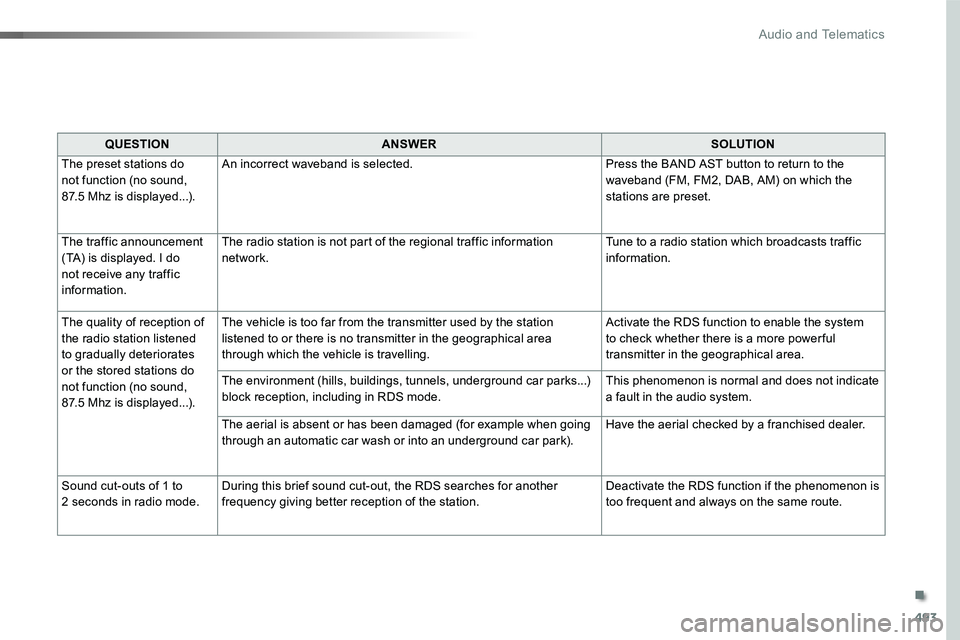
QUESTIONANSWERSOLUTION
The preset stations do not function (no sound, 87.5 Mhz is displayed...).
An incorrect waveband is selected.Press the BAND AST button to return to the waveband (FM, FM2, DAB, AM) on which the stations are preset.
The traffic announcement (TA) is displayed. I do not receive any traffic information.
The radio station is not part of the regional traffic information network.Tune to a radio station which broadcasts traffic information.
The quality of reception of the radio station listened to gradually deteriorates or the stored stations do not function (no sound, 87.5 Mhz is displayed...).
The vehicle is too far from the transmitter used by the station listened to or there is no transmitter in the geographical area through which the vehicle is travelling.
Activate the RDS function to enable the system to check whether there is a more power ful transmitter in the geographical area.
The environment (hills, buildings, tunnels, underground car parks...) block reception, including in RDS mode.This phenomenon is normal and does not indicate a fault in the audio system.
The aerial is absent or has been damaged (for example when going through an automatic car wash or into an underground car park).Have the aerial checked by a franchised dealer.
Sound cut-outs of 1 to 2 seconds in radio mode.During this brief sound cut-out, the RDS searches for another frequency giving better reception of the station.Deactivate the RDS function if the phenomenon is too frequent and always on the same route.
.
Audio and Telematics