lock TOYOTA PROACE VERSO 2020 Manual Online
[x] Cancel search | Manufacturer: TOYOTA, Model Year: 2020, Model line: PROACE VERSO, Model: TOYOTA PROACE VERSO 2020Pages: 418, PDF Size: 39.32 MB
Page 306 of 418
306
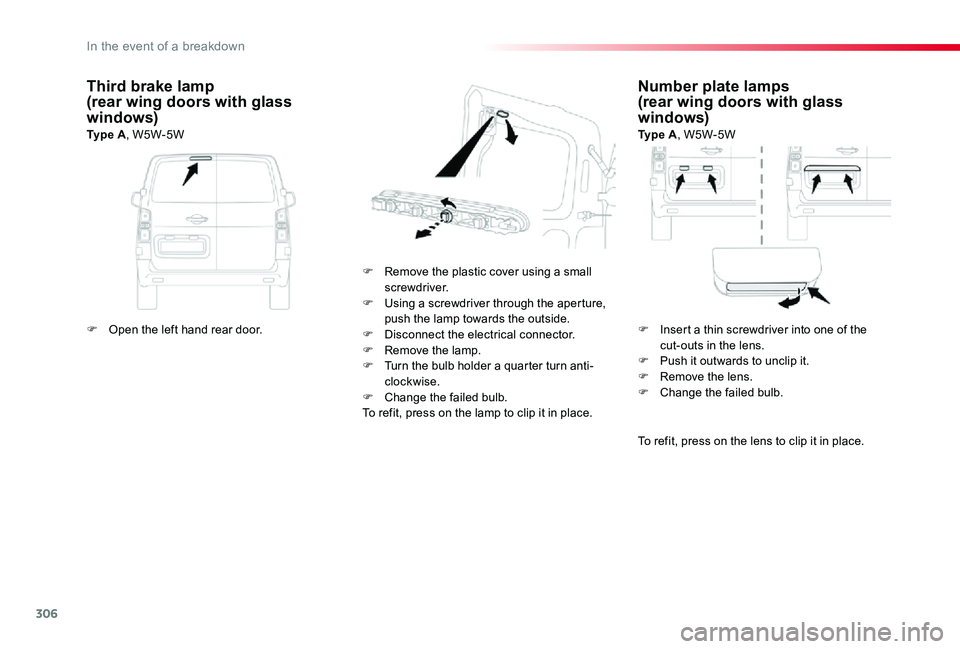
Number plate lamps(rear wing doors with glass windows)Ty p e A, W5W-5W
F Remove the plastic cover using a small screwdriver.F Using a screwdriver through the aperture, push the lamp towards the outside.F Disconnect the electrical connector.F Remove the lamp.F Turn the bulb holder a quarter turn anti-clockwise.F Change the failed bulb.To refit, press on the lamp to clip it in place.
Third brake lamp(rear wing doors with glass windows)Ty p e A, W5W-5W
To refit, press on the lens to clip it in place.
F Open the left hand rear door.F Insert a thin screwdriver into one of the cut-outs in the lens.F Push it outwards to unclip it.F Remove the lens.F Change the failed bulb.
In the event of a breakdown
Page 308 of 418
308
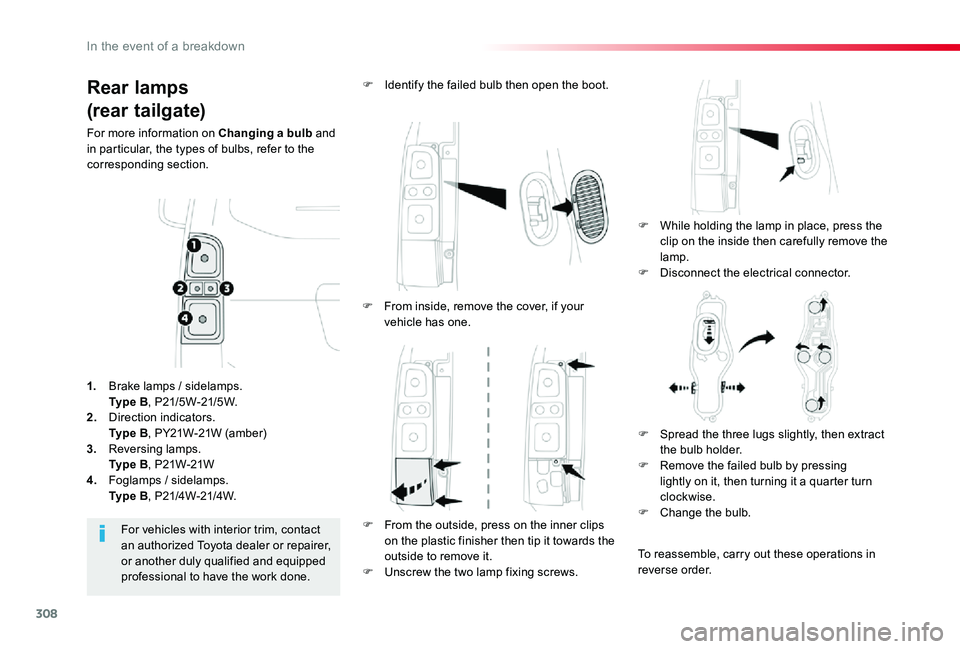
Rear lamps
(rear tailgate)
For more information on Changing a bulb and in particular, the types of bulbs, refer to the corresponding section.
F While holding the lamp in place, press the clip on the inside then carefully remove the
lamp.F Disconnect the electrical connector.
F Identify the failed bulb then open the boot.
For vehicles with interior trim, contact an authorized Toyota dealer or repairer, or another duly qualified and equipped professional to have the work done.
1. Brake lamps / sidelamps. Ty p e B, P21/5W-21/5W.2. Direction indicators. Ty p e B, PY21W-21W (amber)
3. Reversing lamps. Ty p e B, P21W-21W4. Foglamps / sidelamps. Ty p e B, P21/4W-21/4W.
F From inside, remove the cover, if your vehicle has one.
F From the outside, press on the inner clips on the plastic finisher then tip it towards the outside to remove it.F Unscrew the two lamp fixing screws.
F Spread the three lugs slightly, then extract the bulb holder.F Remove the failed bulb by pressing lightly on it, then turning it a quarter turn clockwise.F Change the bulb.
To reassemble, carry out these operations in reverse order.
In the event of a breakdown
Page 309 of 418
309
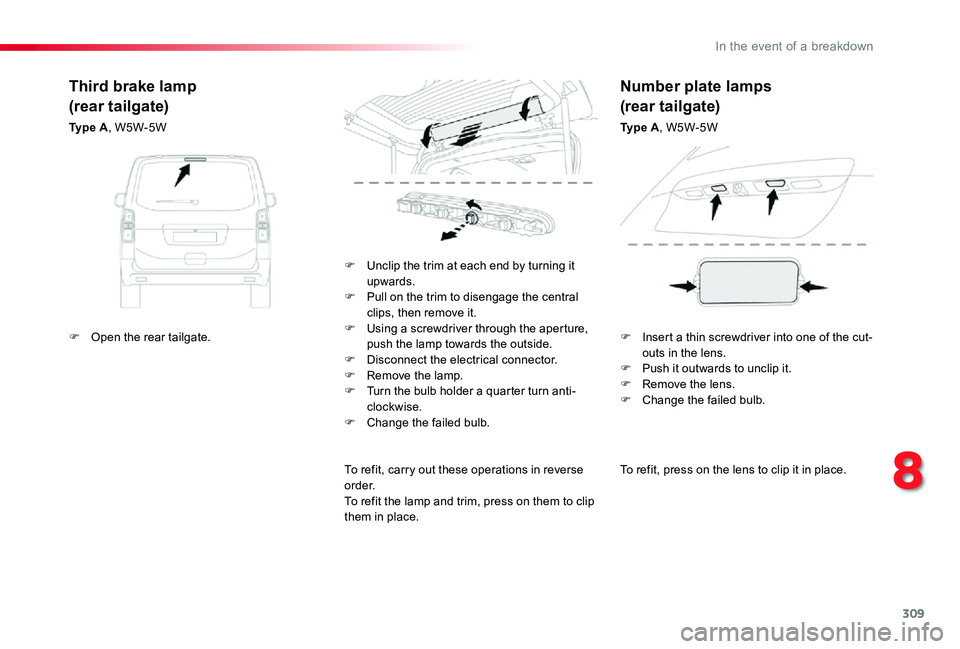
To refit, press on the lens to clip it in place.
F Unclip the trim at each end by turning it upwards.F Pull on the trim to disengage the central clips, then remove it.F Using a screwdriver through the aperture, push the lamp towards the outside.F Disconnect the electrical connector.F Remove the lamp.F Turn the bulb holder a quarter turn anti-clockwise.F Change the failed bulb.
To refit, carry out these operations in reverse o r d e r.To refit the lamp and trim, press on them to clip them in place.
Third brake lamp
(rear tailgate)
Ty p e A, W5W-5W
Number plate lamps
(rear tailgate)
Ty p e A, W5W-5W
F Open the rear tailgate.F Insert a thin screwdriver into one of the cut-outs in the lens.F Push it outwards to unclip it.F Remove the lens.F Change the failed bulb.
8
In the event of a breakdown
Page 313 of 418
313
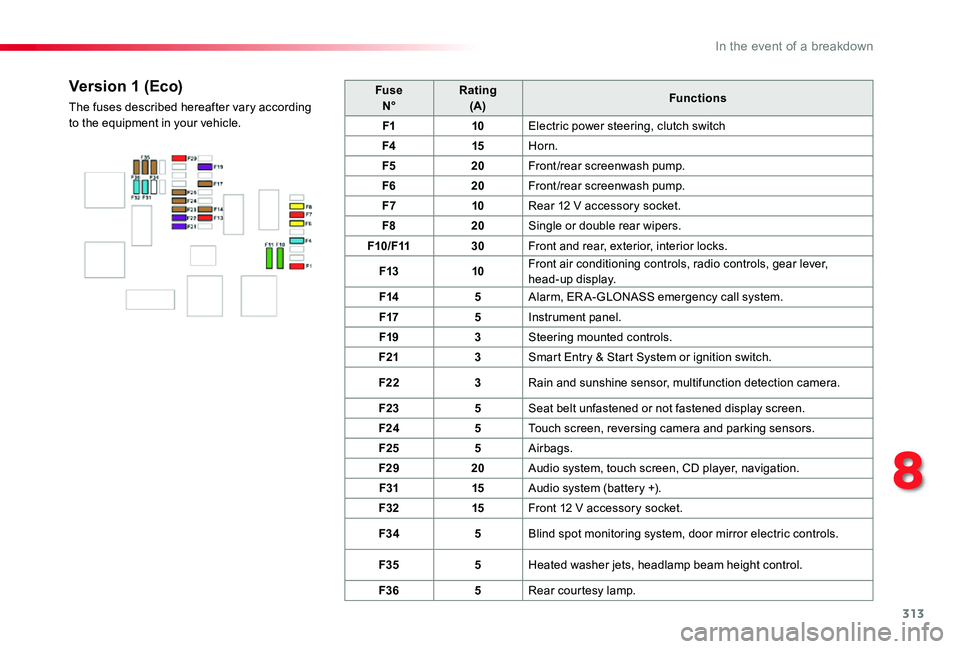
FuseN°Rating(A)Functions
F110Electric power steering, clutch switch
F415Horn.
F520Front/rear screenwash pump.
F620Front/rear screenwash pump.
F710Rear 12 V accessory socket.
F820Single or double rear wipers.
F10/F1130Front and rear, exterior, interior locks.
F1310Front air conditioning controls, radio controls, gear lever, head-up display.
F145Alarm, ER A-GLONASS emergency call system.
F175Instrument panel.
F193Steering mounted controls.
F213Smart Entry & Start System or ignition switch.
F223Rain and sunshine sensor, multifunction detection camera.
F235Seat belt unfastened or not fastened display screen.
F245Touch screen, reversing camera and parking sensors.
F255Airbags.
F2920Audio system, touch screen, CD player, navigation.
F3115Audio system (battery +).
F3215Front 12 V accessory socket.
F345Blind spot monitoring system, door mirror electric controls.
F355Heated washer jets, headlamp beam height control.
F365Rear courtesy lamp.
Version 1 (Eco)
The fuses described hereafter vary according to the equipment in your vehicle.
8
In the event of a breakdown
Page 314 of 418
314
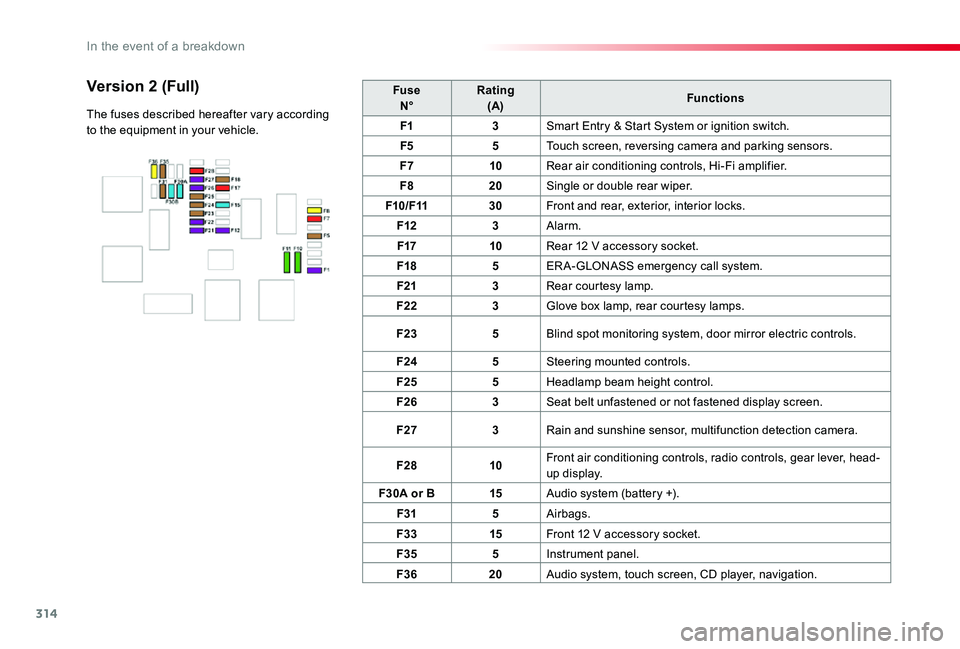
FuseN°Rating(A)Functions
F13Smart Entry & Start System or ignition switch.
F55Touch screen, reversing camera and parking sensors.
F710Rear air conditioning controls, Hi-Fi amplifier.
F820Single or double rear wiper.
F10/F1130Front and rear, exterior, interior locks.
F123Alarm.
F1710Rear 12 V accessory socket.
F185ER A-GLONASS emergency call system.
F213Rear courtesy lamp.
F223Glove box lamp, rear courtesy lamps.
F235Blind spot monitoring system, door mirror electric controls.
F245Steering mounted controls.
F255Headlamp beam height control.
F263Seat belt unfastened or not fastened display screen.
F273Rain and sunshine sensor, multifunction detection camera.
F2810Front air conditioning controls, radio controls, gear lever, head-up display.
F30A or B15Audio system (battery +).
F315Airbags.
F3315Front 12 V accessory socket.
F355Instrument panel.
F3620Audio system, touch screen, CD player, navigation.
Version 2 (Full)
The fuses described hereafter vary according to the equipment in your vehicle.
In the event of a breakdown
Page 319 of 418
319
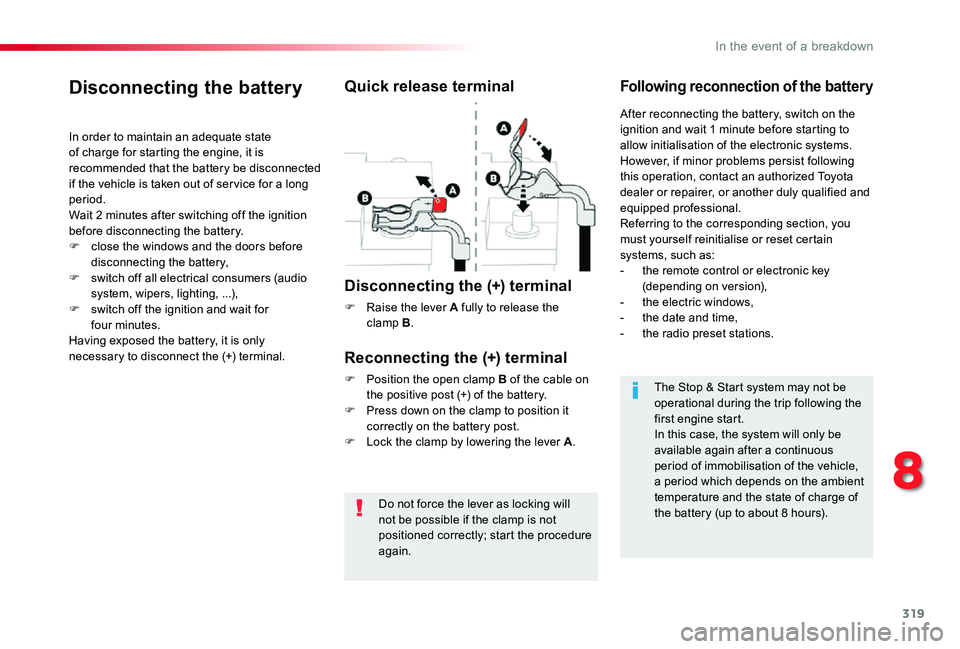
Do not force the lever as locking will not be possible if the clamp is not positioned correctly; start the procedure again.
Disconnecting the battery
In order to maintain an adequate state of charge for starting the engine, it is recommended that the battery be disconnected if the vehicle is taken out of ser vice for a long period.Wait 2 minutes after switching off the ignition before disconnecting the battery.
F close the windows and the doors before disconnecting the battery,F switch off all electrical consumers (audio system, wipers, lighting, ...),F switch off the ignition and wait for four minutes.Having exposed the battery, it is only necessary to disconnect the (+) terminal.
Quick release terminal
Disconnecting the (+) terminal
F Raise the lever A fully to release the clamp B.
Following reconnection of the battery
Reconnecting the (+) terminal
F Position the open clamp B of the cable on the positive post (+) of the battery.F Press down on the clamp to position it correctly on the battery post.F Lock the clamp by lowering the lever A.
After reconnecting the battery, switch on the ignition and wait 1 minute before starting to allow initialisation of the electronic systems.However, if minor problems persist following this operation, contact an authorized Toyota dealer or repairer, or another duly qualified and equipped professional.Referring to the corresponding section, you must yourself reinitialise or reset certain
systems, such as:- the remote control or electronic key (depending on version),- the electric windows,- the date and time,- the radio preset stations.
The Stop & Start system may not be operational during the trip following the first engine start.In this case, the system will only be
available again after a continuous period of immobilisation of the vehicle, a period which depends on the ambient temperature and the state of charge of the battery (up to about 8 hours).
8
In the event of a breakdown
Page 321 of 418
321
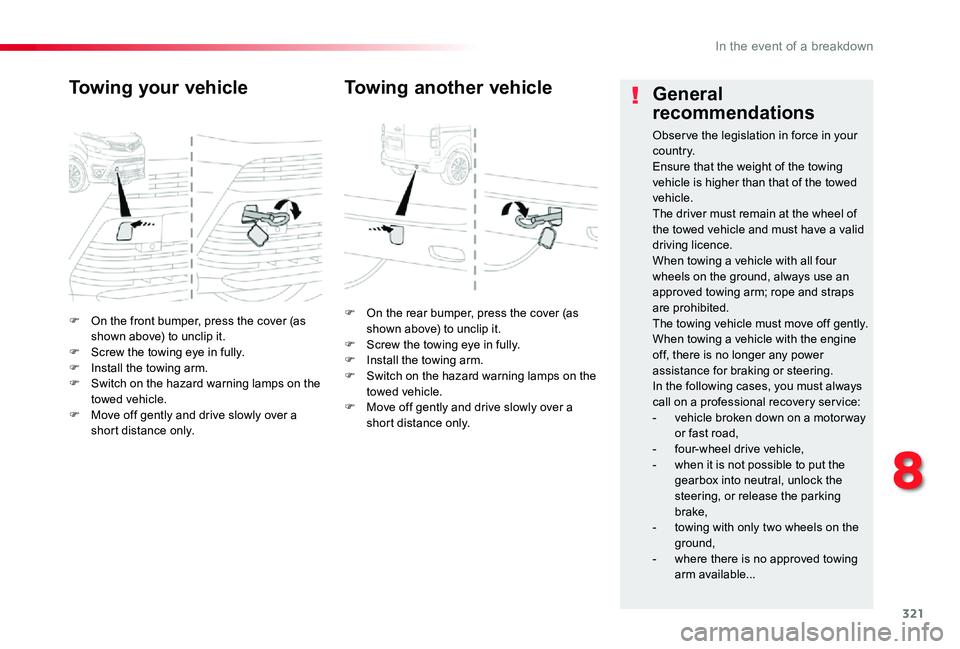
F On the front bumper, press the cover (as shown above) to unclip it.F Screw the towing eye in fully.F Install the towing arm.F Switch on the hazard warning lamps on the towed vehicle.F Move off gently and drive slowly over a short distance only.
Towing your vehicle
F On the rear bumper, press the cover (as shown above) to unclip it.F Screw the towing eye in fully.F Install the towing arm.F Switch on the hazard warning lamps on the towed vehicle.F Move off gently and drive slowly over a short distance only.
Towing another vehicleGeneral
recommendations
Obser ve the legislation in force in your c o u nt r y.Ensure that the weight of the towing vehicle is higher than that of the towed vehicle.The driver must remain at the wheel of the towed vehicle and must have a valid
driving licence.When towing a vehicle with all four wheels on the ground, always use an approved towing arm; rope and straps are prohibited.The towing vehicle must move off gently.When towing a vehicle with the engine off, there is no longer any power assistance for braking or steering.In the following cases, you must always call on a professional recovery ser vice:- vehicle broken down on a motor way or fast road,- four-wheel drive vehicle,- when it is not possible to put the gearbox into neutral, unlock the
steering, or release the parking brake,- towing with only two wheels on the ground,
- where there is no approved towing arm available...
8
In the event of a breakdown
Page 347 of 418
347
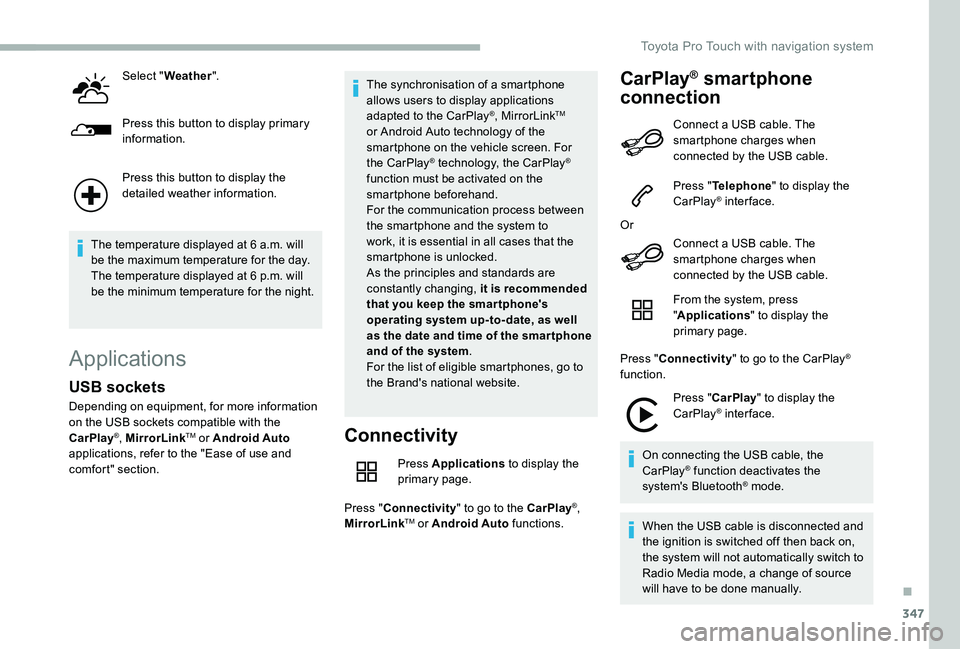
Select "Weather".
Press this button to display primary information.
Press this button to display the detailed weather information.
The temperature displayed at 6 a.m. will be the maximum temperature for the day.The temperature displayed at 6 p.m. will be the minimum temperature for the night.
Applications
Connectivity
Press Applications to display the primary page.
Press "Connectivity" to go to the CarPlay®, MirrorLinkTM or Android Auto functions.
CarPlay® smartphone
connection
USB sockets
Depending on equipment, for more information on the USB sockets compatible with the CarPlay®, MirrorLinkTM or Android Auto applications, refer to the "Ease of use and comfort" section.
The synchronisation of a smartphone allows users to display applications adapted to the CarPlay®, MirrorLinkTM or Android Auto technology of the smartphone on the vehicle screen. For the CarPlay® technology, the CarPlay® function must be activated on the smartphone beforehand.For the communication process between the smartphone and the system to work, it is essential in all cases that the smartphone is unlocked.As the principles and standards are constantly changing, it is recommended that you keep the smar tphone's operating system up-to- date, as well as the date and time of the smar tphone and of the system.For the list of eligible smartphones, go to the Brand's national website.
Connect a USB cable. The smartphone charges when connected by the USB cable.
Press "Telephone" to display the CarPlay® inter face.
Or
Connect a USB cable. The
smartphone charges when connected by the USB cable.
From the system, press "Applications" to display the primary page.
Press "Connectivity" to go to the CarPlay® function.
Press "CarPlay" to display the CarPlay® inter face.
On connecting the USB cable, the CarPlay® function deactivates the system's Bluetooth® mode.
When the USB cable is disconnected and the ignition is switched off then back on, the system will not automatically switch to Radio Media mode, a change of source will have to be done manually.
.
Toyota Pro Touch with navigation system
Page 351 of 418
351
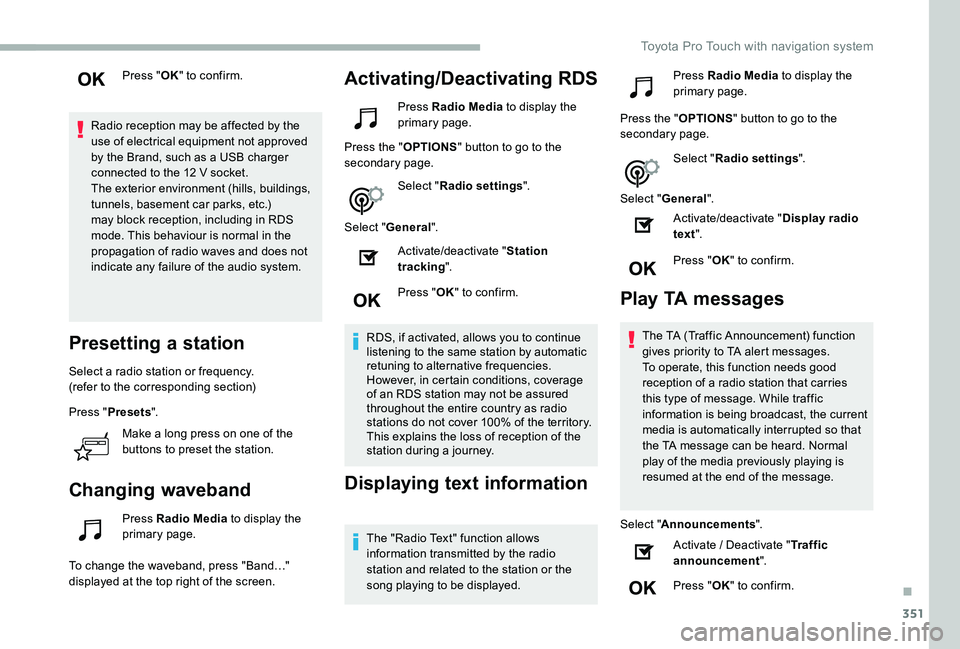
Press "OK" to confirm.
Radio reception may be affected by the use of electrical equipment not approved by the Brand, such as a USB charger connected to the 12 V socket.The exterior environment (hills, buildings, tunnels, basement car parks, etc.) may block reception, including in RDS mode. This behaviour is normal in the propagation of radio waves and does not indicate any failure of the audio system.
Presetting a station
Select a radio station or frequency.(refer to the corresponding section)
Press "Presets".
Make a long press on one of the
buttons to preset the station.
Changing waveband
Press Radio Media to display the primary page.
To change the waveband, press "Band…" displayed at the top right of the screen.
Activating/Deactivating RDS
Press Radio Media to display the primary page.
Press the "OPTIONS" button to go to the secondary page.
Select "Radio settings".
Select "General".
Activate/deactivate "Station tracking".
Press "OK" to confirm.
RDS, if activated, allows you to continue listening to the same station by automatic retuning to alternative frequencies. However, in certain conditions, coverage of an RDS station may not be assured throughout the entire country as radio stations do not cover 100% of the territory. This explains the loss of reception of the station during a journey.
Displaying text information
The "Radio Text" function allows information transmitted by the radio station and related to the station or the song playing to be displayed.
Press Radio Media to display the primary page.
Press the "OPTIONS" button to go to the secondary page.
Select "Radio settings".
Select "General".
Activate/deactivate "Display radio text".
Press "OK" to confirm.
Play TA messages
The TA (Traffic Announcement) function gives priority to TA alert messages. To operate, this function needs good reception of a radio station that carries this type of message. While traffic information is being broadcast, the current media is automatically interrupted so that
the TA message can be heard. Normal play of the media previously playing is resumed at the end of the message.
Select "Announcements".
Activate / Deactivate "Traffic announcement".
Press "OK" to confirm.
.
Toyota Pro Touch with navigation system
Page 362 of 418
362
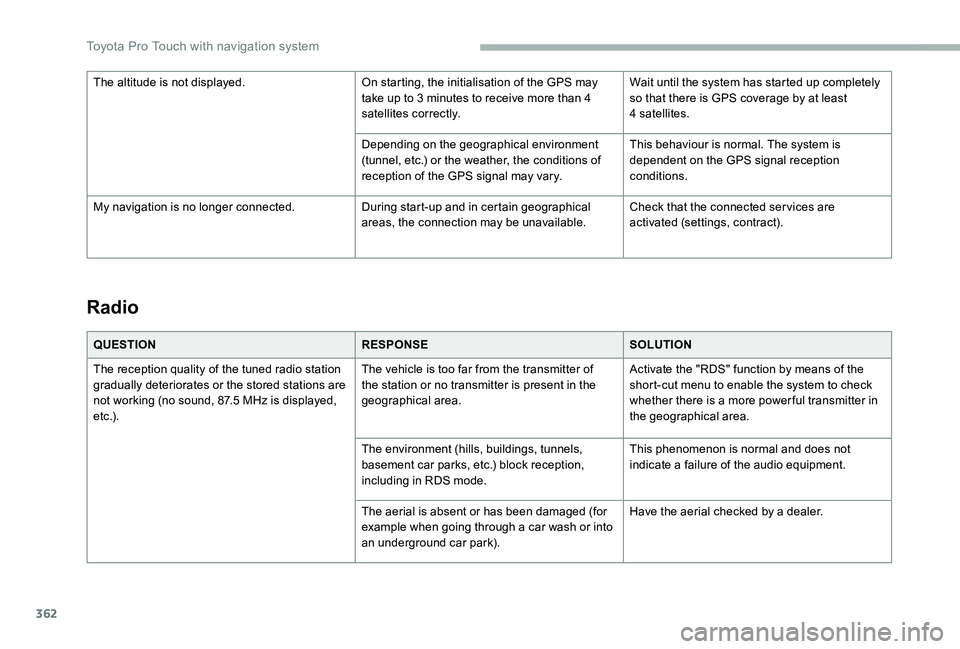
Radio
QUESTIONRESPONSESOLUTION
The reception quality of the tuned radio station gradually deteriorates or the stored stations are not working (no sound, 87.5 MHz is displayed, e t c .) .
The vehicle is too far from the transmitter of the station or no transmitter is present in the geographical area.
Activate the "RDS" function by means of the short-cut menu to enable the system to check whether there is a more power ful transmitter in the geographical area.
The environment (hills, buildings, tunnels, basement car parks, etc.) block reception, including in RDS mode.
This phenomenon is normal and does not indicate a failure of the audio equipment.
The aerial is absent or has been damaged (for example when going through a car wash or into an underground car park).
Have the aerial checked by a dealer.
The altitude is not displayed.On starting, the initialisation of the GPS may take up to 3 minutes to receive more than 4 satellites correctly.
Wait until the system has started up completely so that there is GPS coverage by at least 4 satellites.
Depending on the geographical environment (tunnel, etc.) or the weather, the conditions of reception of the GPS signal may vary.
This behaviour is normal. The system is dependent on the GPS signal reception conditions.
My navigation is no longer connected.During start-up and in certain geographical areas, the connection may be unavailable.Check that the connected ser vices are activated (settings, contract).
Toyota Pro Touch with navigation system