change wheel TOYOTA PROACE VERSO 2023 Manual del propietario (in Spanish)
[x] Cancel search | Manufacturer: TOYOTA, Model Year: 2023, Model line: PROACE VERSO, Model: TOYOTA PROACE VERSO 2023Pages: 360, tamaño PDF: 70.22 MB
Page 187 of 360
187
Driving
6
Detection - Alert
You are alerted by the flashing of this warning lamp in the instrument panel, accompanied by an audible signal.
NOTIC E
No warning is transmitted while the direction indicator is active and for approximately 20 seconds after the direction indicator is switched off.
Activation/Deactivation
With audio system
► To activate or deactivate the system, press this button.The indicator lamp is on when the system is activated.
With touch screen
The settings are changed via the vehicle configuration menu.
Malfunction
Depending on the vehicle’s equipment:The indicator lamp in this button flashes.
or/The button flashes and a fault appears.Consult any authorized Toyota retailer or Toyota authorized repairer, or any reliable repairer.
NOTIC E
Detection may be impeded:– If the markings on the ground are worn and not clearly contrasted against the road surface.– If the windscreen is dirty.– In certain extreme weather conditions: fog, heavy rain, snow, shade, bright sunlight or direct exposure to the sun (e.g. low sun, leaving a tunnel).
Distraction detection
WARNI NG
Refer to the General recommendations on the use of driving and manoeuvring aids.
Depending on version, the function consists of either the "Coffee Break Alert" system alone or combined with the "Driver Attention Alert" system.
WARNI NG
These systems are in no way designed to keep the driver awake or to prevent the driver from falling asleep at the wheel. It is the driver’s responsibility to stop if feeling tired.Take a break in case of feeling tired or at least every 2 hours.
Activation/Deactivation
This function is set via the vehicle configuration menu.The state of the system is memorised when the ignition is switched off.
Page 194 of 360
194
NOTIC E
The function will be deactivated:– If a trailer is attached or a bicycle carrier is fitted on a towing device (vehicle fitted with a towing device installed in line with the manufacturer's recommendations).– Above about 6 mph (10 km/h).– When the boot is opened.
– Upon changing out of reverse gear (the image remains displayed for 7 seconds).– By pressing the white arrow in the upper-left corner of the touch screen.
AUTO mode
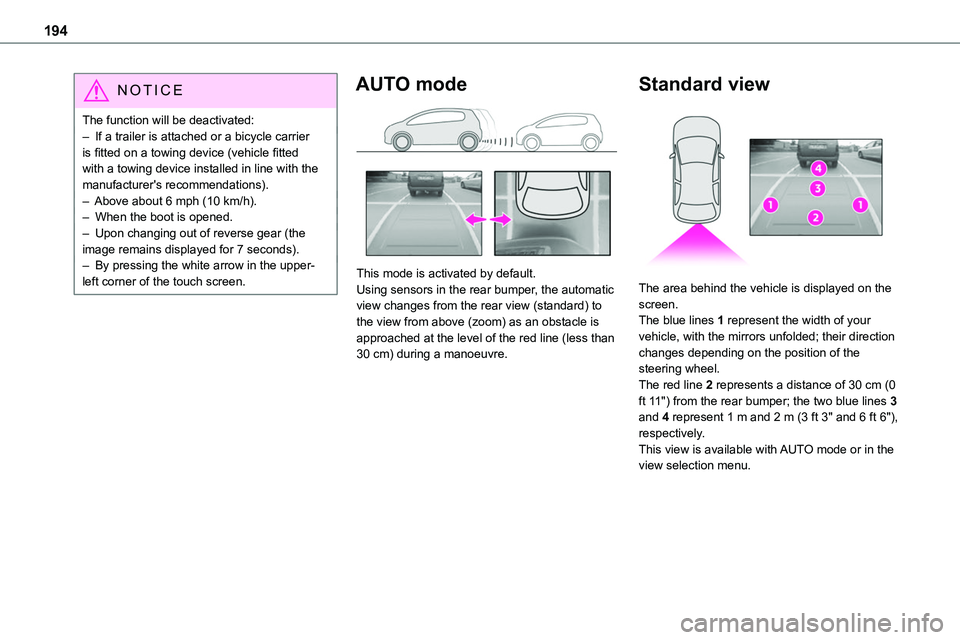
This mode is activated by default.Using sensors in the rear bumper, the automatic view changes from the rear view (standard) to the view from above (zoom) as an obstacle is approached at the level of the red line (less than 30 cm) during a manoeuvre.
Standard view
The area behind the vehicle is displayed on the screen.The blue lines 1 represent the width of your vehicle, with the mirrors unfolded; their direction changes depending on the position of the steering wheel.The red line 2 represents a distance of 30 cm (0 ft 11") from the rear bumper; the two blue lines 3 and 4 represent 1 m and 2 m (3 ft 3" and 6 ft 6"), respectively.This view is available with AUTO mode or in the view selection menu.
Page 219 of 360
219
Practical information
7
NOTIC E
New vehicleDuring the first few particle filter regeneration operations, you may notice a "burning" smell. This is perfectly normal.
Manual gearbox
The gearbox does not require any maintenance (no oil change).
Automatic gearbox
The gearbox does not require any maintenance (no oil change).
Drive selector (Electric)
The drive selector does not require any maintenance.
Manual parking brake
If you notice excessive brake lever travel or decreased effectiveness, the parking brake must be adjusted, even between two services.This system must be checked by any authorized Toyota retailer or Toyota authorized repairer, or any reliable repairer.
Electric parking brake
This system does not require any routine servicing. However, in the event of a
problem, do not hesitate to have the system checked by a TOYOTA dealer or a qualified workshop.
NOTIC E
For more information on the Electric parking brake, refer to the corresponding section.
Brake pads
Brake wear depends on the style of driving, particularly in the case of vehicles used in town, over short distances. It may be necessary to have the condition of the brakes checked, even between vehicle services.Unless there is a leak in the circuit, a drop in the brake fluid level indicates that the brake pads are worn.
NOTIC E
After washing the vehicle, moisture, or in wintry conditions, ice can form on the brake discs and pads: braking efficiency may be reduced. Gently dab the brakes to dry and defrost them.
Brake disc/drum wear
For any information on checking brake disc/drum wear, contact any authorized Toyota retailer or Toyota authorized repairer, or any reliable repairer.
Wheels and tyres
The inflation pressure of all tyres, including the spare wheel, must be checked on "cold” tyres.The pressures indicated on the tyre pressure label are valid for "cold" tyres. If you have driven for more than 10 minutes or more than 10 km (6 miles) at over 50 km/h (31 mph), add 0.3 bar (30 kPa) to the values indicated on the label.
WARNI NG
Under-inflation increases fuel consumption. Non-compliant tyre pressure causes premature wear on tyres and has an adverse effect on the vehicle's road holding - risk of an accident!
Driving with worn or damaged tyres reduces the braking and road holding performance of the vehicle. It is recommended to regularly check the condition of the tyres (tread and sidewalls) and wheel rims as well as the presence of the valves.When the wear indicators no longer appear set back from the tread, the depth of the grooves is less than 1.6 mm; it is imperative to replace the tyres.Using different size wheels and tyres from those specified can affect the lifetime of tyres, wheel
rotation, ground clearance, the speedometer reading and have an adverse effect on road holding.
Page 233 of 360
233
In the event of a breakdown
8
► Remove the pipe assembly 2.► Hold the compressor up vertically.► Unscrew the cartridge 4 from the bottom.To fit the new cartridge and new pipe, carry out these operations in reverse order.
WARNI NG
Beware of fluid discharge.The expiry date of the fluid is indicated on the cartridge.The sealant cartridge is designed for single use; it must be replaced even if only partly used.After use, do not discard the cartridge in standard waste, take it to any authorized Toyota retailer or Toyota authorized repairer, or any reliable repairer waste disposal site.Do not forget to obtain a new cartridge, available from any authorized Toyota retailer or Toyota authorized repairer, or any reliable repairer.
Spare wheel
Access to the tools
The tools are stowed in a tool box.
NOTIC E
For more information on the Tool box, refer to the corresponding section.
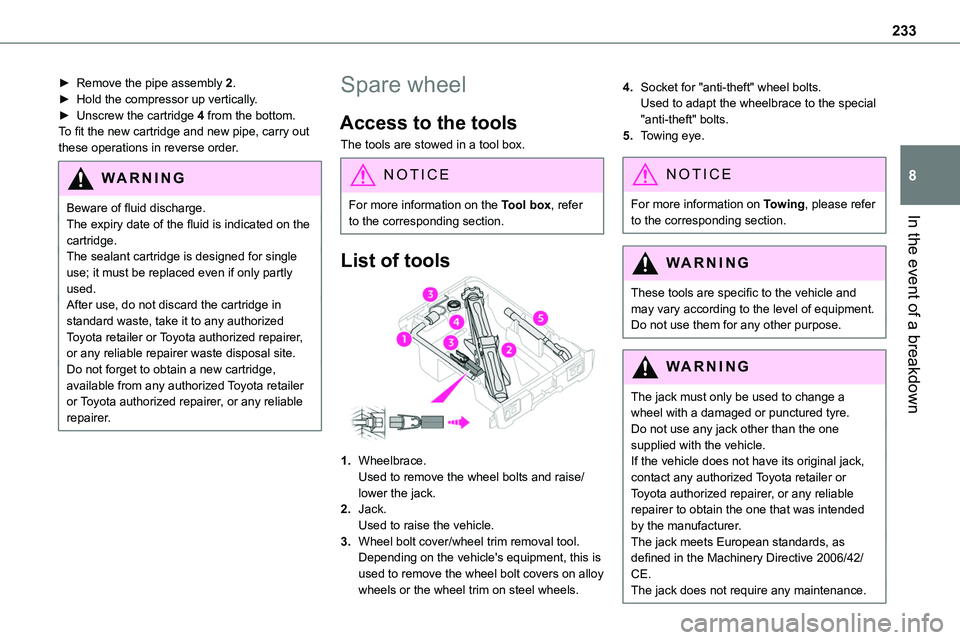
List of tools
1.Wheelbrace.Used to remove the wheel bolts and raise/lower the jack.
2.Jack.Used to raise the vehicle.
3.Wheel bolt cover/wheel trim removal tool.Depending on the vehicle's equipment, this is used to remove the wheel bolt covers on alloy wheels or the wheel trim on steel wheels.
4.Socket for "anti-theft" wheel bolts.Used to adapt the wheelbrace to the special "anti-theft" bolts.
5.Towing eye.
NOTIC E
For more information on Towing, please refer to the corresponding section.
WARNI NG
These tools are specific to the vehicle and may vary according to the level of equipment.Do not use them for any other purpose.
WARNI NG
The jack must only be used to change a wheel with a damaged or punctured tyre.Do not use any jack other than the one supplied with the vehicle.If the vehicle does not have its original jack, contact any authorized Toyota retailer or Toyota authorized repairer, or any reliable repairer to obtain the one that was intended by the manufacturer.
The jack meets European standards, as defined in the Machinery Directive 2006/42/CE.The jack does not require any maintenance.
Page 234 of 360
234
Access to the spare wheel
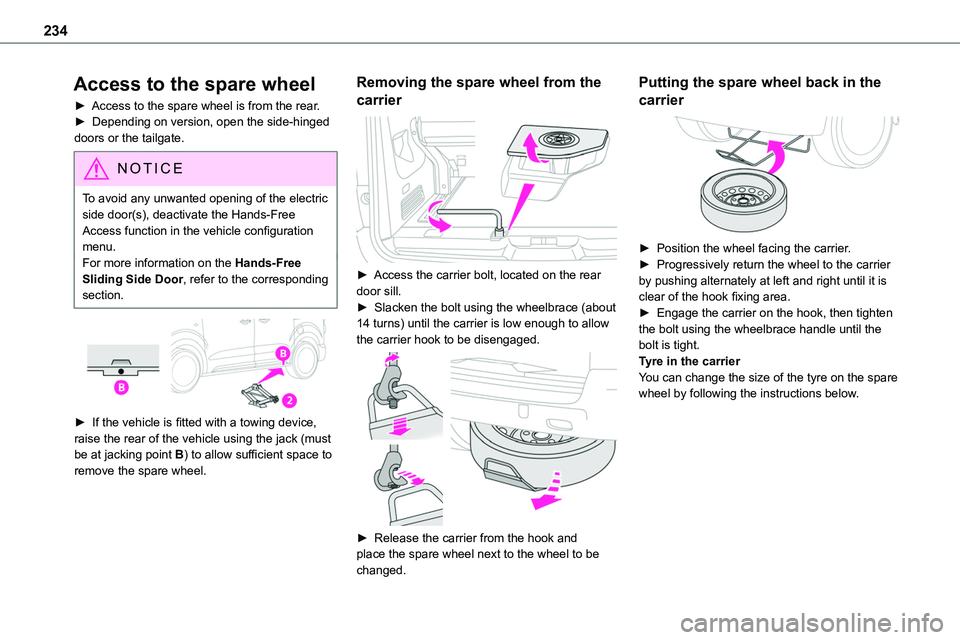
► Access to the spare wheel is from the rear.► Depending on version, open the side-hinged doors or the tailgate.
NOTIC E
To avoid any unwanted opening of the electric side door(s), deactivate the Hands-Free Access function in the vehicle configuration menu.For more information on the Hands-Free Sliding Side Door, refer to the corresponding section.
► If the vehicle is fitted with a towing device,
raise the rear of the vehicle using the jack (must be at jacking point B) to allow sufficient space to remove the spare wheel.
Removing the spare wheel from the
carrier
► Access the carrier bolt, located on the rear door sill.► Slacken the bolt using the wheelbrace (about 14 turns) until the carrier is low enough to allow the carrier hook to be disengaged.
► Release the carrier from the hook and place the spare wheel next to the wheel to be changed.
Putting the spare wheel back in the
carrier
► Position the wheel facing the carrier.► Progressively return the wheel to the carrier by pushing alternately at left and right until it is clear of the hook fixing area.► Engage the carrier on the hook, then tighten the bolt using the wheelbrace handle until the bolt is tight.Tyre in the carrierYou can change the size of the tyre on the spare wheel by following the instructions below.
Page 235 of 360
235
In the event of a breakdown
8
Original tyre sizeMediumLong
215/65 R16Placing a 225 wheel in the carrier is prohibited.
There is no 215/60 R17
215/60 R17 M&S
225/55 R17Placing a 215 wheel in the carrier is not recommended (risk of noise).
NOTIC E
A punctured tyre of size 215 or 225 can be placed in the carrier.
Removing a wheel
WARNI NG
Parking the vehicleImmobilise the vehicle where it does not obstruct traffic: the ground must be level, stable and non-slippery.With a manual gearbox, engage first gear
then switch off the ignition to block the wheels.With an automatic gearbox, place the gear selector in position P then switch off the ignition to block the wheels. With a drive selector, place the gear selector in position P then switch off the ignition to block the wheels.Apply the parking brake, unless it is programmed to automatic mode (for an electric parking brake), and check that the indicator lamp lights up on the instrument panel.Ensure that the occupants have left the vehicle and are located in a safe place.Never go underneath a vehicle raised using a jack; use an axle stand.With an electric parking brake, place a chock against the wheel diagonally opposite to the one being replaced.
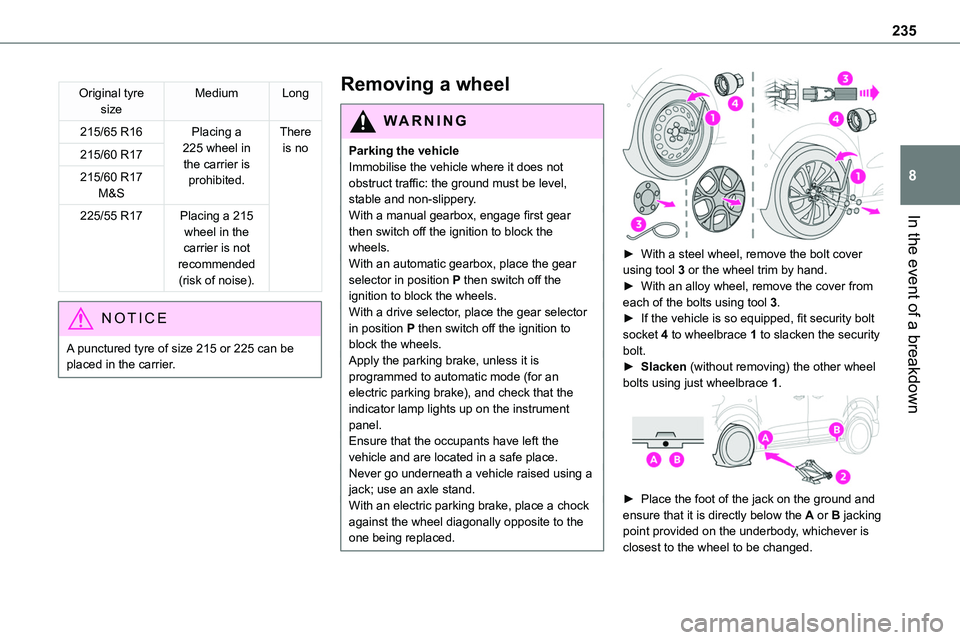
► With a steel wheel, remove the bolt cover using tool 3 or the wheel trim by hand.► With an alloy wheel, remove the cover from each of the bolts using tool 3.► If the vehicle is so equipped, fit security bolt socket 4 to wheelbrace 1 to slacken the security bolt.► Slacken (without removing) the other wheel bolts using just wheelbrace 1.
► Place the foot of the jack on the ground and ensure that it is directly below the A or B jacking point provided on the underbody, whichever is closest to the wheel to be changed.
Page 278 of 360
278
Steering mounted controls -
Type 2
Voice commands:This control is located on the steering wheel or at the end of the lighting control stalk (depending on equipment).
Short press, smartphone voice commands via the system.Increase volume.
Decrease volume.Mute by pressing the volume increase and decrease buttons simultaneously (depending on equipment).Restore the sound by pressing one of the two volume buttons.Media (short press): change the multimedia source.Telephone (short press): start telephone call.Call in progress (short press): access telephone menu.Telephone (long press): reject an incoming call, end call; when no call is in progress, access telephone menu.Radio (rotate): automatic search for the previous/next station.Media (rotate): previous/next track, move in a list.
Short press: confirm a selection; if nothing selected, access to presets.Radio: display the list of stations.Media: display the list of tracks.Radio (press and hold): update the list of stations received.
Menus
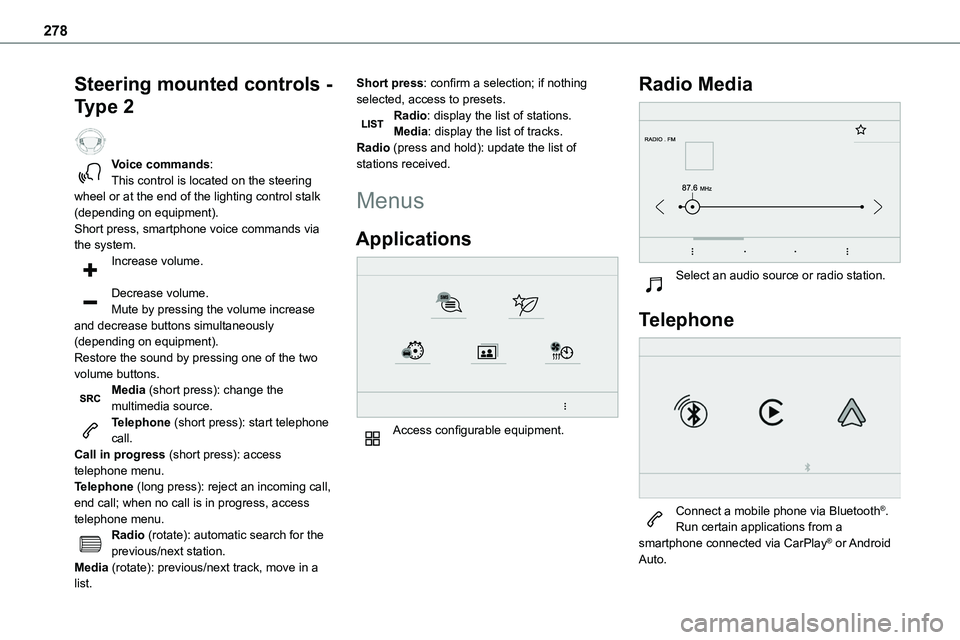
Applications
Access configurable equipment.
Radio Media
Select an audio source or radio station.
Telephone
Connect a mobile phone via Bluetooth®.Run certain applications from a smartphone connected via CarPlay® or Android Auto.
Page 292 of 360
292
– Air conditioning status information (depending on version), and direct access to the corresponding menu.– Go directly to the audio source selection option, to view the list of radio stations (or list of titles depending on the source).– Go to the "Notifications" of messages, emails, map updates and, depending on the services, the navigation notifications.
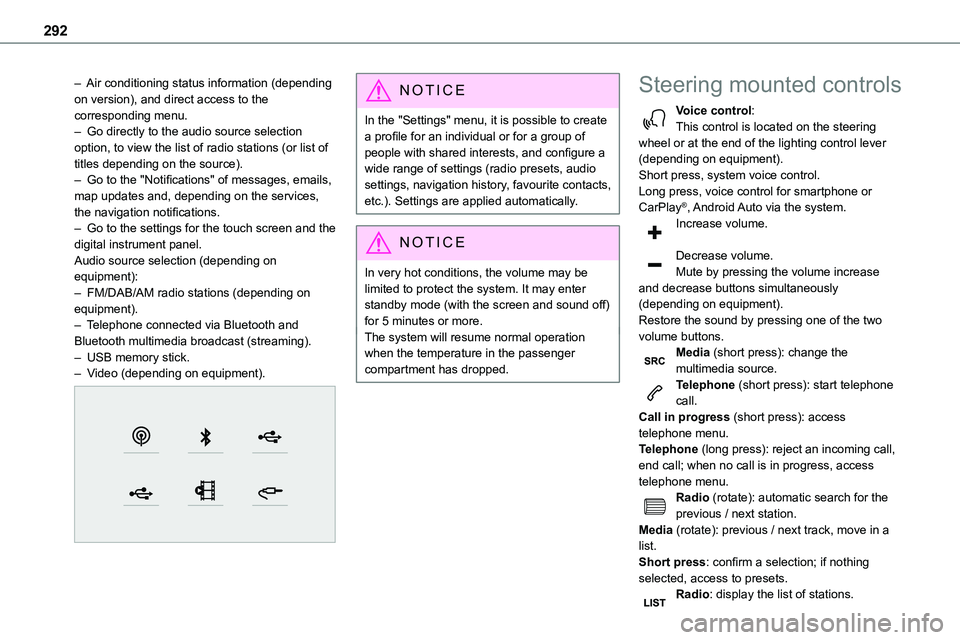
– Go to the settings for the touch screen and the digital instrument panel.Audio source selection (depending on equipment):– FM/DAB/AM radio stations (depending on equipment).– Telephone connected via Bluetooth and Bluetooth multimedia broadcast (streaming).– USB memory stick.– Video (depending on equipment).
NOTIC E
In the "Settings" menu, it is possible to create a profile for an individual or for a group of people with shared interests, and configure a wide range of settings (radio presets, audio settings, navigation history, favourite contacts, etc.). Settings are applied automatically.
NOTIC E
In very hot conditions, the volume may be limited to protect the system. It may enter standby mode (with the screen and sound off) for 5 minutes or more.The system will resume normal operation when the temperature in the passenger compartment has dropped.
Steering mounted controls
Voice control:This control is located on the steering wheel or at the end of the lighting control lever (depending on equipment).Short press, system voice control.Long press, voice control for smartphone or CarPlay®, Android Auto via the system.
Increase volume.
Decrease volume.Mute by pressing the volume increase and decrease buttons simultaneously (depending on equipment).Restore the sound by pressing one of the two volume buttons.Media (short press): change the multimedia source.Telephone (short press): start telephone call.Call in progress (short press): access telephone menu.Telephone (long press): reject an incoming call, end call; when no call is in progress, access telephone menu.Radio (rotate): automatic search for the previous / next station.Media (rotate): previous / next track, move in a list.Short press: confirm a selection; if nothing selected, access to presets.Radio: display the list of stations.
Page 318 of 360
318
Recording event data
Electronic control units are installed in your vehicle. These control units process data received from the vehicle's sensors, for example, or data they generate themselves or exchange with each other. Some of these control units are required for the correct operation of your vehicle, some others assist you while driving (driving or
manoeuvring aids), while others provide comfort or infotainment functions.The following contains general information about how data is processed within the vehicle.You will find additional information about the specific data which is downloaded, stored and transmitted to third parties and what it is used for in your vehicle under the keyword "Data protection". This information is directly associated with the references for the functions in question contained in the corresponding vehicle handbook, or in the general terms and conditions of sale.This information is also available online.
Vehicle operating data
The control units process the data used for the operation of the vehicle. This data includes, for example: – Information about the state of the vehicle (e.g. speed, travel time, lateral acceleration, wheel rotation rate, fastened seat belts display). – Environmental conditions (e.g. temperature, rain sensor, distance sensor).
As a general rule, this data is temporary, is not stored for longer than one operating cycle and is only used within the vehicle itself. The control units often record this data (including the vehicle's key). This function allows either the temporary or permanent storage of information about the state of the vehicle, stresses on components, servicing requirements, as well as events and technical errors. Depending on the vehicle's equipment level, the data stored is as follows: – Operating state of system components (e.g. filling level, tyre pressures, battery charge status). – Faults and malfunctions in important system components (e.g. lamps, brakes). – System reactions in specific driving situations (e.g. deployment of an airbag, triggering of stability control and braking systems). – Information about events which have damaged the vehicle.
– For electric and rechargeable hybrid vehicles, the traction battery charge level and the estimated driving range. In particular circumstances (e.g. if the vehicle has detected a malfunction), it may be necessary to record data which would otherwise simply not be stored. When taking your vehicle in for servicing (e.g. repairs, maintenance), the stored operating
data may be read along with the vehicle's identification number and used if necessary. The personnel working for the servicing network (e.g. garages, manufacturers) or third parties (e.g. roadside assistance agents) may read the vehicle's data. This also applies to work carried out under warranty and quality assurance measures. This data is generally read via the OBD (On-Board Diagnostics) port fitted by law to the vehicle. It is used to report on the technical state of the vehicle or its components and facilitates the diagnosis of malfunctions, in compliance with warranty obligations and for quality improvement. This data, in particular the information relating to stress on components, technical events, operator errors and other malfunctions, is sent to the Manufacturer, if necessary, along with the vehicle's identification number. The Manufacturer's liability may also be engaged. The Manufacturer may also use the operating data taken from the vehicle for product recalls. This data may also be used to check the
Page 319 of 360
319
Event data recorders
13
customer's warranty and any claims made under warranty. Any malfunctions stored in the vehicle may be reset by an after-sales service company during servicing or repair work, or at your request.
Comfort and infotainment
functions
Comfort settings and personalised settings
may be saved in the vehicle and modified or reinitialised at any time. Depending on the vehicle's equipment level, this may include: – Seat and steering wheel position settings. – Chassis and air conditioning settings. – Personalised settings such as the interior lighting. You can enter your own data into the functions of your vehicle's audio and telematic system, as part of the selected functionalities. Depending on the vehicle's equipment level, this may include: – Multimedia data such as music, videos or photos to be read by an integrated multimedia system. – Address book data to be used with an integrated hands-free system or with an integrated navigation system. – Entered destinations. – Data regarding the use of online services. This data for the comfort and infotainment functions may be stored locally in the vehicle
or saved to a device that you have connected to the vehicle (e.g. smartphone, USB memory stick or MP3 player). Data that you have entered yourself may be deleted at any time. This data may also be transmitted outside the vehicle at your request, particularly when using online services in line with the settings that you have selected.
Smartphone integration
(e.g. Android Auto® or
Apple®CarPlay®)
If your vehicle is equipped accordingly, you can connect your smartphone or another mobile device to the vehicle in order to operate it using the vehicle's integrated controls. Images and sounds from the smartphone can be transmitted through the audio and telematics system. Specific information is simultaneously sent to your smartphone. Depending on the type of integration, this includes data such as location, day/night mode and other general information about the vehicle. For more information, please refer to the user instructions for the vehicle or the audio and telematics system.Integrating a smartphone allows you to use its applications, such as a navigation app or music player. No other integration between the smartphone and the vehicle is possible, in particular active access to vehicle data. How the data is processed subsequently is determined by the supplier of the application being used.
The ability the change settings depends on the application in question and on the operating system installed on your smartphone.
Online services
If your vehicle is connected to a wireless network, data can be exchanged between your vehicle and other systems. Connection to a wireless network is made possible via a
transmitter located in your vehicle or a mobile device that you have provided (e.g. smartphone). The online services can be used via this wireless connection. These include online services and applications (apps) provided to you by the Manufacturer or other suppliers.
Exclusive services
As regards the Manufacturer's online services, the corresponding functions are described by the Manufacturer in an appropriate medium (e.g. handbook, Manufacturer's website) and the information about data protection is provided. Personal data may be used for online services. The exchange of data for this purpose takes place over a secure connection, using for example the Manufacturer's dedicated computer systems. The collection, processing and use of personal data for the development of services are carried out solely on the basis of a legal authorisation, for example in the case of a legal emergency call system or a contractual agreement or else under a consent agreement.