light TOYOTA PROACE VERSO EV 2020 Workshop Manual
[x] Cancel search | Manufacturer: TOYOTA, Model Year: 2020, Model line: PROACE VERSO EV, Model: TOYOTA PROACE VERSO EV 2020Pages: 360, PDF Size: 68.91 MB
Page 188 of 360
188
NOTIC E
No warning is transmitted while the direction indicator is active and for approximately 20 seconds after the direction indicator is switched off.
Activation/Deactivation
With/without audio system
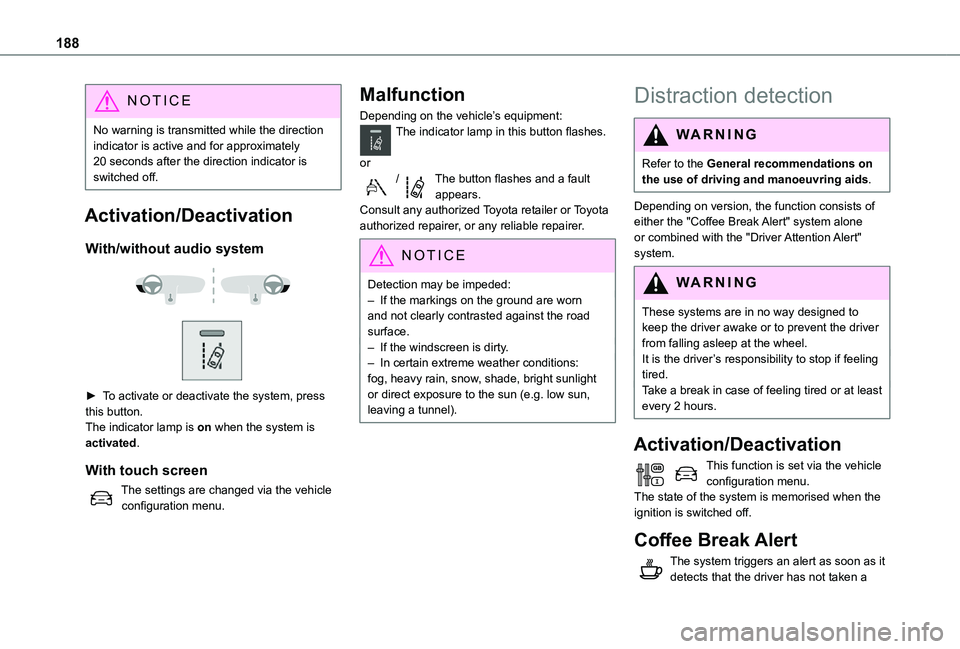
► To activate or deactivate the system, press this button.The indicator lamp is on when the system is activated.
With touch screen
The settings are changed via the vehicle configuration menu.
Malfunction
Depending on the vehicle’s equipment:The indicator lamp in this button flashes.
or/The button flashes and a fault appears.Consult any authorized Toyota retailer or Toyota authorized repairer, or any reliable repairer.
NOTIC E
Detection may be impeded:– If the markings on the ground are worn and not clearly contrasted against the road surface.– If the windscreen is dirty.– In certain extreme weather conditions: fog, heavy rain, snow, shade, bright sunlight or direct exposure to the sun (e.g. low sun, leaving a tunnel).
Distraction detection
WARNI NG
Refer to the General recommendations on the use of driving and manoeuvring aids.
Depending on version, the function consists of either the "Coffee Break Alert" system alone or combined with the "Driver Attention Alert"
system.
WARNI NG
These systems are in no way designed to keep the driver awake or to prevent the driver from falling asleep at the wheel. It is the driver’s responsibility to stop if feeling tired.Take a break in case of feeling tired or at least every 2 hours.
Activation/Deactivation
This function is set via the vehicle configuration menu.The state of the system is memorised when the ignition is switched off.
Coffee Break Alert
The system triggers an alert as soon as it detects that the driver has not taken a
Page 190 of 360
190
Blind Spot Monitoring
System
WARNI NG
Refer to the General recommendations on the use of driving and manoeuvring aids.
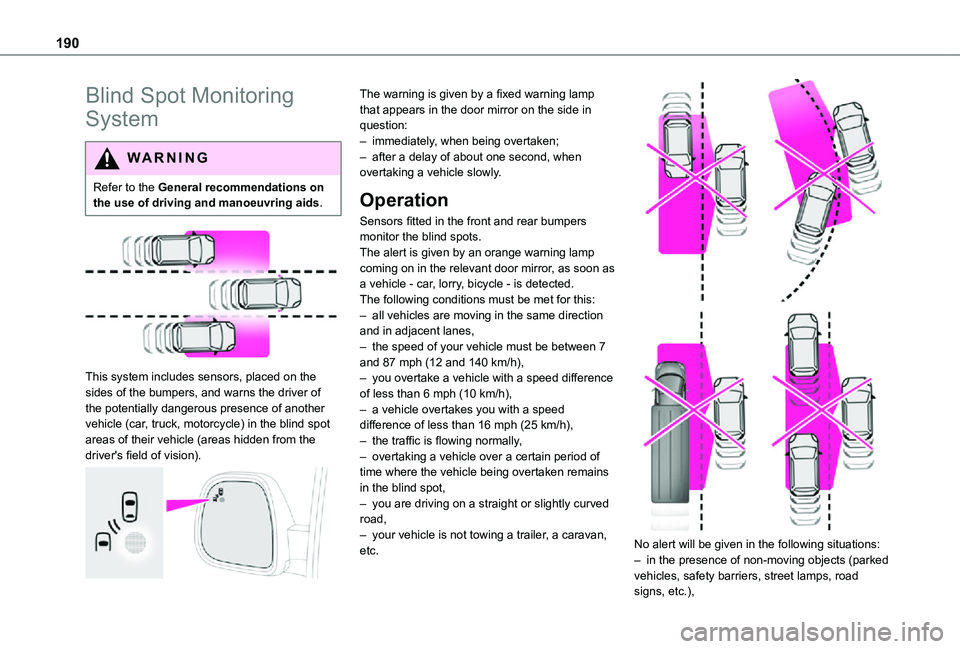
This system includes sensors, placed on the sides of the bumpers, and warns the driver of the potentially dangerous presence of another vehicle (car, truck, motorcycle) in the blind spot areas of their vehicle (areas hidden from the
driver's field of vision).
The warning is given by a fixed warning lamp that appears in the door mirror on the side in question:– immediately, when being overtaken;– after a delay of about one second, when overtaking a vehicle slowly.
Operation
Sensors fitted in the front and rear bumpers monitor the blind spots.The alert is given by an orange warning lamp coming on in the relevant door mirror, as soon as a vehicle - car, lorry, bicycle - is detected.The following conditions must be met for this:– all vehicles are moving in the same direction and in adjacent lanes,– the speed of your vehicle must be between 7 and 87 mph (12 and 140 km/h),– you overtake a vehicle with a speed difference of less than 6 mph (10 km/h),– a vehicle overtakes you with a speed difference of less than 16 mph (25 km/h),– the traffic is flowing normally,
– overtaking a vehicle over a certain period of time where the vehicle being overtaken remains in the blind spot,– you are driving on a straight or slightly curved road,– your vehicle is not towing a trailer, a caravan, etc.
No alert will be given in the following situations:
– in the presence of non-moving objects (parked vehicles, safety barriers, street lamps, road signs, etc.),
Page 193 of 360
193
Driving
6
Malfunction
In the event of a malfunction when changing into reverse gear, this warning lamp lights up on the instrument panel, accompanied by the display of a message and an audible signal (short beep).Have it checked by any authorized Toyota retailer or Toyota authorized repairer, or any reliable repairer.
VisioPark Light
WARNI NG
Refer to the General recommendations on the use of driving and manoeuvring aids.
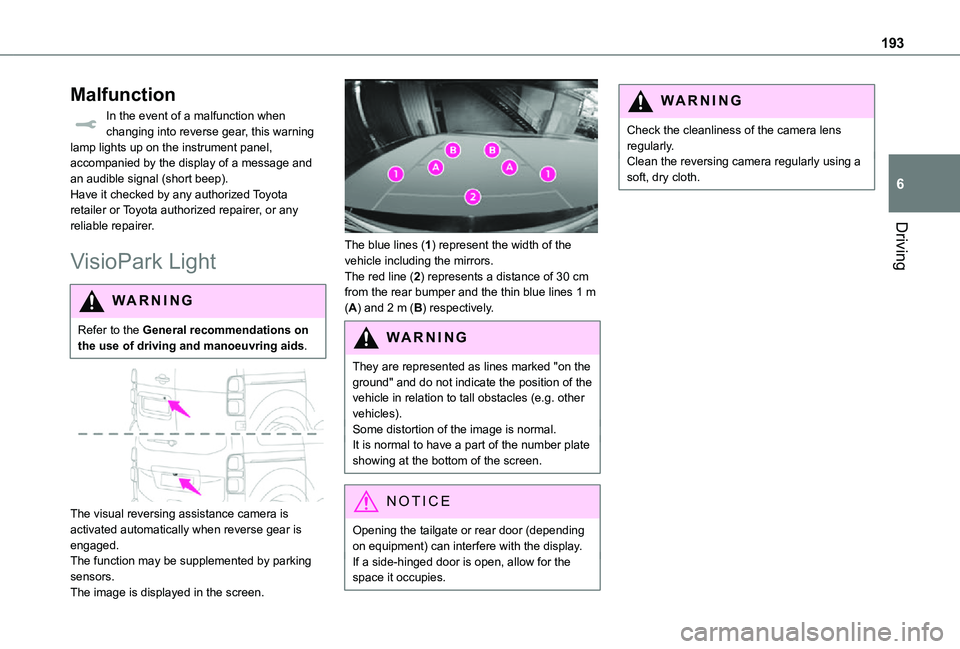
The visual reversing assistance camera is activated automatically when reverse gear is
engaged.The function may be supplemented by parking sensors.The image is displayed in the screen.
The blue lines (1) represent the width of the vehicle including the mirrors.The red line (2) represents a distance of 30 cm from the rear bumper and the thin blue lines 1 m (A) and 2 m (B) respectively.
WARNI NG
They are represented as lines marked "on the ground" and do not indicate the position of the vehicle in relation to tall obstacles (e.g. other vehicles).Some distortion of the image is normal.
It is normal to have a part of the number plate showing at the bottom of the screen.
NOTIC E
Opening the tailgate or rear door (depending
on equipment) can interfere with the display.If a side-hinged door is open, allow for the space it occupies.
WARNI NG
Check the cleanliness of the camera lens regularly.Clean the reversing camera regularly using a soft, dry cloth.
Page 197 of 360
197
Practical information
7
Compatibility of fuels
Diesel fuels conforming to the EN590, EN16734 and EN16709 standards and containing up to 7%, 10%, 20% and 30% fatty acid methyl ester respectively. The use of B20 or B30 fuels, even occasionally, imposes special maintenance conditions referred to as "Arduous conditions".
Paraffinic Diesel fuel conforming to the EN15940 standard.
WARNI NG
The use of any other type of (bio) fuel (vegetable or animal oils, pure or diluted, domestic fuel, etc.) is strictly prohibited (risk of damage to the engine and fuel system).
NOTIC E
The only Diesel fuel additives authorised for use are those that meet the B715000 standard.
Diesel at low temperature
At temperatures below 0 °C (+32 °F), the formation of paraffins in summer-type Diesel fuels could prevent the engine from operating correctly. In these temperature conditions, use winter-type Diesel fuel and keep the fuel tank more than 50 % full.At temperatures below -15 °C (+5 °F) to avoid problems starting, it is best to park the vehicle under shelter (heated garage).
Travelling abroad
Certain fuels could damage your vehicle’s engine.In certain countries, the use of a particular fuel may be required (specific octane rating, specific trade name, etc.) to ensure correct operation of the engine.For all additional information, consult a dealer.
Refuelling
Fuel tank capacity: approximately 69 litres.Reserve level: approximately 6 litres.
Low fuel level
When the low fuel level is reached, one of these warning lamps lights up on the instrument panel, accompanied by the display of a message and an audible signal. When it first comes on, about 8 litres of fuel remain.You must refuel as soon as possible to avoid running out of fuel.For more information on Running out of fuel (Diesel), refer to the corresponding section.
NOTIC E
A small arrow by the warning lamp indicates which side of the vehicle the fuel filler flap is located on.
WARNI NG
Stop & StartNever refuel with the engine in STOP mode; you must switch off the ignition.
Refuelling
At least 8 litres of fuel must be added, in order to be registered by the fuel gauge.
Page 201 of 360
201
Practical information
7
WARNI NG
In the event of damage to the traction batteryIt is strictly prohibited to work on the vehicle yourself.Do not touch liquids coming from the battery, and in the event of skin contact with these products, wash abundantly with water and contact a doctor as soon as possible.Contact any authorized Toyota retailer or Toyota authorized repairer, or any reliable repairer to have the system checked.
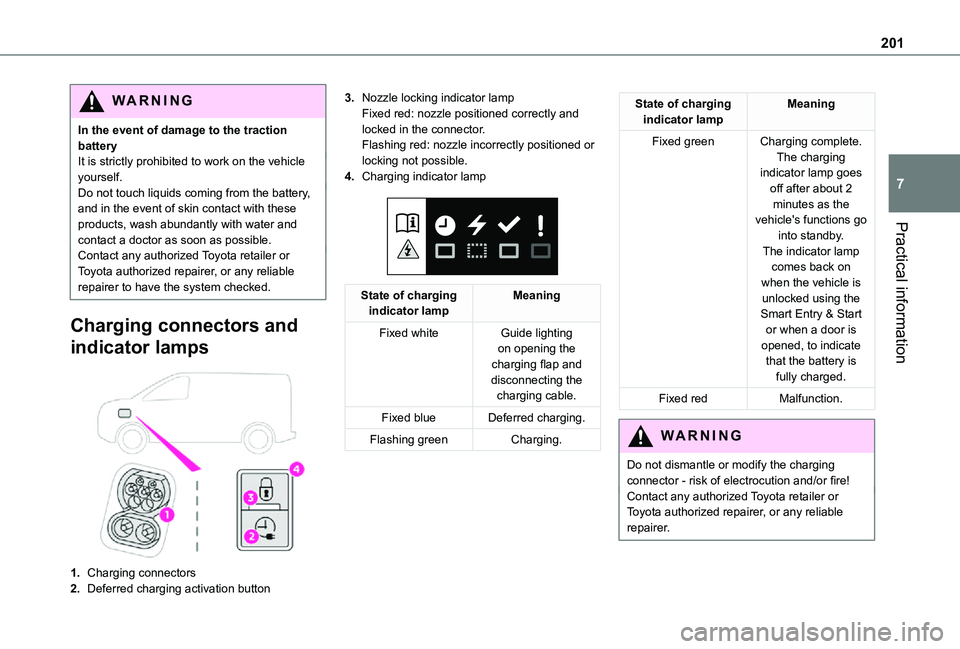
Charging connectors and
indicator lamps
1.Charging connectors
2.Deferred charging activation button
3.Nozzle locking indicator lampFixed red: nozzle positioned correctly and locked in the connector.Flashing red: nozzle incorrectly positioned or locking not possible.
4.Charging indicator lamp
State of charging indicator lampMeaning
Fixed whiteGuide lighting on opening the charging flap and disconnecting the charging cable.
Fixed blueDeferred charging.
Flashing greenCharging.
State of charging indicator lampMeaning
Fixed greenCharging complete.The charging indicator lamp goes off after about 2 minutes as the vehicle's functions go into standby.
The indicator lamp comes back on when the vehicle is unlocked using the Smart Entry & Start or when a door is opened, to indicate that the battery is fully charged.
Fixed redMalfunction.
WARNI NG
Do not dismantle or modify the charging connector - risk of electrocution and/or fire!Contact any authorized Toyota retailer or Toyota authorized repairer, or any reliable repairer.
Page 209 of 360
209
Practical information
7
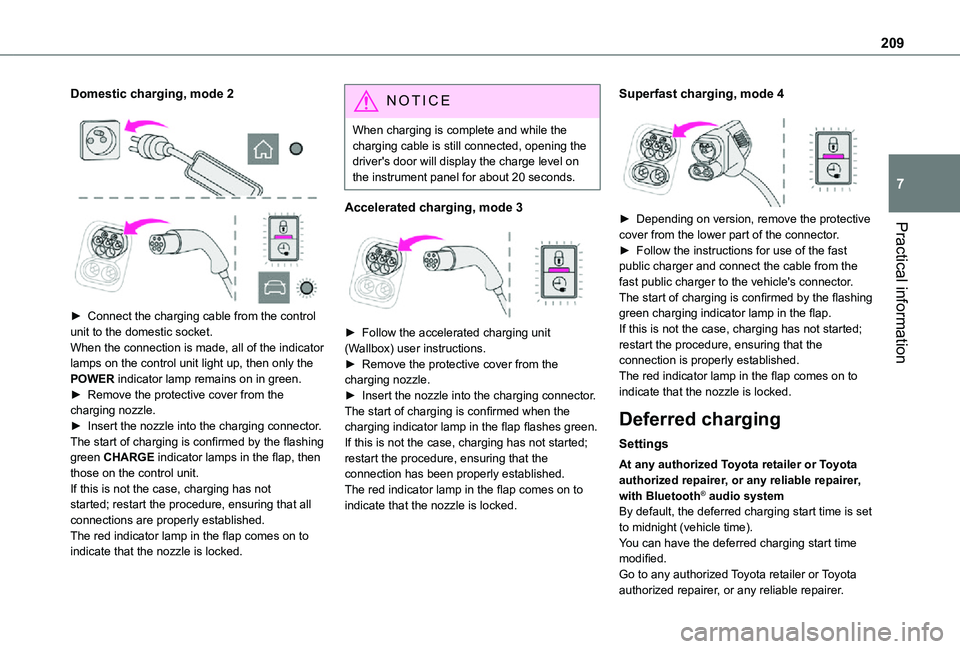
Domestic charging, mode 2
► Connect the charging cable from the control unit to the domestic socket.When the connection is made, all of the indicator lamps on the control unit light up, then only the POWER indicator lamp remains on in green.► Remove the protective cover from the charging nozzle.► Insert the nozzle into the charging connector.The start of charging is confirmed by the flashing green CHARGE indicator lamps in the flap, then those on the control unit.If this is not the case, charging has not started; restart the procedure, ensuring that all connections are properly established.The red indicator lamp in the flap comes on to
indicate that the nozzle is locked.
NOTIC E
When charging is complete and while the charging cable is still connected, opening the driver's door will display the charge level on the instrument panel for about 20 seconds.
Accelerated charging, mode 3
► Follow the accelerated charging unit (Wallbox) user instructions.► Remove the protective cover from the charging nozzle.► Insert the nozzle into the charging connector.The start of charging is confirmed when the charging indicator lamp in the flap flashes green.If this is not the case, charging has not started; restart the procedure, ensuring that the connection has been properly established.The red indicator lamp in the flap comes on to indicate that the nozzle is locked.
Superfast charging, mode 4
► Depending on version, remove the protective cover from the lower part of the connector.► Follow the instructions for use of the fast public charger and connect the cable from the
fast public charger to the vehicle's connector.The start of charging is confirmed by the flashing green charging indicator lamp in the flap.If this is not the case, charging has not started; restart the procedure, ensuring that the connection is properly established.The red indicator lamp in the flap comes on to indicate that the nozzle is locked.
Deferred charging
Settings
At any authorized Toyota retailer or Toyota authorized repairer, or any reliable repairer, with Bluetooth® audio systemBy default, the deferred charging start time is set to midnight (vehicle time).You can have the deferred charging start time
modified.Go to any authorized Toyota retailer or Toyota authorized repairer, or any reliable repairer.
Page 210 of 360
210
On a smartphone or tablet (GSM), with TOYOTA Pro Touch or TOYOTA Pro Touch with navigation systemYou can programme the deferred charging function at any time via the MyToyota application (Available soon).For more information on Remote functions, refer to the corresponding section.In the vehicle, with TOYOTA Pro Touch with navigation system► In the Energy touch screen menu, select the Charge page.► Set the charging start time.► Press OK.The setting is saved in the system.
Activation
NOTIC E
Deferred charging is only possible with modes 2 and 3.
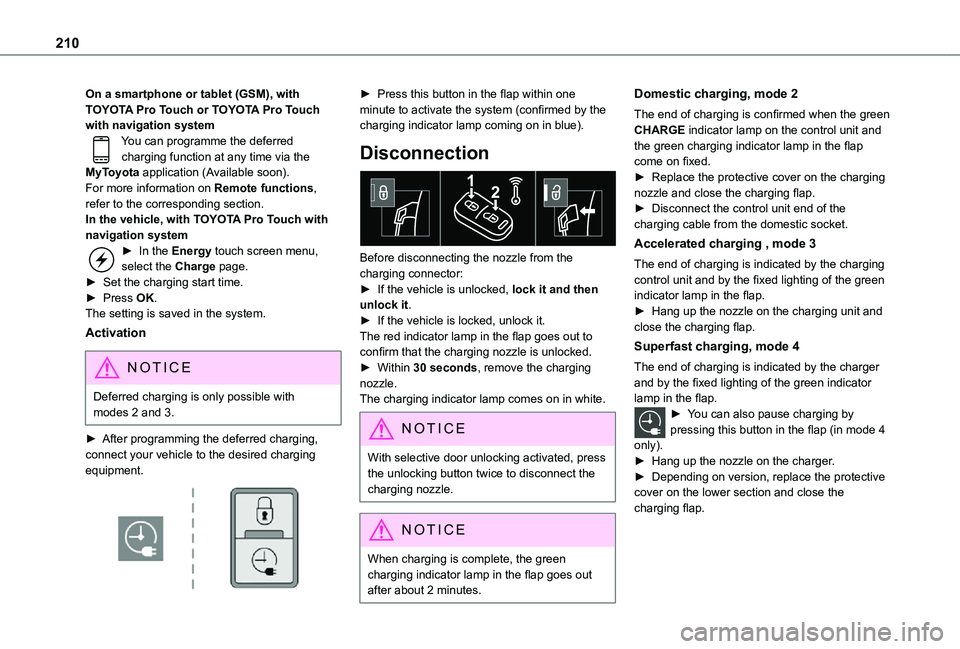
► After programming the deferred charging, connect your vehicle to the desired charging equipment.
► Press this button in the flap within one minute to activate the system (confirmed by the charging indicator lamp coming on in blue).
Disconnection
Before disconnecting the nozzle from the charging connector:► If the vehicle is unlocked, lock it and then unlock it.► If the vehicle is locked, unlock it.The red indicator lamp in the flap goes out to confirm that the charging nozzle is unlocked.► Within 30 seconds, remove the charging nozzle.The charging indicator lamp comes on in white.
NOTIC E
With selective door unlocking activated, press the unlocking button twice to disconnect the charging nozzle.
NOTIC E
When charging is complete, the green charging indicator lamp in the flap goes out after about 2 minutes.
Domestic charging, mode 2
The end of charging is confirmed when the green CHARGE indicator lamp on the control unit and the green charging indicator lamp in the flap come on fixed.► Replace the protective cover on the charging nozzle and close the charging flap.► Disconnect the control unit end of the charging cable from the domestic socket.
Accelerated charging , mode 3
The end of charging is indicated by the charging control unit and by the fixed lighting of the green indicator lamp in the flap.► Hang up the nozzle on the charging unit and close the charging flap.
Superfast charging, mode 4
The end of charging is indicated by the charger and by the fixed lighting of the green indicator lamp in the flap.► You can also pause charging by pressing this button in the flap (in mode 4
only).► Hang up the nozzle on the charger.► Depending on version, replace the protective cover on the lower section and close the charging flap.
Page 219 of 360
219
Practical information
7
Air filter
Depending on the environment and the use of the vehicle (e.g. dusty atmosphere, city driving), change it twice as often, if necessary.
Oil filter
Change the oil filter each time the engine oil is changed.
Particle filter (Diesel)
The start of clogging of the particle filter is indicated by the temporary lighting of this warning lamp, accompanied by an alert message.As soon as the traffic conditions permit, regenerate the filter by driving at a speed of at least 60 km/h (37 mph) until the warning lamp goes off.
NOTIC E
If the warning lamp stays on, this indicates a low Diesel additive level.For more information on Checking levels, refer to the corresponding section.
NOTIC E
Following prolonged operation of the vehicle at very low speed or at idle, you may, in exceptional circumstances, notice the emission of water vapour at the exhaust while accelerating. This has no impact on the vehicle’s behaviour or the environment.
NOTIC E
New vehicleDuring the first few particle filter regeneration operations, you may notice a "burning" smell. This is perfectly normal.
Manual gearbox
The gearbox does not require any maintenance (no oil change).
Automatic gearbox
The gearbox does not require any maintenance (no oil change).
Drive selector (Electric)
The drive selector does not require any maintenance.
Manual parking brake
If you notice excessive brake lever travel or decreased effectiveness, the parking
brake must be adjusted, even between two services.This system must be checked by any authorized Toyota retailer or Toyota authorized repairer, or any reliable repairer.
Electric parking brake
This system does not require any routine servicing. However, in the event of a problem, do not hesitate to have the system checked by a TOYOTA dealer or a qualified workshop.
NOTIC E
For more information on the Electric parking brake, refer to the corresponding section.
Brake pads
Brake wear depends on the style of driving, particularly in the case of vehicles used in town, over short distances. It may be necessary to have the condition of the brakes checked, even between vehicle services.Unless there is a leak in the circuit, a drop in the brake fluid level indicates that the brake pads are worn.
Page 222 of 360
222
WARNI NG
Never top up from an AdBlue® dispenser reserved for heavy goods vehicles.
Storage recommendations
AdBlue® freezes at about -11°C and deteriorates above +25°C. Containers should be stored in a cool area and protected from direct sunlight.Under these conditions, the fluid can be kept for at least a year.If the fluid has frozen, it can be used once it has completely thawed out in the ambient air.
WARNI NG
Never store AdBlue® containers in your vehicle.
Precautions for use
AdBlue® is a urea-based solution. This fluid is non-flammable, colourless and odourless (when kept in a cool place).In the event of contact with the skin, wash the affected area with soap and running water. In the event of contact with the eyes, immediately rinse the eyes with large amounts of water or with an eye wash solution for at least 15 minutes. Seek medical attention if you feel a persistent burning sensation or irritation.
If swallowed, immediately wash out the mouth with clean water and then drink plenty of water.In certain conditions (high temperature, for example), the risk of release of ammonia cannot be excluded: do not inhale the fluid. Ammonia vapours have an irritant effect on mucous membranes (eyes, nose and throat).
WARNI NG
Store AdBlue® out of the reach of children, in
its original container.
Procedure
Before starting the top-up procedure, ensure that the vehicle is parked on a flat and level surface.In wintry conditions, ensure that the temperature of the vehicle is above -11 °C. Otherwise the AdBlue® may be frozen and so cannot be poured into its tank. Park the vehicle in a warmer area for a few hours to allow the top-up to be carried out.
WARNI NG
Never put the AdBlue® into the Diesel fuel tank.
WARNI NG
If any AdBlue® is splashed, or if there are any spillages on the bodywork, rinse immediately with cold water or wipe with a damp cloth.If the fluid has crystallised, clean it off using a sponge and hot water.
WARNI NG
Important: in the event of a top-up after a breakdown because of a lack of AdBlue, it is essential to wait around 5 minutes before switching on the ignition, without opening the driver’s door, unlocking the vehicle, inserting the key into the ignition switch, or bringing the key for the "Smart Entry & Start" system into the passenger compartment.Switch on the ignition, then wait for 10 seconds before starting the engine.
► Switch off the ignition and remove the key from the switch to switch off the engine.or► With Smart Entry & Start, press the "START/STOP" button to switch off the engine.
Page 226 of 360
226
NOTIC E
Use a soft sponge and soapy water or a pH neutral product.Gently wipe the bodywork with a clean microfibre cloth.Apply polish with the vehicle clean and dry.Comply with the instructions for use stated on the product.
Textured paint
This type of paint reacts under the effect of light, through variations in appearance and finish that highlight the lines and contours of the vehicle. Its varnish is enriched with particles that remain visible and create a unique satin effect with relief. Its slightly granular texture gives it a surprising touch.
WARNI NG
Never attempt to clean without water.
Never clean your vehicle in an automatic roller-brush car wash.Never select the programme with hot wax finish.Never use high-pressure lances equipped with brushes - risk of scratching paint!Never apply glossy polish or preservatives to the bodywork or alloy wheels; these products irreversibly reveal glossy or spotted areas.
NOTIC E
Choose high-pressure wash, or at least high-flow water jet.Rinse the vehicle with demineralised water.Only a clean microfibre cloth is recommended for wiping the vehicle; pass it over the vehicle without rubbing.Carefully wipe off any fuel spilt on the bodywork using a soft cloth, then allow to dry.Clean off minor marks (for example, finger marks), using a maintenance product recommended by TOYOTA.
Decals
(Depending on version)
WARNI NG
Do not use a high pressure washer to clean the vehicle. Risk of damaging or detaching the decals!
NOTIC E
Use a high-flow hose at a temperature between 25°C and 40°C.Sweep the jet of water across the surface to
be cleaned, perpendicular to it.Rinse the vehicle with demineralised water.
Leather
Leather is a natural product. Appropriate regular care is essential for its durability.It must be protected and nourished using a specific leather product, to keep it supple and preserve its original appearance.
WARNI NG
Do not clean leather using unsuitable
cleaning agents such as solvents, detergents, petrol or pure alcohol.When cleaning items partly made from leather, take care not to damage the other materials with the specific leather product.
NOTIC E
Before cleaning greasy stains or liquids, quickly mop up any surplus.Before cleaning, wipe off any residues liable to scuff the leather, using a cloth that has been dampened with demineralised water and thoroughly wrung out.Clean leather using a soft cloth moistened with soapy water or a pH-neutral product.Dry with a soft, dry cloth.