warning TOYOTA PROACE VERSO EV 2023 Repair Manual
[x] Cancel search | Manufacturer: TOYOTA, Model Year: 2023, Model line: PROACE VERSO EV, Model: TOYOTA PROACE VERSO EV 2023Pages: 360, PDF Size: 70.22 MB
Page 217 of 360
217
Practical information
7
If the level is close to or below the "MIN" mark, it is essential to top it up.When the engine is hot, the temperature of the coolant is regulated by the fan.As the cooling system is pressurised, wait at least one hour after switching off the engine before carrying out any work.In order to avoid the risk of scalding if you need to top up in an emergency, wrap a cloth around
the cap and unscrew the cap by two turns to allow the pressure to drop.Once the pressure has dropped, remove the cap and top up to the required level.
(Electric)
WARNI NG
Do not top up the coolant.
If the level is close to or below the "MIN" mark, it is essential to contact any authorized Toyota retailer or Toyota authorized repairer, or any reliable repairer.
Screenwash fluid
Top up to the required level when necessary.
Fluid specification
The fluid must be topped up with a ready-to-use mixture.In winter (temperatures below zero), a liquid containing an agent to prevent freezing must
be used which is appropriate for the prevailing conditions, in order to protect the elements of the system (pump, tank, ducts, jets, etc.).
WARNI NG
Filling with pure water is prohibited under all circumstances (risk of freezing, limestone deposits, etc.).
Diesel fuel additive (Diesel
with particle filter)
or On reaching the minimum level in the particle filter additive tank, this warning lamp comes on fixed, accompanied by an audible warning and a message warning that the additive level is too low.
Topping up
The topping up of this additive must be carried out quickly.
Go to any authorized Toyota retailer or Toyota authorized repairer, or any reliable repairer.
AdBlue (Diesel engines)
An alert is triggered when the reserve level is reached.For more information on the Indicators and in particular the AdBlue range indicators, refer to the corresponding section.
To avoid the vehicle being immobilised in accordance with regulations, you must top up the AdBlue tank.For more information on AdBlue, and in particular the supply of AdBlue, refer to the corresponding section.
Checks
Unless otherwise indicated, check these components in accordance with the manufacturer's service schedule and according to your engine.Otherwise, have them checked by any authorized Toyota retailer or Toyota authorized repairer, or any reliable repairer.
Page 218 of 360
218
WARNI NG
Only use products recommended by TOYOTA or products of equivalent quality and specification.In order to optimise the operation of components as important as those in the braking system, TOYOTA selects and offers very specific products.
12 V battery
The battery does not require any maintenance.However, check regularly that the terminals are correctly tightened (versions without quick release terminals) and that the connections are clean.
NOTIC E
For more information on the precautions to take before any work on the 12 V battery, refer to the corresponding section.
WARNI NG
Versions equipped with Stop & Start are fitted with a 12 V lead-acid battery of specific technology and specification.Its replacement should be carried out only by any authorized Toyota retailer or Toyota authorized repairer, or any reliable repairer.
Passenger compartment
filter
Depending on the environment and the use of the vehicle (e.g. dusty atmosphere, city driving), change it twice as often, if necessary.
NOTIC E
A clogged passenger compartment filter can adversely affect air conditioning system performance and generate undesirable odours.
Air filter
Depending on the environment and the use of the vehicle (e.g. dusty atmosphere,
city driving), change it twice as often, if necessary.
Oil filter
Change the oil filter each time the engine oil is changed.
Particle filter (Diesel)
The start of clogging of the particle filter is indicated by the temporary lighting of this warning lamp, accompanied by an alert message.
As soon as the traffic conditions permit, regenerate the filter by driving at a speed of at least 60 km/h (37 mph) until the warning lamp goes off.
NOTIC E
If the warning lamp stays on, this indicates a low Diesel additive level.For more information on Checking levels, refer to the corresponding section.
NOTIC E
Following prolonged operation of the vehicle at very low speed or at idle, you may, in exceptional circumstances, notice the emission of water vapour at the exhaust while accelerating. This has no impact on the vehicle’s behaviour or the environment.
Page 220 of 360
220
Fitting different tyres on the front and rear axles can cause the VSC to mistime.Always mark the direction of rotation on the tyres that will be stored when fitting winter or summer tyres. Store them in a cool, dry place and away from direct exposure to the sun's rays.Winter or 4-seasons tyres can be identified by this symbol on their sidewalls.
Shock absorbers
It is not easy for drivers to detect when shock absorbers are worn. Nevertheless, the shock absorbers have a major impact on road holding and braking performance.For your safety and driving comfort, it is important to have them regularly checked by any authorized Toyota retailer or Toyota authorized repairer, or any reliable repairer.
Timing and accessory kits
The timing and accessory kits are used from the time the engine is started until it is switched off. It is normal for them to wear over time.A faulty timing or accessory kit can damage the engine, rendering it unusable. Observe the recommended replacement frequency, stated in distance travelled or time elapsed, whichever is reached first.
AdBlue® (Diesel engines)
To respect the environment and ensure compliance with the Euro 6 standard, without adversely affecting the performance or fuel consumption of its Diesel engines, TOYOTA has taken the decision to equip its vehicles with a system that associates SCR (Selective Catalytic Reduction) with a Diesel particle filter (DPF) for
the treatment of exhaust gases.
SCR system
Using a liquid called AdBlue® that contains urea, a catalytic converter turns up to 85% of the nitrogen oxides (NOx) into nitrogen and water, which are harmless to health and the environment.The AdBlue® is contained in a special tank holding about 20 litres.Its capacity allows a driving range of approximately 3,000 miles (5,000 km) (which may vary considerably depending on your driving style and the vehicle). An alert system is automatically triggered when the remaining range reaches 1,500 miles (2,400 km), i.e. once the reserve level has been reached.Several alerts are triggered successively during the remaining 1,500 miles (2,400 km) until the tank is empty and the vehicle is immobilised.If the estimated distance travelled by the vehicle between two services is greater than 3,000 miles (5,000 km), it will be necessary to top up the AdBlue.
NOTIC E
For more information on the Warning and indicator lamps and the associated alerts, or the Indicators, please refer to the corresponding sections.
WARNI NG
Once the AdBlue® tank is empty, a device required by law prevents the engine from being restarted.If the SCR system is faulty, the level of emissions from the vehicle will no longer meet the Euro 6 standard and the vehicle starts polluting the environment.In the event of a confirmed SCR system malfunction, it is essential to visit any authorized Toyota retailer or Toyota authorized repairer, or any reliable repairer. After 685 miles (1,100 km), a device is automatically activated to prevent the engine from starting.In both cases, a range indicator indicates the distance that can be travelled before the vehicle is stopped.
Page 227 of 360
227
In the event of a breakdown
8
Warning triangle
This reflective and dismantlable device is to be installed on the side of the road when a vehicle is broken down or damaged.
WARNI NG
Before getting out of the vehicleTurn on the hazard warning lamps, then put on the safety vest to assemble and install the triangle.
Assembling and placing the
triangle
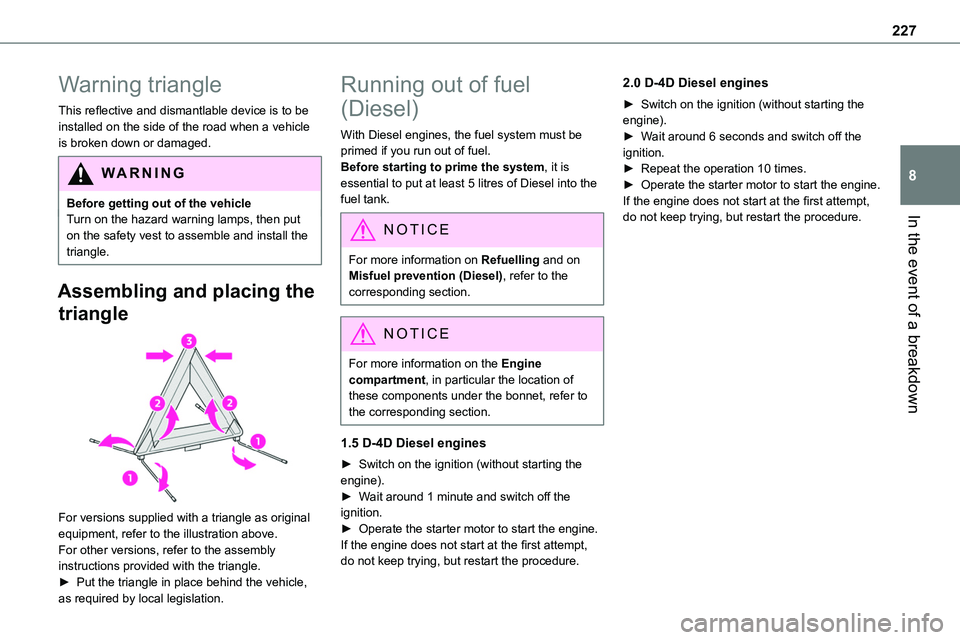
For versions supplied with a triangle as original equipment, refer to the illustration above.For other versions, refer to the assembly instructions provided with the triangle.► Put the triangle in place behind the vehicle,
as required by local legislation.
Running out of fuel
(Diesel)
With Diesel engines, the fuel system must be primed if you run out of fuel.Before starting to prime the system, it is essential to put at least 5 litres of Diesel into the fuel tank.
NOTIC E
For more information on Refuelling and on Misfuel prevention (Diesel), refer to the corresponding section.
NOTIC E
For more information on the Engine compartment, in particular the location of these components under the bonnet, refer to the corresponding section.
1.5 D-4D Diesel engines
► Switch on the ignition (without starting the engine).► Wait around 1 minute and switch off the ignition.► Operate the starter motor to start the engine.If the engine does not start at the first attempt, do not keep trying, but restart the procedure.
2.0 D-4D Diesel engines
► Switch on the ignition (without starting the engine).► Wait around 6 seconds and switch off the ignition.► Repeat the operation 10 times.► Operate the starter motor to start the engine.If the engine does not start at the first attempt, do not keep trying, but restart the procedure.
Page 230 of 360
230
NOTIC E
Tyre inflation pressures are indicated on this label.For more information on Identification markings, particularly this label, refer to the corresponding section.
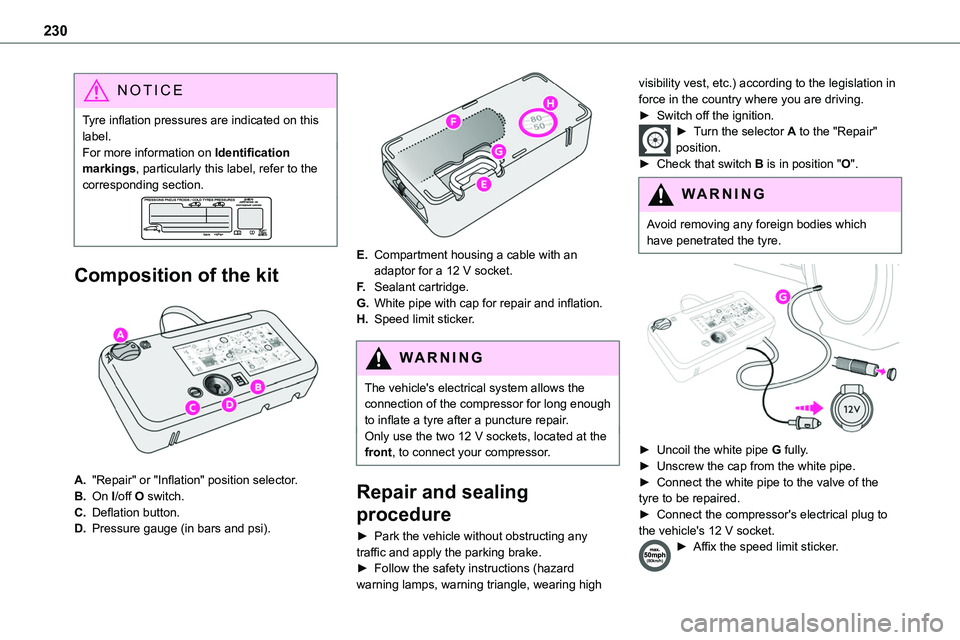
Composition of the kit
A."Repair" or "Inflation" position selector.
B.On I/off O switch.
C.Deflation button.
D.Pressure gauge (in bars and psi).
E.Compartment housing a cable with an adaptor for a 12 V socket.
F.Sealant cartridge.
G.White pipe with cap for repair and inflation.
H.Speed limit sticker.
WARNI NG
The vehicle's electrical system allows the connection of the compressor for long enough to inflate a tyre after a puncture repair.
Only use the two 12 V sockets, located at the front, to connect your compressor.
Repair and sealing
procedure
► Park the vehicle without obstructing any traffic and apply the parking brake.► Follow the safety instructions (hazard warning lamps, warning triangle, wearing high
visibility vest, etc.) according to the legislation in force in the country where you are driving.► Switch off the ignition.► Turn the selector A to the "Repair" position.► Check that switch B is in position "O".
WARNI NG
Avoid removing any foreign bodies which have penetrated the tyre.
► Uncoil the white pipe G fully.► Unscrew the cap from the white pipe.► Connect the white pipe to the valve of the tyre to be repaired.► Connect the compressor's electrical plug to the vehicle's 12 V socket.► Affix the speed limit sticker.
Page 252 of 360
252
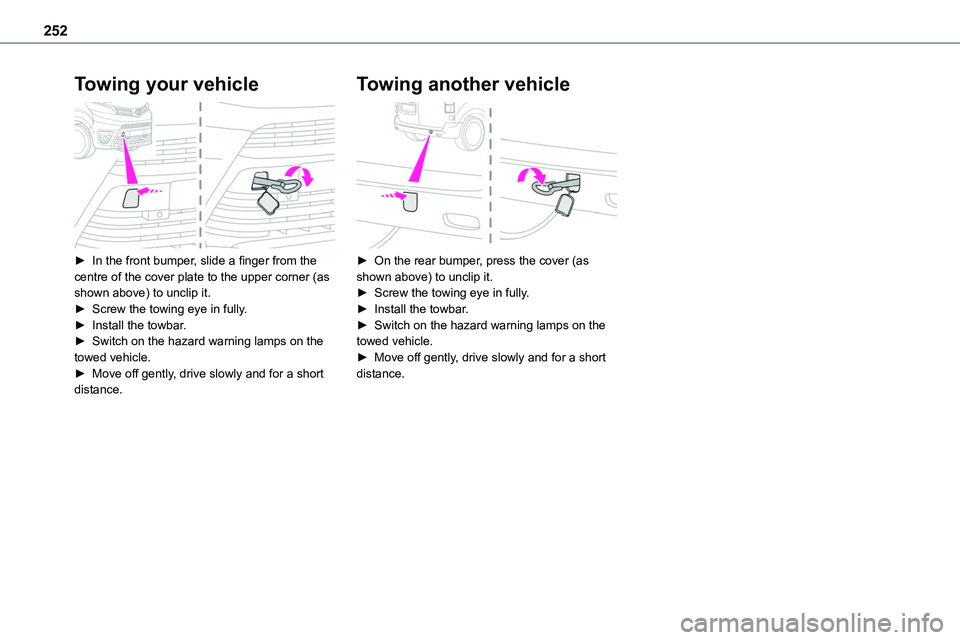
Towing your vehicle
► In the front bumper, slide a finger from the centre of the cover plate to the upper corner (as shown above) to unclip it.► Screw the towing eye in fully.► Install the towbar.► Switch on the hazard warning lamps on the towed vehicle.► Move off gently, drive slowly and for a short distance.
Towing another vehicle
► On the rear bumper, press the cover (as shown above) to unclip it.► Screw the towing eye in fully.► Install the towbar.► Switch on the hazard warning lamps on the towed vehicle.► Move off gently, drive slowly and for a short distance.
Page 265 of 360
265
Bluetooth® audio system
10
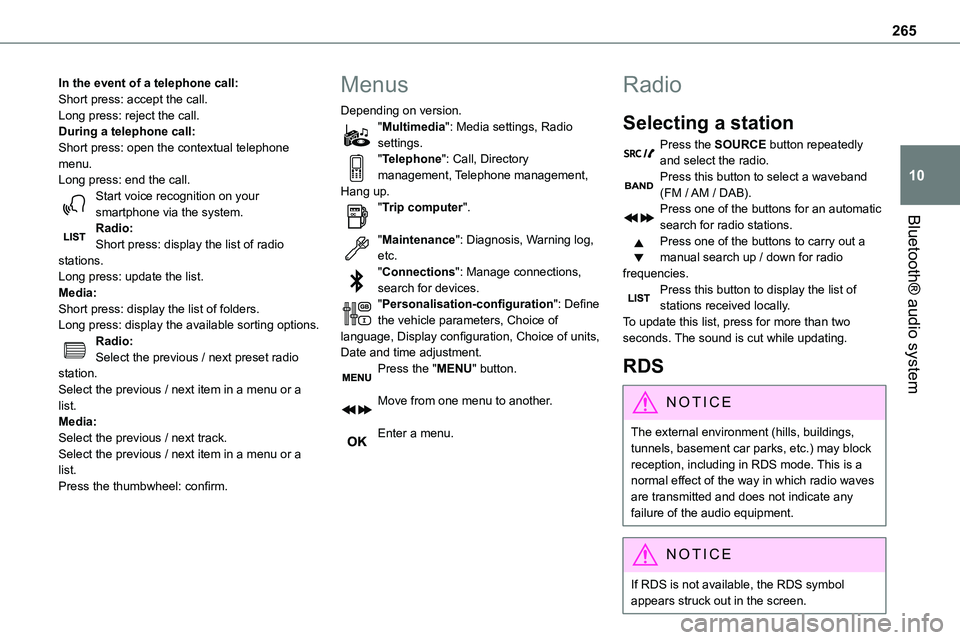
In the event of a telephone call:Short press: accept the call.Long press: reject the call.During a telephone call:Short press: open the contextual telephone menu.Long press: end the call.Start voice recognition on your smartphone via the system.
Radio:Short press: display the list of radio stations.Long press: update the list.Media:Short press: display the list of folders.Long press: display the available sorting options.Radio:Select the previous / next preset radio station.Select the previous / next item in a menu or a list.Media:Select the previous / next track.Select the previous / next item in a menu or a list.Press the thumbwheel: confirm.
Menus
Depending on version."Multimedia": Media settings, Radio settings."Telephone": Call, Directory management, Telephone management, Hang up."Trip computer".
"Maintenance": Diagnosis, Warning log, etc."Connections": Manage connections, search for devices."Personalisation-configuration": Define the vehicle parameters, Choice of language, Display configuration, Choice of units, Date and time adjustment.Press the "MENU" button.
Move from one menu to another.
Enter a menu.
Radio
Selecting a station
Press the SOURCE button repeatedly and select the radio.Press this button to select a waveband (FM / AM / DAB).Press one of the buttons for an automatic
search for radio stations.Press one of the buttons to carry out a manual search up / down for radio frequencies.Press this button to display the list of stations received locally.To update this list, press for more than two seconds. The sound is cut while updating.
RDS
NOTIC E
The external environment (hills, buildings, tunnels, basement car parks, etc.) may block reception, including in RDS mode. This is a normal effect of the way in which radio waves are transmitted and does not indicate any failure of the audio equipment.
NOTIC E
If RDS is not available, the RDS symbol appears struck out in the screen.
Page 302 of 360
302
– "Only data sharing"– "Sharing data and vehicle position"
Settings specific to
connected navigation
Press Navigation to display the main page.Press the "MENU" button to access the secondary page.
Select "Settings".
Select the "Map” tab.
Activate or deactivate:– "Allow declaration of danger zones".– "Guidance to final destination on foot".These settings must be configured for each profile.Press “OK” to confirm your selection.
Select the "Alerts” tab.
Activate or deactivate:
– "Advise of car park nearby".– "Filling station alert".– “Risk areas alert" then press the warning icon (triangle) to configure the alerts.– "Give an audible warning".– "Advise proximity of POI 1".– "Advise proximity of POI 2".
Press “OK” to confirm your selection.
NOTIC E
The "Notifications", located in the upper bar, can be accessed at any time.
NOTIC E
Danger zone alerts may or may not be displayed, depending on the applicable legislation and subscription to the corresponding service.
When "TOMTOM TRAFFIC” appears, the services are available.
NOTIC E
The services offered with connected navigation are as follows.A Connected Services pack:– Weather,– Filling stations,– Car park,– Traffic,– POI local search.A Danger area pack (optional).
Declaration: "Risk areas
alert"
WARNI NG
To send information about danger zones, select the option:Allow declaration of danger zones
Press Navigation to display the main page.Press the "Declare a new danger zone" button located in the side bars or the upper bar of the touch screen (depending on equipment).Select the "Type” option to select the type of "Danger area".Select the ""Speed" option and enter it using the virtual keypad.Press "OK" to save and send the information.
Displaying fuel information
Press Navigation to display the main page.Press this button to display the list of services.Press "POI on map" to display the list
of points of interest.Press one of the buttons to search for "Stations".
Page 315 of 360
315
TOYOTA Pro Touch with navigation system
12
Colour schemes
Depending on equipment/Depending on version.
WARNI NG
As a safety measure, the procedure for changing the colour scheme is only possible when the vehicle is stationary.
Press Settings to display the main page.
Select "Color schemes".
Select a colour scheme in the list then press "OK" to confirm.
NOTIC E
Whenever the colour scheme is changed, the system restarts, temporarily displaying a black screen.
Frequently asked
questions
The following information groups together the answers to the most frequently asked questions concerning the system.
Navigation
I cannot enter the navigation address.
The address is not recognised.► Use the "intuitive method" by pressing the "Search…" button at the bottom of the "Navigation” page.The route calculation is not successful.The route settings may conflict with the current location (for example, if toll roads are excluded but the vehicle is on a toll road).► Check the route settings in the "Navigation" menu.I do not receive "Danger zone” alerts.You have not subscribed to the online services option.► If you have subscribed to the option:- a few days may elapse before the service is activated,- services may not be selected in the system menu,- online services are not active ("TOMTOM TRAFFIC" not shown on the map).The POIs do not appear.The POIs have not been selected.► Set the zoom level to 600 ft (200 m) or select POIs in the POI list.
The "Danger zone" audible warning feature is not working.The audible warning is not active or the volume is too low.► Activate the audible warning in the "Navigation" menu and check the voice volume in the sound settings.The system does not suggest a detour around an incident on the route.
The route settings do not take account of TMC messages.► Configure the "Traffic info " function in the route settings list (Without, Manual or Automatic).I receive a warning about a "Danger area" that is not on my route.As well as providing guided navigation, the system announces all "Danger areas" positioned in a cone located in front of the vehicle. It may provide an alert for "Danger areas" located on nearby or parallel roads.► Zoom the map to show the exact location of the "Danger area". You can select "On the route" to stop receiving warnings or decrease the warning duration.Certain traffic jams along the route are not indicated in real time.On starting, a few minutes may elapse before the system begins to receive traffic information.► Wait until traffic information is being received correctly (traffic information icons shown on the map).
Page 321 of 360
321
Alphabetical index
A
ABS 11 2Accelerated charging unit (Wallbox) 201Accessories 109, 154Access to the 3rd row 63, 65Access to the spare wheel 234Active Safety Brake 184–186
AdBlue® 20, 220AdBlue® tank 221Additive, Diesel 217–218Adjusting head restraints 54Adjusting seat 52–53Adjusting the air distribution 88–89Adjusting the air flow 88–89Adjusting the date 29, 288, 314Adjusting the height and reach of the steering wheel 56Adjusting the lumbar support 52Adjusting the seat angle 52–53Adjusting the seat belt height 11 7Adjusting the temperature 88–89Adjusting the time 29, 288, 314Advice on care and maintenance 199, 224Advice on driving 8, 148–149Airbags 120, 122–123, 125Airbags, curtain 121, 123Airbags, front 120, 122, 125Airbags, lateral 121–122Air conditioning 86, 90, 92Air conditioning, digital 91Air conditioning, dual-zone automatic 88–89
Air conditioning, manual 87–88, 91Air intake 88–90Air vents 86Alarm 48–50Android Auto connection 284, 304Anti-lock braking system (ABS) 11 2–11 3Anti-pinch 82Antitheft / Immobiliser 31
Apple CarPlay connection 284, 304Applications 304Area, loading 79Armrest, front 55, 74Assistance call 11 0–111Assistance, emergency braking 11 3, 185Audible warning 11 2Audio streaming (Bluetooth) 270, 282–283, 309
B
Battery 210, 246Battery, 12 V 218, 246–249Battery, ancillaries 246Battery, charging 248–249Battery, remote control 38, 94Bench seat, one-piece, fixed 63–64Blind, panoramic roof 82Blind spot monitoring system 190Blind spot sensors 189Blinds, side 81BlueHDi 227
Bluetooth (hands-free) 271, 285–286, 310Bluetooth (telephone) 285–286, 310–3 11Bodywork 225Bonnet 213–214Boot 47Boot lid 34–36, 38, 47Bottle holder 74Brake discs 219
Brake lamps 241, 243Brakes 219Braking 164Braking assistance system 11 2–11 3Braking, automatic emergency 184–186Braking, dynamic emergency 156–158Brightness 287Bulbs 238Bulbs (changing) 238, 241
C
Capacity, fuel tank 196–198Cap, fuel filler 197–198Care of the bodywork 225CD 269, 282CD, MP3 269, 282Central locking 30, 34–35, 39Changing a bulb 238, 241, 243Changing a bulb (side-hinged doors) 241Changing a fuse 243–245Changing a wheel 233Changing a wiper blade 107–108