fuel TOYOTA RAIZE 2023 User Guide
[x] Cancel search | Manufacturer: TOYOTA, Model Year: 2023, Model line: RAIZE, Model: TOYOTA RAIZE 2023Pages: 516, PDF Size: 44.62 MB
Page 88 of 516
862-1. Instrument cluster
RAIZE_OM_General_BZ358E✽
: If equipped
Multi-information display✽
Display contents
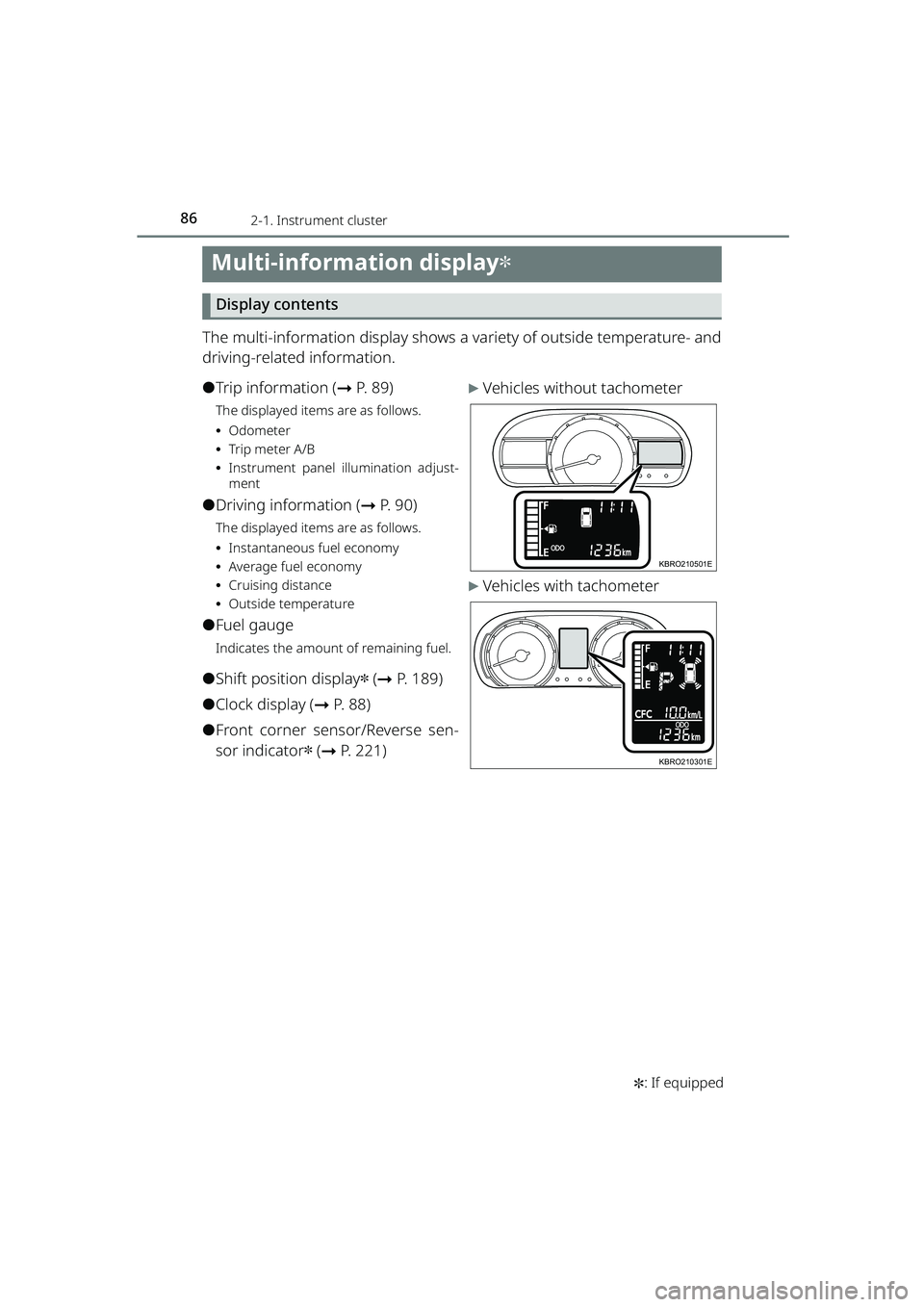
The multi-information display shows a va riety of outside temperature- and
driving-related information.
⚫Trip information ( ➞P. 8 9 )
The displayed items are as follows.
⦁Odometer
⦁ Tr ip m eter A/B
⦁ Instrument panel illumination adjust-
ment
⚫Driving information ( ➞P. 90)
The displayed items are as follows.
⦁Instantaneous fuel economy
⦁ Average fuel economy
⦁ Cruising distance
⦁ Outside temperature
⚫Fuel gauge
Indicates the amount of remaining fuel.
⚫Shift position display✽ (➞ P. 189)
⚫Clock display ( ➞P. 88)
⚫Front corner sensor/Reverse sen-
sor indicator
✽ (➞ P. 221)
▶Vehicles without tachometer
▶Vehicles with tachometer
KBRO210501E
KBRO210301E
RAIZE_OM_General_BZ358E.book 86 ページ 2022年5月17日 火曜日 午後1時59分
Page 91 of 516
892-1. Instrument cluster
RAIZE_OM_General_BZ358E
Instrument cluster
2
Trip information
Use the ODO/TRIP DISP switch (for vehicles without tachometer) or the
ODO/TRIP switch (for vehicles with tachometer) to switch the display.
*The text layout in the display varies according to the vehicle grade level and
options, etc.
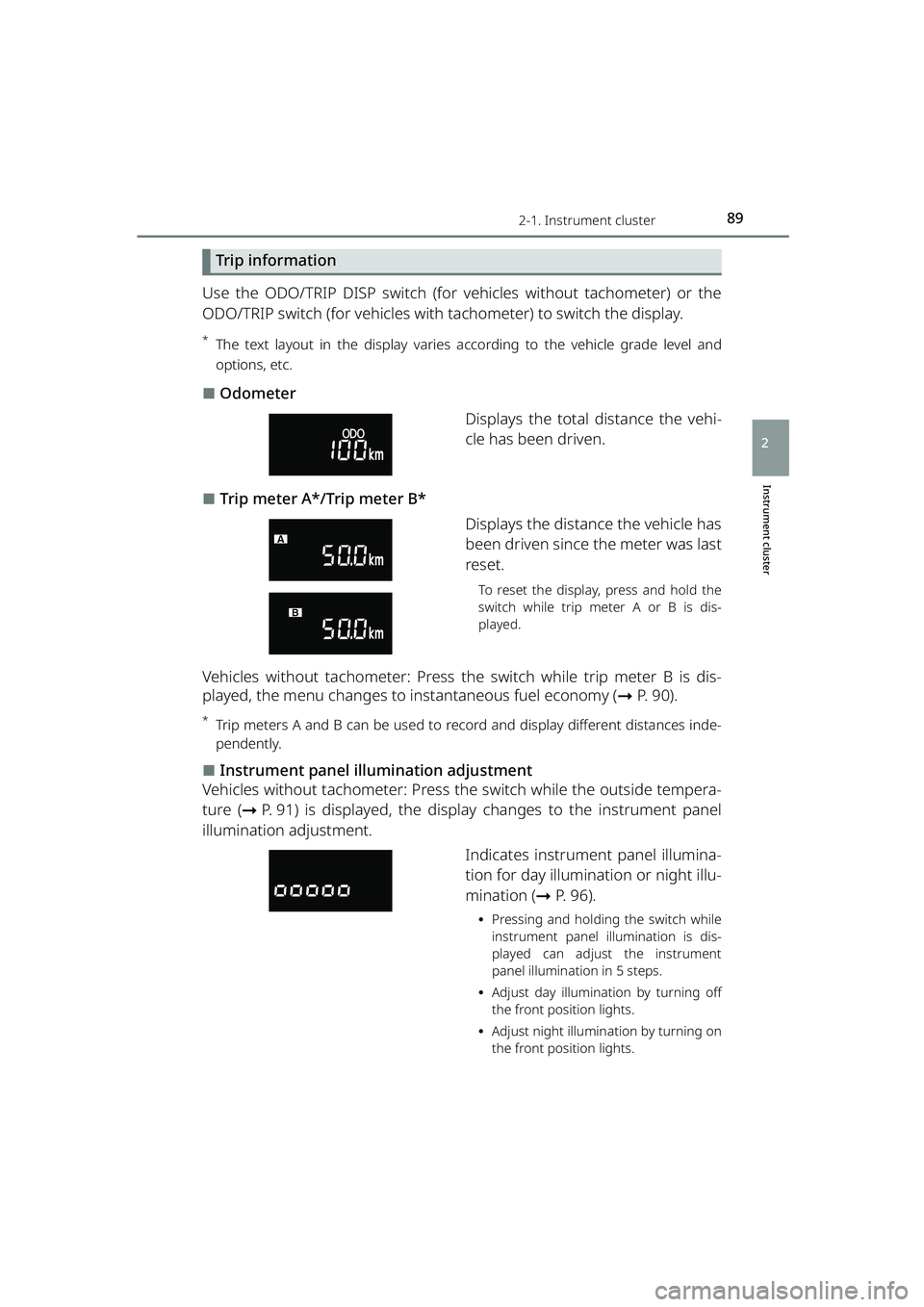
⬛Odometer
Displays the total distance the vehi-
cle has been driven.
⬛Trip meter A*/Trip meter B*Displays the distance the vehicle has
been driven since the meter was last
reset.
To reset the display, press and hold the
switch while trip meter A or B is dis-
played.
Vehicles without tachometer: Press th e switch while trip meter B is dis-
played, the menu changes to instantaneous fuel economy ( ➞P. 90).
*Trip meters A and B can be used to reco rd and display different distances inde-
pendently.
⬛Instrument panel illumination adjustment
Vehicles without tachometer: Press th e switch while the outside tempera-
ture ( ➞P. 91) is displayed, the display changes to the instrument panel
illumination adjustment.
Indicates instrument panel illumina-
tion for day illumination or night illu-
mination (➞P. 96).
⦁Pressing and holding the switch while
instrument panel illumination is dis-
played can adjust the instrument
panel illumination in 5 steps.
⦁ Adjust day illumination by turning off
the front position lights.
⦁ Adjust night illumination by turning on
the front position lights.
RAIZE_OM_General_BZ358E.book 89 ページ 2022年5月17日 火曜日 午後1時59分
Page 92 of 516
902-1. Instrument cluster
RAIZE_OM_General_BZ358E
Driving information
Use the ODO/TRIP DISP switch (for vehicles without tachometer) or the
DISP switch (for vehicles with tachometer) to switch the display.
*The text layout in the display varies according to the vehicle grade level and
options, etc.
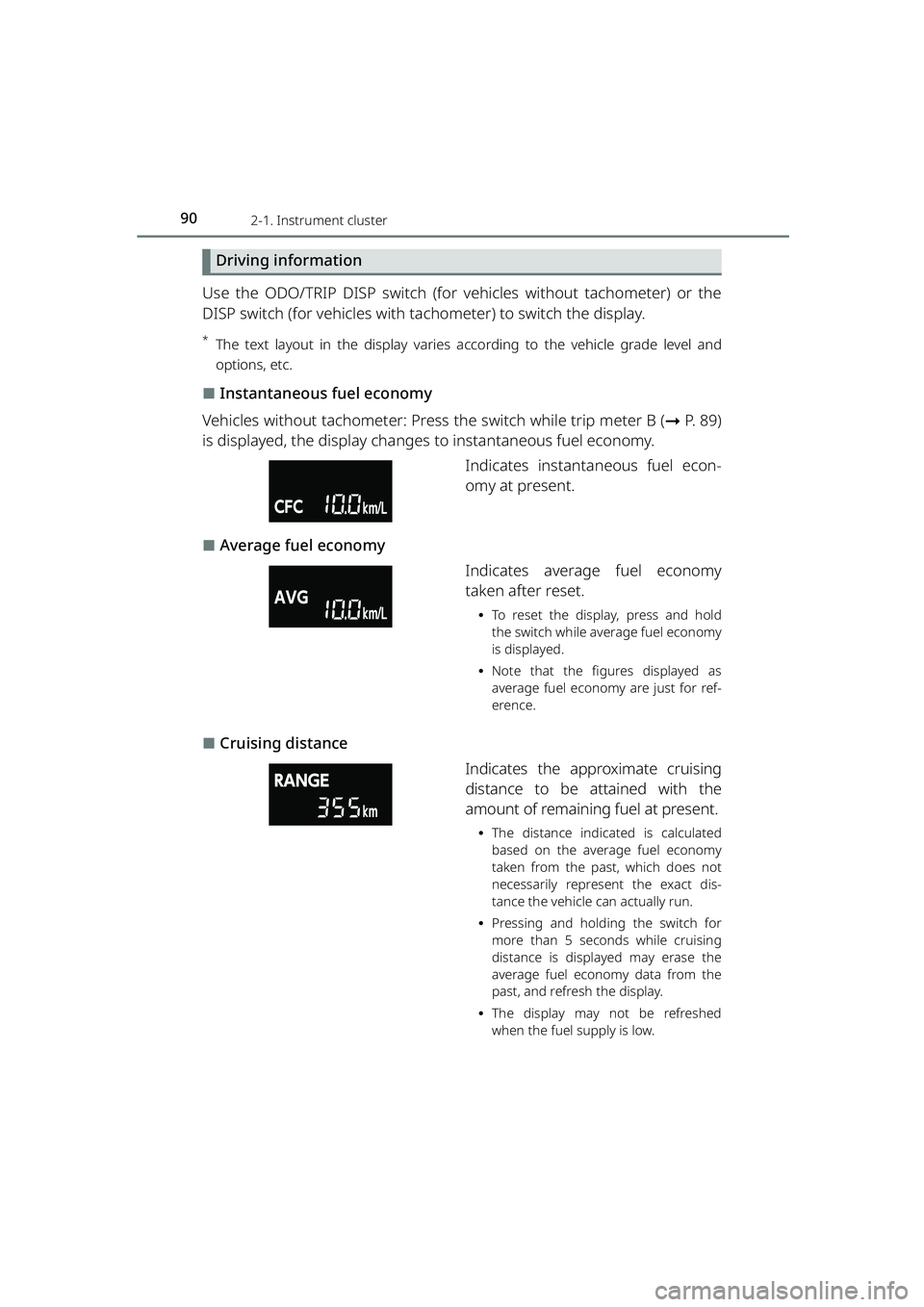
⬛Instantaneous fuel economy
Vehicles without tachometer: Press the switch while trip meter B (➞P. 89)
is displayed, the display changes to instantaneous fuel economy.
Indicates instantaneous fuel econ-
omy at present.
⬛Average fuel economy
Indicates average fuel economy
taken after reset.
⦁To reset the display, press and hold
the switch while average fuel economy
is displayed.
⦁ Note that the figures displayed as
average fuel economy are just for ref-
erence.
⬛Cruising distance
Indicates the approximate cruising
distance to be attained with the
amount of remaining fuel at present.
⦁The distance indicated is calculated
based on the average fuel economy
taken from the past, which does not
necessarily represent the exact dis-
tance the vehicle can actually run.
⦁ Pressing and holding the switch for
more than 5 seconds while cruising
distance is displayed may erase the
average fuel economy data from the
past, and refresh the display.
⦁ The display may not be refreshed
when the fuel supply is low.
RAIZE_OM_General_BZ358E.book 90 ページ 2022年5月17日 火曜日 午後1時59分
Page 94 of 516
922-1. Instrument cluster
RAIZE_OM_General_BZ358E✽
: If equipped
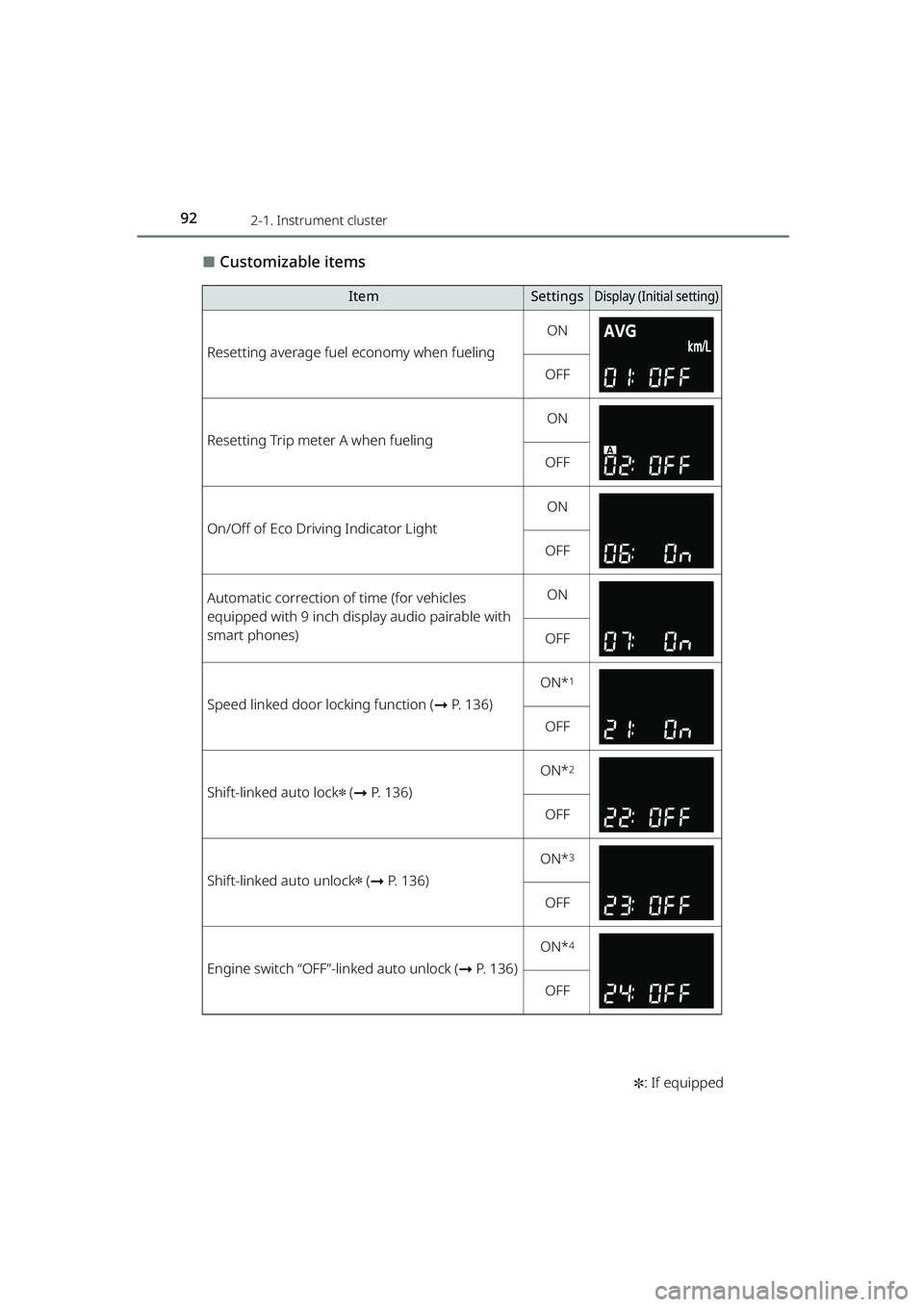
⬛Customizable items
ItemSettingsDisplay (Initi al setting)
Resetting average fuel economy when fueling
ON
OFF
Resetting Trip meter A when fueling
ON
OFF
On/Off of Eco Driving Indicator Light
ON
OFF
Automatic correction of time (for vehicles
equipped with 9 inch display audio pairable with
smart phones)ON
OFF
Speed linked door locking function ( ➞P. 136)
ON*1
OFF
Shift-linked auto lock✽ (➞ P. 136)
ON*2
OFF
Shift-linked auto unlock✽ (➞ P. 136)
ON*3
OFF
Engine switch “OFF”-linked auto unlock ( ➞P. 136)
ON*4
OFF
RAIZE_OM_General_BZ358E.book 92 ページ 2022年5月17日 火曜日 午後1時59分
Page 96 of 516
942-1. Instrument cluster
RAIZE_OM_General_BZ358E✽
: If equipped
⬛How to initialize settings
a Press and hold the switch while Odometer is displayed to switch to the
user customization screen
b Press the switch until appears
c While is displayed, press and hold the switch. After
appears, press and hold the switch again
After starts flashing, go back to the odometer display to see the fol-
lowing items are initialized.
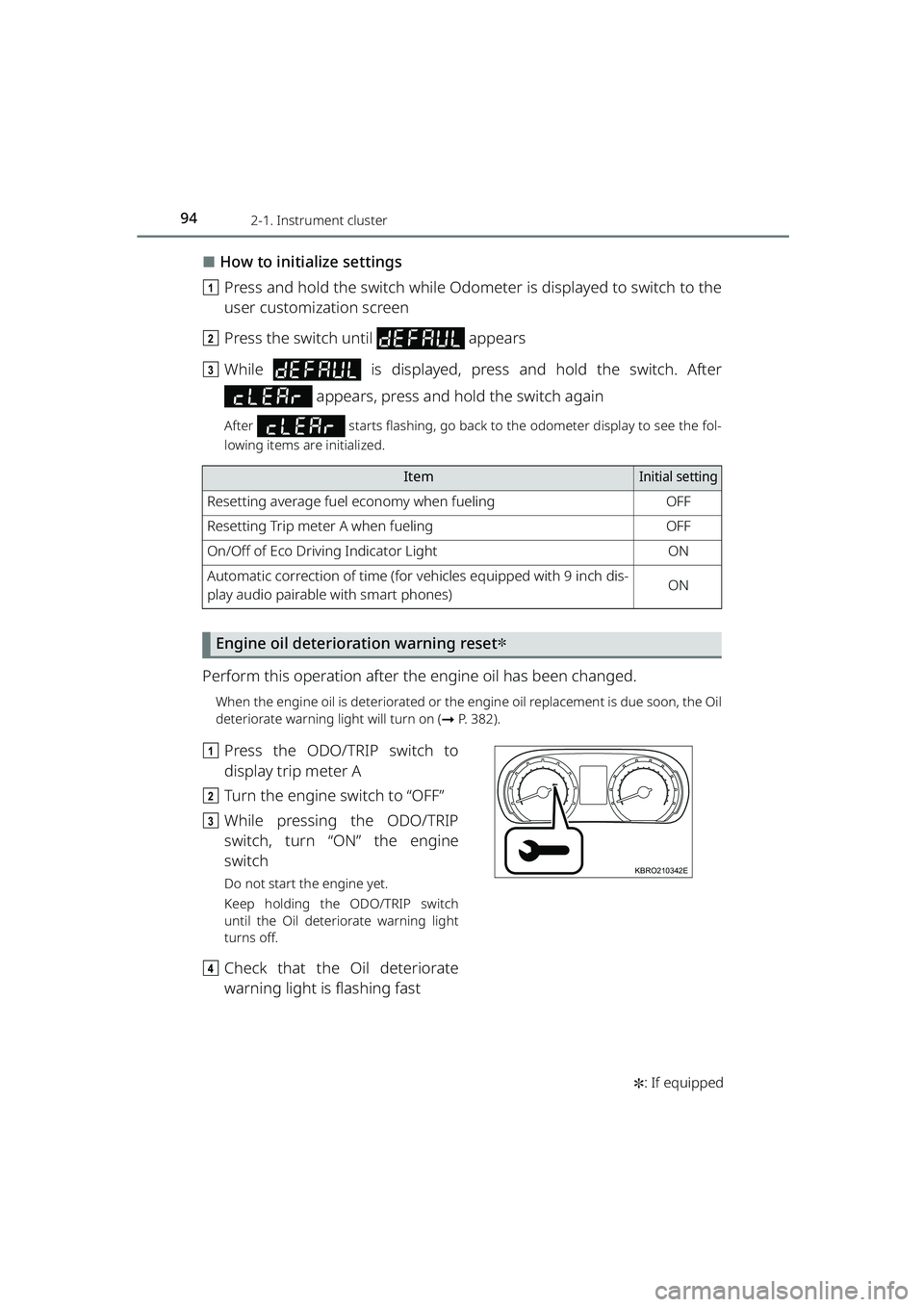
Engine oil deterioration warning reset✽
Perform this operation after th e engine oil has been changed.
When the engine oil is deteriorated or the engine oil replacement is due soon, the Oil
deteriorate warning light will turn on ( ➞P. 382).
a Press the ODO/TRIP switch to
display trip meter A
b Turn the engine switch to “OFF”
c While pressing the ODO/TRIP
switch, turn “ON” the engine
switch
Do not start the engine yet.
Keep holding the ODO/TRIP switch
until the Oil deteriorate warning light
turns off.
dCheck that the Oil deteriorate
warning light is flashing fast
ItemInitial setting
Resetting average fuel economy when fuelingOFF
Resetting Trip meter A when fuelingOFF
On/Off of Eco Driving Indicator LightON
Automatic correction of time (for vehicles equipped with 9 inch dis-
play audio pairable with smart phones)ON
KBRO210342E
RAIZE_OM_General_BZ358E.book 94 ページ 2022年5月17日 火曜日 午後1時59分
Page 97 of 516
952-1. Instrument cluster
RAIZE_OM_General_BZ358E
Instrument cluster
2
⬛About average fuel economy
⚫Immediately after the engine switch has been turned “ON”, it shows the
value when the engine was stopped last.
⚫Fuel economy is not displayed if the da ta cannot be received when refresh-
ing the display, or if in valid data is received.
⬛About cruising distance
⚫Refreshing time for display depend s on driving conditions (running,
stopped).
⚫Note that the cruising distance data shown as when you receive your new
vehicle does not necessarily represent the correct value.
⚫When a malfunction is detected, cruising distance data may not be displayed
for a while.
⬛About outside temperature
⚫When the outside temperature cannot be measured correctly, it shows “- -°C”.
⚫Under the following conditions, the outside temperature may not be dis-
played properly, or update of temperat ure indication may be delayed. These
phenomena are not considered a failure.
⦁ When the vehicle is stopped or is running at low speeds (approx. 20 km/h
[12.4 mph] or lower)
⦁ When the outside temperature drastically changes (in a garage, or at the
entrance/exit of a tunnel)
⚫The outside temperature indication may change depending on the vehicle
conditions, such as speed and wind direction.
⬛About road surface freezing warning indication
⚫Indication of road surface freezing warnin g is just a guide. Be sure to check
the actual condition of the road.
⚫When the engine switch is turned “ON” , the warning will not be displayed if
the outside temperature is already 3°C (37 ℉) or below.
⚫Once the road surface freezing warning is displayed, the warning will not
appear again until the outside temperature becomes 4°C (39 ℉) or higher
and then goes down to 3°C (37 ℉) or lower.
RAIZE_OM_General_BZ358E.book 95 ページ 2022年5月17日 火曜日 午後1時59分
Page 99 of 516
972-1. Instrument cluster
RAIZE_OM_General_BZ358E
Instrument cluster
2
WARNING
⬛Caution while driving
For safety reasons, do not operate the display change button or the clock
adjustment switch while driving. Doing so is dangerous and may lead to an
accident such as incorrect op eration of the steering wheel.
Stop the vehicle to operate it. While drivin g, keep the time that you look at the
display to the minimum necessary.
⬛When changing settings
As the engine needs to be running duri ng setting up the display, ensure that
the vehicle is parked in a place with adeq uate ventilation. In a closed area such
as a garage, exhaust gases including harmful carbon monoxide (CO) may col-
lect and enter the vehicle. This may cau se death or a serious health hazard.
NOTICE
⬛Screen display at low temperatures
When the display screen temperature is extremely low, the display changes
may be delayed. Allow the interior of th e vehicle to warm up before using it.
⬛When changing display settings
Make sure that the engine is running, as otherwise the battery may discharge.
⬛About cruising distance
Even if the value indicated for cruising distance seems sufficient, try to fill the
fuel tank when the fuel gauge nears “E”, or the low fuel level warning light
turns on.
RAIZE_OM_General_BZ358E.book 97 ページ 2022年5月17日 火曜日 午後1時59分
Page 103 of 516
1012-1. Instrument cluster
RAIZE_OM_General_BZ358E
Instrument cluster
2
Running information
Various information on fuel economy is displayed.
aPress / switch to switch menu to
b Press / switch to switch display contents
⬛“Current”/“Average”
⚫“Current”
Indicates instantaneous fuel economy at present.
⚫“Average”
Indicates average fuel economy taken after reset.
⦁To reset, hold down the ENTER switch while “Average” is being displayed.
⦁ Note that the figures displayed as average fuel economy are just for reference.
⬛“Range”
Indicates the approximate cruising distance to be attained with the
amount of remaining fuel at present.
⚫The distance indicated is calculated based on the average fuel economy
taken from the past, which does not necessarily represent the exact dis-
tance the vehicle can actually run.
⦁ Pressing and holding the ENTER switch for approx. 5 seconds and longer while
“Range” is being displayed may erase the average fuel economy data from the past
and refresh the display.
⚫The display may not be refreshed when the fuel supply is low.
Vehicle information
Various information on vehicles is displayed.
a Press / switch to switch menu to
b Press / switch to switch display contents
⬛Analog clock
Analog clock is displayed.
⬛Screen OFF
Contents are hidden.
RAIZE_OM_General_BZ358E.book 101 ページ 2022年5月17日 火曜日 午後1時59分
Page 105 of 516
1032-1. Instrument cluster
RAIZE_OM_General_BZ358E
Instrument cluster
2
Opening screen
When the engine switch is turned to “ON”, the date and the notification
screen appear for a few seconds, after the presentation screen.
The following notification screens can be displayed.
⚫New year greetings
⚫Birthday
⚫Anniversary
⚫Date of vehicle inspection
⚫Date of inspection
⚫Engine oil replacement
⚫Oil filter replacement
⚫Tire rotation
⚫Distance driven
⬛New year greetings
Displayed on January 1.
⬛Birthday, and Anniversary
Displayed on the specified days.
⬛Date of vehicle inspection , and date of inspection
Displayed when the remaining days till the specified day are less than 1
month, and when once a day after the specified day.
⬛Engine oil replacement, oil filter replacement, and tire rotation
Displayed once a day when the remaining distance to the specified dis-
tance becomes less than 500 km (310 miles) or when it has reached the
specified distance.
Ending screen
When the engine switch is turned “O FF”, the notification screen appears.
⬛Driving record, scores (fuel economy)
When the ending setting is switched to “ECO” ( ➞P. 106), the driving
records, which were taken between a period from turning the engine
switch “ON” to “OFF”, will be displayed, and the score for environment-
friendly level will be displayed as points.
RAIZE_OM_General_BZ358E.book 103 ページ 2022年5月17日 火曜日 午後1時59分
Page 108 of 516
1062-1. Instrument cluster
RAIZE_OM_General_BZ358E
⬛Settings of display options
The follow settings can be selected as needed.
⚫ON/OFF of eco driving assist illumination
⚫ON/OFF of resetting average fuel economy when fueling
⚫ON/OFF of resetting Trip meter A when fueling
⚫ON/OFF of opening screen display
⚫Settings of ending screen display (Eco, Standard, OFF)
⚫ON/OFF of steering wheel position monitor (display of steering wheel
position)
(Initial setting: ➞P. 113)
a Press / switch to switch menu to
b Press the / switch and select “Display Settings”, and then press
the ENTER switch
c Press and hold the / switch or press it several times to switch
the “Display Settings” screen
d Press / switch to select setting s for each function and press the
ENTER switch
⦁ Each time you press the ENTER switch, the display switches to the screen to be
displayed.
⦁ When appears after you press the ENTER switch, press / switch to
select the settings, and then press the ENTER switch again.
RAIZE_OM_General_BZ358E.book 106 ページ 2022年5月17日 火曜日 午後1時59分