reset TOYOTA RAIZE 2023 User Guide
[x] Cancel search | Manufacturer: TOYOTA, Model Year: 2023, Model line: RAIZE, Model: TOYOTA RAIZE 2023Pages: 516, PDF Size: 44.62 MB
Page 107 of 516
1052-1. Instrument cluster
RAIZE_OM_General_BZ358E
Instrument cluster
2
⬛Time and date
Time and date can be set.
Vehicles equipped with 9 inch display audio pairable with smart phones:
ON/OFF for automatic correction of date and time can be set.
a Press / switch to switch menu to
b Press the / switch and select “Time and Date”, and then press
the ENTER switch
c Press / / / switch to select an item you need to set, and
press the ENTER switch
⦁ Each time you press the ENTER switch, “Auto Time ADJ” is switched “ON” or “OFF”.
⦁ When “Auto Time ADJ” is set to “ON”, the date and time adjustment is not availa-
ble.
⦁ For Year/Hour/Minute, after appears, use / switch to set the value,
and press the ENTER switch again.
The clock starts counting from 0 second, which is the reset state of the set time.
⦁ For “12H/24H”, “12H” (12-hour format) and “24H” (24-hour format) will be
switched every time the ENTER switch is pressed.
⦁ Regardless of the “12H/24H” setting, the time is displayed in the 24-hour format
during time adjustment.
⬛Screen selection
Basic screens can be changed. ( ➞P. 100)
RAIZE_OM_General_BZ358E.book 105 ページ 2022年5月17日 火曜日 午後1時59分
Page 108 of 516
1062-1. Instrument cluster
RAIZE_OM_General_BZ358E
⬛Settings of display options
The follow settings can be selected as needed.
⚫ON/OFF of eco driving assist illumination
⚫ON/OFF of resetting average fuel economy when fueling
⚫ON/OFF of resetting Trip meter A when fueling
⚫ON/OFF of opening screen display
⚫Settings of ending screen display (Eco, Standard, OFF)
⚫ON/OFF of steering wheel position monitor (display of steering wheel
position)
(Initial setting: ➞P. 113)
a Press / switch to switch menu to
b Press the / switch and select “Display Settings”, and then press
the ENTER switch
c Press and hold the / switch or press it several times to switch
the “Display Settings” screen
d Press / switch to select setting s for each function and press the
ENTER switch
⦁ Each time you press the ENTER switch, the display switches to the screen to be
displayed.
⦁ When appears after you press the ENTER switch, press / switch to
select the settings, and then press the ENTER switch again.
RAIZE_OM_General_BZ358E.book 106 ページ 2022年5月17日 火曜日 午後1時59分
Page 113 of 516
1112-1. Instrument cluster
RAIZE_OM_General_BZ358E
Instrument cluster
2
⬛Settings of turn signal lights
You can set ON/OFF of the one-touch turn signal lights (3-time blinking of
turn signal indicator when the turn signal lever is pushed half way
through).
(List of customizable features: ➞ P. 430)
a Press / switch to switch menu to
b Press and hold the / switch or press it several times to switch the
“Settings” screen, select “Vehicle Settings” and press the ENTER switch
c Press and hold the / switch or press it several times to switch the
“Vehicle Settings” screen, select “T urn Signal” and press the ENTER switch
d Press the ENTER switch to switch settings
Each time you press the ENTER switch, it toggles between “ON” and “OFF”.
⬛Settings of maintenance
Timings for engine oil replacement, oil filter replacement, and tire rotation,
which appear on the opening screen ca n be set by the unit of distance.
(Initial setting: ➞P. 113)
a Press / switch to switch menu to
b Press and hold the / switch or press it several times to switch
the “Settings” screen, select “Mai ntenance Settings” and press the
ENTER switch
c To set ON or OFF, press the / switch to select “ON” or “OFF” for
each maintenance item, and then press the ENTER switch
Screens for oil filter replacement and tire rotation can be displayed by pressing and
holding / switch, or pressing it several times.
▶When the display is set to “OFF” and the distance is not specified
It displays the “Next Notice Timing” screen, as specified in Step e. (➞ P. 112)
▶If the distance is already set
Each time you press the ENTER switch, it toggles between “ON” and “OFF”.
d To set or reset the distance, press the / switch to select “Notifi-
cation Timing Settings” for each ma intenance item, and then press the
ENTER switch
Screens for oil filter replacement and tire rotation can be displayed by pressing and
holding / switch, or pressing it several times.
RAIZE_OM_General_BZ358E.book 111 ページ 2022年5月17日 火曜日 午後1時59分
Page 114 of 516
1122-1. Instrument cluster
RAIZE_OM_General_BZ358E✽
: If equipped
e Press / switch to select di stance and press the ENTER switch
⦁After appears, use / switch to set the distance, and press the
ENTER switch again.
⦁ If the distance is already set, the distance to go before the next notification time
is displayed.
⦁ To reset the distance, press / switch to select “Reset” and press the
ENTER switch.
⬛Engine oil deterioration warning reset✽
Perform this operation after th e engine oil has been changed.
When the engine oil is deteriorated or the engine oil replacement is due soon, a mes-
sage reminding you of changing the engine oil will appear ( ➞P. 392).
a Press / switch to switch menu to
b Press and hold the / switch or press it several times to switch
the “Settings” screen, select “Oil De teriorate WNG Reset” and press the
ENTER switch
c Press the / switch to select “Yes”, and then press the ENTER
switch
Make sure that “Reset Completed” is displayed.
RAIZE_OM_General_BZ358E.book 112 ページ 2022年5月17日 火曜日 午後1時59分
Page 115 of 516
1132-1. Instrument cluster
RAIZE_OM_General_BZ358E
Instrument cluster
2
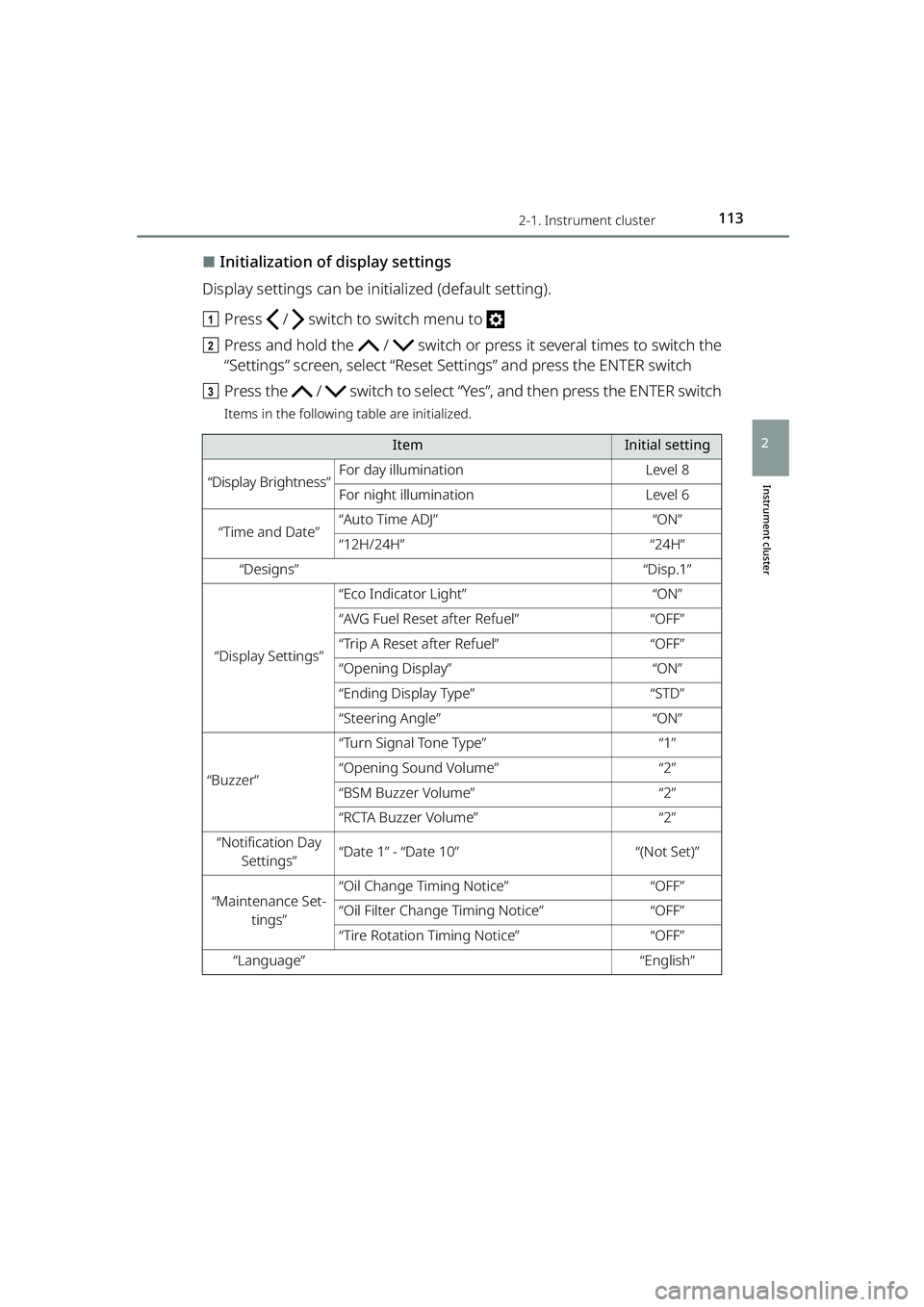
⬛Initialization of display settings
Display settings can be initialized (default setting).
a Press / switch to switch menu to
b Press and hold the / switch or press it several times to switch the
“Settings” screen, select “Reset Settings” and press the ENTER switch
c Press the / switch to select “Y es”, and then press the ENTER switch
Items in the following table are initialized.
ItemInitial setting
“Display Brightness”For day illuminationLevel 8
For night illuminationLevel 6
“Time and Date”“Auto Time ADJ”“ON”
“12H/24H”“24H”
“Designs”“Disp.1”
“Display Settings”
“Eco Indicator Light”“ON”
“AVG Fuel Reset after Refuel”“OFF”
“Trip A Reset after Refuel”“OFF”
“Opening Display”“ON”
“Ending Display Type”“STD”
“Steering Angle”“ON”
“Buzzer”
“Turn Signal Tone Type”“1”
“Opening Sound Volume”“2”
“BSM Buzzer Volume”“2”
“RCTA Buzzer Volume”“2”
“Notification Day
Settings”“Date 1” - “Date 10”“(Not Set)”
“Maintenance Set- tings”“Oil Change Timing Notice”“OFF”
“Oil Filter Change Timing Notice”“OFF”
“Tire Rotation Timing Notice”“OFF”
“Language”“English”
RAIZE_OM_General_BZ358E.book 113 ページ 2022年5月17日 火曜日 午後1時59分
Page 117 of 516
1152-1. Instrument cluster
RAIZE_OM_General_BZ358E
Instrument cluster
2
⬛“Settings” operation
⚫The operation will be temporarily suspended if any of the following condi-
tions occur during the “Settings” operation.
⦁When warning messages are displayed
⦁ When the vehicle starts driving
⚫If the settings cannot be changed even after performing the operation, the
“Settings Failed” message will appear.
⬛When battery terminals are connected/disconnected
Clock data is reset when battery terminals are connected or disconnected.
⬛Liquid crystal display
➞ P. 8 5
⬛About notification screen
⚫Notification screen is displayed once a day.
⚫Birthday, and Anniversary day set to Fe bruary 29 are displayed on March 1,
except the leap year.
WARNING
⬛Caution while driving
For safety reasons, do not use the oper ation button while driving. Doing so is
dangerous and may lead to an accident such as incorrect operation of the
steering wheel.
Stop the vehicle to operate it. While drivin g, keep the time that you look at the
display to the minimum necessary.
⬛When changing settings
➞ P. 9 7
NOTICE
⬛Screen display at low temperatures
➞P. 9 7
⬛When changing display settings
➞P. 9 7
⬛About cruising distance
➞P. 9 7
RAIZE_OM_General_BZ358E.book 115 ページ 2022年5月17日 火曜日 午後1時59分
Page 331 of 516
3296-3. Do-it-yourself maintenance
RAIZE_OM_General_BZ358E
Maintenance and care
6
Initializing the tire pressure warning system
(vehicles with a tire pressure warning system)
⬛The tire pressure warning system must be initialized in the
following circumstances:
⚫When rotating front and rear tires which have different tire inflation
pressures
⚫When changing the tire size
When the tire pressure warning system is initialized, the current tire infla-
tion pressure is set as the benchmark pressure.
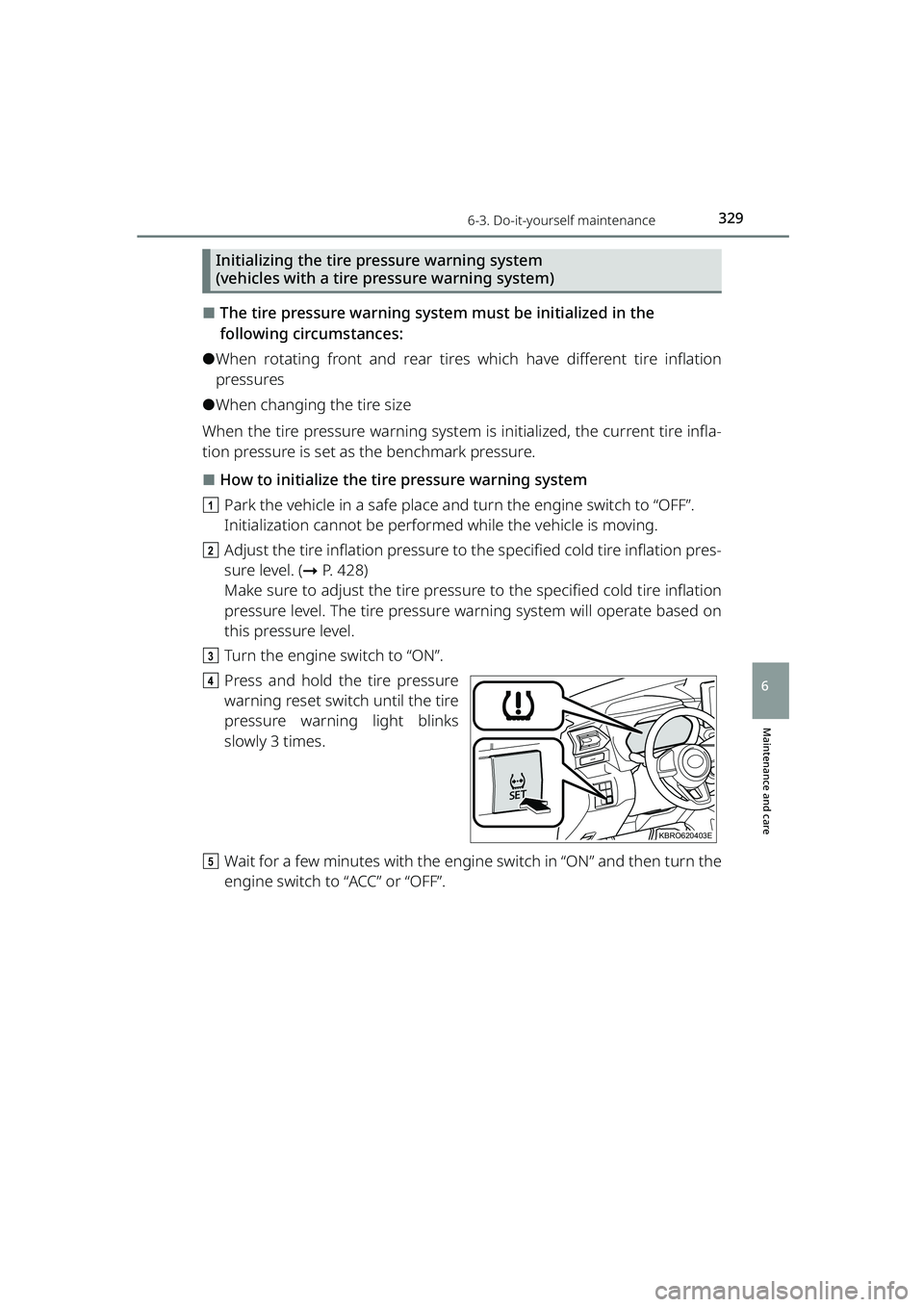
⬛How to initialize the tire pressure warning system
a Park the vehicle in a safe place and turn the engine switch to “OFF”.
Initialization cannot be performed while the vehicle is moving.
b Adjust the tire inflation pressure to the specified cold tire inflation pres-
sure level. ( ➞P. 428)
Make sure to adjust the tire pressure to the specified cold tire inflation
pressure level. The tire pressure warning system will operate based on
this pressure level.
c Turn the engine switch to “ON”.
d Press and hold the tire pressure
warning reset switch until the tire
pressure warning light blinks
slowly 3 times.
e Wait for a few minutes with the engine switch in “ON” and then turn the
engine switch to “ACC” or “OFF”.
KBRO620403E
RAIZE_OM_General_BZ358E.book 329 ページ 2022年5月17日 火曜日 午後1時59分
Page 333 of 516

3316-3. Do-it-yourself maintenance
RAIZE_OM_General_BZ358E
✽: If equipped
Maintenance and care
6
⬛Situations in which the tire pressure warning system may not operate properly✽
⚫In the following cases, the tire pressure warning system may not operate
properly.
⦁ If non-genuine Toyota wheels are used.
⦁A tire has been replaced with a tire that is not an OE (Original Equipment) tire.
⦁A tire has been replaced with a tire that is not of the specified size.
⦁ Tire chains, etc., are equipped.
⦁ An auxiliary-supported run-flat tire is equipped.
⦁ If a window tint that affects the radio wave signals is installed.
⦁ If there is a lot of snow or ice on th e vehicle, particularly around the wheels
or wheel housings.
⦁ If the tire inflation pressure is extr emely higher than the specified level.
⦁ If the spare tire is in a location subj ect to poor radio wave signal reception.
⦁ If a large metallic object which can in terfere with signal reception is put
near the spare tire.
⦁ If a wheel, not equipped with a tire pressure warning valve and transmit-
ter, is used.
⦁ If the ID code on the tire pressure warning valves and transmitters is not
registered in the tire pressure warning computer.
⚫Performance may be affected in the following situations.
⦁Near a TV tower, electric power plant, gas station, radio station, large display,
airport or other facility that generates strong radio waves or electrical noise
⦁ When carrying a portable radio, cellul ar phone, cordless phone or other
wireless communication device
⚫When the vehicle is parked, the time ta ken for the warning to start or go off
could be extended.
⚫When tire inflation pressure declin es rapidly for example when a tire has
burst, the warning may not function.
⬛The initialization operation (vehicles with the tire pressure warning system)
⚫Make sure to carry out init ialization after adjusting th e tire inflation pressure.
Also, make sure the tires are cold befo re carrying out initialization or tire
inflation pressure adjustment.
⚫If you have accidentally turned the engi ne switch to “OFF” during initializa-
tion, it is not necessary to press the reset switch again as initialization will
restart automatically when the engine switch has been turned to “ON” for
the next time.
⚫If you accidentally press the reset switch when initialization is not necessary,
adjust the tire inflation pressure to the specified level when the tires are
cold, and conduct initialization again.
RAIZE_OM_General_BZ358E.book 331 ページ 2022年5月17日 火曜日 午後1時59分
Page 334 of 516
3326-3. Do-it-yourself maintenance
RAIZE_OM_General_BZ358E
✽: If equipped
⬛Warning performance of the tire pressure warning system✽
The warning of the tire pressure warning system will change in accordance
with the conditions under which it was initialized. For this reason, the system
may give a warning even if the tire pre ssure does not reach a low enough level,
or if the pressure is higher than the pressure that was adjusted to when the
system was initialized.
⬛When initialization of the tire pressure warning system✽ has failed
Initialization can be completed in a fe w minutes. However, in the following
cases, the settings have not been reco rded and the system will not operate
properly. If repeated attempts to reco rd tire inflation pressure settings are
unsuccessful, have the vehicle in spected by your Toyota dealer.
⚫When operating the tire pressure wa rning reset switch, the tire pressure
warning light does not blink 3 times.
⚫After driving for a certain period of time since the initialization has been
completed, the warning light comes on after blinking for 1 minute.
WARNING
⬛When inspecting or replacing tires
Observe the following precautions to prevent accidents.
Failure to do so may cause damage to parts of the drive train as well as dan-
gerous handling characteristics, which may lead to an accident resulting in
death or serious injury.
⚫Do not mix tires of different makes, models or tread patterns.
Also, do not mix tires of remarkably different treadwear.
⚫Do not use tire sizes other than those recommended by Toyota.
⚫Do not mix differently constructed tires (r adial, bias-belted or bias-ply tires).
⚫Do not mix summer and all season tires.
⚫Do not use tires that have been used on another vehicle.
Do not use tires if you do not know how they were used previously.
⬛When initializing the tire pressure warning system✽
Do not operate the tire pressure warning reset switch without first adjusting
the tire inflation pressure to the specif ied level. Otherwise, the tire pressure
warning light may not come on even if th e tire inflation pressure is low, or it
may come on when the tire inflation pressure is actually normal.
RAIZE_OM_General_BZ358E.book 332 ページ 2022年5月17日 火曜日 午後1時59分
Page 444 of 516
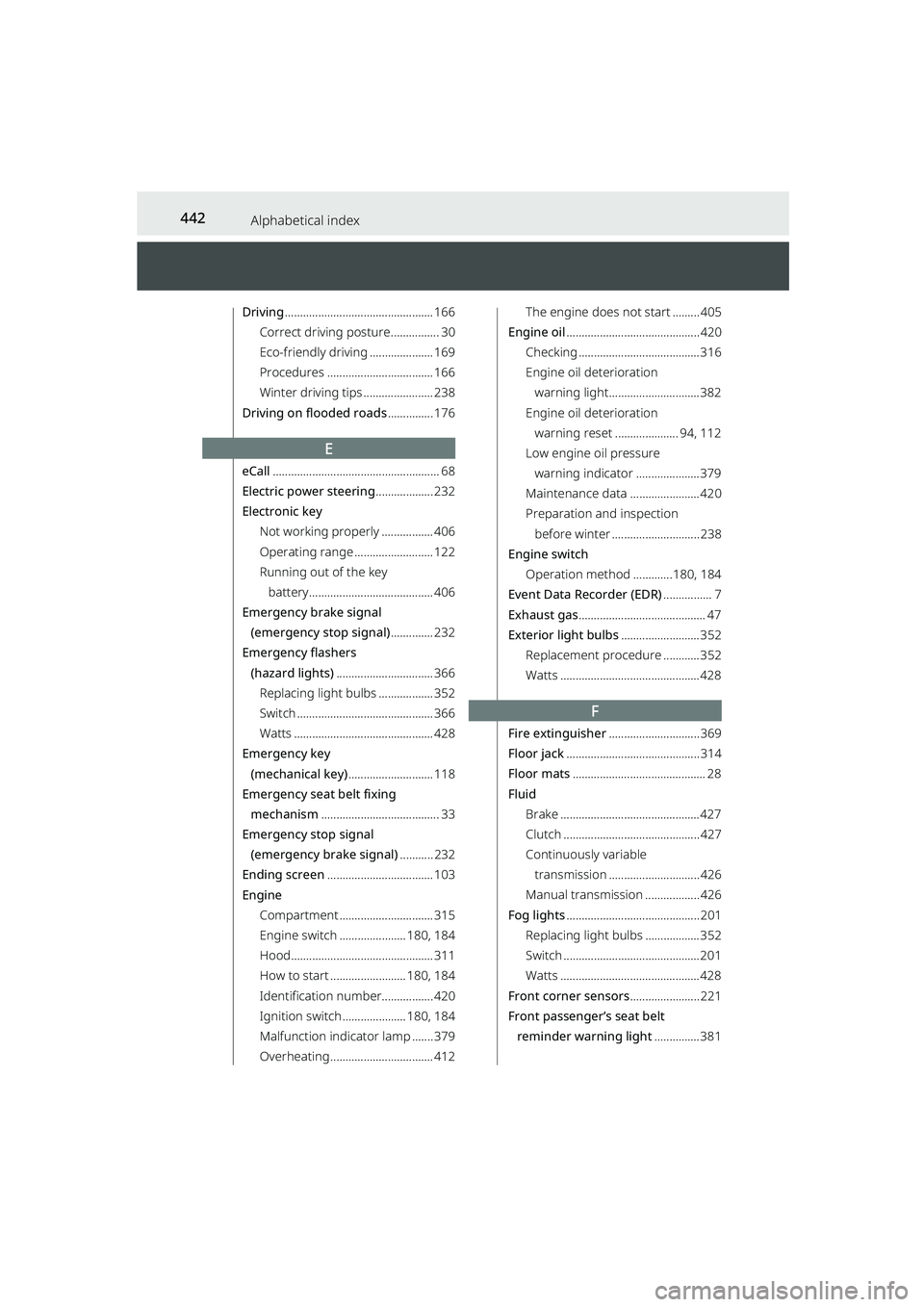
442Alphabetical index
RAIZE_OM_General_BZ358E
Driving................................................. 166
Correct driving posture................ 30
Eco-friendly driving ..................... 169
Procedures ................................... 166
Winter driving tips ....................... 238
Driving on flooded roads ............... 176
E
eCall....................................................... 68
Electric power steering ................... 232
Electronic key
Not working properly ................. 406
Operating range .......................... 122
Running out of the key battery......................................... 406
Emergency brake signal (emergency stop signal) .............. 232
Emergency flashers (hazard lights) ................................ 366
Replacing light bulbs .................. 352
Switch ............................................. 366
Watts .............................................. 428
Emergency key
(mechanical key) ............................ 118
Emergency seat belt fixing mechanism ....................................... 33
Emergency stop signal (emergency brake signal) ........... 232
Ending screen ................................... 103
Engine Compartment ............................... 315
Engine switch ......... ............. 180, 184
Hood............................................... 311
How to start ......... ................ 180, 184
Identification number................. 420
Ignition switch ..... ................ 180, 184
Malfunction indicator lamp ....... 379
Overheating .................................. 412
The engine does not start ......... 405
Engine oil ............................................ 420
Checking ........................................ 316
Engine oil deterioration warning light.............................. 382
Engine oil deterioration warning reset ..................... 94, 112
Low engine oil pressure
warning indicator ..................... 379
Maintenance data ....................... 420
Preparation and inspection before winter ............................. 238
Engine switch Operation method .. ...........180, 184
Event Data Recorder (EDR) ................ 7
Exhaust gas .......................................... 47
Exterior light bulbs .......................... 352
Replacement procedure ............ 352
Watts .............................................. 428
F
Fire extinguisher .............................. 369
Floor jack ............................................ 314
Floor mats ............................................ 28
Fluid Brake .............................................. 427
Clutch ............................................. 427
Continuously variable
transmission .............................. 426
Manual transmission .................. 426
Fog lights ............................................ 201
Replacing light bulbs .................. 352
Switch ............................................. 201
Watts .............................................. 428
Front corner sensors ....................... 221
Front passenger’s seat belt
reminder warning light ............... 381
RAIZE_OM_General_BZ358E.book 442 ページ 2022年5月17日 火曜日 午後1時59分