Unlock back door TOYOTA RAV4 2011 XA30 / 3.G Owners Manual
[x] Cancel search | Manufacturer: TOYOTA, Model Year: 2011, Model line: RAV4, Model: TOYOTA RAV4 2011 XA30 / 3.GPages: 536, PDF Size: 9.52 MB
Page 26 of 536
26
1-2. Opening, closing and locking the doors
Smart key system
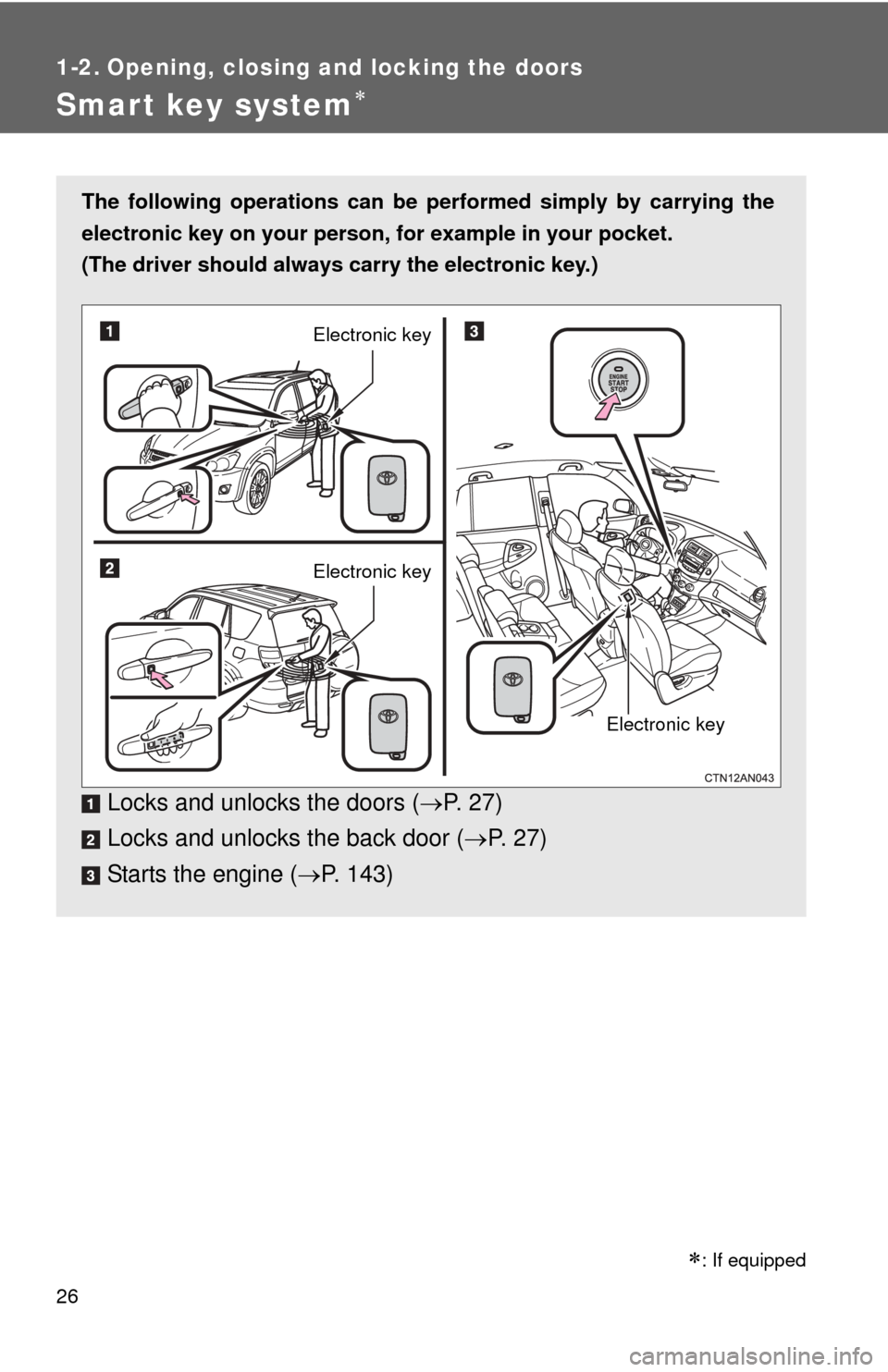
The following operations can be performed simply by carrying the
electronic key on your person, for example in your pocket.
(The driver should always carry the electronic key.)
Locks and unlocks the doors ( P. 2 7 )
Locks and unlocks the back door ( P. 27)
Starts the engine ( P. 143)
Electronic key
Electronic key
Electronic key
: If equipped
Page 27 of 536
27
1-2. Opening, closing and locking the doors
1
Before driving
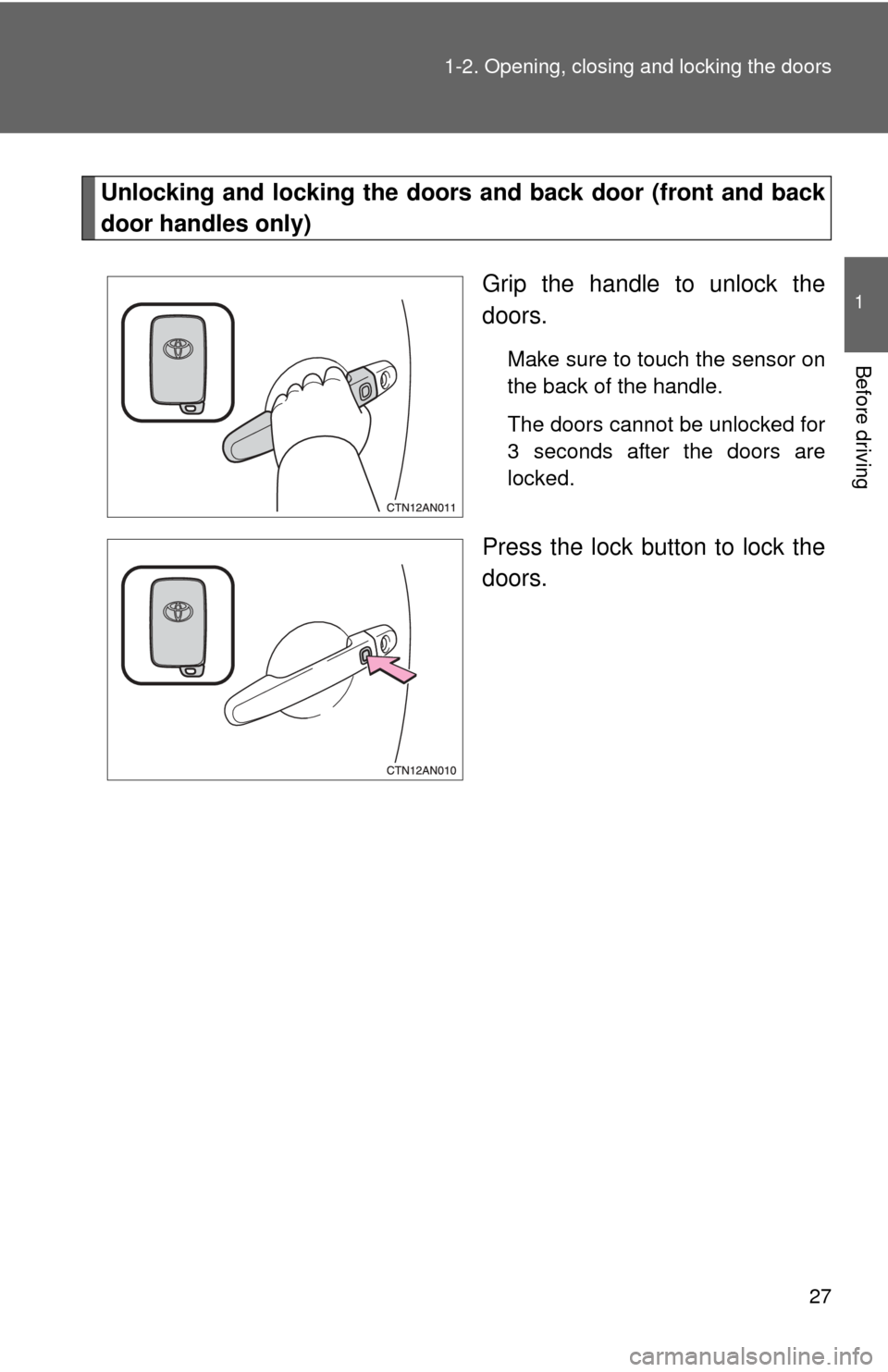
Unlocking and locking the doors and back door (front and back
door handles only)
Grip the handle to unlock the
doors.
Make sure to touch the sensor on
the back of the handle.
The doors cannot be unlocked for
3 seconds after the doors are
locked.
Press the lock button to lock the
doors.
Page 29 of 536
29
1-2. Opening, closing and locking the doors
1
Before driving
■
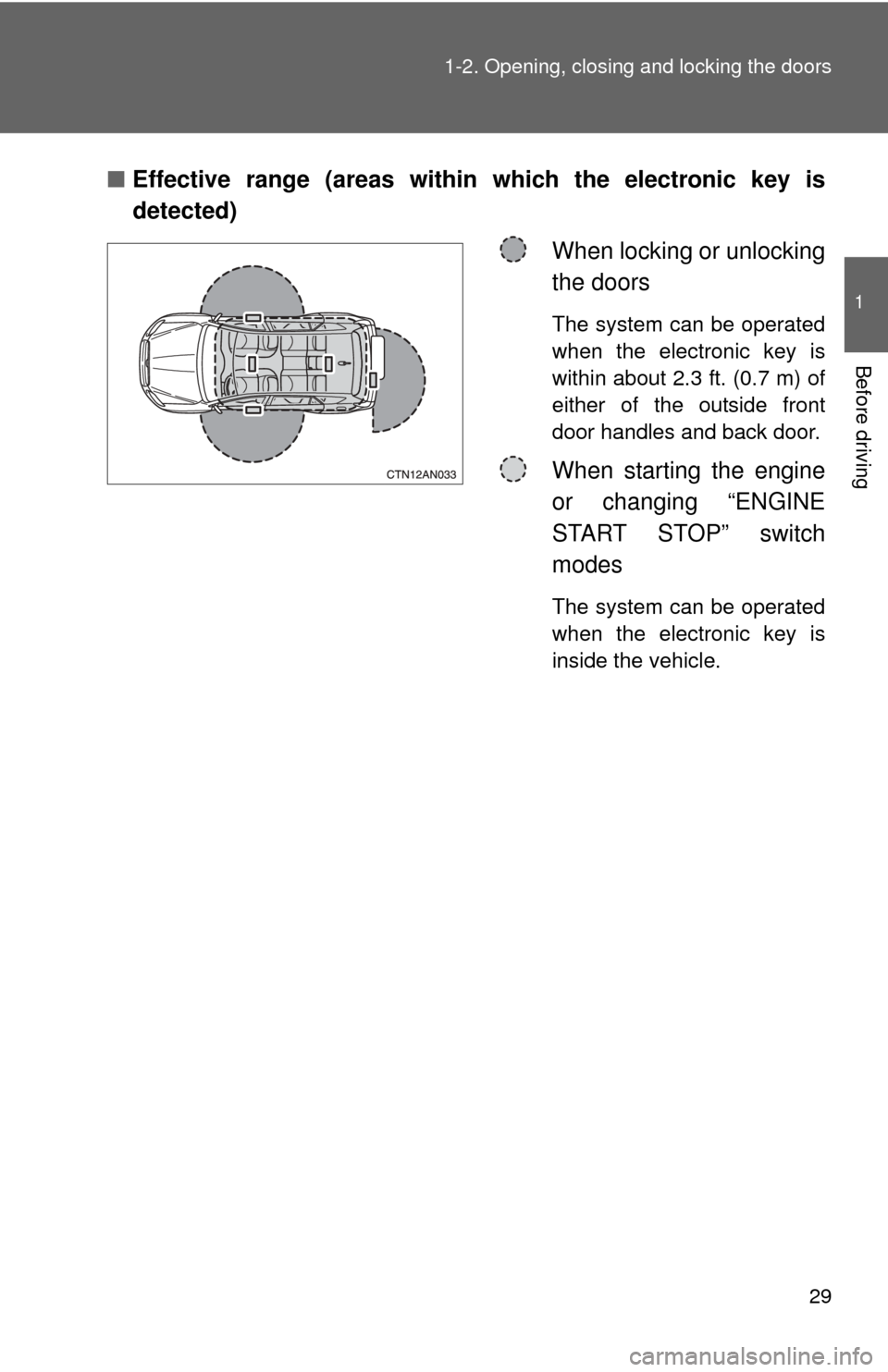
Effective range (areas within which the electronic key is
detected)
When locking or unlocking
the doors
The system can be operated
when the electronic key is
within about 2.3 ft. (0.7 m) of
either of the outside front
door handles and back door.
When starting the engine
or changing “ENGINE
START STOP” switch
modes
The system can be operated
when the electronic key is
inside the vehicle.
Page 31 of 536
31
1-2. Opening, closing and locking the doors
1
Before driving
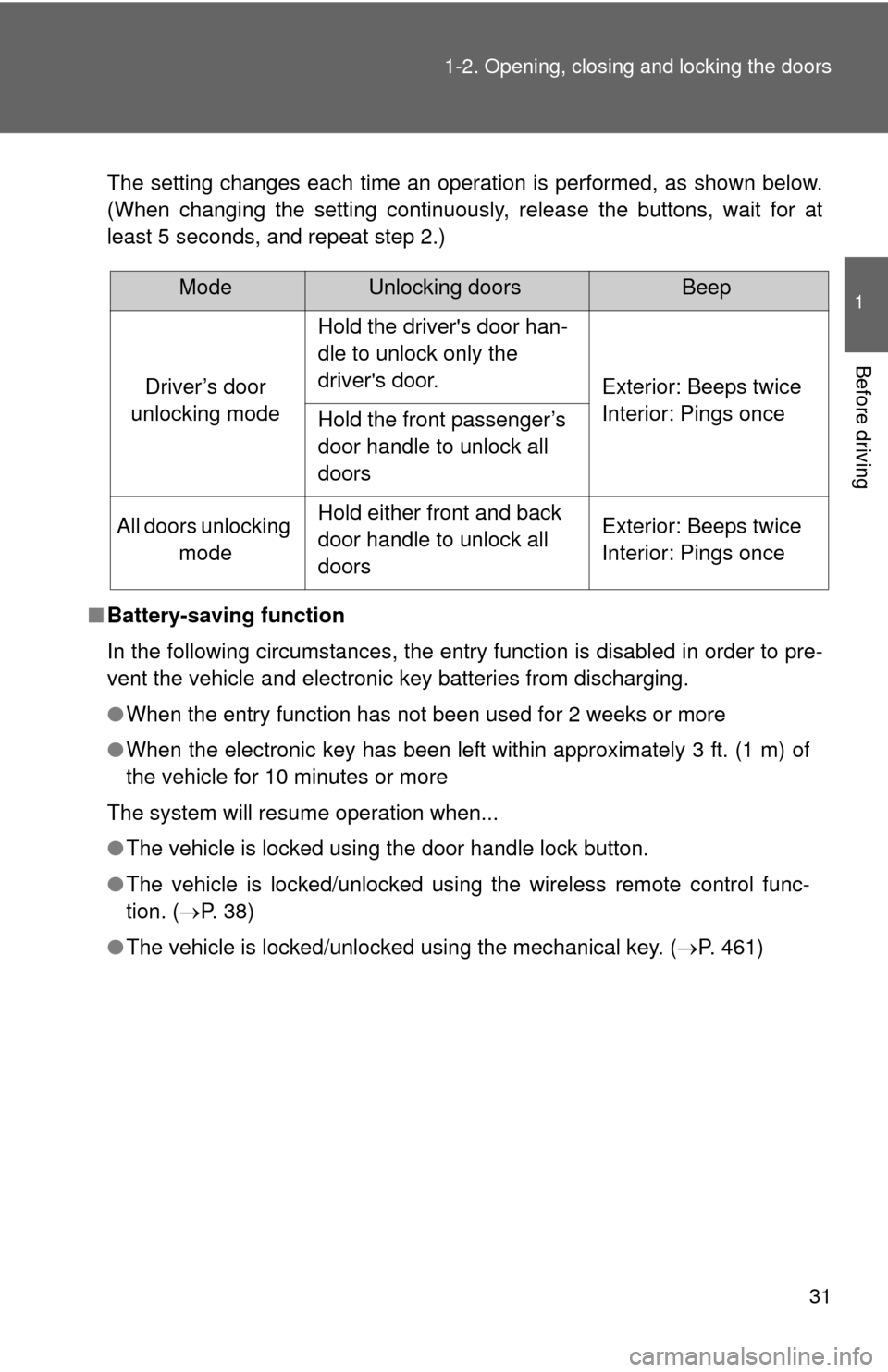
The setting changes each time an operation is performed, as shown below.
(When changing the setting continuously, release the buttons, wait for at
least 5 seconds, and repeat step 2.)
■ Battery-saving function
In the following circumstances, the entry function is disabled in order to pre-
vent the vehicle and electronic key batteries from discharging.
●When the entry function has not been used for 2 weeks or more
● When the electronic key has been left within approximately 3 ft. (1 m) of
the vehicle for 10 minutes or more
The system will resume operation when...
● The vehicle is locked using the door handle lock button.
● The vehicle is locked/unlocked using the wireless remote control func-
tion. ( P. 38)
● The vehicle is locked/unlocked using the mechanical key. ( P. 461)
ModeUnlocking doorsBeep
Driver’s door
unlocking mode
Hold the driver's door han-
dle to unlock only the
driver's door.
Exterior: Beeps twice
Interior: Pings once
Hold the front passenger’s
door handle to unlock all
doors
All doors unlocking modeHold either front and back
door handle to unlock all
doorsExterior: Beeps twice
Interior: Pings once
Page 35 of 536
35
1-2. Opening, closing and locking the doors
1
Before driving
■
If the smart key system does not operate properly
● Locking and unlocking the doors: Use the mechanical key. ( P. 461)
● Starting the engine. ( P. 461)
■ When the electronic key battery is fully depleted
P. 388
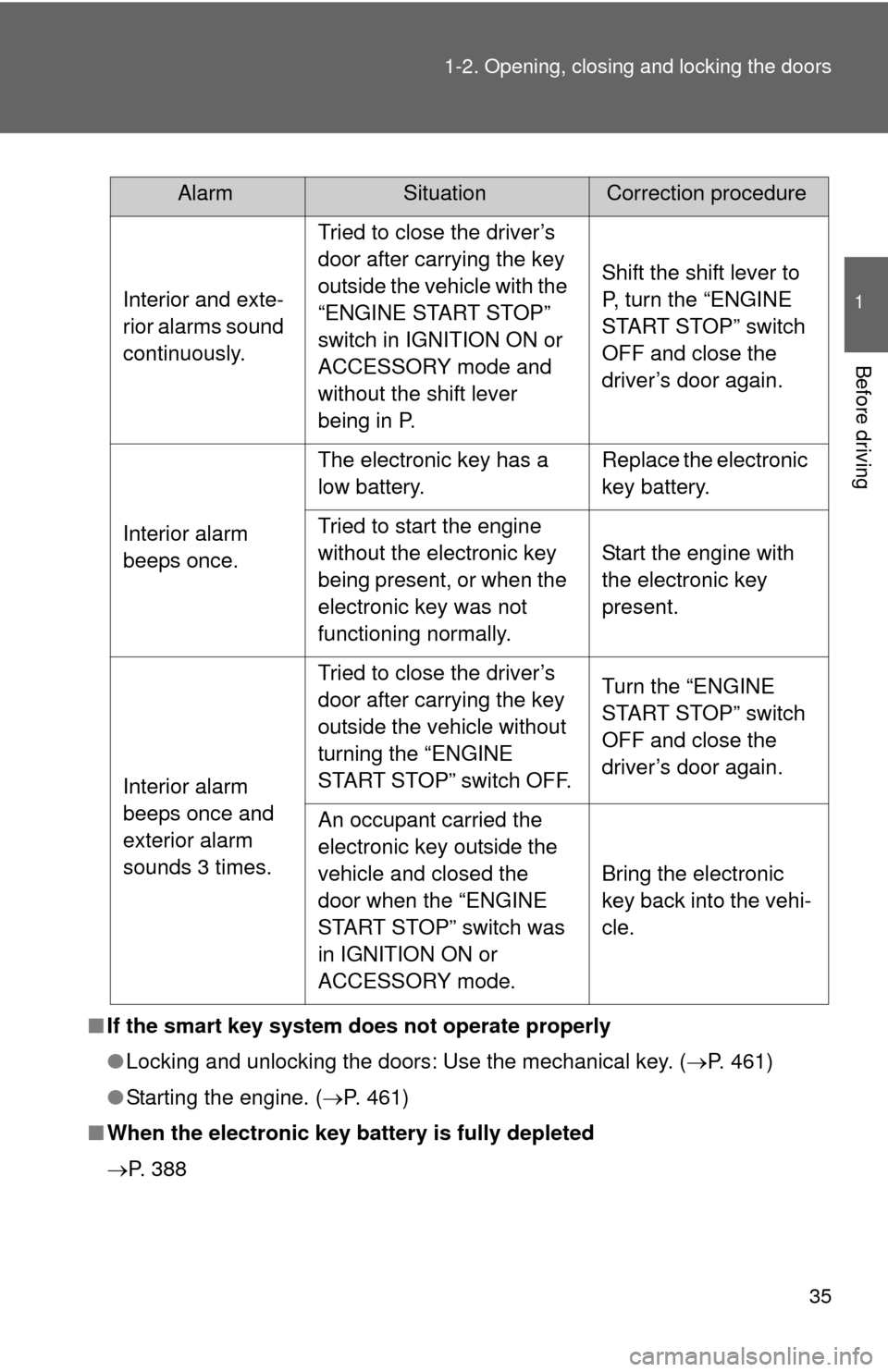
AlarmSituationCorrection procedure
Interior and exte-
rior alarms sound
continuously. Tried to close the driver’s
door after carrying the key
outside the vehicle with the
“ENGINE START STOP”
switch in IGNITION ON or
ACCESSORY mode and
without the shift lever
being in P. Shift the shift lever to
P, turn the “ENGINE
START STOP” switch
OFF and close the
driver’s door again.
Interior alarm
beeps once. The electronic key has a
low battery.
Replace the electronic
key battery.
Tried to start the engine
without the electronic key
being present, or when the
electronic key was not
functioning normally. Start the engine with
the electronic key
present.
Interior alarm
beeps once and
exterior alarm
sounds 3 times. Tried to close the driver’s
door after carrying the key
outside the vehicle without
turning the “ENGINE
START STOP” switch OFF.
Turn the “ENGINE
START STOP” switch
OFF and close the
driver’s door again.
An occupant carried the
electronic key outside the
vehicle and closed the
door when the “ENGINE
START STOP” switch was
in IGNITION ON or
ACCESSORY mode. Bring the electronic
key back into the vehi-
cle.
Page 46 of 536
46
1-2. Opening, closing and locking the doors
Back door
■Customization that can be co nfigured at Toyota dealer
Settings (e.g. wireless remote control) can be changed.
(Customizable features P. 500)
CAUTION
■Caution while driving
●Keep the back door closed while driving.
If the back door is left open, it may hit near-by objects while driving or lug-
gage may be unexpectedly thrown out, causing an accident.
In addition, exhaust gases may enter the vehicle, causing death or a seri-
ous health hazard. Make sure to close the back door before driving.
● Before driving the vehicle, make sure that the back door is fully closed. If
the back door is not fully closed, it may open unexpectedly while driving,
causing an accident.
● Never let anyone sit in the luggage compartment. In the event of sudden
braking or a collision, they are susceptible to death or serious injury.
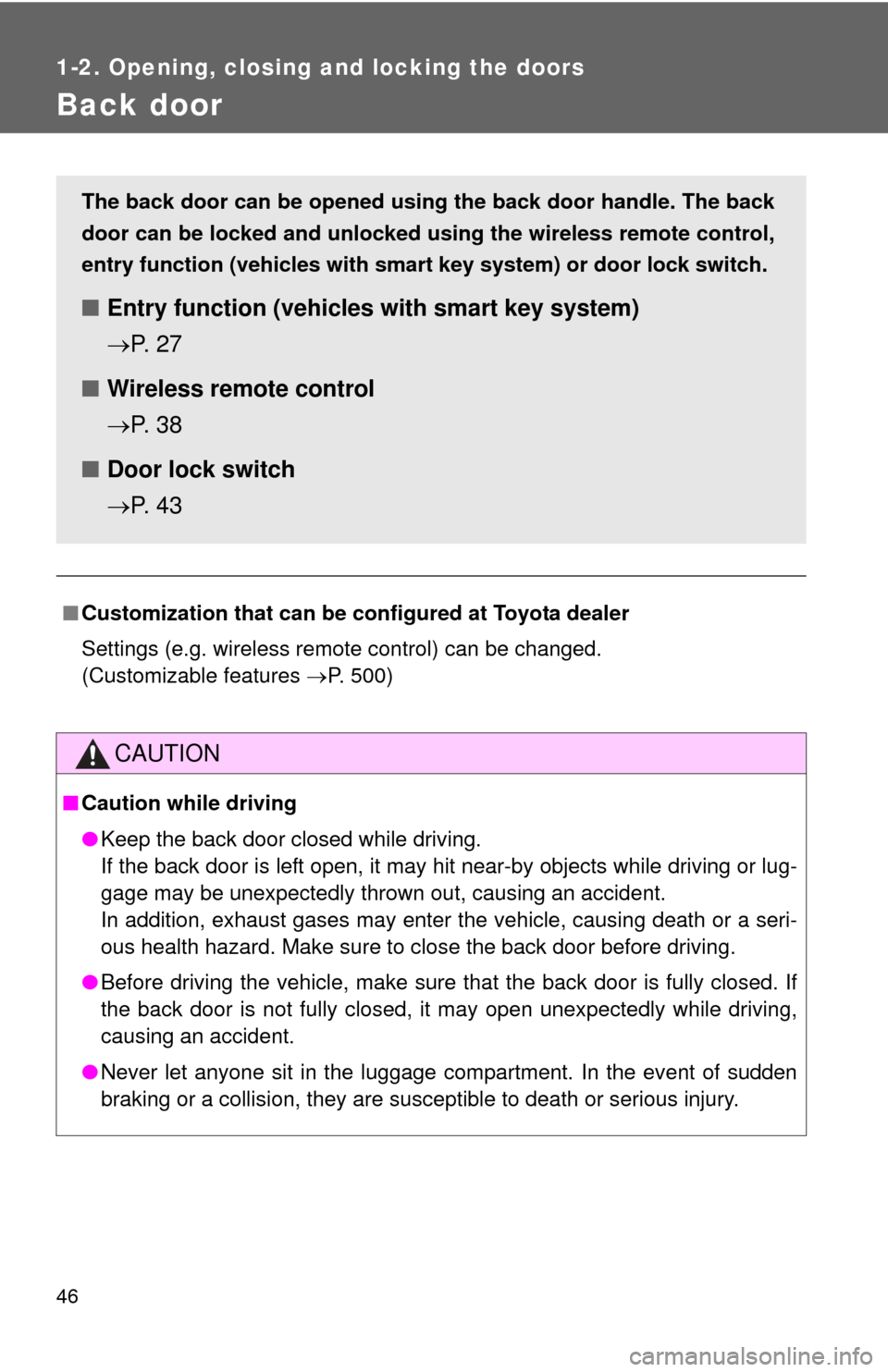
The back door can be opened using the back door handle. The back
door can be locked and unlocked us ing the wireless remote control,
entry function (vehicles with sm art key system) or door lock switch.
■Entry function (vehicles with smart key system)
P. 2 7
■ Wireless remote control
P. 3 8
■ Door lock switch
P. 4 3
Page 307 of 536
307
3
Interior features
3-4. Using the interior lights
Interior lights list
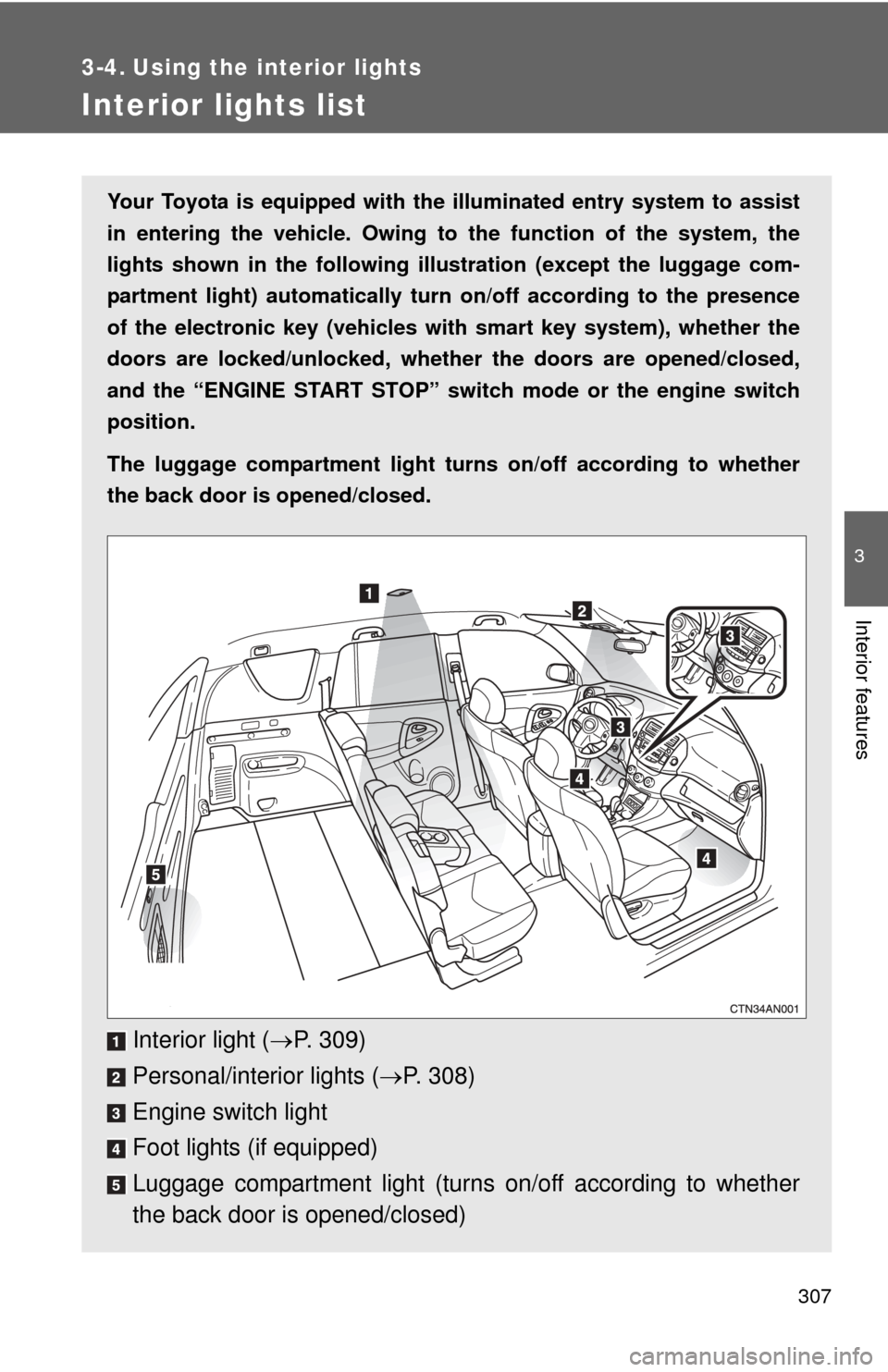
Your Toyota is equipped with the illuminated entry system to assist
in entering the vehicle. Owing to the function of the system, the
lights shown in the following illu stration (except the luggage com-
partment light) automatically turn on/off according to the presence
of the electronic key (vehicles wit h smart key system), whether the
doors are locked/unlocked, whethe r the doors are opened/closed,
and the “ENGINE START STOP” switch mode or the engine switch
position.
The luggage compartment light tu rns on/off according to whether
the back door is opened/closed.
Interior light ( P. 309)
Personal/interior lights ( P. 308)
Engine switch light
Foot lights (if equipped)
Luggage compartment light (turns on/off according to whether
the back door is opened/closed)
Page 441 of 536
5
When trouble arises
441
5-2. Steps to take in an emergency
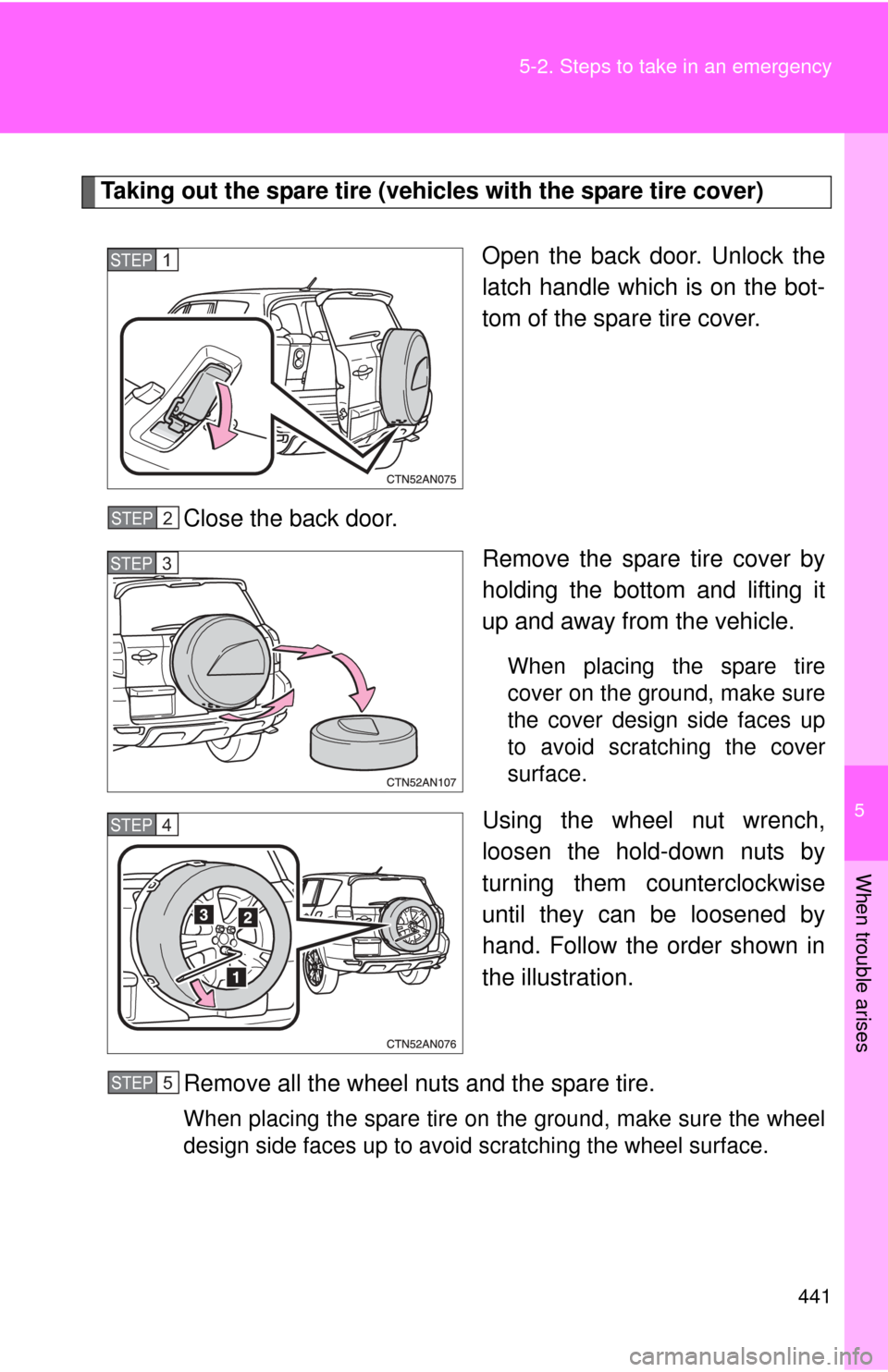
Taking out the spare tire (vehicles with the spare tire cover)
Open the back door. Unlock the
latch handle which is on the bot-
tom of the spare tire cover.
Close the back door. Remove the spare tire cover by
holding the bottom and lifting it
up and away from the vehicle.
When placing the spare tire
cover on the ground, make sure
the cover design side faces up
to avoid scratching the cover
surface.
Using the wheel nut wrench,
loosen the hold-down nuts by
turning them counterclockwise
until they can be loosened by
hand. Follow the order shown in
the illustration.
Remove all the wheel nuts and the spare tire.
When placing the spare tire on the ground, make sure the wheel
design side faces up to avoid scratching the wheel surface.
STEP 1
STEP 2
STEP 3
STEP 4
STEP 5
Page 461 of 536
5
When trouble arises
461
5-2. Steps to take in an emergency
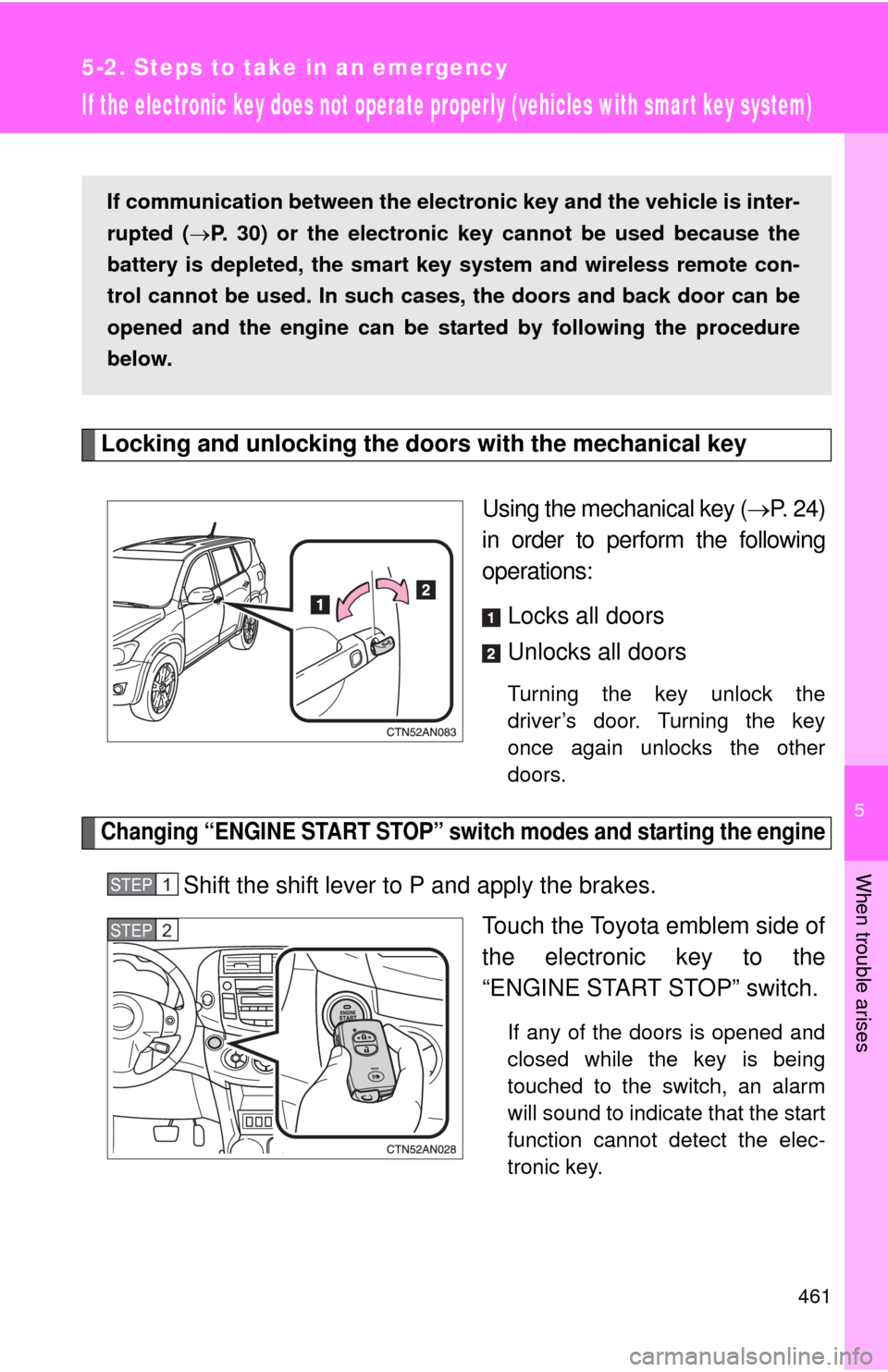
If the electronic key does not operate properly (vehicles with smart key system)
Locking and unlocking the doors with the mechanical keyUsing the mechanical key (P. 24)
in order to perform the following
operations:
Locks all doors
Unlocks all doors
Turning the key unlock the
driver’s door. Turning the key
once again unlocks the other
doors.
Changing “ENGINE START STOP” switch modes and starting the engine
Shift the shift lever to P and apply the brakes. Touch the Toyota emblem side of
the electronic key to the
“ENGINE START STOP” switch.
If any of the doors is opened and
closed while the key is being
touched to the switch, an alarm
will sound to indicate that the start
function cannot detect the elec-
tronic key.
If communication between the elect ronic key and the vehicle is inter-
rupted ( P. 30) or the electronic key cannot be used because the
battery is depleted, the smart key system and wireless remote con-
trol cannot be used. In such cases, the doors and back door can be
opened and the engine can be st arted by following the procedure
below.
STEP 1
STEP 2