key TOYOTA RAV4 2013 XA40 / 4.G User Guide
[x] Cancel search | Manufacturer: TOYOTA, Model Year: 2013, Model line: RAV4, Model: TOYOTA RAV4 2013 XA40 / 4.GPages: 624, PDF Size: 9.82 MB
Page 78 of 624
781-2. Theft deterrent system
RAV4_OM_OM42809U_(U)■
Certifications for the engine immobili zer system (for vehicles sold in the
U.S.A.)
Vehicles without a smart key system
FCC ID: MOZRI-42BTY FCC ID: WRKRI-44BTY
Vehicles with a smart key system
FCC ID: NI4TMIMB-3
This device complies with part 15 of the FCC Rules. Operation is subject to
the following two conditions: (1) This device may not cause harmful interfer-
ence, and (2) this device must accept any interference received, including
interference that may cause undesired operation.
■ Certifications for the engine imm obilizer system (for vehicles sold in
Canada)
Vehicles without a smart key system
This device complies with Industry Canada licence-exempt RSS standard(s).
Operation is subject to the following two conditions: (1) this device may not
cause interference, and (2) this device must accept any interference, includ-
ing interference that may cause undesired operation of the device.
Vehicles with a smart key system
Operation is subject to the following two conditions: (1) this device may not
cause interference, and (2) this device must accept any interference, includ-
ing interference that may cause undesired operation of the device.
CAUTION
■ Certifications for the engine immobilizer system
Changes or modifications not expressly approved by the party responsible
for compliance could void the user’s authority to operate the equipment.
NOTICE
■To ensure the system operates correctly
Do not modify or remove the system. If modified or removed, the proper
operation of the system cannot be guaranteed.
Page 84 of 624
84
RAV4_OM_OM42809U_(U)
2. Instrument cluster
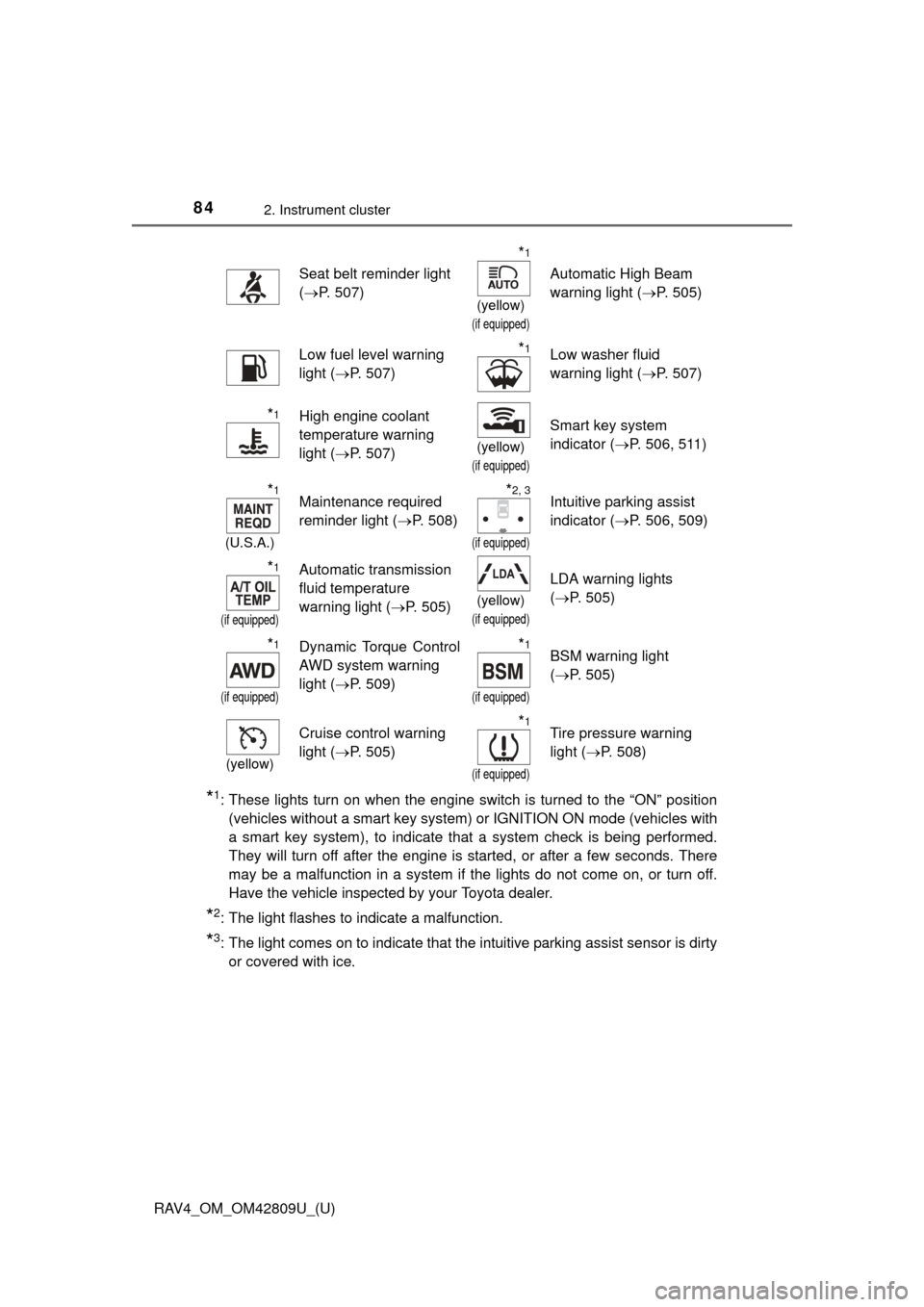
*1: These lights turn on when the engine switch is turned to the “ON” position(vehicles without a smart key system) or IGNITION ON mode (vehicles with
a smart key system), to indicate that a system check is being performed.
They will turn off after the engine is started, or after a few seconds. There
may be a malfunction in a system if the lights do not come on, or turn off.
Have the vehicle inspected by your Toyota dealer.
*2: The light flashes to indicate a malfunction.
*3: The light comes on to indicate that the intuitive parking assist sensor is dirtyor covered with ice.
Seat belt reminder light
(P. 507)
*1
(yellow)
(if equipped)
Automatic High Beam
warning light ( P. 505)
Low fuel level warning
light (P. 507)*1Low washer fluid
warning light ( P. 507)
*1High engine coolant
temperature warning
light (P. 507)
(yellow)
(if equipped)
Smart key system
indicator ( P. 506, 511)
*1
(U.S.A.)
Maintenance required
reminder light ( P. 508)*2, 3
(if equipped)
Intuitive parking assist
indicator (P. 506, 509)
*1
(if equipped)
Automatic transmission
fluid temperature
warning light ( P. 505)
(yellow)
(if equipped)
LDA warning lights
(P. 505)
*1
(if equipped)
Dynamic Torque Control
AWD system warning
light ( P. 509)*1
(if equipped)
BSM warning light
(P. 505)
(yellow)
Cruise control warning
light ( P. 505)*1
(if equipped)
Tire pressure warning
light (P. 508)
Page 85 of 624
RAV4_OM_OM42809U_(U)
852. Instrument cluster
2
Instrument cluster
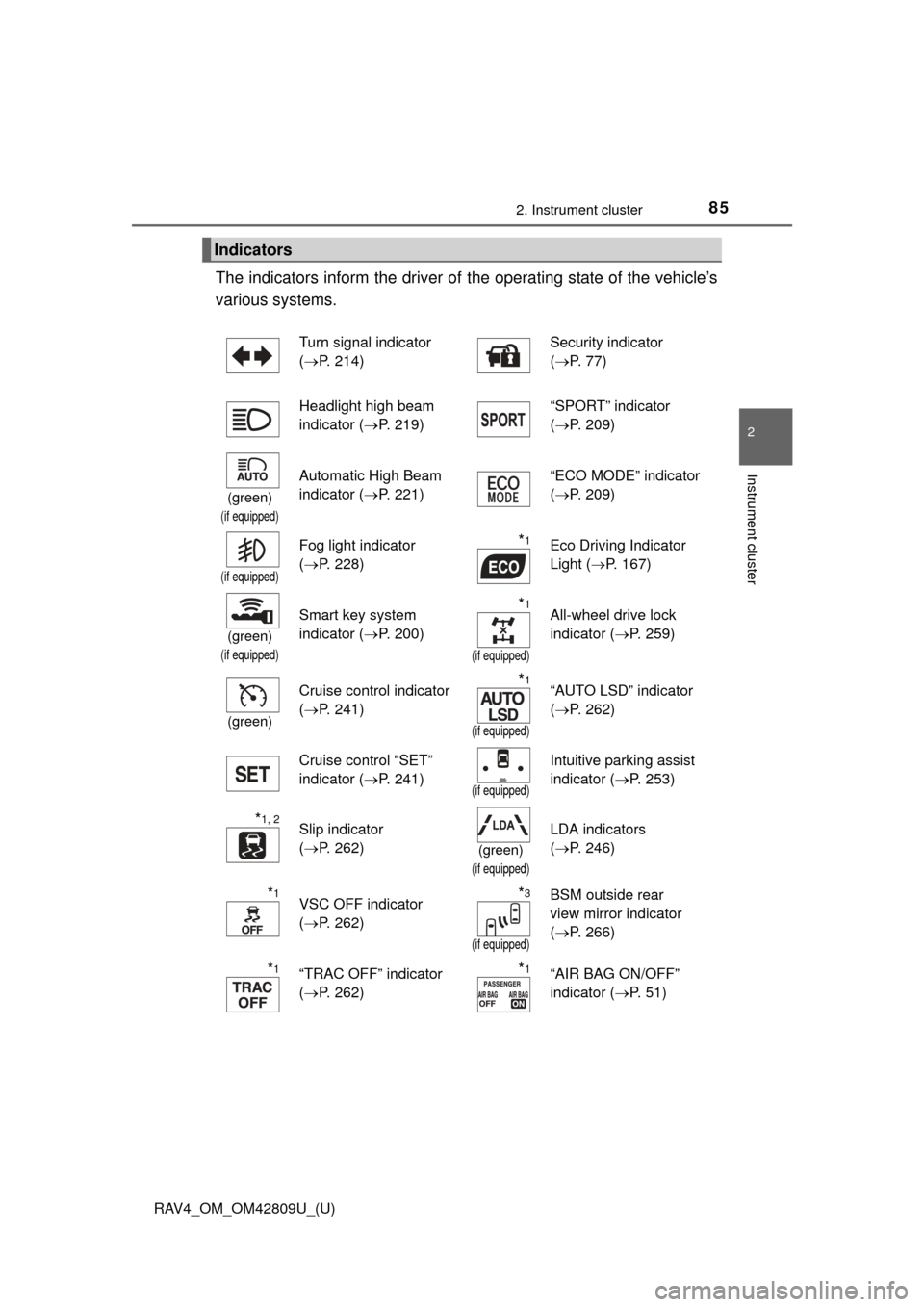
The indicators inform the driver of the operating state of the vehicle’s
various systems.
Indicators
Turn signal indicator
( P. 214) Security indicator
(
P. 77)
Headlight high beam
indicator ( P. 219) “SPORT” indicator
(
P. 209)
(green)
(if equipped)
Automatic High Beam
indicator ( P. 221) “ECO MODE” indicator
(
P. 209)
(if equipped)
Fog light indicator
(P. 228)*1Eco Driving Indicator
Light ( P. 167)
(green)
(if equipped)
Smart key system
indicator ( P. 200)*1
(if equipped)
All-wheel drive lock
indicator (P. 259)
(green)
Cruise control indicator
(P. 241)*1
(if equipped)
“AUTO LSD” indicator
(P. 262)
Cruise control “SET”
indicator ( P. 241)
(if equipped)
Intuitive parking assist
indicator (P. 253)
*1, 2Slip indicator
(P. 262)
(green)
(if equipped)
LDA indicators
(P. 246)
*1VSC OFF indicator
(P. 262)*3
(if equipped)
BSM outside rear
view mirror indicator
(P. 266)
*1“TRAC OFF” indicator
(P. 262)*1“AIR BAG ON/OFF”
indicator ( P. 5 1 )
Page 86 of 624
86
RAV4_OM_OM42809U_(U)
2. Instrument cluster
*1: These lights turn on when the engine switch is turned to the “ON” position(vehicles without a smart key system) or IGNITION ON mode (vehicles with
a smart key system), to indicate that a system check is being performed.
They will turn off after the engine is started, or after a few seconds. There
may be a malfunction in a system if the lights do not come on, or turn off.
Have the vehicle inspected by your Toyota dealer.
*2: The light flashes to indicate that the system is operating.
*3: In order to confirm operation, the BS M outside rear view mirror indicators
illuminate in the following situations:
• When the engine switch is turned to the “ON” position (vehicles without a smart key system) or IGNITION ON mode (vehicles with a smart key sys-
tem) while the BSM main switch is set to ON.
• When the BSM main switch is set to ON while the engine switch is in the “ON” position (vehicles without a smart key system) or IGNITION ON
mode (vehicles with a smart key system).
If the system is functioning correctly, the BSM outside rear view mirror indi-
cators will turn off after a few seconds.
If the BSM outside rear view mirror indicators do not illuminate or do not
turn off, there may be a malfunction with the system. If this occurs, have the
vehicle inspected by your Toyota dealer.
CAUTION
■ If a safety system warning light does not come on
Should a safety system light such as the ABS and SRS warning light not
come on when you start the engine, this could mean that these systems are
not available to help protect you in an accident, which could result in death
or serious injury. Have the vehicle inspected by your Toyota dealer immedi-
ately if this occurs.
NOTICE
■ To prevent damage to the engine and its components
The engine may be overheating if the high engine coolant temperature
warning light flashes or turns on. In this case, immediately stop the vehicle
in a safe place, and check the engine after it has cooled completely.
(P. 546)
Page 95 of 624
95
RAV4_OM_OM42809U_(U)
3
Operation of
each component
3-1. Key information
Keys .................................... 96
3-2. Opening, closing and locking the doors
Smart key system ............... 99
Wireless remote control .... 113
Side doors ......................... 120
Back door .......................... 125
3-3. Adjusting the seats Front seats ........................ 137
Rear seats......................... 139
Driving position memory ... 143
Head restraints.................. 147
3-4. Adjusting the steering wheel and mirrors
Steering wheel .................. 150
Inside rear view mirror ...... 151
Outside rear view mirrors ............................. 154
3-5. Opening, closing the windows and moon roof
Power windows ................. 156
Moon roof .......................... 159
Page 96 of 624
96
RAV4_OM_OM42809U_(U)
3-1. Key information
Keys
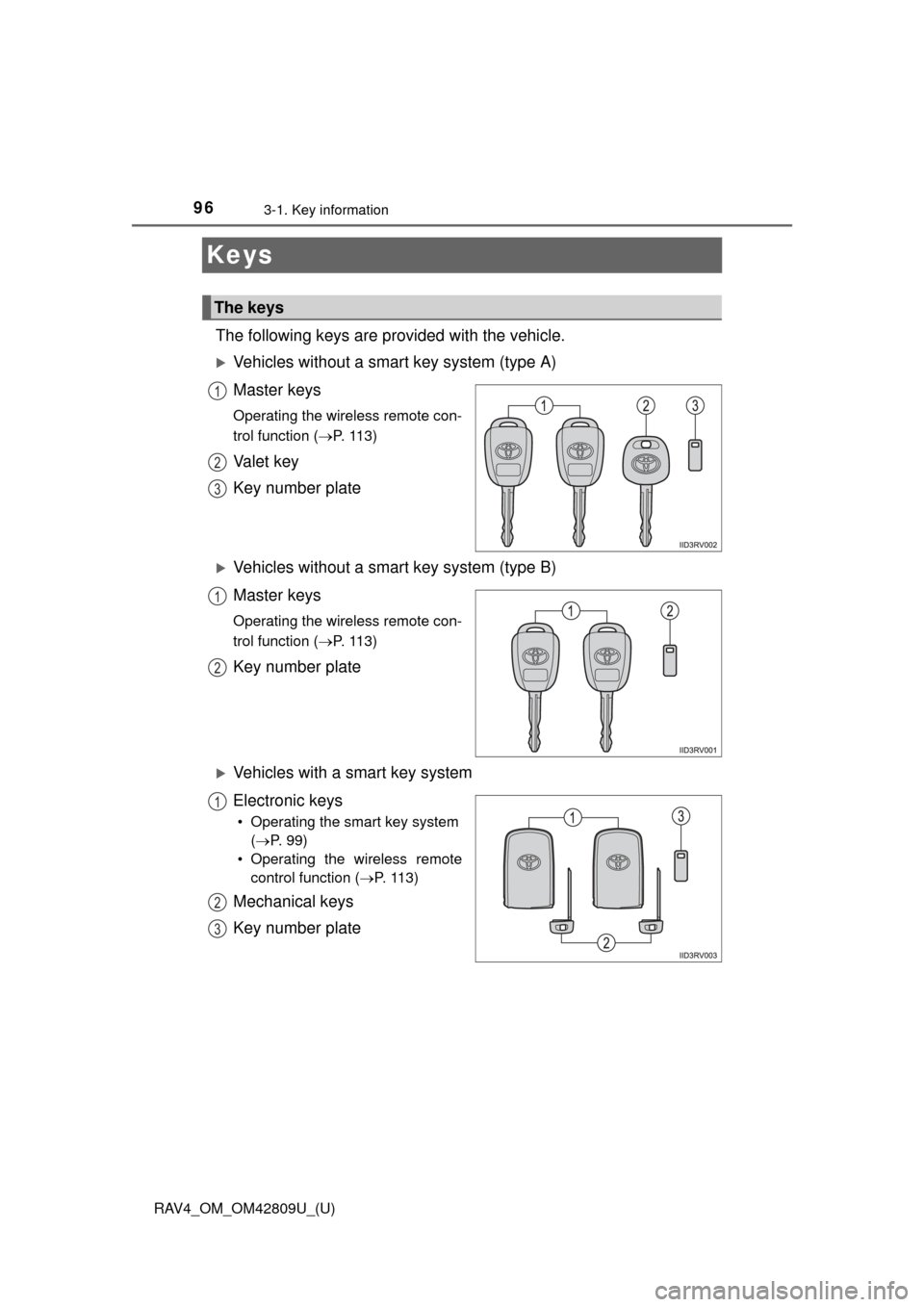
The following keys are provided with the vehicle.
Vehicles without a smart key system (type A)
Master keys
Operating the wireless remote con-
trol function (P. 113)
Va l e t k e y
Key number plate
Vehicles without a smart key system (type B)
Master keys
Operating the wireless remote con-
trol function (P. 113)
Key number plate
Vehicles with a smart key system
Electronic keys
• Operating the smart key system
( P. 99)
• Operating the wireless remote control function ( P. 113)
Mechanical keys
Key number plate
The keys
1
2
3
1
2
1
2
3
Page 97 of 624
RAV4_OM_OM42809U_(U)
973-1. Key information
3
Operation of each component
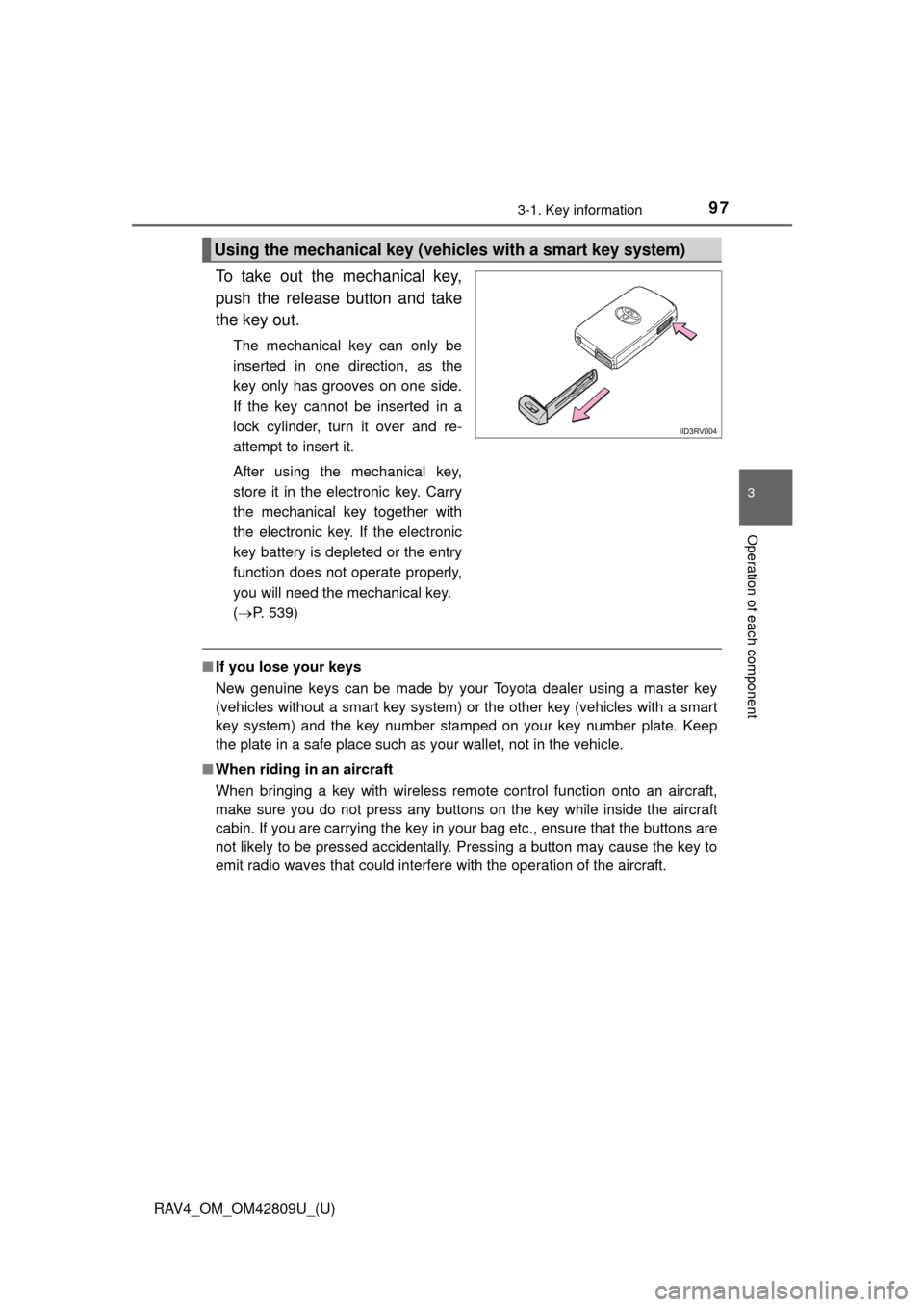
To take out the mechanical key,
push the release button and take
the key out.
The mechanical key can only be
inserted in one direction, as the
key only has grooves on one side.
If the key cannot be inserted in a
lock cylinder, turn it over and re-
attempt to insert it.
After using the mechanical key,
store it in the electronic key. Carry
the mechanical key together with
the electronic key. If the electronic
key battery is depleted or the entry
function does not operate properly,
you will need the mechanical key.
( P. 539)
■If you lose your keys
New genuine keys can be made by your Toyota dealer using a master key
(vehicles without a smart key system) or the other key (vehicles with a smart
key system) and the key number stam ped on your key number plate. Keep
the plate in a safe place such as your wallet, not in the vehicle.
■ When riding in an aircraft
When bringing a key with wireless remote control function onto an aircraft,
make sure you do not press any buttons on the key while inside the aircraft
cabin. If you are carrying the key in your bag etc., ensure that the buttons are
not likely to be pressed accidentally. Pressing a button may cause the key to
emit radio waves that could interfere with the operation of the aircraft.
Using the mechanical key (vehic les with a smart key system)
Page 98 of 624
98
RAV4_OM_OM42809U_(U)
3-1. Key information
NOTICE
■To prevent key damage
●Do not drop the keys, subject them to strong shocks or bend them.
● Do not expose the keys to high temperatures for long periods of time.
● Do not get the keys wet or wash them in an ultrasonic washer etc.
● Do not attach metallic or magnetic materials to the keys or place the keys
close to such materials.
● Do not disassemble the keys.
● Do not attach a sticker or anything else to the surface of the electronic key.
● Do not place the keys near objects that produce magnetic fields, such as
TVs, audio systems and induction cooker s, or medical electrical equip-
ment, such as low-frequency therapy equipment.
■ Carrying the electronic key on your person (vehicles with a smart key
system)
Carry the electronic key 3.9 in. (10 cm) or more away from electric appli-
ances that are turned on. Radio waves emitted from electric appliances
within 3.9 in. (10 cm) of the electronic key may interfere with the key, caus-
ing the key to not function properly.
■ In case of a smart key system malfunction or other key-related prob-
lems (vehicles with a smart key system)
Take your vehicle with all the electronic keys provided with your vehicle to
your Toyota dealer.
■ When an electronic key is lost (vehicles with a smart key system)
If the electronic key remains lost, the risk of vehicle theft increases signifi-
cantly. Visit your Toyota dealer imm ediately with all remaining electronic
keys that was provided with your vehicle.
Page 99 of 624
99
RAV4_OM_OM42809U_(U)
3-2. Opening, closing and locking the doors
3
Operation of each component
Smar t key system
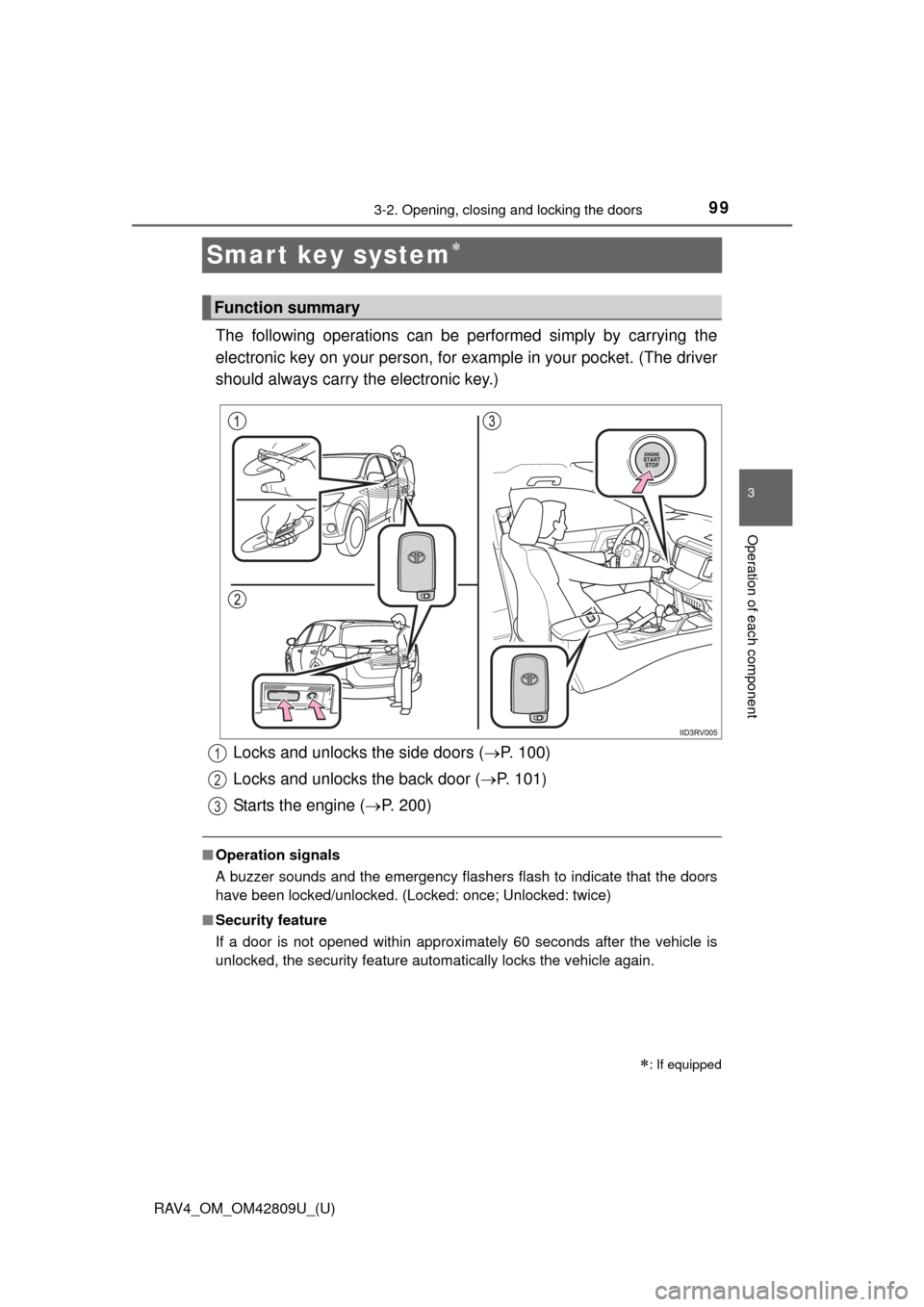
The following operations can be performed simply by carrying the
electronic key on your person, for example in your pocket. (The driver
should always carry the electronic key.)
■ Operation signals
A buzzer sounds and the emergency flashers flash to indicate that the doors
have been locked/unlocked. (Locked: once; Unlocked: twice)
■ Security feature
If a door is not opened within approximately 60 seconds after the vehicle is
unlocked, the security feature automatically locks the vehicle again.
: If equipped
Function summary
Locks and unlocks the side doors ( P. 100)
Locks and unlocks the back door ( P. 101)
Starts the engine ( P. 200)1
2
3
Page 103 of 624
RAV4_OM_OM42809U_(U)
1033-2. Opening, closing and locking the doors
3
Operation of each component
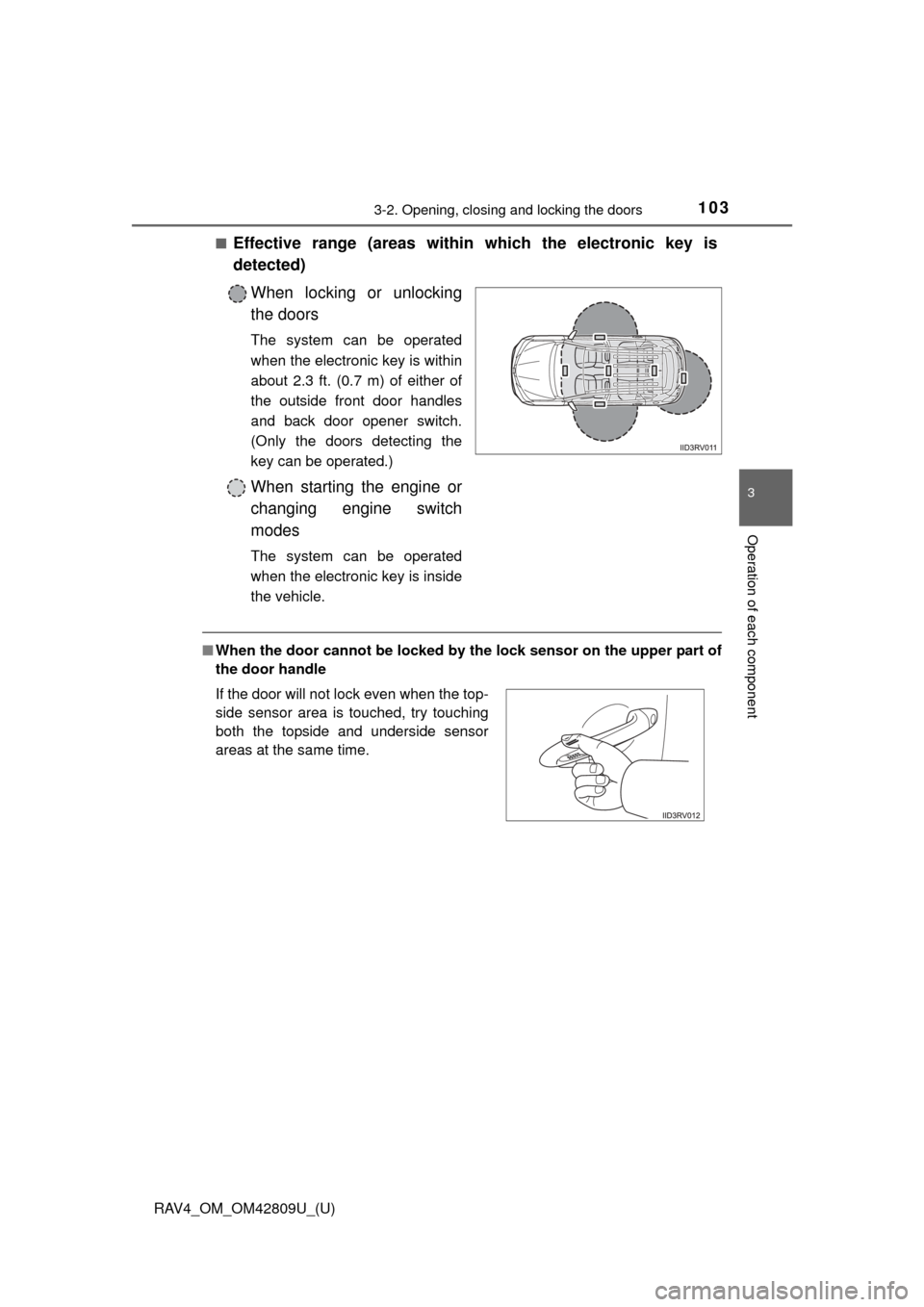
■Effective range (areas within which the electronic key is
detected)When locking or unlocking
the doors
The system can be operated
when the electronic key is within
about 2.3 ft. (0.7 m) of either of
the outside front door handles
and back door opener switch.
(Only the doors detecting the
key can be operated.)
When starting the engine or
changing engine switch
modes
The system can be operated
when the electronic key is inside
the vehicle.
■When the door cannot be locked by the lock sensor on the upper part of
the door handle
If the door will not lock even when the top-
side sensor area is touched, try touching
both the topside and underside sensor
areas at the same time.