key TOYOTA RAV4 2013 XA40 / 4.G Owner's Guide
[x] Cancel search | Manufacturer: TOYOTA, Model Year: 2013, Model line: RAV4, Model: TOYOTA RAV4 2013 XA40 / 4.GPages: 624, PDF Size: 9.82 MB
Page 114 of 624
114
RAV4_OM_OM42809U_(U)
3-2. Opening, closing and locking the doors
■Operation signals
Doors:
A buzzer sounds and the emergency flashers flash to indicate that the doors
have been locked/unlocked. (Locked: once; Unlocked: twice)
Back door (if equipped):
A buzzer sounds and the emergency flashers flash twice to indicate that the
back door is opening/closing.
■ Door lock buzzer
If an attempt to lock the doors is made when a door is not fully closed, a
buzzer sounds continuously for 5 seconds. Fully close the door to stop the
buzzer, and lock the vehicle once more.
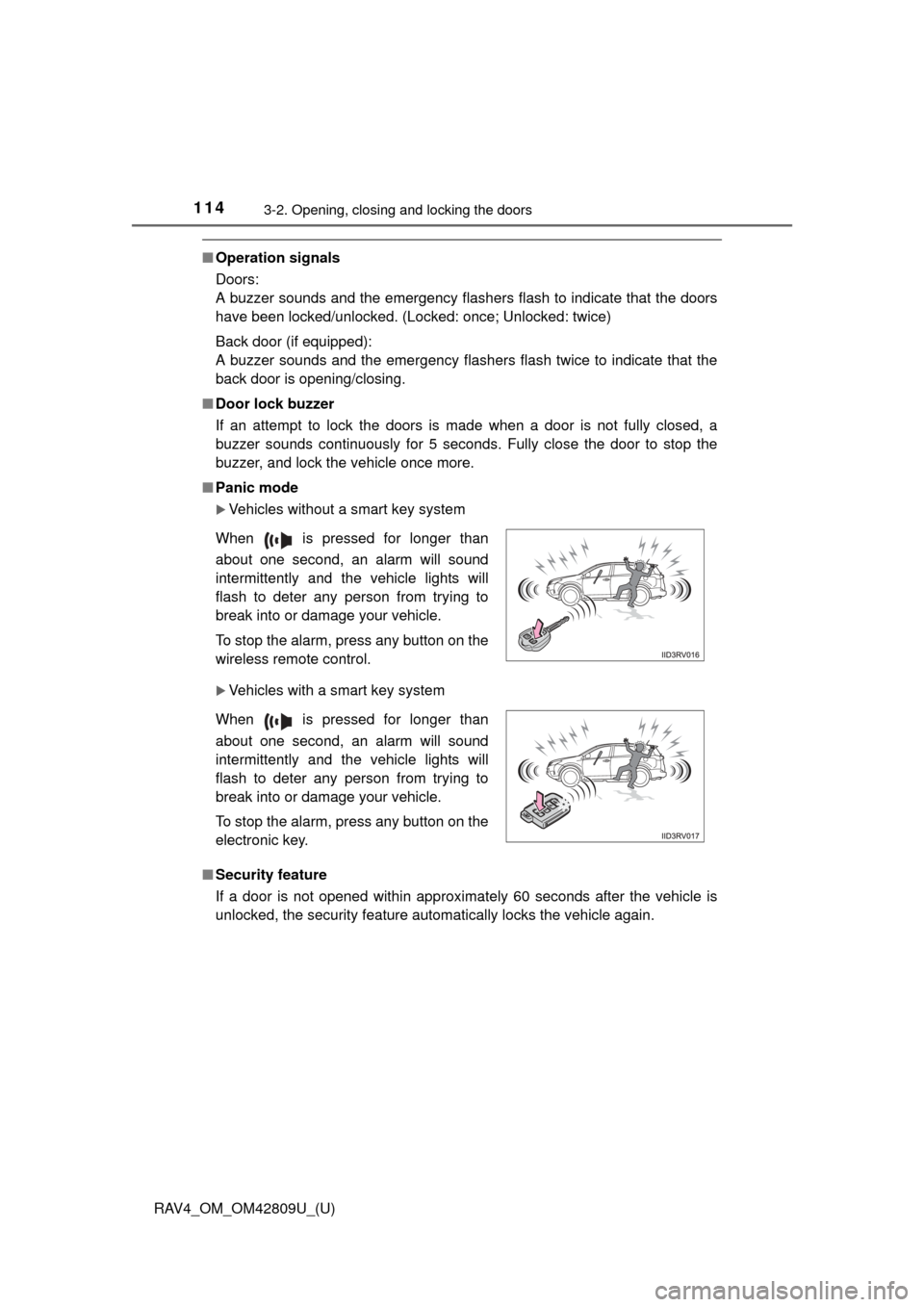
■ Panic mode
Vehicles without a smart key system
Vehicles with a smart key system
■ Security feature
If a door is not opened within approximately 60 seconds after the vehicle is
unlocked, the security feature automatically locks the vehicle again. When is pressed for longer than
about one second, an alarm will sound
intermittently and the vehicle lights will
flash to deter any person from trying to
break into or damage your vehicle.
To stop the alarm, press any button on the
wireless remote control.
When is pressed for longer than
about one second, an alarm will sound
intermittently and the vehicle lights will
flash to deter any person from trying to
break into or damage your vehicle.
To stop the alarm, press any button on the
electronic key.
Page 115 of 624

RAV4_OM_OM42809U_(U)
1153-2. Opening, closing and locking the doors
3
Operation of each component
■Conditions affecting operation
Vehicles without a smart key system
The wireless remote control function may not operate normally in the follow-
ing situations.
● Near a TV tower, radio station, electric power plant, airport or other facility
that generates strong radio waves
● When carrying a portable radio, cellular phone or other wireless communi-
cation device
● When multiple wireless keys are in the vicinity
● When the wireless key has come into contact with, or is covered by a metal-
lic object
● When a wireless key (that emits radio waves) is being used nearby
● When the wireless key has been left near an electrical appliance such as a
personal computer
Vehicles with a smart key system
P. 107
■ If the wireless remote control does not operate properly (vehicles with a
smart key system)
Locking and unlocking the doors: Use the mechanical key. ( P. 539)
■ Key battery depletion
Vehicles without a smart key system
If the wireless remote control function does not operate, the battery may be
depleted. Replace the battery when necessary. (P. 462)
Vehicles with a smart key system
P. 1 1 1
■ When the electronic key battery is fully depleted
P. 462
■ Confirmation of the registered key number
The number of keys already registered to the vehicle can be confirmed. Ask
your Toyota dealer for details.
■ Customization
Settings (e.g. wireless remote control system) can be changed.
(Customizable features: P. 579)
Page 116 of 624

116
RAV4_OM_OM42809U_(U)
3-2. Opening, closing and locking the doors
■Certification for wireless remote co ntrol (vehicles without a smart key
system - type A)
For vehicles sold in the U.S.A.
FCC ID: HYQ23AAC
FCC ID: HYQ12BDM
NOTE:
This device complies with part 15 of the FCC Rules. Operation is subject to
the following two conditions: (1) This device may not cause harmful interfer-
ence, and (2) this device must accept any interference received, including
interference that may cause undesired operation.
FCC WARNING:
Changes or modifications not expressly approved by the party responsible for
compliance could void the user’s authority to operate the equipment.
For vehicles sold in Canada
NOTE:
This device complies with Industry Canada licence-exempt RSS standard(s).
Operation is subject to the following two conditions: (1) this device may not
cause interference, and (2) this device must accept any interference, includ-
ing interference that may cause undesired operation of the device.
Page 117 of 624

RAV4_OM_OM42809U_(U)
1173-2. Opening, closing and locking the doors
3
Operation of each component
■Certification for wireless remote co ntrol (vehicles without a smart key
system - type B)
TRW Automotive
Automobile Entry/Security Transmitter
Model: 226624-101, 226624-102
FCC ID: GQ4-52T
IC: 1470A-33T
MADE IN U.S.A.
This device complies with Part 15 of the FCC Rules and with Industry Canada
license-exempt RSS standard(s). Operation is subject to the following two
conditions:
(1) This device may not cause harmful interference, and
(2) This device must accept any interference received, including interference that may cause undesired operation.
Le present appareil est conforme aux CNR d’Industrie Canada applicable aux
appareils radio exempts de licence.
L’exploitation est autorisee aux deux conditions suivantes:
1. L’appareil ne doit pas produire de brouillage.
2. L’utilisateur de l’appareil doit accepter tout brouillage radioelectrique subi, meme si le brouillage est susceptible d’en compromettre le
fonctionnement.
WARNING: Changes or modifications not expressively approved by TRW
Automotive U.S. LLC could void the user’s authority to operate the equip-
ment.
Page 119 of 624

RAV4_OM_OM42809U_(U)
1193-2. Opening, closing and locking the doors
3
Operation of each component
■Certification for wireless remote c ontrol (vehicles with a smart key sys-
tem)
For vehicles sold in the U.S.A.
FCC ID: HYQ23AAB FCC ID: HYQ14FBA
FCC ID: NI4TMLF10-13
NOTE:
This device complies with part 15 of the FCC Rules. Operation is subject to
the following two conditions: (1) This device may not cause harmful interfer-
ence, and (2) this device must accept any interference received, including
interference that may cause undesired operation.
FCC WARNING:
Changes or modifications not expressly approved by the party responsible for
compliance could void the user’s authority to operate the equipment.
For vehicles sold in Canada
NOTE:
Operation is subject to the following two conditions: (1) this device may not
cause interference, and (2) this device must accept any interference, includ-
ing interference that may cause undesired operation of the device.
Page 120 of 624
120
RAV4_OM_OM42809U_(U)
3-2. Opening, closing and locking the doors
Side doors
The vehicle can be locked and unlocked using the key, entry function,
wireless remote control or door lock switch.
◆Entry function (if equipped)
P. 9 9
◆Wireless remote control
P. 1 1 3
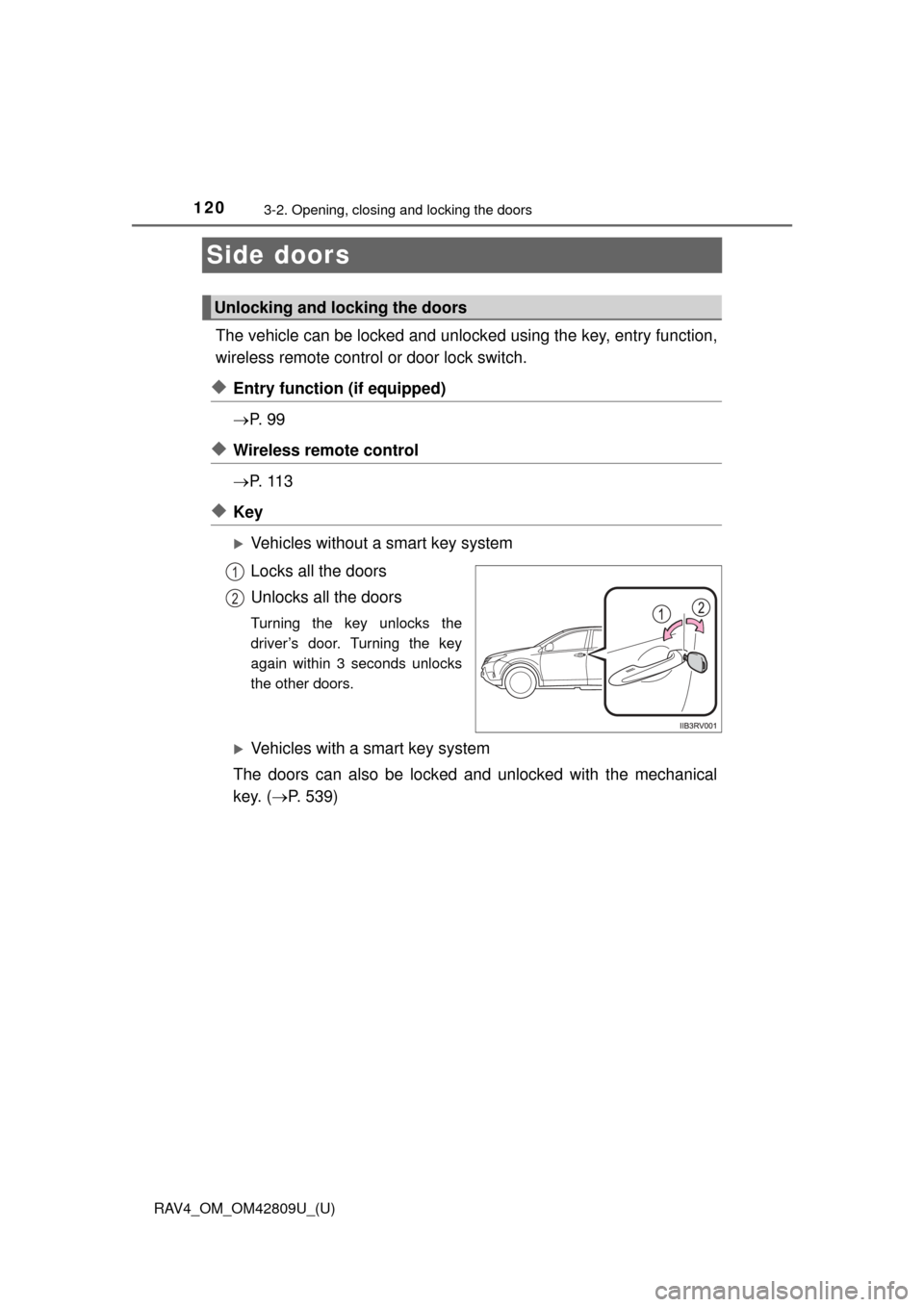
◆Key
Vehicles without a smart key system
Locks all the doors
Unlocks all the doors
Turning the key unlocks the
driver’s door. Turning the key
again within 3 seconds unlocks
the other doors.
Vehicles with a smart key system
The doors can also be locked and unlocked with the mechanical
key. ( P. 539)
Unlocking and locking the doors
1
2
Page 122 of 624
122
RAV4_OM_OM42809U_(U)
3-2. Opening, closing and locking the doors
Move the inside lock button to the lock position.
Close the door.
Vehicles without a smart key system
The door cannot be locked if the key is in the engine switch.
Vehicles with a smart key system
The door cannot be locked if the engine switch is in ACCESSORY or
IGNITION ON mode, or the electronic key is left inside the vehicle.
Depending on the position of the electronic key, the key may not be
detected correctly and the door may be locked.
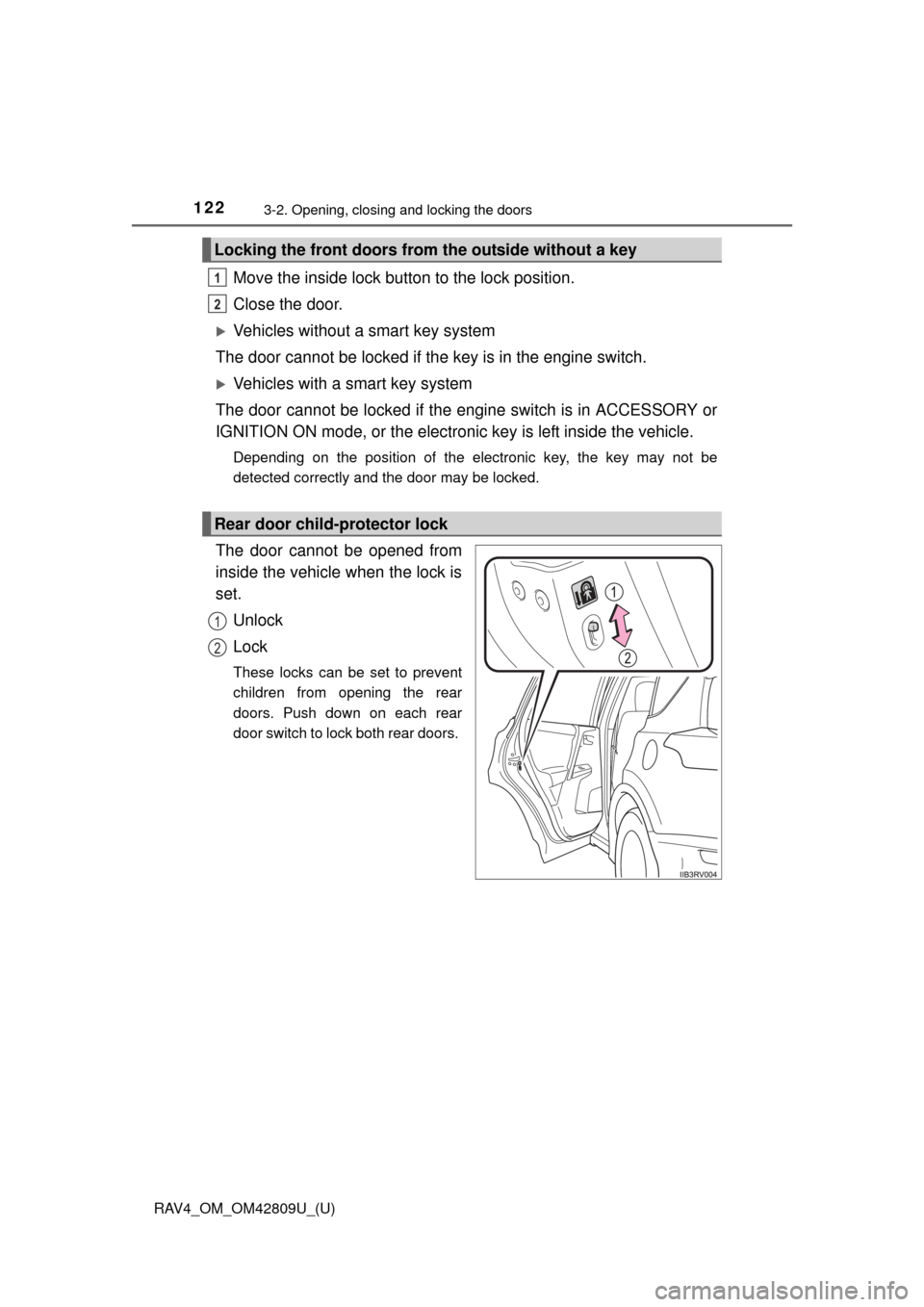
The door cannot be opened from
inside the vehicle when the lock is
set.
Unlock
Lock
These locks can be set to prevent
children from opening the rear
doors. Push down on each rear
door switch to lock both rear doors.
Locking the front doors from the outside without a key
Rear door child-protector lock
1
2
1
2
Page 123 of 624
RAV4_OM_OM42809U_(U)
1233-2. Opening, closing and locking the doors
3
Operation of each component
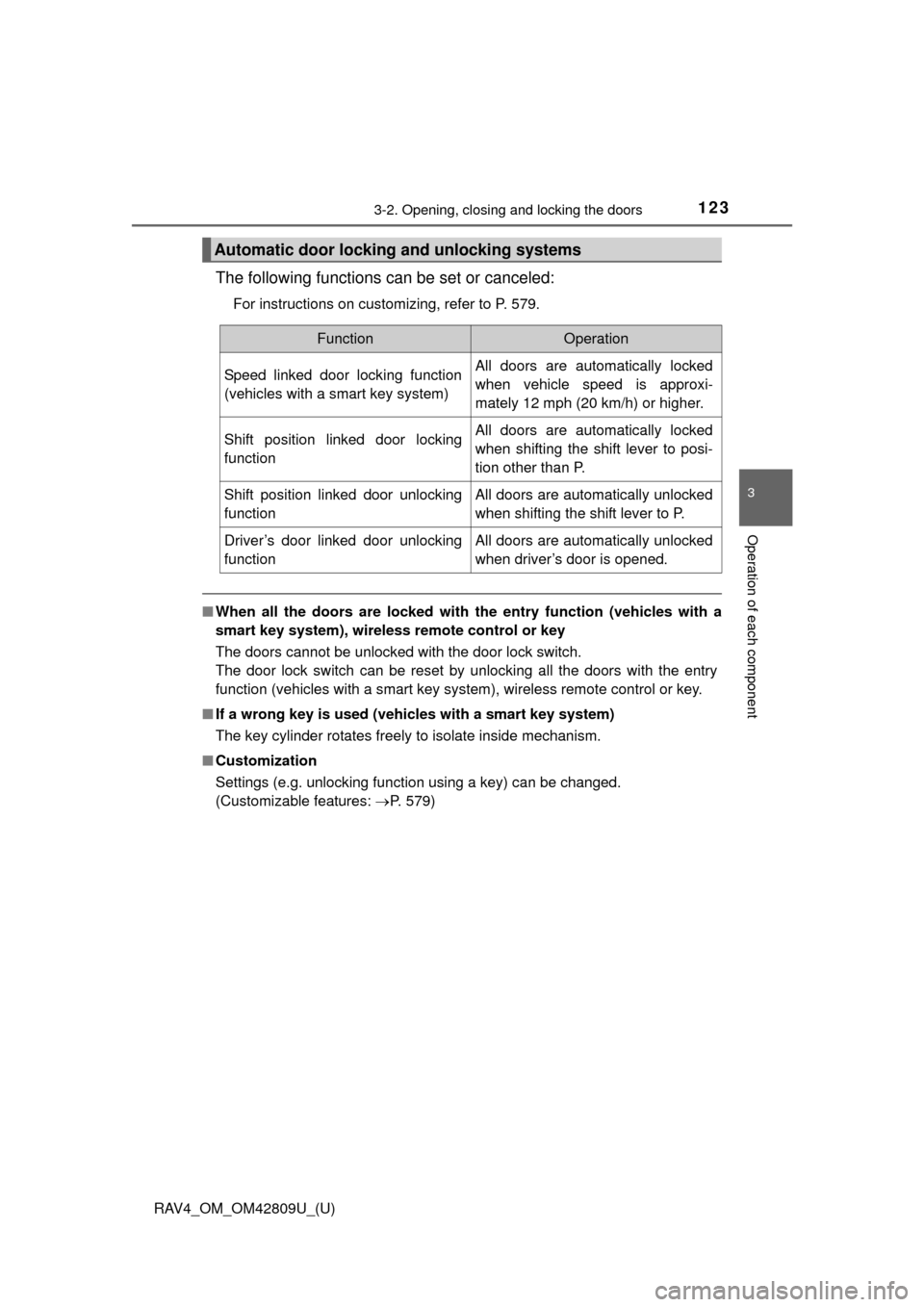
The following functions can be set or canceled:
For instructions on customizing, refer to P. 579.
■When all the doors are locked with the entry function (vehicles with a
smart key system), wireless remote control or key
The doors cannot be unlocked with the door lock switch.
The door lock switch can be reset by unlocking all the doors with the entry
function (vehicles with a smart key system), wireless remote control or key.
■ If a wrong key is used (vehicles with a smart key system)
The key cylinder rotates freely to isolate inside mechanism.
■ Customization
Settings (e.g. unlocking function using a key) can be changed.
(Customizable features: P. 579)
Automatic door locking and unlocking systems
FunctionOperation
Speed linked door locking function
(vehicles with a smart key system)All doors are automatically locked
when vehicle speed is approxi-
mately 12 mph (20 km/h) or higher.
Shift position linked door locking
functionAll doors are automatically locked
when shifting the shift lever to posi-
tion other than P.
Shift position linked door unlocking
functionAll doors are automatically unlocked
when shifting the shift lever to P.
Driver’s door linked door unlocking
functionAll doors are automatically unlocked
when driver’s door is opened.
Page 126 of 624
126
RAV4_OM_OM42809U_(U)
3-2. Opening, closing and locking the doors
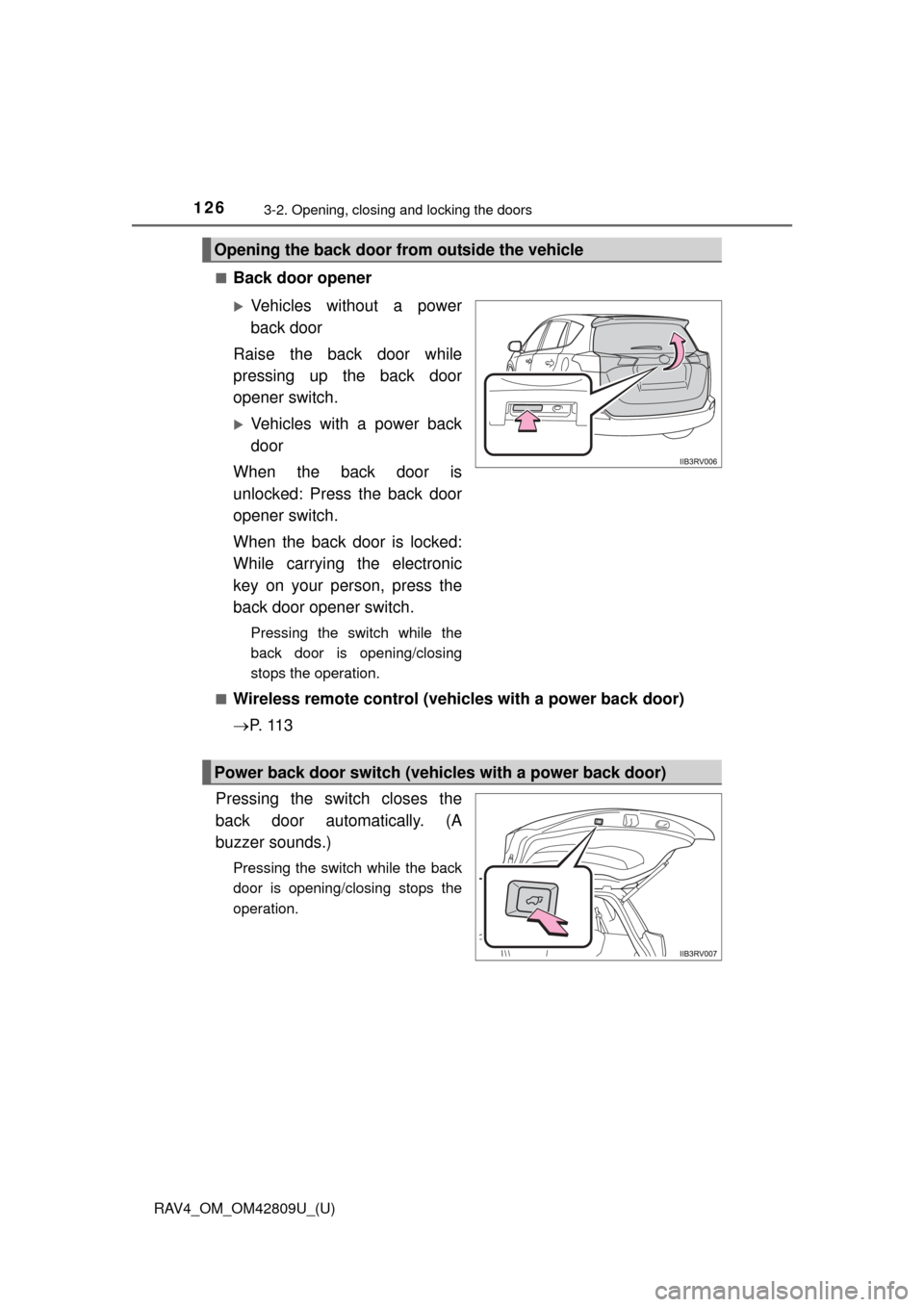
■Back door opener
Vehicles without a power
back door
Raise the back door while
pressing up the back door
opener switch.
Vehicles with a power back
door
When the back door is
unlocked: Press the back door
opener switch.
When the back door is locked:
While carrying the electronic
key on your person, press the
back door opener switch.
Pressing the switch while the
back door is opening/closing
stops the operation.
■
Wireless remote control (vehicles with a power back door)
P. 1 1 3
Pressing the switch closes the
back door automatically. (A
buzzer sounds.)
Pressing the switch while the back
door is opening/closing stops the
operation.
Opening the back door from outside the vehicle
Power back door switch (vehicles with a power back door)
Page 133 of 624

RAV4_OM_OM42809U_(U)
1333-2. Opening, closing and locking the doors
3
Operation of each component
CAUTION
■Power back door (if equipped)
Observe the following precautions when operating the power back door.
Failure to do so may cause death or serious injury.
●Check the safety of the surrounding area to make sure there are no obsta-
cles or anything that could cause any of your belongings to get caught.
● If anyone is in the vicinity, make sure they are safe and let them know that
the back door is about to open or close.
● If the power back door main switch is turned off while the back door is
operating during automatic operation, the back door stops operating. Take
extra care when on an incline, as the back door may open or close sud-
denly.
● If the operating conditions of the power back door are no longer met, a
buzzer may sound and the back door may stop opening or closing. The
back door then has to be operated manually. Take extra care in this situa-
tion, as the back door may move abruptly.
● On an incline, the back door may suddenly shut after it opens automati-
cally. Make sure the back door is fully open and secure.
● In the following situations, the power back door may detect an abnormality
and automatic operation may be stopped. In this case, the back door has
to be operated manually. Take extra care in this situation, as the stopped
back door may suddenly open or close, causing an accident.
• When the back door contacts an obstacle
• When the battery voltage suddenly drops, such as when the engine
switch is turned to the “ON” position (vehicles without a smart key sys-
tem) or IGNITION ON mode (vehicles with a smart key system) or the
engine is started during automatic operation