reset TOYOTA RAV4 2014 XA40 / 4.G Owner's Manual
[x] Cancel search | Manufacturer: TOYOTA, Model Year: 2014, Model line: RAV4, Model: TOYOTA RAV4 2014 XA40 / 4.GPages: 732, PDF Size: 14.44 MB
Page 408 of 732
408
RAV4_OM_OM42A04U_(U)
5-3. Using the audio system (Entune Audio)
Search for desired stations by turning the “TUNE•SCROLL” knob or
pressing the “SEEK >” button or “< TRACK” button.
Select “(add new)”.
To change the preset station to a different one, select and hold the preset
station.
Select “Yes”.
Select “OK” after setting the new preset station.
■Refreshing the station list
Select “Refresh” on the “Station List” screen.
To cancel the refresh, select “Cancel Refresh”.
■Reception sensitivity
●Maintaining perfect radio reception at all times is difficult due to the continu-
ally changing position of the antenna, differences in signal strength and sur-
rounding objects, such as trains, transmitters, etc.
● The radio antenna is mounted on the roof. The antenna can be removed
from the base by turning it.
Setting station presets
1
2
3
4
1
Page 418 of 732
418
RAV4_OM_OM42A04U_(U)
5-3. Using the audio system (Entune Audio)
■iPod problems
To resolve most problems encountered when using your iPod, disconnect
your iPod from the vehicle iPod connection and reset it. For instructions on
how to reset your iPod, refer to your iPod Owner’s Manual.
■ Error messages
If the following error messages appear on the screen, refer to the table and
take the appropriate measures. If the problem is not rectified, take the vehicle
to your Toyota dealer.
MessageCause/Correction procedures
“Connection error. Please
consult your Owner’s Man-
ual for instructions on how
to connect the iPod.”
This indicates a problem in the iPod or its con-
nection.
“No music files found.”This indicates that there is no music data in
the iPod.
“No videos found.”This indicates that no video files are included
in the iPod.
“Please check the iPod
firmware version.”
This indicates that the software version is not
compatible.
Please check the compatible models.
( P. 419)
“iPod authorization unsuc-
cessful.”This indicates that the audio system failed to
authorize the iPod.
Please check your iPod.
Page 460 of 732
460
RAV4_OM_OM42A04U_(U)
5-3. Using the audio system (Entune Audio)
Contact/Call Histor y Settings
The contact can be trans ferred from a Bluetooth® phone to the sys-
tem. The contact also c an be added, edited and deleted.
The call history can be deleted and contact and favorites can be
changed. Display the “Phone/Message Settings” screen. ( P. 458)
Select “Contact/Call History Settings”.
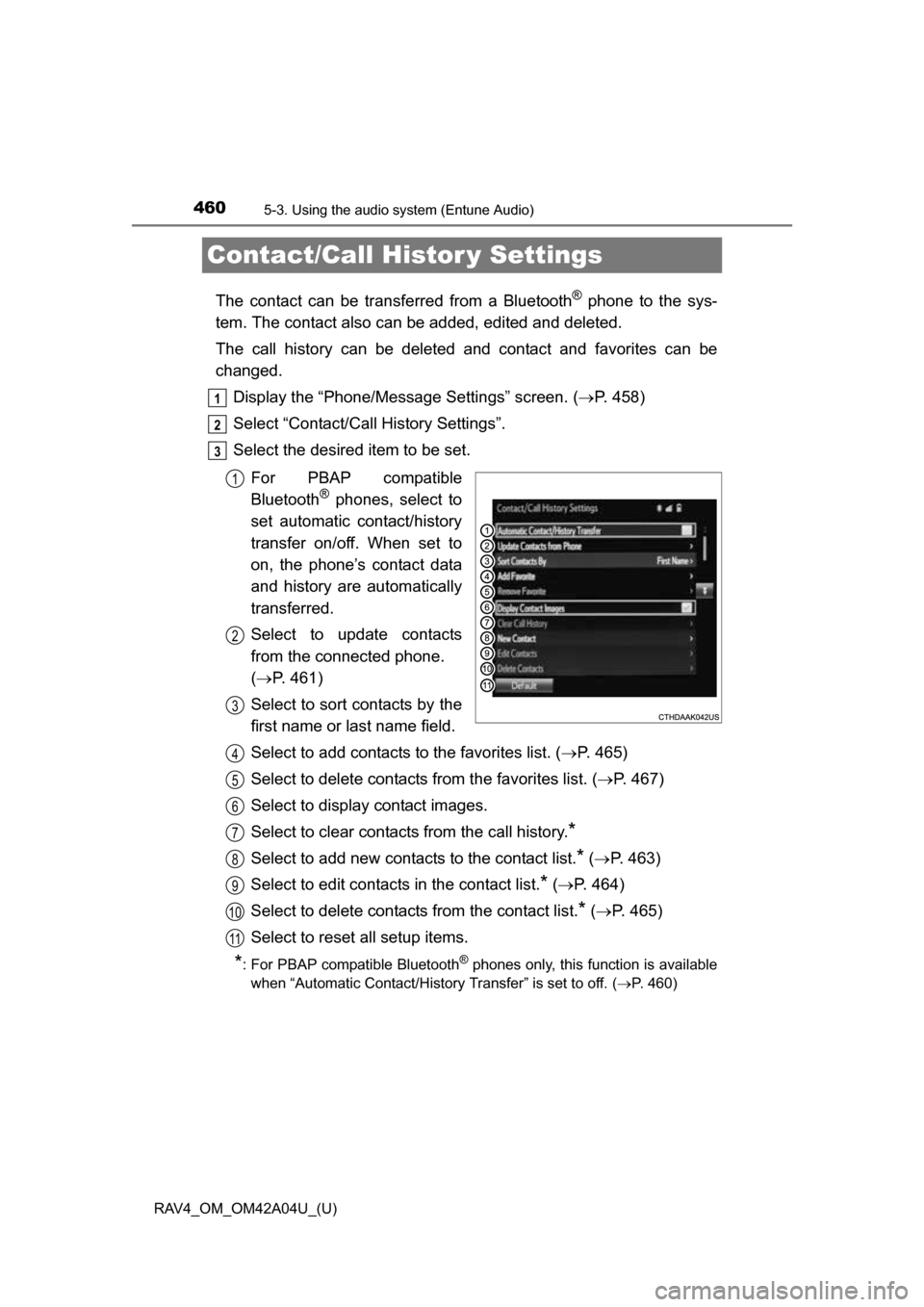
Select the desired item to be set.
For PBAP compatible
Bluetooth
® phones, select to
set automatic contact/history
transfer on/off. When set to
on, the phone’s contact data
and history are automatically
transferred.
Select to update contacts
from the connected phone.
( P. 461)
Select to sort contacts by the
first name or last name field.
Select to add contacts to the favorites list. ( P. 465)
Select to delete contacts from the favorites list. ( P. 467)
Select to display contact images.
Select to clear contacts from the call history.
*
Select to add new contacts to the contact list.* ( P. 463)
Select to edit contacts in the contact list.
* ( P. 464)
Select to delete contacts from the contact list.
* ( P. 465)
Select to reset all setup items.
*: For PBAP compatible Bluetooth® phones only, this function is available
when “Automatic Contact/History Transfer” is set to off.
( P. 460)
1
2
3
1
2
3
4
5
6
7
8
9
10
11
Page 504 of 732
504
RAV4_OM_OM42A04U_(U)
5-6. Other interior features
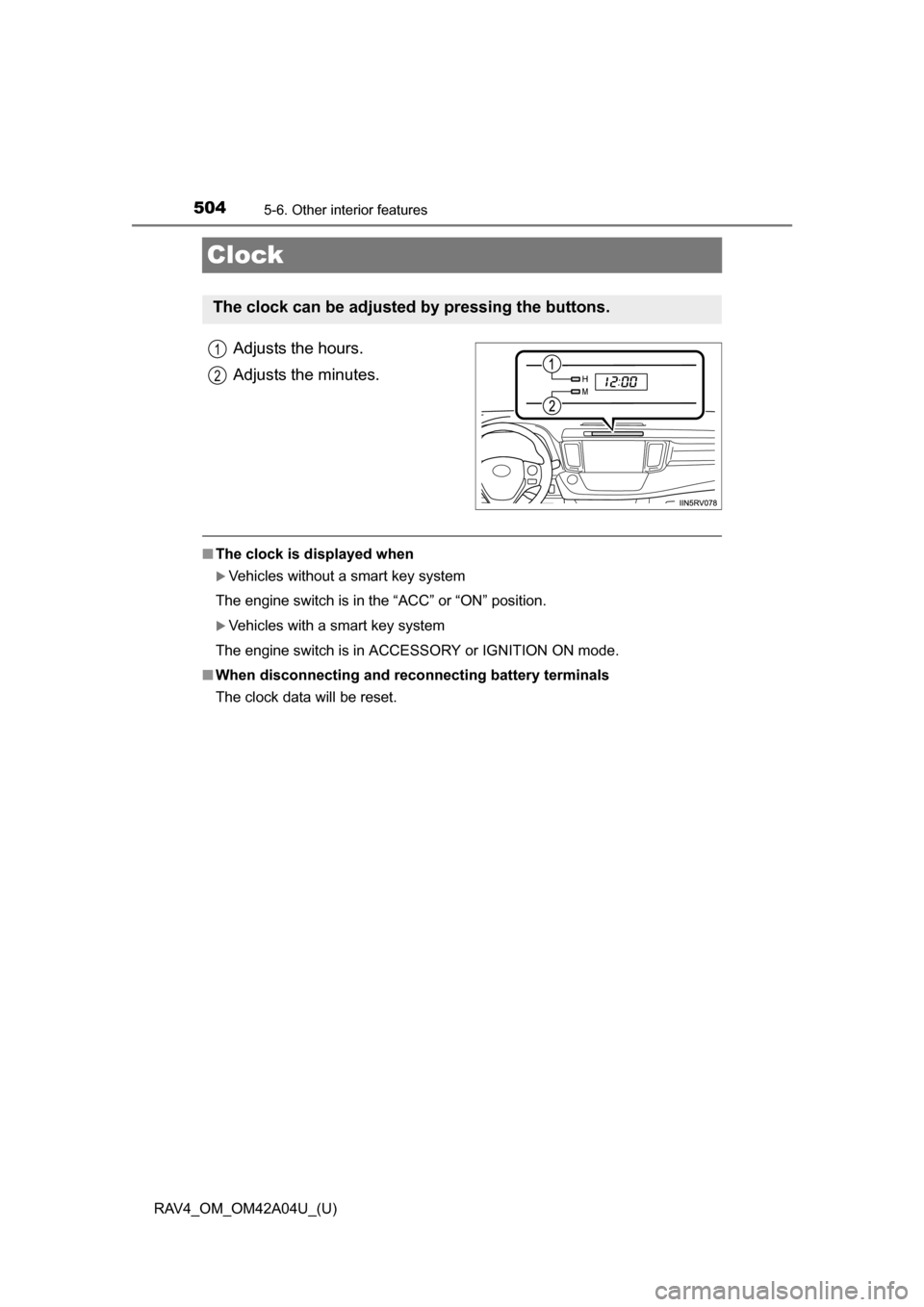
Clock
Adjusts the hours.
Adjusts the minutes.
■The clock is displayed when
Vehicles without a smart key system
The engine switch is in the “ACC” or “ON” position.
Vehicles with a smart key system
The engine switch is in ACCESSORY or IGNITION ON mode.
■ When disconnecting and reco nnecting battery terminals
The clock data will be reset.
The clock can be adjusted by pressing the buttons.
1
2
Page 521 of 732
RAV4_OM_OM42A04U_(U)
5216-2. Maintenance
6
Maintenance and care
■Repair and replacement
It is recommended that genuine Toyota parts be used for repairs to ensure
performance of each system. If non-Toyota parts are used in replacement or if
a repair shop other than a Toyota dealer performs repairs, confirm the war-
ranty coverage.
■ Reset the maintenance data (U.S.A. only)
After the required maintenance is performed according to the maintenance
schedule, please reset the maintenance data.
To reset the data, follow the procedure described below:
Vehicles without a smart key system
Switch the display to the trip meter A (P. 88) and then turn the engine
switch to the “LOCK” position.
While pressing the “DISP” button ( P. 88), turn the engine switch to the
“ON” position (do not start the engine because reset mode will be can-
celed).
Continue to press and hold the button until the trip meter displays “000000”.
Vehicles with a smart key system
Switch the display to the trip meter A (P. 88) and then turn the engine
switch off.
While pressing the “DISP” button ( P. 88), turn the engine switch to IGNI-
TION ON mode (do not start the engine because reset mode will be can-
celed).
Continue to press and hold the button until the trip meter displays “000000”.
■ Allow inspection and repairs to be performed by a Toyota dealer
●Toyota technicians are well-trained specialists and are kept up to date with
the latest service information. They are well informed about the operations
of all systems on your vehicle.
● Keep a copy of the repair order. It proves that the maintenance that has
been performed is under warranty cove rage. If any problem should arise
while your vehicle is under warranty, your Toyota dealer will promptly take
care of it.
1
2
3
1
2
3
Page 554 of 732
554
RAV4_OM_OM42A04U_(U)
6-3. Do-it-yourself maintenance
■How to initialize the tire pressure warning systemPark the vehicle in a safe place and turn the engine switch to the
“LOCK” position (vehicles without a smart key system) or off
(vehicles with a smart key system).
Initialization cannot be performed while the vehicle is moving.
Adjust the tire inflation pressure to the specified cold tire inflation
pressure level. ( P. 669)
Make sure to adjust the tire pressure to the specified cold tire inflation
pressure level. The tire pressure warning system will operate based on
this pressure level.
Turn the engine switch to the “ON” position (vehicles without a
smart key system) or IGNITION ON mode (vehicles with a smart
key system).
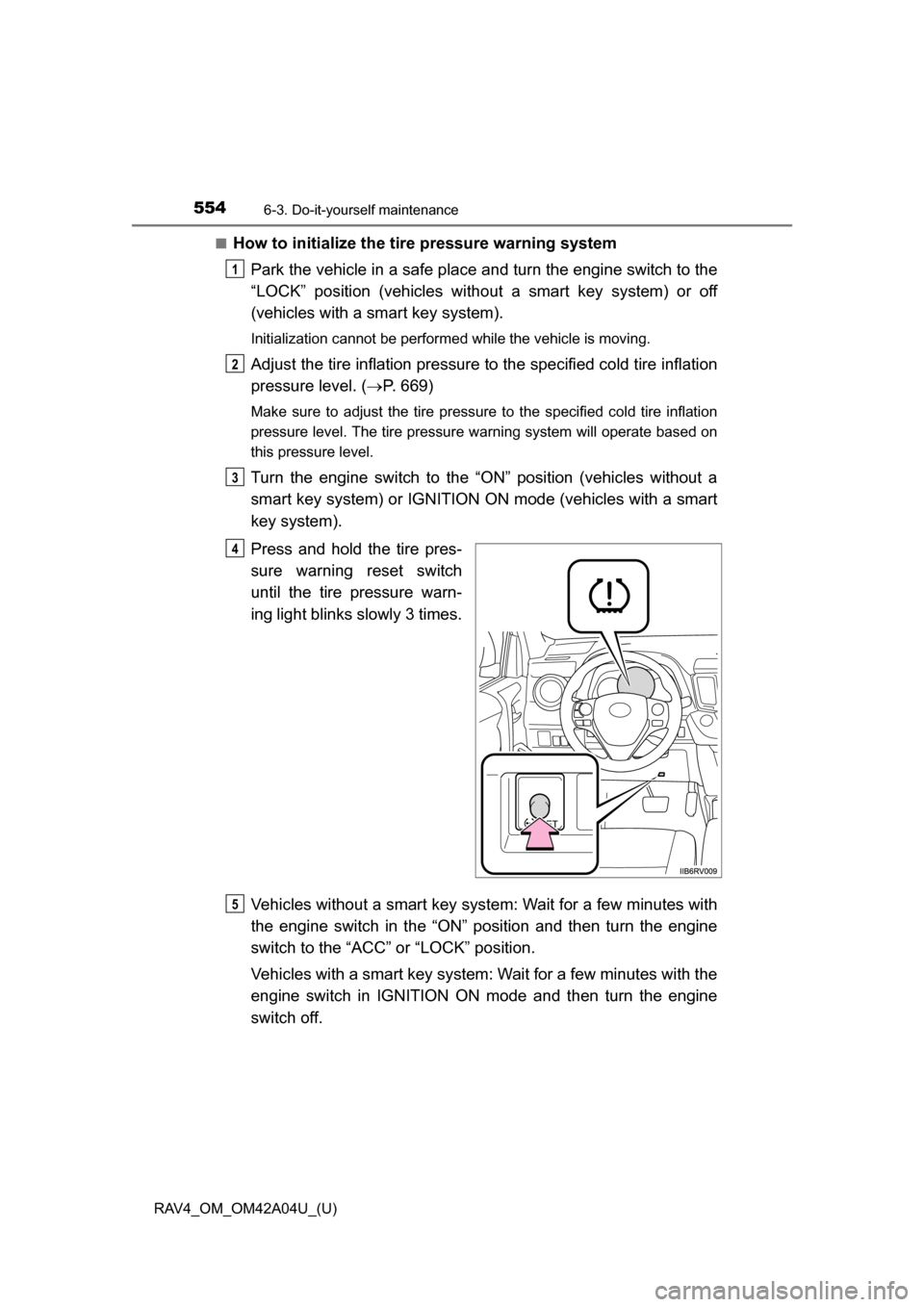
Press and hold the tire pres-
sure warning reset switch
until the tire pressure warn-
ing light blinks slowly 3 times.
Vehicles without a smart key syst em: Wait for a few minutes with
the engine switch in the “ON” position and then turn the engine
switch to the “ACC” or “LOCK” position.
Vehicles with a smart key system: Wait for a few minutes with the
engine switch in IGNITION ON mode and then turn the engine
switch off.
1
2
3
4
5
Page 558 of 732
558
RAV4_OM_OM42A04U_(U)
6-3. Do-it-yourself maintenance
■The initialization operation (vehicles with the tire pressure warning sys-
tem)
●Make sure to carry out initialization after adjusting the tire inflation pressure.
Also, make sure the tires are cold before carrying out initialization or tire
inflation pressure adjustment.
● If you have accidentally turned the engine switch to the “LOCK” position
(vehicles without a smart key system) or off (vehicles with a smart key sys-
tem) during initialization, it is not necessary to press the reset switch again
as initialization will restart automatically when the engine switch has been
turned to the “ON” position (vehicles without a smart key system) or IGNI-
TION ON mode (vehicles with a smart key system) for the next time.
● If you accidentally press the reset switch when initialization is not necessary,
adjust the tire inflation pressure to the specified level when the tires are
cold, and conduct initialization again.
■ When initialization of the tire pressure warning system has failed (if
equipped)
Initialization can be completed in a few minutes. However, in the following
cases, the settings have not been recorded and the system will not operate
properly. If repeated attempts to record tire inflation pressure settings are
unsuccessful, have the vehicle inspected by your Toyota dealer.
● When operating the tire pressure warning reset switch, the tire pressure
warning light does not blink 3 times.
● After driving for a certain period of time since the initialization has been
completed, the warning light comes on after blinking for 1 minute.
■ Tire pressure warning system certification
For vehicles sold in the U.S.A.
TRW Automotive
Tire Pressure Monitoring Sensor
FCC ID: GQ4-51T
This device complies with Part 15 of the FCC Rules. Operation is subject to the
following two conditions: (1) This device may not cause harmful interference, and
(2) This device must accept any interfer ence received, including interference that
may cause undesired operation of this device.
WARNING: Changes or modifications not expressively approved by TRW Auto-
motive U.S. LLC could void the user’s authority to operate the equipment.
Page 560 of 732
560
RAV4_OM_OM42A04U_(U)
6-3. Do-it-yourself maintenance
CAUTION
■When inspecting or replacing tires
Observe the following precautions to prevent accidents.
Failure to do so may cause damage to parts of the drive train as well as
dangerous handling characteristics, which may lead to an accident resulting
in death or serious injury.
●Do not mix tires of different makes, models or tread patterns.
Also, do not mix tires of remarkably different treadwear.
● Do not use tire sizes other than those recommended by Toyota.
● Do not mix differently constructed tires (radial, bias-belted or bias-ply
tires).
● Do not mix summer, all season and snow tires.
● Do not use tires that have been used on another vehicle.
Do not use tires if you do not know how they were used previously.
● Vehicles with a compact spare tire: Do not tow if your vehicle has a com-
pact spare tire installed.
■ When initializing the tire pressu re warning system (if equipped)
Do not operate the tire pressure warning reset switch without first adjusting
the tire inflation pressure to the specified level. Otherwise, the tire pressure
warning light may not come on even if the tire inflation pressure is low, or it
may come on when the tire inflation pressure is actually normal.
Page 613 of 732
6137-2. Steps to take in an emergency
RAV4_OM_OM42A04U_(U)
7
When trouble arises
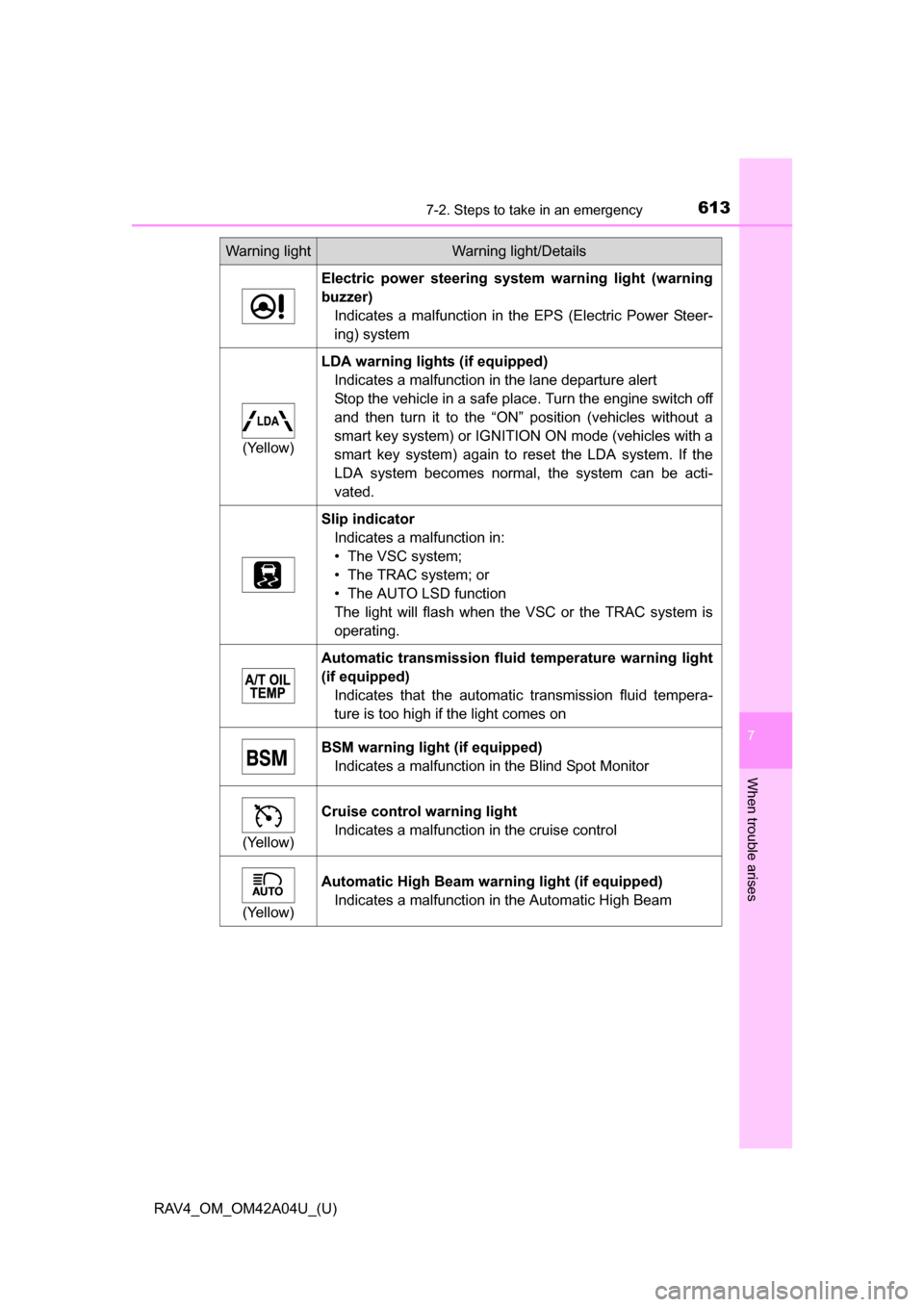
Electric power steering system warning light (warning
buzzer)Indicates a malfunction in the EPS (Electric Power Steer-
ing) system
(Yellow)
LDA warning lights (if equipped)Indicates a malfunction in the lane departure alert
Stop the vehicle in a safe place. Turn the engine switch off
and then turn it to the “ON” position (vehicles without a
smart key system) or IGNITION ON mode (vehicles with a
smart key system) again to reset the LDA system. If the
LDA system becomes normal, the system can be acti-
vated.
Slip indicatorIndicates a malfunction in:
• The VSC system;
• The TRAC system; or
• The AUTO LSD function
The light will flash when the VSC or the TRAC system is
operating.
Automatic transmission flui d temperature warning light
(if equipped) Indicates that the automatic transmission fluid tempera-
ture is too high if the light comes on
BSM warning light (if equipped)Indicates a malfunction in the Blind Spot Monitor
(Yellow)
Cruise control warning lightIndicates a malfunction in the cruise control
(Yellow)
Automatic High Beam warning light (if equipped)Indicates a malfunction in the Automatic High Beam
Warning lightWarning light/Details
Page 616 of 732
6167-2. Steps to take in an emergency
RAV4_OM_OM42A04U_(U)
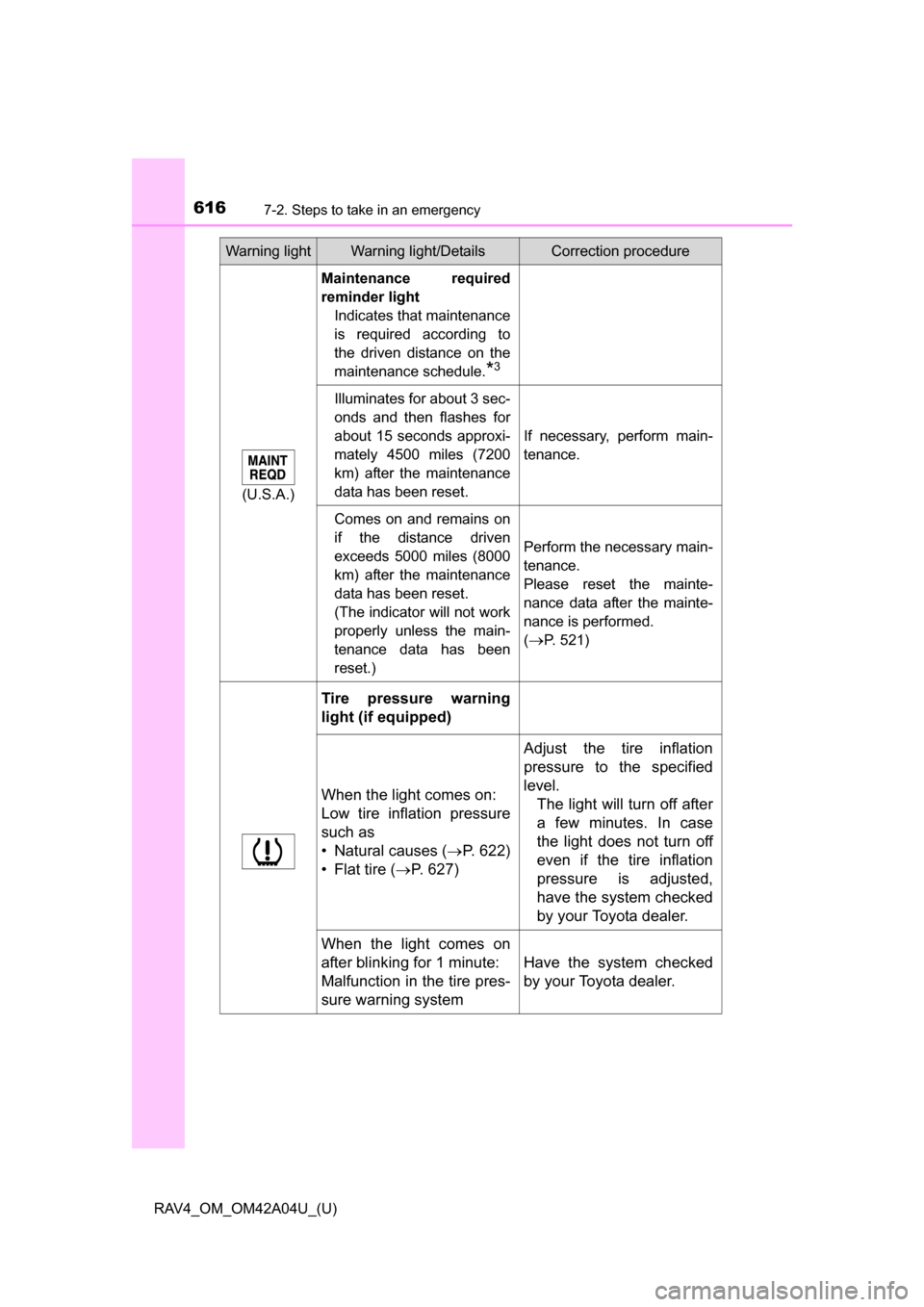
(U.S.A.)
Maintenance required
reminder lightIndicates that maintenance
is required according to
the driven distance on the
maintenance schedule.
*3
Illuminates for about 3 sec-
onds and then flashes for
about 15 seconds approxi-
mately 4500 miles (7200
km) after the maintenance
data has been reset.
If necessary, perform main-
tenance.
Comes on and remains on
if the distance driven
exceeds 5000 miles (8000
km) after the maintenance
data has been reset.
(The indicator will not work
properly unless the main-
tenance data has been
reset.)
Perform the necessary main-
tenance.
Please reset the mainte-
nance data after the mainte-
nance is performed.
(
P. 521)
Tire pressure warning
light (if equipped)
When the light comes on:
Low tire inflation pressure
such as
• Natural causes ( P. 622)
• Flat tire (P. 627)
Adjust the tire inflation
pressure to the specified
level. The light will turn off after
a few minutes. In case
the light does not turn off
even if the tire inflation
pressure is adjusted,
have the system checked
by your Toyota dealer.
When the light comes on
after blinking for 1 minute:
Malfunction in the tire pres-
sure warning system
Have the system checked
by your Toyota dealer.
Warning lightWarning light/DetailsCorrection procedure