reset TOYOTA RAV4 2014 XA40 / 4.G User Guide
[x] Cancel search | Manufacturer: TOYOTA, Model Year: 2014, Model line: RAV4, Model: TOYOTA RAV4 2014 XA40 / 4.GPages: 732, PDF Size: 14.44 MB
Page 323 of 732
RAV4_OM_OM42A04U_(U)
3235-2. Using the audio system
5
Interior features
■Scanning the preset radio stationsPress and hold the “SCAN” button until you hear a beep.
Preset stations will be played for 5 seconds each.
To cancel, press the button again.
When the desired station is reached, press the button again.
■Scanning all the radio stations within rangePress the “SCAN” button.
All the stations with reception will be played for 5 seconds each.
To cancel, press the button again.
When the desired station is reached, press the button again.
Press the “TEXT” button to display or hide the radio texts.
If there are continuing texts, is displayed.
Press the button to display the remaining texts.
Scanning radio stations
Switching the display
1
2
1
2
Page 324 of 732
324
RAV4_OM_OM42A04U_(U)
5-2. Using the audio system
■When the battery is disconnected
Stations presets are erased.
■ Reception sensitivity
●Maintaining perfect radio reception at all times is difficult due to the continu-
ally changing position of the antenna, differences in signal strength and sur-
rounding objects, such as trains, transmitters, etc.
● The radio antenna is mounted on the roof. The antenna can be removed
from the base by turning it.
NOTICE
■ To prevent damage, remove the antenna in the following cases
●The antenna will touch the ceiling of a garage.
● A cover will be put on the roof.
Page 342 of 732
342
RAV4_OM_OM42A04U_(U)
5-2. Using the audio system
■iPod functions
●When an iPod is connected and the audio source is changed to iPod mode,
the iPod will resume play from the same point in which it was last used.
● Depending on the iPod that is connected to the system, certain functions
may not be available. Disconnecting the device and reconnecting it once
again may resolve some malfunctions.
● While connected to the system, the iPod cannot be operated with its own
controls. It is necessary to use the controls of the vehicle’s audio system
instead.
■ iPod problems
To resolve most problems encountered when using your iPod, disconnect
your iPod from the vehicle iPod connection and reset it.
For instructions on how to reset your iPod, refer to your iPod Owner’s Man-
ual.
■ Display
P. 327
■ Error messages
“ERROR”:
This indicates a problem in the iPod or its connection.
“NO SONGS”:
This indicates that there is no music data in the iPod.
“NO PLAYLIST”:
This indicates that some available songs are not found in a selected playlist.
“UPDATE YOUR iPod”:
This indicates that the version of the iPod is not compatible. Upgrade your
iPod software to the latest version.
Page 357 of 732
RAV4_OM_OM42A04U_(U)
3575-2. Using the audio system
5
Interior features
Press the “MODE” switch when the audio system is turned off.
Press the “MODE” switch when the audio system is turned on. The
audio source changes as follows each time the button is pressed. If a
mode cannot be used, it will be skipped.
AM FM1 FM2 CD mode iPod or USB memory
Bluetooth
® audio AUX
Press the “+” switch to increase the volume and the “-” switch to
decrease the volume.
Hold down the switch to continue increasing or decreasing the volume.
Press and hold the “MODE” switch.
To cancel, press and hold the switch again.
Press the “MODE” switch to select the radio mode.
Press the “ ” or “ ” switch to select a preset station.
To scan for receivable stations, press and hold the switch until you hear a
beep.
Turning on the power
Changing the audio source
Adjusting the volume
Silencing a sound
Selecting a radio station
1
2
Page 373 of 732
RAV4_OM_OM42A04U_(U)
3735-2. Using the audio system
5
Interior features
Select “Phonebook” using the “TUNE•SCROLL” knob.
Select the desired name using the knob and press the off-hook
switch.
By pressing (Add S. Dial) and one of the speed dial buttons (from [1] to [5]) while the desired name is selected, it can be regis-
tered as a speed dial.
Press (A-Z) to display the regi stered names in alphabetical order
of the initial.
Select “Speed dials” using the “TUNE•SCROLL” knob.
Press the desired preset button (f rom [1] to [5]) and press
the off-hook switch.
To delete a registered speed dial, after selecting the desired preset
button (from [1] to [5]) press (DELETE) and then press (YES).
To overwrite a speed dial, after selecting the desired preset button
(from [1] to [5]) press (YES).
Dialing by selecting a name
Speed dialing
1
2
1
2
Page 374 of 732
374
RAV4_OM_OM42A04U_(U)
5-2. Using the audio system
Select “Dial by number” using the “TUNE•SCROLL” knob.
Enter the phone number and press the off-hook switch.
Select “All calls”, “Missed calls”, “Incoming calls” or “Outgoing calls”
using the “TUNE•SCROLL” knob.
Select a desired number using th e knob and press the off-hook
switch.
The following operations can be performed:
● Registering a number as a speed dial
Press (Add S. Dial) and then press the desired preset button
(from [1] to [5]).
● Deleting the selected number
Press (DELETE) and press (YES).
Dialing by entering the number
Dialing from call histories
1
2
1
2
Page 383 of 732
RAV4_OM_OM42A04U_(U)
3835-2. Using the audio system
5
Interior features
Select “Add contacts” using the “TUNE•SCROLL” knob.
● Transferring all contacts from the cellular phone
Select “Overwrite all” using th e “TUNE•SCROLL” knob and press
(YES).
● Transferring one contact from the cellular phone
Select “Add one contact” usi ng the “TUNE•SCROLL” knob and
press (YES).
Select “Add SD” using the “TUNE•SCROLL” knob.
Select the desired data using the knob.
Press the desired preset butt on (from [1] to [5]).
For details about setting speed dials from the call history: P. 374
For details about deleting speed dials: P. 373
Adding a new phone number
Setting speed dials
1
2
3
Page 389 of 732
389
RAV4_OM_OM42A04U_(U)
5-3. Using the audio system (Entune Audio)
5
Interior features
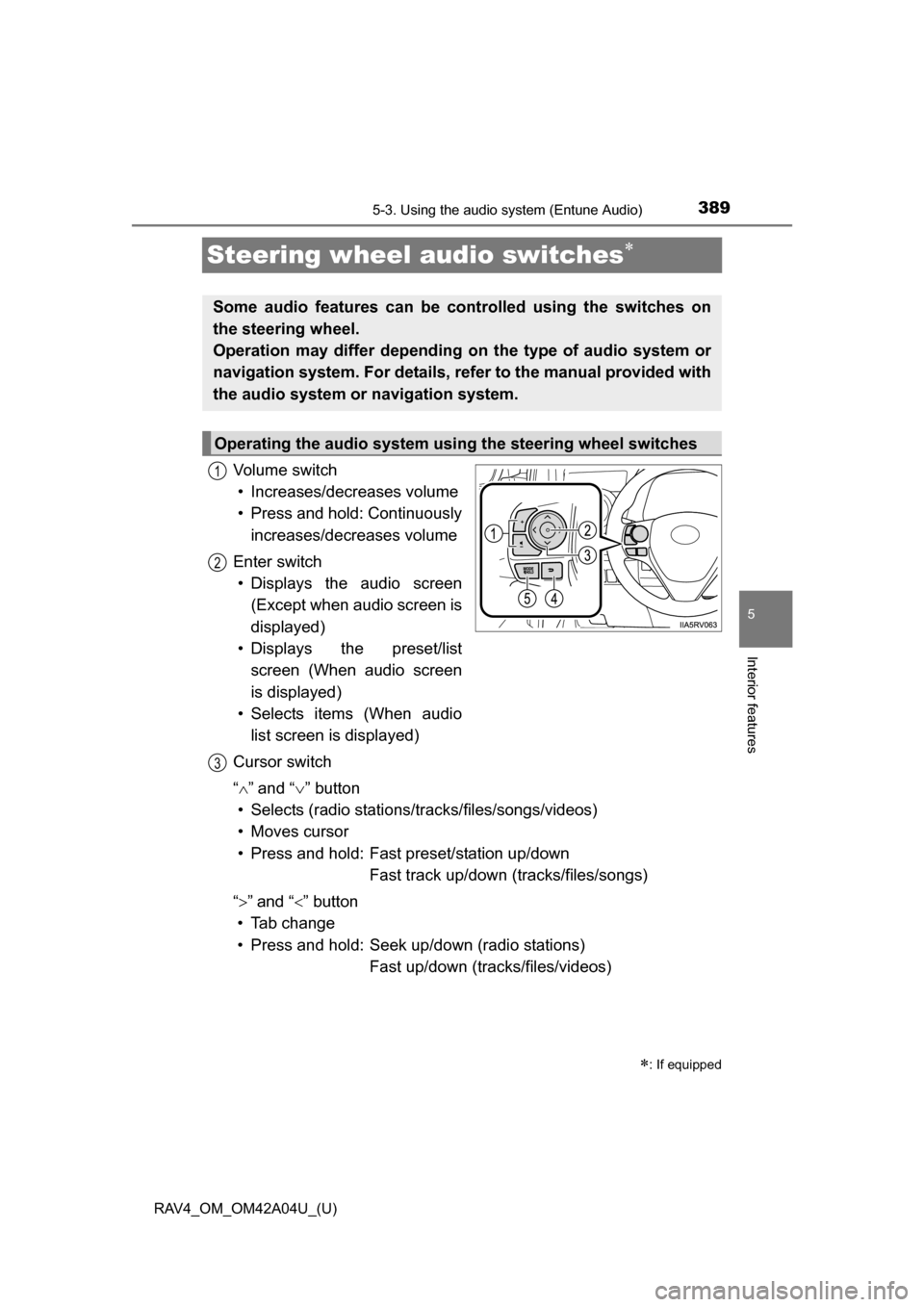
Steering wheel audio switches
Vo l u m e s w i t c h• Increases/decreases volume
• Press and hold: Continuously
increases/decreases volume
Enter switch • Displays the audio screen
(Except when audio screen is
displayed)
• Displays the preset/list
screen (When audio screen
is displayed)
• Selects items (When audio
list screen is displayed)
Cursor switch
“ ”and “ ” button
• Selects (radio stations/tr acks/files/songs/videos)
• Moves cursor
• Press and hold: Fast preset/station up/down Fast track up/down (tracks/files/songs)
“ ” and “ ” button
• Tab change
• Press and hold: Seek up/down (radio stations) Fast up/down (tracks/files/videos)
: If equipped
Some audio features can be c ontrolled using the switches on
the steering wheel.
Operation may differ depending on the type of audio system or
navigation system. For details, refer to the manual provided with
the audio system or navigation system.
Operating the audio system using the steering wheel switches
1
12
3
Page 399 of 732
399
RAV4_OM_OM42A04U_(U)
5-3. Using the audio system (Entune Audio)
5
Interior features
Audio settings
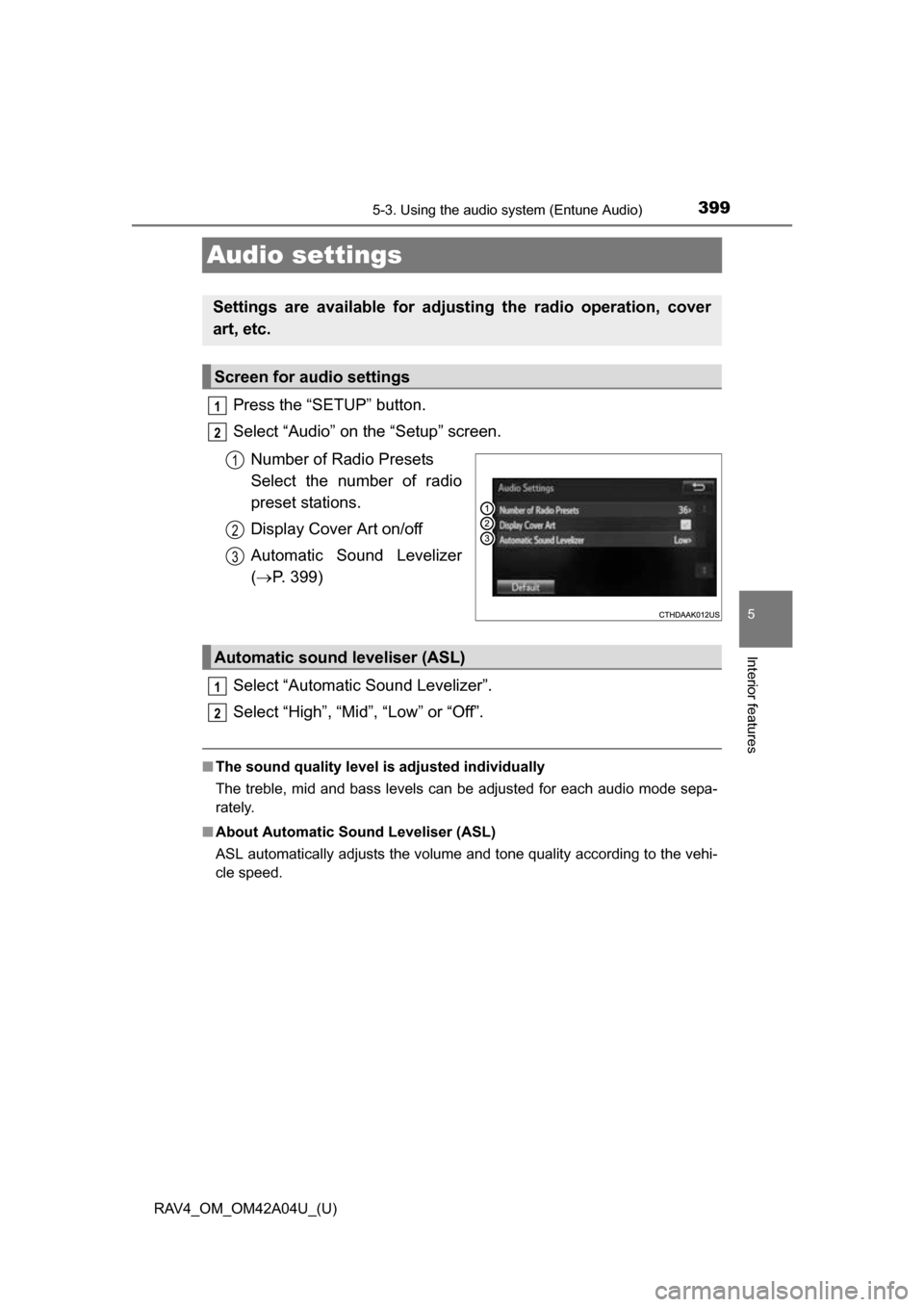
Press the “SETUP” button.
Select “Audio” on the “Setup” screen.Number of Radio Presets
Select the number of radio
preset stations.
Display Cover Art on/off
Automatic Sound Levelizer
( P. 399)
Select “Automatic Sound Levelizer”.
Select “High”, “Mid”, “Low” or “Off”.
■ The sound quality level is adjusted individually
The treble, mid and bass levels can be adjusted for each audio mode sepa-
rately.
■ About Automatic Sou nd Leveliser (ASL)
ASL automatically adjusts the volume and tone quality according to the vehi-
cle speed.
Settings are available for adjusting the radio operation, cover
art, etc.
Screen for audio settings
1
2
1
2
3
Automatic sound leveliser (ASL)
1
2
Page 407 of 732
407
RAV4_OM_OM42A04U_(U)
5-3. Using the audio system (Entune Audio)
5
Interior features
Radio operation
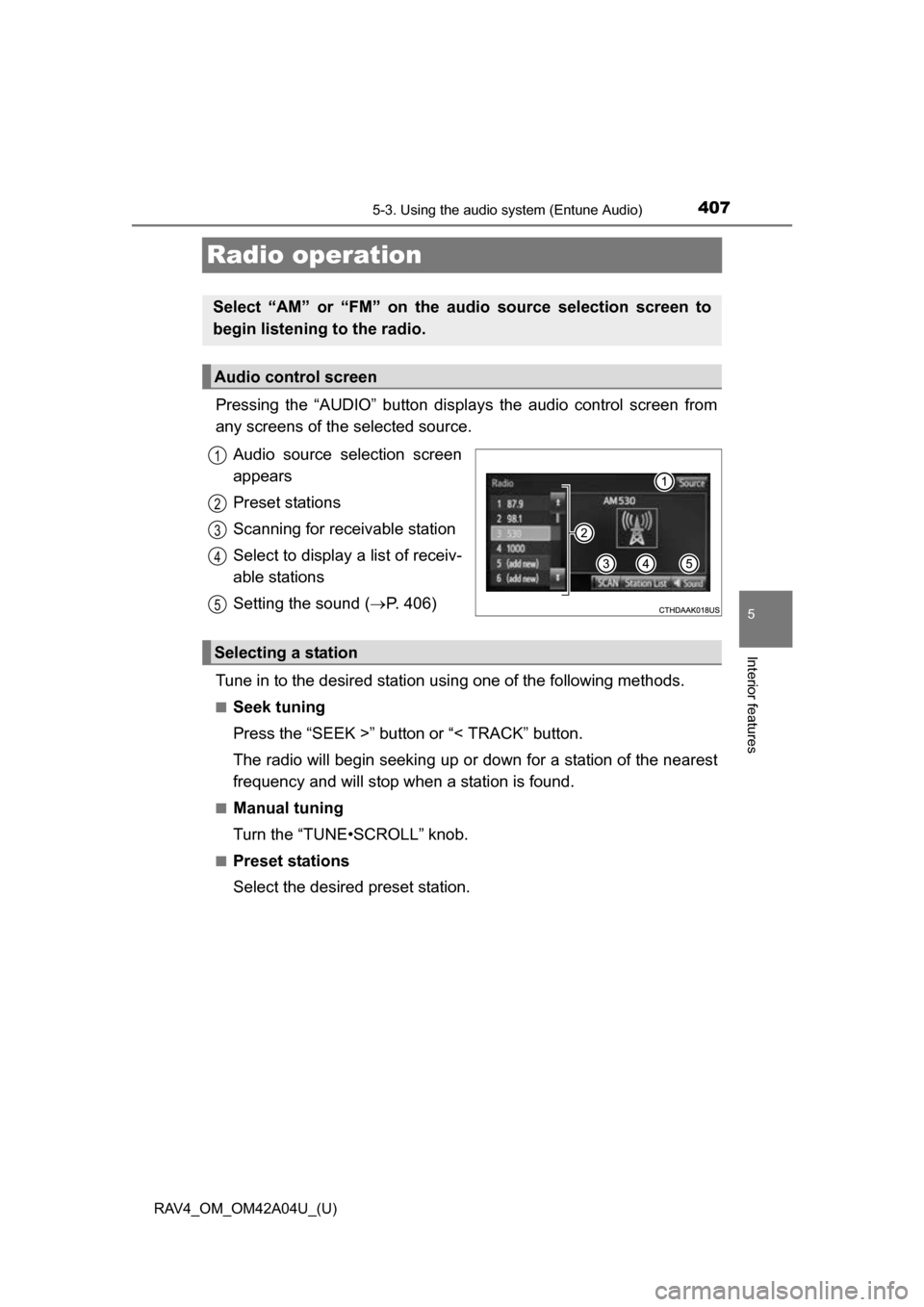
Pressing the “AUDIO” button displays the audio control screen from
any screens of the selected source.
Audio source selection screen
appears
Preset stations
Scanning for receivable station
Select to display a list of receiv-
able stations
Setting the sound ( P. 406)
Tune in to the desired station using one of the following methods.
■Seek tuning
Press the “SEEK >” button or “< TRACK” button.
The radio will begin seeking up or down for a station of the nearest
frequency and will stop when a station is found.
■Manual tuning
Turn the “TUNE•SCROLL” knob.
■Preset stations
Select the desired preset station.
Select “AM” or “FM” on the audio source selection screen to
begin listening to the radio.
Audio control screen
1
2
3
4
5
Selecting a station