change time TOYOTA RAV4 2015 XA40 / 4.G User Guide
[x] Cancel search | Manufacturer: TOYOTA, Model Year: 2015, Model line: RAV4, Model: TOYOTA RAV4 2015 XA40 / 4.GPages: 732, PDF Size: 12.43 MB
Page 357 of 732
RAV4_OM_OM42A78U_(U)
3575-2. Using the audio system
5
Interior features
Press the “MODE” switch when the audio system is turned off.
Press the “MODE” switch when the audio system is turned on. The
audio source changes as follows each time the button is pressed. If a
mode cannot be used, it will be skipped.
AM FM1FM2 CD mode iPod or USB memory
Bluetooth
® audio AUX
Press the “+” switch to increase the volume and the “-” switch to
decrease the volume.
Hold down the switch to continue increasing or decreasing the volume.
Press and hold the “MODE” switch.
To cancel, press and hold the switch again.
Press the “MODE” switch to select the radio mode.
Press the “ ” or “ ” switch to select a preset station.
To scan for receivable stations, press and hold the switch until you hear a
beep.
Turning on the power
Changing the audio source
Adjusting the volume
Silencing a sound
Selecting a radio station
1
2
Page 403 of 732
403
RAV4_OM_OM42A78U_(U)
5-3. Using the audio system (Entune Audio)
5
Interior features
Selecting the audio source
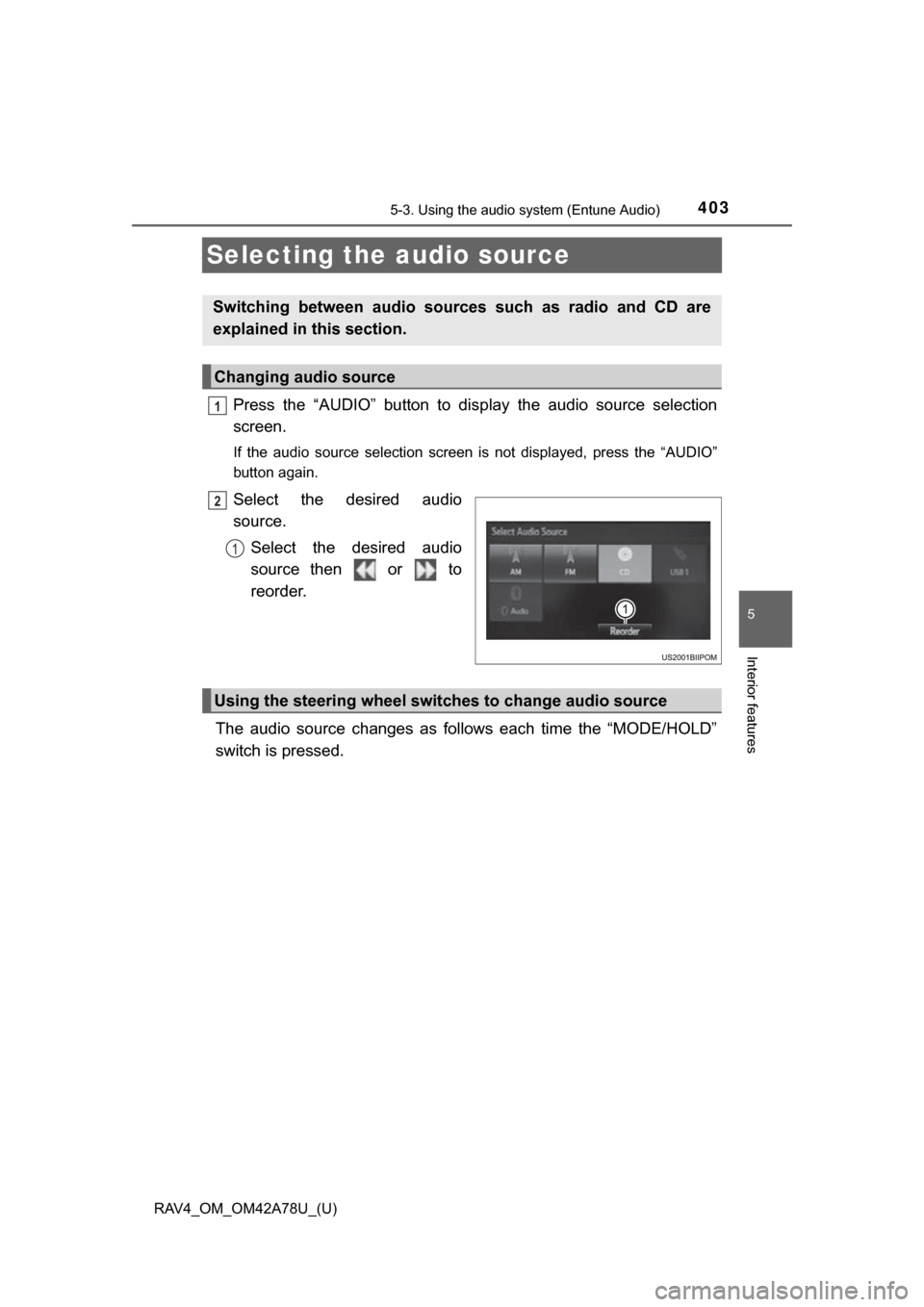
Press the “AUDIO” button to display the audio source selection
screen.
If the audio source selection screen is not displayed, press the “AUDIO”
button again.
Select the desired audio
source.
Select the desired audio
source then or to
reorder.
The audio source changes as follows each time the “MODE/HOLD”
switch is pressed.
Switching between audio sources such as radio and CD are
explained in this section.
Changing audio source
1
2
1
Using the steering wheel switches to change audio source
Page 408 of 732
408
RAV4_OM_OM42A78U_(U)
5-3. Using the audio system (Entune Audio)
Search for desired stations by turning the “TUNE•SCROLL” knob or
pressing the “SEEK >” button or “< TRACK” button.
Select “(add new)”.
To change the preset station to a different one, select and hold the preset
station.
Select “Yes”.
Select “OK” after setting the new preset station.
■Refreshing the station list
Select “Refresh” on the “Station List” screen.
To cancel the refresh, select “Cancel Refresh”.
■Reception sensitivity
●Maintaining perfect radio reception at all times is difficult due to the continu-
ally changing position of the antenna, differences in signal strength and sur-
rounding objects, such as trains, transmitters, etc.
● The radio antenna is mounted on the roof. The antenna can be removed
from the base by turning it.
Setting station presets
1
2
3
4
1
Page 417 of 732
RAV4_OM_OM42A78U_(U)
4175-3. Using the audio system (Entune Audio)
5
Interior features
■About iPod
●“Made for iPod” and “Made for iPhone” mean that an electronic accessory
has been designed to connect specifically to iPod or iPhone, respectively,
and has been certified by the developer to meet Apple performance stan-
dards.
● Apple is not responsible for the operation of this device or its compliance
with safety and regulatory standards. Please note that the use of this acces-
sory with iPod or iPhone may affect wireless performance.
● iPhone, iPod, iPod classic, iPod nano, and iPod touch are trademarks of
Apple Inc., registered in the U.S. and other countries. Lightning is a trade-
mark of Apple Inc.
■ iPod cover art
●Depending on the iPod and songs in the iPod, iPod cover art may be dis-
played.
● This function can be changed to on/off. (P. 399)
● It may take time to display iPod cover art, and the iPod may not be operated
while the cover art display is in process.
● Only iPod cover art that is saved in JPEG format can be displayed.
■ iPod functions
●When an iPod is connected and the audio source is changed to iPod mode,
the iPod will resume play from the same point in which it was last used.
● Depending on the iPod that is connected to the system, certain functions
may not be available. If a function is unavailable due to a malfunction (as
opposed to a system specification), disconnecting the device and recon-
necting it may resolve the problem.
● While connected to the system, the iPod cannot be operated with its own
controls. It is necessary to use the controls of the vehicle’s audio system
instead.
● When the battery level of an iPod is very low, the iPod may not operate. If
so, charge the iPod before use.
● Compatible models ( P. 419)
Page 488 of 732

488
RAV4_OM_OM42A78U_(U)
5-4. Using the interior lights
■Illuminated entry system
Vehicles without a smart key system
The lights automatically turn on/off according to the engine switch position,
whether the doors are locked/unlocked, and whether the doors are open/
closed.
Vehicles with a smart key system
The lights automatically turn on/off according to engine switch mode, the
presence of the electronic key, whether the doors are locked/unlocked, and
whether the doors are opened/closed.
■ To prevent battery discharge
If the following lights remain on when the door is not fully closed and the inte-
rior light main switch is in the door position, the lights will go off automatically
after 20 minutes:
●Interior light
● Engine switch light (if equipped)
■ Customization
Setting (e.g. the time elapsed before lights turn off) can be changed.
(Customizable features: P. 687)
Page 558 of 732

558
RAV4_OM_OM42A78U_(U)
6-3. Do-it-yourself maintenance
■The initialization operation (vehicles with the tire pressure warning
system)
●Make sure to carry out in itialization after adjusting the tire inflation pres-
sure.
Also, make sure the tires are cold be fore carrying out initialization or tire
inflation pressure adjustment.
●If you have accidentally turned the engine switch to the “LOCK” position
(vehicles without a smart key system) or off (vehicles with a smart key
system) during initialization, it is no t necessary to press the reset switch
again as initialization will restart aut omatically when the engine switch
has been turned to the “ON” position (vehicles without a smart key sys-
tem) or IGNITION ON mode (vehic les with a smart key system) for the
next time.
●If you accidentally press the reset s witch when initialization is not neces-
sary, adjust the tire inflation pressu re to the specified level when the
tires are cold, and conduct initialization again.
■When initialization of the tire pressure warning system has failed (if
equipped)
Initialization can be completed in a few minutes. However, in the following
cases, the settings have not been recorded and the system will not oper-
ate properly. If repeated attempts to record tire inflation pressure settings
are unsuccessful, have the vehicle inspected by your Toyota dealer.
●When operating the tire pressure wa rning reset switch, the tire pressure
warning light does not blink 3 times.
●After driving for a certain period of time since the initialization has been
completed, the warning light comes on after blinking for 1 minute.
■Tire pressure warning system certification
For vehicles sold in the U.S.A.
TRW Automotive
Tire Pressure Monitoring Sensor
FCC ID: GQ4-51T
This device complies with Part 15 of th e FCC Rules. Operation is subject
to the following two conditions: (1) This device may not cause harmful
interference, and (2) This device must accept any interference received,
including interference that may cause undesired operation of this device.
WARNING: Changes or modifications not expressly approved by TRW
Automotive U.S. LLC could void the user’s authority to operate the equip-
ment.
Page 619 of 732
6197-2. Steps to take in an emergency
RAV4_OM_OM42A78U_(U)
7
When trouble arises
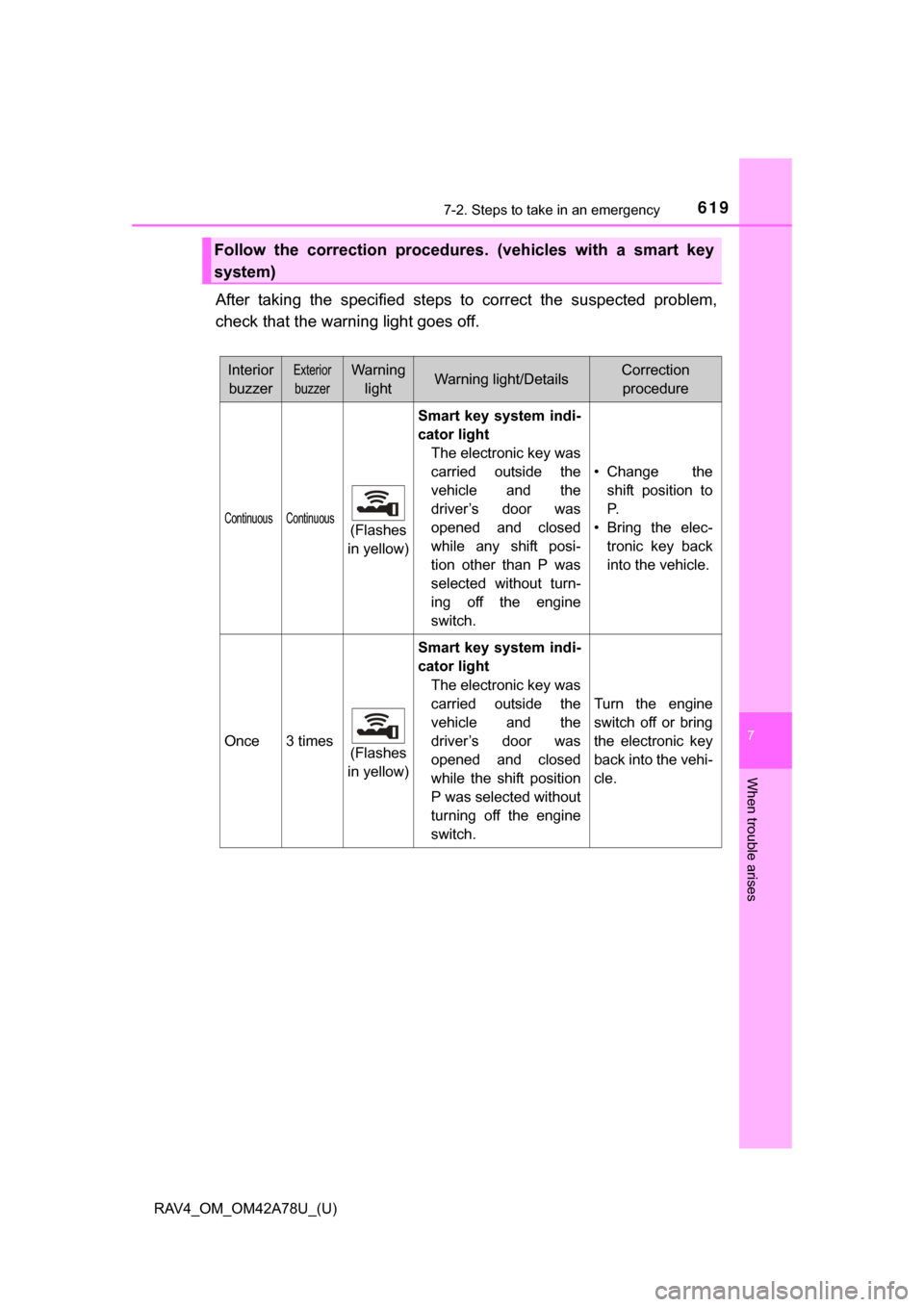
After taking the specified steps to correct the suspected problem,
check that the warning light goes off.
Follow the correction procedures. (vehicles with a smart key
system)
InteriorbuzzerExterior
buzzer
Warning lightWarning light/DetailsCorrection procedure
Continuous Continuous(Flashes
in yellow) Smart key system indi-
cator light
The electronic key was
carried outside the
vehicle and the
driver’s door was
opened and closed
while any shift posi-
tion other than P was
selected without turn-
ing off the engine
switch. • Change the
shift position to
P.
• Bring the elec- tronic key back
into the vehicle.
Once3 times(Flashes
in yellow)
Smart key system indi-
cator light
The electronic key was
carried outside the
vehicle and the
driver’s door was
opened and closed
while the shift position
P was selected without
turning off the engine
switch.
Turn the engine
switch off or bring
the electronic key
back into the vehi-
cle.
Page 648 of 732

6487-2. Steps to take in an emergency
RAV4_OM_OM42A78U_(U)
■Stopping the engine
Shift the shift lever to P and press the engine switch as you normally do when
stopping the engine.
■ Replacing the key battery
As the above procedure is a temporary measure, it is recommended that the
electronic key battery be replaced immediately when the battery is depleted.
(P. 570)
■ Changing engine switch modes
Release the brake pedal and press the engine switch in step above.
The engine does not start and modes will be changed each time the switch is
pressed.( P. 201)
■ When the electronic key does not work properly
●Make sure that the smart key system has not been deactivated in the cus-
tomization setting. If it is off, turn the function on.
(Customizable features: P. 687)
● Check if battery-saving mode is set. If it is set, cancel the function.
(P. 106)
3
Page 691 of 732
RAV4_OM_OM42A78U_(U)
6918-2. Customization
8
Vehicle specifications
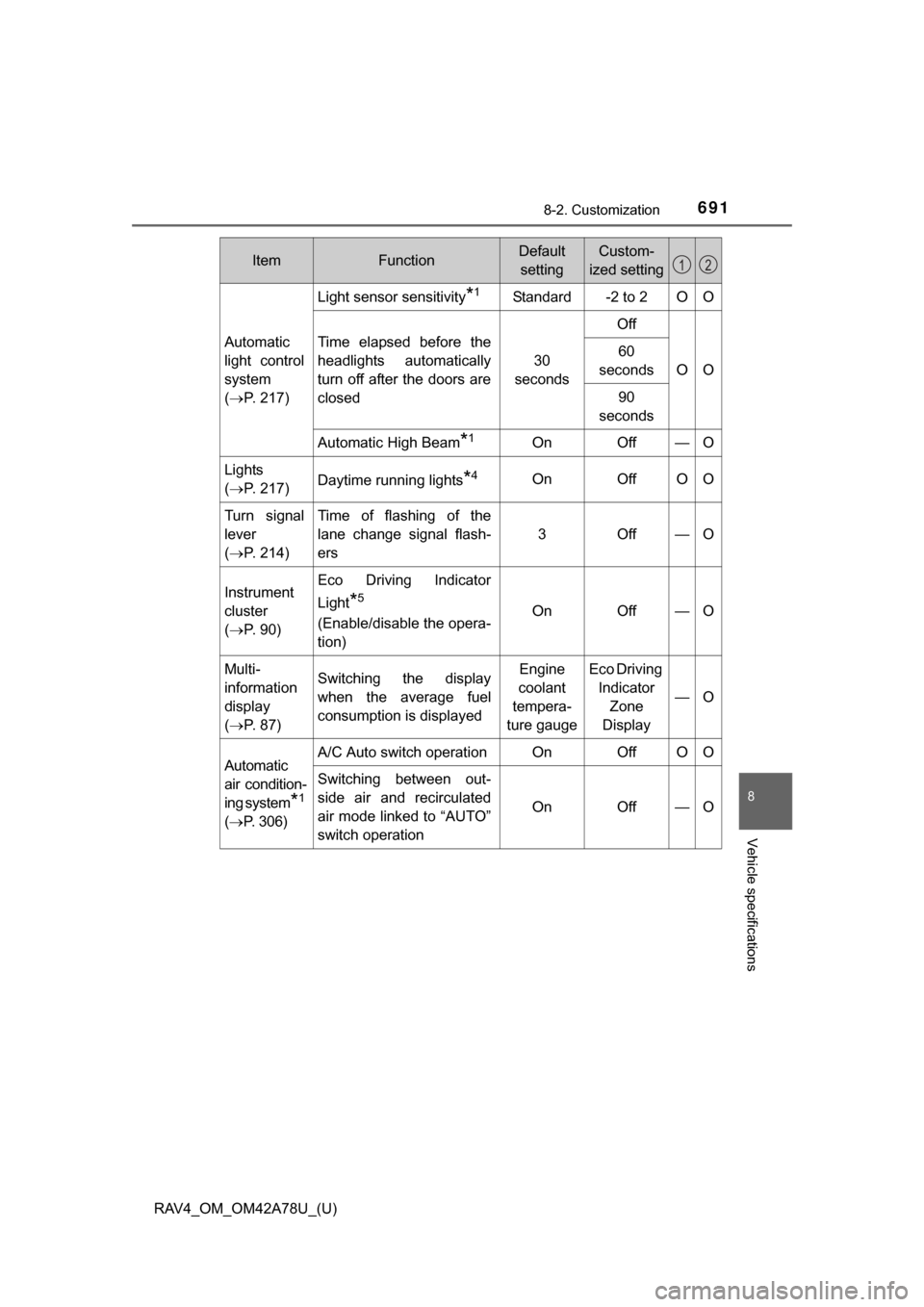
Automatic
light control
system
( P. 217)
Light sensor sensitivity*1Standard-2 to 2OO
Time elapsed before the
headlights automatically
turn off after the doors are
closed
30
seconds
Off
OO
60
seconds
90
seconds
Automatic High Beam*1OnOff—O
Lights
( P. 217)Daytime running lights*4OnOffOO
Turn signal
lever
( P. 214)Time of flashing of the
lane change signal flash-
ers
3Off—O
Instrument
cluster
( P. 9 0 )Eco Driving Indicator
Light
*5
(Enable/disable the opera-
tion)OnOff—O
Multi-
information
display
( P. 8 7 )Switching the display
when the average fuel
consumption is displayedEngine
coolant
tempera-
ture gaugeEco Driving Indicator Zone
Display
—O
Automatic
air condition-
ing system
*1
( P. 306)
A/C Auto switch operationOnOffOO
Switching between out-
side air and recirculated
air mode linked to “AUTO”
switch operation
OnOff—O
ItemFunctionDefault
settingCustom-
ized setting12