display TOYOTA RAV4 2015 XA40 / 4.G User Guide
[x] Cancel search | Manufacturer: TOYOTA, Model Year: 2015, Model line: RAV4, Model: TOYOTA RAV4 2015 XA40 / 4.GPages: 732, PDF Size: 12.43 MB
Page 91 of 732
RAV4_OM_OM42A78U_(U)
912. Instrument cluster
2
Instrument cluster
■When disconnecting and reco nnecting battery terminals
The following information data will be reset:
● Trip meters “A” and “B”
● Average fuel consumption
● Average vehicle speed
● Driving range
■ Outside temperature display
In the following situations, the correct outside temperature may not be dis-
played, or the display may take longer than normal to change.
●When stopped, or driving at low speeds (approximately 12 mph [20 km/h] or
less)
● When the outside temperature has changed suddenly (at the entrance/exit
of a garage, tunnel, etc.)
■ When “--- F” is displayed
The system may be malfunctioning. Take your vehicle to your Toyota dealer.
■ Customization
Settings can be changed. (Customizable features: P. 687)
NOTICE
■The multi-information disp lay at low temperatures
Allow the interior of the vehicle to warm up before using the liquid crystal
information display. At extremely low temperatures, the information display
monitor may respond slowly, and display changes may be delayed.
Page 92 of 732
92
RAV4_OM_OM42A78U_(U)
2. Instrument cluster
Fuel consumption information
Vehicles with Entune Audio
Press the “CAR” button.
Vehicles with Entune Premium Au dio with Navigation and Entune
Audio Plus
Press the “APPS” button, and t hen select “Eco” on the screen.
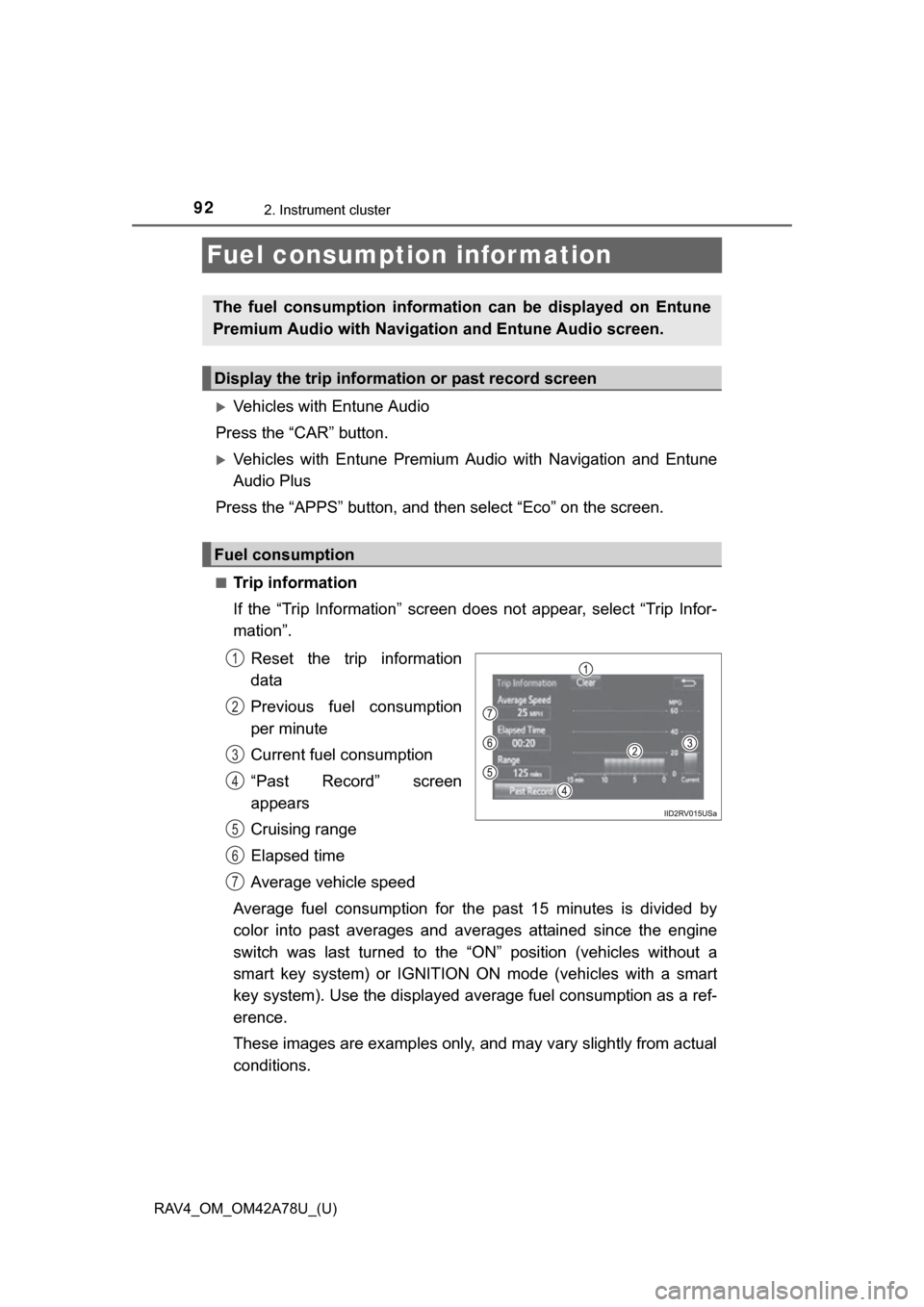
■Trip information
If the “Trip Information” screen does not appear, select “Trip Infor-
mation”.
Reset the trip information
data
Previous fuel consumption
per minute
Current fuel consumption
“Past Record” screen
appears
Cruising range
Elapsed time
Average vehicle speed
Average fuel consumption for the past 15 minutes is divided by
color into past averages and av erages attained since the engine
switch was last turned to the “O N” position (vehicles without a
smart key system) or IGNITION ON mode (vehicles with a smart
key system). Use the displayed average fuel consumption as a ref-
erence.
These images are examples only, and may vary slightly from actual
conditions.
The fuel consumption informat ion can be displayed on Entune
Premium Audio with Navigation and Entune Audio screen.
Display the trip information or past record screen
Fuel consumption
1
2
3
4
5
6
7
Page 93 of 732
RAV4_OM_OM42A78U_(U)
932. Instrument cluster
2
Instrument cluster
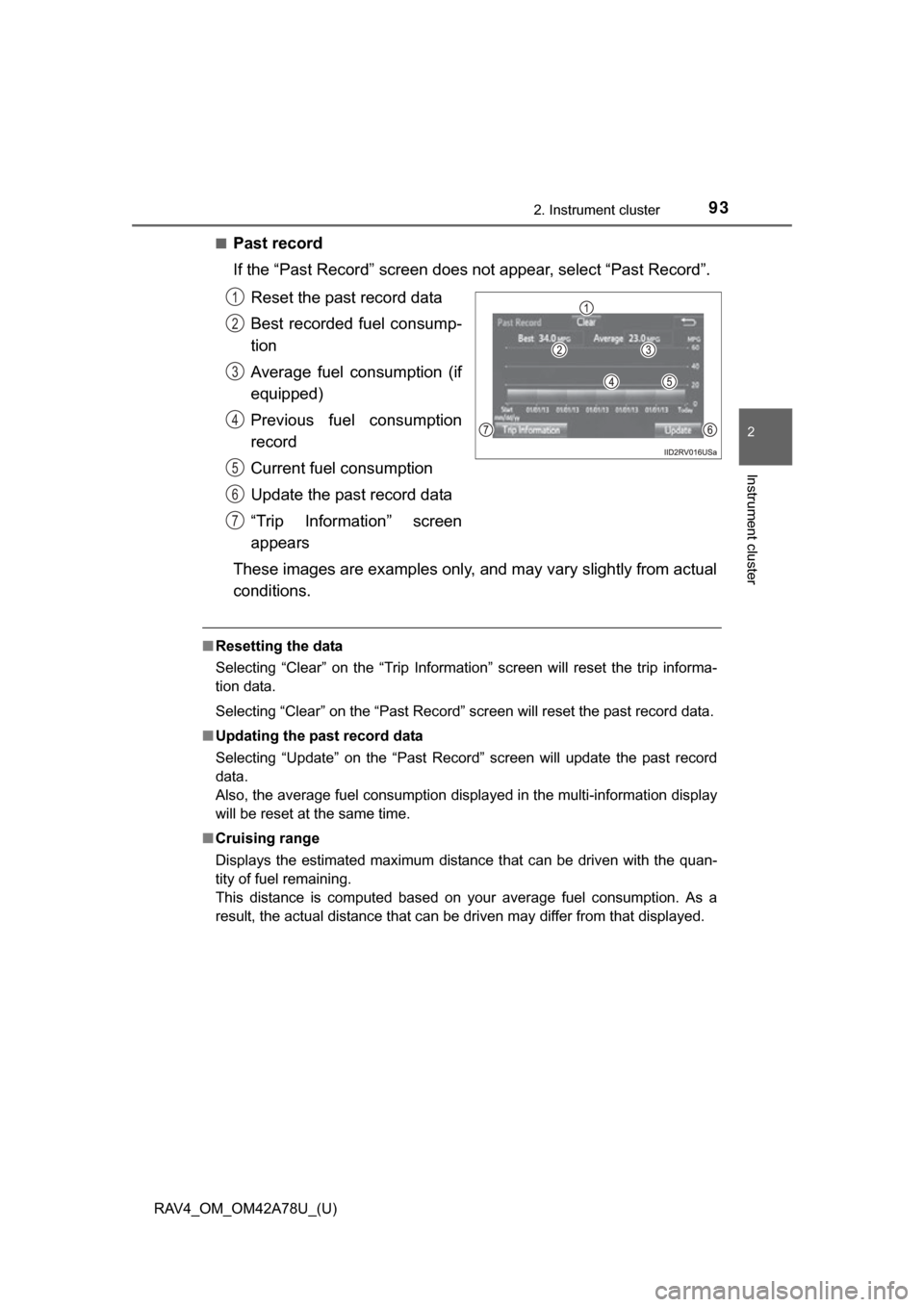
■Past record
If the “Past Record” screen does not appear, select “Past Record”.
Reset the past record data
Best recorded fuel consump-
tion
Average fuel consumption (if
equipped)
Previous fuel consumption
record
Current fuel consumption
Update the past record data
“Trip Information” screen
appears
These images are examples only, and may vary slightly from actual
conditions.
■ Resetting the data
Selecting “Clear” on the “Trip Information” screen will reset the trip informa-
tion data.
Selecting “Clear” on the “Past Record” screen will reset the past record data.
■ Updating the past record data
Selecting “Update” on the “Past Record” screen will update the past record
data.
Also, the average fuel consumption displa yed in the multi-information display
will be reset at the same time.
■ Cruising range
Displays the estimated maximum distance that can be driven with the quan-
tity of fuel remaining.
This distance is computed based on your average fuel consumption. As a
result, the actual distance that can be driven may differ from that displayed.
1
2
3
4
5
6
7
Page 167 of 732
RAV4_OM_OM42A78U_(U)
1674-1. Before driving
4
Driving
■Drum-in-disc type parking brake system
Your vehicle has a drum-in-disc type parking brake system. This type of brake
system needs bedding-down of the brake shoes periodically or whenever the
parking brake shoes and/or drum are replaced. Have your Toyota dealer per-
form the bedding down operation.
■ Operating your vehicle in a foreign country
Comply with the relevant vehicle registration laws and confirm the availability
of the correct fuel. ( P. 671)
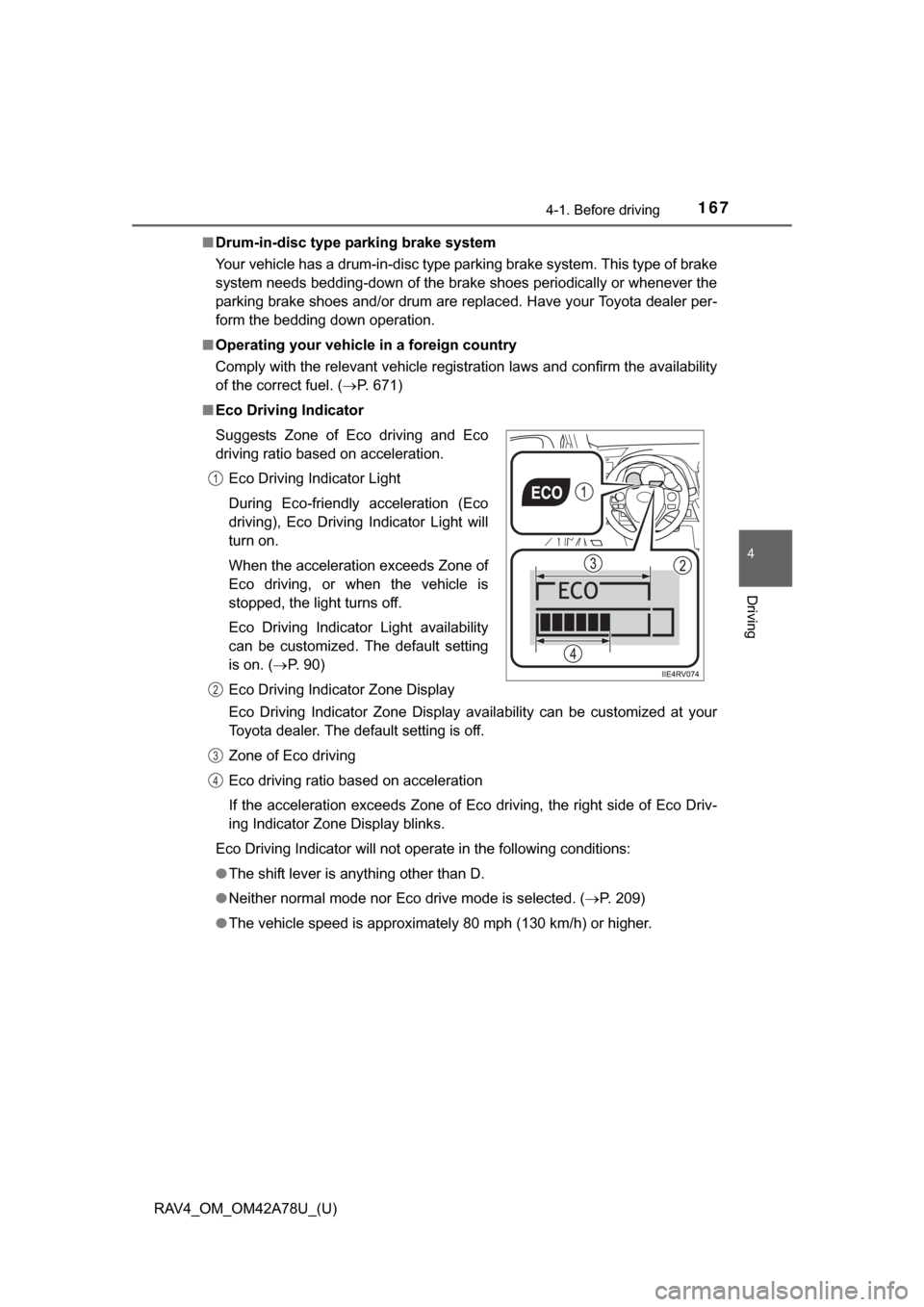
■ Eco Driving Indicator
Eco Driving Indicator Zone Display availability can be customized at your
Toyota dealer. The default setting is off.
Zone of Eco driving
Eco driving ratio based on acceleration
If the acceleration exceeds Zone of Eco driving, the right side of Eco Driv-
ing Indicator Zone Display blinks.
Eco Driving Indicator will not operate in the following conditions:
● The shift lever is anything other than D.
● Neither normal mode nor Eco drive mode is selected. ( P. 209)
● The vehicle speed is approximately 80 mph (130 km/h) or higher.
Suggests Zone of Eco driving and Eco
driving ratio based on acceleration.
Eco Driving Indicator Light
During Eco-friendly acceleration (Eco
driving), Eco Driving Indicator Light will
turn on.
When the acceleration exceeds Zone of
Eco driving, or when the vehicle is
stopped, the light turns off.
Eco Driving Indicator Light availability
can be customized. The default setting
is on. ( P. 90)
Eco Driving Indicator Zone Display
1
2
3
4
Page 210 of 732
210
RAV4_OM_OM42A78U_(U)
4-2. Driving procedures
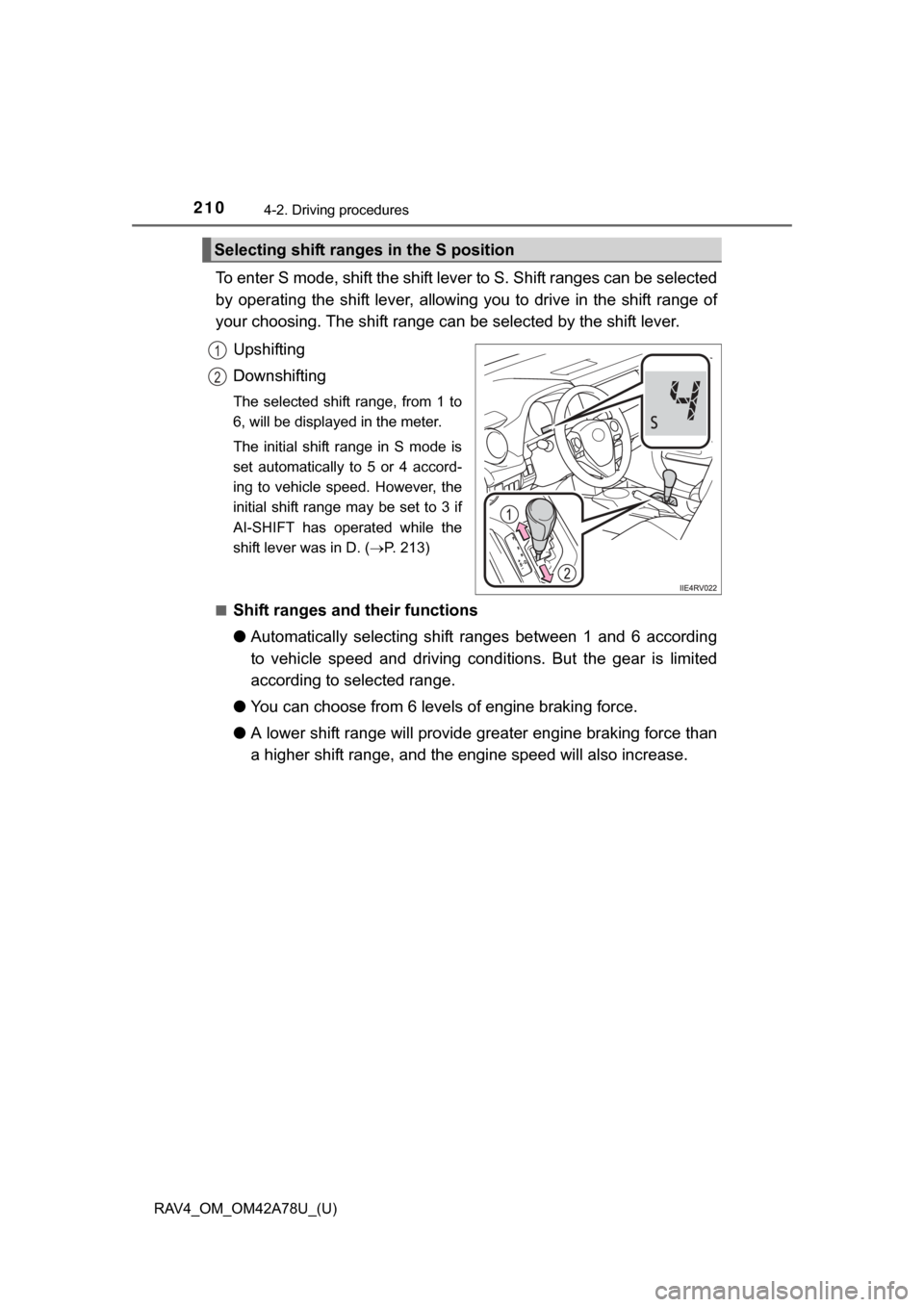
To enter S mode, shift the shift lever to S. Shift ranges can be selected
by operating the shift lever, allowing you to drive in the shift range of
your choosing. The shift range can be selected by the shift lever.
Upshifting
Downshifting
The selected shift range, from 1 to
6, will be displayed in the meter.
The initial shift range in S mode is
set automatically to 5 or 4 accord-
ing to vehicle speed. However, the
initial shift range may be set to 3 if
AI-SHIFT has operated while the
shift lever was in D. (P. 213)
■
Shift ranges and their functions
● Automatically selecting shift ranges between 1 and 6 according
to vehicle speed and driving cond itions. But the gear is limited
according to selected range.
● You can choose from 6 levels of engine braking force.
● A lower shift range will provide gr eater engine braking force than
a higher shift range, and the engine speed will also increase.
Selecting shift ranges in the S position
1
2
Page 212 of 732
212
RAV4_OM_OM42A78U_(U)
4-2. Driving procedures
■If the “S” indicator does not come on or the “D” indicator is displayed
even after shifting the shift lever to S
This may indicate a malfunction in the automatic transmission system. Have
the vehicle inspected by your Toyota dealer immediately.
(In this situation, the transmission will operate in the same manner as when
the shift lever is in D.)
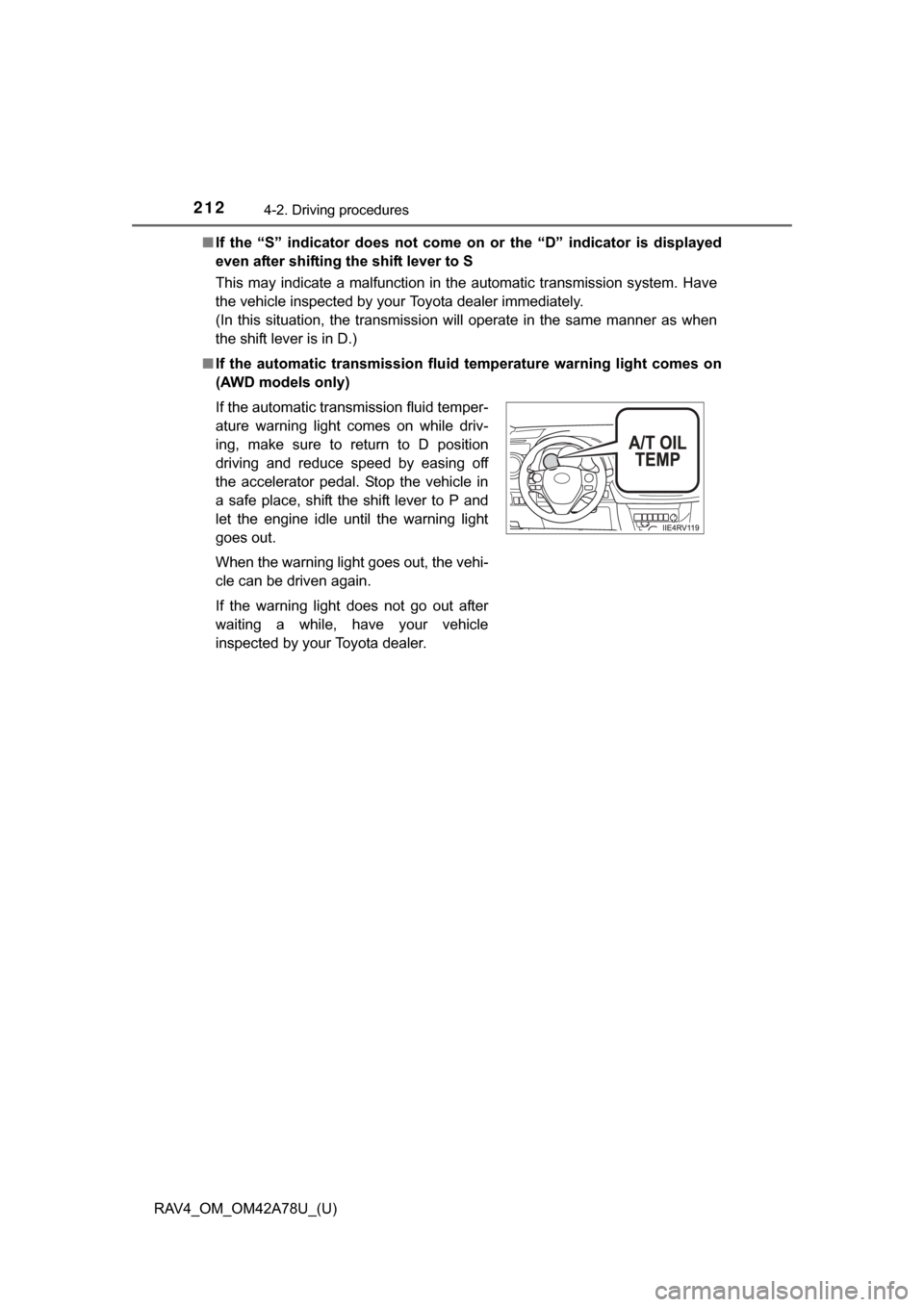
■ If the automatic transmission flui d temperature warning light comes on
(AWD models only)
If the automatic transmission fluid temper-
ature warning light comes on while driv-
ing, make sure to return to D position
driving and reduce speed by easing off
the accelerator pedal. Stop the vehicle in
a safe place, shift the shift lever to P and
let the engine idle until the warning light
goes out.
When the warning light goes out, the vehi-
cle can be driven again.
If the warning light does not go out after
waiting a while, have your vehicle
inspected by your Toyota dealer.
Page 259 of 732
259
RAV4_OM_OM42A78U_(U)
4-5. Using the driving support systems
4
Driving
Rear view monitor system
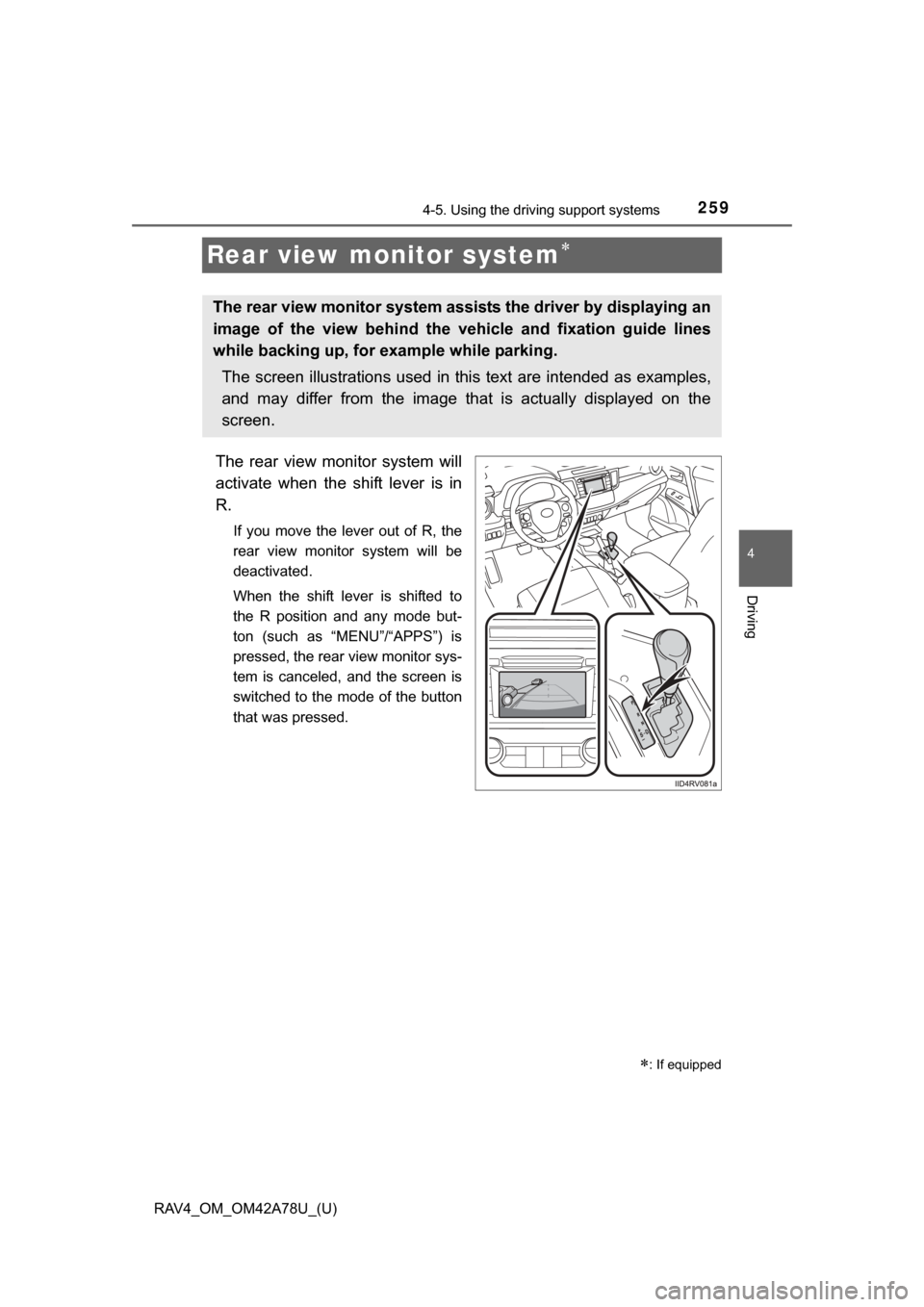
The rear view monitor system will
activate when the shift lever is in
R.
If you move the lever out of R, the
rear view monitor system will be
deactivated.
When the shift lever is shifted to
the R position and any mode but-
ton (such as “MENU”/“APPS”) is
pressed, the rear view monitor sys-
tem is canceled, and the screen is
switched to the mode of the button
that was pressed.
: If equipped
The rear view monitor system assists the driver by displaying an
image of the view behind the vehicle and fixation guide lines
while backing up, for example while parking.
The screen illustrations used in this text are intended as examples,
and may differ from the image that is actually displayed on the
screen.
Page 260 of 732
260
RAV4_OM_OM42A78U_(U)
4-5. Using the driving support systems
■Screen description
Vehicles without a smart key system
The rear view monitor system screen will be displayed if the shift
lever is shifted to R while the engine switch is in the “ON” position.
Vehicles with a smart key system
The rear view monitor system screen will be displayed if the shift
lever is shifted to R while the engine switch is in IGNITION ON
mode.
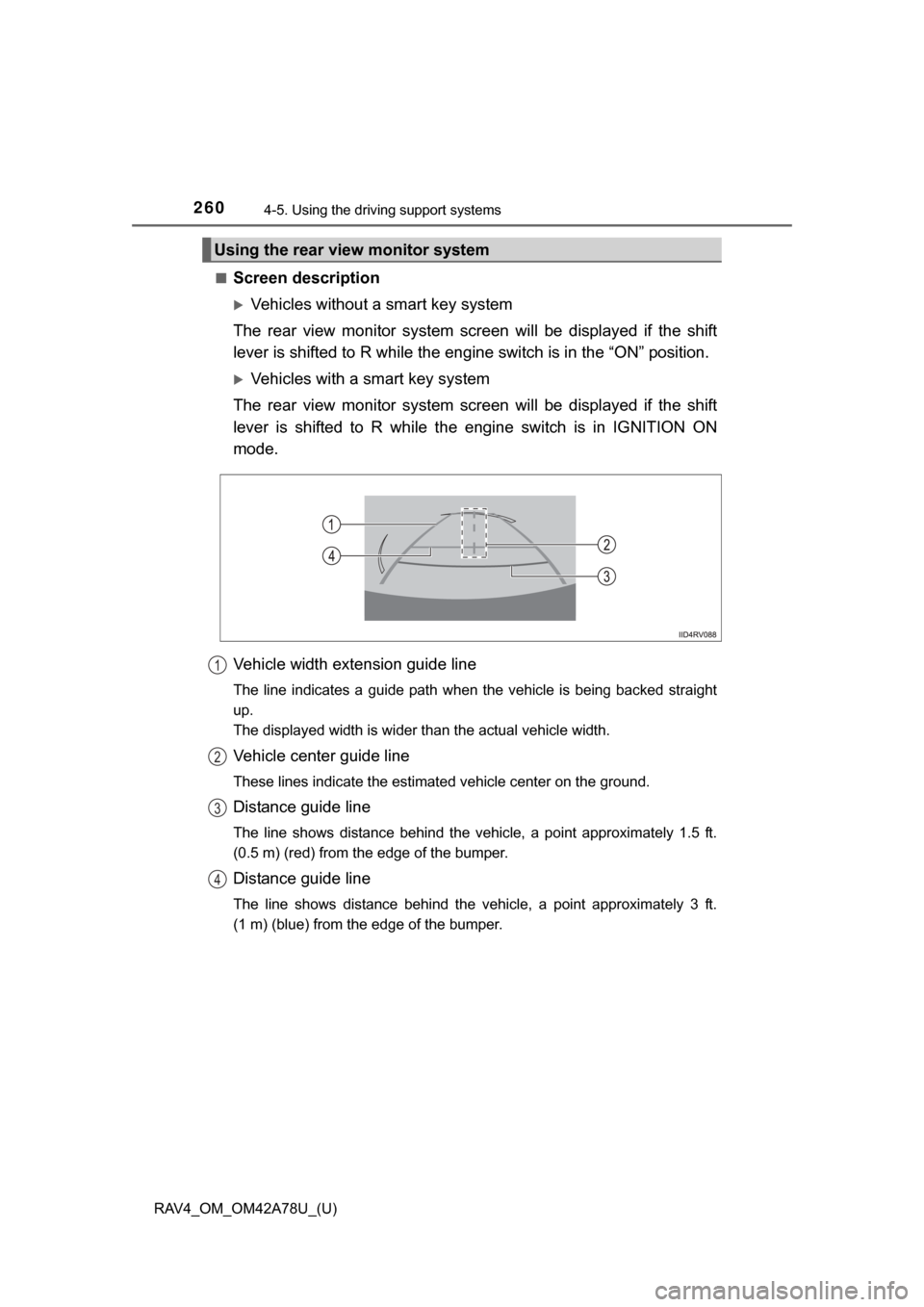
Vehicle width extension guide line
The line indicates a guide path when the vehicle is being backed straight
up.
The displayed width is wider than the actual vehicle width.
Vehicle center guide line
These lines indicate the estimated vehicle center on the ground.
Distance guide line
The line shows distance behind the vehicle, a point approximately 1.5 ft.
(0.5 m) (red) from the edge of the bumper.
Distance guide line
The line shows distance behind the vehicle, a point approximately 3 ft.
(1 m) (blue) from the edge of the bumper.
Using the rear view monitor system
1
2
3
4
Page 261 of 732
RAV4_OM_OM42A78U_(U)
2614-5. Using the driving support systems
4
Driving
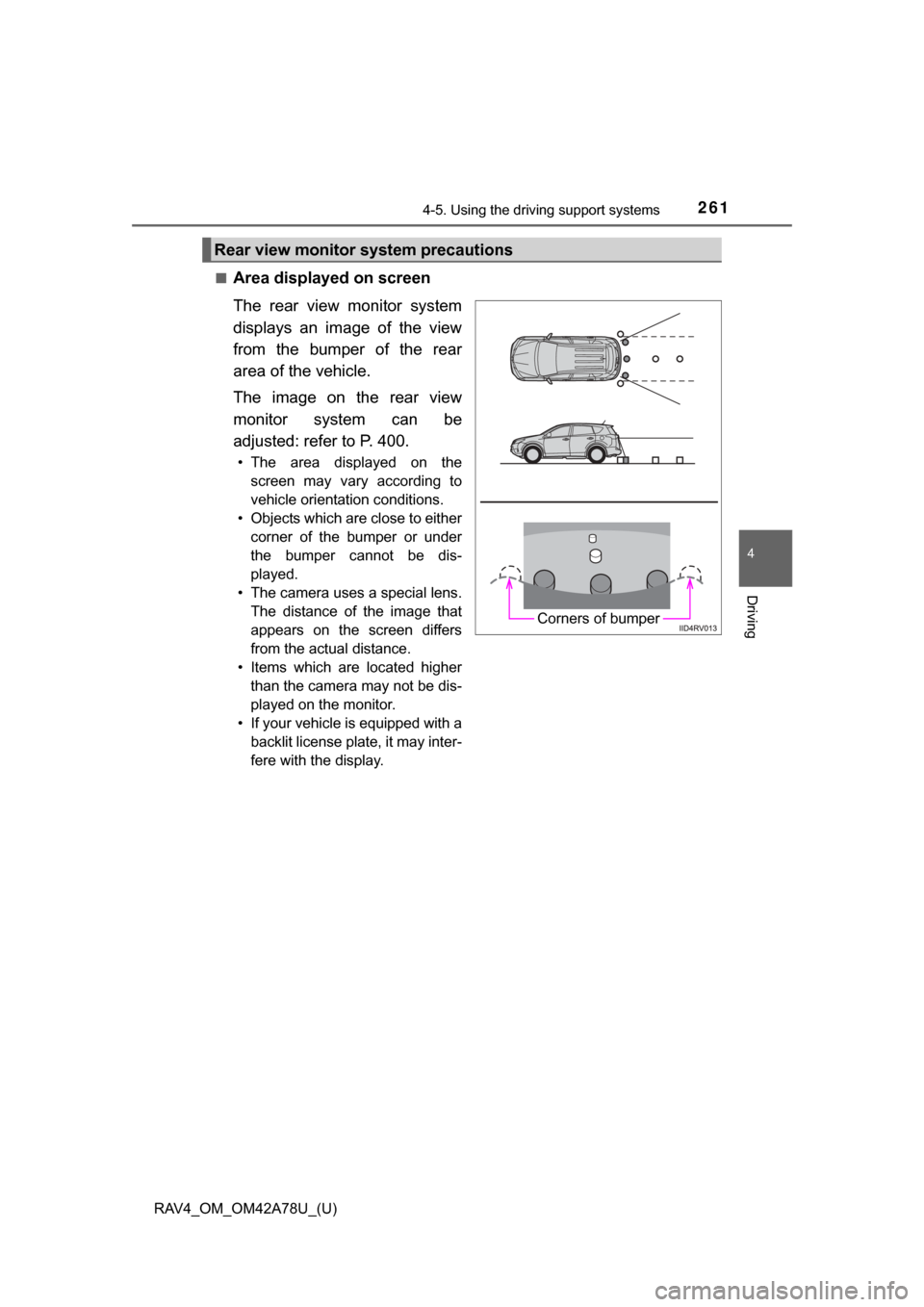
■Area displayed on screen
The rear view monitor system
displays an image of the view
from the bumper of the rear
area of the vehicle.
The image on the rear view
monitor system can be
adjusted: refer to P. 400.
• The area displayed on the
screen may vary according to
vehicle orientation conditions.
• Objects which are close to either corner of the bumper or under
the bumper cannot be dis-
played.
• The camera uses a special lens. The distance of the image that
appears on the screen differs
from the actual distance.
• Items which are located higher than the camera may not be dis-
played on the monitor.
• If your vehicle is equipped with a backlit license plate, it may inter-
fere with the display.
Rear view monitor system precautions
Corners of bumper
Page 268 of 732
268
RAV4_OM_OM42A78U_(U)
4-5. Using the driving support systems
CAUTION
■When using the rear view monitor system
The rear view monitor system is a supplemental device intended to assist
the driver when backing up. When backing up, be sure to check visually
behind and all around the vehicle before proceeding.
Observe the following precautions to avoid an accident that could result in
death or serious injuries.
● Never depend on the rear view monitor system entirely when backing up.
The image and the position of the guide lines displayed on the screen may
differ from the actual state.
Use caution, just as you would when backing up any vehicle.
● Be sure to back up slowly, depressing the brake pedal to control vehicle
speed.
● The instructions given are only guide lines.
When and how much to turn the steering wheel will vary according to traf-
fic conditions, road surface conditions, vehicle condition, etc. when park-
ing. It is necessary to be fully aware of this before using the rear view
monitor system.
● When parking, be sure to check that the parking space will accommodate
your vehicle before maneuvering into it.
● Do not use the rear view monitor system in the following cases:
• On icy or slick road surfaces, or in snow
• When using tire chains or the compact spare tire (if equipped)
• When the back door is not closed completely
• On roads that are not flat or straight, such as curves or slopes.
● In low temperatures, the screen may darken or the image may become
faint. The image could distort when the vehicle is moving, or you may
become unable to see the image on the screen. Be sure to check direct
visually and with the mirrors all around the vehicle before proceeding.
● If the tire sizes are changed, the position of the fixation guide lines dis-
played on the screen may change.
● The camera uses a special lens. The distances between objects and
pedestrians that appear in the image displayed on the screen will differ
from the actual distances. ( P. 262)