radio TOYOTA RAV4 2015 XA40 / 4.G User Guide
[x] Cancel search | Manufacturer: TOYOTA, Model Year: 2015, Model line: RAV4, Model: TOYOTA RAV4 2015 XA40 / 4.GPages: 732, PDF Size: 12.43 MB
Page 115 of 732
RAV4_OM_OM42A78U_(U)
1153-2. Opening, closing and locking the doors
3
Operation of each component
■Conditions affecting operation
Vehicles without a smart key system
The wireless remote control function may not operate normally in the follow-
ing situations.
● Near a TV tower, radio station, electric power plant, airport or other facility
that generates strong radio waves
● When carrying a portable radio, cellular phone or other wireless communi-
cation device
● When multiple wireless keys are in the vicinity
● When the wireless key has come into contact with, or is covered by a metal-
lic object
● When a wireless key (that emits radio waves) is being used nearby
● When the wireless key has been left near an electrical appliance such as a
personal computer
Vehicles with a smart key system
P. 107
■ If the wireless remote control does not operate properly (vehicles with a
smart key system)
Locking and unlocking the doors: Use the mechanical key. ( P. 646)
■ Key battery depletion
Vehicles without a smart key system
If the wireless remote control function does not operate, the battery may be
depleted. Replace the battery when necessary. ( P. 570)
Vehicles with a smart key system
P. 1 1 1
■ When the electronic key battery is fully depleted
P. 570
■ Confirmation of the registered key number
The number of keys already registered to the vehicle can be confirmed. Ask
your Toyota dealer for details.
■ Customization
Settings (e.g. wireless remote control system) can be changed.
(Customizable features: P. 687)
Page 256 of 732

256
RAV4_OM_OM42A78U_(U)
4-5. Using the driving support systems
■Sensor detection information
●The sensor’s detection areas are limited to the areas around the vehicle’s
rear bumper.
● Certain vehicle conditions and the surrounding environment may affect the
ability of a sensor to correctly detect an obstacle. Particular instances where
this may occur are listed below.
• There is dirt, snow or ice on a sensor. (Wiping the sensors will resolve
this problem.)
• A sensor is frozen. (Thawing the area will resolve this problem.)
• A sensor is covered in any way.
• The vehicle is leaning considerably to one side.
• On an extremely bumpy road, on an incline, on gravel, or on grass.
• The vicinity of the vehicle is noisy due to vehicle horns, motorcycle engines, air brakes of large vehicles, or other loud noises producing ultra-
sonic waves.
• There is another vehicle equipped with parking assist sensors in the vicinity.
• A sensor is coated with a sheet of spray or heavy rain.
• The vehicle is equipped with a fender pole or radio antenna.
• A bumper or sensor receives a strong impact.
• The vehicle is approaching a tall or right-angled curb.
• In harsh sunlight or intense cold weather.
• The area directly under the bumpers is not detected.
• If obstacles draw too close to the sensor.
• A non-genuine Toyota suspension (lowered suspension etc.) is installed.
• People may not be detected if they are wearing certain types of clothing.
In addition to the examples above, there are instances in which, because of
their shape, signs and other objects may be judged by a sensor to be closer
than they are.
Page 298 of 732

298
RAV4_OM_OM42A78U_(U)
5-1. Using the air conditioning system and defogger
Manual air conditioning system............................. 300
Automatic air conditioning system ... 306
Rear window and outside rear view mirror
defoggers ........................ 316
Windshield wiper de-icer ... 318
5-2. Using the audio system Audio system types ........... 319
Using the radio .................. 322
Using the CD player .......... 325
Playing back MP3 and WMA discs ...................... 330
Operating an iPod ............. 337
Operating a USB memory................... 345
Optimal use of the audio system ................... 353
Using the AUX port ........... 355
Using the steering wheel audio switches ................ 356
Bluetooth
® audio/phone .... 359
Using the Bluetooth®
audio/phone .................... 364
Operating a Bluetooth
®
enabled portable
player .............................. 369
Making a phone call .......... 372
Using the “SETUP” menu (“Bluetooth
*” menu) ........ 377
Using the “SETUP” menu (“PHONE” menu) ............ 382 5-3. Using the audio system
(Entune Audio)
Audio system .................... 387
Steering wheel audio switches .......................... 389
USB Port/AUX Port ........... 391
Basic Audio Operations .... 392
Setup menu....................... 394
General settings ................ 395
Audio settings ................... 399
Display settings ................. 400
Voice settings.................... 402
Selecting the audio source ............................. 403
List screen operation......... 404
Optimal use of the audio system................... 406
Radio operation................. 407
CD player operation .......... 409
Listening to an iPod .......... 415
Listening to a USB memory device ............... 420
Using the AUX port ........... 425
Preparations to use wireless
communication ................ 426
5
Page 320 of 732
320
RAV4_OM_OM42A78U_(U)
5-2. Using the audio system
Vehicles without an Entune Premium Audio with Navigation or
Entune Audio Plus or Entune Audio
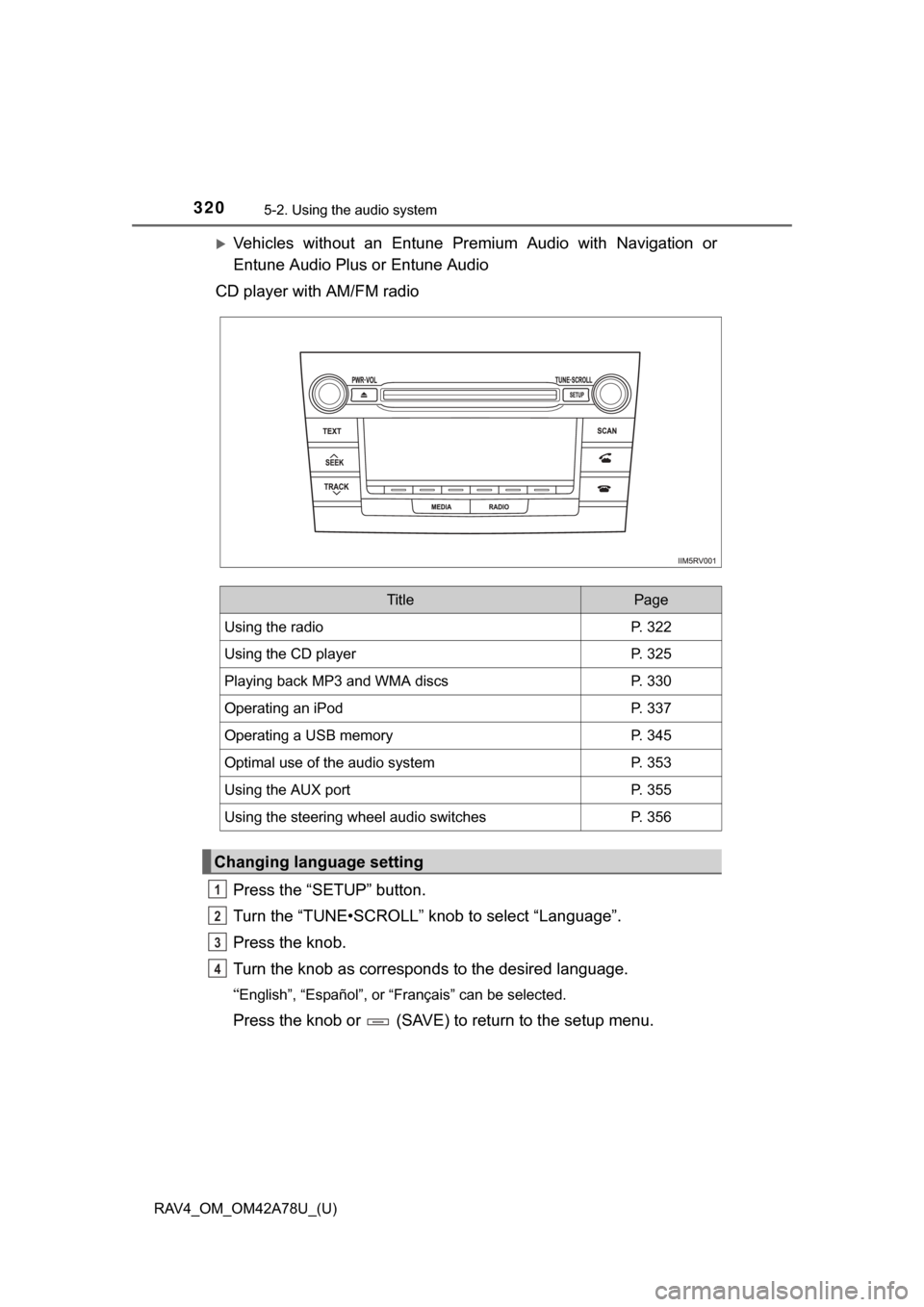
CD player with AM/FM radio
Press the “SETUP” button.
Turn the “TUNE•SCROLL” knob to select “Language”.
Press the knob.
Turn the knob as corresponds to the desired language.
“English”, “Español”, or “Français” can be selected.
Press the knob or (SAVE) to return to the setup menu.
TitlePage
Using the radioP. 322
Using the CD playerP. 325
Playing back MP3 and WMA discsP. 330
Operating an iPodP. 337
Operating a USB memoryP. 345
Optimal use of the audio systemP. 353
Using the AUX portP. 355
Using the steering wheel audio switchesP. 356
Changing language setting
1
2
3
4
Page 322 of 732
322
RAV4_OM_OM42A78U_(U)
5-2. Using the audio system
Using the radio
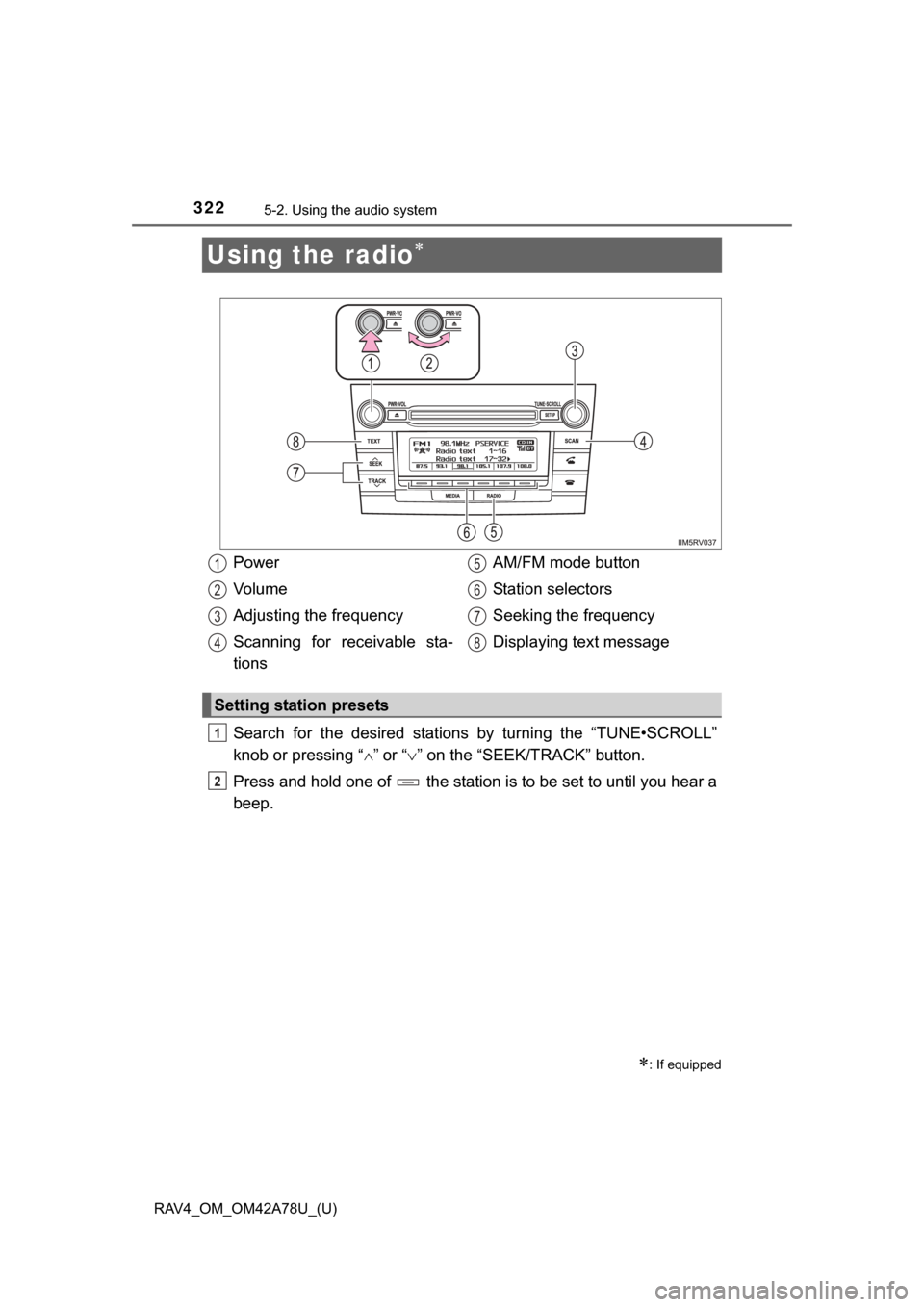
Search for the desired stations by turning the “TUNE•SCROLL”
knob or pressing “”
or “ ” on the “SEEK/TRACK” button.
Press and hold one of the station is to be set to until you hear a
beep.
: If equipped
Power
Vo l u m e
Adjusting the frequency
Scanning for receivable sta-
tions AM/FM mode button
Station selectors
Seeking the frequency
Displaying text message
Setting station presets
1
2
3
4
5
6
7
8
1
2
Page 323 of 732
RAV4_OM_OM42A78U_(U)
3235-2. Using the audio system
5
Interior features
■Scanning the preset radio stationsPress and hold the “SCAN” button until you hear a beep.
Preset stations will be played for 5 seconds each.
To cancel, press the button again.
When the desired station is reached, press the button again.
■Scanning all the radio stations within rangePress the “SCAN” button.
All the stations with reception will be played for 5 seconds each.
To cancel, press the button again.
When the desired station is reached, press the button again.
Press the “TEXT” button to display or hide the radio texts.
If there are continuing texts, is displayed.
Press the button to display the remaining texts.
Scanning radio stations
Switching the display
1
2
1
2
Page 324 of 732
324
RAV4_OM_OM42A78U_(U)
5-2. Using the audio system
■When the battery is disconnected
Stations presets are erased.
■ Reception sensitivity
●Maintaining perfect radio reception at all times is difficult due to the continu-
ally changing position of the antenna, differences in signal strength and sur-
rounding objects, such as trains, transmitters, etc.
● The radio antenna is mounted on the roof. The antenna can be removed
from the base by turning it.
NOTICE
■To prevent damage, remove the antenna in the following cases
● The antenna will touch the ceiling of a garage.
● A cover will be put on the roof.
Page 356 of 732
356
RAV4_OM_OM42A78U_(U)
5-2. Using the audio system
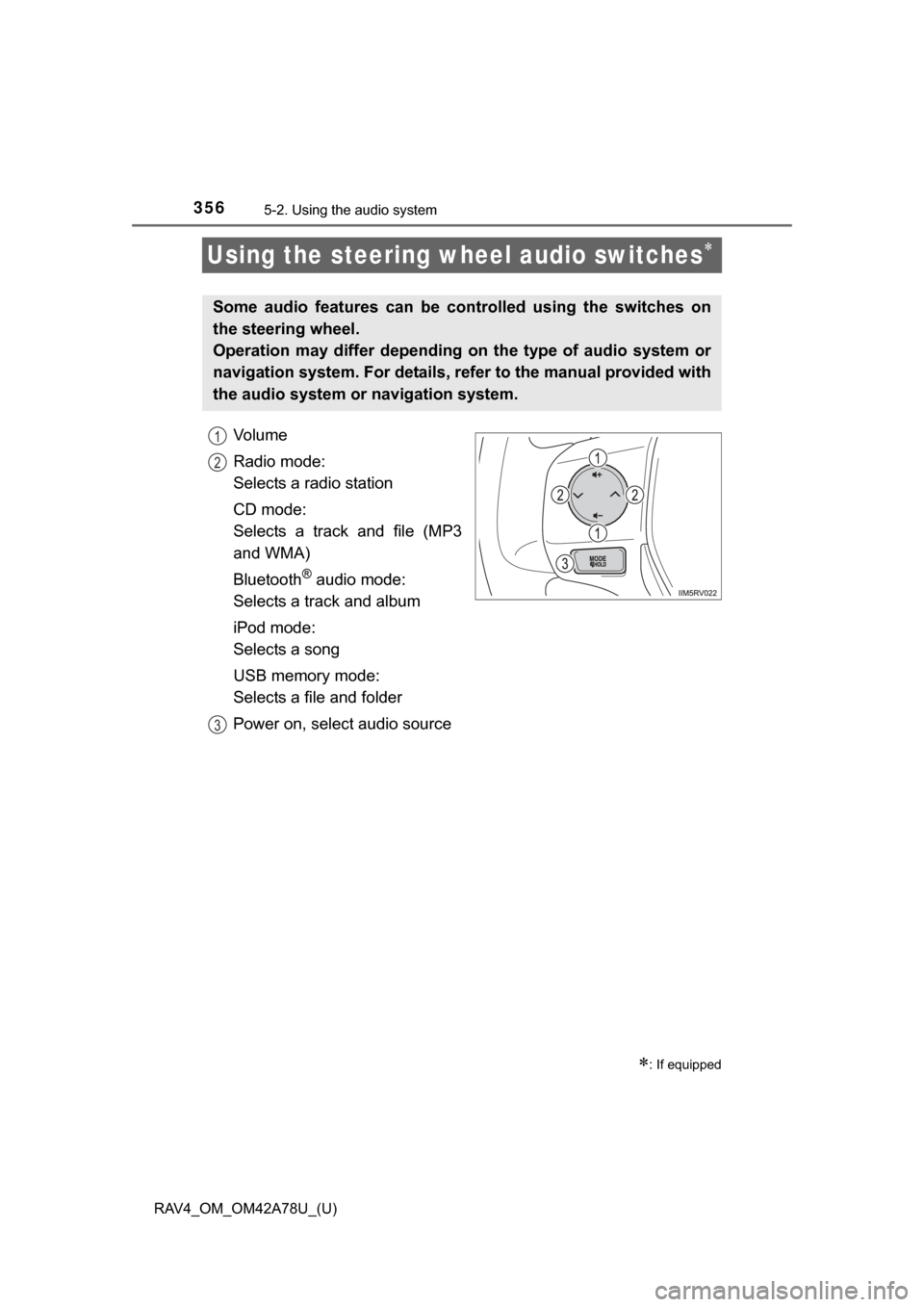
Using the steering wheel audio switches
Vo l u m e
Radio mode:
Selects a radio station
CD mode:
Selects a track and file (MP3
and WMA)
Bluetooth
® audio mode:
Selects a track and album
iPod mode:
Selects a song
USB memory mode:
Selects a file and folder
Power on, select audio source
: If equipped
Some audio features can be c ontrolled using the switches on
the steering wheel.
Operation may differ depending on the type of audio system or
navigation system. For details, refer to the manual provided with
the audio system or navigation system.
1
2
3
Page 357 of 732
RAV4_OM_OM42A78U_(U)
3575-2. Using the audio system
5
Interior features
Press the “MODE” switch when the audio system is turned off.
Press the “MODE” switch when the audio system is turned on. The
audio source changes as follows each time the button is pressed. If a
mode cannot be used, it will be skipped.
AM FM1FM2 CD mode iPod or USB memory
Bluetooth
® audio AUX
Press the “+” switch to increase the volume and the “-” switch to
decrease the volume.
Hold down the switch to continue increasing or decreasing the volume.
Press and hold the “MODE” switch.
To cancel, press and hold the switch again.
Press the “MODE” switch to select the radio mode.
Press the “ ” or “ ” switch to select a preset station.
To scan for receivable stations, press and hold the switch until you hear a
beep.
Turning on the power
Changing the audio source
Adjusting the volume
Silencing a sound
Selecting a radio station
1
2
Page 361 of 732

RAV4_OM_OM42A78U_(U)
3615-2. Using the audio system
5
Interior features
■Certification
FCC ID: BABFT0023A
IC: 2024B-FT0023A
For vehicles sold in the U.S.A. and Puerto Rico
This device complies with part 15 of the FCC Rules. Operation is subject to
the following two conditions: (1) This device may not cause harmful interfer-
ence, and (2) this device must accept any interference received, including
interference that may cause undesired operation.
For vehicles sold in Canada
In English
This device complies with Industry Canada licence-exempt RSS standard(s).
Operation is subject to the following two conditions: (1) this device may not
cause interference, and (2) this device must accept any interference, includ-
ing interference that may cause undesired operation of the device.
In French
Le présent appareil est conforme aux CNR d’Industrie Canada applicables
aux appareils radio exempts de licence. L’exploitation est autorisée aux deux
conditions suivantes : (1) l’appareil ne doit pas produire de brouillage, et (2)
l’utilisateur de l’appareil doit accept er tout brouillage radioélectrique subi,
même si le brouillage est susceptible d’en compromettre le fonctionnement.