radio TOYOTA RAV4 2015 XA40 / 4.G Owner's Manual
[x] Cancel search | Manufacturer: TOYOTA, Model Year: 2015, Model line: RAV4, Model: TOYOTA RAV4 2015 XA40 / 4.GPages: 732, PDF Size: 12.43 MB
Page 362 of 732

362
RAV4_OM_OM42A78U_(U)
5-2. Using the audio system
CAUTION
■FCC WARNING
Changes or modifications not expressly approved by the party responsible
for compliance could void the user’s authority to operate the equipment.
Radio Frequency Radiation Exposure:
This equipment complies with FCC radiation exposure limits set forth for
uncontrolled equipment and meets the FCC radio frequency (RF) Exposure
Guidelines in Supplement C to OET65. This equipment has very low levels
of RF energy that it deemed to comply without maximum permissive
exposure evaluation (MPE). But it is desirable that it should be installed and
operated with at least 20 cm and more between the radiator and person’s
body (excluding extremities: hands, wrists, feet and ankles).
Co-location:
This transmitter must not be co-located or operated in conjunction with any
other antenna or transmitter.
Page 363 of 732
RAV4_OM_OM42A78U_(U)
3635-2. Using the audio system
5
Interior features
CAUTION
■While driving
Do not operate the portable audio player, cellular phone or connect a device
to the Bluetooth
® system.
■ Caution regarding interfer ence with electronic devices
● Your audio unit is fitted with Bluetooth
® antennas. People with implantable
cardiac pacemakers, cardiac resynchronization therapy-pacemakers or
implantable cardioverter defibrillators should maintain a reasonable dis-
tance between themselves and the Bluetooth
® antennas. The radio waves
may affect the operation of such devices.
● Before using Bluetooth
® devices, users of any electrical medical device
other than implantable cardiac pacemakers, cardiac resynchronization
therapy-pacemakers or implantable cardioverter defibrillators should con-
sult the manufacturer of the device for information about its operation
under the influence of radio waves. Radio waves could have unexpected
effects on the operation of such medical devices.
NOTICE
■ When leaving the vehicle
Do not leave your portable audio player or cellular phone in the vehicle. The
inside of the vehicle may become hot, causing damage to the portable
audio player or cellular phone.
Page 389 of 732
389
RAV4_OM_OM42A78U_(U)
5-3. Using the audio system (Entune Audio)
5
Interior features
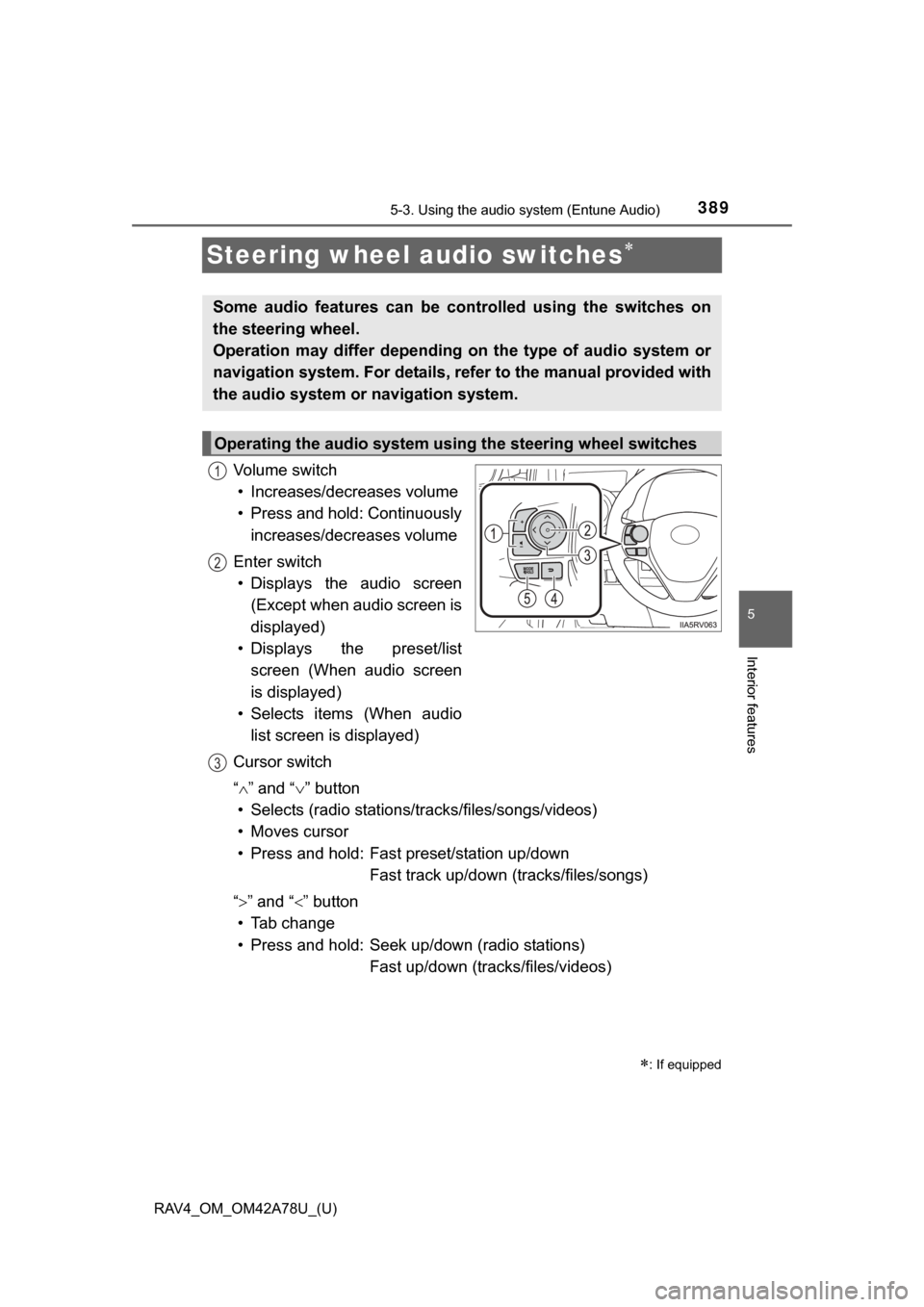
Steering wheel audio switches
Vo l u m e s w i t c h• Increases/decreases volume
• Press and hold: Continuously
increases/decreases volume
Enter switch • Displays the audio screen
(Except when audio screen is
displayed)
• Displays the preset/list
screen (When audio screen
is displayed)
• Selects items (When audio
list screen is displayed)
Cursor switch
“ ”and “ ” button
• Selects (radio stations/tr acks/files/songs/videos)
• Moves cursor
• Press and hold: Fast preset/station up/down Fast track up/down (tracks/files/songs)
“ ”and “” button
• Tab change
• Press and hold: Seek up/down (radio stations) Fast up/down (tracks/files/videos)
: If equipped
Some audio features can be c ontrolled using the switches on
the steering wheel.
Operation may differ depending on the type of audio system or
navigation system. For details, refer to the manual provided with
the audio system or navigation system.
Operating the audio system using the steering wheel switches
1
12
3
Page 392 of 732
392
RAV4_OM_OM42A78U_(U)
5-3. Using the audio system (Entune Audio)
Basic Audio Operations
Basic audio operations and functi ons common to each mode are
explained in this section.
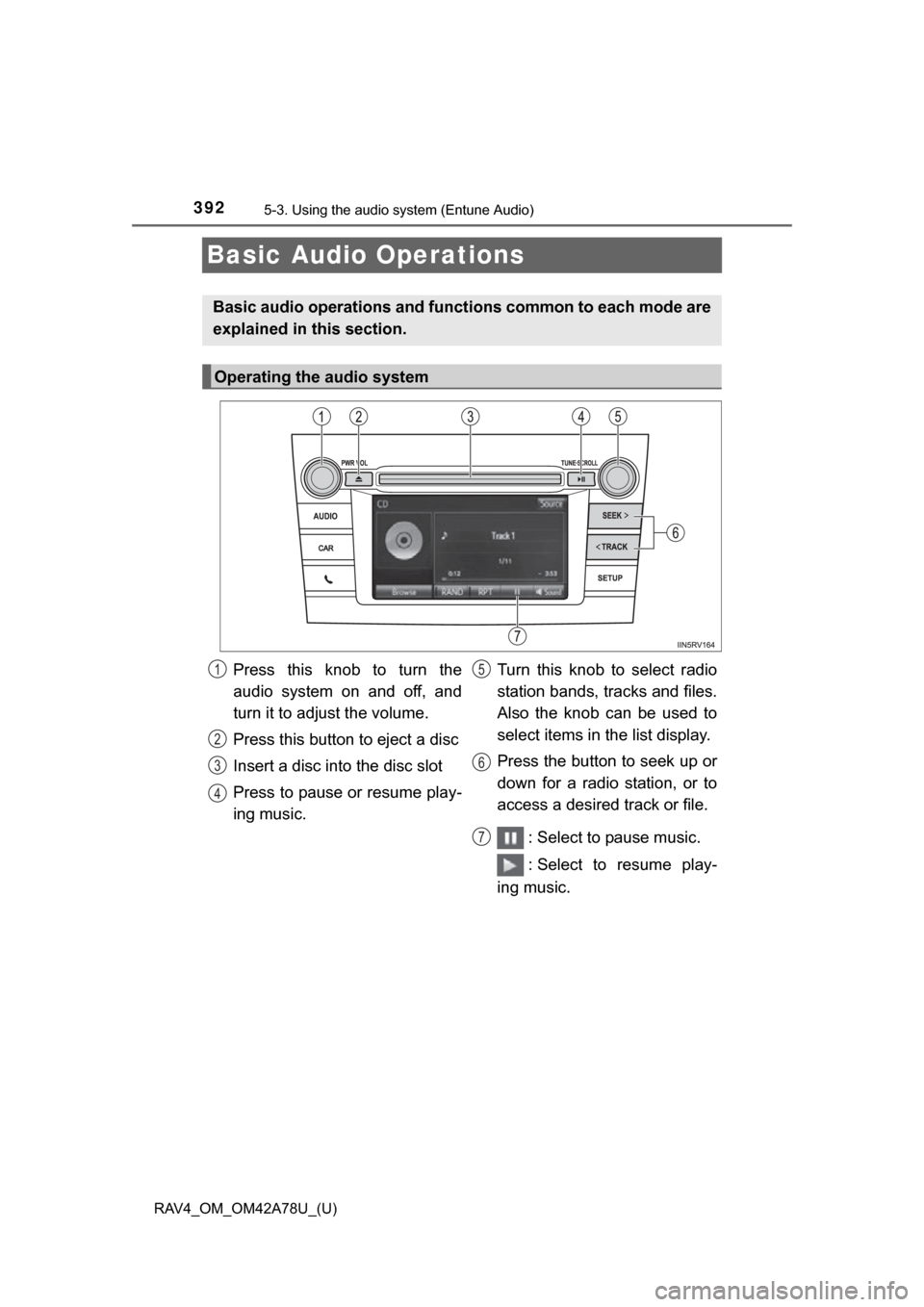
Operating the audio system
Press this knob to turn the
audio system on and off, and
turn it to adjust the volume.
Press this button to eject a disc
Insert a disc into the disc slot
Press to pause or resume play-
ing music. Turn this knob to select radio
station bands, tracks and files.
Also the knob can be used to
select items in the list display.
Press the button to seek up or
down for a radio station, or to
access a desired track or file.
: Select to pause music.
: Select to resume play-
ing music.1
2
3
4
5
6
7
Page 399 of 732
399
RAV4_OM_OM42A78U_(U)
5-3. Using the audio system (Entune Audio)
5
Interior features
Audio settings
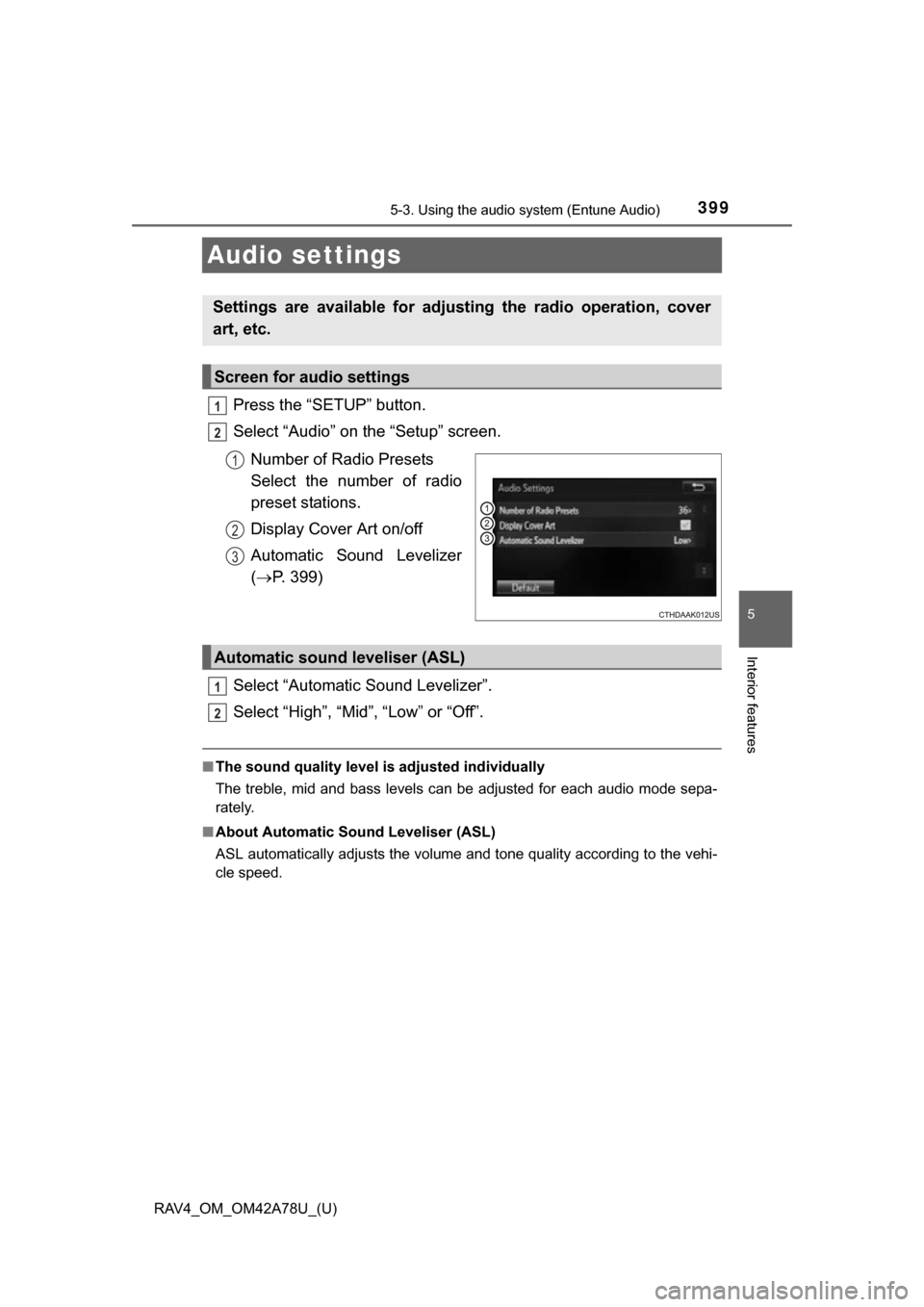
Press the “SETUP” button.
Select “Audio” on the “Setup” screen.Number of Radio Presets
Select the number of radio
preset stations.
Display Cover Art on/off
Automatic Sound Levelizer
( P. 399)
Select “Automatic Sound Levelizer”.
Select “High”, “Mid”, “Low” or “Off”.
■ The sound quality level is adjusted individually
The treble, mid and bass levels can be adjusted for each audio mode sepa-
rately.
■ About Automatic Sou nd Leveliser (ASL)
ASL automatically adjusts the volume and tone quality according to the vehi-
cle speed.
Settings are available for adjusting the radio operation, cover
art, etc.
Screen for audio settings
1
2
1
2
3
Automatic sound leveliser (ASL)
1
2
Page 403 of 732
403
RAV4_OM_OM42A78U_(U)
5-3. Using the audio system (Entune Audio)
5
Interior features
Selecting the audio source
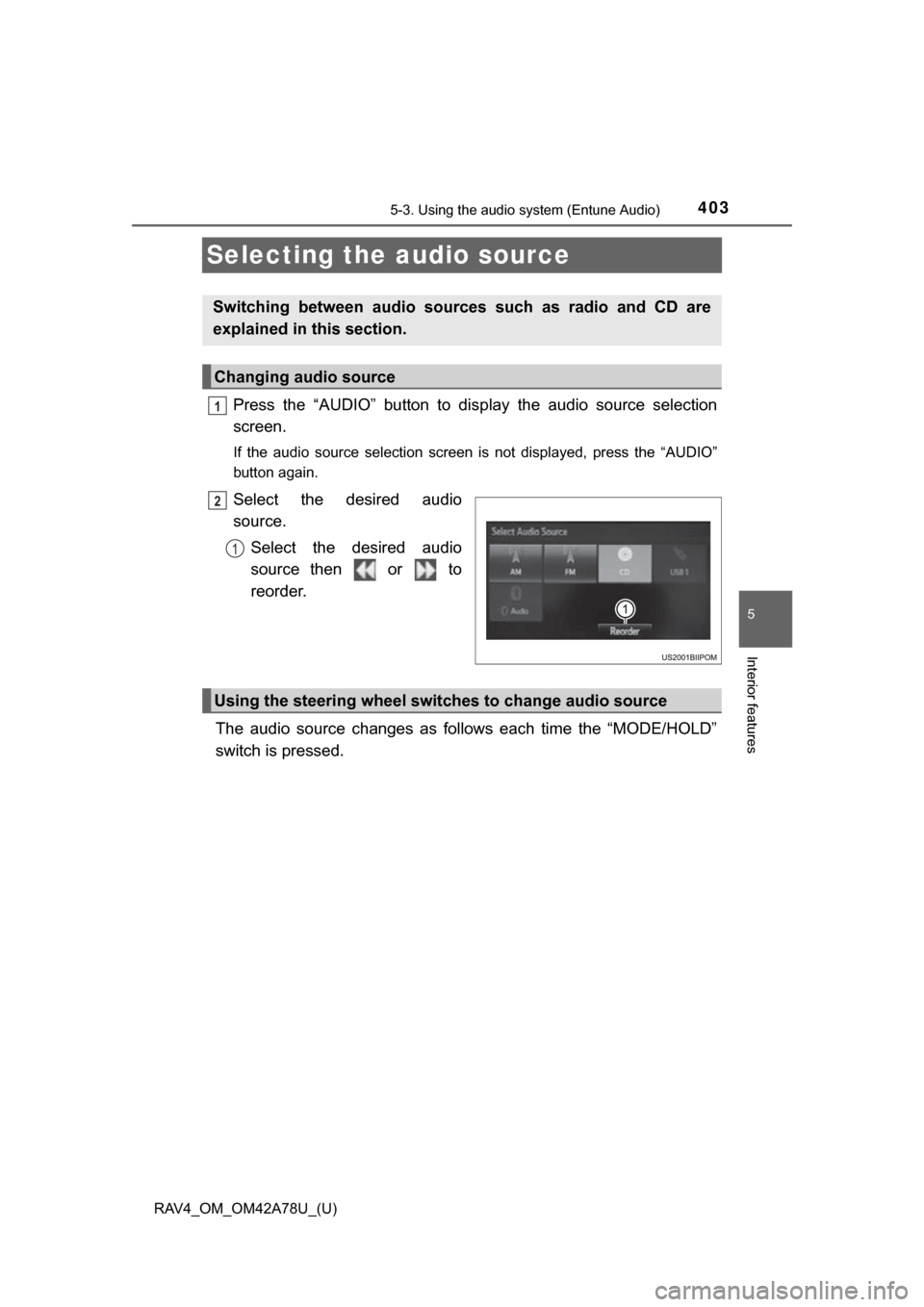
Press the “AUDIO” button to display the audio source selection
screen.
If the audio source selection screen is not displayed, press the “AUDIO”
button again.
Select the desired audio
source.
Select the desired audio
source then or to
reorder.
The audio source changes as follows each time the “MODE/HOLD”
switch is pressed.
Switching between audio sources such as radio and CD are
explained in this section.
Changing audio source
1
2
1
Using the steering wheel switches to change audio source
Page 407 of 732
407
RAV4_OM_OM42A78U_(U)
5-3. Using the audio system (Entune Audio)
5
Interior features
Radio operation
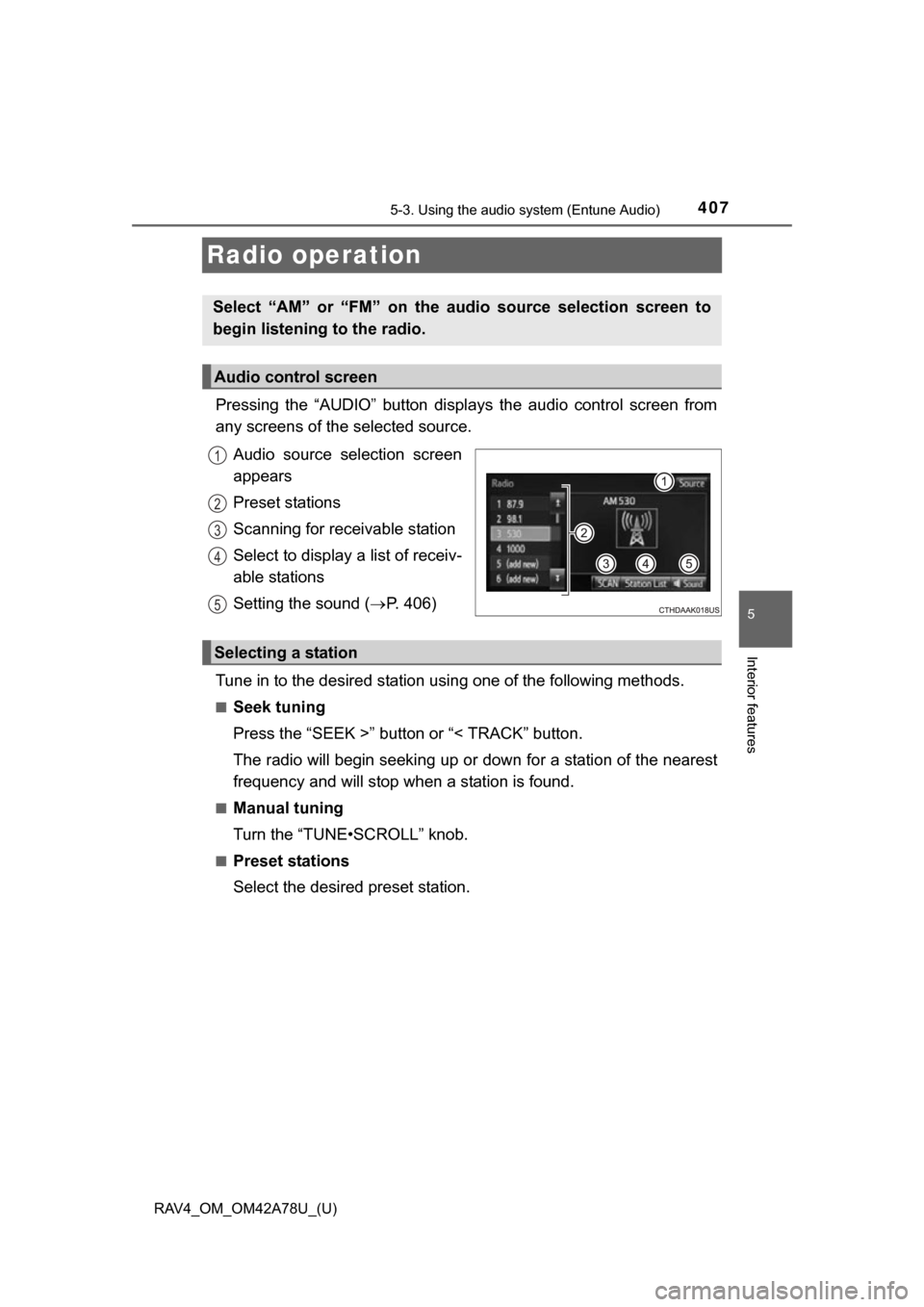
Pressing the “AUDIO” button displays the audio control screen from
any screens of the selected source.
Audio source selection screen
appears
Preset stations
Scanning for receivable station
Select to display a list of receiv-
able stations
Setting the sound ( P. 406)
Tune in to the desired station using one of the following methods.
■Seek tuning
Press the “SEEK >” button or “< TRACK” button.
The radio will begin seeking up or down for a station of the nearest
frequency and will stop when a station is found.
■Manual tuning
Turn the “TUNE•SCROLL” knob.
■Preset stations
Select the desired preset station.
Select “AM” or “FM” on the audio source selection screen to
begin listening to the radio.
Audio control screen
1
2
3
4
5
Selecting a station
Page 408 of 732
408
RAV4_OM_OM42A78U_(U)
5-3. Using the audio system (Entune Audio)
Search for desired stations by turning the “TUNE•SCROLL” knob or
pressing the “SEEK >” button or “< TRACK” button.
Select “(add new)”.
To change the preset station to a different one, select and hold the preset
station.
Select “Yes”.
Select “OK” after setting the new preset station.
■Refreshing the station list
Select “Refresh” on the “Station List” screen.
To cancel the refresh, select “Cancel Refresh”.
■Reception sensitivity
●Maintaining perfect radio reception at all times is difficult due to the continu-
ally changing position of the antenna, differences in signal strength and sur-
rounding objects, such as trains, transmitters, etc.
● The radio antenna is mounted on the roof. The antenna can be removed
from the base by turning it.
Setting station presets
1
2
3
4
1
Page 481 of 732

RAV4_OM_OM42A78U_(U)
4815-3. Using the audio system (Entune Audio)
5
Interior features
■Certification
FCC ID: BABFT0049A
CAUTION:
Radio Frequency Radiation Exposure
This equipment complies with FCC radiation exposure limits set forth for
uncontrolled equipment and meets the FCC radio frequency (RF) Exposure
Guidelines in Supplement C to OET65. This equipment has very low levels of
RF energy that it deemed to comply without maximum permissive exposure
evaluation (MPE). But it is desirable that it should be installed and operated
with at least 20 cm and more between the radiator and person’s body
(excluding extremities: hands, wrists, feet and ankles).
Co-location:
This transmitter must not be co-located or operated in conjunction with any
other antenna or transmitter.
FCC WARNING:
Changes or modifications not expressly approved by the party responsible for
compliance could void the user’s authority to operate the equipment.
This device complies with part 15 of the FCC Rules. Operation is subject to
the following two conditions: (1) This device may not cause harmful interfer-
ence, and (2) this device must accept any interference received, including
interference that may cause undesired operation.
IC: 2024B-FT0049A
This device complies with Industry Canada licence-exempt RSS standard(s).
Operation is subject to the following two conditions: (1) this device may not
cause interference, and (2) this device must accept any interference, includ-
ing interference that may cause undesired operation of the device.
CAUTION:
Radio Frequency Radiation Exposure
This equipment complies with IC radiation exposure limits set forth for uncon-
trolled equipment and meets RSS-102 of the IC radio frequency (RF) Expo-
sure rules. This equipment has very low levels of RF energy that it deemed to
comply without maximum permissive exposure evaluation (MPE). But it is
desirable that it should be installed and operated with at least 20cm and more
between the radiator and person’s body (excluding extremities: hands, wrists,
feet and ankles).
Page 482 of 732
482
RAV4_OM_OM42A78U_(U)
5-3. Using the audio system (Entune Audio)
■Reconnecting the portable audio player
If the portable audio player is disconnected due to poor reception when the
engine switch is in the “ACC” or “ON” position (vehicles without a smart key
system) or ACCESSORY or IGNITION ON mode (vehicles with a smart key
system), the system automatically reconnects the portable audio player.
If you have switched off the portable audio player yourself, follow the instruc-
tions below to reconnect:
● Select the portable audio player again
● Enter the portable audio player
■ When you sell your car
Be sure to delete your personal data. ( P. 398)
CAUTION
■While driving
Do not operate the portable audio player, cellular phone or connect a device
to the Bluetooth
® system.
■ Caution regarding interfer ence with electronic devices
● Your audio unit is fitted with Bluetooth
® antennas. People with implantable
cardiac pacemakers, cardiac resynchronization therapy-pacemakers or
implantable cardioverter defibrillators should maintain a reasonable dis-
tance between themselves and the Bluetooth
® antennas. The radio waves
may affect the operation of such devices.
● Before using Bluetooth
® devices, users of any electrical medical device
other than implantable cardiac pacemakers, cardiac resynchronization
therapy-pacemakers or implantable cardioverter defibrillators should con-
sult the manufacturer of the device for information about its operation
under the influence of radio waves. Radio waves could have unexpected
effects on the operation of such medical devices.
NOTICE
■ When leaving the vehicle
Do not leave your portable audio player or cellular phone in the vehicle. The
inside of the vehicle may become hot, causing damage to the portable
audio player or cellular phone.