key TOYOTA RAV4 2015 XA40 / 4.G Repair Manual
[x] Cancel search | Manufacturer: TOYOTA, Model Year: 2015, Model line: RAV4, Model: TOYOTA RAV4 2015 XA40 / 4.GPages: 732, PDF Size: 12.43 MB
Page 203 of 732
RAV4_OM_OM42A78U_(U)
2034-2. Driving procedures
4
Driving
■Auto power off function
If the vehicle is left in ACCESSORY or IGNITION ON mode (the engine is not
running) for more than an hour with the shift lever in P, the engine switch will
automatically turn off. However, this function cannot entirely prevent battery
discharge. Do not leave the vehicle with the engine switch in ACCESSORY
or IGNITION ON mode for long periods of time when the engine is not run-
ning.
■ Electronic key battery depletion
P. 1 1 1
■ Conditions affecting operation
P. 107
■ Notes for the entry function
P. 108
■ If the engine does not start
●The engine immobilizer system may not have been deactivated. ( P. 76)
Contact your Toyota dealer.
● The steering lock may not have been canceled.
■ Steering lock
After turning the engine switch off and opening and closing the doors, the
steering wheel will be locked due to the steering lock function. Operating the
engine switch again automatically cancels the steering lock.
Page 204 of 732
204
RAV4_OM_OM42A78U_(U)
4-2. Driving procedures
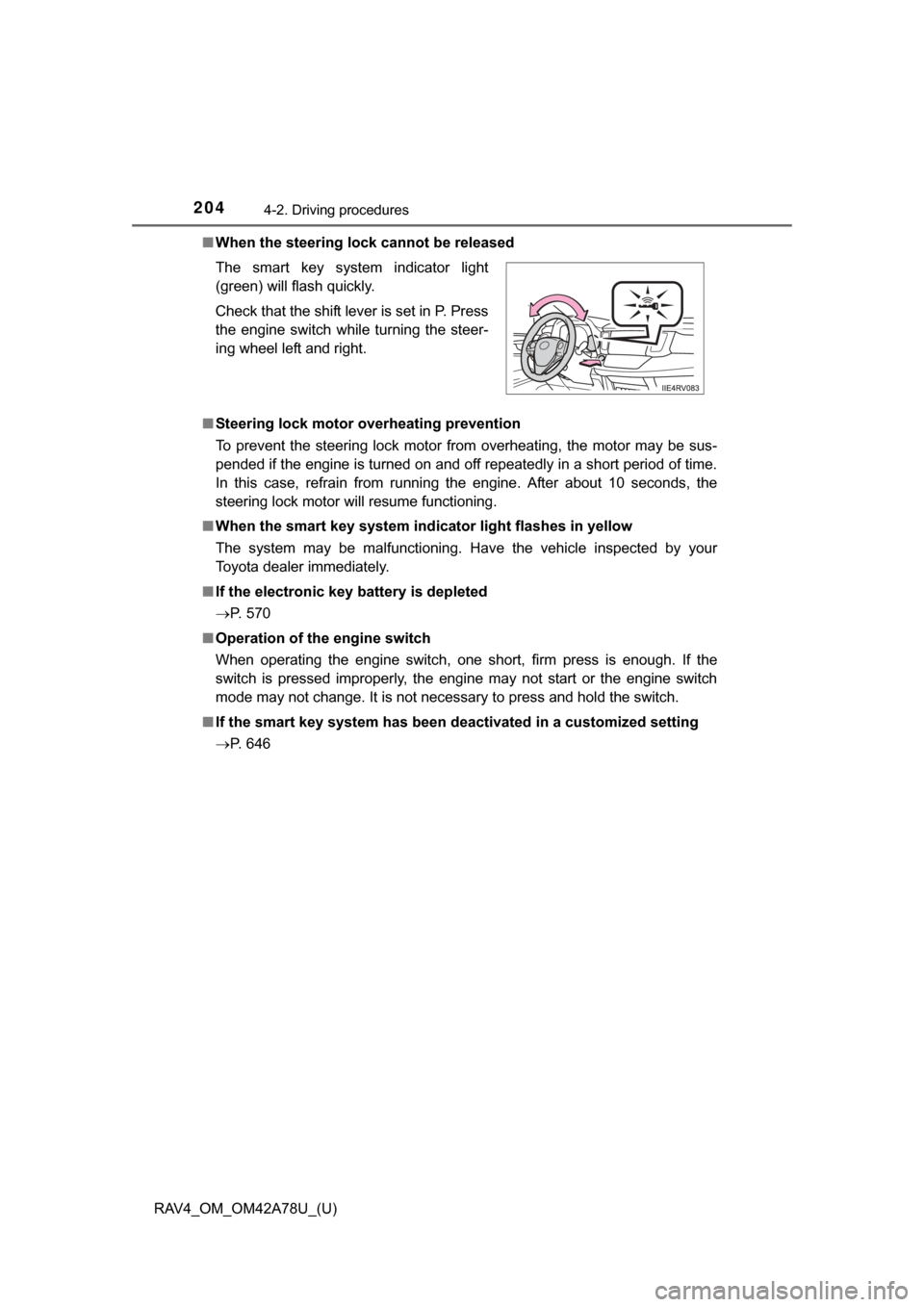
■When the steering lock cannot be released
■ Steering lock motor overheating prevention
To prevent the steering lock motor from overheating, the motor may be sus-
pended if the engine is turned on and off repeatedly in a short period of time.
In this case, refrain from running the engine. After about 10 seconds, the
steering lock motor will resume functioning.
■ When the smart key system indi cator light flashes in yellow
The system may be malfunctioning. Have the vehicle inspected by your
Toyota dealer immediately.
■ If the electronic key battery is depleted
P. 570
■ Operation of the engine switch
When operating the engine switch, one short, firm press is enough. If the
switch is pressed improperly, the engine may not start or the engine switch
mode may not change. It is not necessary to press and hold the switch.
■ If the smart key system has been deactivated in a customized setting
P. 646 The smart key system indicator light
(green) will flash quickly.
Check that the shift lever is set in P. Press
the engine switch while turning the steer-
ing wheel left and right.
Page 206 of 732
206
RAV4_OM_OM42A78U_(U)
4-2. Driving procedures
NOTICE
■To prevent battery discharge
● Do not leave the engine switch in ACCESSORY or IGNITION ON mode
for long periods of time without the engine running.
● If the smart key system indicator light (green) is illuminated, the engine
switch is not off. When exiting the vehicle, always check that the engine
switch is off.
● Do not stop the engine when the shift lever is in a position other than P. If
the engine is stopped in another shift lever position, the engine switch will
not be turned off but instead be turned to ACCESSORY mode. If the vehi-
cle is left in ACCESSORY mode, battery discharge may occur.
■ When starting the engine
● Do not race a cold engine.
● If the engine becomes difficult to star t or stalls frequently, have your vehi-
cle checked by your Toyota dealer immediately.
■ Symptoms indicating a malfunction with the engine switch
If the engine switch seems to be operating somewhat differently than usual,
such as the switch sticking slightly, there may be a malfunction. Contact
your Toyota dealer immediately.
Page 207 of 732
207
RAV4_OM_OM42A78U_(U)
4-2. Driving procedures
4
Driving
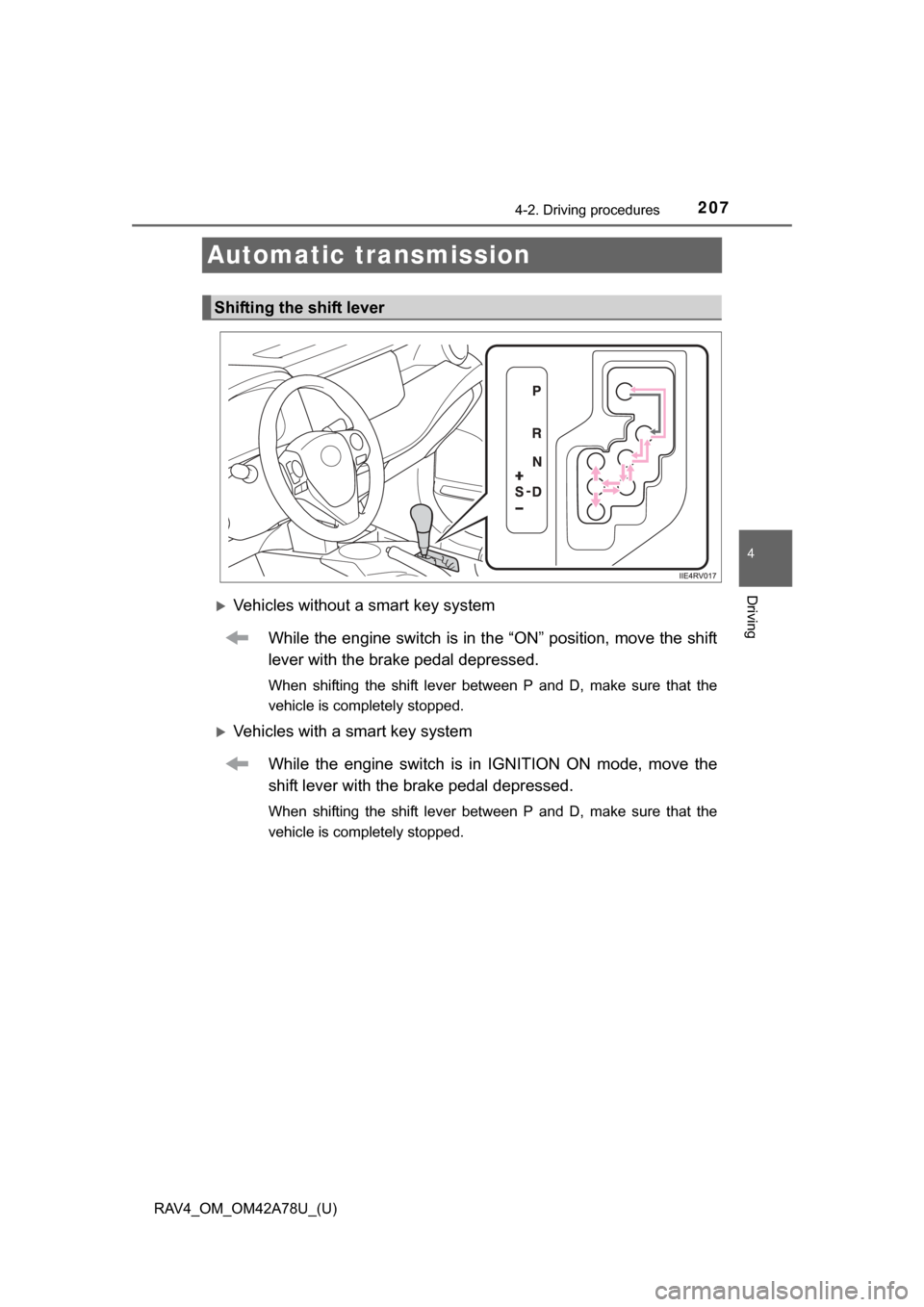
Automatic transmission
Vehicles without a smart key systemWhile the engine switch is in the “ON” position, move the shift
lever with the brake pedal depressed.
When shifting the shift lever between P and D, make sure that the
vehicle is completely stopped.
Vehicles with a smart key systemWhile the engine switch is in IGNITION ON mode, move the
shift lever with the brake pedal depressed.
When shifting the shift lever between P and D, make sure that the
vehicle is completely stopped.
Shifting the shift lever
Page 214 of 732
214
RAV4_OM_OM42A78U_(U)
4-2. Driving procedures
Tur n signal lever
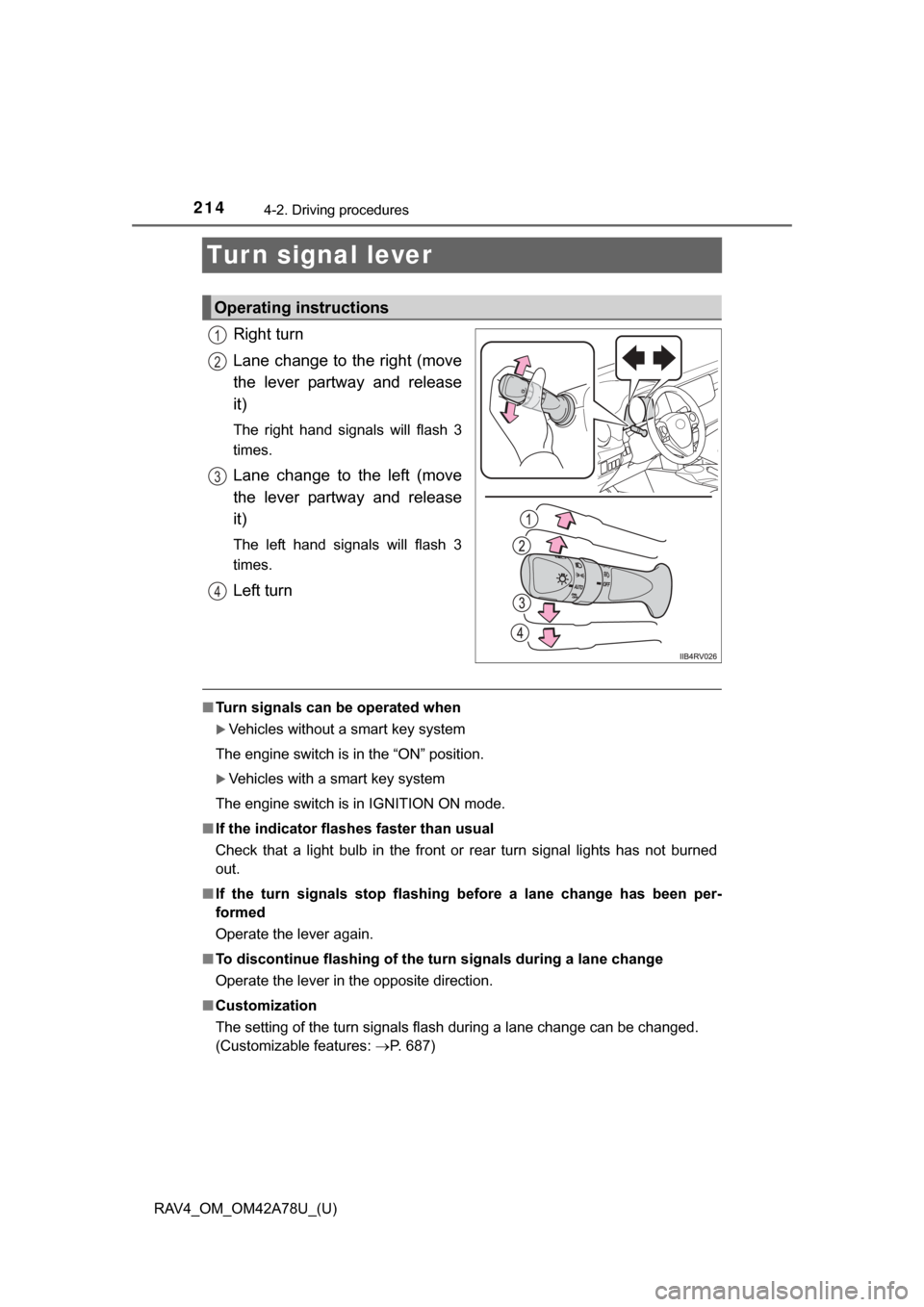
Right turn
Lane change to the right (move
the lever partway and release
it)
The right hand signals will flash 3
times.
Lane change to the left (move
the lever partway and release
it)
The left hand signals will flash 3
times.
Left turn
■Turn signals can be operated when
Vehicles without a smart key system
The engine switch is in the “ON” position.
Vehicles with a smart key system
The engine switch is in IGNITION ON mode.
■ If the indicator flashes faster than usual
Check that a light bulb in the front or rear turn signal lights has not burned
out.
■ If the turn signals stop flashing before a lane change has been per-
formed
Operate the lever again.
■ To discontinue flashing of the turn signals during a lane change
Operate the lever in the opposite direction.
■ Customization
The setting of the turn signals flash during a lane change can be changed.
(Customizable features: P. 687)
Operating instructions
1
2
3
4
Page 217 of 732
217
RAV4_OM_OM42A78U_(U)
4-3. Operating the lights and wipers
4
Driving
Headlight switch
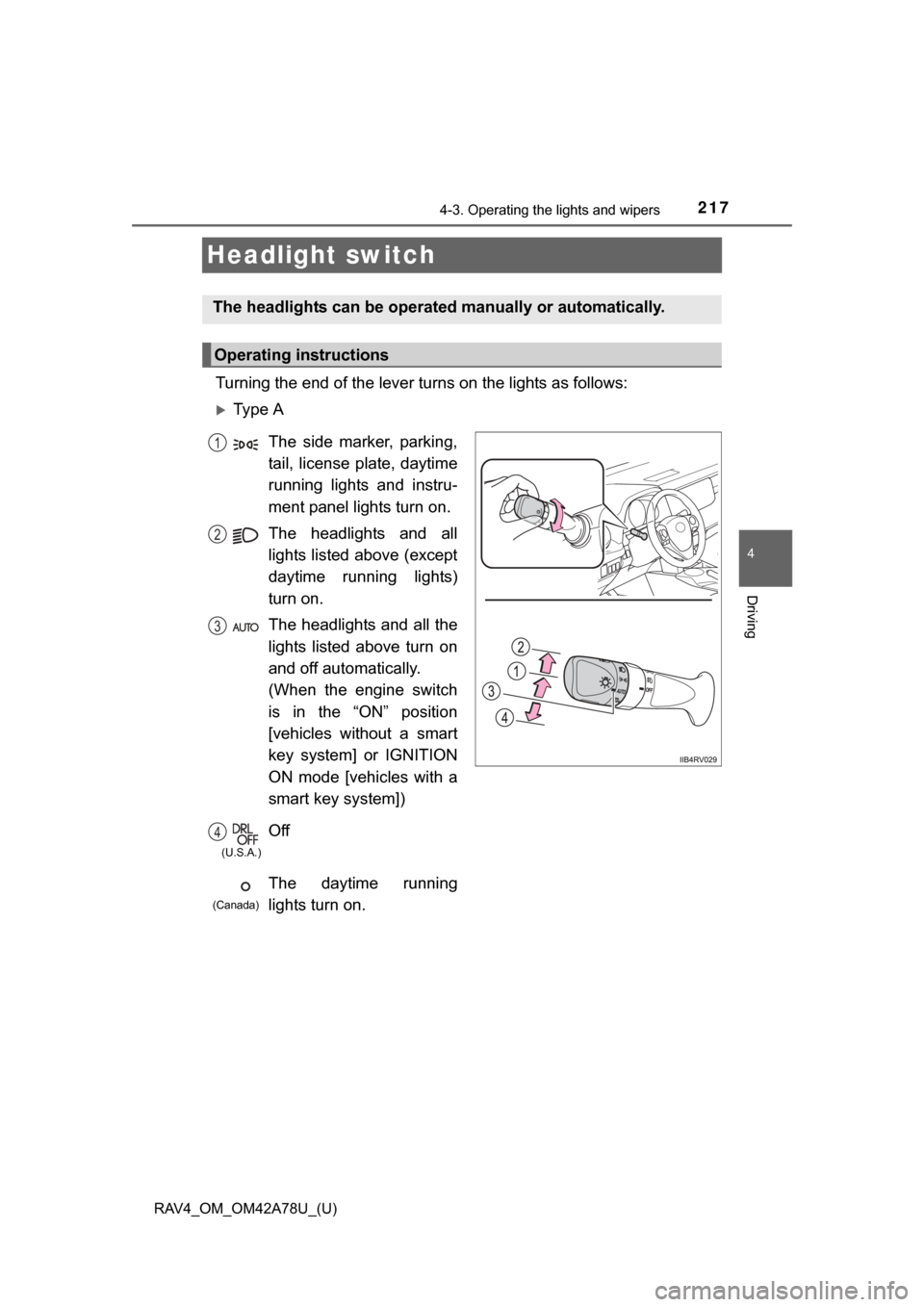
Turning the end of the lever turns on the lights as follows:
Ty p e A
The headlights can be operated manually or automatically.
Operating instructions
The side marker, parking,
tail, license plate, daytime
running lights and instru-
ment panel lights turn on.
The headlights and all
lights listed above (except
daytime running lights)
turn on.
The headlights and all the
lights listed above turn on
and off automatically.
(When the engine switch
is in the “ON” position
[vehicles without a smart
key system] or IGNITION
ON mode [vehicles with a
smart key system])
Off
The daytime running
lights turn on.1
2
3
4
(U.S.A.)
(Canada)
Page 220 of 732
220
RAV4_OM_OM42A78U_(U)
4-3. Operating the lights and wipers
■Automatic light off system
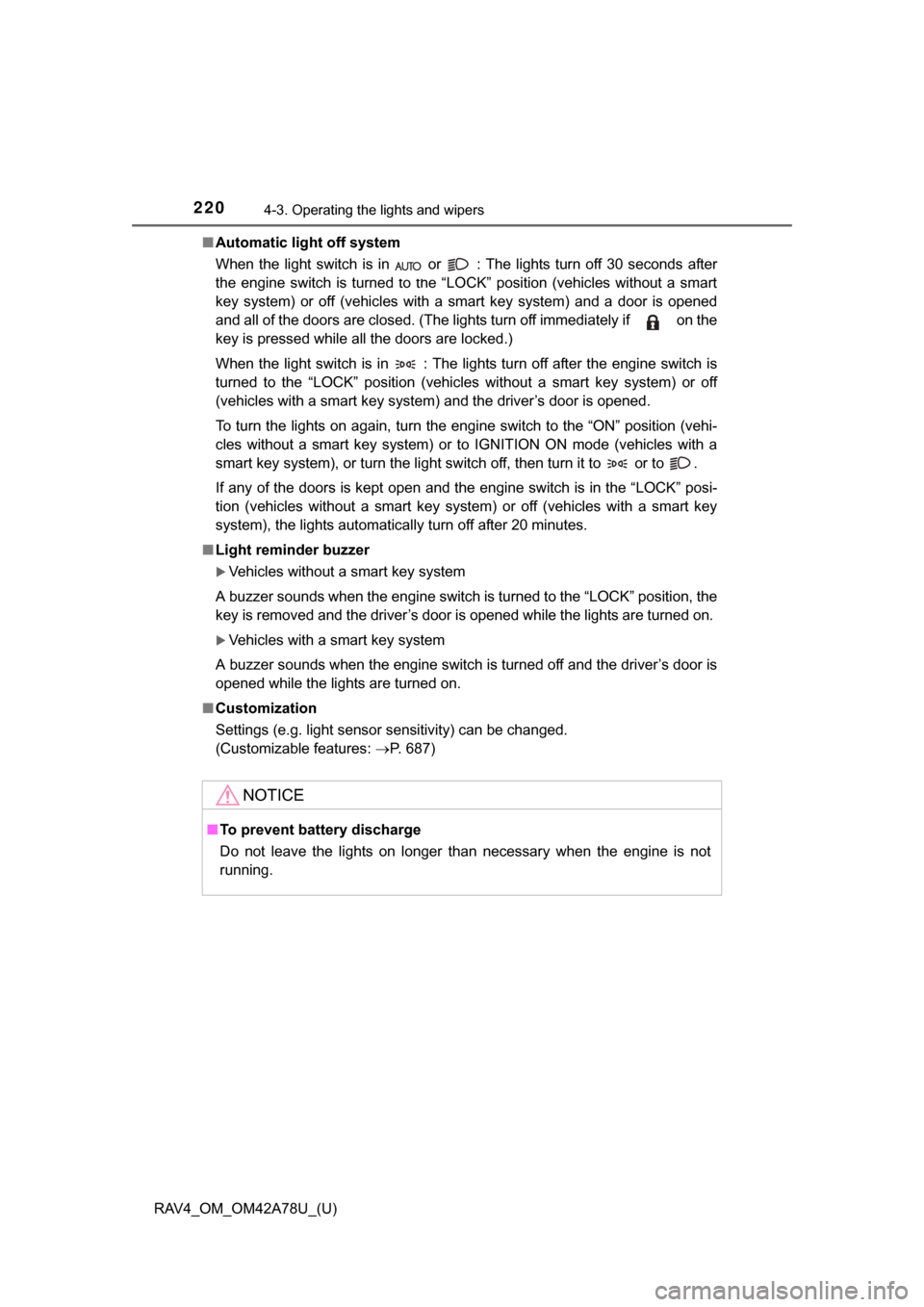
When the light switch is in or : The lights turn off 30 seconds after
the engine switch is turned to the “LOCK” position (vehicles without a smart
key system) or off (vehicles with a smart key system) and a door is opened
and all of the doors are closed. (The lights turn off immediately if on the
key is pressed while all the doors are locked.)
When the light switch is in : The lights turn off after the engine switch is
turned to the “LOCK” position (vehicles without a smart key system) or off
(vehicles with a smart key system) and the driver’s door is opened.
To turn the lights on again, turn the engine switch to the “ON” position (vehi-
cles without a smart key system) or to IGNITION ON mode (vehicles with a
smart key system), or turn the light switch off, then turn it to or to .
If any of the doors is kept open and the engine switch is in the “LOCK” posi-
tion (vehicles without a smart key system) or off (vehicles with a smart key
system), the lights automatically turn off after 20 minutes.
■ Light reminder buzzer
Vehicles without a smart key system
A buzzer sounds when the engine switch is turned to the “LOCK” position, the
key is removed and the driver’s door is opened while the lights are turned on.
Vehicles with a smart key system
A buzzer sounds when the engine switch is turned off and the driver’s door is
opened while the lights are turned on.
■ Customization
Settings (e.g. light sensor sensitivity) can be changed.
(Customizable features: P. 687)
NOTICE
■To prevent battery discharge
Do not leave the lights on longer than necessary when the engine is not
running.
Page 224 of 732

224
RAV4_OM_OM42A78U_(U)
4-3. Operating the lights and wipers
■The Automatic High Beam can be operated when
Vehicles without a smart key system
The engine switch is in the “ON” position.
Vehicles with a smart key system
The engine switch is in IGNITION ON mode.
■ Camera sensor detection information
●High beam may not be automatically turned off in the following situations:
• When oncoming vehicles suddenly appear from a curve
• When the vehicle is cut in front of by another
• When oncoming or preceding vehicles are hidden from sight due to
repeated curves, road dividers or roadside trees
• When oncoming vehicles appear from the faraway lane on wide road
• When oncoming or preceding vehicles have no lights
● High beam may be turned off if an oncoming vehicle that is using fog lights
without using the headlights is detected.
● House lights, street lights, red traffic signals, and illuminated billboards or
signs may cause the high beam to turn off.
● The following factors may affect the amount of time taken to turn high beam
on or off:
• The brightness of headlights, fog lights, and tail lights of oncoming and
preceding vehicles
• The movement and direction of oncoming and preceding vehicles
• When a oncoming or preceding vehicle only has operational lights on one side
• When a oncoming or preceding vehicle is a two-wheeled vehicle
• The condition of the road (gradient, curve, condition of the road surface etc.)
• The number of passengers and amount of luggage
● High beam may be turned on or off when unexpected by the driver.
Page 226 of 732

226
RAV4_OM_OM42A78U_(U)
4-3. Operating the lights and wipers
■Temporarily lowering sensor sensitivity
The sensitivity of the sensor can be temporarily lowered.
Vehicles without a smart key system: Turn the engine switch to the
“LOCK” position while the following conditions are met.
Vehicles with a smart key system: Turn the engine switch off while the fol-
lowing conditions are met.
• The headlight switch is in .
• The headlight switch lever is in high beam position. Vehicles without a smart key system: Turn the engine switch to the “ON”
position.
Vehicles with a smart key system: Turn the engine switch to IGNITION
ON mode.
Within 5 seconds after , repeat pulling the headlight switch lever to the
original position then pushing it to the high beam position quickly 9 times,
then leave the lever in high beam position.
Automatic High Beam (headlights) may turn on even the vehicle is stopped.
■ If the Automatic High Beam indicator turns to yellow...
It may indicate a malfunction in the system. Contact your Toyota dealer.
■ Customization
The Automatic High Beam can be turned off.
(Customizable features: P. 687)
CAUTION
■Limitations of the Automatic High Beam
Do not rely on the Automatic High Beam. Always drive safely, taking care to
observe your surroundings and turning high beam on or off manually if nec-
essary.
1
2
32
Page 232 of 732
232
RAV4_OM_OM42A78U_(U)
4-3. Operating the lights and wipers
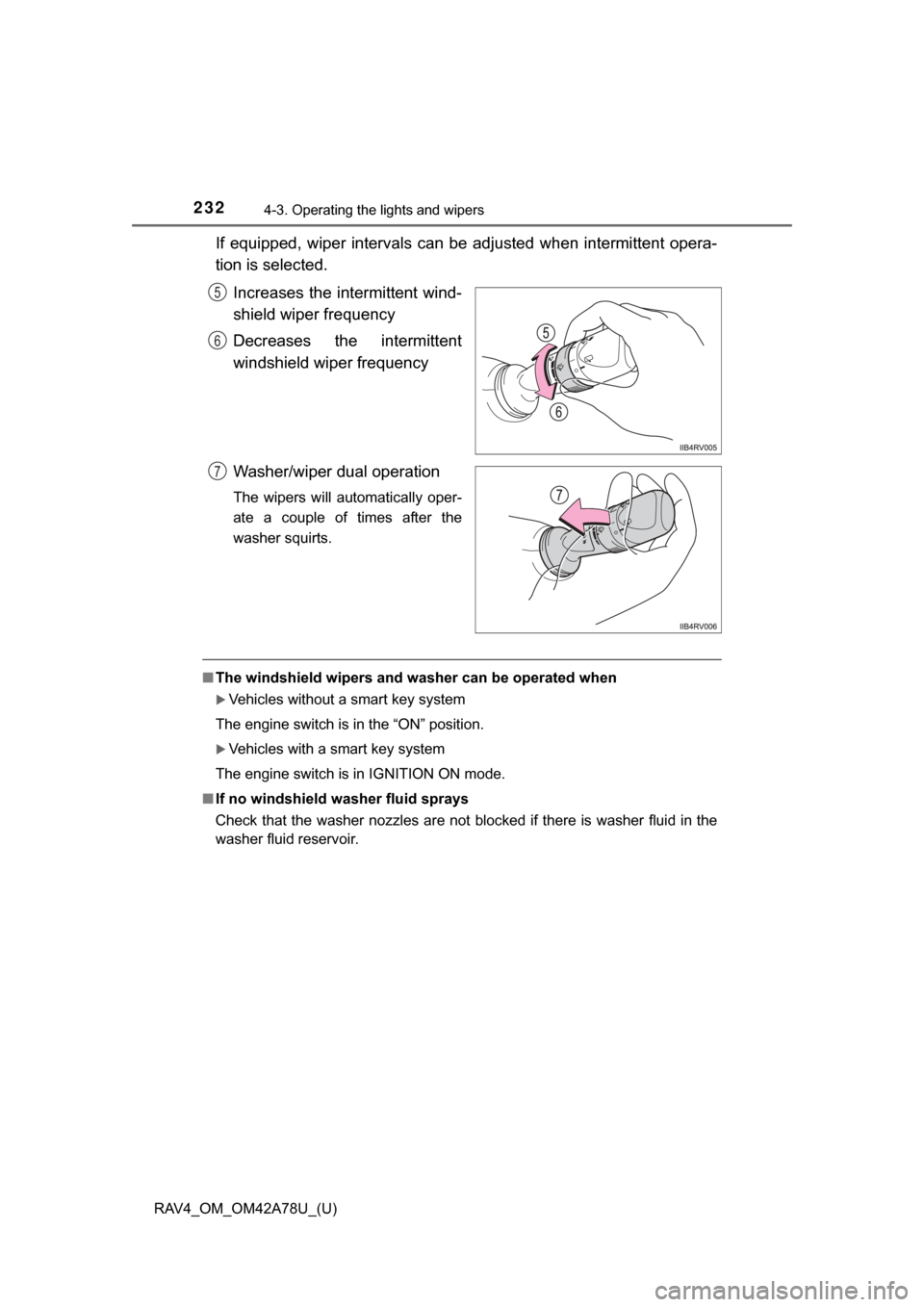
If equipped, wiper intervals can be adjusted when intermittent opera-
tion is selected.Increases the intermittent wind-
shield wiper frequency
Decreases the intermittent
windshield wiper frequency
Washer/wiper dual operation
The wipers will automatically oper-
ate a couple of times after the
washer squirts.
■The windshield wipers and washer can be operated when
Vehicles without a smart key system
The engine switch is in the “ON” position.
Vehicles with a smart key system
The engine switch is in IGNITION ON mode.
■ If no windshield washer fluid sprays
Check that the washer nozzles are not blocked if there is washer fluid in the
washer fluid reservoir.
5
6
7