engine TOYOTA RAV4 2016 XA40 / 4.G Owner's Manual
[x] Cancel search | Manufacturer: TOYOTA, Model Year: 2016, Model line: RAV4, Model: TOYOTA RAV4 2016 XA40 / 4.GPages: 741, PDF Size: 14.31 MB
Page 90 of 741

90
RAV4_OM_OM42A41U_(U)
2. Instrument cluster
●Odometer
Displays the total distance the vehicle has been driven.
● Trip meters “A” and “B”
Displays the distance the vehicl e has been driven since the meter
was last reset. Trip meters “A” and “B” can be used to record and
display different distances independently.
Pressing and holding the “DISP” button will reset the trip meter that is
currently displayed.
● Current fuel consumption
Displays the current rate of fuel consumption.
● Average fuel consumption
Displays the average fuel consum ption since the function was
reset.
• The function can be reset by pressing the “DISP” button for longer than 1 second when the average fuel consumption is displayed.
• Use the displayed average fuel consumption as a reference.
● Average vehicle speed
Displays the average vehicle speed since the engine was last
started.
● Driving range
Displays the estimated approxim ate distance that can be driven
with the quantity of fuel remaining.
• This distance is computed based on your average fuel consumption. As a result, the actual distance that can be driven may differ from that dis-
played.
• When only a small amount of fuel is added to the tank, the display may not be updated.
When refueling, turn the engine switch off. If the vehicle is refueled with-
out turning the engine switch off, the display may not be updated.
Trip information
Page 93 of 741

RAV4_OM_OM42A41U_(U)
932. Instrument cluster
2
Instrument cluster
Warning message display
Select to display warning messages and measures to be taken if a
malfunction is detected. (→P. 626)
Settings display
Select to change the system settings and meter display settings.
(→P. 95)
*: If equipped
The multi-information display is
operated using the meter control
switches.
Enter/Set
Select an item/change pages
Return to the previous screen
Items displayed can be switched by pressing or of the meter
control switches to select and pressing or .
■Average fuel economy (after start/after reset*1/after refuel)
Displays the average fuel co nsumption since the engine was
started, the function was rese t and the vehicle was refueled,
respectively
Use the displayed average fuel consumption as a reference.
Operating the meter control switches
1
2
3
Drive information
Page 94 of 741
94
RAV4_OM_OM42A41U_(U)
2. Instrument cluster
■Average speed (after start/after reset*1/after refuel)
Displays the average vehicle speed since the engine was started,
the function was reset and the v ehicle was refueled, respectively
■Range (after refuel)
Displays the estimated maximum distance that can be driven with
the quantity of fuel remaining
• This distance is computed base d on your average fuel consump-
tion. As a result, the actual dist ance that can be driven may differ
from that displayed.
• When only a small amount of fuel is added to the tank, the dis- play may not be updated.
When refueling, turn the engine switch off. If the vehicle is refu-
eled without turning the engine switch off, the display may not be
updated.
■Eco Driving Indicator Zone Display
→ P. 8 3
■Dynamic Torque Control AWD system display*2
→P. 9 4
■LDA (Lane Departure Alert with steering control) vehicle sway
warning
*2
→P. 2 5 3
■Display off
A blank screen is displayed
*1: The function can be reset by pressing and holding the of the meter
control switches when the reset item is displayed.
*2: If equipped
Page 96 of 741
96
RAV4_OM_OM42A41U_(U)
2. Instrument cluster
■System check display
After turning the engine switch to IGNITION ON mode, opening image is dis-
played while system operation is checked. When the system check is com-
plete, the normal screen will return.
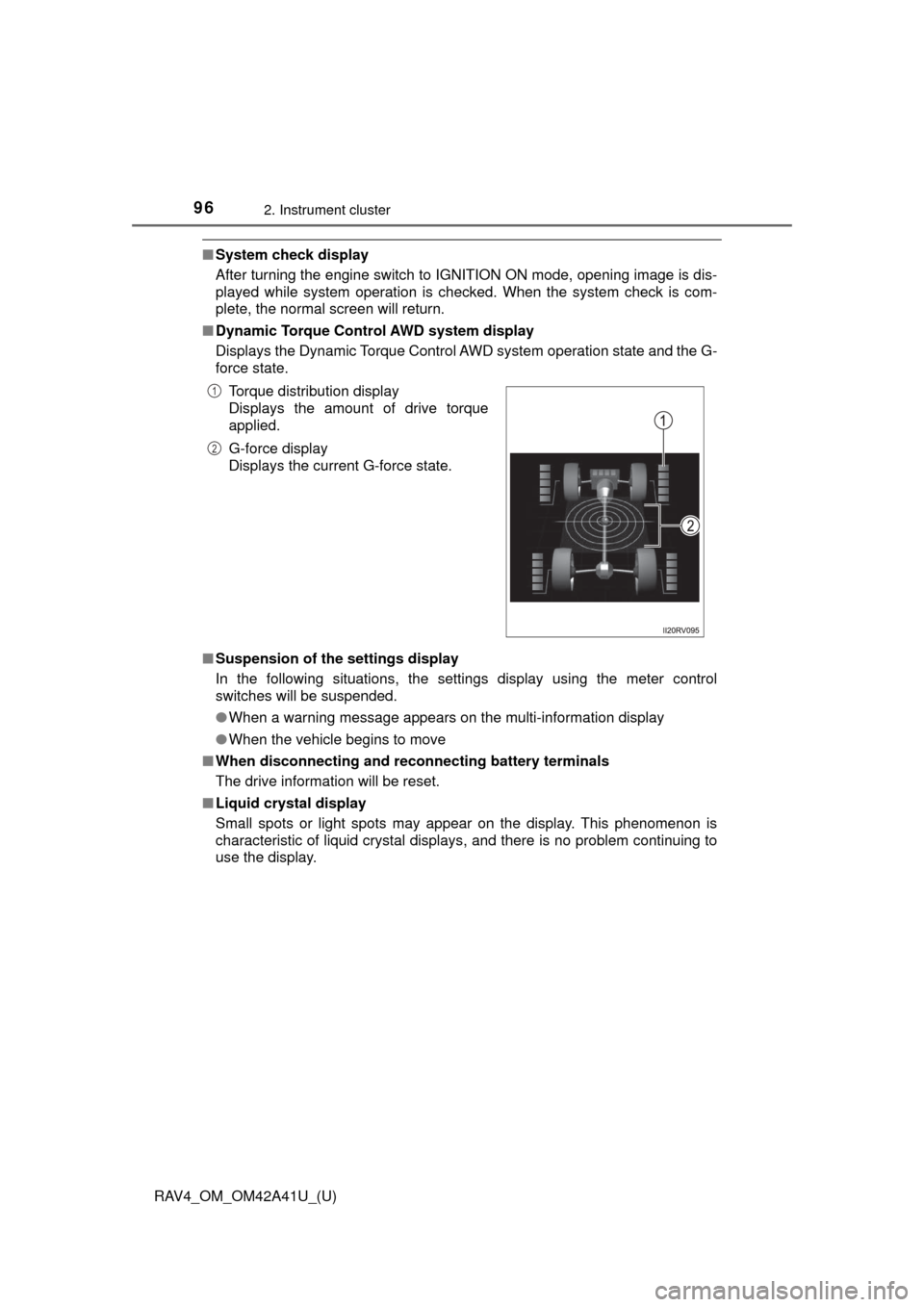
■ Dynamic Torque Control AWD system display
Displays the Dynamic Torque Control AWD system operation state and the G-
force state.
■ Suspension of the settings display
In the following situations, the settings display using the meter control
switches will be suspended.
●When a warning message appears on the multi-information display
● When the vehicle begins to move
■ When disconnecting and reco nnecting battery terminals
The drive information will be reset.
■ Liquid crystal display
Small spots or light spots may appear on the display. This phenomenon is
characteristic of liquid crystal displays, and there is no problem continuing to
use the display.Torque distribution display
Displays the amount of drive torque
applied.
G-force display
Displays the current G-force state.
1
2
Page 97 of 741
RAV4_OM_OM42A41U_(U)
972. Instrument cluster
2
Instrument cluster
WARNING
■Caution for use while driving
For safety, avoid operating the meter control switches while driving as much
as possible, and do not look continuously at the multi-information display
while driving. Stop the vehicle and operate the meter control switches. Fail-
ure to do so may cause a steering wheel operation error, resulting in an
unexpected accident.
■ Cautions during setting up the display
As the engine needs to be running during setting up the display, ensure that
the vehicle is parked in a place with adequate ventilation. In a closed area
such as a garage, exhaust gases including harmful carbon monoxide (CO)
may collect and enter the vehicle. This may lead to death or a serious
health hazard.
NOTICE
■During setting up the display
To prevent battery discharge, ensure that the engine is running while setting
up the display features.
Page 98 of 741

98
RAV4_OM_OM42A41U_(U)
2. Instrument cluster
Fuel consumption information
Vehicles with Entune Audio
Press the “CAR” button.
Vehicles with Entune Premium Audio with Navigation and Entune
Audio Plus
Press the “APPS” button, and t hen select “Eco” on the screen.
If the “Trip Information” screen does not appear, select “Trip Informa-
tion”. Reset the trip information data
Previous fuel consumption per
minute
Current fuel consumption
“Past Record” screen appears
Cruising range
Elapsed time
Average vehicle speed
Average fuel consumption for the past 15 minutes is divided by color
into past averages and averages at tained since the engine switch was
last turned to the “ON” position (vehicles without smart key system) or
IGNITION ON mode (vehicles with smart key system). Use the dis-
played average fuel consumption as a reference.
These images are examples only, an d may vary slightly from actual
conditions.
The fuel consumption informat ion can be displayed on Entune
Premium Audio with Navigation and Entune Audio screen.
Display the trip information or past record screen
Trip information
1
2
3
4
5
6
7
Page 113 of 741
RAV4_OM_OM42A41U_(U)
1133-2. Opening, closing and locking the doors
3
Operation of each component
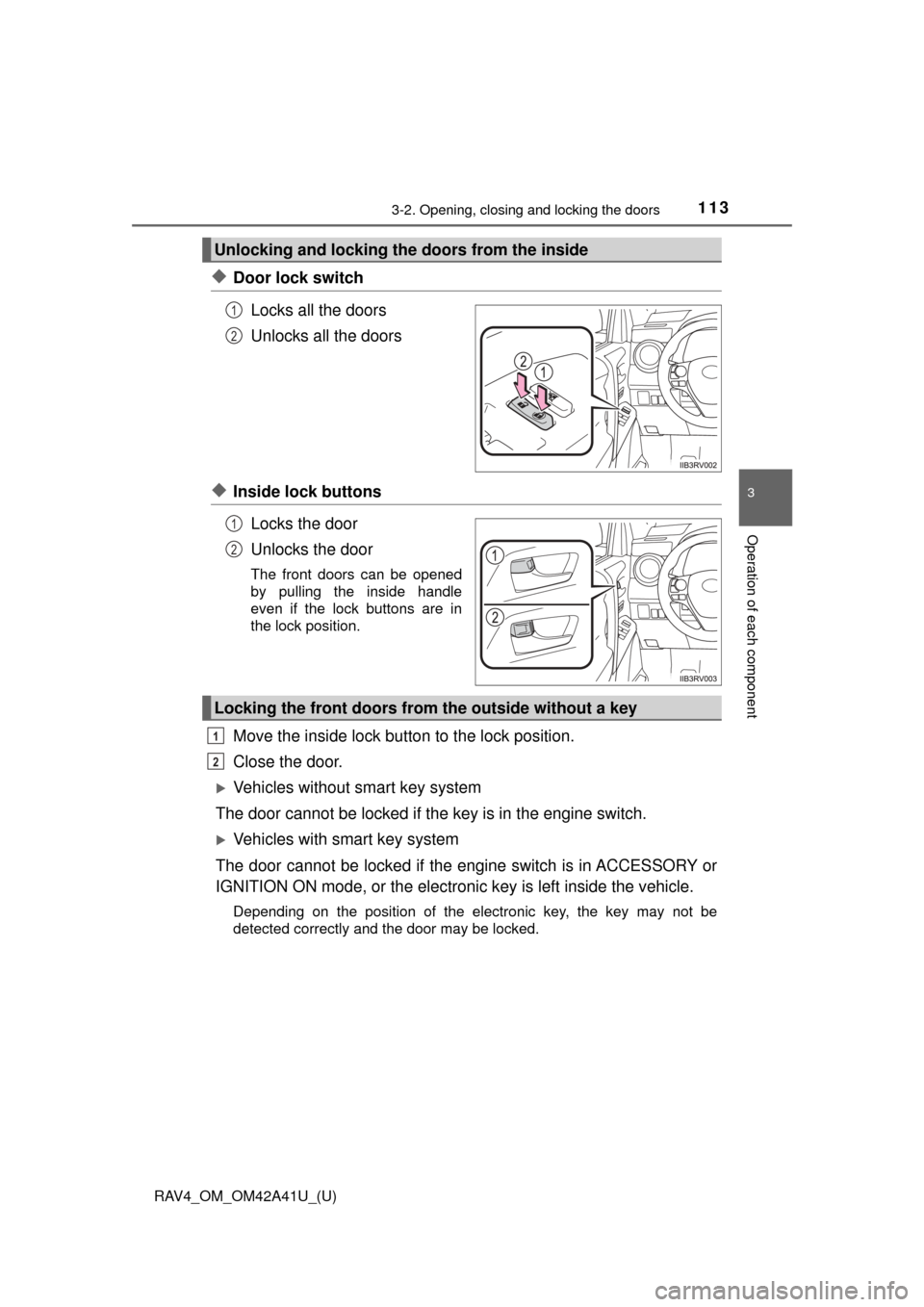
◆Door lock switchLocks all the doors
Unlocks all the doors
◆Inside lock buttonsLocks the door
Unlocks the door
The front doors can be opened
by pulling the inside handle
even if the lock buttons are in
the lock position.
Move the inside lock button to the lock position.
Close the door.
Vehicles without smart key system
The door cannot be locked if the key is in the engine switch.
Vehicles with smart key system
The door cannot be locked if the engine switch is in ACCESSORY or
IGNITION ON mode, or the electronic key is left inside the vehicle.
Depending on the position of the electronic key, the key may not be
detected correctly and the door may be locked.
Unlocking and locking the doors from the inside
1
2
1
2
Locking the front doors from the outside without a key
1
2
Page 115 of 741
RAV4_OM_OM42A41U_(U)
1153-2. Opening, closing and locking the doors
3
Operation of each component
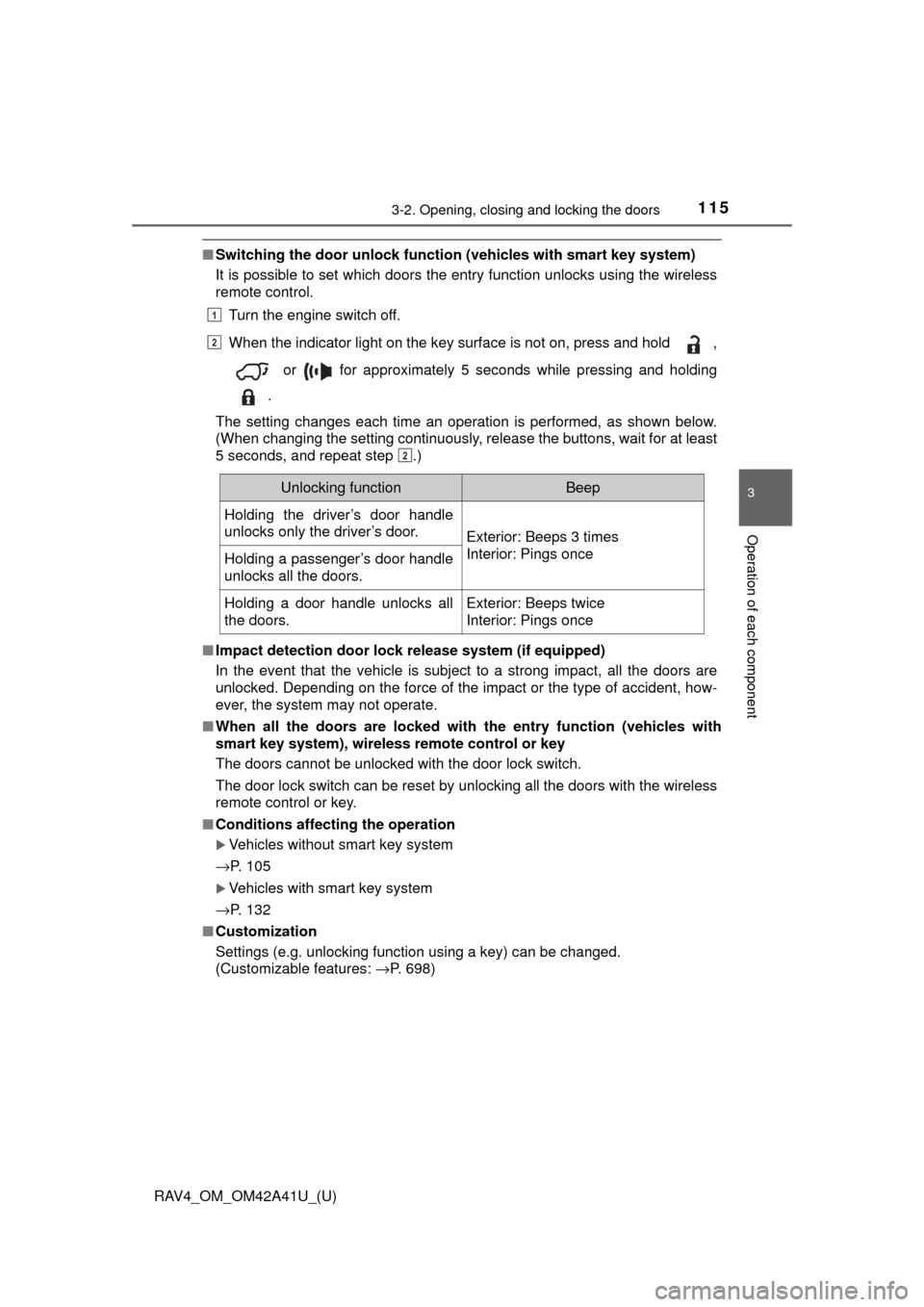
■Switching the door unlock functi on (vehicles with smart key system)
It is possible to set which doors the entry function unlocks using the wireless
remote control.
Turn the engine switch off.
When the indicator light on the key surface is not on, press and hold ,
or for approximately 5 seconds while pressing and holding
.
The setting changes each time an operation is performed, as shown below.
(When changing the setting continuously, release the buttons, wait for at least
5 seconds, and repeat step .)
■ Impact detection door lock release system (if equipped)
In the event that the vehicle is subject to a strong impact, all the doors are
unlocked. Depending on the force of the impact or the type of accident, how-
ever, the system may not operate.
■ When all the doors are locked with the entry function (vehicles with
smart key system), wireless remote control or key
The doors cannot be unlocked with the door lock switch.
The door lock switch can be reset by unlocking all the doors with the wireless
remote control or key.
■ Conditions affecting the operation
Vehicles without smart key system
→P. 105
Vehicles with smart key system
→P. 132
■ Customization
Settings (e.g. unlocking function using a key) can be changed.
(Customizable features: →P. 698)
1
2
2
Unlocking functionBeep
Holding the driver’s door handle
unlocks only the driver’s door.
Exterior: Beeps 3 times
Interior: Pings once
Holding a passenger’s door handle
unlocks all the doors.
Holding a door handle unlocks all
the doors.Exterior: Beeps twice
Interior: Pings once
Page 127 of 741
RAV4_OM_OM42A41U_(U)
1273-2. Opening, closing and locking the doors
3
Operation of each component
WARNING
●In the following situations, the power back door may detect an abnormality
and automatic operation may be stopped. In this case, the back door has
to be operated manually. Take extra care in this situation, as the stopped
back door may suddenly open or close, causing an accident.
• When the back door contacts an obstacle
• When the battery voltage suddenly drops, such as when the engine
switch is turned to the “ON” position (vehicles without smart key sys-
tem) or IGNITION ON mode (vehicles with smart key system) or the
engine is started during automatic operation
● If a bicycle carrier or similar heavy object is attached to the back door, the
power back door may not operate, causing itself to malfunction, or the
back door may move slightly in the closing direction after being opened,
causing someone’s hands, head or neck to be caught and injured. When
installing an accessory part to the back door, ask your Toyota dealer for
details.
■ Jam protection function (vehicles with power back door)
Observe the following precautions.
Failure to do so may cause death or serious injury.
● Never use any part of your body to intentionally activate the jam protection
function.
● The jam protection function may not work if something gets caught just
before the back door fully closes. Be careful not to catch fingers or any-
thing else.
● The jam protection function may not work depending on the shape of the
object that is caught. Be careful not to catch fingers or anything else.\
Page 130 of 741
130
RAV4_OM_OM42A41U_(U)
3-2. Opening, closing and locking the doors
Smart key system∗
●Locks and unlocks the side doors ( →P. 1 1 1 )
● Locks and unlocks the back door ( →P. 117)
● Starts the engine ( →P. 198)
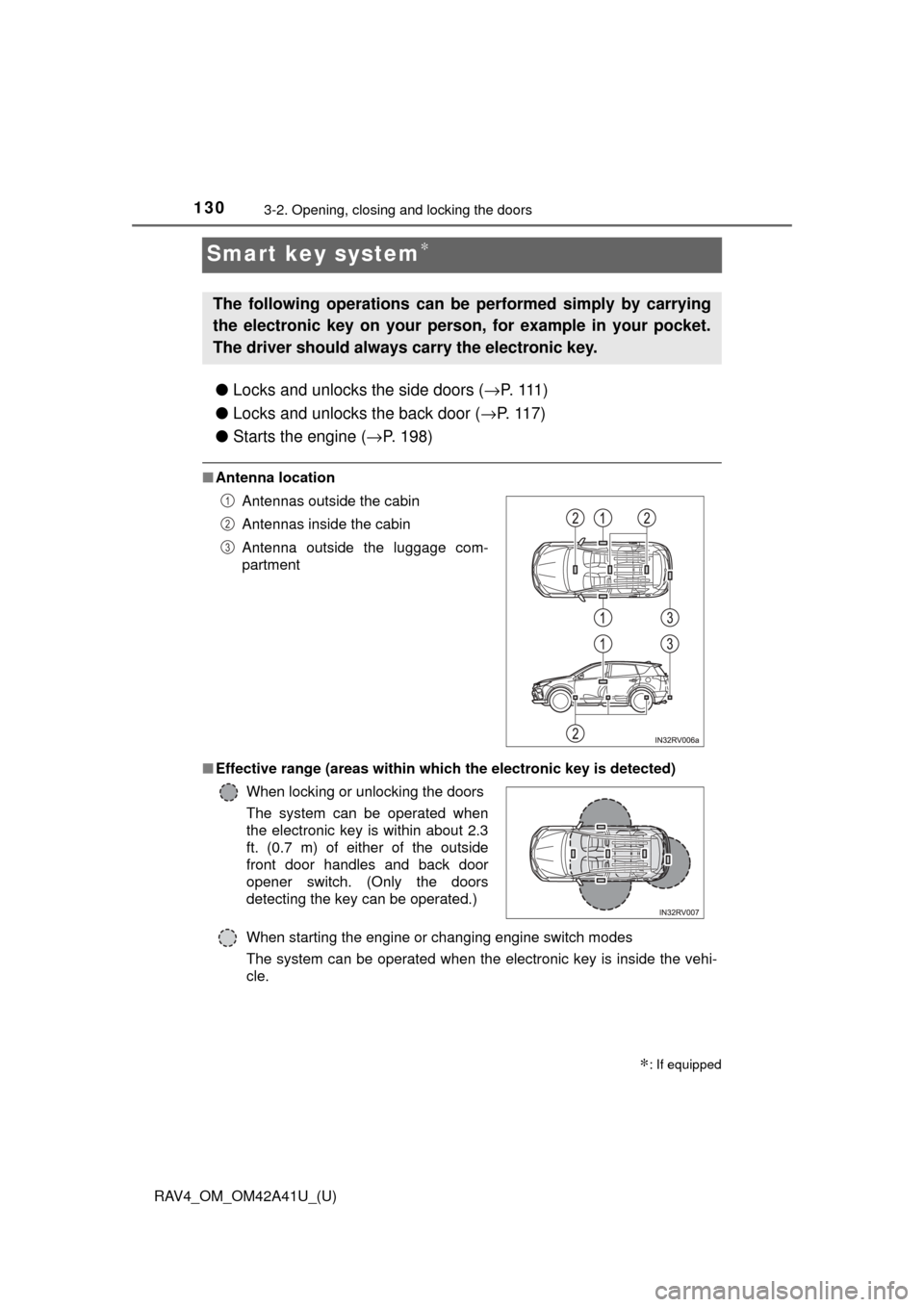
■Antenna location
■ Effective range (areas within whic h the electronic key is detected)
When starting the engine or changing engine switch modes
The system can be operated when the electronic key is inside the vehi-
cle.
∗: If equipped
The following operations can be performed simply by carrying
the electronic key on your person, for example in your pocket.
The driver should always carry the electronic key.
Antennas outside the cabin
Antennas inside the cabin
Antenna outside the luggage com-
partment
When locking or unlocking the doors
The system can be operated when
the electronic key is within about 2.3
ft. (0.7 m) of either of the outside
front door handles and back door
opener switch. (Only the doors
detecting the key can be operated.)1
2
3