USB TOYOTA RAV4 2016 XA40 / 4.G Owners Manual
[x] Cancel search | Manufacturer: TOYOTA, Model Year: 2016, Model line: RAV4, Model: TOYOTA RAV4 2016 XA40 / 4.GPages: 741, PDF Size: 14.31 MB
Page 4 of 741

TABLE OF CONTENTS4
RAV4_OM_OM42A41U_(U)5-1. Basic Operations
Audio system types ........... 326
Using the steering wheel audio switches ................ 329
AUX port/USB port ............ 332
5-2. Using the audio system Optimal use of the audio system ................... 334
5-3. Using the radio Radio operation ................. 336
5-4. Playing an audio CD and MP3/WMA discs
CD player operation .......... 338
5-5. Using an external device Listening to an iPod........... 348
Listening to USB memory device................ 354
Using the AUX port ........... 360
5-6. Using Bluetooth
® devices
Bluetooth® audio/
phone .............................. 361
Using the steering wheel switches ................ 366
Register a Bluetooth
®
device.............................. 367
5-7. “SETUP” menu Using the “SETUP” menu (“Bluetooth
*” menu) ........ 368
Using the “SETUP” menu (“PHONE” menu) ............ 373
5-8. Bluetooth
® Audio
Operating a Bluetooth®
enabled portable
player .............................. 378 5-9. Bluetooth
® Phone
Making a phone call........... 381
When receiving a phone call ........................ 383
Speaking on the phone...... 384
5-10. Bluetooth
®
Bluetooth®......................... 386
5-11. Using the audio system (Entune Audio)
Audio system (Entune Audio) ................ 389
5-12. Basic Operations Audio system operations (Entune Audio) ................ 391
Steering wheel audio switches........................... 393
AUX port/USB port ............ 394
Basic audio operations ...... 395
5-13. Setup Setup menu ....................... 397
General settings ................ 398
Audio settings .................... 400
Display settings ................. 401
Voice settings .................... 403
5-14. Using the audio system Selecting the audio source.............................. 404
List screen operation ......... 405
Optimal use of the audio system ............................. 407
5-15. Using the radio Radio operation ................. 408
5-16. Playing an audio CD and MP3/WMA/AAC discs
CD player operation........... 410
CD player and disc information....................... 411
5Audio system
*: Bluetooth is a registered trademark of Bluetooth SIG, Inc.
Page 5 of 741
5
RAV4_OM_OM42A41U_(U)
1
9 8
7
6 4 3
2
10
5
5-17. Using an external deviceiPod player operation ........ 417
USB memory device player operation .............. 422
Using the AUX port ........... 427
5-18. Connecting Bluetooth
®
Preparations to use wireless
communication ................ 428
Registering a Bluetooth
®
audio player for the
first time .......................... 431
Registering a Bluetooth
®
phone for the
first time .......................... 432
Registering a Bluetooth
®
device.............................. 433
Connecting a Bluetooth
®
device.............................. 435
Displaying a Bluetooth
®
device details .................. 437
Detailed Bluetooth
®
settings............................ 438
5-19. Bluetooth
® Audio
Listening to Bluetooth®
Audio ............................... 440
5-20. Bluetooth
® Phone
Using a Bluetooth®
Phone.............................. 442
Making a call ..................... 444
Receiving a call ................. 447
Speaking on the phone ..... 448
Bluetooth
® phone
message function ............ 451
Using the steering wheel switches ................ 456
Bluetooth
® phone
settings............................ 457 5-21. Phonebook
Contact/Call History Settings ........................... 459
5-22. Bluetooth
®
What to do if... (Troubleshooting) ............ 469
Bluetooth
®......................... 473
5-23. Other function Voice command system ............................. 478
6-1. Using the air conditioning system and defogger
Manual air conditioning system ............................. 484
Automatic air conditioning system .... 490
Heated steering wheel/ seat heaters..................... 499
6-2. Using the interior lights Interior lights list................. 501• Interior lights.................. 502
• Personal lights............... 502
6-3. Using the storage features List of storage features ...... 504• Glove box ...................... 505
• Console box .................. 505
• Cup holders ................... 506
• Bottle holders ................ 507
• Auxiliary box .................. 507
Luggage compartment features ........................... 508
6Interior features
Page 20 of 741
20Pictorial index
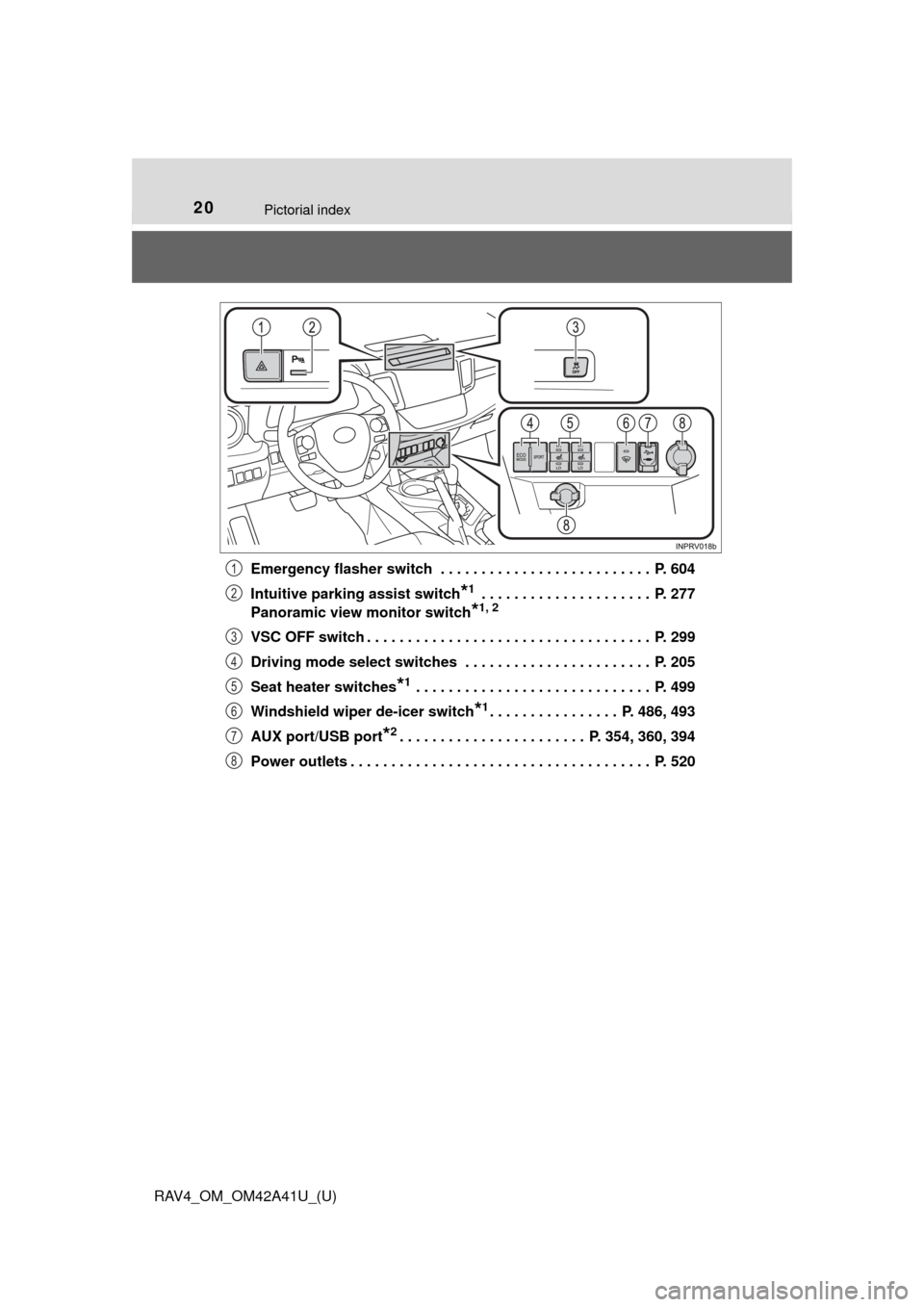
RAV4_OM_OM42A41U_(U)Emergency flasher switch . . . . . . . . . . . . . . . . . . . . . . . . . . P. 604
Intuitive parking assist switch
*1 . . . . . . . . . . . . . . . . . . . . . P. 277
Panoramic view monitor switch
*1, 2
VSC OFF switch . . . . . . . . . . . . . . . . . . . . . . . . . . . . . . . . . . . P. 299
Driving mode select switches . . . . . . . . . . . . . . . . . . . . . . . P. 205
Seat heater switches
*1 . . . . . . . . . . . . . . . . . . . . . . . . . . . . . P. 499
Windshield wiper de-icer switch
*1. . . . . . . . . . . . . . . . P. 486, 493
AUX port/USB port
*2. . . . . . . . . . . . . . . . . . . . . . . P. 354, 360, 394
Power outlets . . . . . . . . . . . . . . . . . . . . . . . . . . . . . . . . . . . . . P. 520
1
2
3
4
5
6
7
8
Page 325 of 741

324
RAV4_OM_OM42A41U_(U)
5-1. Basic OperationsAudio system types ........... 326
Using the steering wheel audio switches ................ 329
AUX port/USB port ............ 332
5-2. Using the audio system Optimal use of the audio system ................... 334
5-3. Using the radio Radio operation ................. 336
5-4. Playing an audio CD and MP3/WMA discs
CD player operation .......... 338
5-5. Using an external device Listening to an iPod .......... 348
Listening to USB memory device................ 354
Using the AUX port ........... 360
5-6. Using Bluetooth
® devices
Bluetooth® audio/
phone .............................. 361
Using the steering wheel switches ................ 366
Register a Bluetooth
®
device.............................. 367
5-7. “SETUP” menu Using the “SETUP” menu (“Bluetooth
*” menu) ........ 368
Using the “SETUP” menu (“PHONE” menu) ............ 373 5-8. Bluetooth
® Audio
Operating a Bluetooth®
enabled portable
player .............................. 378
5-9. Bluetooth
® Phone
Making a phone call .......... 381
When receiving a phone call ....................... 383
Speaking on the phone ..... 384
5-10. Bluetooth
®
Bluetooth®......................... 386
5-11. Using the audio system (Entune Audio)
Audio system (Entune Audio) ................ 389
5-12. Basic Operations Audio system operations (Entune Audio) ................ 391
Steering wheel audio switches .......................... 393
AUX port/USB port ............ 394
Basic audio operations...... 395
5-13. Setup Setup menu....................... 397
General settings ................ 398
Audio settings ................... 400
Display settings ................. 401
Voice settings.................... 403
5-14. Using the audio system Selecting the audio source ............................. 404
List screen operation......... 405
Optimal use of the audio system ............................ 407
*: Bluetooth is a registered trademark of Bluetooth SIG, Inc.
5Audio system
Page 326 of 741

325
RAV4_OM_OM42A41U_(U)
5Audio system
5-15. Using the radioRadio operation ................. 408
5-16. Playing an audio CD and MP3/WMA/AAC discs
CD player operation .......... 410
CD player and disc information ...................... 411
5-17. Using an external device iPod player operation ........ 417
USB memory device player operation .............. 422
Using the AUX port ........... 427
5-18. Connecting Bluetooth
®
Preparations to use wireless
communication ................ 428
Registering a Bluetooth
®
audio player for the
first time .......................... 431
Registering a Bluetooth
®
phone for the
first time .......................... 432
Registering a Bluetooth
®
device.............................. 433
Connecting a Bluetooth
®
device.............................. 435
Displaying a Bluetooth
®
device details .................. 437
Detailed Bluetooth
®
settings............................ 438 5-19. Bluetooth
® Audio
Listening to Bluetooth®
Audio............................... 440
5-20. Bluetooth
® Phone
Using a Bluetooth®
Phone ............................. 442
Making a call ..................... 444
Receiving a call ................. 447
Speaking on the phone ..... 448
Bluetooth
® phone
message function ............ 451
Using the steering wheel switches ................ 456
Bluetooth
® phone
settings ........................... 457
5-21. Phonebook Contact/Call History Settings ........................... 459
5-22. Bluetooth
®
What to do if... (Troubleshooting) ............ 469
Bluetooth
®......................... 473
5-23. Other function Voice command system ............................ 478
Page 330 of 741
329
RAV4_OM_OM42A41U_(U)
5-1. Basic Operations
5
Audio system
Using the steering wheel audio switches
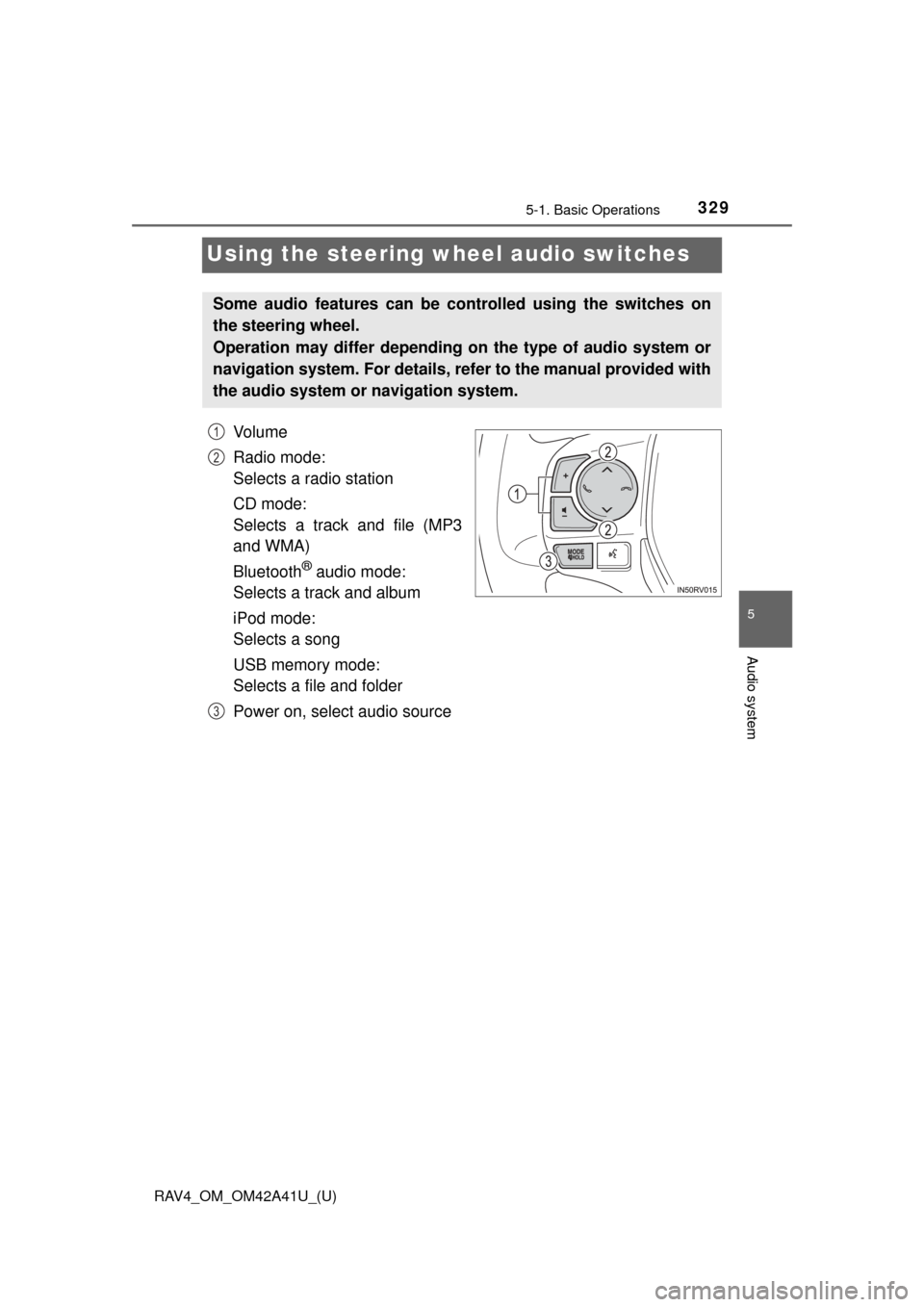
Vo l u m e
Radio mode:
Selects a radio station
CD mode:
Selects a track and file (MP3
and WMA)
Bluetooth
® audio mode:
Selects a track and album
iPod mode:
Selects a song
USB memory mode:
Selects a file and folder
Power on, select audio source
Some audio features can be c ontrolled using the switches on
the steering wheel.
Operation may differ depending on the type of audio system or
navigation system. For details, refer to the manual provided with
the audio system or navigation system.
1
2
3
Page 331 of 741
330
RAV4_OM_OM42A41U_(U)
5-1. Basic Operations
Press the “MODE” switch when the audio system is turned off.
Press the “MODE” switch when the audio system is turned on. The
audio source changes as follows each time the button is pressed. If a
mode cannot be used, it will be skipped.
AM→FM1→FM2 →CD mode →iPod or USB memory →
Bluetooth
® audio →AUX
Press the “+” switch to increase the volume and the “-” switch to
decrease the volume.
Hold down the switch to continue increasing or decreasing the volume.
Press and hold the “MODE” switch.
To cancel, press and hold the switch again.
Press the “MODE” switch to select the radio mode.
Press the “ ∧” or “ ∨” switch to select a preset station.
To scan for receivable stations, press and hold the switch until you hear a
beep.
Turning on the power
Changing the audio source
Adjusting the volume
Silencing a sound
Selecting a radio station
1
2
Page 332 of 741
RAV4_OM_OM42A41U_(U)
3315-1. Basic Operations
5
Audio system
Press the “MODE” switch to select the CD, Bluetooth® audio, iPod
or USB memory mode.
Press the “ ∧” or “ ∨” switch to select the desired track/file or song.
Press the “MODE” switch to select Bluetooth
® audio mode.
Press and hold the “ ∧” or “ ∨” switch until you hear a beep.
Press the “MODE” switch to se lect CD or USB memory mode.
Press and hold the “ ∧” or “ ∨” switch until you hear a beep.
Selecting a track/file or song
Selecting an album
Selecting a folder (MP3 and WMA or USB memory)
WARNING
■ To reduce the risk of an accident
Exercise care when operating the audio switches on the steering wheel.
1
2
1
2
1
2
Page 333 of 741
332
RAV4_OM_OM42A41U_(U)
5-1. Basic Operations
AUX port/USB port
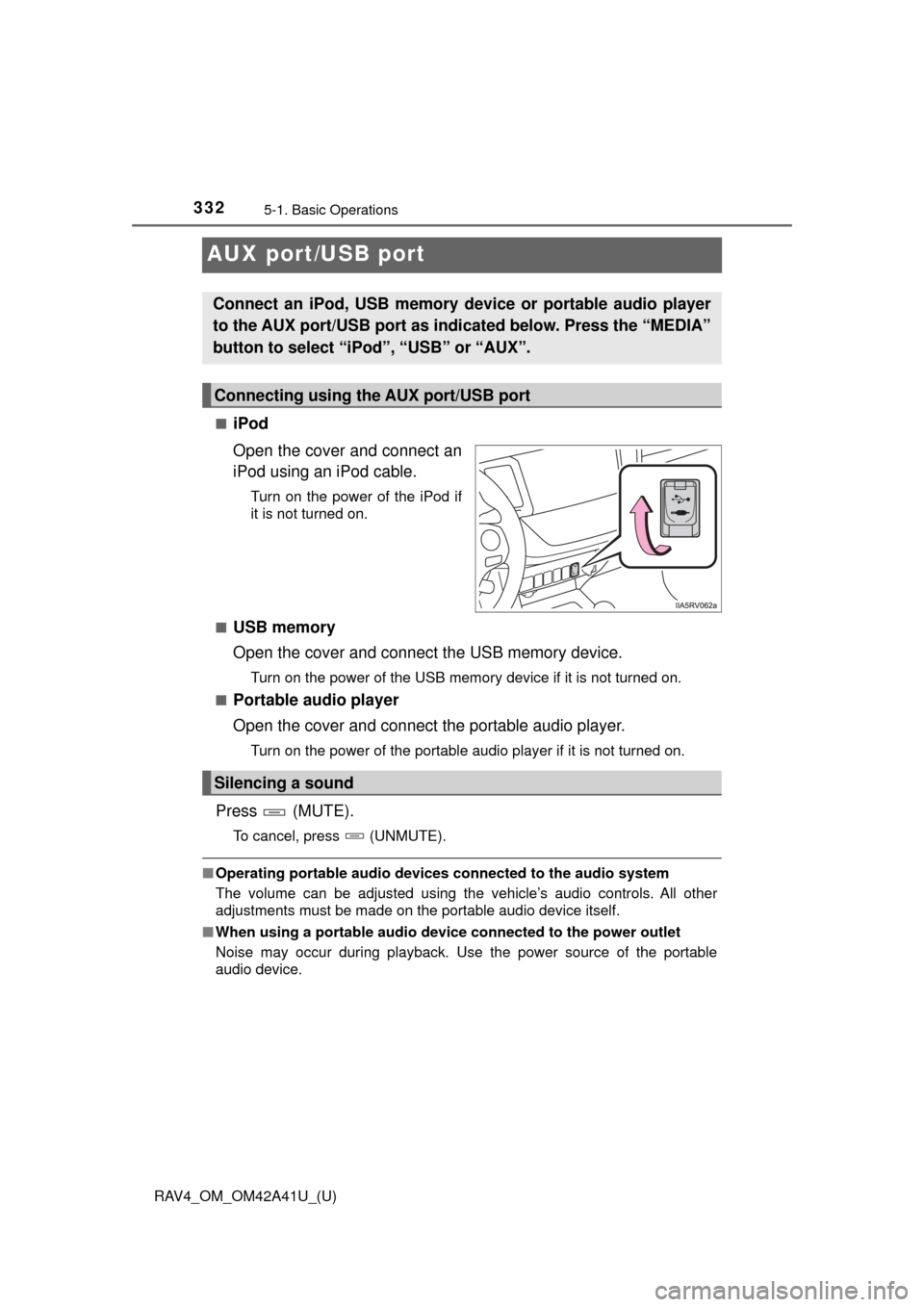
■iPod
Open the cover and connect an
iPod using an iPod cable.
Turn on the power of the iPod if
it is not turned on.
■
USB memory
Open the cover and connect the USB memory device.
Turn on the power of the USB memory device if it is not turned on.
■
Portable audio player
Open the cover and connect the portable audio player.
Turn on the power of the portable audio player if it is not turned on.
Press (MUTE).
To cancel, press (UNMUTE).
■ Operating portable audio devices connected to the audio system
The volume can be adjusted using the vehicle’s audio controls. All other
adjustments must be made on the portable audio device itself.
■ When using a portable audio devi ce connected to the power outlet
Noise may occur during playback. Use the power source of the portable
audio device.
Connect an iPod, USB memory device or portable audio player
to the AUX port/USB port as indi cated below. Press the “MEDIA”
button to select “iPo d”, “USB” or “AUX”.
Connecting using the AUX port/USB port
Silencing a sound
Page 355 of 741
354
RAV4_OM_OM42A41U_(U)
5-5. Using an external device
Listening to USB memory device∗
→P. 3 3 2
∗: If equipped
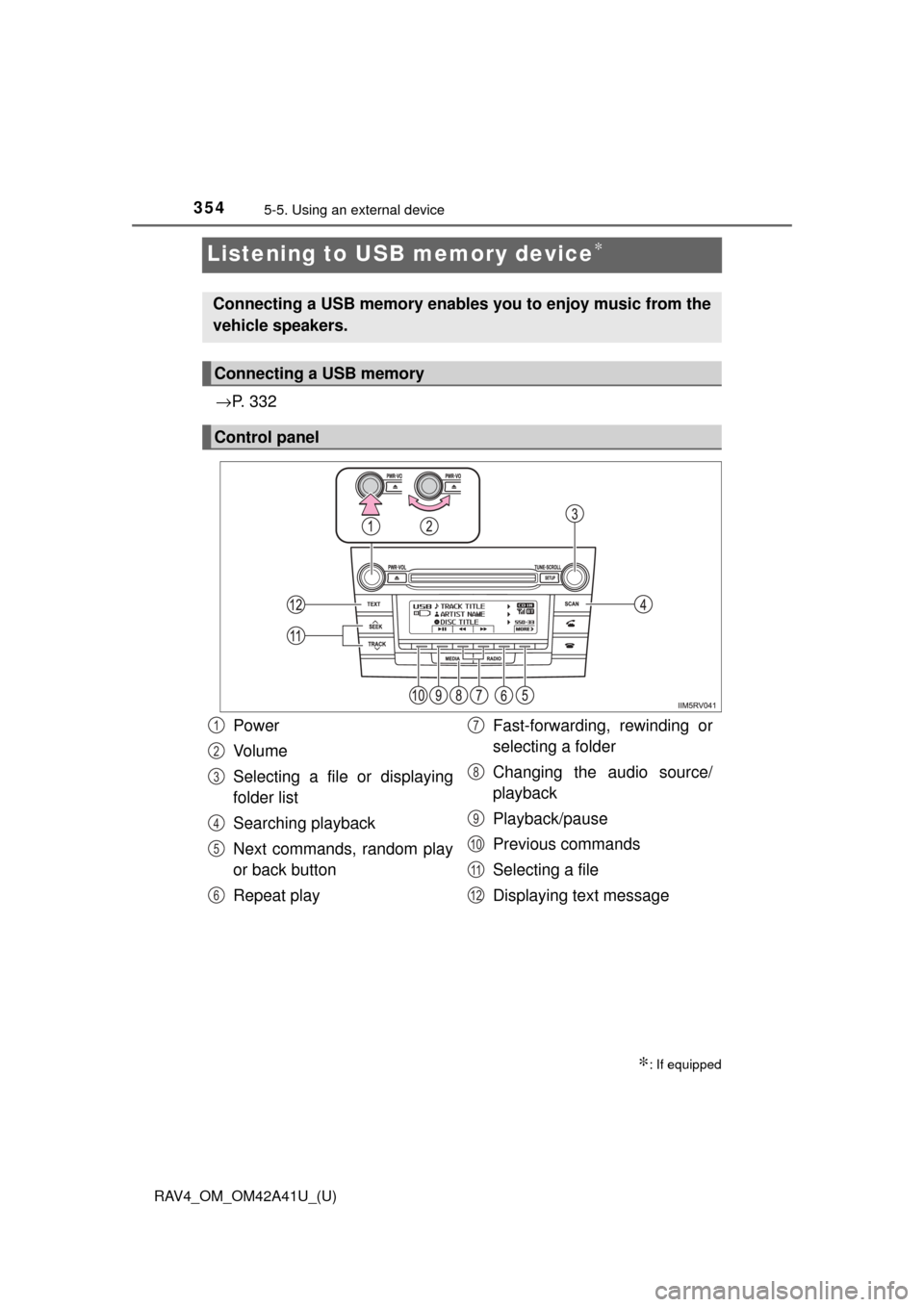
Connecting a USB memory enables you to enjoy music from the
vehicle speakers.
Connecting a USB memory
Control panel
Power
Vo l u m e
Selecting a file or displaying
folder list
Searching playback
Next commands, random play
or back button
Repeat play Fast-forwarding, rewinding or
selecting a folder
Changing the audio source/
playback
Playback/pause
Previous commands
Selecting a file
Displaying text message1
2
3
4
5
6
7
8
9
10
11
12