navigation TOYOTA RAV4 2017 XA40 / 4.G Navigation Manual
[x] Cancel search | Manufacturer: TOYOTA, Model Year: 2017, Model line: RAV4, Model: TOYOTA RAV4 2017 XA40 / 4.GPages: 366, PDF Size: 12.77 MB
Page 21 of 366
21
2. QUICK REFERENCE
RAV4_RAV4 HV_Navi+MM_OM0R007U_(U)
16.06.10 19:05
QUICK GUIDE
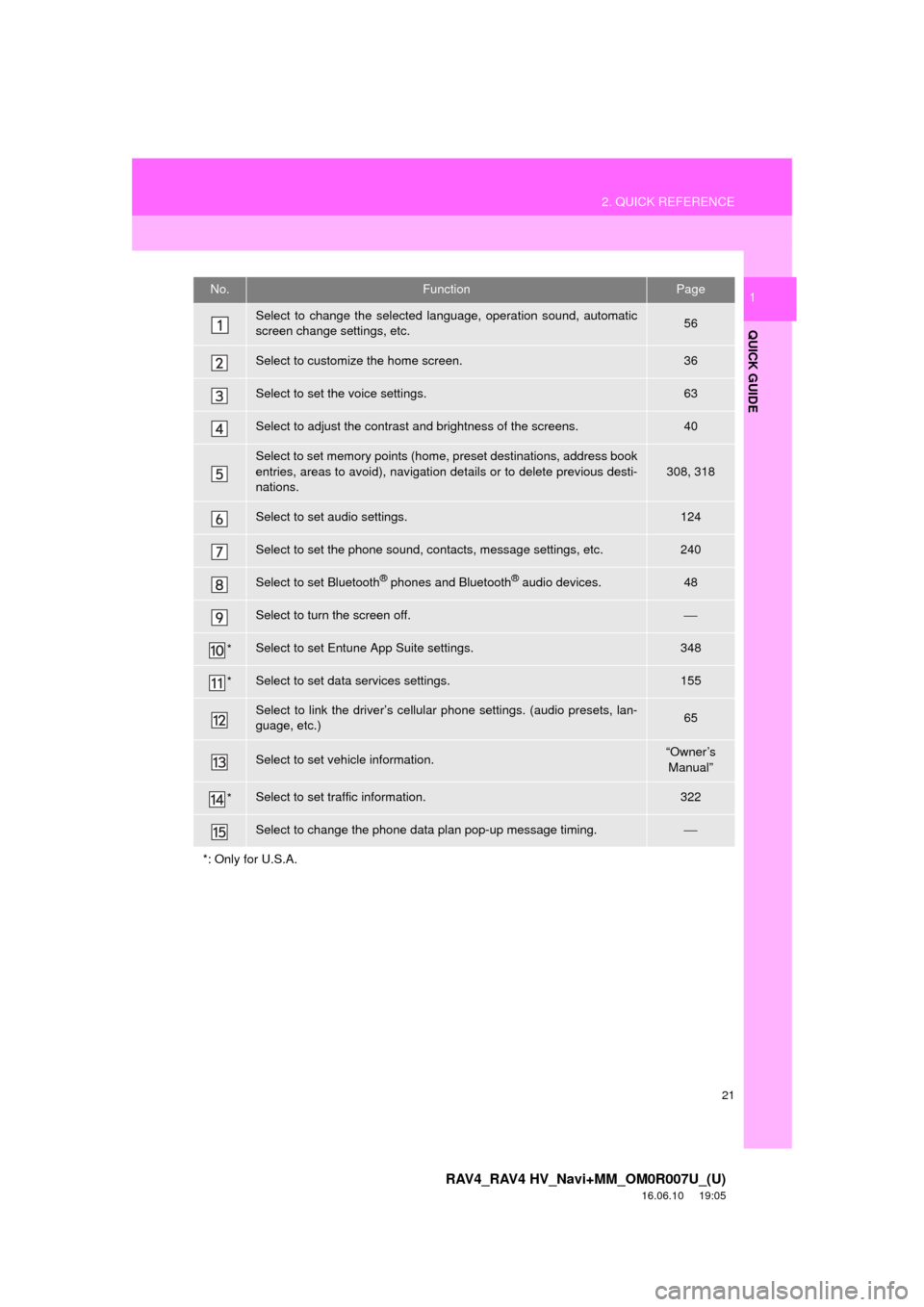
1No.FunctionPage
Select to change the selected language, operation sound, automatic
screen change settings, etc.56
Select to customize the home screen.36
Select to set the voice settings.63
Select to adjust the contrast and brightness of the screens.40
Select to set memory points (home, preset destinations, address book
entries, areas to avoid), navigation details or to delete previous desti-
nations.
308, 318
Select to set audio settings.124
Select to set the phone sound, contacts, message settings, etc.240
Select to set Bluetooth® phones and Bluetooth® audio devices.48
Select to turn the screen off.⎯
*Select to set Entune App Suite settings.348
*Select to set data services settings.155
Select to link the driver’s cellular phone settings. (audio presets, lan-
guage, etc.)65
Select to set vehicle information.“Owner’s Manual”
*Select to set traffic information.322
Select to change the phone data plan pop-up message timing.⎯
*: Only for U.S.A.
Page 22 of 366
22
RAV4_RAV4 HV_Navi+MM_OM0R007U_(U)
16.06.10 19:05
3. NAVIGATION OPERATION
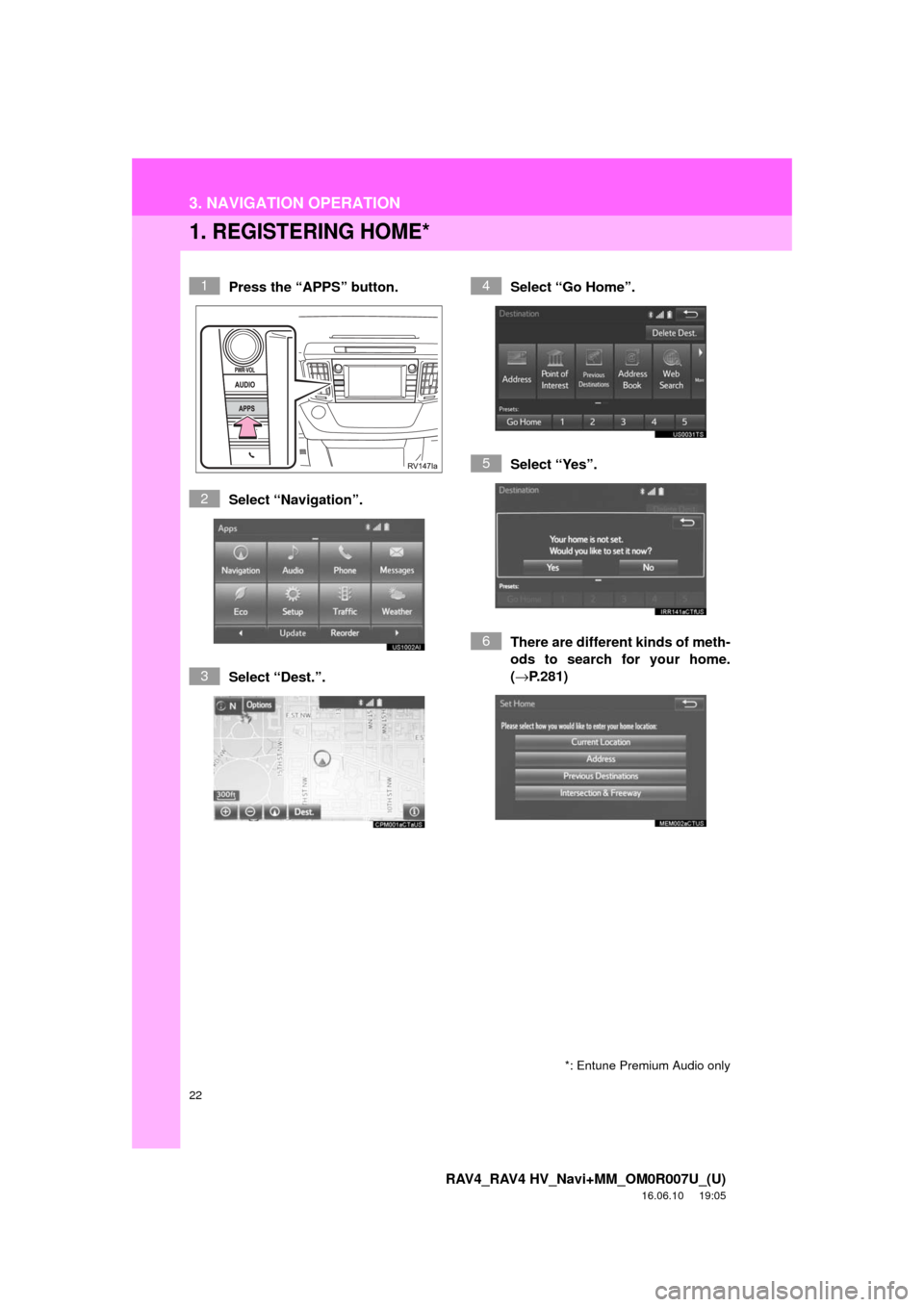
1. REGISTERING HOME*
Press the “APPS” button.
Select “Navigation”.
Select “Dest.”.Select “Go Home”.
Select “Yes”.
There are different kinds of meth-
ods to search for your home.
(→
P.281)1
2
3
4
5
6
*: Entune Premium Audio only
Page 23 of 366
23
3. NAVIGATION OPERATION
RAV4_RAV4 HV_Navi+MM_OM0R007U_(U)
16.06.10 19:05
QUICK GUIDE
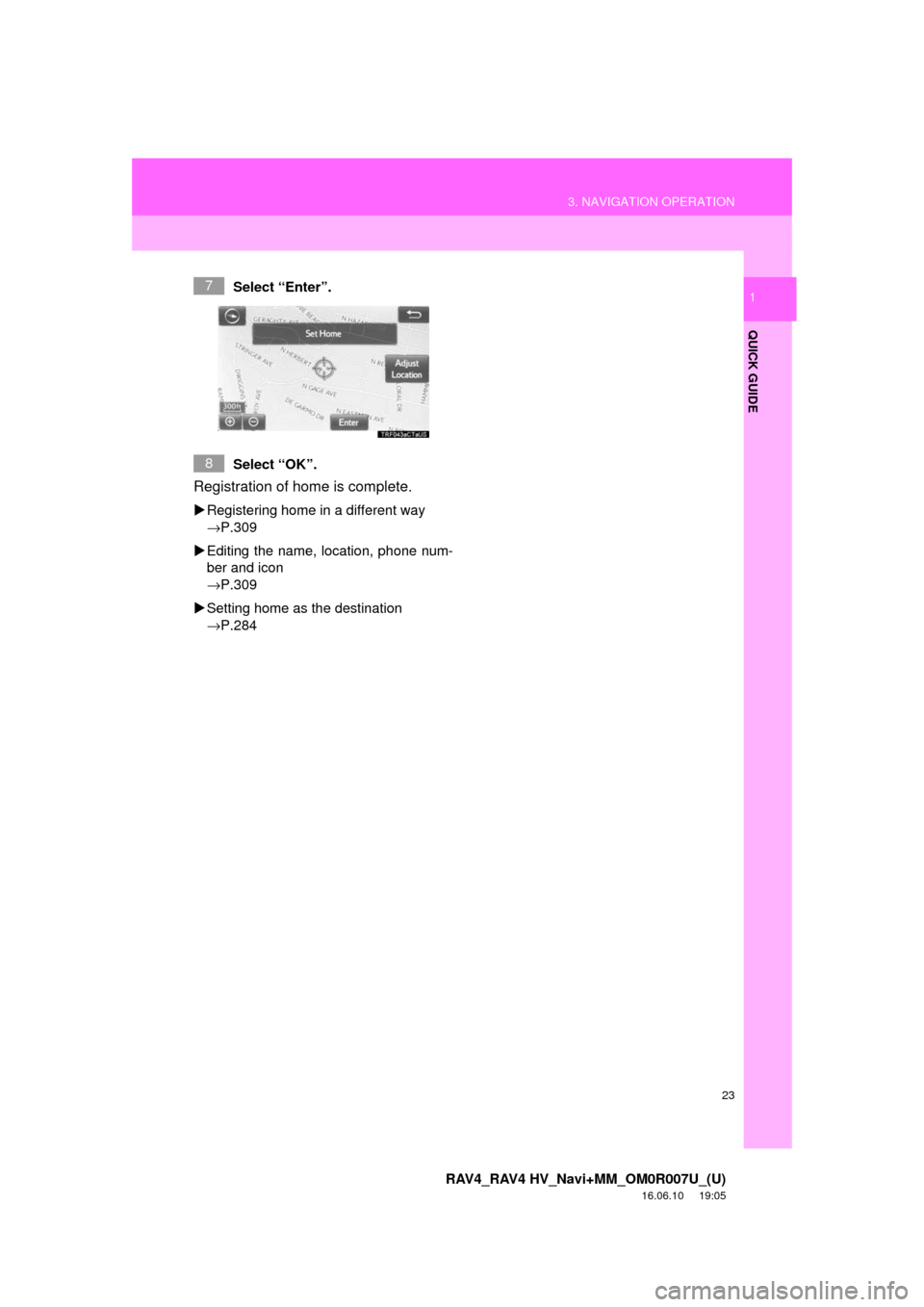
1Select “Enter”.
Select “OK”.
Registration of home is complete.
Registering home in a different way
→P.309
Editing the name, location, phone num-
ber and icon
→P.309
Setting home as the destination
→P.284
7
8
Page 24 of 366
24
3. NAVIGATION OPERATION
RAV4_RAV4 HV_Navi+MM_OM0R007U_(U)
16.06.10 19:05
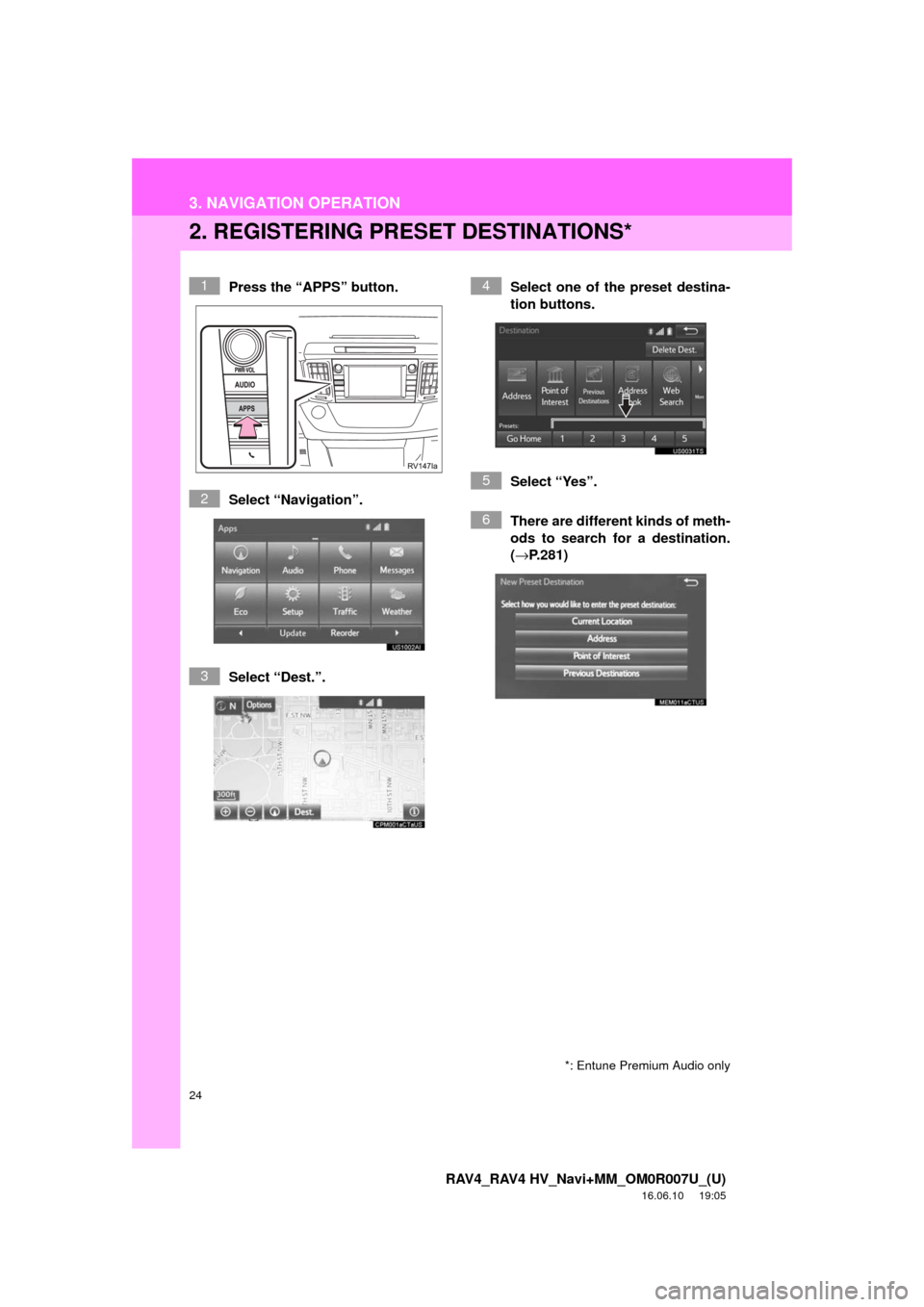
2. REGISTERING PRESET DESTINATIONS*
Press the “APPS” button.
Select “Navigation”.
Select “Dest.”. Select one of the preset destina-
tion buttons.
Select “Yes”.
There are different kinds of meth-
ods to search for a destination.
(→
P.281)1
2
3
4
5
6
*: Entune Premium Audio only
Page 25 of 366
25
3. NAVIGATION OPERATION
RAV4_RAV4 HV_Navi+MM_OM0R007U_(U)
16.06.10 19:05
QUICK GUIDE
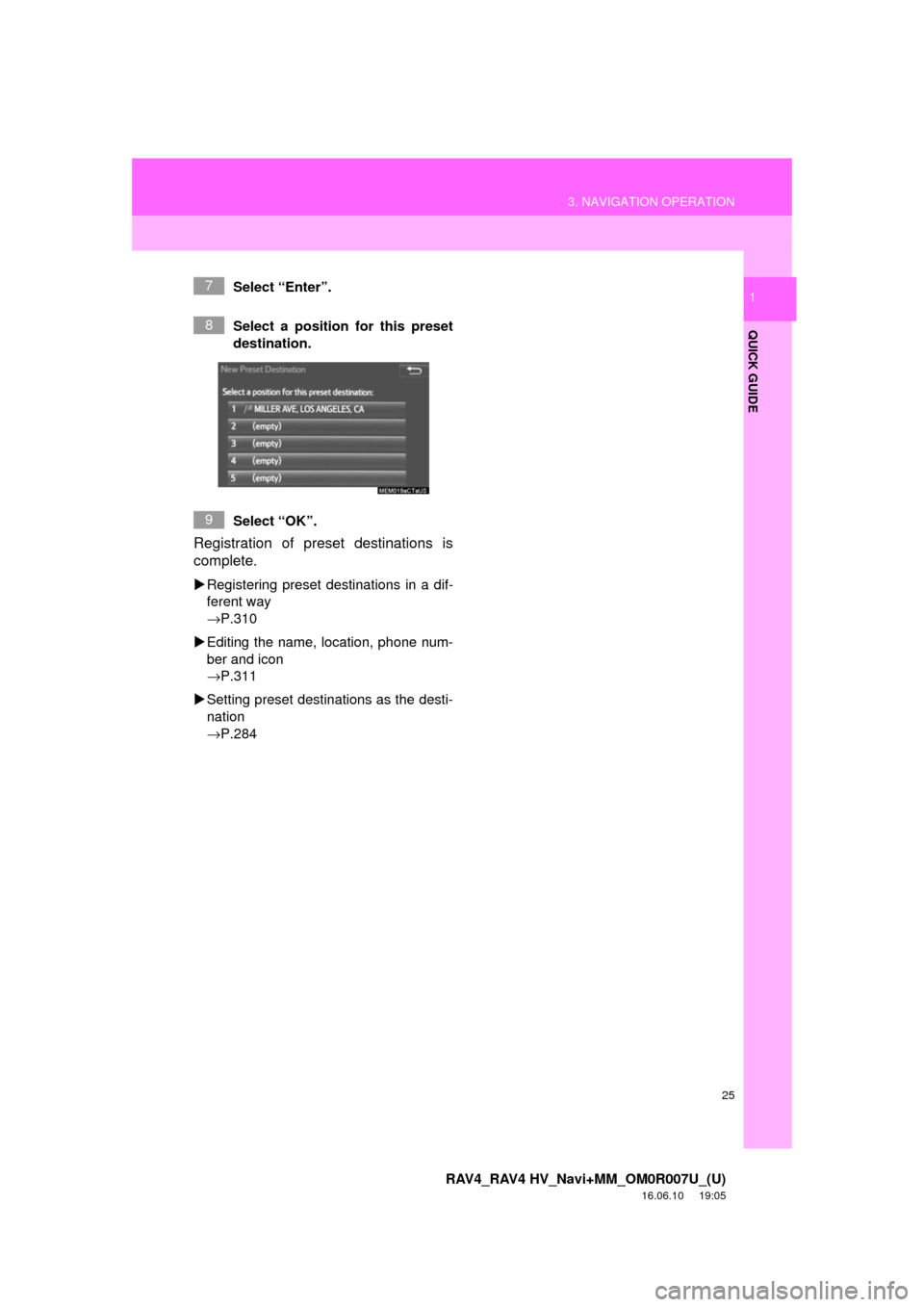
1Select “Enter”.
Select a position for this preset
destination.
Select “OK”.
Registration of preset destinations is
complete.
Registering preset destinations in a dif-
ferent way
→P.310
Editing the name, location, phone num-
ber and icon
→P.311
Setting preset destinations as the desti-
nation
→P.284
7
8
9
Page 26 of 366
26
3. NAVIGATION OPERATION
RAV4_RAV4 HV_Navi+MM_OM0R007U_(U)
16.06.10 19:05
3. OPERATION FLOW: GUIDING THE ROUTE*
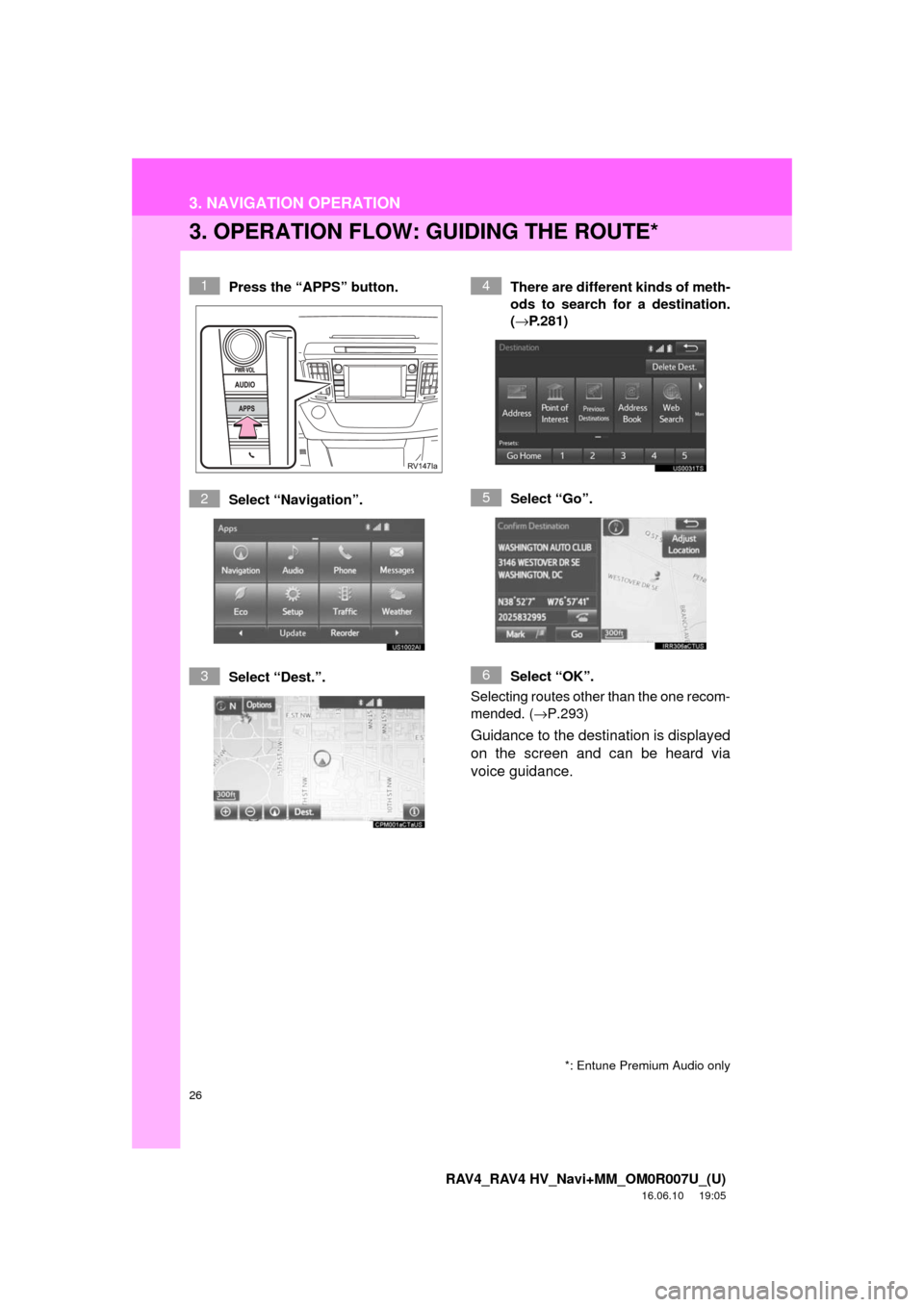
Press the “APPS” button.
Select “Navigation”.
Select “Dest.”.There are different kinds of meth-
ods to search for a destination.
(→
P.281)
Select “Go”.
Select “OK”.
Selecting routes other than the one recom-
mended. ( →P.293)
Guidance to the destination is displayed
on the screen and can be heard via
voice guidance.
1
2
3
4
5
6
*: Entune Premium Audio only
Page 27 of 366
27
3. NAVIGATION OPERATION
RAV4_RAV4 HV_Navi+MM_OM0R007U_(U)
16.06.10 19:05
QUICK GUIDE
1
4. SETTING HOME AS THE DESTINATION*
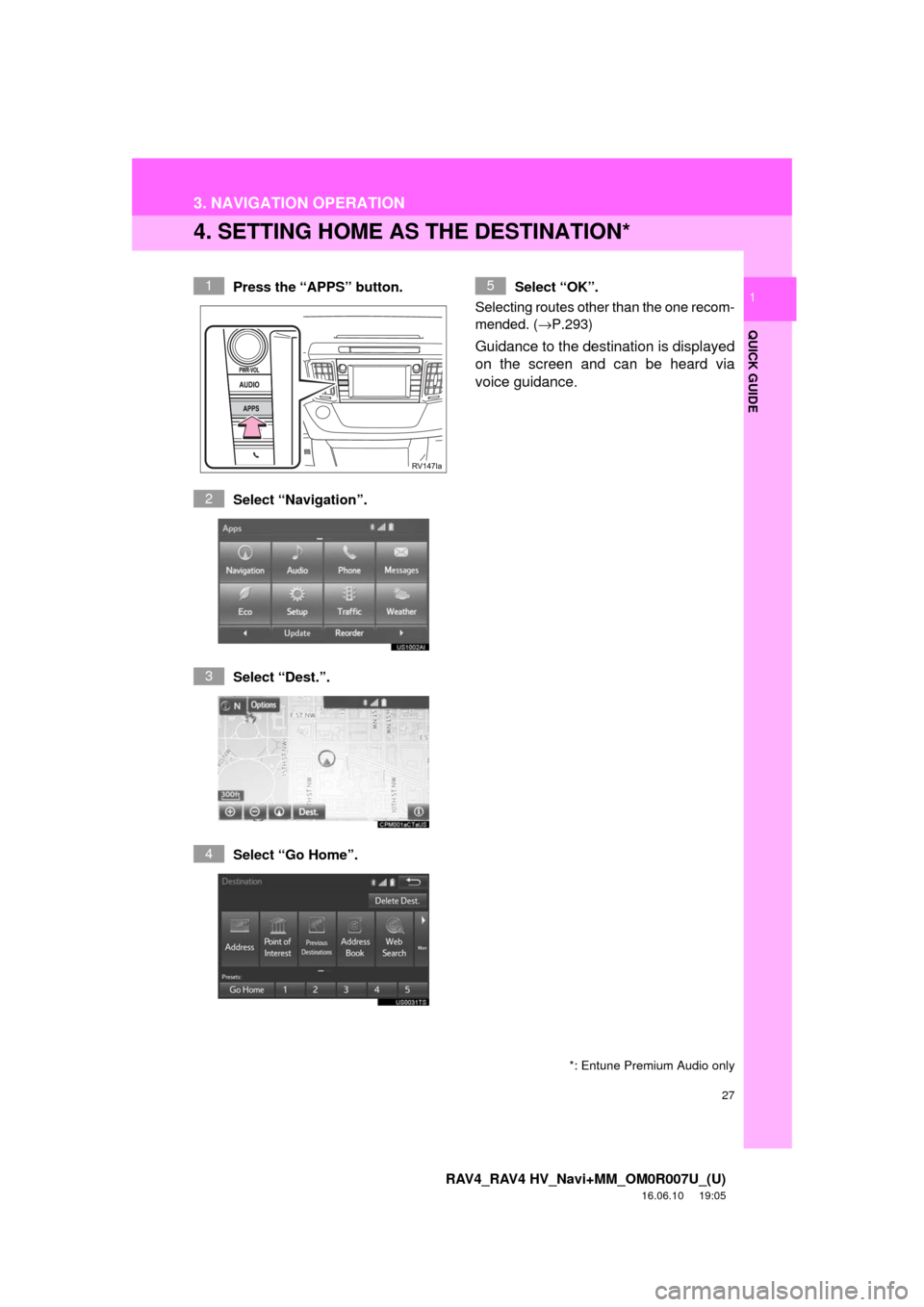
Press the “APPS” button.
Select “Navigation”.
Select “Dest.”.
Select “Go Home”. Select “OK”.
Selecting routes other than the one recom-
mended. ( →P.293)
Guidance to the destination is displayed
on the screen and can be heard via
voice guidance.
1
2
3
4
5
*: Entune Premium Audio only
Page 31 of 366
2
31
RAV4_RAV4 HV_Navi+MM_OM0R007U_(U)
16.06.10 19:05
1
2
3
4
5
6
7
8
9
1. INITIAL SCREEN ........................... 32
2. TOUCH SCREEN GESTURES ...... 34
3. TOUCH SCREEN OPERATION .... 35
4. HOME SCREEN OPERATION ...... 36
5. ENTERING LETTERS AND NUMBERS/LIST SCREEN
OPERATION ................................ 37
ENTERING LETTERS AND
NUMBERS .......................................... 37
LIST SCREEN ....................................... 37
6. SCREEN ADJUSTMENT ............... 40
7. LINKING MULTI-INFORMATION DISPLAY AND NAVIGATION
SYSTEM....................................... 42 1. REGISTERING/CONNECTING
Bluetooth
® DEVICE ................... 43
REGISTERING A Bluetooth®
PHONE FOR THE FIRST TIME .......... 43
REGISTERING A Bluetooth
® AUDIO
PLAYER FOR THE FIRST TIME......... 44
PROFILES ............................................. 46
2. SETTING Bluetooth® DETAILS ... 48
“Bluetooth* Setup” SCREEN.................. 48
REGISTERING A Bluetooth®
DEVICE ............................................... 49
DELETING A Bluetooth
® DEVICE ......... 50
CONNECTING A Bluetooth® DEVICE ... 51
EDITING THE Bluetooth® DEVICE
INFORMATION ................................... 53
“System Settings” SCREEN................... 54
1. GENERAL SETTINGS .................. 56
GENERAL SETTINGS SCREEN ........... 56
2. VOICE SETTINGS ......................... 63
VOICE SETTINGS SCREEN ................. 63
3. DRIVER SETTINGS ...................... 65
MANUALLY SELECT LINKED SETTINGS .......................................... 65
4. MAINTENANCE ............................ 66
1BASIC INFORMATION BEFORE
OPERATION2Bluetooth® SETTINGS
3OTHER SETTINGS
BASIC FUNCTION
*: Bluetooth is a registered trademark of Bluetooth SIG, Inc.
Page 42 of 366

42
1. BASIC INFORMATION BEFORE OPERATION
RAV4_RAV4 HV_Navi+MM_OM0R007U_(U)
16.06.10 19:05
7. LINKING MULTI-INFORMATION DISPLAY AND NAVIGATION SYSTEM*
The following functions of the navigation system are linked with the multi-informa\
-
tion display in the instrument cluster:
• Navigation
• Audio
etc.
These functions can be operated using multi-information display control switches
on the steering wheel. For details, refer to “Owner’s Manual”.
*: If equipped
Page 58 of 366
58
3. OTHER SETTINGS
RAV4_RAV4 HV_Navi+MM_OM0R007U_(U)
16.06.10 19:05
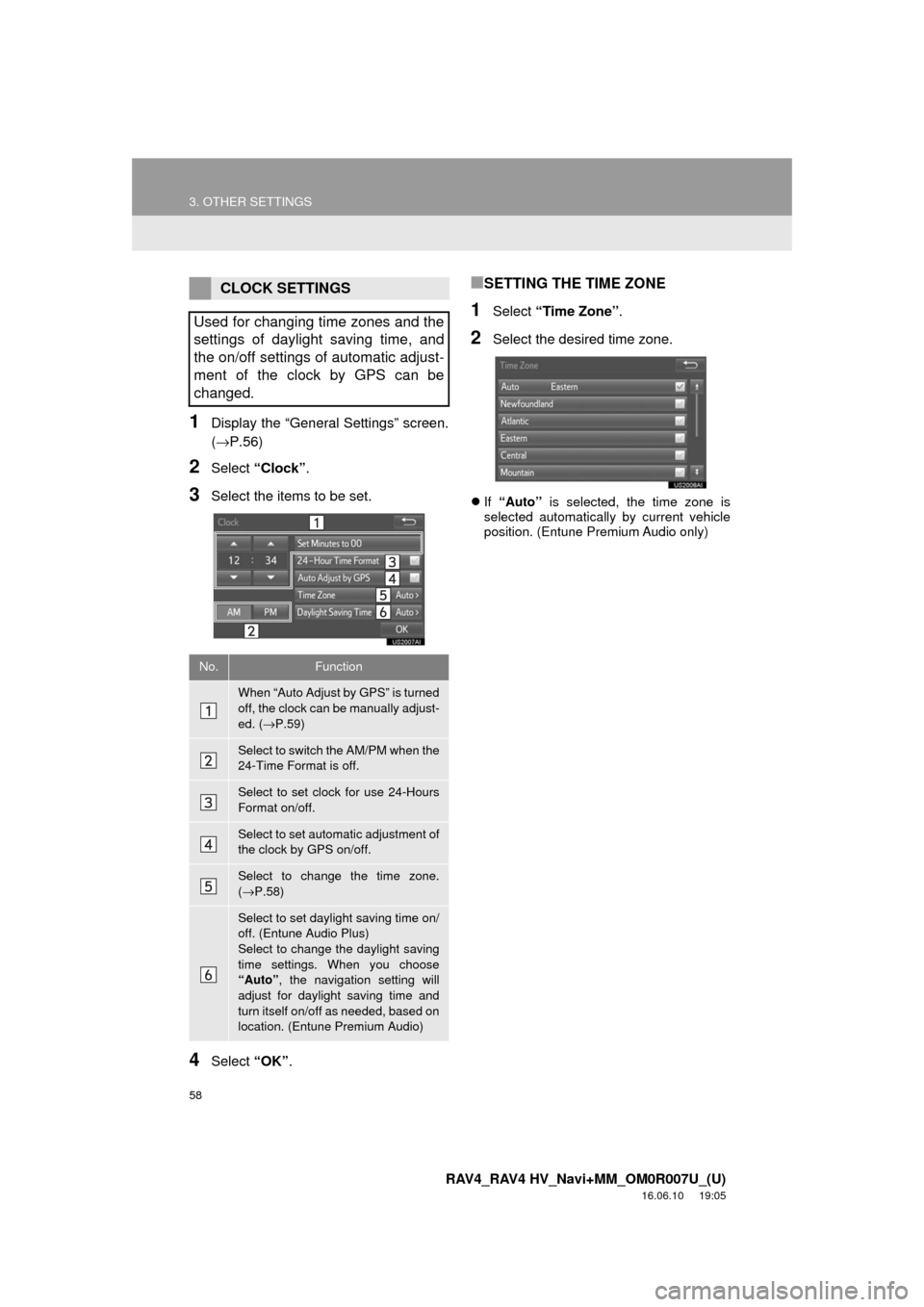
1Display the “General Settings” screen.
(→P.56)
2Select “Clock”.
3Select the items to be set.
4Select “OK”.
■SETTING THE TIME ZONE
1Select “Time Zone” .
2Select the desired time zone.
If “Auto” is selected, the time zone is
selected automatically by current vehicle
position. (Entune Premium Audio only)
CLOCK SETTINGS
Used for changing time zones and the
settings of daylight saving time, and
the on/off settings of automatic adjust-
ment of the clock by GPS can be
changed.
No.Function
When “Auto Adjust by GPS” is turned
off, the clock can be manually adjust-
ed. ( →P.59)
Select to switch the AM/PM when the
24-Time Format is off.
Select to set clock for use 24-Hours
Format on/off.
Select to set automatic adjustment of
the clock by GPS on/off.
Select to change the time zone.
(→ P.58)
Select to set daylight saving time on/
off. (Entune Audio Plus)
Select to change the daylight saving
time settings. When you choose
“Auto” , the navigation setting will
adjust for daylight saving time and
turn itself on/off as needed, based on
location. (Entune Premium Audio)