phone TOYOTA RAV4 2017 XA40 / 4.G User Guide
[x] Cancel search | Manufacturer: TOYOTA, Model Year: 2017, Model line: RAV4, Model: TOYOTA RAV4 2017 XA40 / 4.GPages: 741, PDF Size: 19.55 MB
Page 350 of 741
RAV4_OM_OM0R005U_(U)
3495-5. Using an external device
5
Audio system
■About iPod
●“Made for iPod” and “Made for iPhone” mean that an electronic accessory
has been designed to connect specifically to iPod, or iPhone, respectively,
and has been certified by the developer to meet Apple performance stan-
dards.
● Apple is not responsible for the operation of this device or its compliance
with safety and regulatory standards. Please note that the use of this acces-
sory with iPod or iPhone may affect wireless performance.
● iPhone, iPod, iPod classic, iPod nano , iPod shuffle, and iPod touch are
trademarks of Apple Inc., registered in the U.S. and other countries.
■ iPod functions
●When an iPod is connected and the audio source is changed to iPod mode,
the iPod will resume play from the same point in which it was last used.
● Depending on the iPod that is connected to the system, certain functions
may not be available. Disconnecting the device and reconnecting it once
again may resolve some malfunctions.
● While connected to the system, the iPod cannot be operated with its own
controls. It is necessary to use the controls of the vehicle’s audio system
instead.
■ iPod problems
To resolve most problems encountered when using your iPod, disconnect
your iPod from the vehicle iPod connection and reset it.
For instructions on how to reset your iPod, refer to your iPod Owner’s Man-
ual.
■ Display
→P. 340
Page 351 of 741
350
RAV4_OM_OM0R005U_(U)
5-5. Using an external device
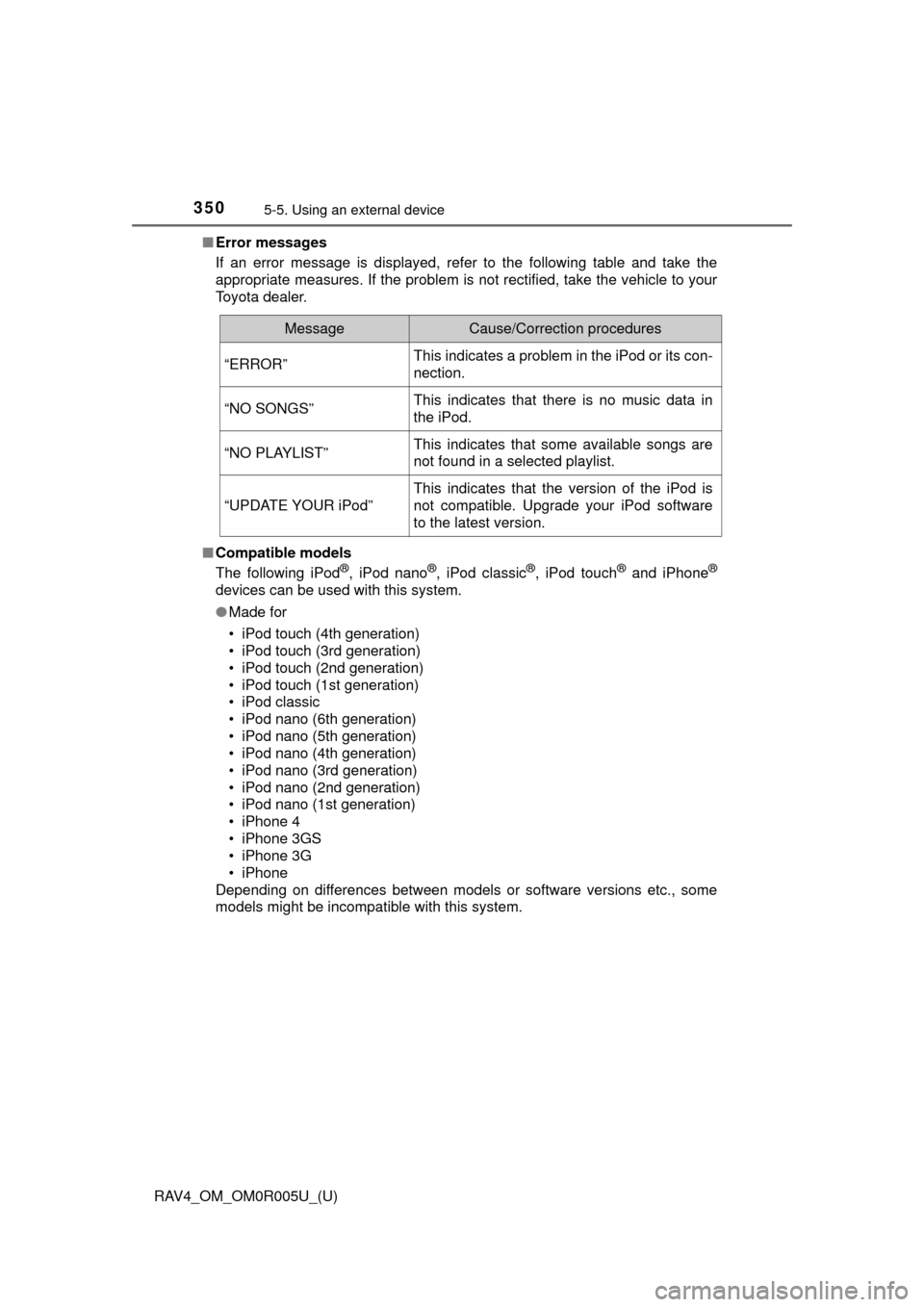
■Error messages
If an error message is displayed, refer to the following table and take the
appropriate measures. If the problem is not rectified, take the vehicle to your
Toyota dealer.
■ Compatible models
The following iPod
®, iPod nano®, iPod classic®, iPod touch® and iPhone®
devices can be used with this system.
●Made for
• iPod touch (4th generation)
• iPod touch (3rd generation)
• iPod touch (2nd generation)
• iPod touch (1st generation)
• iPod classic
• iPod nano (6th generation)
• iPod nano (5th generation)
• iPod nano (4th generation)
• iPod nano (3rd generation)
• iPod nano (2nd generation)
• iPod nano (1st generation)
• iPhone 4
• iPhone 3GS
• iPhone 3G
• iPhone
Depending on differences between models or software versions etc., some
models might be incompatible with this system.
MessageCause/Correction procedures
“ERROR”This indicates a problem in the iPod or its con-
nection.
“NO SONGS”This indicates that there is no music data in
the iPod.
“NO PLAYLIST”This indicates that some available songs are
not found in a selected playlist.
“UPDATE YOUR iPod”
This indicates that the version of the iPod is
not compatible. Upgrade your iPod software
to the latest version.
Page 360 of 741
359
RAV4_OM_OM0R005U_(U)
5-6. Using Bluetooth® devices
5
Audio system
Bluetooth® audio/phone∗
■Bluetooth® audio
The Bluetooth
® audio system enables you to enjoy music played on
a portable digital audio player (p ortable player) from the vehicle
speakers via wireless communication.
This audio system supports Bluetooth
®, a wireless data system
capable of playing port able audio music without cables. If your por-
table player does no t support Bluetooth
®, the Bluetooth® audio sys-
tem will not function.
■Bluetooth® phone (hands-free phone system)
This system supports Bluetooth
®, which allows you to make or
receive calls without using cables to connect a cellular phone and
the system, and without ope rating the cellular phone.
∗: If equipped
The following can be performed using Bluetooth® wireless com-
munication:
Page 361 of 741

360
RAV4_OM_OM0R005U_(U)
5-6. Using Bluetooth® devices
Device registration/connection flow
1. Register the Bluetooth® device to be used with audio
system ( →P. 365)
2. Connect the registered Bluetooth® device to be used
( → P. 366)
5. Use Bluetooth® audio
( → P. 376)5. Use Bluetooth® phone
( → P. 379)
3. Set automatic connection of the device
(→ P. 369)
4. Check Bluetooth® connection condition
( → P. 361)
To be used for audio
To be used for hands-free phone
Page 362 of 741
RAV4_OM_OM0R005U_(U)
3615-6. Using Bluetooth® devices
5
Audio system
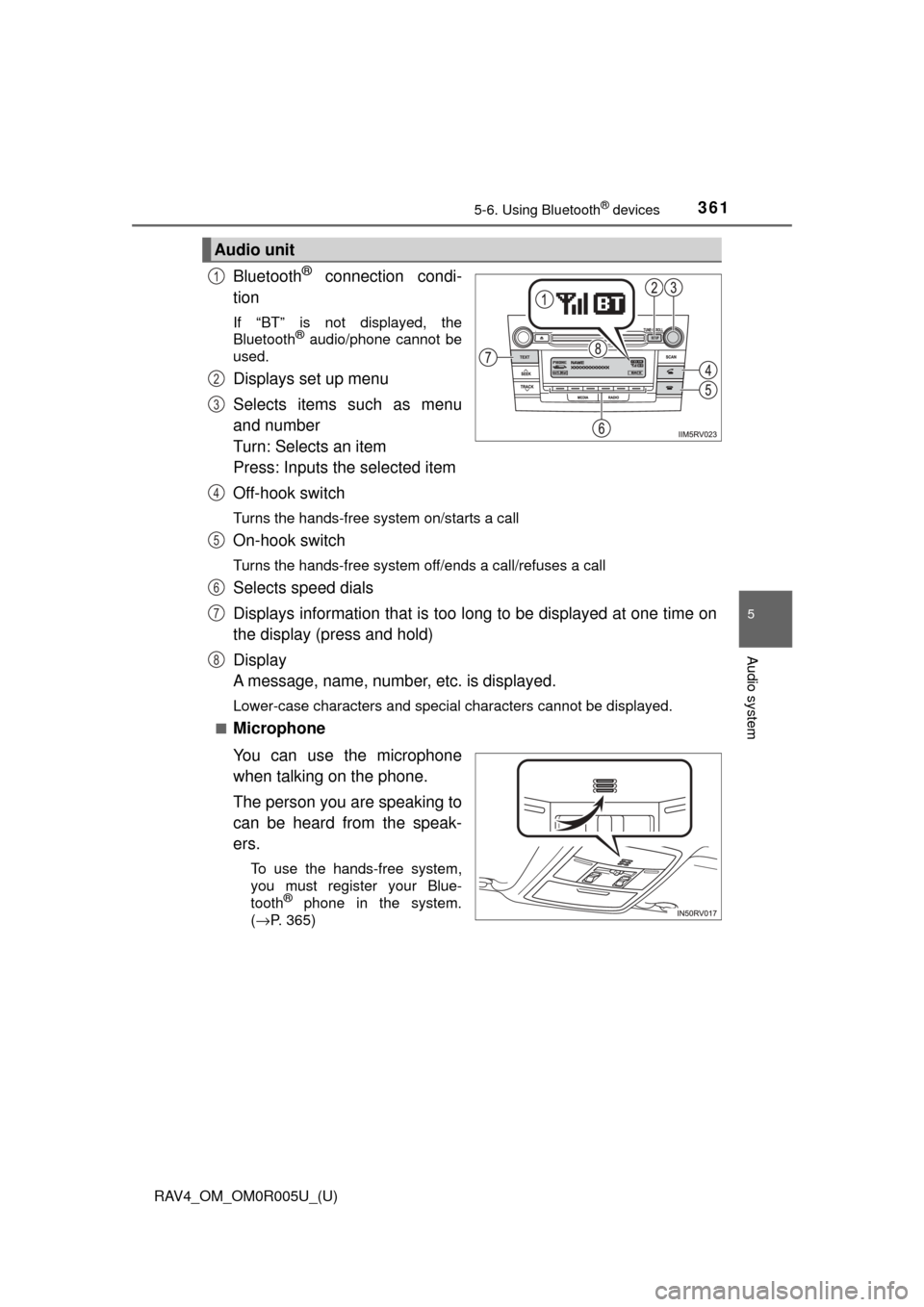
Bluetooth® connection condi-
tion
If “BT” is not displayed, the
Bluetooth® audio/phone cannot be
used.
Displays set up menu
Selects items such as menu
and number
Turn: Selects an item
Press: Inputs t he selected item
Off-hook switch
Turns the hands-free system on/starts a call
On-hook switch
Turns the hands-free system off/ends a call/refuses a call
Selects speed dials
Displays information that is too long to be displayed at one time on
the display (press and hold)
Display
A message, name, number, etc. is displayed.
Lower-case characters and special characters cannot be displayed.
■
Microphone
You can use the microphone
when talking on the phone.
The person you are speaking to
can be heard from the speak-
ers.
To use the hands-free system,
you must register your Blue-
tooth
® phone in the system.
( →P. 365)
Audio unit
1
2
3
4
5
6
7
8
Page 363 of 741
362
RAV4_OM_OM0R005U_(U)
5-6. Using Bluetooth® devices
*: Bluetooth is a registered trademark of Bluetooth SIG, Inc.
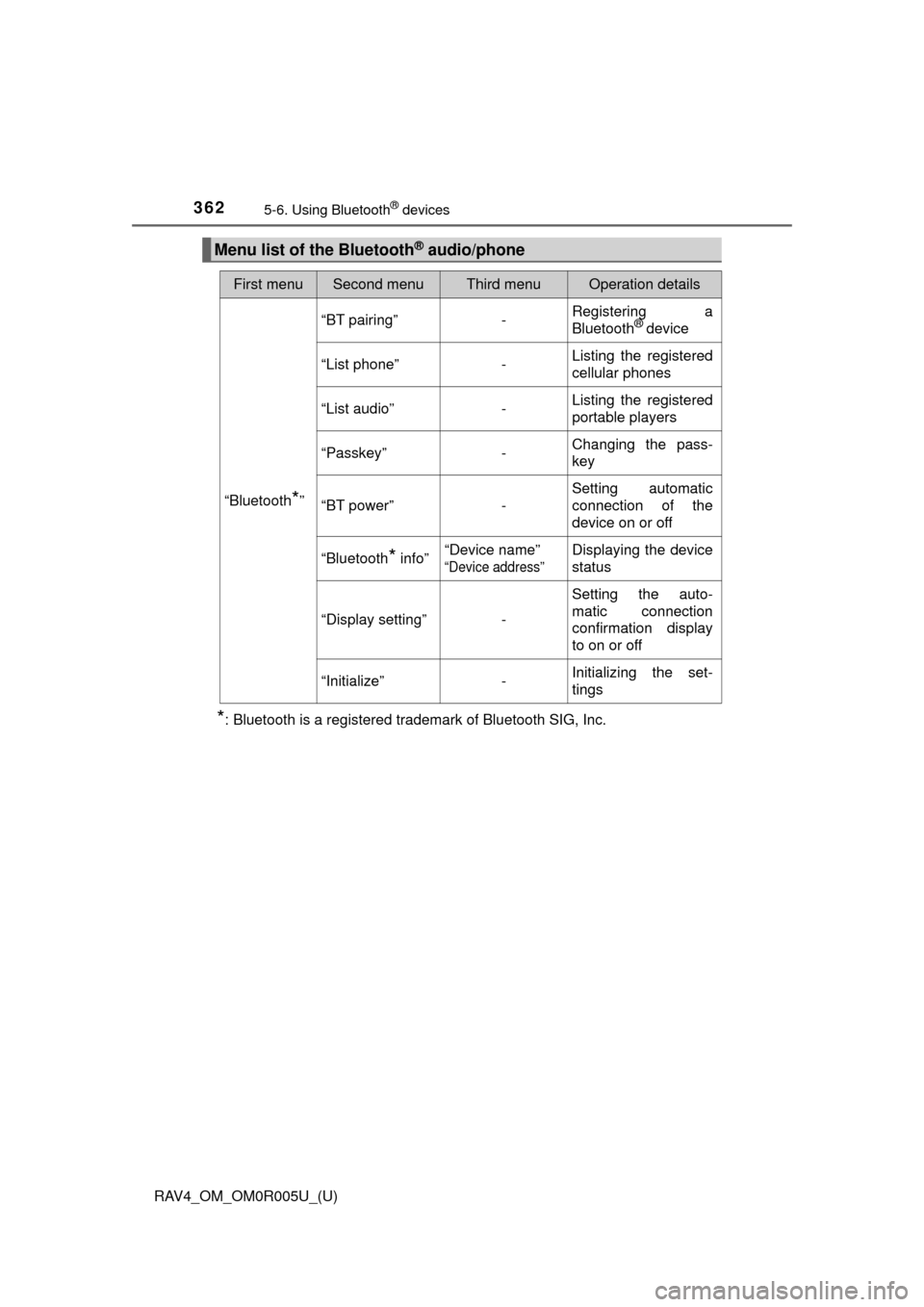
Menu list of the Bluetooth® audio/phone
First menuSecond menuThird menuOperation details
“Bluetooth*”
“BT pairing”-Registering a
Bluetooth® device
“List phone”
-Listing the registered
cellular phones
“List audio”
-Listing the registered
portable players
“Passkey”
-Changing the pass-
key
“BT power”
-Setting automatic
connection of the
device on or off
“Bluetooth
* info” “Device name” “Device address”
Displaying the device
status
“Display setting” - Setting the auto-
matic connection
confirmation display
to on or off
“Initialize” - Initializing the set-
tings
Page 364 of 741

RAV4_OM_OM0R005U_(U)
3635-6. Using Bluetooth® devices
5
Audio system
■Bluetooth® audio/phone system functions
Depending on the Bluetooth® device, certain functions may not be available.
First menuSecond menuThird menuOperation details
“PHONE” “Phonebook” “Add contacts”
Adding a new num-
ber
“Add SD” Registering a speed
dial
“Delete call
history” Deleting a number
stored in the call his-
tory
“Delete contacts” Deleting a number
stored in the phone-
book
“Delete other PB” Deleting a phone-
book’s data
“Auto transfer” - Setting automatic
transferring of the
phonebook on or off
“HF sound
setting” “Call volume” Setting call volume
“Ringtone
volume”
Setting ring tone vol-
ume
“Ringtone” Setting the ring tone
“Transfer
histories” -Transferring the call
histories
Page 365 of 741
364
RAV4_OM_OM0R005U_(U)
5-6. Using Bluetooth® devices
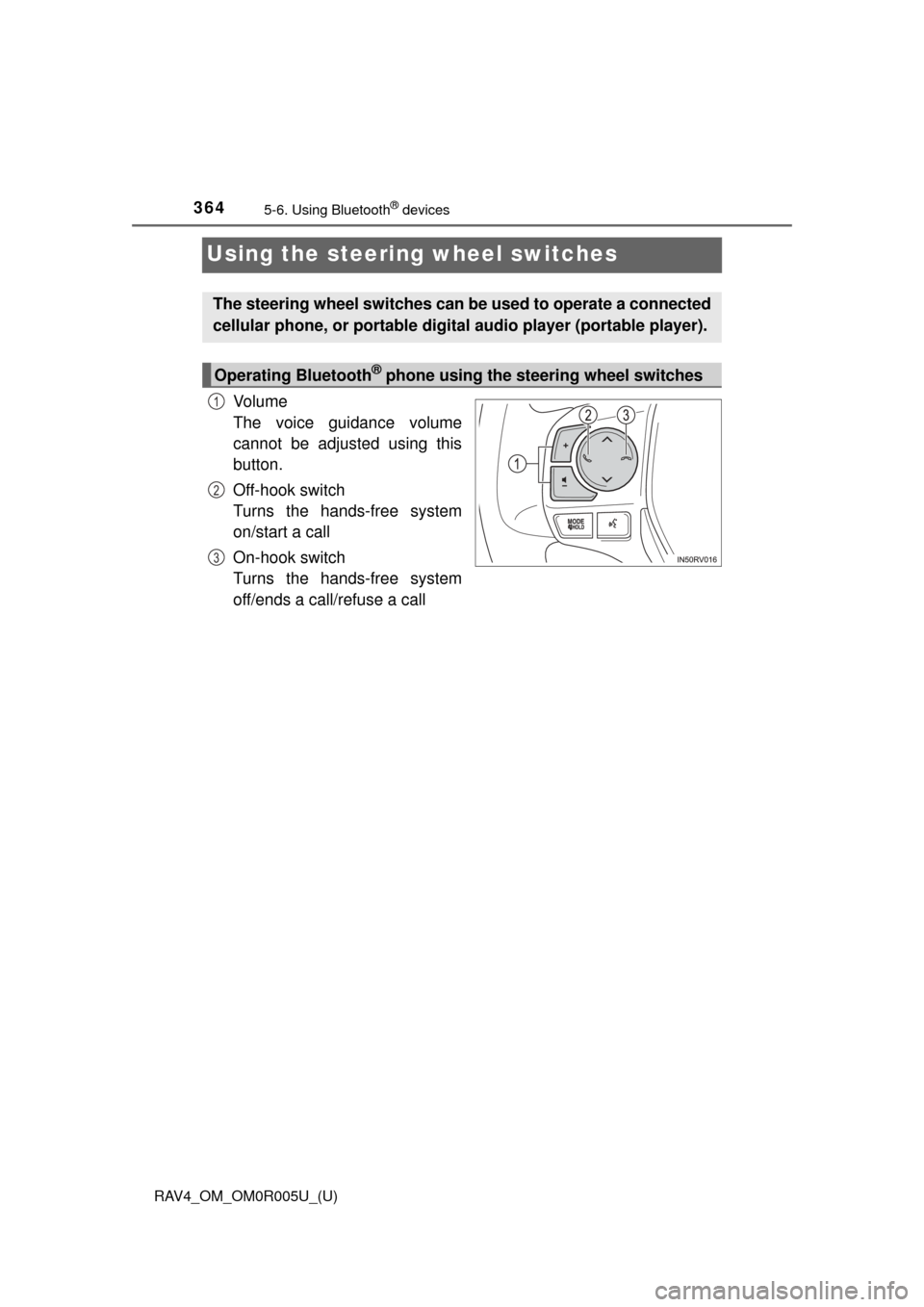
Using the steering wheel switches
Vo l u m e
The voice guidance volume
cannot be adjusted using this
button.
Off-hook switch
Turns the hands-free system
on/start a call
On-hook switch
Turns the hands-free system
off/ends a call/refuse a call
The steering wheel switches can be used to operate a connected
cellular phone, or port able digital audio player (portable player).
Operating Bluetooth® phone using the steering wheel switches
1
2
3
Page 366 of 741
365
RAV4_OM_OM0R005U_(U)
5-6. Using Bluetooth® devices
5
Audio system
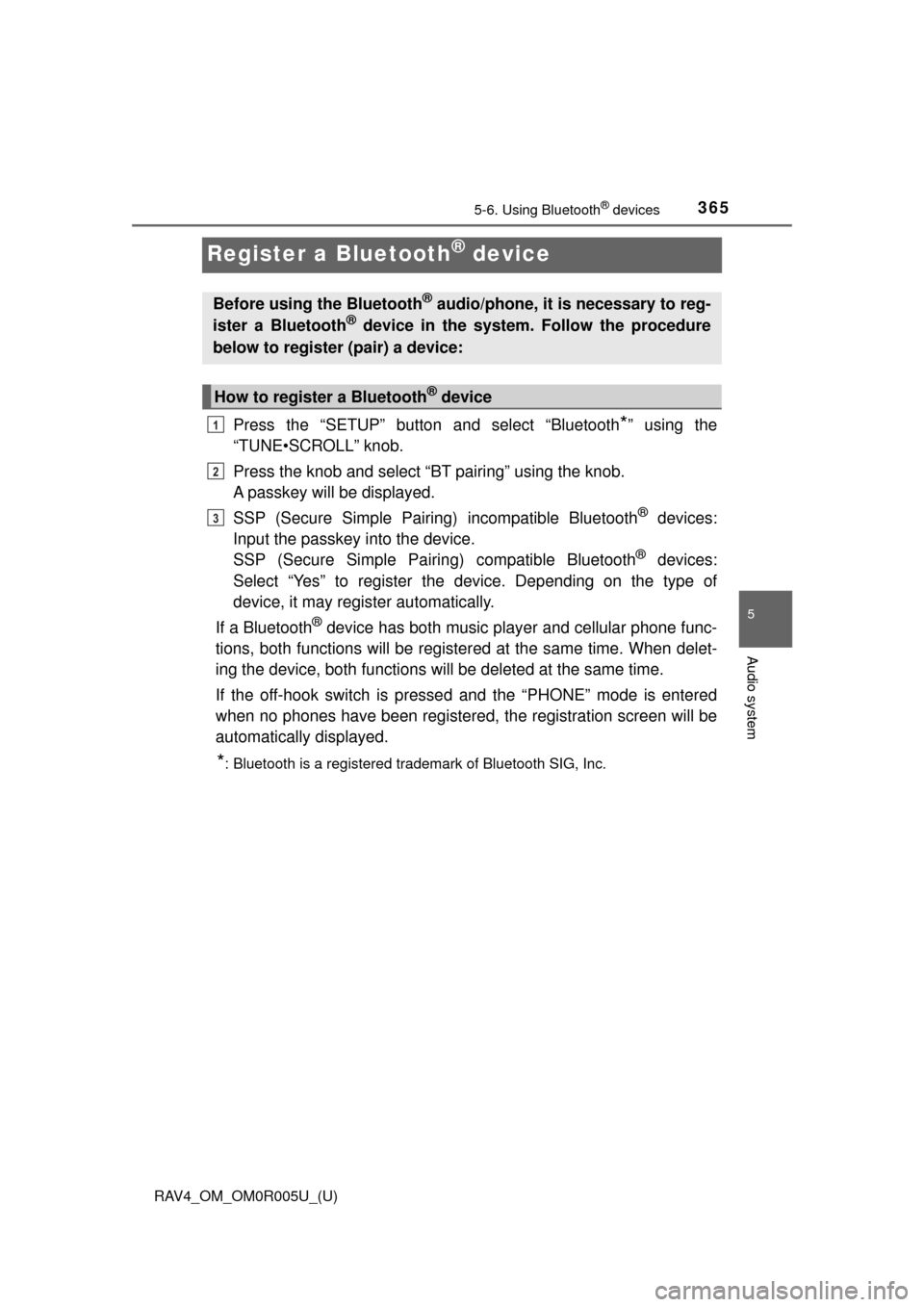
Register a Bluetooth® device
Press the “SETUP” button and select “Bluetooth*” using the
“TUNE•SCROLL” knob.
Press the knob and select “BT pairing” using the knob.
A passkey will be displayed.
SSP (Secure Simple Pairing) incompatible Bluetooth
® devices:
Input the passkey into the device.
SSP (Secure Simple Pairin g) compatible Bluetooth
® devices:
Select “Yes” to register the device. Depending on the type of
device, it may register automatically.
If a Bluetooth
® device has both music player and cellular phone func-
tions, both functions will be register ed at the same time. When delet-
ing the device, both functions will be deleted at the same time.
If the off-hook switch is presse d and the “PHONE” mode is entered
when no phones have been registered, the registration screen will be
automatically displayed.
*: Bluetooth is a registered trademark of Bluetooth SIG, Inc.
Before using the Bluetooth® audio/phone, it is necessary to reg-
ister a Bluetooth® device in the system. Follow the procedure
below to register (pair) a device:
How to register a Bluetooth® device
1
2
3
Page 367 of 741

366
RAV4_OM_OM0R005U_(U)
5-7. “SETUP” menu
Using the “SETUP” menu (“Bluetooth*”
menu)
∗
■Functions and operation proceduresPress the “SETUP” button and select “Bluetooth
*” using the
“TUNE•SCROLL” knob.
Press the knob and select one of the following functions using
the knob.
● Registering a Bluetooth
® device
“BT pairing”
● Listing the registered cellular phones
“List phone”
● Listing the registered portable players
“List audio”
● Changing the passkey
“Passkey”
● Setting automatic connection of the device on or off
“BT power”
● Displaying the device status
“Bluetooth
* info”
● Setting the automatic connection confirmation display to on or off
“Display setting”
● Initialization
“Initialize”
*: Bluetooth is a registered trademark of Bluetooth SIG, Inc.
∗: If equipped
Registering a Bluetooth® device in the system allows the system
to function. The following functi ons can be used for registered
devices:
1
2