ECO mode TOYOTA RAV4 2017 XA40 / 4.G Owners Manual
[x] Cancel search | Manufacturer: TOYOTA, Model Year: 2017, Model line: RAV4, Model: TOYOTA RAV4 2017 XA40 / 4.GPages: 741, PDF Size: 19.55 MB
Page 25 of 741
251-1. For safe use
RAV4_OM_OM0R005U_(U)
1
For safety and security
WARNING
Observe the following precautions.
Failure to do so may cause the driver’s floor mat to slip, possibly interfering
with the pedals while driving. An unexpectedly high speed may result or it may
become difficult to stop the vehicle. This could lead to an accident, resulting in
death or serious injury.
■When installing the driver’s floor mat
● Do not use floor mats designed for other models or different model year
vehicles, even if they are Toyota Genuine floor mats.
● Only use floor mats designed for the driver’s seat.
● Always install the floor mat securely using the retaining hooks (clips) pro-
vided.
● Do not use two or more floor mats on top of each other.
● Do not place the floor mat bottom-side up or upside-down.
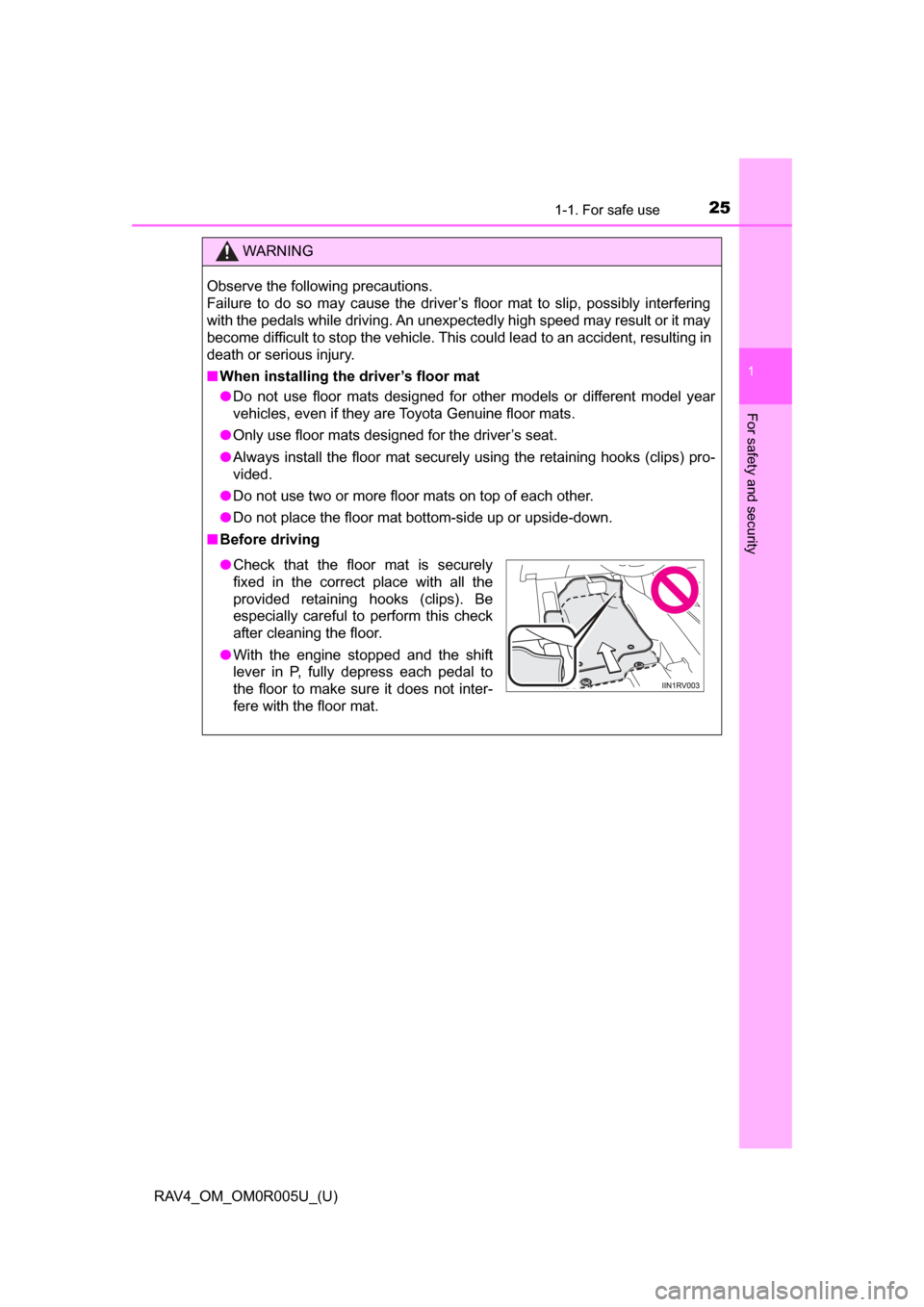
■ Before driving
● Check that the floor mat is securely
fixed in the correct place with all the
provided retaining hooks (clips). Be
especially careful to perform this check
after cleaning the floor.
● With the engine stopped and the shift
lever in P, fully depress each pedal to
the floor to make sure it does not inter-
fere with the floor mat.
Page 80 of 741

80
RAV4_OM_OM0R005U_(U)
2. Instrument cluster
*1: These lights turn on when the engine switch is turned to the “ON” position(vehicles without smart key system) or IGNITION ON mode (vehicles with
smart key system), to indicate that a system check is being performed.
They will turn off after the engine is started, or after a few seconds. There
may be a malfunction in a system if the lights do not come on, or turn off.
Have the vehicle inspected by your Toyota dealer.
*2: The light flashes to indicate a malfunction.
*3: The light comes on to indicate that the intuitive parking assist sensor is dirtyor covered with ice.
*4: This light illuminates on the center panel.
Page 81 of 741
RAV4_OM_OM0R005U_(U)
812. Instrument cluster
2
Instrument cluster
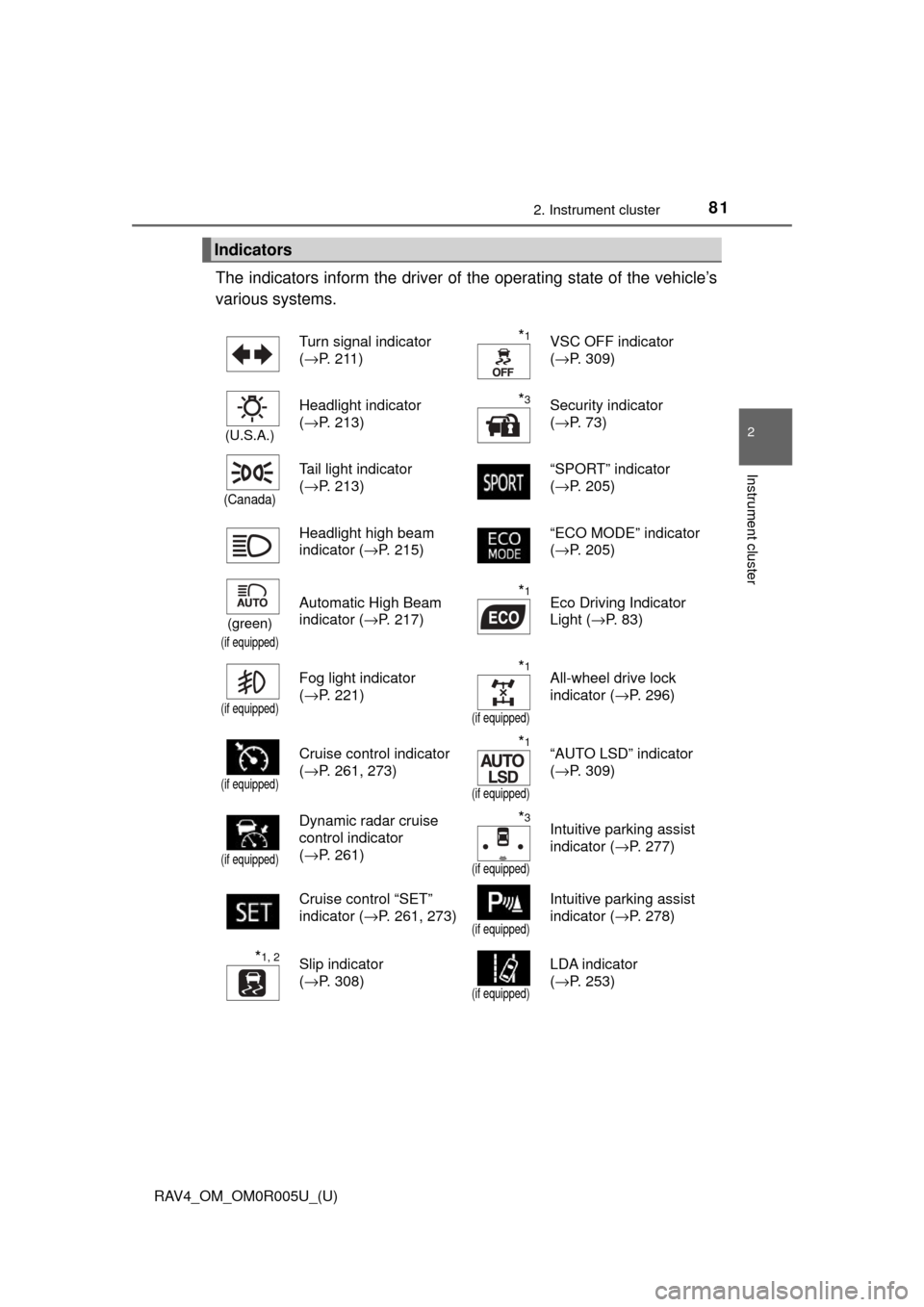
The indicators inform the driver of the operating state of the vehicle’s
various systems.
Indicators
Turn signal indicator
( →P. 211)*1VSC OFF indicator
(→P. 309)
(U.S.A.)
Headlight indicator
(→P. 213)*3Security indicator
(→P. 73)
(Canada)
Tail light indicator
(→P. 213) “SPORT” indicator
(
→P. 205)
Headlight high beam
indicator ( →P. 215) “ECO MODE” indicator
(
→P. 205)
(green)
(if equipped)
Automatic High Beam
indicator ( →P. 217)*1Eco Driving Indicator
Light (→P. 83)
(if equipped)
Fog light indicator
(→P. 221)*1
(if equipped)
All-wheel drive lock
indicator ( →P. 296)
(if equipped)
Cruise control indicator
(→P. 261, 273)*1
(if equipped)
“AUTO LSD” indicator
(→P. 309)
(if equipped)
Dynamic radar cruise
control indicator
(→P. 261)*3
(if equipped)
Intuitive parking assist
indicator ( →P. 277)
Cruise control “SET”
indicator ( →P. 261, 273)
(if equipped)
Intuitive parking assist
indicator (→P. 278)
*1, 2Slip indicator
(→P. 308)
(if equipped)
LDA indicator
(→P. 253)
Page 82 of 741
82
RAV4_OM_OM0R005U_(U)
2. Instrument cluster
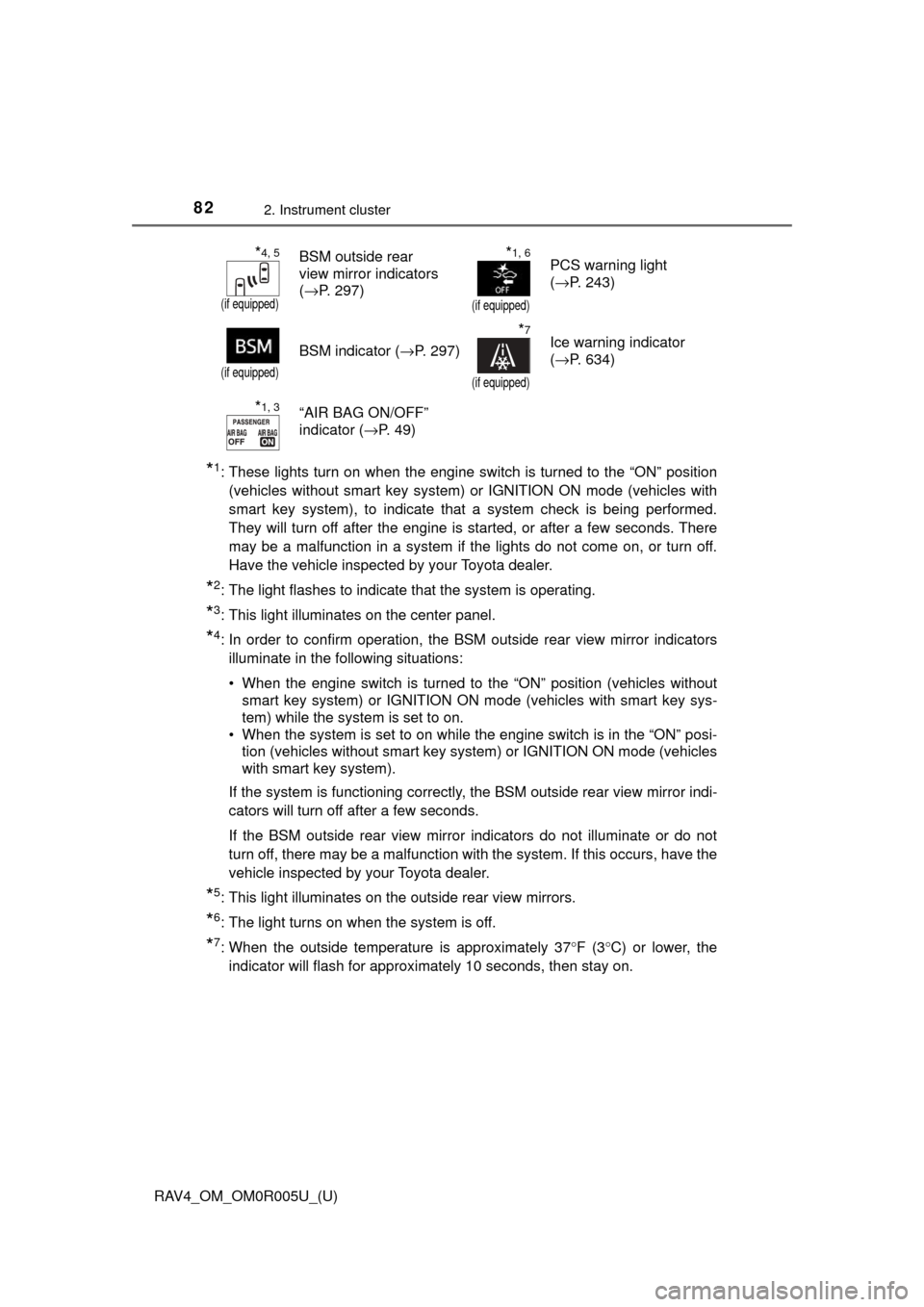
*1: These lights turn on when the engine switch is turned to the “ON” position(vehicles without smart key system) or IGNITION ON mode (vehicles with
smart key system), to indicate that a system check is being performed.
They will turn off after the engine is started, or after a few seconds. There
may be a malfunction in a system if the lights do not come on, or turn off.
Have the vehicle inspected by your Toyota dealer.
*2: The light flashes to indicate that the system is operating.
*3: This light illuminates on the center panel.
*4: In order to confirm operation, the BS M outside rear view mirror indicators
illuminate in the following situations:
• When the engine switch is turned to the “ON” position (vehicles without smart key system) or IGNITION ON mode (vehicles with smart key sys-
tem) while the system is set to on.
• When the system is set to on while the engine switch is in the “ON” posi- tion (vehicles without smart key system) or IGNITION ON mode (vehicles
with smart key system).
If the system is functioning correctly, the BSM outside rear view mirror indi-
cators will turn off after a few seconds.
If the BSM outside rear view mirror indicators do not illuminate or do not
turn off, there may be a malfunction with the system. If this occurs, have the
vehicle inspected by your Toyota dealer.
*5: This light illuminates on the outside rear view mirrors.
*6: The light turns on when the system is off.
*7: When the outside temperature is approximately 37° F (3°C) or lower, the
indicator will flash for approximately 10 seconds, then stay on.
*4, 5
(if equipped)
BSM outside rear
view mirror indicators
( →P. 297)*1, 6
(if equipped)
PCS warning light
(→P. 243)
(if equipped)
BSM indicator ( →P. 297)
*7
(if equipped)
Ice warning indicator
(→P. 634)
*1, 3“AIR BAG ON/OFF”
indicator ( →P. 4 9 )
Page 83 of 741
RAV4_OM_OM0R005U_(U)
832. Instrument cluster
2
Instrument cluster
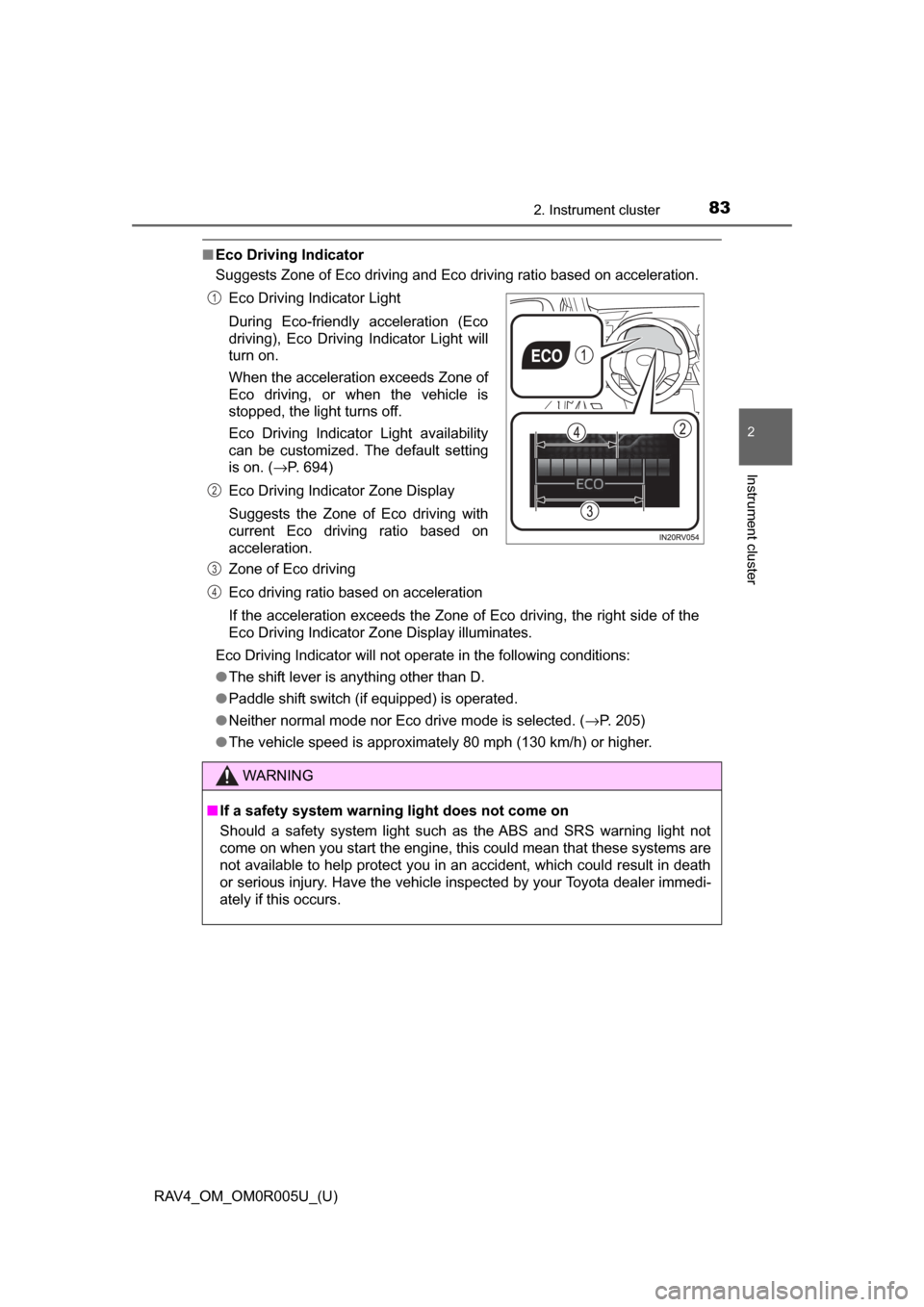
■Eco Driving Indicator
Suggests Zone of Eco driving and Eco driving ratio based on acceleration.
Eco Driving Indicator will not operate in the following conditions:
● The shift lever is anything other than D.
● Paddle shift switch (if equipped) is operated.
● Neither normal mode nor Eco drive mode is selected. ( →P. 205)
● The vehicle speed is approximately 80 mph (130 km/h) or higher. Eco Driving Indicator Light
During Eco-friendly acceleration (Eco
driving), Eco Driving Indicator Light will
turn on.
When the acceleration exceeds Zone of
Eco driving, or when the vehicle is
stopped, the light turns off.
Eco Driving Indicator Light availability
can be customized. The default setting
is on. ( →P. 694)
Eco Driving Indicator Zone Display
Suggests the Zone of Eco driving with
current Eco driving ratio based on
acceleration.
Zone of Eco driving
Eco driving ratio based on acceleration
If the acceleration exceeds the Zone of Eco driving, the right side of the
Eco Driving Indicator Zone Display illuminates.
WARNING
■ If a safety system warning light does not come on
Should a safety system light such as the ABS and SRS warning light not
come on when you start the engine, this could mean that these systems are
not available to help protect you in an accident, which could result in death
or serious injury. Have the vehicle inspected by your Toyota dealer immedi-
ately if this occurs.
1
2
3
4
Page 92 of 741
92
RAV4_OM_OM0R005U_(U)
2. Instrument cluster
■System check display
After turning the engine switch to IGNITION ON mode, opening image is dis-
played while system operation is checked. When the system check is com-
plete, the normal screen will return.
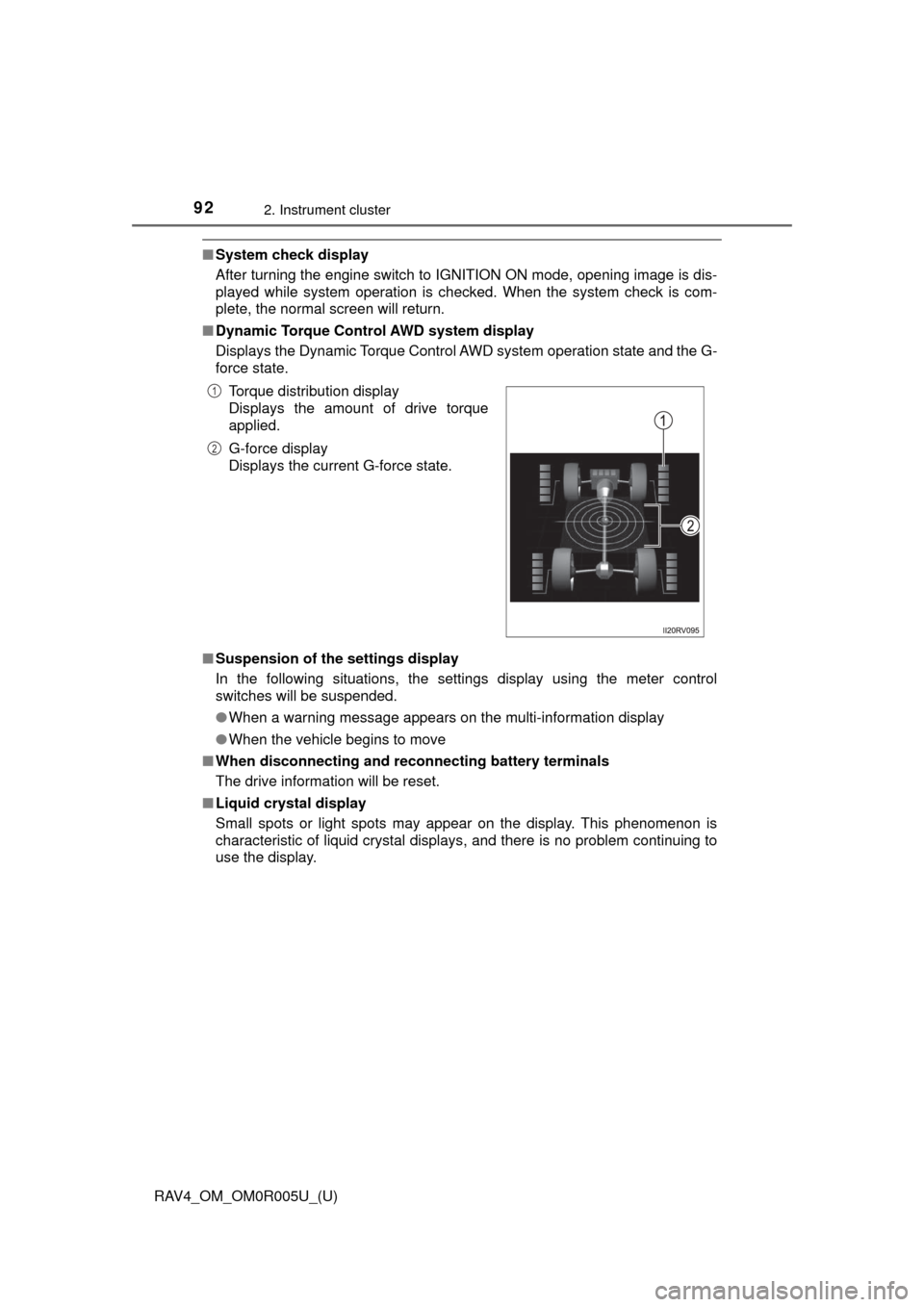
■ Dynamic Torque Control AWD system display
Displays the Dynamic Torque Control AWD system operation state and the G-
force state.
■ Suspension of the settings display
In the following situations, the settings display using the meter control
switches will be suspended.
●When a warning message appears on the multi-information display
● When the vehicle begins to move
■ When disconnecting and reco nnecting battery terminals
The drive information will be reset.
■ Liquid crystal display
Small spots or light spots may appear on the display. This phenomenon is
characteristic of liquid crystal displays, and there is no problem continuing to
use the display.Torque distribution display
Displays the amount of drive torque
applied.
G-force display
Displays the current G-force state.
1
2
Page 94 of 741
94
RAV4_OM_OM0R005U_(U)
2. Instrument cluster
Fuel consumption information
Vehicles with Entune Audio
Press the “CAR” button.
Vehicles with Entune Premium Audio with Navigation and Entune
Audio Plus
Press the “APPS” button, and t hen select “Eco” on the screen.
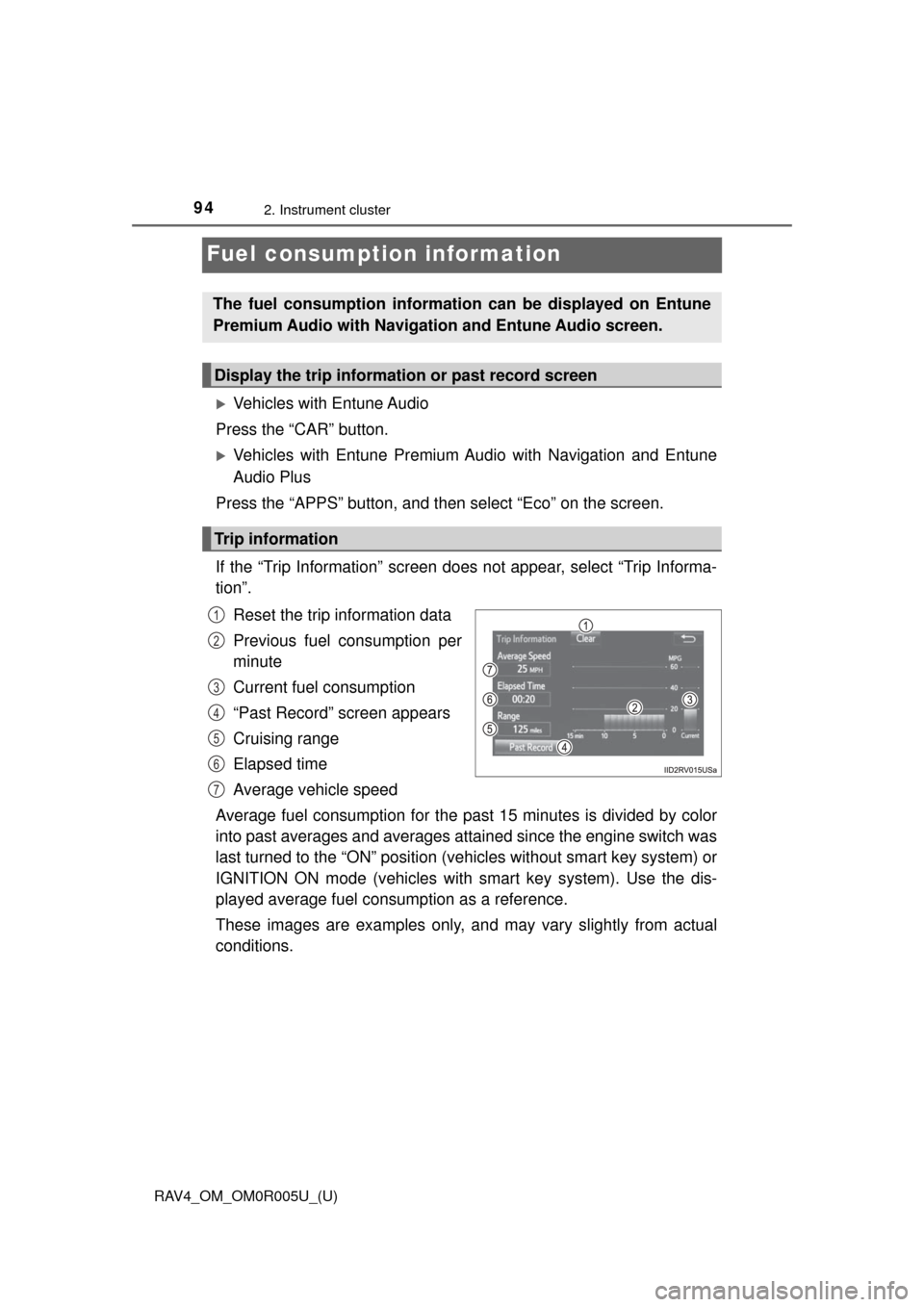
If the “Trip Information” screen does not appear, select “Trip Informa-
tion”. Reset the trip information data
Previous fuel consumption per
minute
Current fuel consumption
“Past Record” screen appears
Cruising range
Elapsed time
Average vehicle speed
Average fuel consumption for the past 15 minutes is divided by color
into past averages and averages at tained since the engine switch was
last turned to the “ON” position (vehicles without smart key system) or
IGNITION ON mode (vehicles with smart key system). Use the dis-
played average fuel consumption as a reference.
These images are examples only, an d may vary slightly from actual
conditions.
The fuel consumption informat ion can be displayed on Entune
Premium Audio with Navigation and Entune Audio screen.
Display the trip information or past record screen
Trip information
1
2
3
4
5
6
7
Page 100 of 741
100
RAV4_OM_OM0R005U_(U)
3-1. Key information
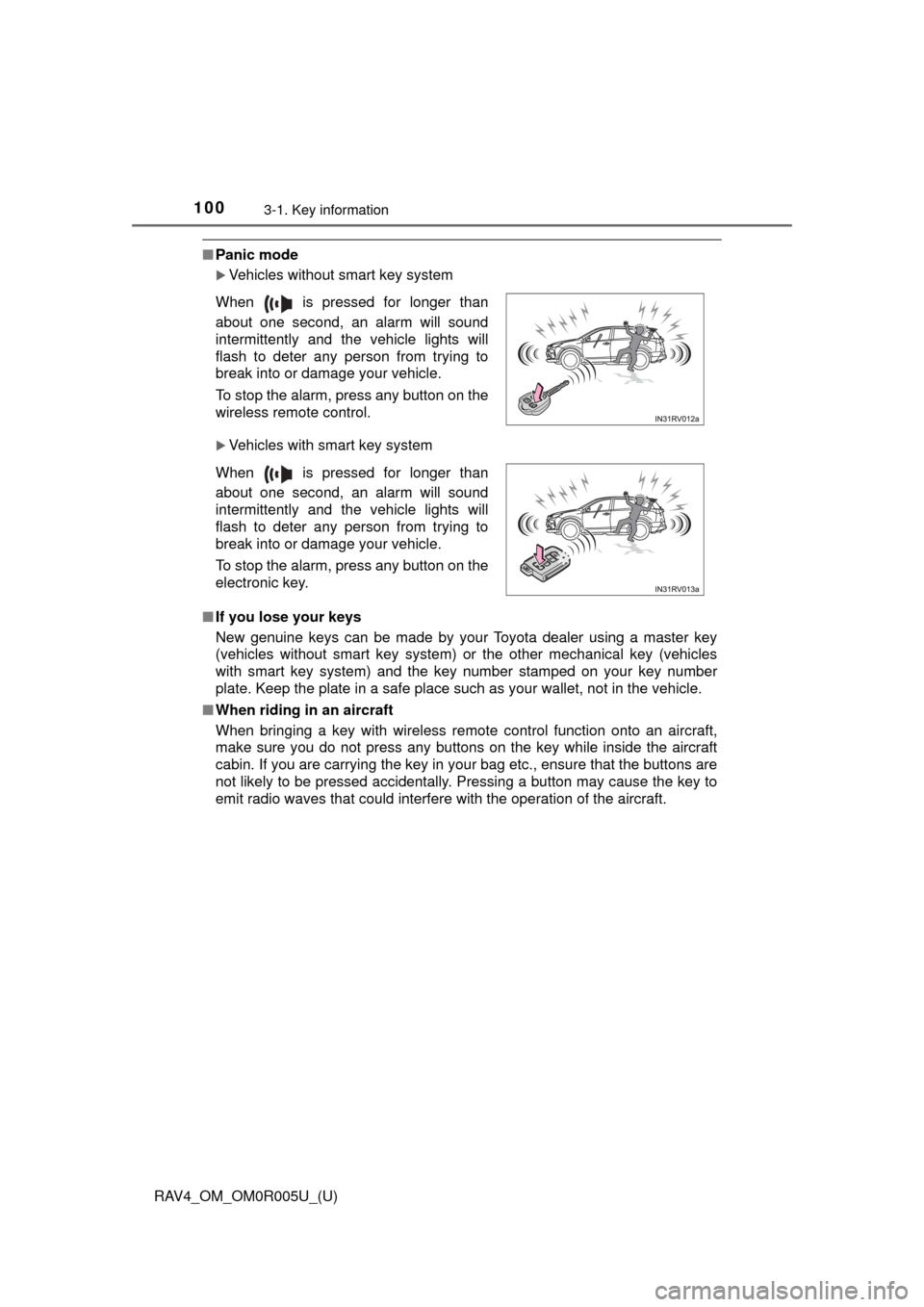
■Panic mode
Vehicles without smart key system
Vehicles with smart key system
■ If you lose your keys
New genuine keys can be made by your Toyota dealer using a master key
(vehicles without smart key system) or the other mechanical key (vehicles
with smart key system) and the key number stamped on your key number
plate. Keep the plate in a safe place such as your wallet, not in the vehicle.
■ When riding in an aircraft
When bringing a key with wireless remote control function onto an aircraft,
make sure you do not press any buttons on the key while inside the aircraft
cabin. If you are carrying the key in your bag etc., ensure that the buttons are
not likely to be pressed accidentally. Pressing a button may cause the key to
emit radio waves that could interfere with the operation of the aircraft. When is pressed for longer than
about one second, an alarm will sound
intermittently and the vehicle lights will
flash to deter any person from trying to
break into or damage your vehicle.
To stop the alarm, press any button on the
wireless remote control.
When is pressed for longer than
about one second, an alarm will sound
intermittently and the vehicle lights will
flash to deter any person from trying to
break into or damage your vehicle.
To stop the alarm, press any button on the
electronic key.
Page 131 of 741
RAV4_OM_OM0R005U_(U)
1313-2. Opening, closing and locking the doors
3
Operation of each component
■Alarms and warning indicators
A combination of exterior and interior alarms as well as warning messages
shown on the multi-information display are used to prevent theft of the vehicle
and accidents resulting from erroneous operation. Take appropriate mea-
sures in response to any warning message on the multi-information dis-
play.( →P. 636)
The following table describes circumstances and correction procedures when
only alarms are sounded.
■ Battery-saving function
The battery-saving function will be activated in order to prevent the electronic
key battery and the vehicle battery from being discharged while the vehicle is
not in operation for a long time.
●In the following situations, the smart key system may take some time to
unlock the doors.
• The electronic key has been left in an area of approximately 6 ft. (2 m) of
the outside of the vehicle for 10 minutes or longer.
• The smart key system has not been used for 5 days or longer.
● If the smart key system has not been used for 14 days or longer, the doors
cannot be unlocked at any doors except the driver’s door. In this case, take
hold of the driver’s door handle, or use the wireless remote control or the
mechanical key, to unlock the doors.
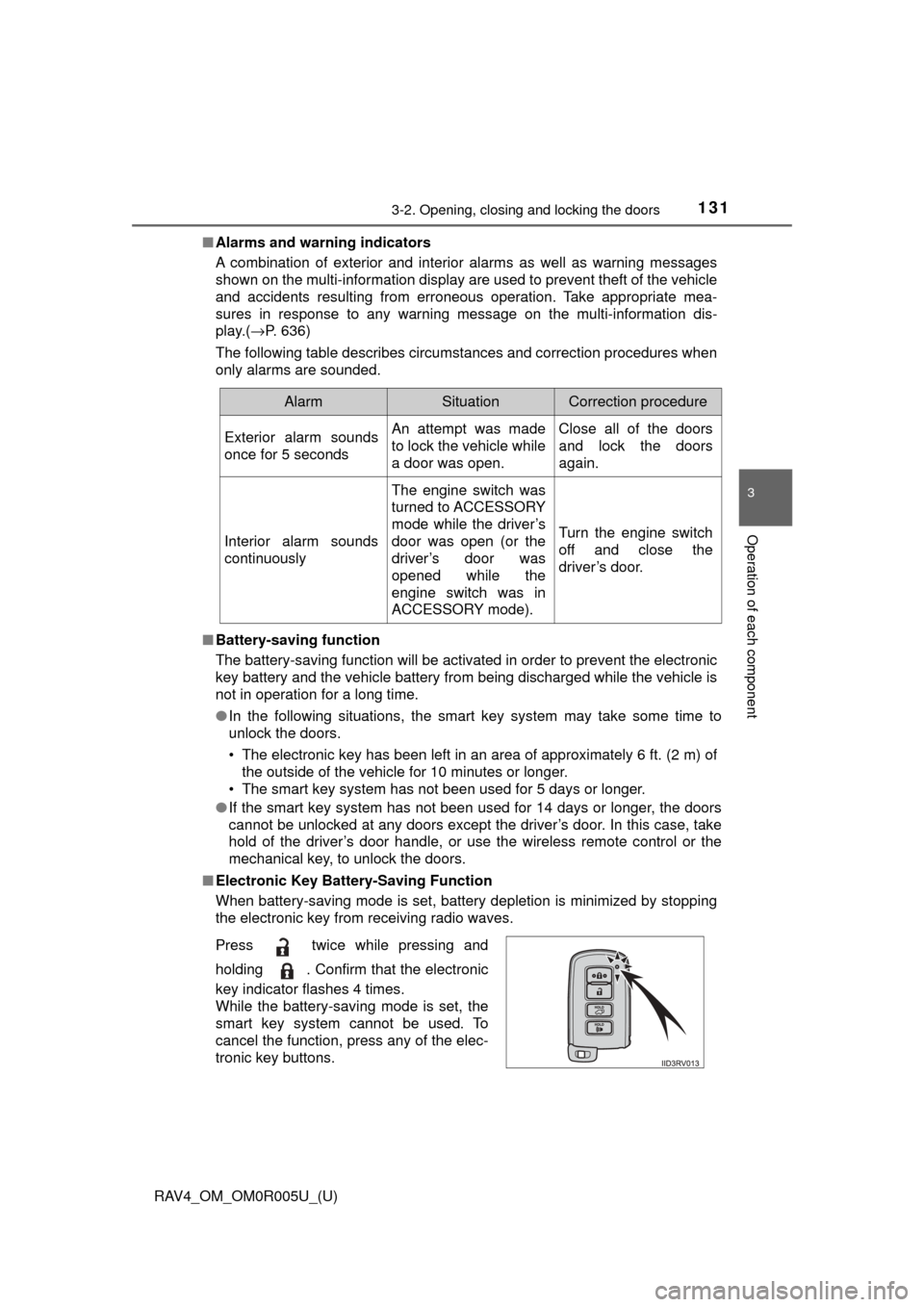
■ Electronic Key Battery-Saving Function
When battery-saving mode is set, battery depletion is minimized by stopping
the electronic key from receiving radio waves.
AlarmSituationCorrection procedure
Exterior alarm sounds
once for 5 secondsAn attempt was made
to lock the vehicle while
a door was open.Close all of the doors
and lock the doors
again.
Interior alarm sounds
continuously
The engine switch was
turned to ACCESSORY
mode while the driver’s
door was open (or the
driver’s door was
opened while the
engine switch was in
ACCESSORY mode).
Turn the engine switch
off and close the
driver’s door.
Press twice while pressing and
holding . Confirm that the electronic
key indicator flashes 4 times.
While the battery-saving mode is set, the
smart key system cannot be used. To
cancel the function, press any of the elec-
tronic key buttons.
Page 133 of 741

RAV4_OM_OM0R005U_(U)
1333-2. Opening, closing and locking the doors
3
Operation of each component
■Note for the entry function
●Even when the electronic key is within the effective range (detection areas),
the system may not operate properly in the following cases:
• The electronic key is too close to the window or outside door handle, near
the ground, or in a high place when the doors are locked or unlocked.
• The electronic key is near the ground or in a high place, or too close to
the rear bumper center when the back door is opened.
• The electronic key is on the instrument panel, luggage cover or floor, or in the door pockets or glove box when the engine is started or engine switch
modes are changed.
● Do not leave the electronic key on top of the instrument panel or near t\
he
door pockets when exiting the vehicle. Depending on the radio wave recep-
tion conditions, it may be detected by the antenna outside the cabin and the
door will become lockable from the out side, possibly trapping the electronic
key inside the vehicle.
● As long as the electronic key is within the effective range, the doors may be
locked or unlocked by anyone. However, only the doors detecting the elec-
tronic key can be used to unlock the vehicle.
● Even if the electronic key is not inside the vehicle, it may be possible to start
the engine if the electronic key is near the window.
● The doors may unlock or lock if a large amount of water splashes on the
door handle, such as in the rain or in a car wash when the electronic key is
within the effective range. (The doors will automatically be locked after
approximately 60 seconds if the doors are not opened and closed.)
● If the wireless remote control is used to lock the doors when the electronic
key is near the vehicle, there is a possibility that the door may not be
unlocked by the entry function. (Use the wireless remote control to unlock
the doors.)
● Touching the door lock sensor while wearing gloves may delay or prevent
lock operation. Remove the gloves and touch the lock sensor again.
● When the lock operation is performed using the lock sensor, recognition sig-
nals will be shown up to two consecutive times. After this, no recognition
signals will be given.
● If the door handle becomes wet while the electronic key is within the effec-
tive range, the door may lock and unlock repeatedly. In that case, follow the
following correction procedures to wash the vehicle:
• Place the electronic key in a location 6 ft. (2 m) or more away from the
vehicle. (Take care to ensure that the key is not stolen.)
• Set the electronic key to battery-saving mode to disable the smart key
system. ( →P. 131)
● If the electronic key is inside the vehicle and a door handle becomes wet
during a car wash, a message may be shown on the multi-information dis-
play and a buzzer will sound outside the vehicle. To turn off the alarm, lock
all the doors.