USB TOYOTA RAV4 2018 (in English) User Guide
[x] Cancel search | Manufacturer: TOYOTA, Model Year: 2018, Model line: RAV4, Model: TOYOTA RAV4 2018Pages: 744, PDF Size: 13.78 MB
Page 357 of 744
RAV4_OM_OM0R012U_(U)
3575-5. Using an external device
5
Audio system
■Selecting folders one at a time
Press (
folder.
Press (MORE>) to display the commands.
■
Selecting a folder and file from folder list
Press the “TUNE•SCROLL” knob.
The folder list will be displayed.
Turn and press the knob to select a folder and file.
To return to the previous display, press (BACK).
■
Returning to the first folder
Press and hold (
Press and hold the “SCAN” button until you hear a beep.
The first 10 seconds of the first file in each folder will be played.
To cancel, press the button again.
When the desired folder is reac hed, press the button again.
■Selecting a file
Turn the “TUNE•SCROLL” knob or press “ ∧” or “ ∨” on the “SEEK/
TRACK” button to select the desired file.
■Scanning the files in a folder
Press the “SCAN” button.
The first 10 seconds of each file will be played.
To cancel, press the button again.
When the desired file is reac hed, press the button again.
■Fast-forwarding and rewinding files
Press ( ) or ( ).
Press (
1
2
1
2
1
2
Page 358 of 744
358
RAV4_OM_OM0R012U_(U)
5-5. Using an external device
■Random play
Pressing (RDM) changes modes in the following order:
Folder random→All folder random →Off
Press (MORE>) to display the command.
■
Repeat play
Pressing (RPT) changes modes in the following order:
File repeat →Folder repeat
*→ Off
*: Available except when RDM (random play) is selected
Press (MORE>) to display the command.
■
Playing and pausing tracks
Press ( ).
Press (
Switching the display
Press the “TEXT” button to display or hide the album title.
If there are continuing texts, is displayed.
Press and hold the button to display the remaining texts.
■ USB memory functions
●Depending on the USB memory that is connected to the system, the device
itself may not be operable and certain functions may not be available. If the
device is inoperable or a function is unavailable due to a malfunction (as
opposed to a system specification), disconnecting the device and recon-
necting it once again may resolve the problem.
● If the USB memory still does not begin operation after being disconnected
and reconnected, format the memory.
■ Display
→P. 344
■ Error messages
If an error message is displayed, refer to the following table and take the
appropriate measures. If the problem is not rectified, take the vehicle to your
Toyota dealer.
MessageCause/Correction procedures
“ERROR”This indicates a problem in the USB memory
or its connection.
“NO MUSIC”This indicates that no MP3/WMA files are
included in the USB memory.
Page 359 of 744
RAV4_OM_OM0R012U_(U)
3595-5. Using an external device
5
Audio system
■USB memory
●Compatible devices
USB memory that can be used for MP3 and WMA playback
● Compatible device formats
The following device formats can be used:
• USB communication formats: USB2.0 FS (12mbps)
• File formats: FAT12/16/32 (Windows)
• Correspondence class: Mass storage class
MP3 and WMA files written in any format other than those listed above may
not play correctly, and their file names and folder names may not be dis-
played correctly.
Items related to standards and limitations are as follows:
• Maximum directory hierarchy: 8 levels
• Maximum number of folders in a device: 999 (including the root)
• Maximum number of files in a device: 9999
• Maximum number of files per folder: 255
● MP3 and WMA files
MP3 (MPEG Audio LAYER3) is a standard audio compression format.
Files can be compressed to approximately 1/10 of their original size by
using MP3 compression.
WMA (Windows Media Audio) is a Microsoft audio compression format.
This format compresses audio data to a size smaller than that of the MP3\
format.
There is a limit to the MP3 and WMA file standards and to the media/for-
mats recorded by them that can be used.
● MP3 file compatibility
• Compatible standards
MP3 (MPEG1 LAYER3, MPEG2 LSF LAYER3)
• Compatible sampling frequencies MPEG1 LAYER3: 32, 44.1, 48 (kHz)
MPEG2 LSF LAYER3: 16, 22.05, 24 (kHz)
• Compatible bit rates (compatible with VBR) MPEG1 LAYER3: 32 - 320 (kbps)
• MPEG2 LSF LAYER3: 8 - 160 (kbps)
• Compatible channel modes: stereo, joint stereo, dual channel and mon- aural
Page 360 of 744

360
RAV4_OM_OM0R012U_(U)
5-5. Using an external device
●WMA file compatibility
• Compatible standards
WMA Ver. 7, 8, 9
• Compatible sampling frequencies
32, 44.1, 48 (kHz)
• Compatible bit rates (only compatible with 2-channel playback) Ver. 7, 8: CBR 48 - 192 (kbps)
Ver. 9: CBR 48 - 320 (kbps)
● File names
The only files that can be recognized as MP3/WMA and played are those
with the extension .mp3 or .wma.
● ID3 and WMA tags
ID3 tags can be added to MP3 files, making it possible to record the track
title, artist name, etc.
The system is compatible with ID3 Ver. 1.0, 1.1, and Ver. 2.2, 2.3, 2.4 ID3
tags. (The number of characters is based on ID3 Ver. 1.0 and 1.1.)
WMA tags can be added to WMA files, making it possible to record the
track title and artist name in the same way as with ID3 tags.
● MP3 and WMA playback
• When a device containing MP3 or WMA files is connected, all files in the
USB memory device are checked. Once the file check is finished, the first
MP3 or WMA file is played. To make the file check finish more quickly, we
recommend that you do not include any files other than MP3 or WMA
files or create any unnecessary folders.
• When the USB device is connected and the audio source is changed to
USB memory mode, the USB device will start playing the first file in the
first folder. If the same device is removed and reinserted (and the con-
tents have not been changed), the USB memory will resume play from
the same point in which it was last used.
● Extensions
If the file extensions .mp3 and .wma are used for files other than MP3 and
WMA files, they will be skipped (not played).
● Playback
• To play MP3 files with steady sound quality, we recommend a fixed bit
rate of at least 128 kbps and a sampling frequency of 44.1 kHz.
• There is a wide variety of freeware and other encoding software for MP3 and WMA files on the market, and depending on the status of the encod-
ing and the file format, poor sound quality or noise at the start of playback
may result. In some cases, playback may not be possible at all.
• Microsoft, Windows, and Windows Media are registered trademarks of Microsoft Corporation in the U.S.A. and other countries.
Page 361 of 744
RAV4_OM_OM0R012U_(U)
3615-5. Using an external device
5
Audio system
WARNING
■While driving
Do not connect USB memory or operate the controls. Doing so may cause
an accident, resulting in death or serious injury.
NOTICE
■To prevent damage to USB memory
● Do not leave USB memory in the vehicle. The temperature inside the vehi-
cle may become high, resulting in damage to the USB memory.
● Do not push down on or apply unnecessary pressure to the USB memory
while it is connected as this may damage the USB memory or its terminal.
● Do not insert foreign objects into the port as this may damage the USB
memory or its terminal.
Page 392 of 744
392
RAV4_OM_OM0R012U_(U)
5-11. Using the audio system (Entune Audio)
Audio system (Entune Audio)
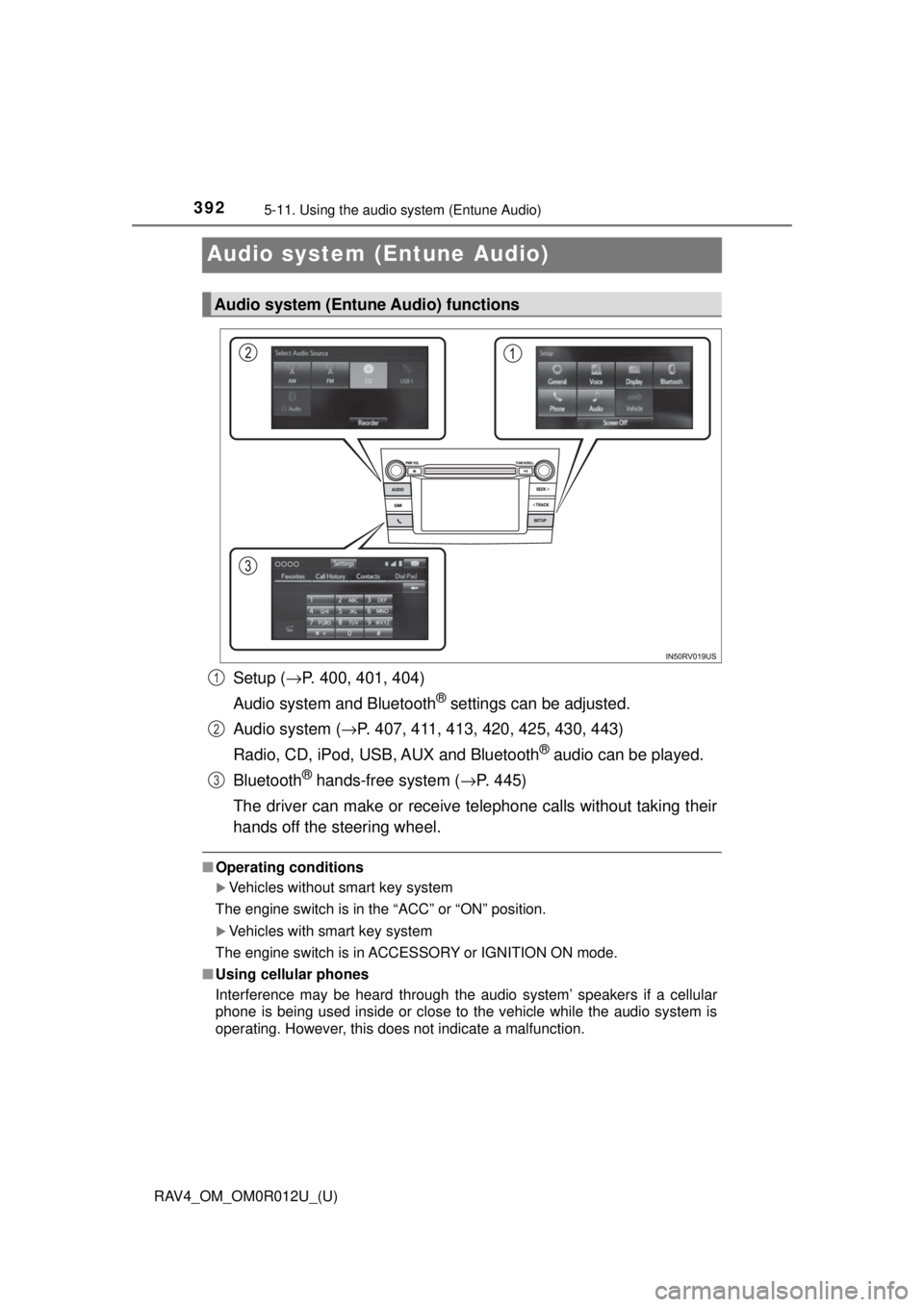
Setup (→P. 400, 401, 404)
Audio system and Bluetooth
® settings can be adjusted.
Audio system ( →P. 407, 411, 413, 420, 425, 430, 443)
Radio, CD, iPod, USB, AUX and Bluetooth
® audio can be played.
Bluetooth
® hands-free system (→ P. 445)
The driver can make or receive telephone calls without taking their
hands off the steering wheel.
■ Operating conditions
Vehicles without smart key system
The engine switch is in the “ACC” or “ON” position.
Vehicles with smart key system
The engine switch is in ACCESSORY or IGNITION ON mode.
■ Using cellular phones
Interference may be heard through the audio system’ speakers if a cellular
phone is being used inside or close to the vehicle while the audio system is
operating. However, this does not indicate a malfunction.
Audio system (Entune Audio) functions
1
2
3
Page 396 of 744
396
RAV4_OM_OM0R012U_(U)
5-12. Basic Operations
Steering wheel audio switches
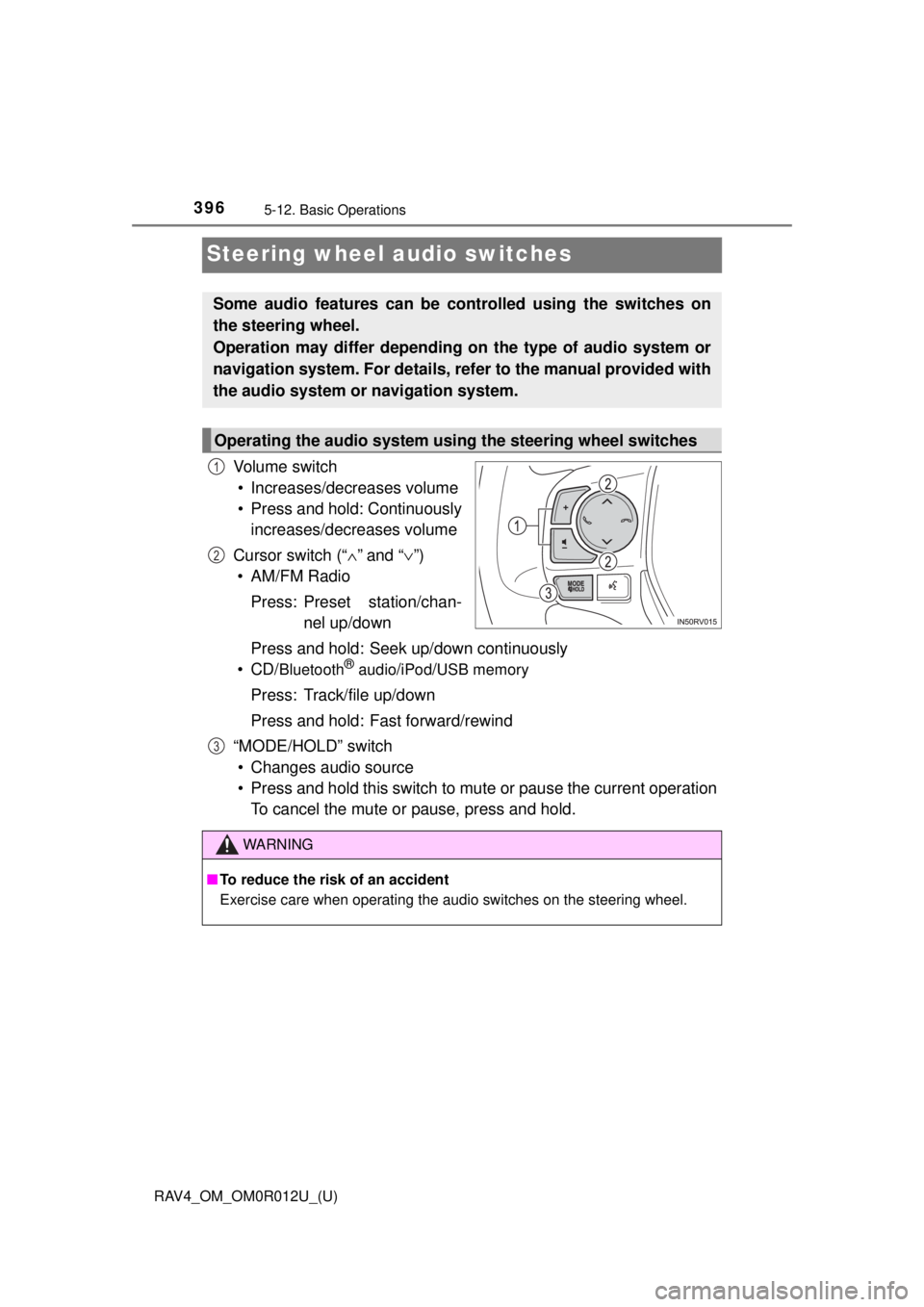
Vo l u m e s w i t c h• Increases/decreases volume
• Press and hold: Continuously increases/decreases volume
Cursor switch (“ ∧” and “ ∨”)
• AM/FM Radio
Press: Preset station/chan- nel up/down
Press and hold: Seek up/down continuously
•CD/
Bluetooth® audio/iPod/USB memory
Press: Track/file up/down
Press and hold: Fast forward/rewind
“MODE/HOLD” switch • Changes audio source
• Press and hold this switch to mute or pause the current operation To cancel the mute or pause, press and hold.
Some audio features can be c ontrolled using the switches on
the steering wheel.
Operation may differ depending on the type of audio system or
navigation system. For details, refer to the manual provided with
the audio system or navigation system.
Operating the audio system using the steering wheel switches
1
2
3
WARNING
■ To reduce the risk of an accident
Exercise care when operating the audio switches on the steering wheel.
Page 397 of 744
397
RAV4_OM_OM0R012U_(U)
5-12. Basic Operations
5
Audio system
AUX port/USB port
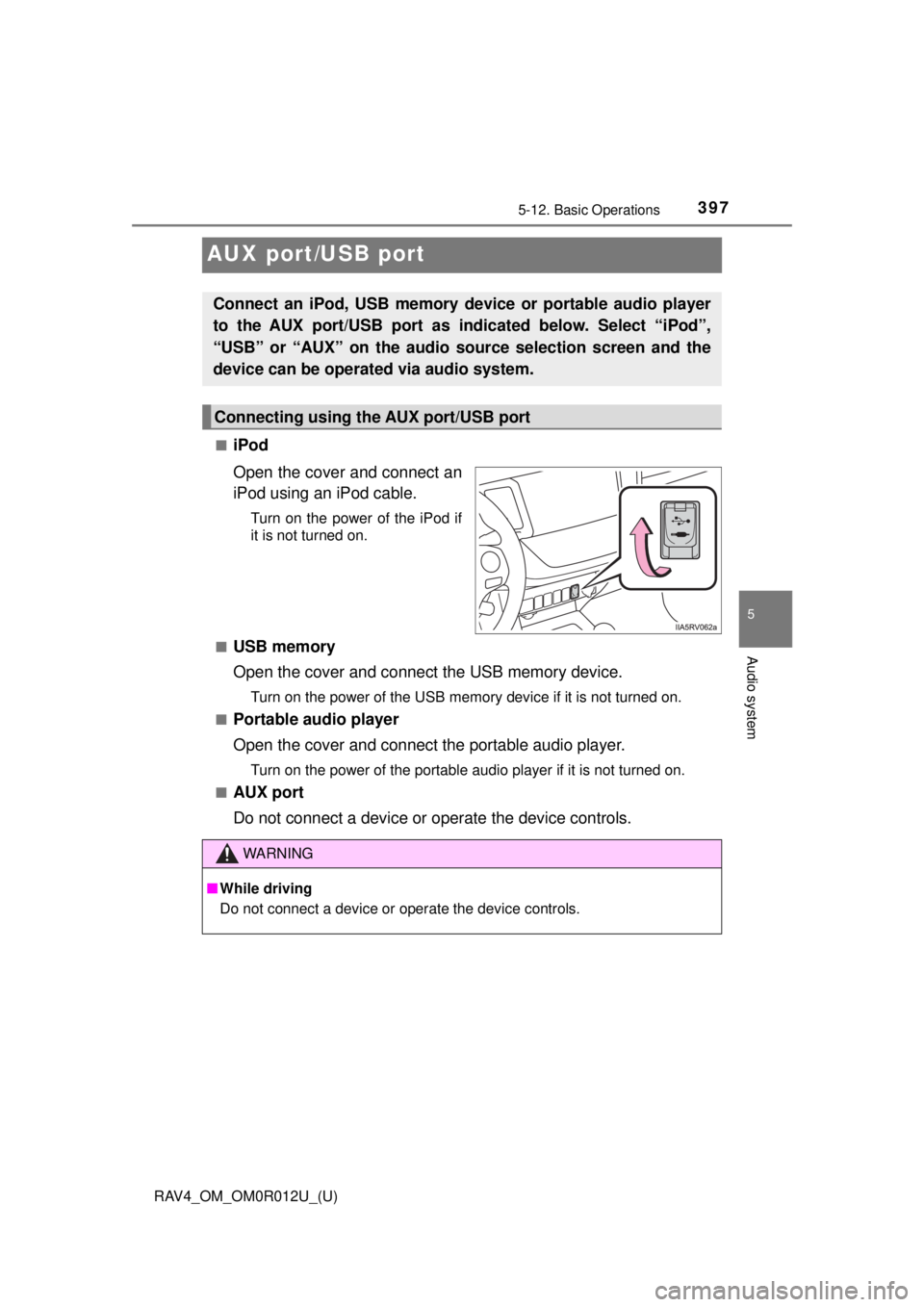
■iPod
Open the cover and connect an
iPod using an iPod cable.
Turn on the power of the iPod if
it is not turned on.
■
USB memory
Open the cover and connect the USB memory device.
Turn on the power of the USB memory device if it is not turned on.
■
Portable audio player
Open the cover and connect the portable audio player.
Turn on the power of the portable audio player if it is not turned on.
■
AUX port
Do not connect a device or op erate the device controls.
Connect an iPod, USB memory device or portable audio player
to the AUX port/USB port as indicated below. Select “iPod”,
“USB” or “AUX” on the audio source selection screen and the
device can be operated via audio system.
Connecting using the AUX port/USB port
WARNING
■While driving
Do not connect a device or operate the device controls.
Page 409 of 744
RAV4_OM_OM0R012U_(U)
4095-14. Using the audio system
5
Audio system
■Selecting a track/file/song
Press the “SEEK >” button or “< TRACK” button, or turn the
“TUNE•SCROLL” knob to select the desired track/file/song number.
To fast-forward or reverse, press and hold the “SEEK >” button or
“< TRACK” button.
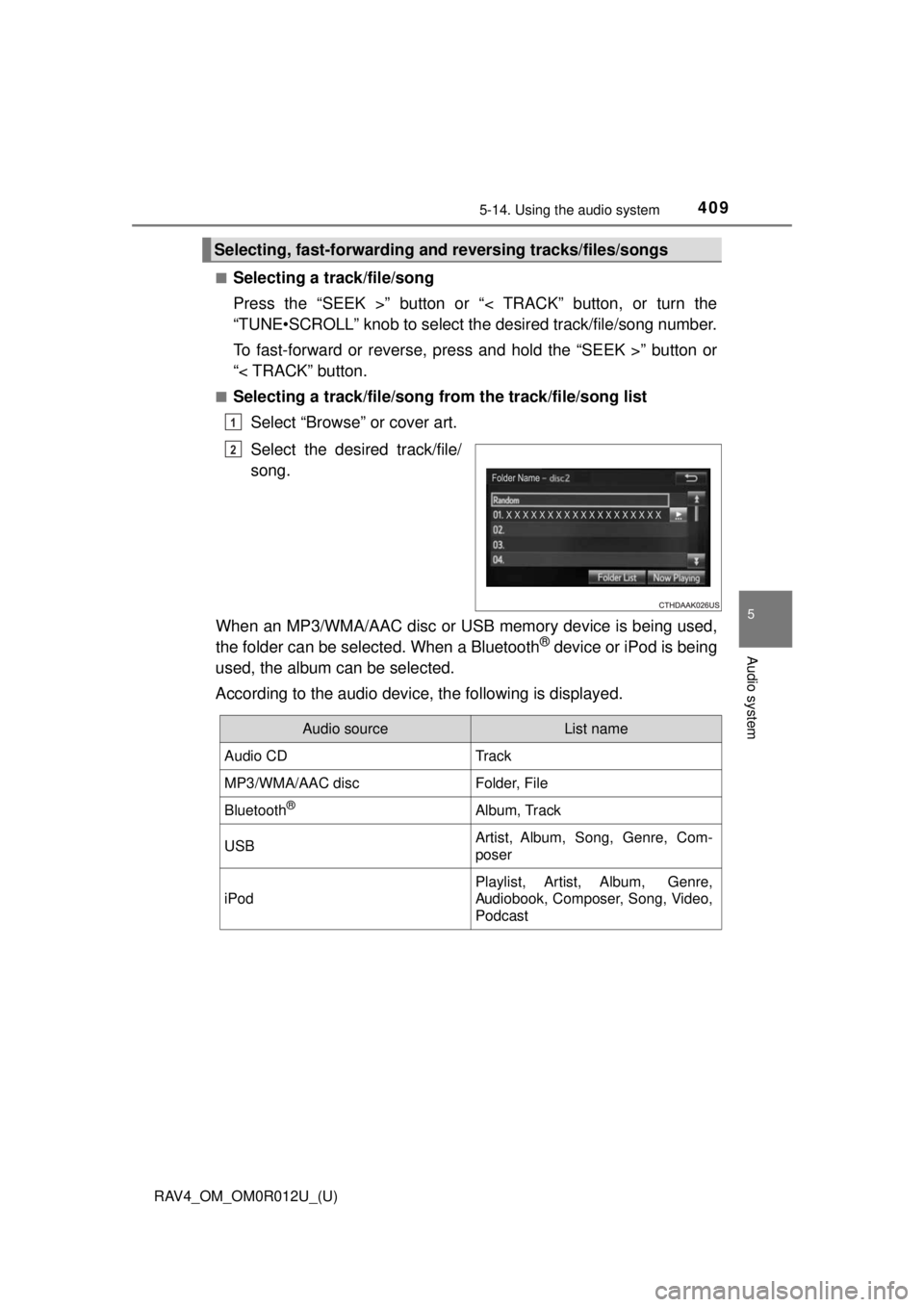
■Selecting a track/file/song from the track/file/song list
Select “Browse” or cover art.
Select the desired track/file/
song.
When an MP3/WMA/AAC disc or USB memory device is being used,
the folder can be selected. When a Bluetooth
® device or iPod is being
used, the album can be selected.
According to the audio device, the following is displayed.
Selecting, fast-forwarding a nd reversing tracks/files/songs
1
2
Audio sourceList name
Audio CDTrack
MP3/WMA/AAC discFolder, File
Bluetooth®Album, Track
USBArtist, Album, Song, Genre, Com-
poser
iPod
Playlist, Artist, Album, Genre,
Audiobook, Composer, Song, Video,
Podcast
Page 425 of 744
425
RAV4_OM_OM0R012U_(U)
5-17. Using an external device
5
Audio system
USB memory device player operation
→P. 3 9 7
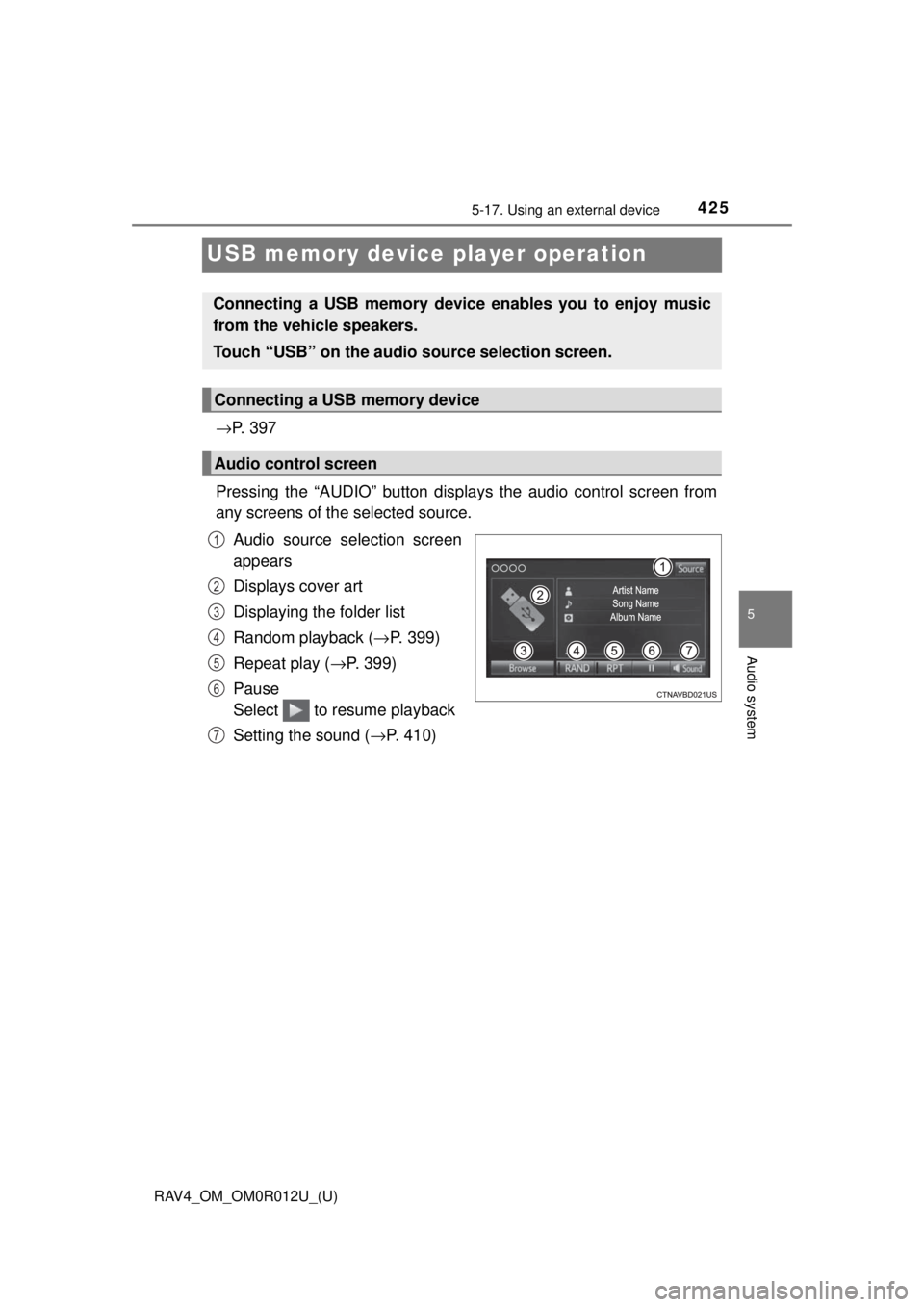
Pressing the “AUDIO” button disp lays the audio control screen from
any screens of the selected source.
Audio source selection screen
appears
Displays cover art
Displaying the folder list
Random playback ( →P. 399)
Repeat play ( →P. 399)
Pause
Select to resume playback
Setting the sound ( →P. 410)
Connecting a USB memory device enables you to enjoy music
from the vehicle speakers.
Touch “USB” on the audio source selection screen.
Connecting a USB memory device
Audio control screen
1
2
3
4
5
6
7