ECU TOYOTA RAV4 2018 (in English) Owner's Guide
[x] Cancel search | Manufacturer: TOYOTA, Model Year: 2018, Model line: RAV4, Model: TOYOTA RAV4 2018Pages: 744, PDF Size: 13.78 MB
Page 69 of 744
691-1. For safe use
RAV4_OM_OM0R012U_(U)
1
For safety and security
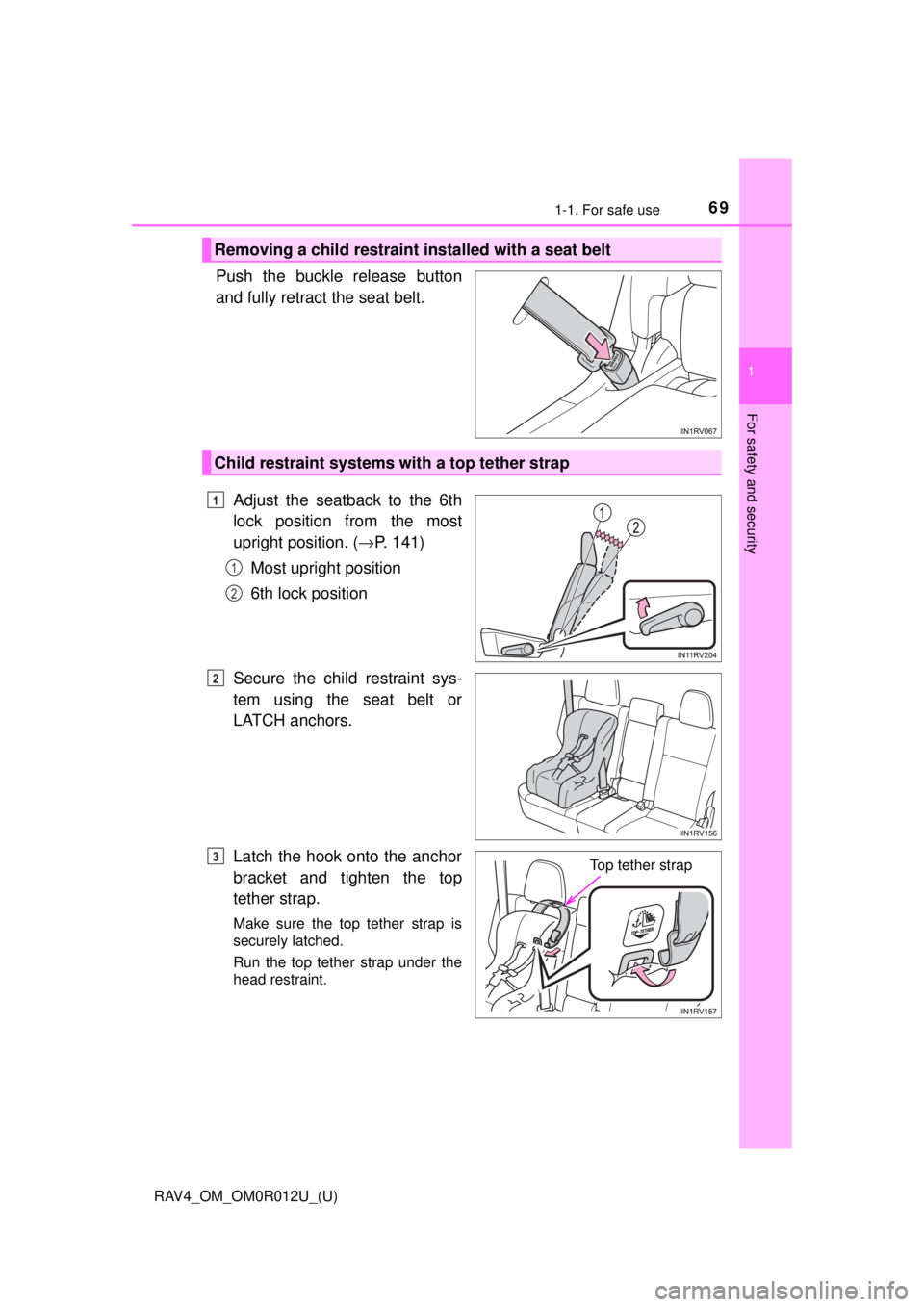
Push the buckle release button
and fully retract the seat belt. Adjust the seatback to the 6th
lock position from the most
upright position. ( →P. 141)
Most upright position
6th lock position
Secure the child restraint sys-
tem using the seat belt or
LATCH anchors.
Latch the hook onto the anchor
bracket and tighten the top
tether strap.
Make sure the top tether strap is
securely latched.
Run the top tether strap under the
head restraint.
Removing a child restraint installed with a seat belt
Child restraint systems with a top tether strap
1
1
2
2
Top tether strap3
Page 70 of 744
701-1. For safe use
RAV4_OM_OM0R012U_(U)
■Laws and regulations pertaining to anchorages
The LATCH system conforms to FMVSS225 or CMVSS210.2.
Child restraint systems conforming to FMVSS213 or CMVSS213 specifica-
tions can be used.
This vehicle is designed to conform to the SAE J1819.
WARNING
■When installing a booster seat
To prevent the belt from going into ALR lock mode, do not fully extend the
shoulder belt. ALR mode causes the belt to tighten only. This could cause
injury or discomfort to the child. ( →P. 32)
■ When installing a child restraint system
Follow the directions given in the child restraint system installation manual
and fix the child restraint system securely in place.
If the child restraint system is not correctly fixed in place, the child or other
passengers may be seriously injured or even killed in the event of sudden
braking, sudden swerving or an accident.
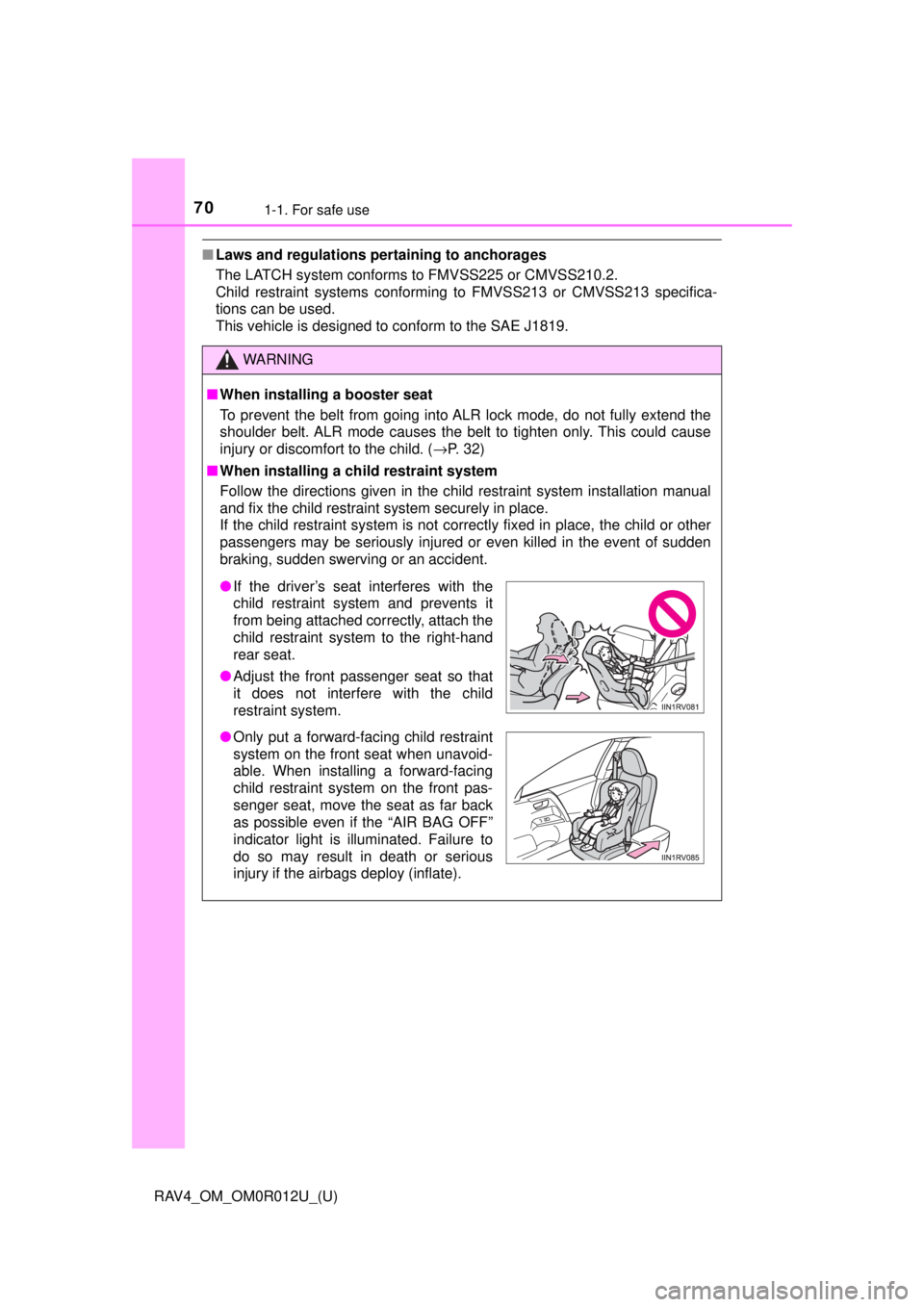
● If the driver’s seat interferes with the
child restraint system and prevents it
from being attached correctly, attach the
child restraint system to the right-hand
rear seat.
● Adjust the front passenger seat so that
it does not interfere with the child
restraint system.
● Only put a forward-facing child restraint
system on the front seat when unavoid-
able. When installing a forward-facing
child restraint system on the front pas-
senger seat, move the seat as far back
as possible even if the “AIR BAG OFF”
indicator light is illuminated. Failure to
do so may result in death or serious
injury if the airbags deploy (inflate).
Page 71 of 744
711-1. For safe use
RAV4_OM_OM0R012U_(U)
1
For safety and security
WARNING
■When installing a child restraint system
● When installing a child restraint system in the rear center seat, adjust both
seatbacks at the same angle. Otherwise, the child restraint system cannot
be securely restrained and this may cause death or serious injuries in the
event of sudden braking, sudden swerving or an accident.
● When a booster seat is installed, always ensure that the shoulder belt is
positioned across the center of the child’s shoulder. The belt should be
kept away from the child’s neck, but not so that it could fall off the child’s
shoulder. Failing to do so may result in death or serious injury in the event
of sudden braking, sudden swerving or an accident.
● Ensure that the belt and plate are securely locked and the seat belt is not
twisted.
● Shake the child restraint system left and right, and forward and backward
to ensure that it has been securely installed.
● After securing a child restraint system, never adjust the seat.
● Follow all installation instructions provided by the child restraint system
manufacturer.
● When securing some types of child restraint systems in rear seats, it may
not be possible to properly use the seat belts in positions next to the child
restraint without interfering with it or affecting seat belt effectiveness. Be
sure your seat belt fits snugly across your shoulder and low on your hips. if
it dose not, or if it interferes with the child restraint, move to a different
position. Failure to do so may result in death or serious injury.
■ Do not use a seat belt extender
If a seat belt extender is used when installing a child restraint system, the
seat belt will not securely hold the child restraint system, which could cause
death or serious injury to the child or other passengers in the event of a sud-
den braking, sudden swerving or an accident.
■ To correctly attach a child r estraint system to the anchors
When using the LATCH anchors, be sure that there are no foreign objects
around the anchors and that the seat belt is not caught behind the child
restraint system. Make sure the child restraint system is securely attached,
or it may cause death or serious injury to the child or other passengers in
the event of sudden braking, sudden swerving or an accident.
Page 73 of 744
731-2. Theft deterrent system
RAV4_OM_OM0R012U_(U)
1
For safety and security
Engine immobilizer system
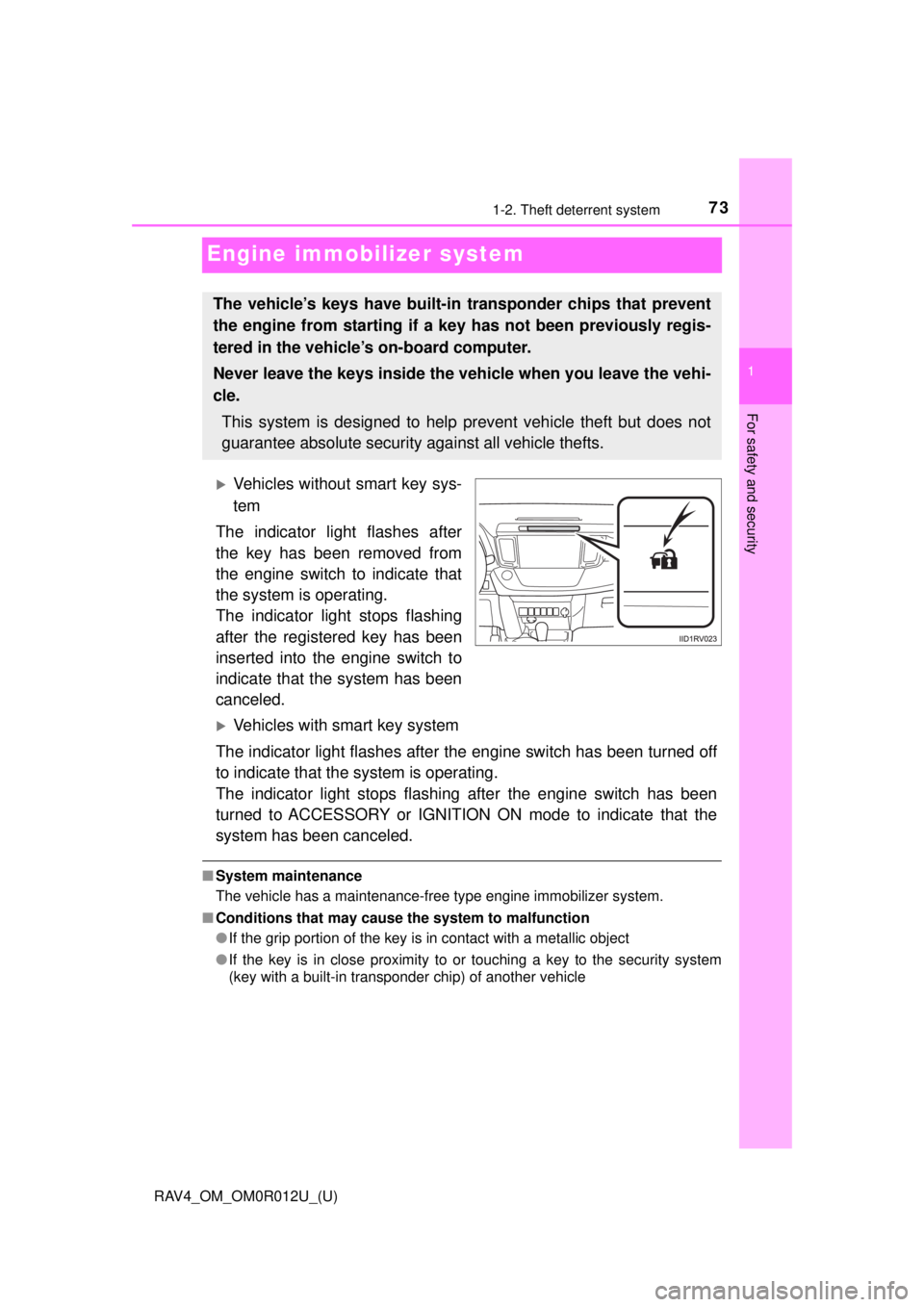
Vehicles without smart key sys-
tem
The indicator light flashes after
the key has been removed from
the engine switch to indicate that
the system is operating.
The indicator light stops flashing
after the registered key has been
inserted into the engine switch to
indicate that the system has been
canceled.
Vehicles with smart key system
The indicator light flashes after the engine switch has been turned off
to indicate that the system is operating.
The indicator light stops flashing after the engine switch has been
turned to ACCESSORY or IGNITION ON mode to indicate that the
system has been canceled.
■ System maintenance
The vehicle has a maintenance-free type engine immobilizer system.
■ Conditions that may cause the system to malfunction
●If the grip portion of the key is in contact with a metallic object
● If the key is in close proximity to or touching a key to the security system
(key with a built-in transponder chip) of another vehicle
The vehicle’s keys have built-in transponder chips that prevent
the engine from starting if a key has not been previously regis-
tered in the vehicle’s on-board computer.
Never leave the keys inside the vehicle when you leave the vehi-
cle.
This system is designed to help prevent vehicle theft but does not
guarantee absolute security against all vehicle thefts.
Page 75 of 744
751-2. Theft deterrent system
RAV4_OM_OM0R012U_(U)
1
For safety and security
For vehicles sold in Canada
WARNING
■Certification for the engine immobilizer system
Changes or modifications not expre ssly approved by the party responsible
for compliance could void the user’s authority to operate the equipment.
Page 81 of 744
RAV4_OM_OM0R012U_(U)
812. Instrument cluster
2
Instrument cluster
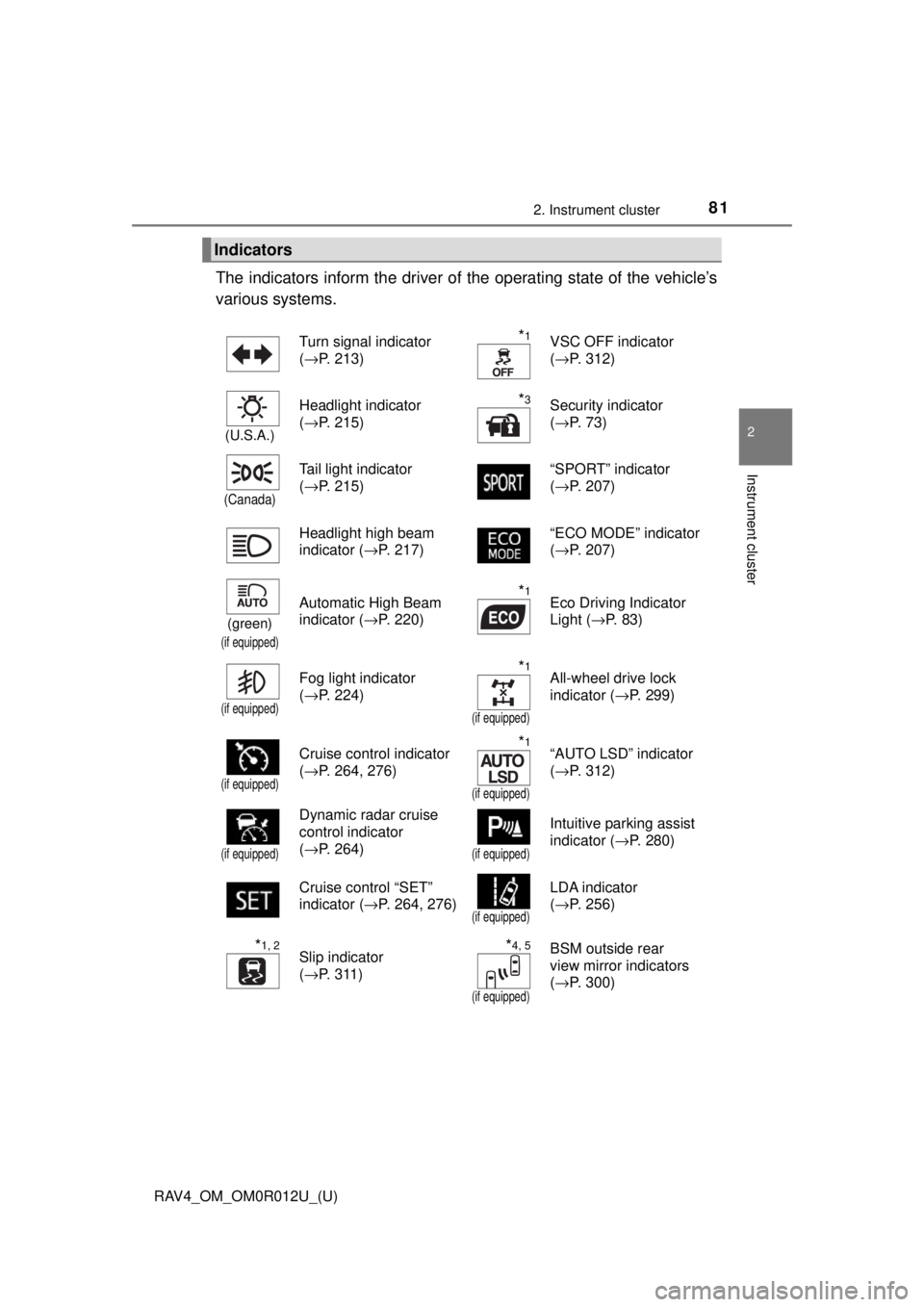
The indicators inform the driver of the operating state of the vehicle’s
various systems.
Indicators
Turn signal indicator
( →P. 213)*1VSC OFF indicator
(→P. 312)
(U.S.A.)
Headlight indicator
(→P. 215)*3Security indicator
(→P. 73)
(Canada)
Tail light indicator
(→P. 215) “SPORT” indicator
(
→P. 207)
Headlight high beam
indicator ( →P. 217) “ECO MODE” indicator
(
→P. 207)
(green)
(if equipped)
Automatic High Beam
indicator ( →P. 220)*1Eco Driving Indicator
Light (→P. 83)
(if equipped)
Fog light indicator
(→P. 224)*1
(if equipped)
All-wheel drive lock
indicator ( →P. 299)
(if equipped)
Cruise control indicator
(→P. 264, 276)*1
(if equipped)
“AUTO LSD” indicator
(→P. 312)
(if equipped)
Dynamic radar cruise
control indicator
(→P. 264)
(if equipped)
Intuitive parking assist
indicator ( →P. 280)
Cruise control “SET”
indicator ( →P. 264, 276)
(if equipped)
LDA indicator
(→P. 256)
*1, 2Slip indicator
(→P. 311)*4, 5
(if equipped)
BSM outside rear
view mirror indicators
(→P. 300)
Page 99 of 744
RAV4_OM_OM0R012U_(U)
993-1. Key information
3
Operation of each component
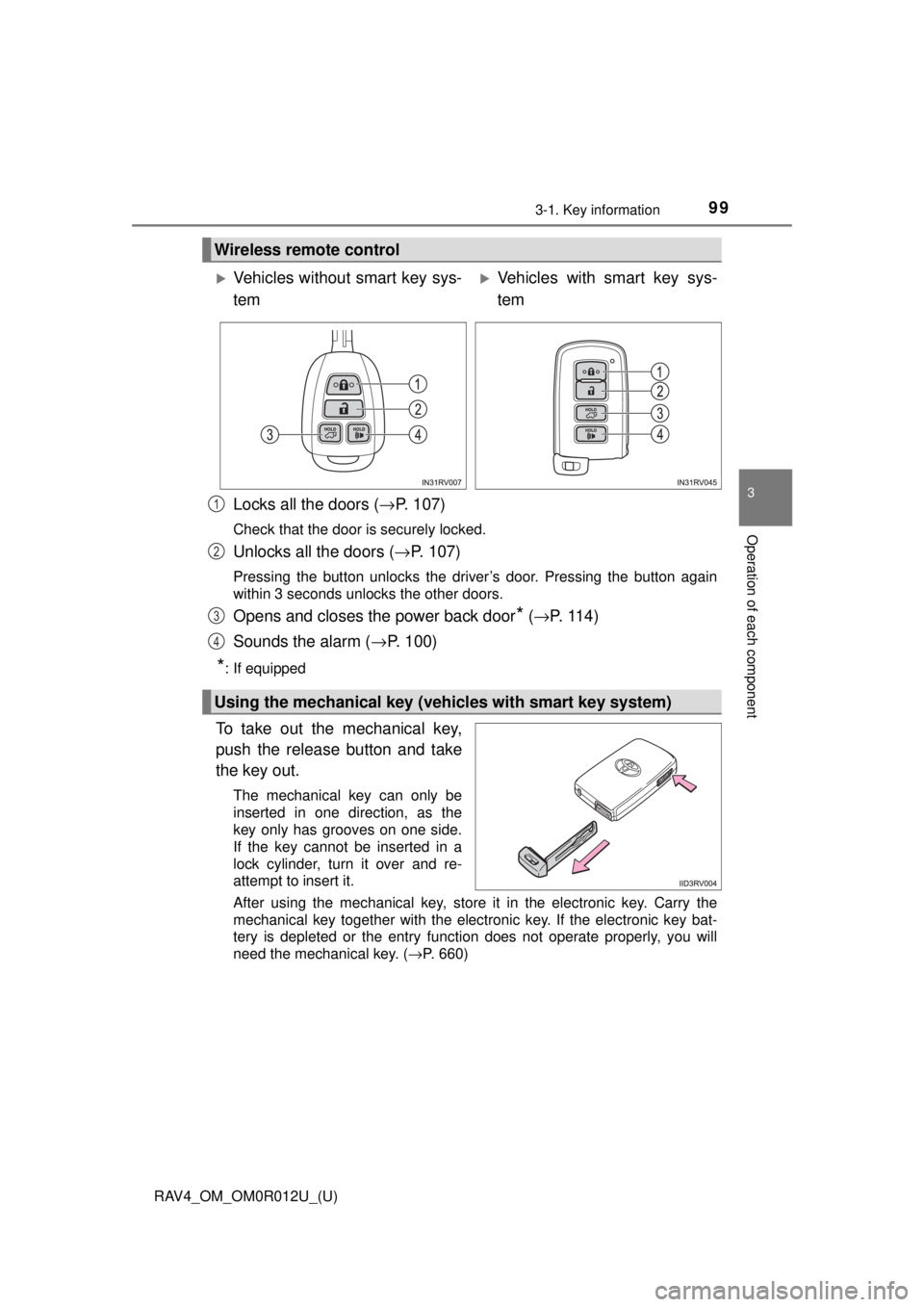
Locks all the doors (→P. 107)
Check that the door is securely locked.
Unlocks all the doors ( →P. 107)
Pressing the button unlocks the driver’s door. Pressing the button again
within 3 seconds unlocks the other doors.
Opens and closes the power back door* (→ P. 11 4 )
Sounds the alarm ( →P. 100)
*: If equipped
To take out the mechanical key,
push the release button and take
the key out.
The mechanical key can only be
inserted in one direction, as the
key only has grooves on one side.
If the key cannot be inserted in a
lock cylinder, turn it over and re-
attempt to insert it.
After using the mechanical key, store it in the electronic key. Carry the
mechanical key together with the electronic key. If the electronic key bat-
tery is depleted or the entry function does not operate properly, you will
need the mechanical key. ( →P. 660)
Wireless remote control
Vehicles without smart key sys-
temVehicles with smart key sys-
tem
Using the mechanical key (veh icles with smart key system)
1
2
3
4
Page 107 of 744
107
RAV4_OM_OM0R012U_(U)
3-2. Opening, closing and locking the doors
3
Operation of each component
Side doors
◆Smart key system (if equipped)
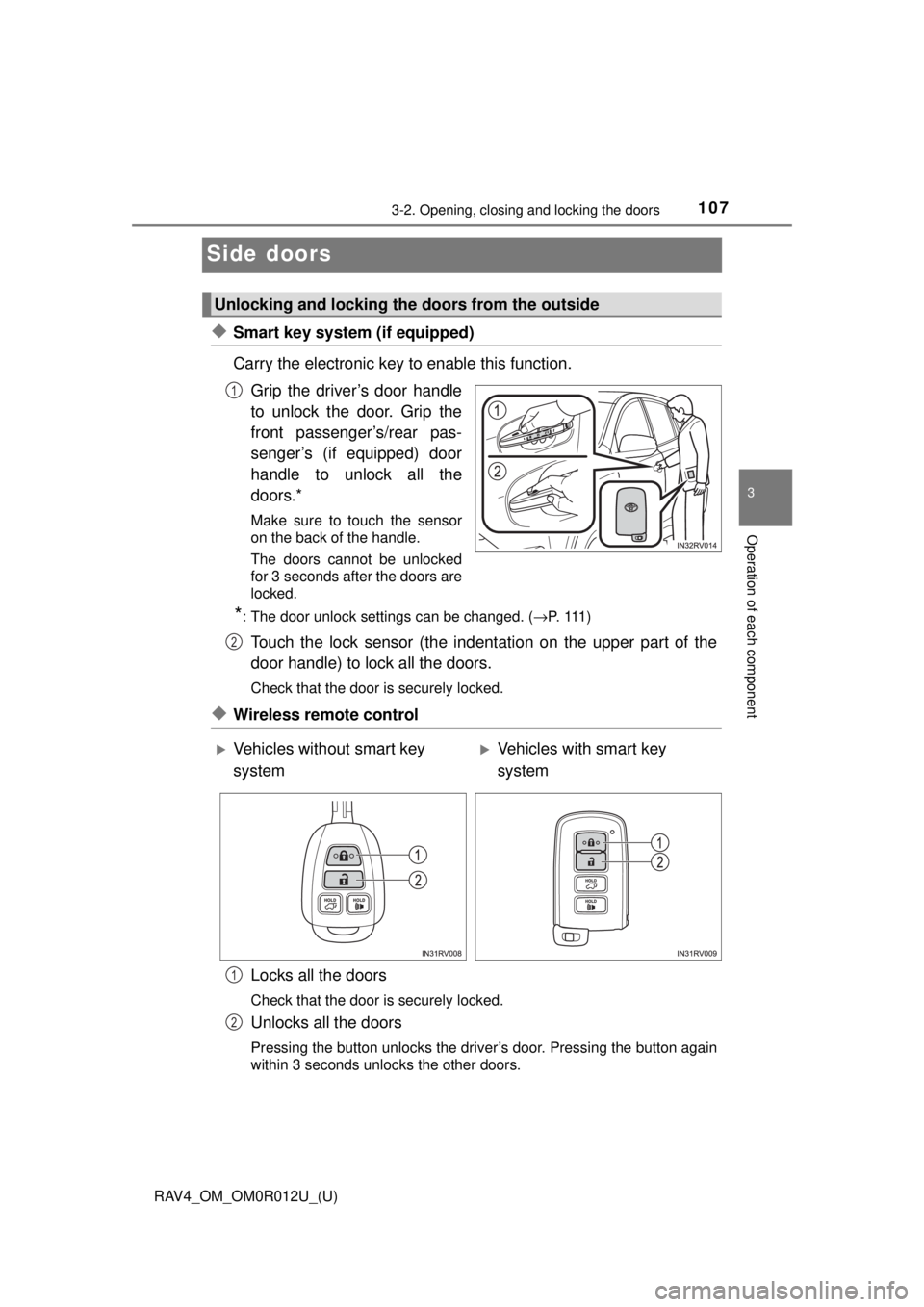
Carry the electronic key to enable this function.Grip the driver’s door handle
to unlock the door. Grip the
front passenger’s/rear pas-
senger’s (if equipped) door
handle to unlock all the
doors.*
Make sure to touch the sensor
on the back of the handle.
The doors cannot be unlocked
for 3 seconds after the doors are
locked.
*: The door unlock settings can be changed. ( →P. 111 )
Touch the lock sensor (the indentation on the upper part of the
door handle) to lock all the doors.
Check that the door is securely locked.
◆Wireless remote control
Locks all the doors
Check that the door is securely locked.
Unlocks all the doors
Pressing the button unlocks the driver’s door. Pressing the button again
within 3 seconds unlocks the other doors.
Unlocking and locking the doors from the outside
1
2
Vehicles without smart key
systemVehicles with smart key
system
1
2
Page 108 of 744
108
RAV4_OM_OM0R012U_(U)
3-2. Opening, closing and locking the doors
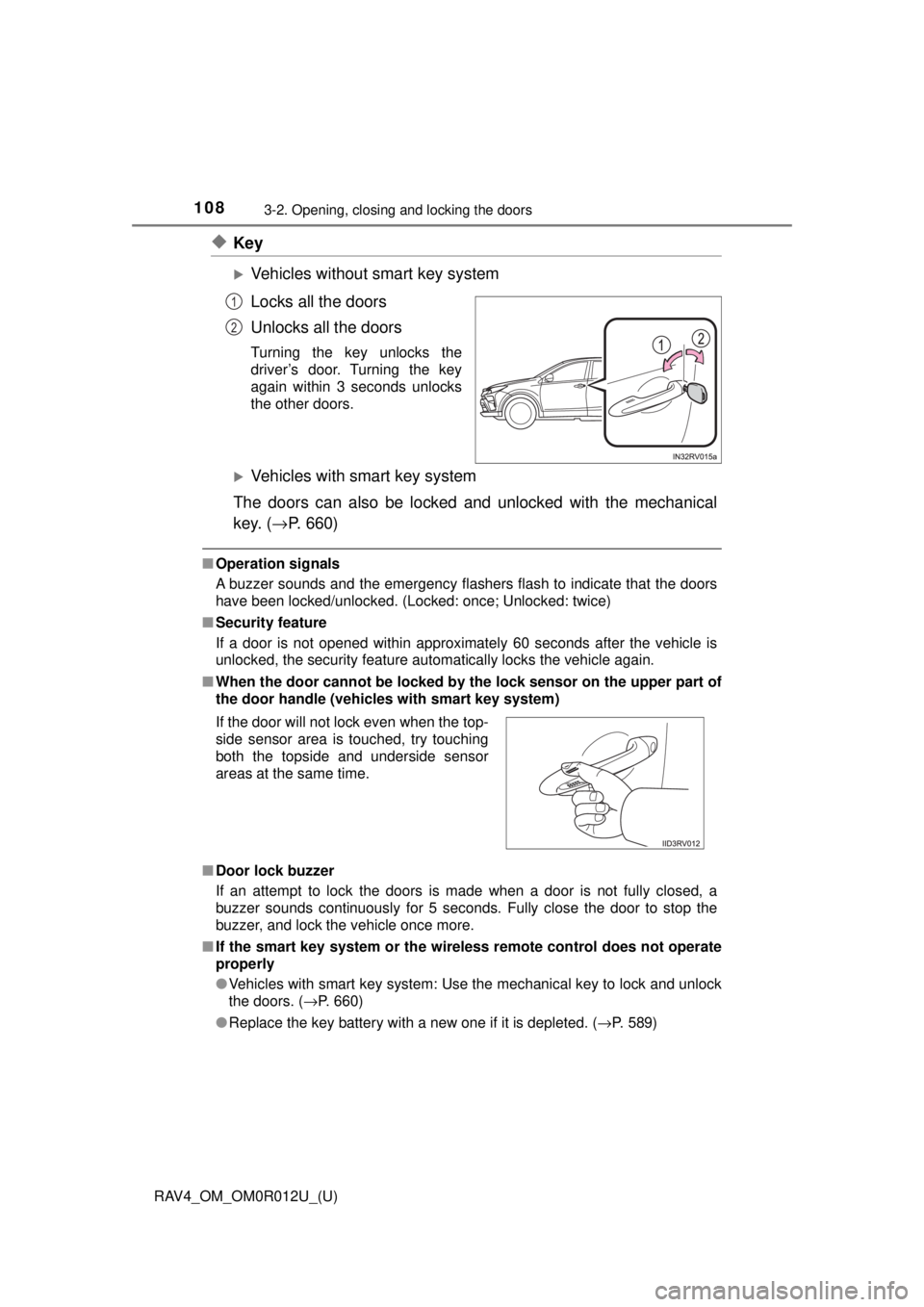
◆Key
Vehicles without smart key system
Locks all the doors
Unlocks all the doors
Turning the key unlocks the
driver’s door. Turning the key
again within 3 seconds unlocks
the other doors.
Vehicles with smart key system
The doors can also be locked and unlocked with the mechanical
key. ( →P. 660)
■Operation signals
A buzzer sounds and the emergency flashers flash to indicate that the doors
have been locked/unlocked. (Locked: once; Unlocked: twice)
■ Security feature
If a door is not opened within approximately 60 seconds after the vehicle is
unlocked, the security feature automatically locks the vehicle again.
■ When the door ca nnot be locked by the lock sen sor on the upper part of
the door handle (vehicles with smart key system)
■ Door lock buzzer
If an attempt to lock the doors is made when a door is not fully closed, a
buzzer sounds continuously for 5 seconds. Fully close the door to stop the
buzzer, and lock the vehicle once more.
■ If the smart key system or the wireless remote control does not operate
properly
●Vehicles with smart key system: Use the mechanical key to lock and unlock
the doors. (→P. 660)
● Replace the key battery with a new one if it is depleted. ( →P. 589)
1
2
If the door will not lock even when the top-
side sensor area is touched, try touching
both the topside and underside sensor
areas at the same time.
Page 113 of 744
113
RAV4_OM_OM0R012U_(U)
3-2. Opening, closing and locking the doors
3
Operation of each component
Back door
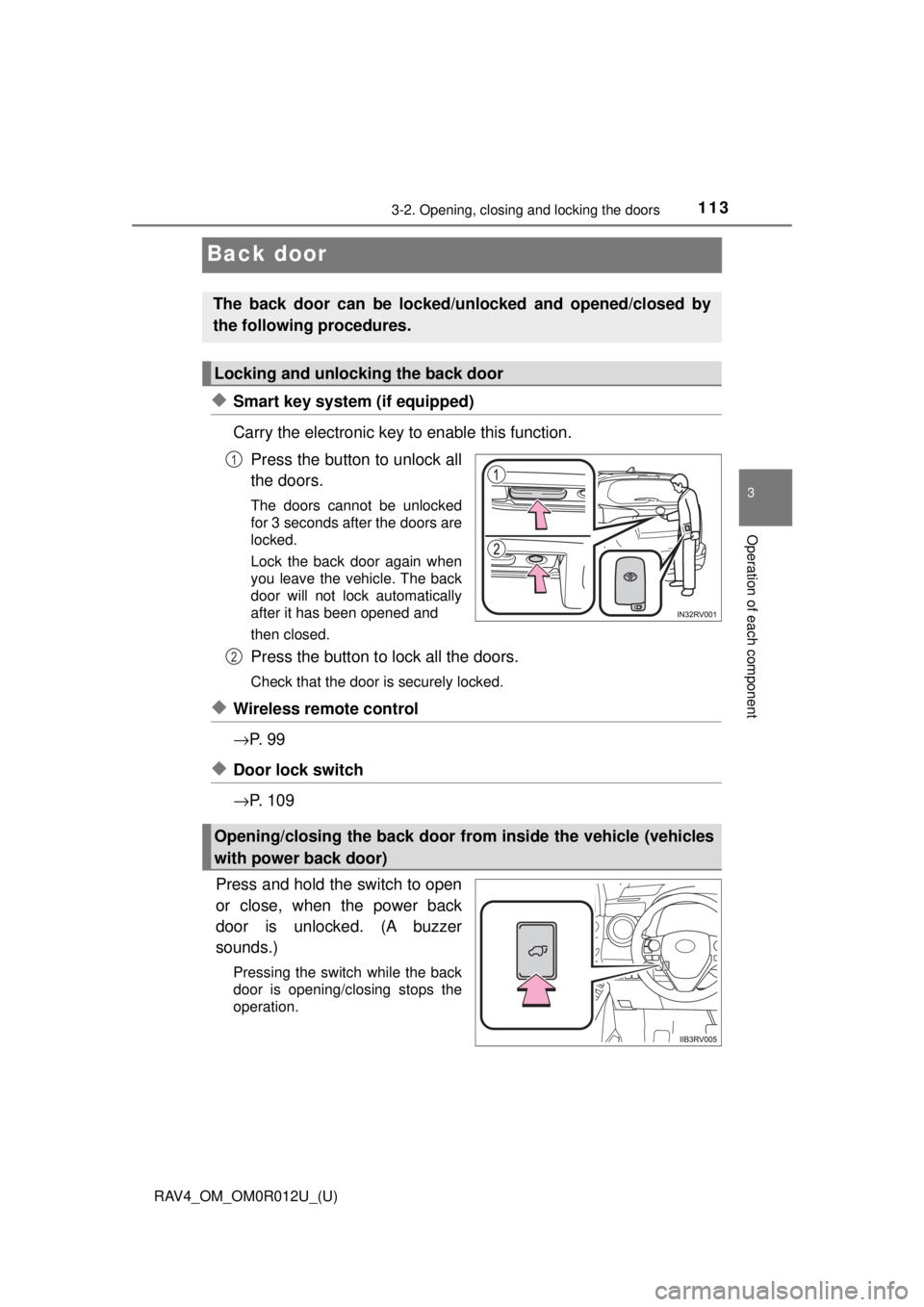
◆Smart key system (if equipped)
Carry the electronic key to enable this function.Press the button to unlock all
the doors.
The doors cannot be unlocked
for 3 seconds after the doors are
locked.
Lock the back door again when
you leave the vehicle. The back
door will not lock automatically
after it has been opened and
then closed.
Press the button to lock all the doors.
Check that the door is securely locked.
◆Wireless remote control
→P. 9 9
◆Door lock switch
→P. 1 0 9
Press and hold the switch to open
or close, when the power back
door is unlocked. (A buzzer
sounds.)
Pressing the switch while the back
door is opening/closing stops the
operation.
The back door can be locked/unl ocked and opened/closed by
the following procedures.
Locking and unlocking the back door
1
Opening/closing the back door from inside the vehicle (vehicles
with power back door)
2