garage door opener TOYOTA RAV4 2018 Owners Manual (in English)
[x] Cancel search | Manufacturer: TOYOTA, Model Year: 2018, Model line: RAV4, Model: TOYOTA RAV4 2018Pages: 744, PDF Size: 13.78 MB
Page 6 of 744
TABLE OF CONTENTS6
RAV4_OM_OM0R012U_(U)6-4. Using the other interior
features
Other interior features ....... 523 • Sun visors .................... 523
• Vanity mirrors ............... 523
• Power outlets ................ 524
• Armrest ......................... 526
• Coat hooks.................... 526
• Assist grips .................. 527
Garage door opener .......... 528
Compass ........................... 535
7-1. Maintenance and care Cleaning and protecting the vehicle exterior .......... 540
Cleaning and protecting the vehicle interior ........... 543
7-2. Maintenance Maintenance requirements ................... 546
General maintenance ........ 549
Emission inspection and maintenance (I/M)
programs ......................... 552 7-3. Do-it-yourself maintenance
Do-it-yourself service precautions ...................... 553
Hood .................................. 555
Positioning a floor jack....... 557
Engine compartment ......... 558
Tires................................... 569
Tire inflation pressure ........ 581
Wheels............................... 584
Air conditioning filter .......... 587
Wireless remote control/electronic
key battery ....................... 589
Checking and replacing fuses ................................ 592
Light bulbs ......................... 595
8-1. Essential information Emergency flashers ........... 608
If your vehicle has to be stopped in an
emergency....................... 609
7Maintenance and care
8When trouble arises
Page 22 of 744
22Pictorial index
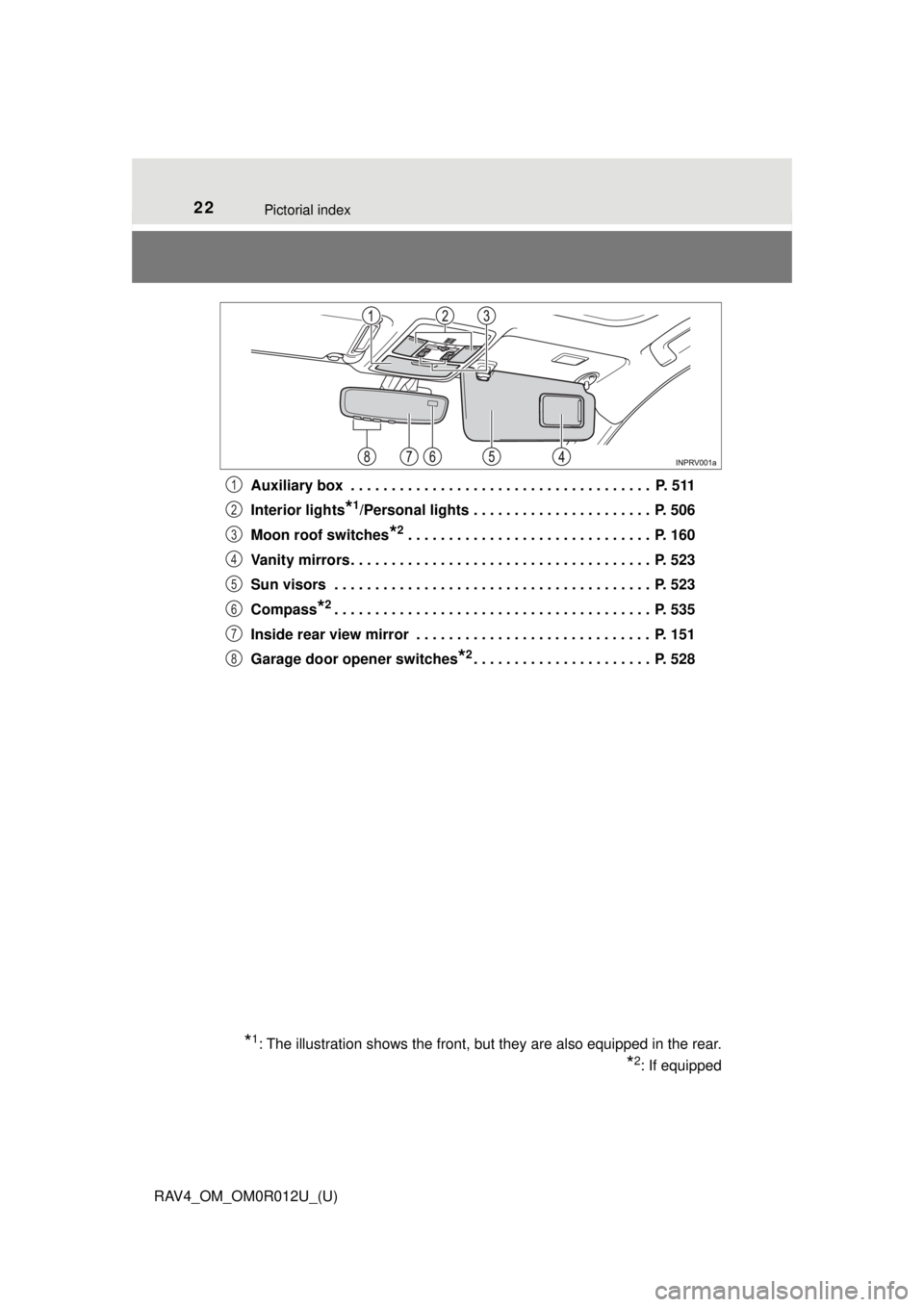
RAV4_OM_OM0R012U_(U)Auxiliary box . . . . . . . . . . . . . . . . . . . . . . . . . . . . . . . . . . . . . P. 511
Interior lights
*1/Personal lights . . . . . . . . . . . . . . . . . . . . . . P. 506
Moon roof switches
*2 . . . . . . . . . . . . . . . . . . . . . . . . . . . . . . P. 160
Vanity mirrors . . . . . . . . . . . . . . . . . . . . . . . . . . . . . . . . . . . . . P. 523
Sun visors . . . . . . . . . . . . . . . . . . . . . . . . . . . . . . . . . . . . . . . P. 523
Compass
*2. . . . . . . . . . . . . . . . . . . . . . . . . . . . . . . . . . . . . . . P. 535
Inside rear view mirror . . . . . . . . . . . . . . . . . . . . . . . . . . . . . P. 151
Garage door opener switches
*2. . . . . . . . . . . . . . . . . . . . . . P. 528
*1: The illustration shows the front, but they are also equipped in the rear.
*2: If equipped
1
2
3
4
5
6
7
8
Page 487 of 744
487
RAV4_OM_OM0R012U_(U)
6Interior features
6-1. Using the air conditioning system and defogger
Manual air conditioning system ............................ 488
Automatic air conditioning system ... 494
Heated steering wheel/ seat heaters .................... 503
6-2. Using the interior lights Interior lights list ................ 505• Interior lights ................. 506
• Personal lights .............. 506
6-3. Using the storage features List of storage features ..... 508• Glove box...................... 509
• Console box .................. 509
• Cup holders .................. 510
• Bottle holders ................ 511
• Auxiliary box ................. 511
Luggage compartment features ........................... 512
6-4. Using the other interior features
Other interior features ....... 523 • Sun visors .................... 523
• Vanity mirrors ............... 523
• Power outlets ................ 524
• Armrest ......................... 526
• Coat hooks.................... 526
• Assist grips .................. 527
Garage door opener.......... 528
Compass ........................... 535
Page 528 of 744
528
RAV4_OM_OM0R012U_(U)
6-4. Using the other interior features
Garage door opener∗
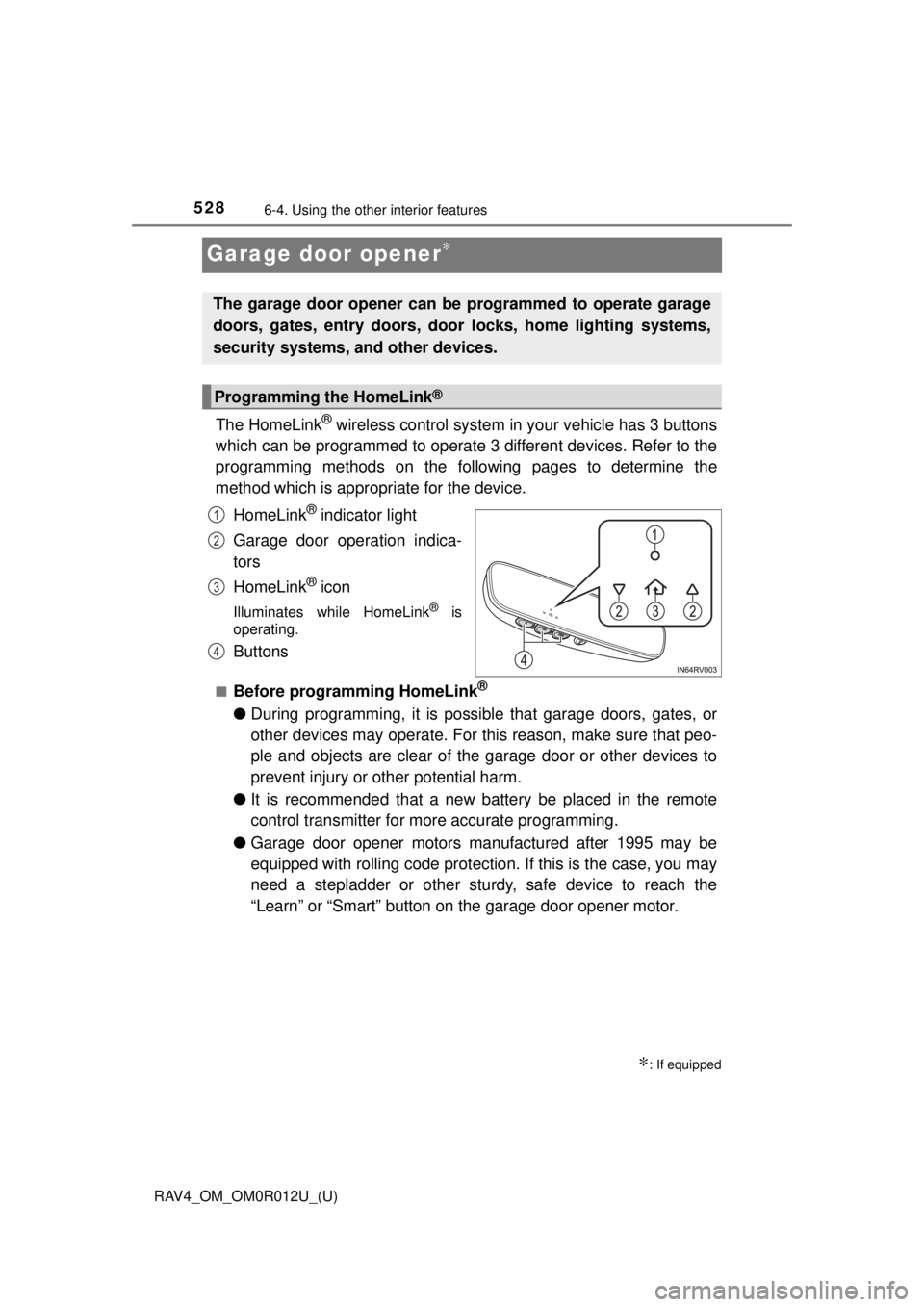
The HomeLink® wireless control system in your vehicle has 3 buttons
which can be programmed to operate 3 different devices. Refer to the
programming methods on the foll owing pages to determine the
method which is appr opriate for the device.
HomeLink
® indicator light
Garage door operation indica-
tors
HomeLink
® icon
Illuminates while HomeLink® is
operating.
Buttons
■Before programming HomeLink®
● During programming, it is possible that garage doors, gates, or
other devices may operate. For this reason, make sure that peo-
ple and objects are clear of the garage door or other devices to
prevent injury or other potential harm.
● It is recommended that a new battery be placed in the remote
control transmitter for more accurate programming.
● Garage door opener motors manufactured after 1995 may be
equipped with rolling code protection. If this is the case, you may
need a stepladder or other sturdy, safe device to reach the
“Learn” or “Smart” button on the garage door opener motor.
∗: If equipped
The garage door opener can be programmed to operate garage
doors, gates, entry doors, door locks, home lighting systems,
security systems, and other devices.
Programming the HomeLink®
1
2
3
4
Page 530 of 744
530
RAV4_OM_OM0R012U_(U)
6-4. Using the other interior features
Test the HomeLink® operation by pressing the newly pro-
grammed button and observing the indicator light:
● Indicator light illuminates: Program ming of a fixed code device
has completed. The garage door or other device should oper-
ate when a HomeLink
® button is pressed and released.
● Indicator light flashes rapidly: The garage door opener motor
or other device is equipped with a rolling code. To complete
programming, firmly press and hold the HomeLink
® button for
2 seconds then release it.
● If the garage door or other device does not operate, proceed
to “Programming a rolling code system”.
Repeat the steps above to program another device for any of the
remaining HomeLink
® buttons.
■Programming a rolling code system
2 or more people may be necessary to complete rolling code pro-
gramming.
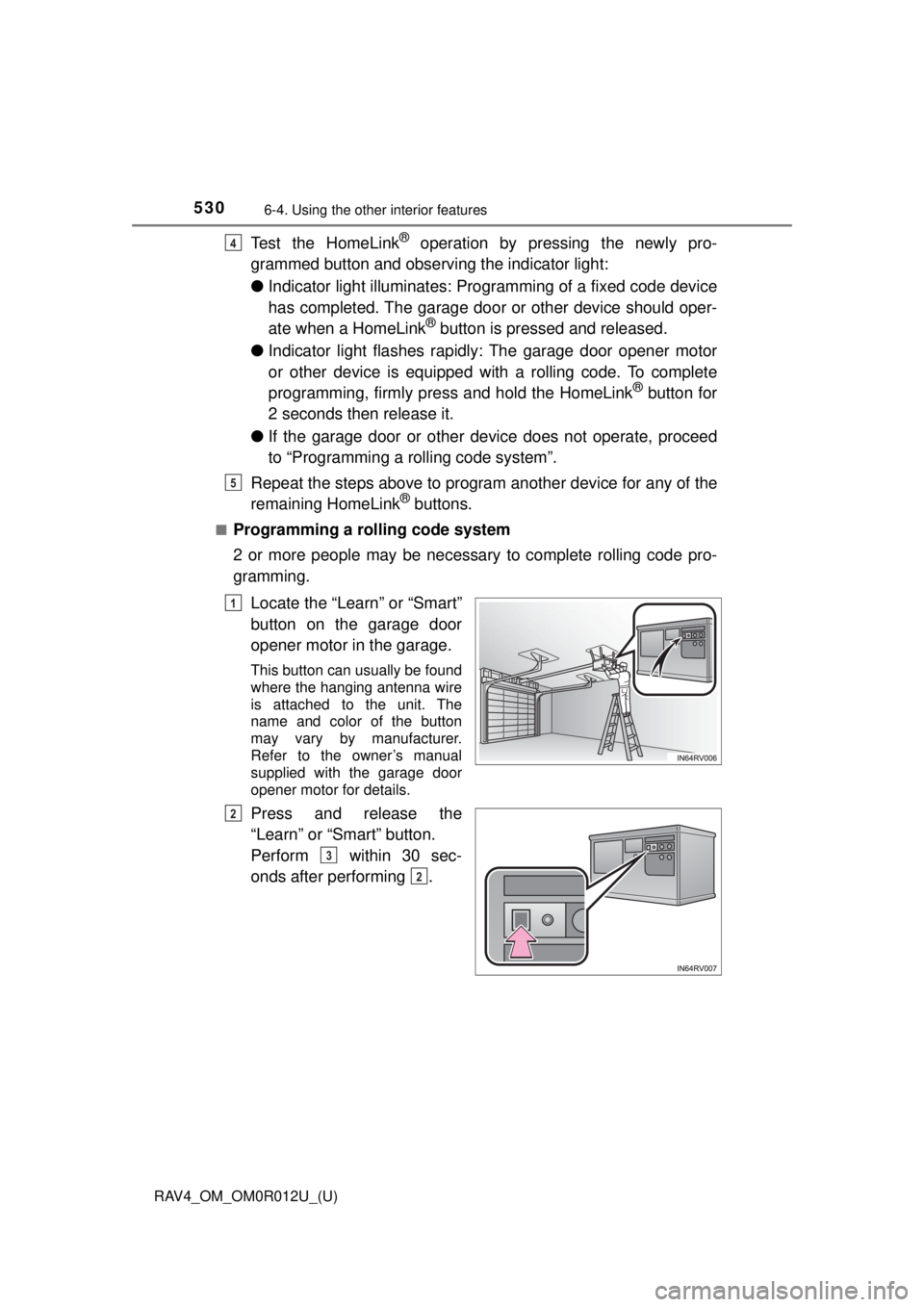
Locate the “Learn” or “Smart”
button on the garage door
opener motor in the garage.
This button can usually be found
where the hanging antenna wire
is attached to the unit. The
name and color of the button
may vary by manufacturer.
Refer to the owner’s manual
supplied with the garage door
opener motor for details.
Press and release the
“Learn” or “Smart” button.
Perform within 30 sec-
onds after performing .
4
5
1
2
3
2
Page 531 of 744
RAV4_OM_OM0R012U_(U)
5316-4. Using the other interior features
6
Interior features
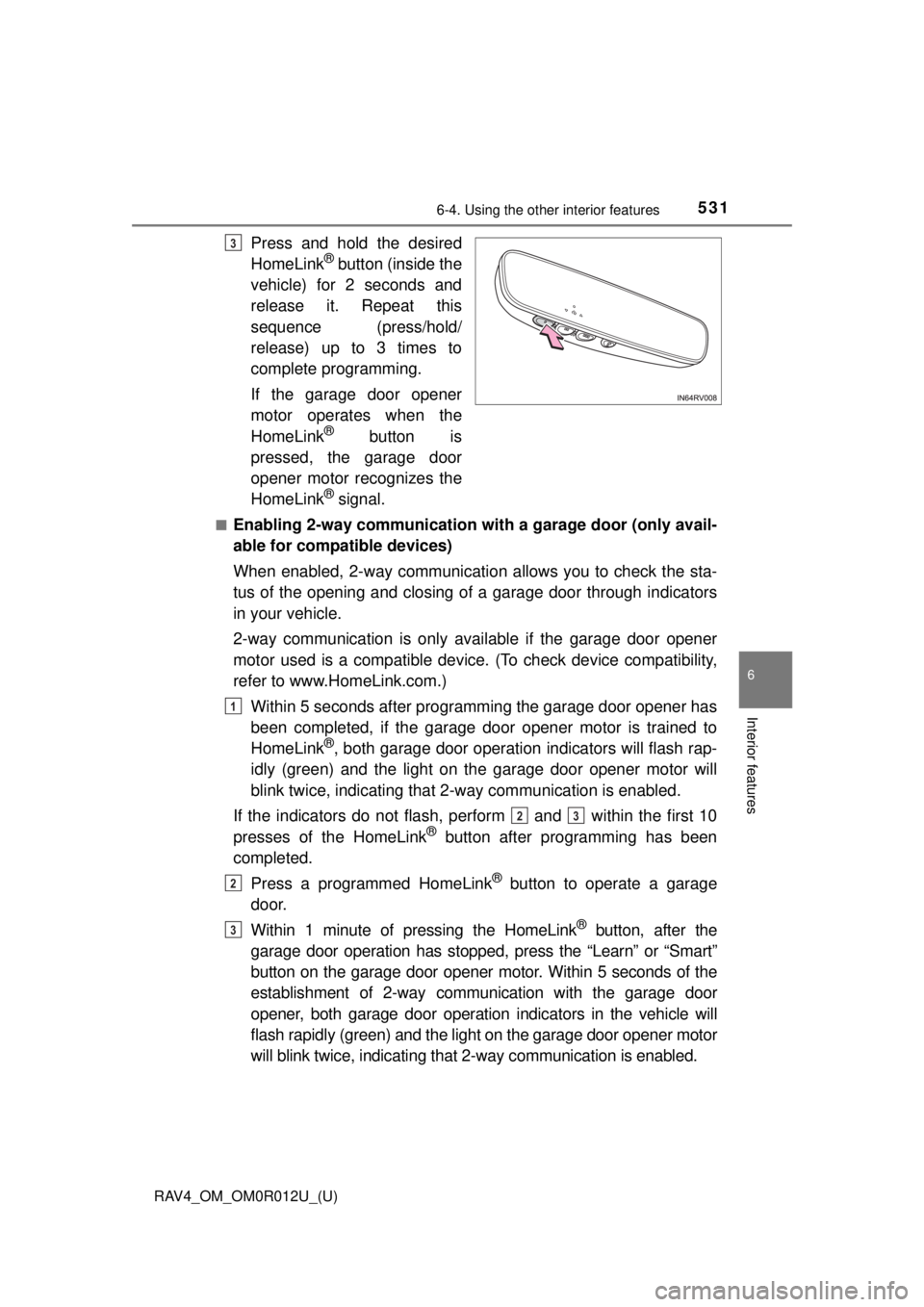
Press and hold the desired
HomeLink® button (inside the
vehicle) for 2 seconds and
release it. Repeat this
sequence (press/hold/
release) up to 3 times to
complete programming.
If the garage door opener
motor operates when the
HomeLink
® button is
pressed, the garage door
opener motor recognizes the
HomeLink
® signal.
■Enabling 2-way communication with a garage door (only avail-
able for compatible devices)
When enabled, 2-way communication allows you to check the sta-
tus of the opening and closing of a garage door through indicators
in your vehicle.
2-way communication is only available if the garage door opener
motor used is a compatible device. (To check device compatibility,
refer to www.HomeLink.com.)
Within 5 seconds after programming the garage door opener has
been completed, if the garage door opener motor is trained to
HomeLink
®, both garage door operation indicators will flash rap-
idly (green) and the light on the garage door opener motor will
blink twice, indicating that 2-way communication is enabled.
If the indicators do not flash, perform
and within the first 10
presses of the HomeLink® button after programming has been
completed.
Press a programmed HomeLink
® button to operate a garage
door.
Within 1 minute of pressing the HomeLink
® button, after the
garage door operation has stopped, press the “Learn” or “Smart”
button on the garage door opener motor. Within 5 seconds of the
establishment of 2-way communication with the garage door
opener, both garage door operation indicators in the vehicle will
flash rapidly (green) and the light on the garage door opener motor
will blink twice, indicating that 2-way communication is enabled.
3
1
23
2
3
Page 532 of 744
532
RAV4_OM_OM0R012U_(U)
6-4. Using the other interior features
■Reprogramming a single HomeLink® button
When the following procedure is pe rformed, buttons which already
have devices registered to them can be overwritten:
With one hand, press and hold the desired HomeLink
® button.
When the HomeLink
® indicator starts flashing (orange), continue
to hold the HomeLink® button and perform “Programming Home-
Link®” (it takes 20 seconds for the HomeLink® indicator to
start flashing).
Press the appropriate HomeLink
® button. The HomeLink® indicator
light should turn on.
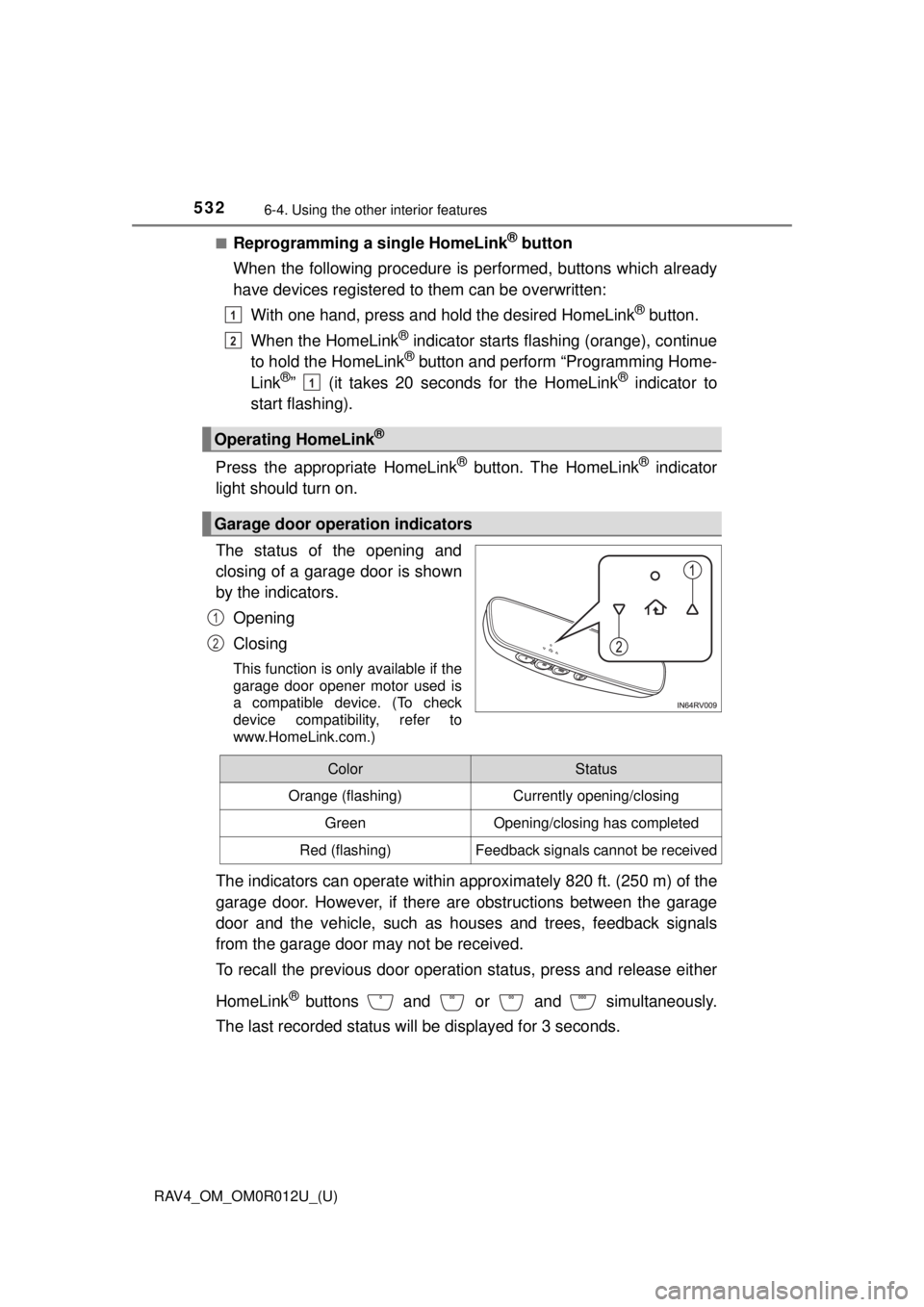
The status of the opening and
closing of a garage door is shown
by the indicators.
Opening
Closing
This function is only available if the
garage door opener motor used is
a compatible device. (To check
device compatibility, refer to
www.HomeLink.com.)
The indicators can operate within appro ximately 820 ft. (250 m) of the
garage door. However, if there are obstructions between the garage
door and the vehicle, such as houses and trees, feedback signals
from the garage door may not be received.
To recall the previous door operation status, press and release either
HomeLink
® buttons and or and simultaneously.
The last recorded status w ill be displayed for 3 seconds.
Operating HomeLink®
Garage door operation indicators
1
2
1
1
2
ColorStatus
Orange (flashing)Currently opening/closing
GreenOpening/closing has completed
Red (flashing)Feedback signals cannot be received
Page 533 of 744
RAV4_OM_OM0R012U_(U)
5336-4. Using the other interior features
6
Interior features
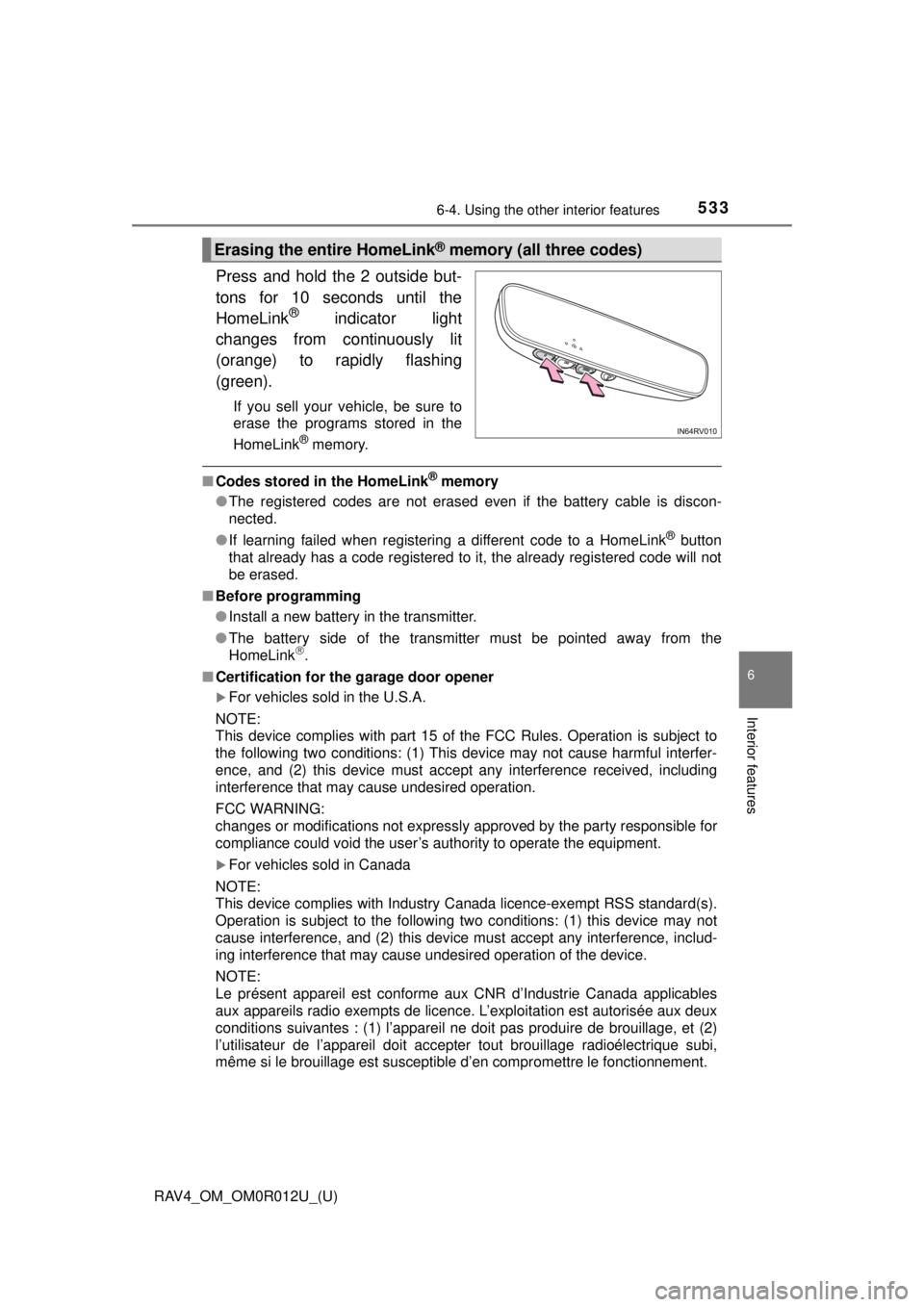
Press and hold the 2 outside but-
tons for 10 seconds until the
HomeLink
® indicator light
changes from continuously lit
(orange) to rapidly flashing
(green).
If you sell your vehicle, be sure to
erase the programs stored in the
HomeLink
® memory.
■ Codes stored in the HomeLink® memory
● The registered codes are not erased even if the battery cable is discon-
nected.
● If learning failed when registering a different code to a HomeLink
® button
that already has a code registered to it, the already registered code will not
be erased.
■ Before programming
●Install a new battery in the transmitter.
● The battery side of the transmitter must be pointed away from the
HomeLink
.
■ Certification for the garage door opener
For vehicles sold in the U.S.A.
NOTE:
This device complies with part 15 of the FCC Rules. Operation is subject to
the following two conditions: (1) This device may not cause harmful interfer-
ence, and (2) this device must accept any interference received, including
interference that may cause undesired operation.
FCC WARNING:
changes or modifications not expressly approved by the party responsible for
compliance could void the user’s authority to operate the equipment.
For vehicles sold in Canada
NOTE:
This device complies with Industry Canada licence-exempt RSS standard(s).
Operation is subject to the following two conditions: (1) this device may not
cause interference, and (2) this device must accept any interference, includ-
ing interference that may cause undesired operation of the device.
NOTE:
Le présent appareil est conforme aux CNR d’Industrie Canada applic\
ables
aux appareils radio exempts de licenc e. L’exploitation est autorisée aux deux
conditions suivantes : (1) l’appareil ne doit pas produire de brouillage, et (2)
l’utilisateur de l’appareil doit accepter tout brouillage radioélectrique subi,
même si le brouillage est susceptible d’en compromettre le fonctionnement.
Erasing the entire HomeLink® memory (all three codes)
Page 534 of 744
534
RAV4_OM_OM0R012U_(U)
6-4. Using the other interior features
■When support is necessary
Visit on the web at www.homelink.com/toyota
or call 1-800-355-3515.
WARNING
■When programming a garage door or other remote control device
The garage door or other device may operate, so ensure people and
objects are out of danger to prevent potential harm.
■ Conforming to federal safety standards
Do not use the HomeLink
® compatible transceiver with any garage door
opener or device that lacks safety stop and reverse features as required by
federal safety standards.
This includes any garage door that cannot detect an interfering object. A
door or device without these features increases the risk of death or ser\
ious
injury.
■ When operating or programming HomeLink
®
Never allow a child to operate or play with the HomeLink® buttons.
Page 733 of 744
733Alphabetical index
RAV4_OM_OM0R012U_(U)
Front seats ............................... 139Adjustment ............................ 139
Cleaning................................ 543
Correct driving posture ........... 26
Driving position memory ....... 144
Head restraints ..................... 146
Seat heaters ......................... 503
Seat position memory ........... 144
Front side marker lights.......... 215 Light switch ........................... 215
Replacing light bulbs............. 598
Wattage ................................ 680
Front turn signal lights ........... 213 Replacing light bulbs............. 597
Turn signal lever ................... 213
Wattage ................................ 680
Fuel ........................................... 674
Capacity ................................ 674
Fuel gauge .............................. 84
Fuel pump shut off system ......... ....................... 618
Information ............................ 681
Refueling............................... 232
Type ...................................... 674
Warning light/ message ..................... 620, 638
Fuel consumption
information .............................. 94
Fuel filler door.......................... 232 Refueling............................... 232
Fuel pump shut off system ..... 618
Fuses ........................................ 592
Garage door opener ................ 528
Gauges ....................................... 84
Glove box ................................. 509
Grocery bag hooks .................. 512 Hands-free system
(for cellular phone) ....... 383, 445
HD Radio
® system*
Head restraints ........................ 146
Headlights ................................ 215 Automatic High Beam ........... 220
Light switch ........................... 215
Replacing light bulbs ............ 596
Wattage ................................ 680
Heated steering wheel ............ 503
Heaters Automatic air conditioning system .......... ...................... 494
Heated steering wheel .......... 504
Manual air conditioning
system .......... ...................... 488
Outside rear view
mirrors ........................ 490, 497
Seat heaters ......................... 504
High mounted stoplight
Replacing.............................. 605
Hill-start assist control ........... 310
Hood ......................................... 555
Hooks Cargo hooks ......................... 512
Coat hooks ........................... 526
Grocery bag hooks ............... 512
Retaining hooks (floor mat) ............................. 24
Horn .......................................... 149
G
H
*: Refer to “NAVIGATION AND MULT IMEDIA SYSTEM OWNER’S MANUAL”.