pairing phone TOYOTA RAV4 2018 Owners Manual (in English)
[x] Cancel search | Manufacturer: TOYOTA, Model Year: 2018, Model line: RAV4, Model: TOYOTA RAV4 2018Pages: 744, PDF Size: 13.78 MB
Page 366 of 744
366
RAV4_OM_OM0R012U_(U)
5-6. Using Bluetooth® devices
*: Bluetooth is a registered trademark of Bluetooth SIG, Inc.
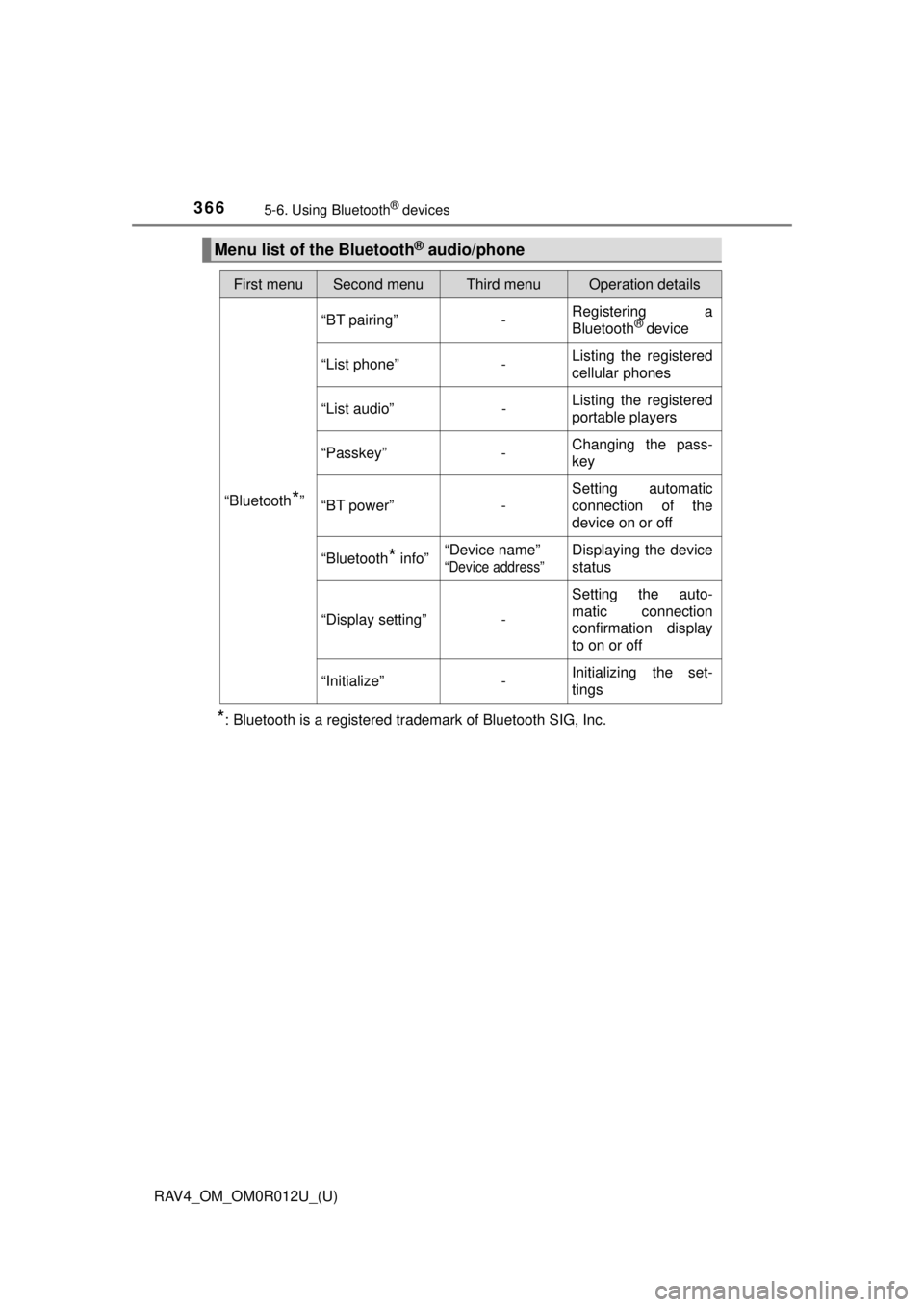
Menu list of the Bluetooth® audio/phone
First menuSecond menuThird menuOperation details
“Bluetooth*”
“BT pairing”-Registering a
Bluetooth® device
“List phone”
-Listing the registered
cellular phones
“List audio”
-Listing the registered
portable players
“Passkey”
-Changing the pass-
key
“BT power”
-Setting automatic
connection of the
device on or off
“Bluetooth
* info” “Device name” “Device address”
Displaying the device
status
“Display setting” - Setting the auto-
matic connection
confirmation display
to on or off
“Initialize” - Initializing the set-
tings
Page 369 of 744
369
RAV4_OM_OM0R012U_(U)
5-6. Using Bluetooth® devices
5
Audio system
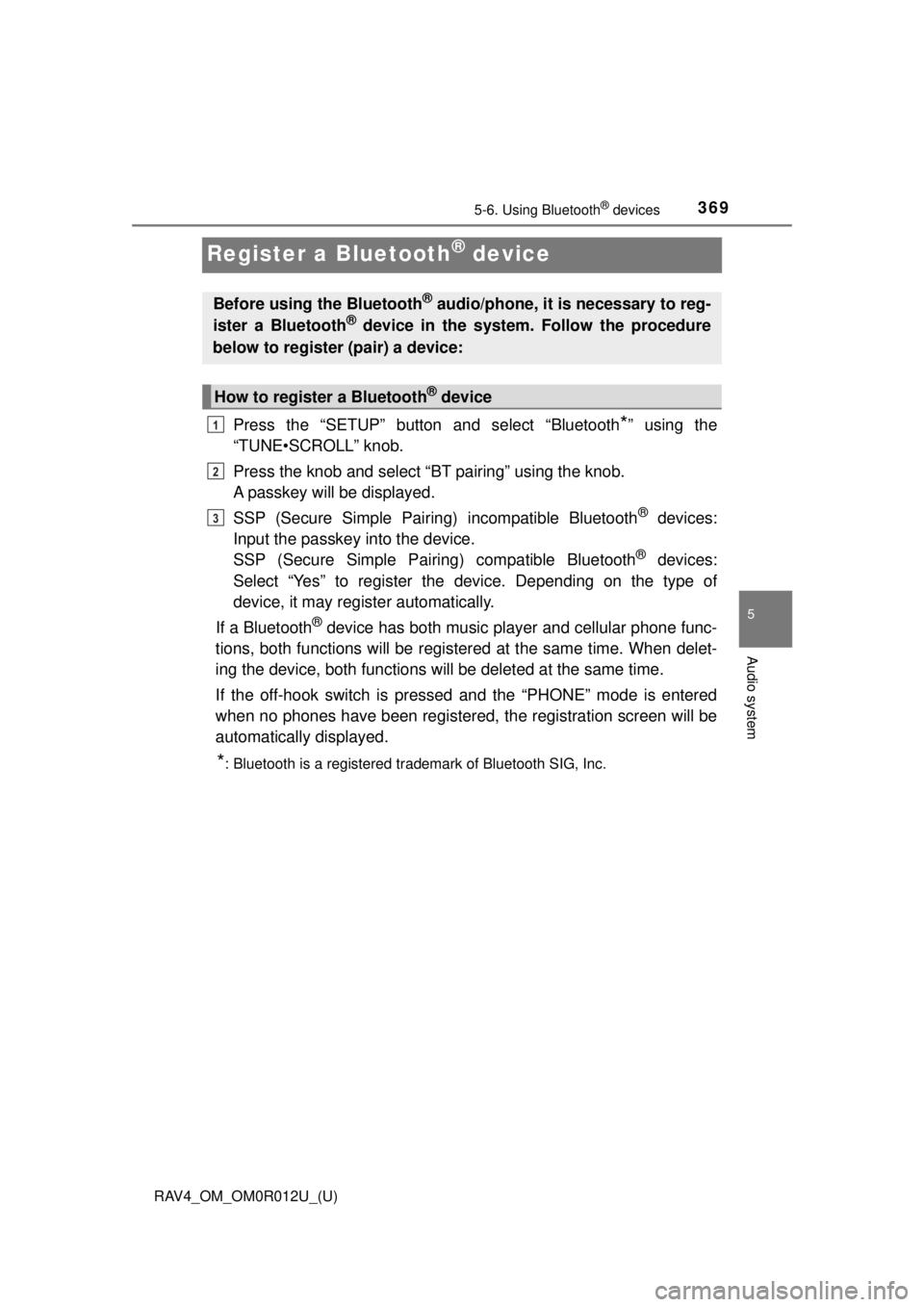
Register a Bluetooth® device
Press the “SETUP” button and select “Bluetooth*” using the
“TUNE•SCROLL” knob.
Press the knob and select “BT pairing” using the knob.
A passkey will be displayed.
SSP (Secure Simple Pairing) incompatible Bluetooth
® devices:
Input the passkey into the device.
SSP (Secure Simple Pairin g) compatible Bluetooth
® devices:
Select “Yes” to register the device. Depending on the type of
device, it may register automatically.
If a Bluetooth
® device has both music player and cellular phone func-
tions, both functions will be register ed at the same time. When delet-
ing the device, both functions will be deleted at the same time.
If the off-hook switch is presse d and the “PHONE” mode is entered
when no phones have been registered, the registration screen will be
automatically displayed.
*: Bluetooth is a registered trademark of Bluetooth SIG, Inc.
Before using the Bluetooth® audio/phone, it is necessary to reg-
ister a Bluetooth® device in the system. Follow the procedure
below to register (pair) a device:
How to register a Bluetooth® device
1
2
3
Page 370 of 744
370
RAV4_OM_OM0R012U_(U)
5-7. “SETUP” menu
Using the “SETUP” menu (“Bluetooth*”
menu)
∗
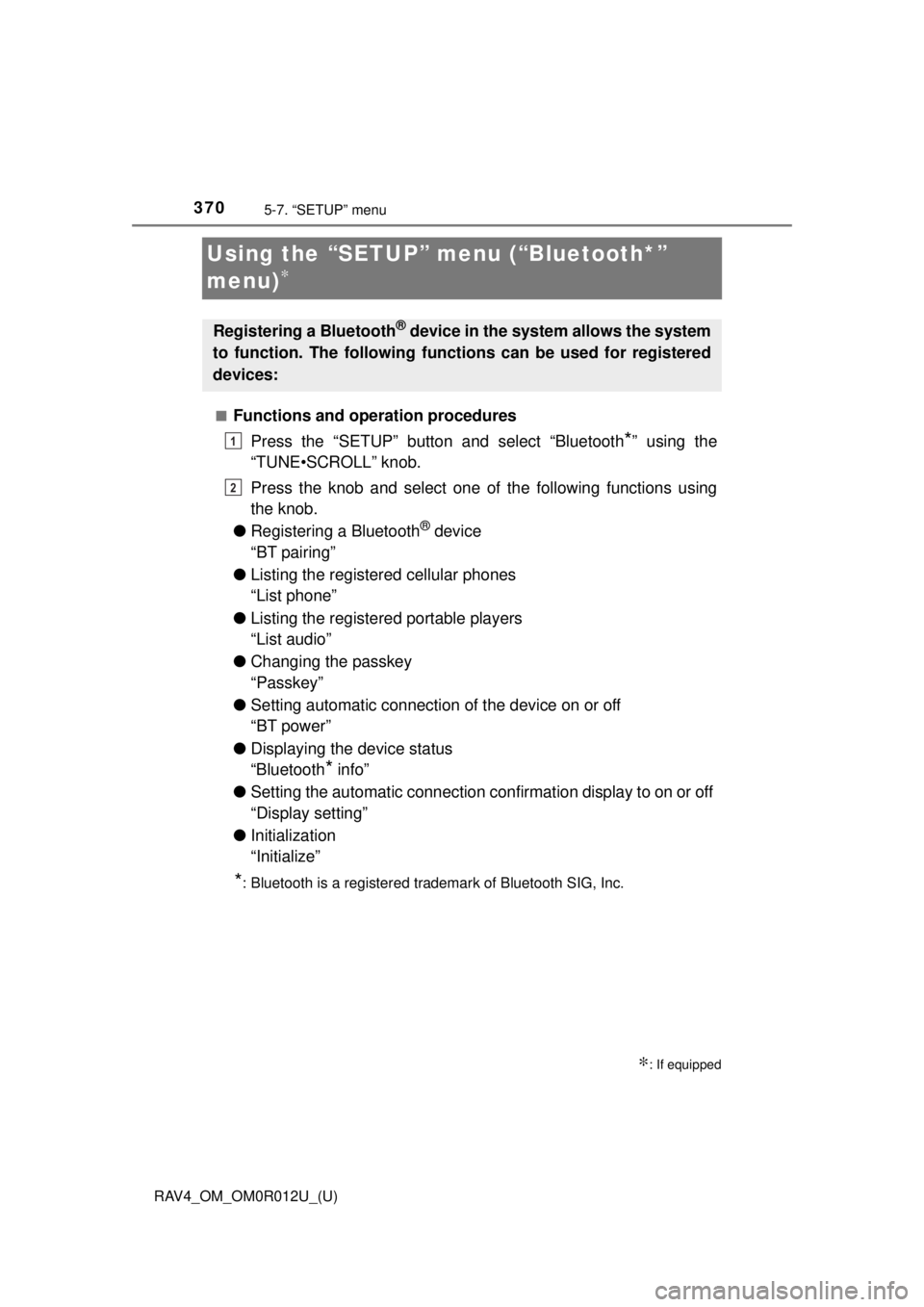
■Functions and operation proceduresPress the “SETUP” button and select “Bluetooth
*” using the
“TUNE•SCROLL” knob.
Press the knob and select one of the following functions using
the knob.
● Registering a Bluetooth
® device
“BT pairing”
● Listing the registered cellular phones
“List phone”
● Listing the registered portable players
“List audio”
● Changing the passkey
“Passkey”
● Setting automatic connection of the device on or off
“BT power”
● Displaying the device status
“Bluetooth
* info”
● Setting the automatic connection confirmation display to on or off
“Display setting”
● Initialization
“Initialize”
*: Bluetooth is a registered trademark of Bluetooth SIG, Inc.
∗: If equipped
Registering a Bluetooth® device in the system allows the system
to function. The following functi ons can be used for registered
devices:
1
2
Page 371 of 744
RAV4_OM_OM0R012U_(U)
3715-7. “SETUP” menu
5
Audio system
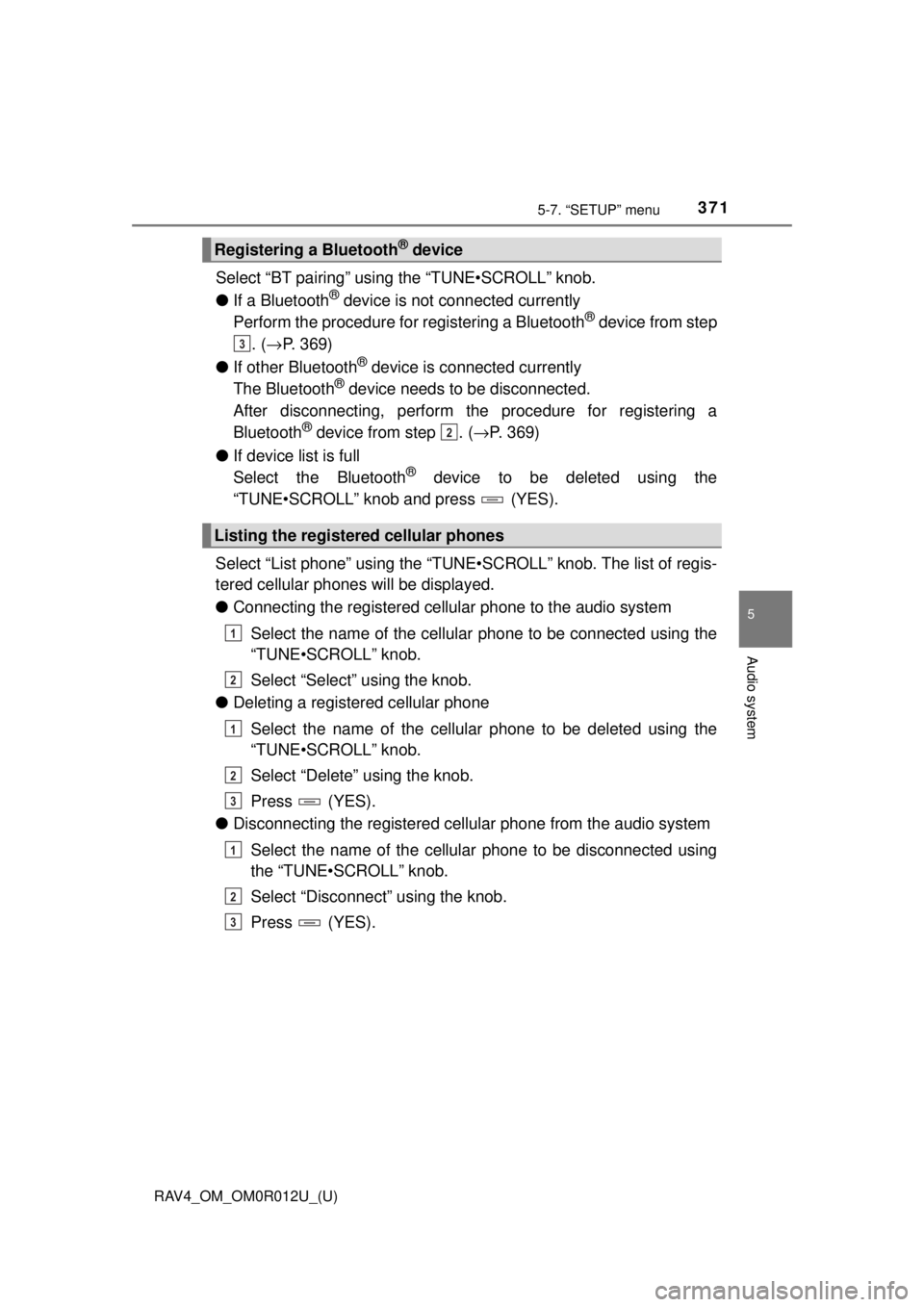
Select “BT pairing” using the “TUNE•SCROLL” knob.
●If a Bluetooth
® device is not connected currently
Perform the procedure for registering a Bluetooth® device from step
. ( → P. 369)
● If other Bluetooth
® device is connected currently
The Bluetooth® device needs to be disconnected.
After disconnecting, perform t he procedure for registering a
Bluetooth
® device from step . ( →P. 369)
● If device list is full
Select the Bluetooth
® device to be deleted using the
“TUNE•SCROLL” knob and press (YES).
Select “List phone” using the “TUNE•SCROLL” knob. The list of regis-
tered cellular phones will be displayed.
● Connecting the registered cellular phone to the audio system
Select the name of the cellular phone to be connected using the
“TUNE•SCROLL” knob.
Select “Select” using the knob.
● Deleting a registered cellular phone
Select the name of the cellular phone to be deleted using the
“TUNE•SCROLL” knob.
Select “Delete” using the knob.
Press (YES).
● Disconnecting the registered cellular phone from the audio system
Select the name of the cellular phone to be disconnected using
the “TUNE•SCROLL” knob.
Select “Disconnect” using the knob.
Press (YES).
Registering a Bluetooth® device
Listing the registered cellular phones
3
2
1
2
1
2
3
1
2
3
Page 436 of 744
436
RAV4_OM_OM0R012U_(U)
5-18. Connecting Bluetooth®
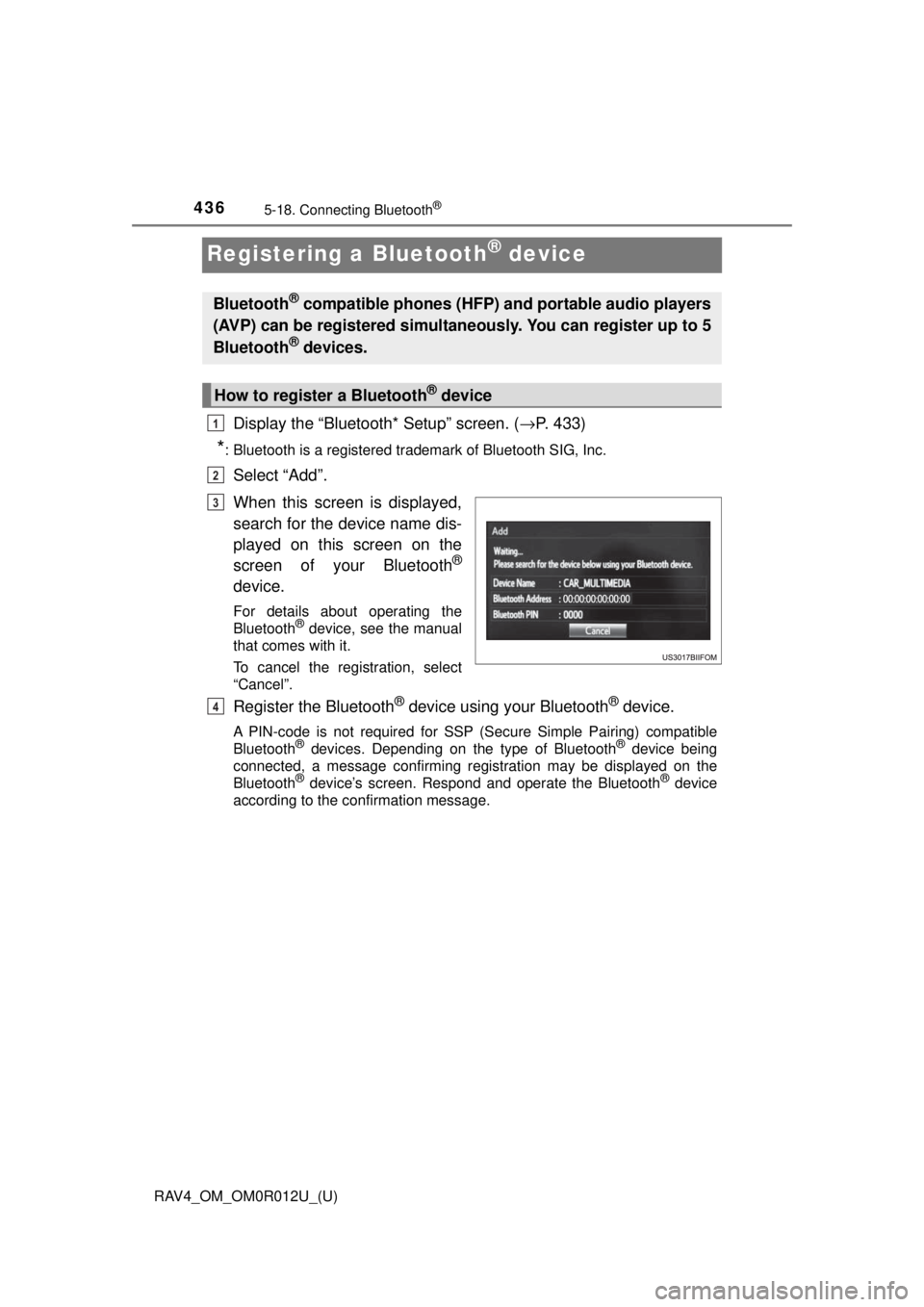
Registering a Bluetooth® device
Display the “Bluetooth* Setup” screen. (→P. 433)
*: Bluetooth is a registered trademark of Bluetooth SIG, Inc.
Select “Add”.
When this screen is displayed,
search for the device name dis-
played on this screen on the
screen of your Bluetooth
®
device.
For details about operating the
Bluetooth® device, see the manual
that comes with it.
To cancel the registration, select
“Cancel”.
Register the Bluetooth® device using your Bluetooth® device.
A PIN-code is not required for SSP (Secure Simple Pairing) compatible
Bluetooth® devices. Depending on the type of Bluetooth® device being
connected, a message confirming registration may be displayed on the
Bluetooth
® device’s screen. Respond and operate the Bluetooth® device
according to the confirmation message.
Bluetooth® compatible phones (HFP) and portable audio players
(AVP) can be registered simultaneously. You can register up to 5
Bluetooth
® devices.
How to register a Bluetooth® device
1
2
3
4