phone TOYOTA RAV4 2018 Owners Manual (in English)
[x] Cancel search | Manufacturer: TOYOTA, Model Year: 2018, Model line: RAV4, Model: TOYOTA RAV4 2018Pages: 744, PDF Size: 13.78 MB
Page 4 of 744

TABLE OF CONTENTS4
RAV4_OM_OM0R012U_(U)5-1. Basic Operations
Audio system types ........... 328
Using the steering wheel audio switches ................ 331
AUX port/USB port ............ 334
5-2. Using the audio system Optimal use of the audio system ................... 336
5-3. Using the radio Radio operation ................. 338
5-4. Playing an audio CD and MP3/WMA discs
CD player operation .......... 340
5-5. Using an external device Listening to an iPod........... 350
Listening to USB memory device................ 356
Using the AUX port ........... 362
5-6. Using Bluetooth
® devices
Bluetooth® audio/
phone .............................. 363
Using the steering wheel switches ................ 368
Register a Bluetooth
®
device.............................. 369
5-7. “SETUP” menu Using the “SETUP” menu (“Bluetooth
*” menu) ........ 370
Using the “SETUP” menu (“PHONE” menu) ............ 375
5-8. Bluetooth
® Audio
Operating a Bluetooth®
enabled portable
player .............................. 380 5-9. Bluetooth
® Phone
Making a phone call........... 383
When receiving a phone call ........................ 385
Speaking on the phone...... 386
5-10. Bluetooth
®
Bluetooth®......................... 388
5-11. Using the audio system (Entune Audio)
Audio system (Entune Audio) ................ 392
5-12. Basic Operations Audio system operations (Entune Audio) ................ 394
Steering wheel audio switches........................... 396
AUX port/USB port ............ 397
Basic audio operations ...... 398
5-13. Setup Setup menu ....................... 400
General settings ................ 401
Audio settings .................... 403
Display settings ................. 404
Voice settings .................... 406
5-14. Using the audio system Selecting the audio source.............................. 407
List screen operation ......... 408
Optimal use of the audio system ............................. 410
5-15. Using the radio Radio operation ................. 411
5-16. Playing an audio CD and MP3/WMA/AAC discs
CD player operation........... 413
CD player and disc information....................... 414
5Audio system
*: Bluetooth is a registered trademark of Bluetooth SIG, Inc.
Page 5 of 744
5
RAV4_OM_OM0R012U_(U)
1
9 8
7
6 4 3
2
10
5
5-17. Using an external deviceiPod player operation ........ 420
USB memory device player operation .............. 425
Using the AUX port ........... 430
5-18. Connecting Bluetooth
®
Preparations to use wireless
communication ................ 431
Registering a Bluetooth
®
audio player for the
first time .......................... 434
Registering a Bluetooth
®
phone for the
first time .......................... 435
Registering a Bluetooth
®
device.............................. 436
Connecting a Bluetooth
®
device.............................. 438
Displaying a Bluetooth
®
device details .................. 440
Detailed Bluetooth
®
settings............................ 441
5-19. Bluetooth
® Audio
Listening to Bluetooth®
Audio ............................... 443
5-20. Bluetooth
® Phone
Using a Bluetooth®
Phone.............................. 445
Making a call ..................... 447
Receiving a call ................. 450
Speaking on the phone ..... 451
Bluetooth
® phone
message function ............ 454
Using the steering wheel switches ................ 459
Bluetooth
® phone
settings............................ 460 5-21. Phonebook
Contact/Call History Settings ........................... 462
5-22. Bluetooth
®
What to do if... (Troubleshooting) ............ 472
Bluetooth
®......................... 476
5-23. Other function Voice command system ............................. 482
6-1. Using the air conditioning system and defogger
Manual air conditioning system ............................. 488
Automatic air conditioning system .... 494
Heated steering wheel/ seat heaters..................... 503
6-2. Using the interior lights Interior lights list................. 505• Interior lights.................. 506
• Personal lights............... 506
6-3. Using the storage features List of storage features ...... 508• Glove box ...................... 509
• Console box .................. 509
• Cup holders ................... 510
• Bottle holders ................ 511
• Auxiliary box .................. 511
Luggage compartment features ........................... 512
6Interior features
Page 11 of 744
RAV4_OM_OM0R012U_(U)
11
The SRS airbag and seat belt pretensioner devices in your Toyota contain
explosive chemicals. If the vehicle is scrapped with the airbags and seat belt
pretensioners left as they are, this may cause an accident such as fire. Be
sure to have the systems of the SRS airbag and seat belt pretensioner
removed and disposed of by a qualified service shop or by your Toyota dealer
before you scrap your vehicle.
Special handling may apply,
See www.dtsc.ca.gov/hazardouswaste/perchlorate.
Your vehicle has components that may contain perchlorate. These compo-
nents may include airbag, seat belt pretensioners, and wireless remote con-
trol batteries.
Scrapping of your Toyota
Perchlorate Material
WARNING
■General precautions while driving
Driving under the influence: Never drive your vehicle when under the influ-
ence of alcohol or drugs that have impaired your ability to operate your vehi-
cle. Alcohol and certain drugs delay reaction time, impair judgment and
reduce coordination, which could lead to an accident that could result in
death or serious injury.
Defensive driving: Always drive defensively. Anticipate mistakes that other
drivers or pedestrians might make and be ready to avoid accidents.
Driver distraction: Always give your full attention to driving. Anything that
distracts the driver, such as adjusting controls, talking on a cellular phone or
reading can result in a collision with resulting death or serious injury to you,
your occupants or others.
■ General precaution regard ing children’s safety
Never leave children unattended in the vehicle, and never allow children to
have or use the key.
Children may be able to start the vehicle or shift the vehicle into neut\
ral.
There is also a danger that children may injure themselves by playing with
the windows, the moon roof, or other features of the vehicle. In addition,
heat build-up or extremely cold temperatures inside the vehicle can be fatal
to children.
Page 19 of 744
19Pictorial index
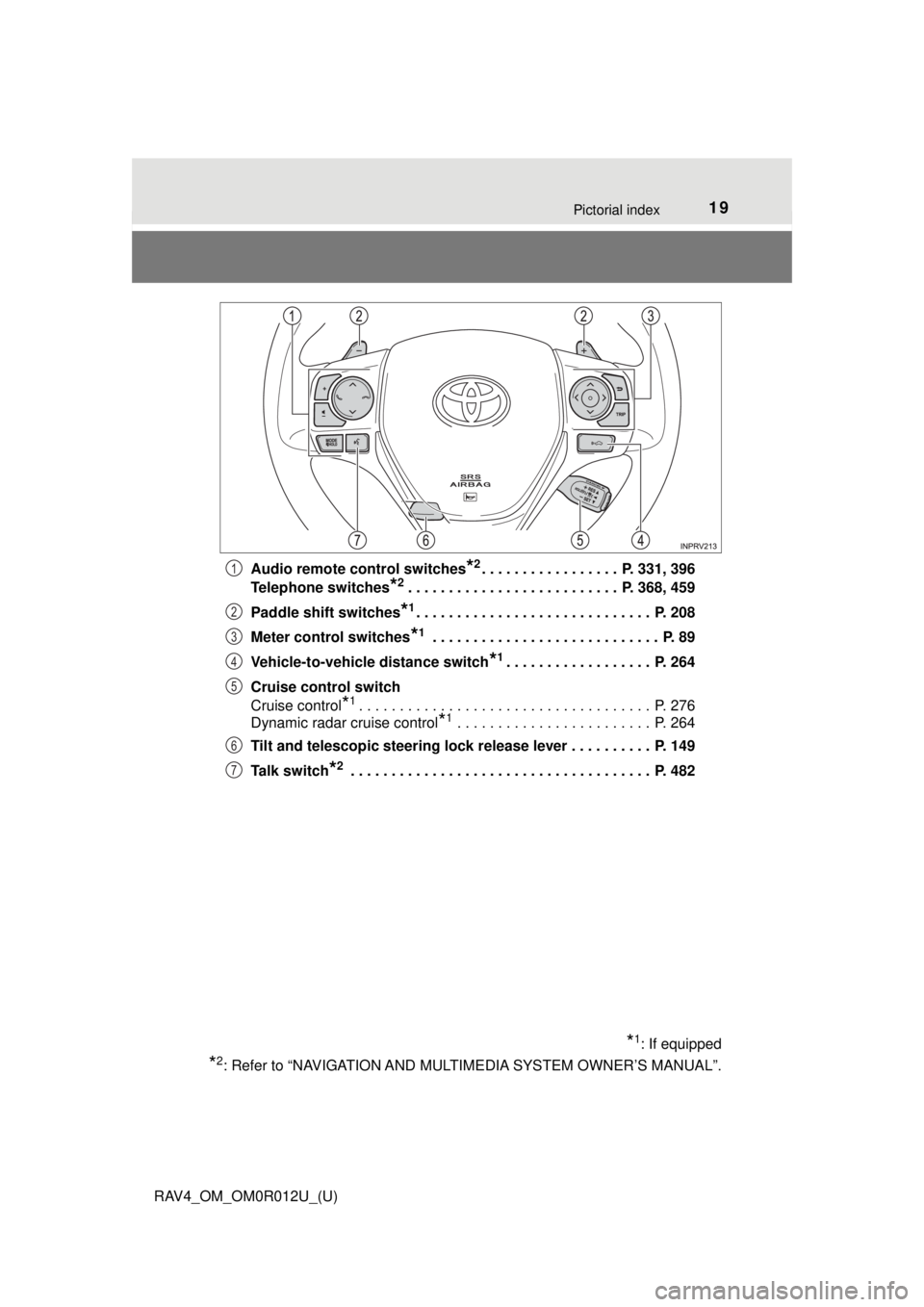
RAV4_OM_OM0R012U_(U)Audio remote control switches
*2. . . . . . . . . . . . . . . . . P. 331, 396
Telephone switches
*2. . . . . . . . . . . . . . . . . . . . . . . . . . P. 368, 459
Paddle shift switches
*1. . . . . . . . . . . . . . . . . . . . . . . . . . . . . P. 208
Meter control switches
*1 . . . . . . . . . . . . . . . . . . . . . . . . . . . . P. 89
Vehicle-to-vehicle distance switch
*1. . . . . . . . . . . . . . . . . . P. 264
Cruise control switch
Cruise control
*1. . . . . . . . . . . . . . . . . . . . . . . . . . . . . . . . . . . . P. 276
Dynamic radar cruise control
*1 . . . . . . . . . . . . . . . . . . . . . . . . P. 264
Tilt and telescopic steering lock release lever . . . . . . . . . . P. 149
Talk switch
*2 . . . . . . . . . . . . . . . . . . . . . . . . . . . . . . . . . . . . . P. 482
*1: If equipped
*2: Refer to “NAVIGATION AND MULT IMEDIA SYSTEM OWNER’S MANUAL”.
1
2
3
4
5
6
7
Page 101 of 744
RAV4_OM_OM0R012U_(U)
1013-1. Key information
3
Operation of each component
■Conditions affecting the operation
Vehicles without smart key system
The wireless remote control function may not operate normally in the follow-
ing situations.
● Near a TV tower, radio station, electric power plant, airport or other facility
that generates strong radio waves
● When carrying a portable radio, cellul ar phone or other wireless communi-
cation device
● When multiple wireless keys are in the vicinity
● When the wireless key has come into contact with, or is covered by a metal-
lic object
● When a wireless key (that emits radio waves) is being used nearby
● When the wireless key has been left near an electrical appliance such as a
personal computer
● If window tint with a metallic content or metallic objects are attached to the
rear window
Vehicles with smart key system
→P. 132
■ Key battery depletion
Vehicles without smart key system
If the wireless remote control function does not operate, the battery may be
depleted. Replace the battery when necessary. ( →P. 589)
Vehicles with smart key system
→P. 135
■ Replacing the battery
→P. 589
■ Confirmation of the registered key number
The number of keys already registered to the vehicle can be confirmed. Ask
your Toyota dealer for details.
■ If a wrong key is used (veh icles with smart key system)
The key cylinder rotates freely to isolate inside mechanism.
■ Customization
Settings (e.g. wireless remote control system) can be changed.
(Customizable features: →P. 702)
Page 132 of 744

132
RAV4_OM_OM0R012U_(U)
3-2. Opening, closing and locking the doors
■Conditions affecting operation
The smart key system uses weak radio waves. In the following situations, the
communication between the electronic key and the vehicle may be affected,
preventing the smart key system, wireless remote control and engine immobi-
lizer system from operating properly. (Ways of coping: →P. 660)
● When the electronic key battery is depleted
● Near a TV tower, electric power plant, gas station, radio station, large dis-
play, airport or other facility that generates strong radio waves or electrical
noise
● When carrying a portable radio, cellular phone, cordless phone or other
wireless communication device
● When the electronic key is in contact with, or is covered by the following
metallic objects
• Cards to which aluminum foil is attached
• Cigarette boxes that have aluminum foil inside
• Metallic wallets or bags
• Coins
• Hand warmers made of metal
• Media such as CDs and DVDs
● When other wireless keys (that emit radio waves) are being used nearby
● When carrying the electronic key together with the following devices that
emit radio waves
• Another vehicle’s electronic key or a wireless key that emits radio waves
• Personal computers or personal digital assistants (PDAs)
• Digital audio players
• Portable game systems
● If window tint with a metallic content or metallic objects are attached to the
rear window
● When the electronic key is placed near a battery charger or electronic
devices
Page 135 of 744
RAV4_OM_OM0R012U_(U)
1353-2. Opening, closing and locking the doors
3
Operation of each component
■Electronic key battery depletion
●The standard battery life is 1 to 2 years.
● If the battery becomes low, an alarm will sound in the cabin when the engine
stops. ( →P. 643)
● As the electronic key always receives radio waves, the battery will become
depleted even if the electronic key is not used. The following symptoms indi-
cate that the electronic key battery may be depleted. Replace the battery
when necessary. ( →P. 589)
• The smart key system or the wireless remote control does not operate.
• The detection area becomes smaller.
• The LED indicator on the key surface does not turn on.
● To avoid serious deterioration, do not leave the electronic key within 3 ft.
(1 m) of the following electrical appliances that produce a magnetic field:
•TVs
• Personal computers
• Cellular phones, cordless phones and battery chargers
• Recharging cellular phones or cordless phones
• Table lamps
• Induction cookers
■ Customization
Settings (e. g. smart key system) can be changed.
(Customizable features: →P. 702)
■ If the smart key system has been deactivated in a customized setting
●Locking and unlocking the doors:
Use the wireless remote control or mechanical key. ( →P. 99, 660)
● Starting the engine and changing engine switch modes: →P. 661
● Stopping the engine: →P. 201
Page 326 of 744

326
RAV4_OM_OM0R012U_(U)
5-1. Basic OperationsAudio system types ........... 328
Using the steering wheel audio switches ................ 331
AUX port/USB port ............ 334
5-2. Using the audio system Optimal use of the audio system ................... 336
5-3. Using the radio Radio operation ................. 338
5-4. Playing an audio CD and MP3/WMA discs
CD player operation .......... 340
5-5. Using an external device Listening to an iPod .......... 350
Listening to USB memory device................ 356
Using the AUX port ........... 362
5-6. Using Bluetooth
® devices
Bluetooth® audio/
phone .............................. 363
Using the steering wheel switches ................ 368
Register a Bluetooth
®
device.............................. 369
5-7. “SETUP” menu Using the “SETUP” menu (“Bluetooth
*” menu) ........ 370
Using the “SETUP” menu (“PHONE” menu) ............ 375 5-8. Bluetooth
® Audio
Operating a Bluetooth®
enabled portable
player .............................. 380
5-9. Bluetooth
® Phone
Making a phone call .......... 383
When receiving a phone call ....................... 385
Speaking on the phone ..... 386
5-10. Bluetooth
®
Bluetooth®......................... 388
5-11. Using the audio system (Entune Audio)
Audio system (Entune Audio) ................ 392
5-12. Basic Operations Audio system operations (Entune Audio) ................ 394
Steering wheel audio switches .......................... 396
AUX port/USB port ............ 397
Basic audio operations...... 398
5-13. Setup Setup menu....................... 400
General settings ................ 401
Audio settings ................... 403
Display settings ................. 404
Voice settings.................... 406
5-14. Using the audio system Selecting the audio source ............................. 407
List screen operation......... 408
Optimal use of the audio system ............................ 410
*: Bluetooth is a registered trademark of Bluetooth SIG, Inc.
5Audio system
Page 327 of 744

327
RAV4_OM_OM0R012U_(U)
5Audio system
5-15. Using the radioRadio operation ................. 411
5-16. Playing an audio CD and MP3/WMA/AAC discs
CD player operation .......... 413
CD player and disc information ...................... 414
5-17. Using an external device iPod player operation ........ 420
USB memory device player operation .............. 425
Using the AUX port ........... 430
5-18. Connecting Bluetooth
®
Preparations to use wireless
communication ................ 431
Registering a Bluetooth
®
audio player for the
first time .......................... 434
Registering a Bluetooth
®
phone for the
first time .......................... 435
Registering a Bluetooth
®
device.............................. 436
Connecting a Bluetooth
®
device.............................. 438
Displaying a Bluetooth
®
device details .................. 440
Detailed Bluetooth
®
settings............................ 441 5-19. Bluetooth
® Audio
Listening to Bluetooth®
Audio............................... 443
5-20. Bluetooth
® Phone
Using a Bluetooth®
Phone ............................. 445
Making a call ..................... 447
Receiving a call ................. 450
Speaking on the phone ..... 451
Bluetooth
® phone
message function ............ 454
Using the steering wheel switches ................ 459
Bluetooth
® phone
settings ........................... 460
5-21. Phonebook Contact/Call History Settings ........................... 462
5-22. Bluetooth
®
What to do if... (Troubleshooting) ............ 472
Bluetooth
®......................... 476
5-23. Other function Voice command system ............................ 482
Page 329 of 744
RAV4_OM_OM0R012U_(U)
3295-1. Basic Operations
5
Audio system
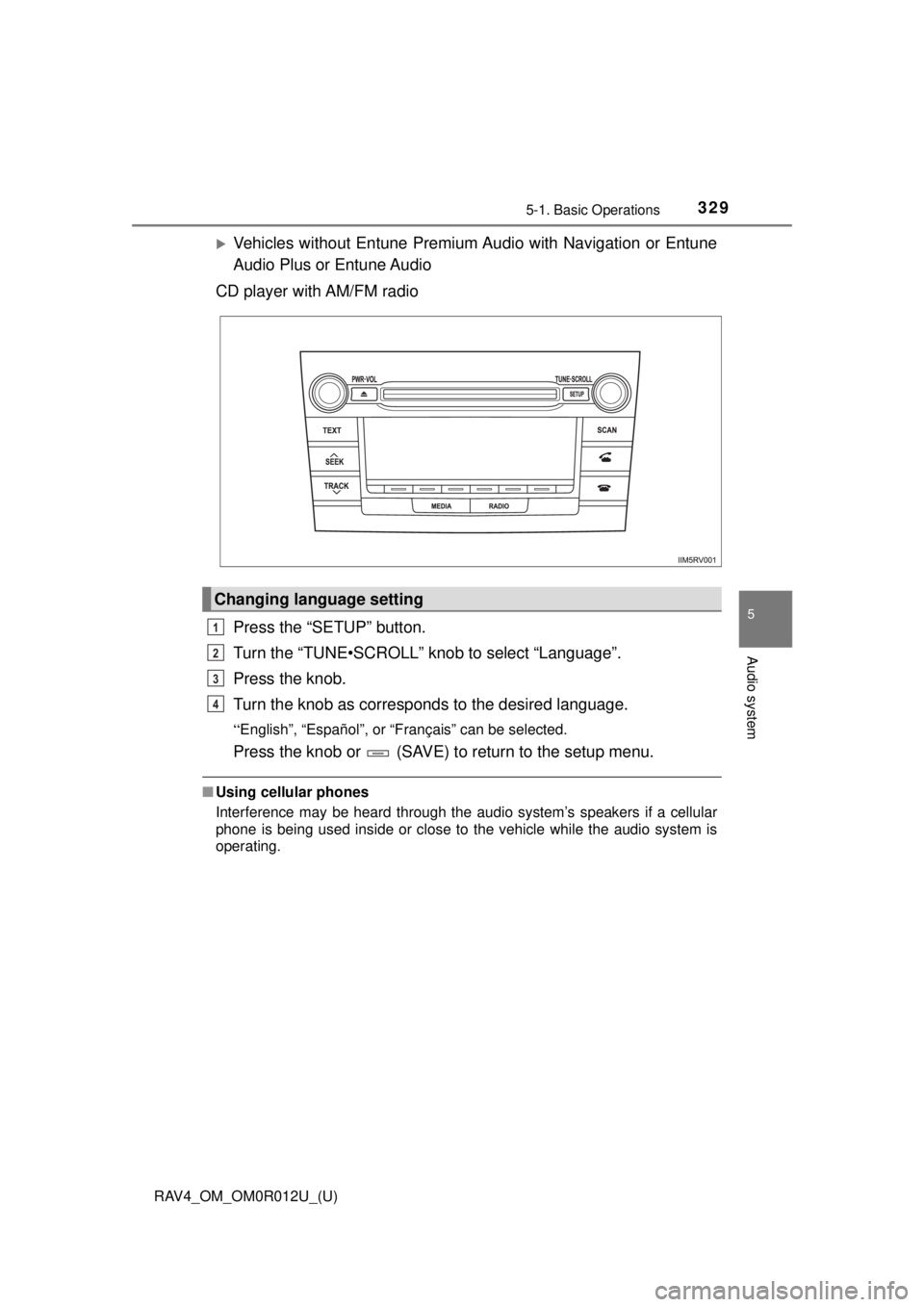
Vehicles without Entune Premium Audio with Navigation or Entune
Audio Plus or Entune Audio
CD player with AM/FM radio
Press the “SETUP” button.
Turn the “TUNE•SCROLL” knob to select “Language”.
Press the knob.
Turn the knob as corresponds to the desired language.
“English”, “Español”, or “Français” can be selected.
Press the knob or (SAVE) to return to the setup menu.
■Using cellular phones
Interference may be heard through the audio system’s speakers if a cellular
phone is being used inside or close to the vehicle while the audio system is
operating.
Changing language setting
1
2
3
4