air conditioning TOYOTA RAV4 2022 User Guide
[x] Cancel search | Manufacturer: TOYOTA, Model Year: 2022, Model line: RAV4, Model: TOYOTA RAV4 2022Pages: 748, PDF Size: 22.93 MB
Page 348 of 748
3484-5. Using the driving support systems
Eco drive mode indicator illumi-
nates on the multi-information dis-
play.
2Normal mode
Suitable for normal driving.
The driving mode returns to normal
mode if the switch is pressed while
in Eco drive mode or sport mode.
3Sport mode
Controls the steering feeling and
engine to create an acceleration
response that is su itable for sporty
driving. Suitable for when crisp
handling is desired, such as when
driving on mountainous roads.
When the switch is pressed while
not in sport mode, the system
switches to sport mode and the
sport mode indicator illuminates on
the multi-inform ation display.
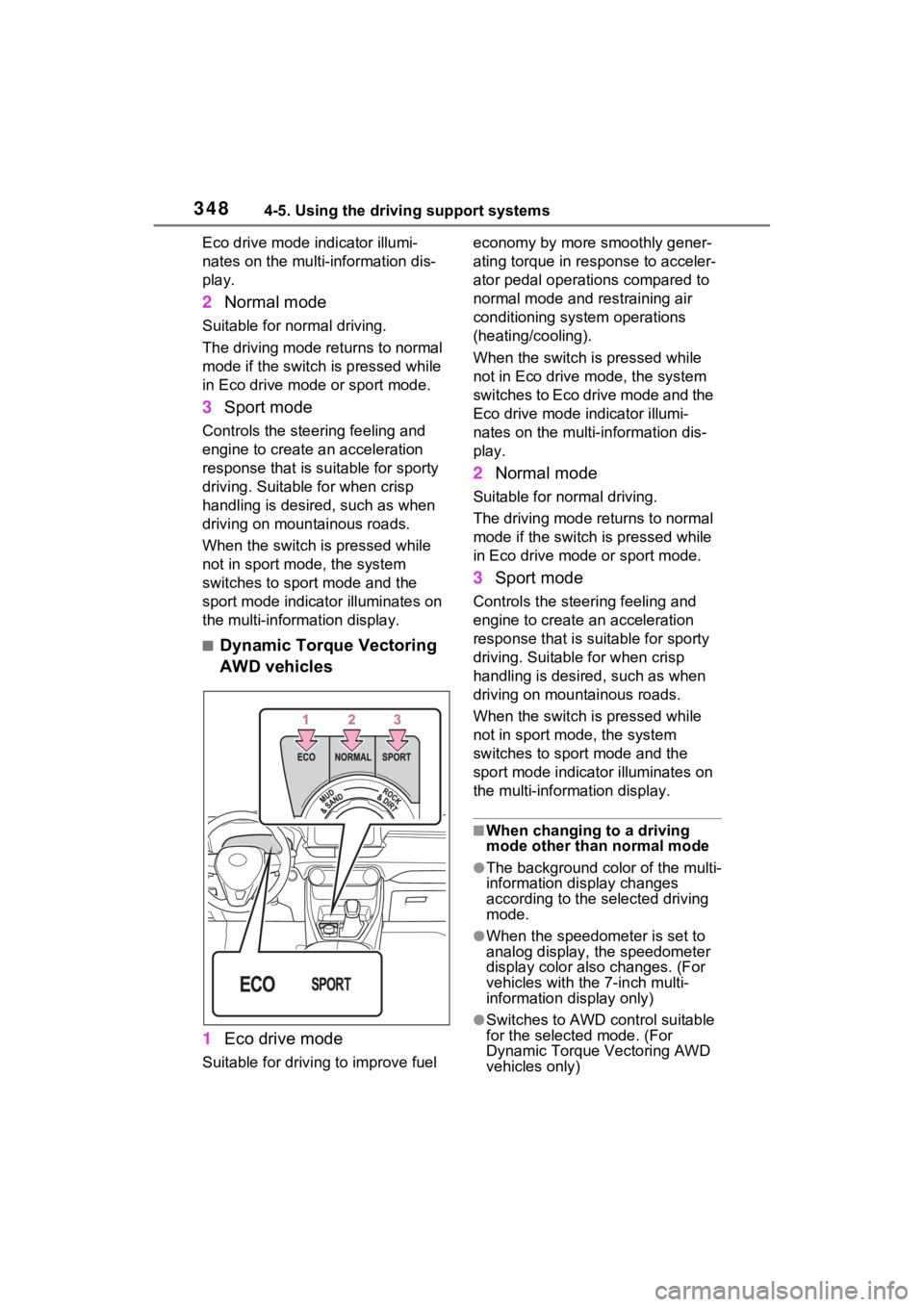
■Dynamic Torque Vectoring
AWD vehicles
1 Eco drive mode
Suitable for driving to improve fuel economy by more
smoothly gener-
ating torque in response to acceler-
ator pedal operations compared to
normal mode and restraining air
conditioning system operations
(heating/cooling).
When the switch is pressed while
not in Eco drive mode, the system
switches to Eco drive mode and the
Eco drive mode i ndicator illumi-
nates on the multi-information dis-
play.
2 Normal mode
Suitable for n ormal driving.
The driving mode returns to normal
mode if the switch i s pressed while
in Eco drive mode or sport mode.
3 Sport mode
Controls the steering feeling and
engine to create an acceleration
response that is suitable for sporty
driving. Suitable for when crisp
handling is desired, such as when
driving on mountainous roads.
When the switch is pressed while
not in sport mode, the system
switches to sport mode and the
sport mode indicat or illuminates on
the multi-information display.
■When changing to a driving
mode other than normal mode
●The background color of the multi-
information display changes
according to the selected driving
mode.
●When the speedometer is set to
analog display, the speedometer
display color also changes. (For
vehicles with the 7-inch multi-
information di splay only)
●Switches to AWD control suitable
for the selected mode. (For
Dynamic Torque Vectoring AWD
vehicles only)
Page 349 of 748
3494-5. Using the driving support systems
4
Driving
■Air conditioning system opera-
tion in Eco drive mode
In Eco drive mode, heating/cooling
operations and the fan speed is con-
trolled to improve fuel efficiency.
Perform the following procedures to
increase the air conditioning perfor-
mance.
●Vehicles with automatic air condi-
tioning system: Turn eco air condi-
tioning mode off ( P.515)
●Adjust the fan speed ( P.508,
515)
●Cancel Eco drive mode
■Canceling a driving mode
●Sport mode is automatically can-
celed and the driving mode
returns to normal mode when the
engine switch is turned off.
●Normal mode and Eco drive mode
are not canceled until another
driving mode is sel ected. (Even if
the engine switch is turned off,
normal mode and Eco drive mode
will not be automatically can-
celed.)
Select a mode that is appropri-
ate for the road condition.
■Mud & Sand mode
Suitable for driving on roads
with increased driving resis-
tance in which tires could
become stuck, such as sandy
roads, muddy roads, etc.
Multi-terrain Select
(AWD vehicles)
Multi-terrain Select is
designed to control AWD,
brake and driving force sys-
tems in accordance with the
road condition. Use the sys-
tem when driving over
muddy, sandy or rough road
surfaces.
WARNING
■Before using Multi-terrain
Select
Make sure to observe the follow-
ing precautions. Failure to
observe these precautions may
result in an unexp ected accident.
●Check that the Mud & Sand and
Rock & Dirt indicators are illumi-
nated before driving.
●Multi-terrain Select is not
intended to expand the limit per-
formance of the vehicle. Thor-
oughly check the road
conditions and driving route
before driving, and drive with
caution.
Control in each mode
Page 454 of 748
4545-12. Voice command system operation
5-12.Voice command system operation
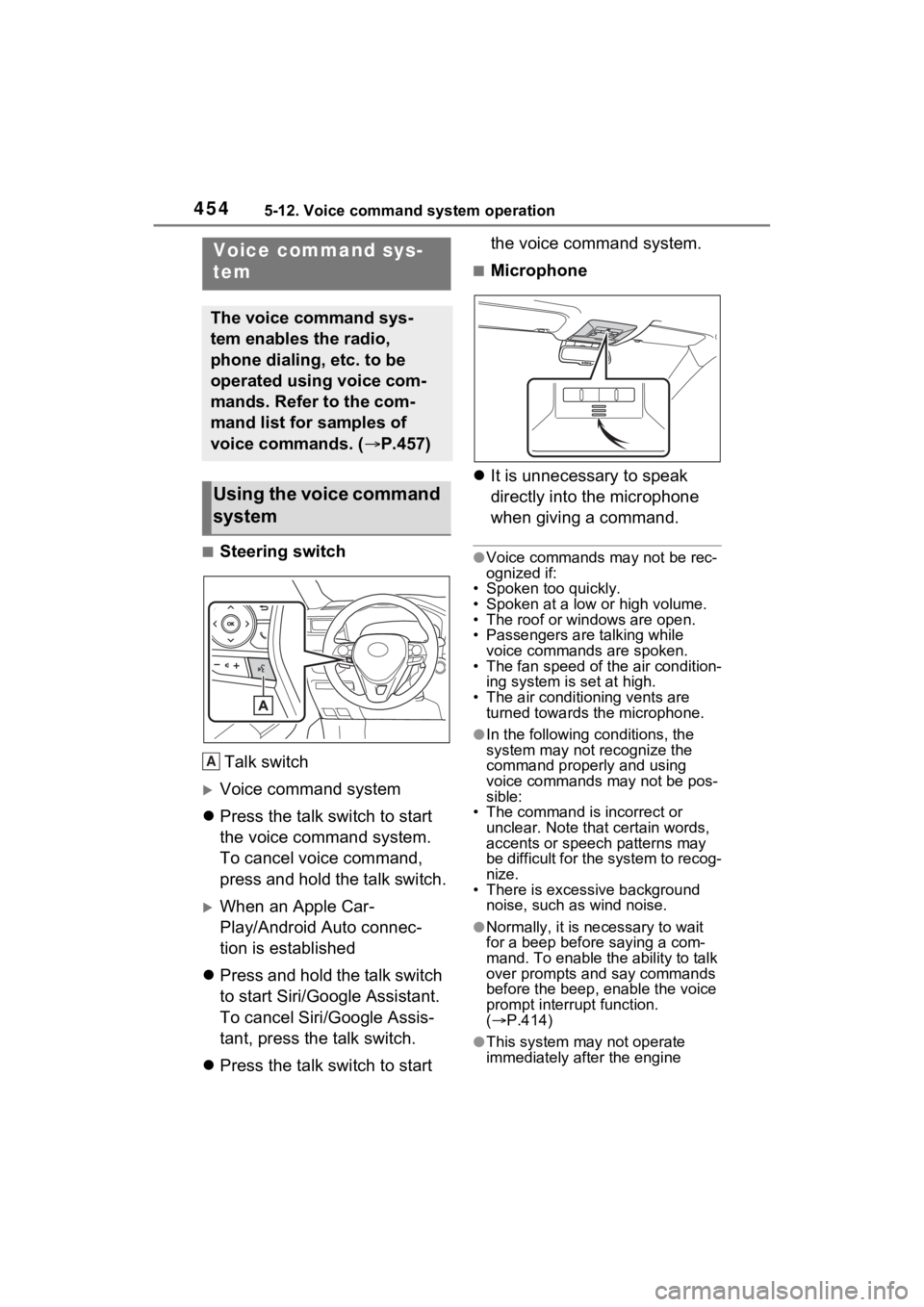
■Steering switchTalk switch
Voice command system
Press the talk switch to start
the voice command system.
To cancel voice command,
press and hold the talk switch.
When an Apple Car-
Play/Android Auto connec-
tion is established
Press and hold the talk switch
to start Siri/Google Assistant.
To cancel Siri/Google Assis-
tant, press the talk switch.
Press the talk switch to start the voice command system.
■Microphone
It is unnecessary to speak
directly into the microphone
when giving a command.
●Voice commands may not be rec-
ognized if:
• Spoken too quickly.
• Spoken at a low or high volume.
• The roof or windows are open.
• Passengers are talking while voice commands are spoken.
• The fan speed of the air condition-
ing system is set at high.
• The air conditioning vents are turned towards the microphone.
●In the following c onditions, the
system may not recognize the
command properly and using
voice commands may not be pos-
sible:
• The command is incorrect or unclear. Note that certain words,
accents or speech patterns may
be difficult for the system to recog-
nize.
• There is excessive background
noise, such as wind noise.
●Normally, it is n ecessary to wait
for a beep before saying a com-
mand. To enable the ability to talk
over prompts and say commands
before the beep, enable the voice
prompt interrupt function.
( P.414)
●This system may not operate
immediately after the engine
Voice command sys-
tem
The voice command sys-
tem enables the radio,
phone dialing, etc. to be
operated using voice com-
mands. Refer to the com-
mand list for samples of
voice commands. ( P.457)
Using the voice command
system
A
Page 462 of 748

4625-13. Mobile Assistant operation
feature will automatically end to
complete the requested action.
The volume of the Mobile
Assistant can be adjusted
using the “POWER VOLUME”
knob or steering wheel vol-
ume control switches. The
Mobile Assistant and phone
call volumes are synchro-
nized.
●While a phone call is active, the
Mobile Assistan t cannot be used.
●If using the navig ation feature of
the cellular phone, ensure the
active audio source is Bluetooth
®
audio or iPod in order to hear turn
by turn direction prompts.
●Wait for the listening beeps before
using the Mobile Assistant.
●The Mobile Assistant may not rec-
ognize commands in the following
situations:
• Spoken too quickly.
• Spoken at a low or high volume.
• The roof or windows are open.
• Passengers are talking while the Mobile Assistan t is being used.
• The fan speed of the air condition-
ing system is set at high.
• The air conditioning vents are
turned toward the microphone.
Page 466 of 748
4665-14. Phone operation (Hands-free system for cellular phones)
(P.374)
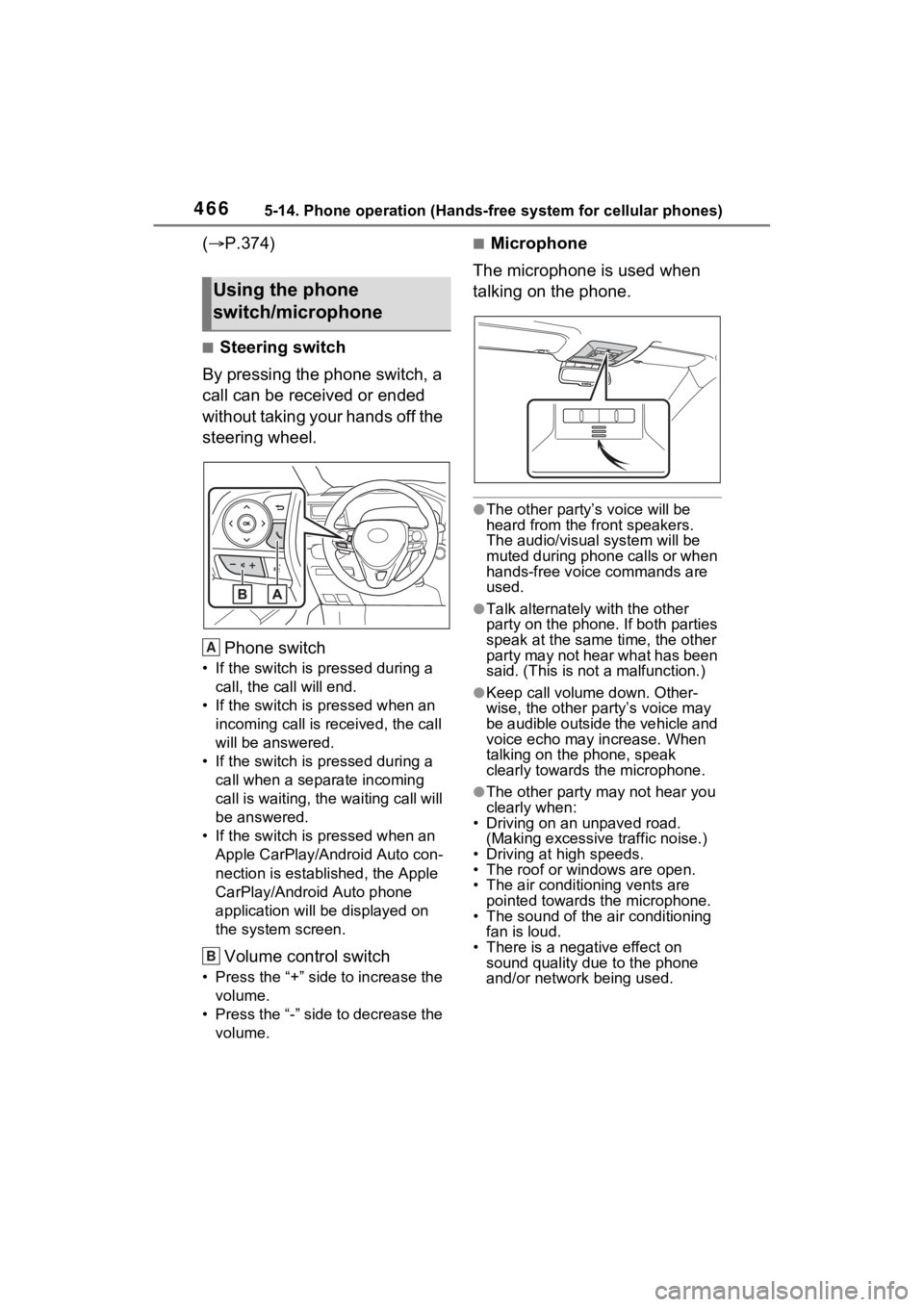
■Steering switch
By pressing the phone switch, a
call can be received or ended
without taking your hands off the
steering wheel.
Phone switch
• If the switch is pressed during a call, the call will end.
• If the switch is pressed when an incoming call is r eceived, the call
will be answered.
• If the switch is pressed during a call when a separate incoming
call is waiting, the waiting call will
be answered.
• If the switch is pressed when an Apple CarPlay/Android Auto con-
nection is established, the Apple
CarPlay/Android Auto phone
application will be displayed on
the system screen.
Volume control switch
• Press the “+” side to increase the volume.
• Press the “-” side to decrease the volume.
■Microphone
The microphone is used when
talking on the phone.
●The other party’s voice will be
heard from the front speakers.
The audio/vis ual system will be
muted during phone calls or when
hands-free voice commands are
used.
●Talk alternately with the other
party on the phone. If both parties
speak at the same time, the other
party may not hear what has been
said. (This is not a malfunction.)
●Keep call volume down. Other-
wise, the other party’s voice may
be audible outside the vehicle and
voice echo may increase. When
talking on the phone, speak
clearly towards the microphone.
●The other party may not hear you
clearly when:
• Driving on an unpaved road.
(Making excessive traffic noise.)
• Driving at high speeds.
• The roof or windows are open.
• The air conditioning vents are pointed towards the microphone.
• The sound of the air conditioning fan is loud.
• There is a negative effect on
sound quality due to the phone
and/or network being used.
Using the phone
switch/microphone
A
B
Page 507 of 748

507
6
6
Interior features
Interior features
6-1. Using the air conditioning system and defogger
Manual air conditioning sys- tem ............................ 508
Automatic air conditioning system ....................... 514
Heated steering wheel/seat heaters/seat ventilators.................................. 521
6-2. Using the interior lights Interior lights list .......... 524
6-3. Using the storage features List of storage features 527
Luggage compartment fea- tures .......................... 531
6-4. Using the other interior features
Other interior features . 536
Garage door opener.... 546
Page 508 of 748
5086-1. Using the air conditioning system and defogger
6-1.Using the air conditioning system and defogger
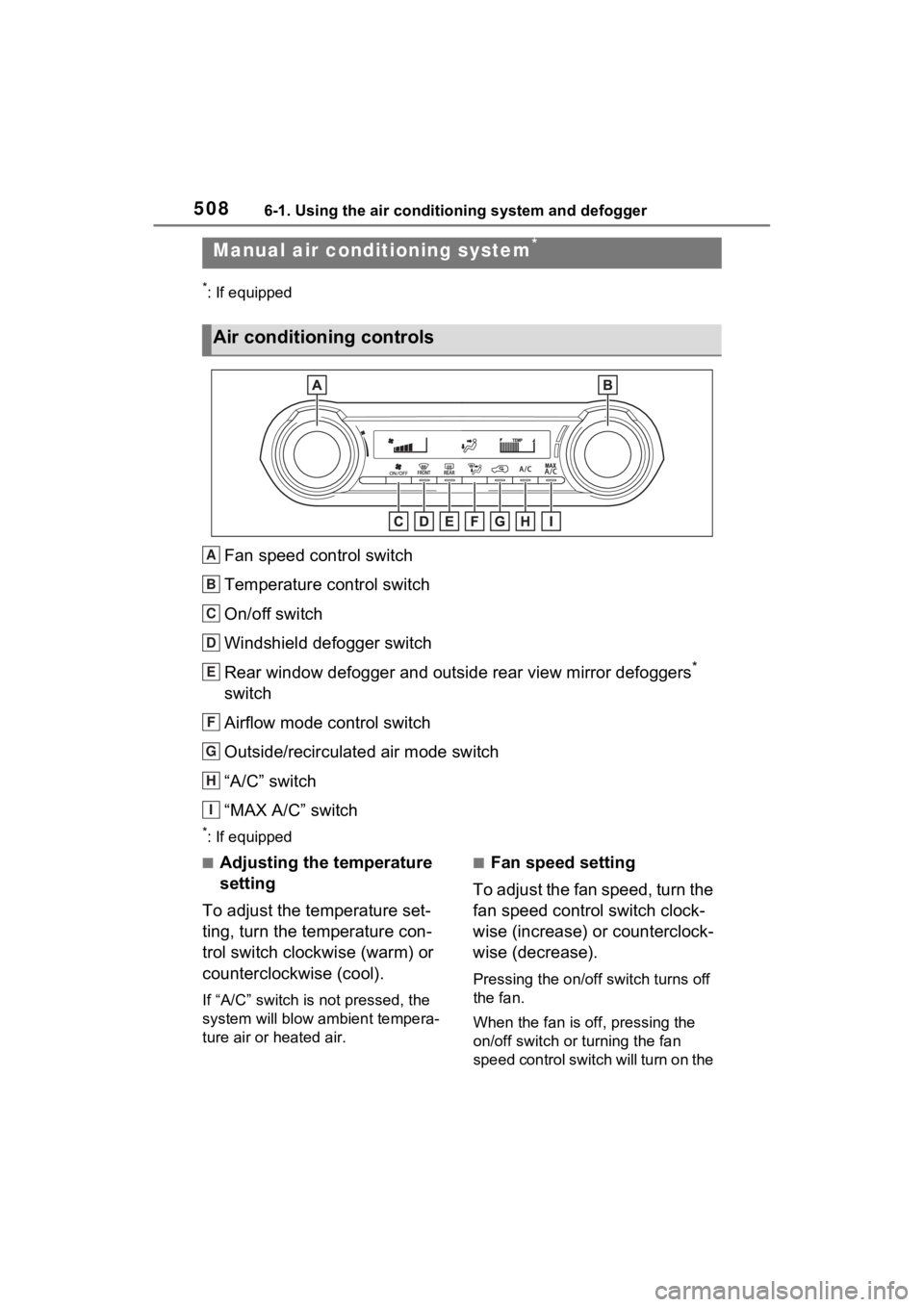
*: If equipped
Fan speed control switch
Temperature control switch
On/off switch
Windshield defogger switch
Rear window defogger and outside rear view mirror defoggers
*
switch
Airflow mode control switch
Outside/recirculated air mode switch
“A/C” switch
“MAX A/C” switch
*: If equipped
■Adjusting the temperature
setting
To adjust the temperature set-
ting, turn the temperature con-
trol switch clockwise (warm) or
counterclockwise (cool).
If “A/C” switch is not pressed, the
system will blow a mbient tempera-
ture air or heated air.
■Fan speed setting
To adjust the fan speed, turn the
fan speed control switch clock-
wise (increase) or counterclock-
wise (decrease).
Pressing the on/off switch turns off
the fan.
When the fan is off, pressing the
on/off switch or turning the fan
speed control switch will turn on the
Manual air condi tioning system*
Air conditioning controls
A
B
C
D
E
F
G
H
I
Page 509 of 748
5096-1. Using the air conditioning system and defogger
6
Interior features
fan.
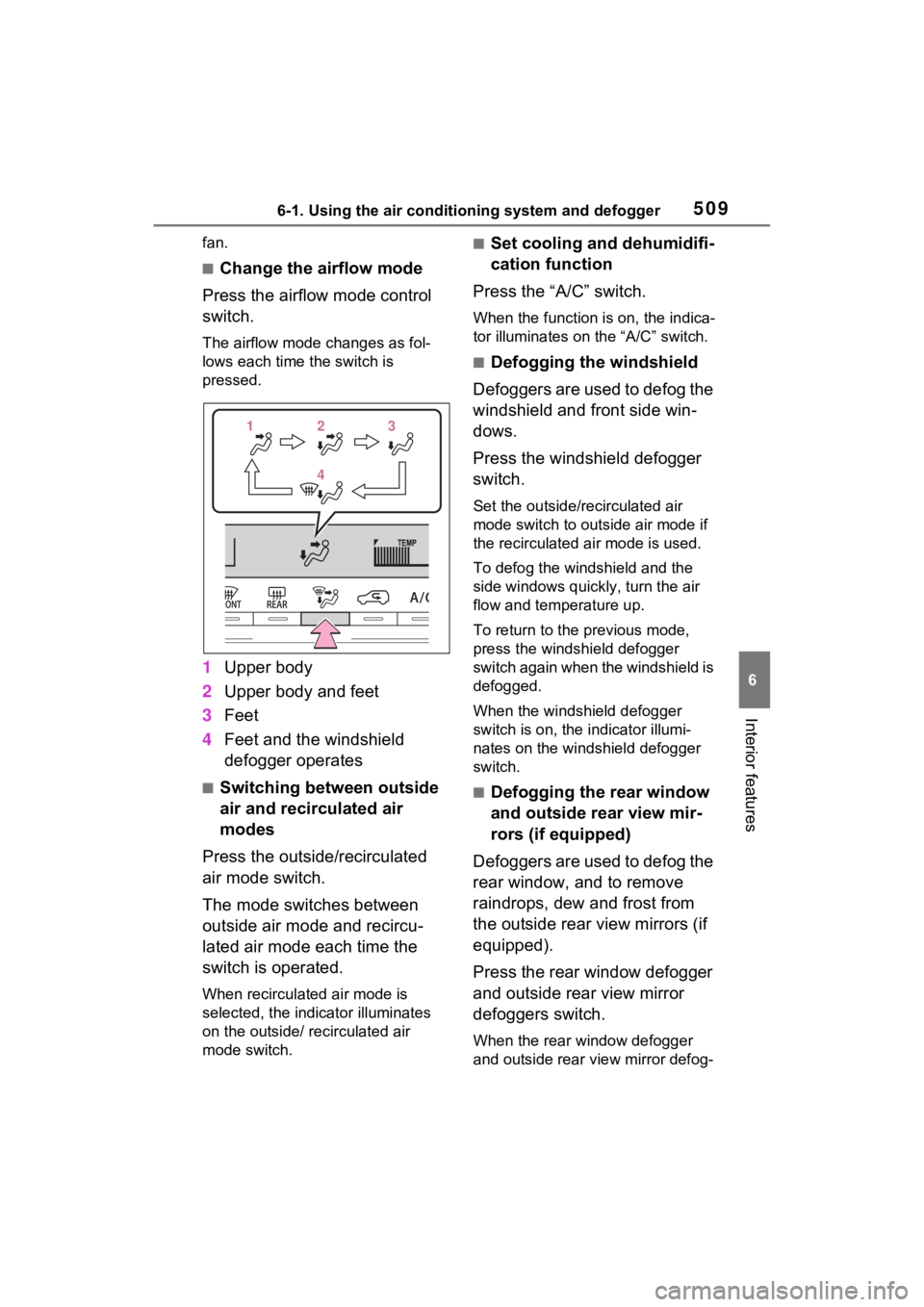
■Change the airflow mode
Press the airflow mode control
switch.
The airflow mode changes as fol-
lows each time the switch is
pressed.
1 Upper body
2 Upper body and feet
3 Feet
4 Feet and the windshield
defogger operates
■Switching between outside
air and recirculated air
modes
Press the outside/recirculated
air mode switch.
The mode switches between
outside air mode and recircu-
lated air mode each time the
switch is operated.
When recirculated air mode is
selected, the indicator illuminates
on the outside/ recirculated air
mode switch.
■Set cooling and dehumidifi-
cation function
Press the “A/C” switch.
When the function is on, the indica-
tor illuminates on the “A/C” switch.
■Defogging the windshield
Defoggers are used to defog the
windshield and front side win-
dows.
Press the windshield defogger
switch.
Set the outside/recirculated air
mode switch to outside air mode if
the recirculated air mode is used.
To defog the windshield and the
side windows quickly, turn the air
flow and temperature up.
To return to the previous mode,
press the windshield defogger
switch again when the windshield is
defogged.
When the windshield defogger
switch is on, the indicator illumi-
nates on the windshield defogger
switch.
■Defogging the rear window
and outside rear view mir-
rors (if equipped)
Defoggers are used to defog the
rear window, and to remove
raindrops, dew and frost from
the outside rear view mirrors (if
equipped).
Press the rear window defogger
and outside rear view mirror
defoggers switch.
When the rear window defogger
and outside rear view mirror defog-
1 1 2
23
3
4
4
Page 510 of 748

5106-1. Using the air conditioning system and defogger
gers switch is on, the indicator illu-
minates on the rear window
defogger and outside rear view mir-
ror defoggers switch.
The rear window defogger and mir-
ror heater automatically turn off
after approximat ely 60 minutes.
However, the rear window defogger
and mirror heater might automati-
cally turn off after approximately 15
minutes depending on conditions
including the outside temperature
and charging syste m conditions.
■For quick cooling
Press the “MAX A/C” switch.
The air conditioning will automati-
cally turn on.
At this time, the fo llowing will occur:
●The recirculated air mode will be
set
●The windshield defogger will turn
off
●The air flow mode will change to
the upper body mode
■Operation of the air condition-
ing system in Eco drive mode
In Eco drive mode, the air condition-
ing system is controlled to prioritize
fuel efficiency by regulating the
engine speed and compressor oper-
ation to restrict t he heating/cooling
capacity.
To improve air con ditioning perfor-
mance, perform t he following opera-
tions:
●Adjust the fan speed
●Adjust the temperature setting
●Turn off Eco drive mode ( P.347)
■Fogging up of the windows
●The windows will easily fog up
when the humidity in the vehicle is
high. Turning the “A/C” switch on
will dehumidify the air from the
outlets and defog the windshield effectively.
●If you turn the “A/C” switch off, the
windows may fog up more easily.
●The windows may fog up if the
recirculated air mode is used.
■When driving on dusty roads
Close all windows. If dust thrown up
by the vehicle is still drawn into the
vehicle after closing the windows, it
is recommended that the air intake
mode be set to outside air mode
and the fan speed to any setting
except off.
■Outside/recirculated air mode
Setting to the recir culated air mode
temporarily is recommended in pre-
venting dirty air from entering the
vehicle interior and helping to cool
the vehicle when the outside air
temperature is high.
■When the outside temperature
falls to nearly 32°F (0°C)
The dehumidification function may
not operate even when the “A/C”
switch is pressed.
■Ventilation and air conditioning
odors
●To let fresh air in, set the air condi-
tioning system to the outside air
mode.
●During use, various odors from
inside and outside the vehicle may
enter into and accumulate in the
air conditioning system. This may
then cause odor to be emitted
from the vents.
●To reduce potential odors from
occurring:
It is recommended that the air
conditioning system be set to out-
side air mode prior to turning the
vehicle off.
●When parking, the system auto-
matically switches to outside air
mode to encourage better air cir-
culation throughout the vehicle,
helping to reduce odors that occur
when starting the vehicle.
Page 511 of 748
5116-1. Using the air conditioning system and defogger
6
Interior features
■Air conditioning system opera-
tions when the engine is
stopped due to the Stop & Start
system (vehicles with Stop &
Start system)
When the engine is stopped due to
the Stop & Start system operations,
the air conditioning cooling, heating
and dehumidification functions turn
off and only ambient temperature air
is blown, and there is a possibility
that the blowing of ambient tem-
perature air will stop. To prevent the
air conditioning system from turning
off, press the Stop & Start cancel
switch to deactivate the system.
■When the windshield is fogged
up and the engine is stopped
due to the Stop & Start system
(vehicles with Stop & Start sys-
tem)
Press the windshield defogger
switch to restart the engine and
defog the windshield.
If the windshield continuously fogs
up, press the Stop & Start cancel
switch and refrain from using the
Stop & Start system.
■When an odor c omes from the
air conditioning system while
the engine is stopped due to the
Stop & Start system (vehicles
with Stop & Start system)
Press the Stop & Start cancel switch
to restart the engine.
■Air conditioning filter
P.592
■Air conditioning system refrig-
erant
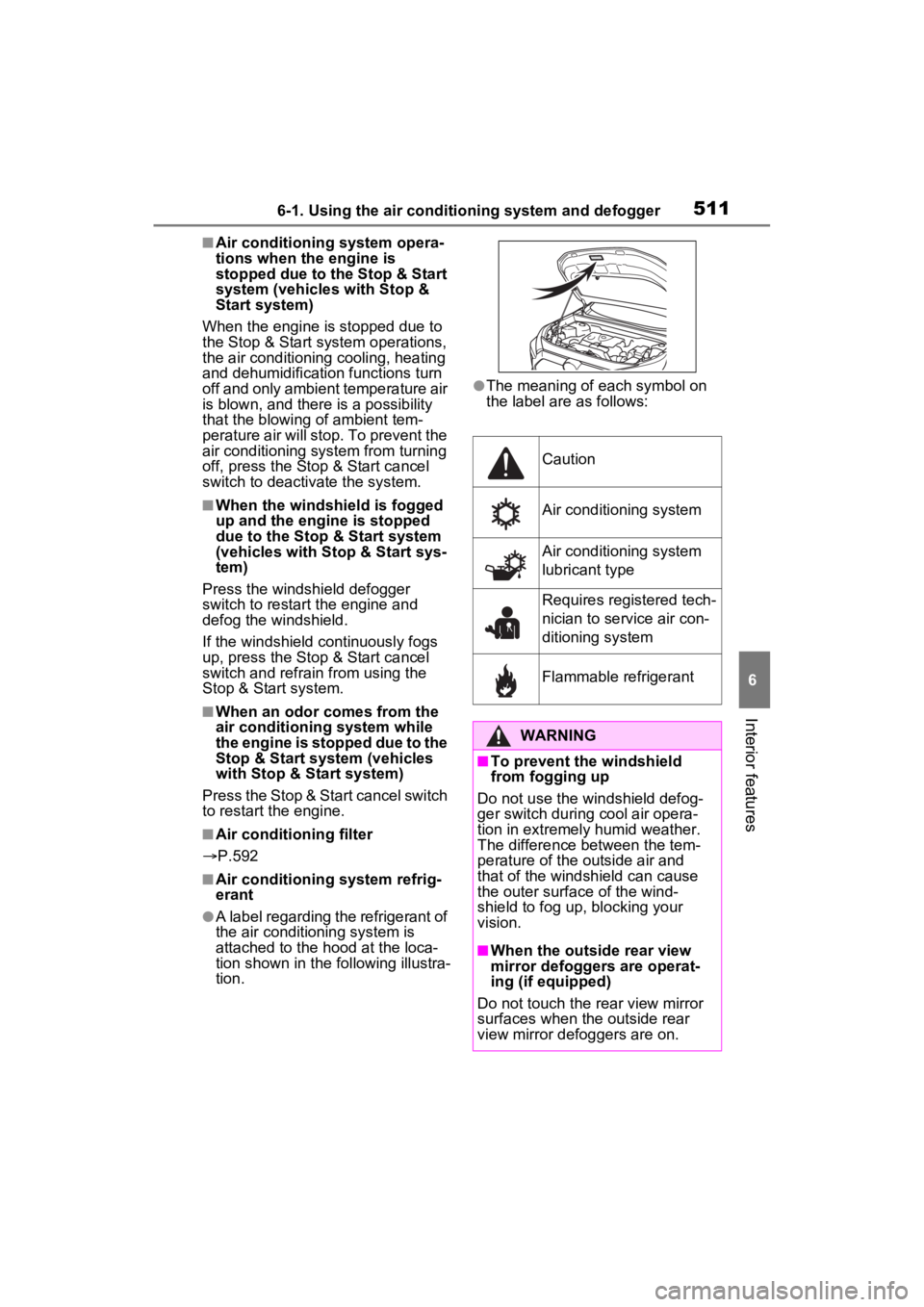
●A label regarding the refrigerant of
the air conditioning system is
attached to the ho od at the loca-
tion shown in the f ollowing illustra-
tion.
●The meaning of each symbol on
the label are as follows:
Caution
Air conditioning system
Air conditioning system
lubricant type
Requires registered tech-
nician to service air con-
ditioning system
Flammable refrigerant
WARNING
■To prevent the windshield
from fogging up
Do not use the windshield defog-
ger switch during cool air opera-
tion in extremel y humid weather.
The difference between the tem-
perature of the outside air and
that of the windshield can cause
the outer surface of the wind-
shield to fog up, blocking your
vision.
■When the outside rear view
mirror defoggers are operat-
ing (if equipped)
Do not touch the rear view mirror
surfaces when the outside rear
view mirror def oggers are on.