lights TOYOTA RAV4 2022 User Guide
[x] Cancel search | Manufacturer: TOYOTA, Model Year: 2022, Model line: RAV4, Model: TOYOTA RAV4 2022Pages: 748, PDF Size: 22.93 MB
Page 47 of 748
471-1. For safe use
1
For safety and security
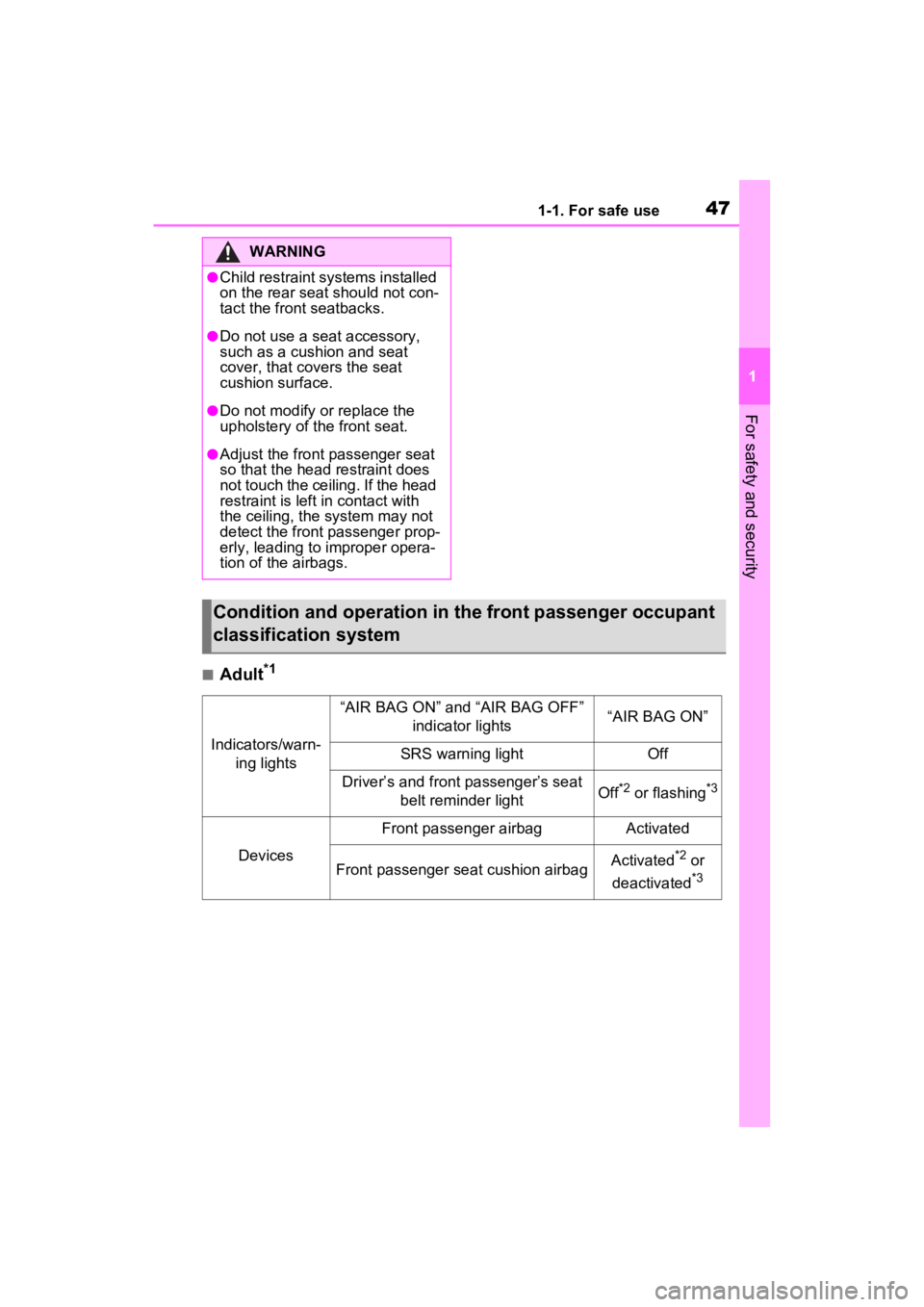
■Adult*1
WARNING
●Child restraint systems installed
on the rear seat should not con-
tact the front seatbacks.
●Do not use a seat accessory,
such as a cushion and seat
cover, that covers the seat
cushion surface.
●Do not modify or replace the
upholstery of the front seat.
●Adjust the front passenger seat
so that the head restraint does
not touch the ceiling. If the head
restraint is left in contact with
the ceiling, the system may not
detect the front passenger prop-
erly, leading to improper opera-
tion of the airbags.
Condition and operation in th e front passenger occupant
classification system
Indicators/warn- ing lights
“AIR BAG ON” and “AIR BAG OFF” indicator lights“AIR BAG ON”
SRS warning lightOff
Driver’s and front passenger’s seat belt reminder lightOff*2 or flashing*3
Devices
Front passenger airbagActivated
Front passenger seat cushion airbagActivated*2 or
deactivated
*3
Page 48 of 748
481-1. For safe use
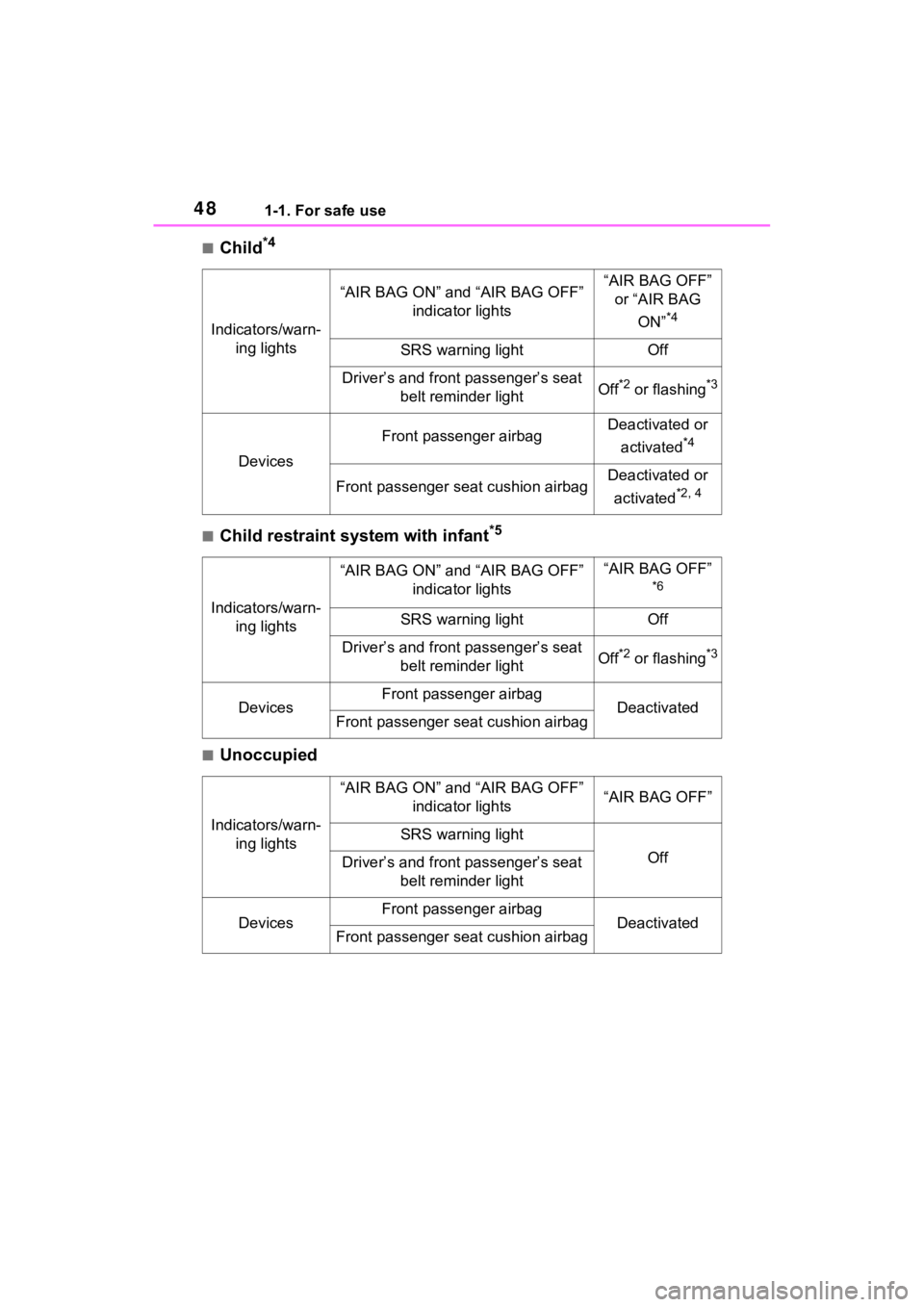
■Child*4
■Child restraint system with infant*5
■Unoccupied
Indicators/warn-ing lights
“AIR BAG ON” and “AIR BAG OFF” indicator lights“AIR BAG OFF” or “AIR BAG
ON”
*4
SRS warning lightOff
Driver’s and front passenger’s seat belt reminder lightOff*2 or flashing*3
Devices
Front passenger airbagDeactivated or
activated
*4
Front passenger seat cushion airbagDeactivated or
activated
*2, 4
Indicators/warn- ing lights
“AIR BAG ON” and “AIR BAG OFF” indicator lights“AIR BAG OFF”
*6
SRS warning lightOff
Driver’s and front passenger’s seat belt reminder lightOff*2 or flashing*3
DevicesFront passenger airbagDeactivatedFront passenger seat cushion airbag
Indicators/warn-ing lights
“AIR BAG ON” and “AIR BAG OFF” indicator lights“AIR BAG OFF”
SRS warning light
OffDriver’s and front passenger’s seat belt reminder light
DevicesFront passenger airbagDeactivatedFront passenger seat cushion airbag
Page 49 of 748
491-1. For safe use
1
For safety and security
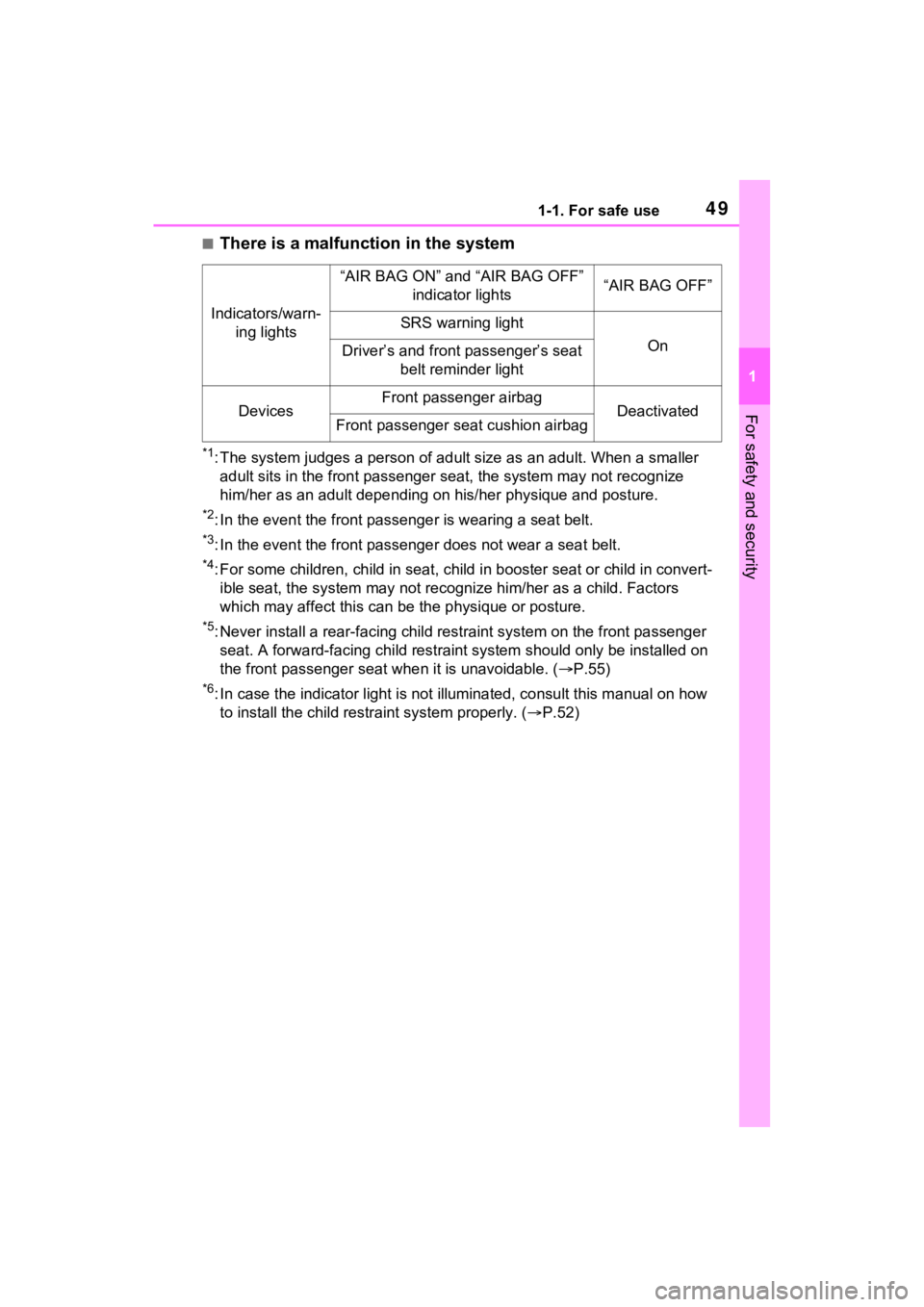
■There is a malfunction in the system
*1: The system judges a person of adult size as an adult. When a smaller
adult sits in the front passenger seat, the system may not recognize
him/her as an adult depending on his/her physique and posture.
*2: In the event the front passenger is wearing a seat belt.
*3: In the event the front passenge r does not wear a seat belt.
*4: For some children, child in seat, child in booster seat or chi ld in convert-
ible seat, the system may not recognize him/her as a child. Fac tors
which may affect this can be the physique or posture.
*5: Never install a rear-facing ch ild restraint system on the front passenger
seat. A forward-facing child res traint system should only be installed on
the front passenger sea t when it is unavoidable. ( P.55)
*6: In case the indicator light is not illuminated, consult this m anual on how
to install the child restr aint system properly. (P.52)
Indicators/warn-
ing lights
“AIR BAG ON” and “AIR BAG OFF” indicator lights“AIR BAG OFF”
SRS warning light
OnDriver’s and front passenger’s seat belt reminder light
DevicesFront passenger airbagDeactivatedFront passenger seat cushion airbag
Page 75 of 748
75
2
2
Vehicle status information and indicators
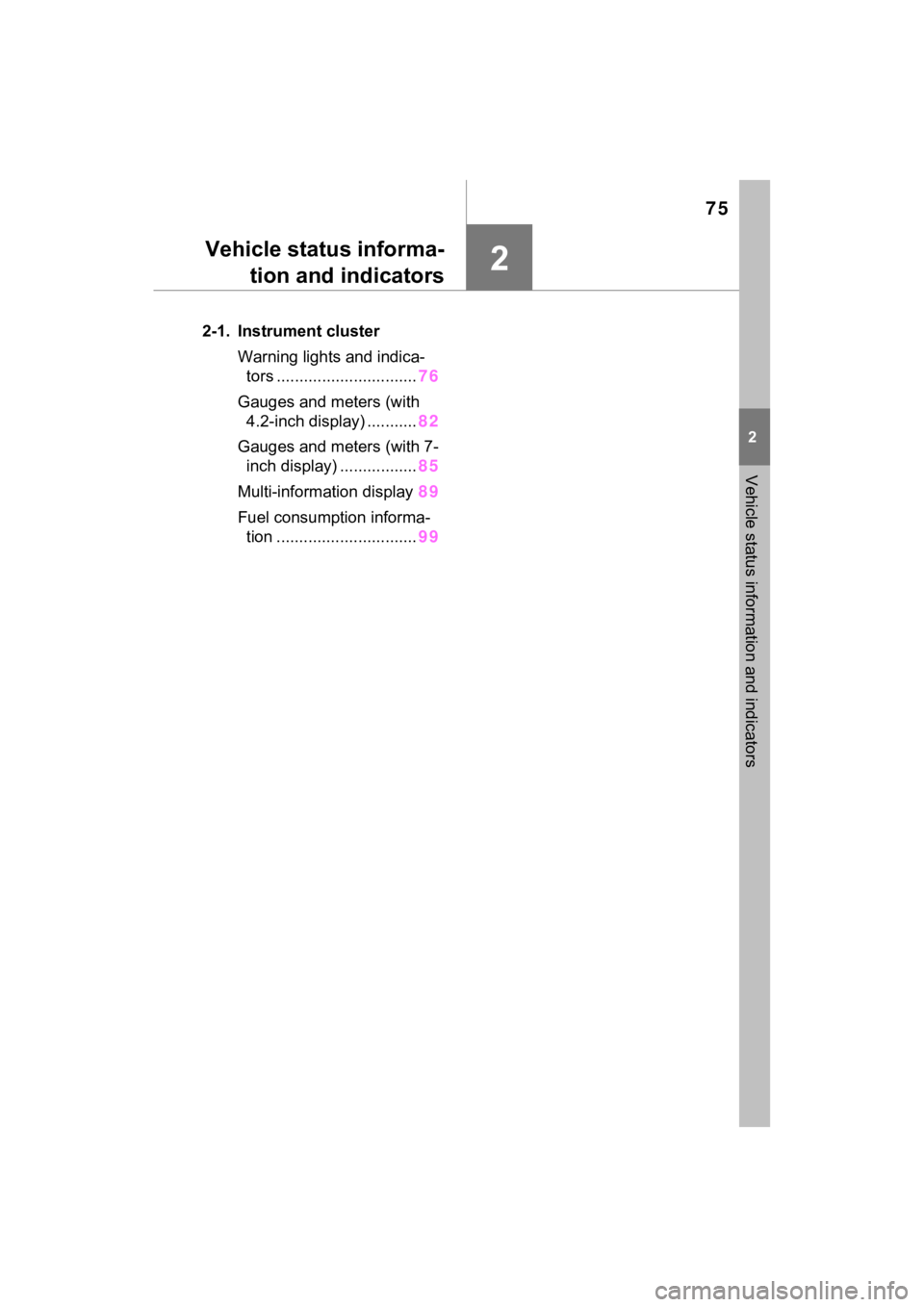
Vehicle status informa-tion and indicators
2-1. Instrument cluster
Warning lights and indica-tors ............................... 76
Gauges and meters (with 4.2-inch display) ........... 82
Gauges and meters (with 7- inch display) ................. 85
Multi-information display 89
Fuel consumption informa- tion ............................... 99
Page 76 of 748
762-1. Instrument cluster
2-1.Instrument cluster
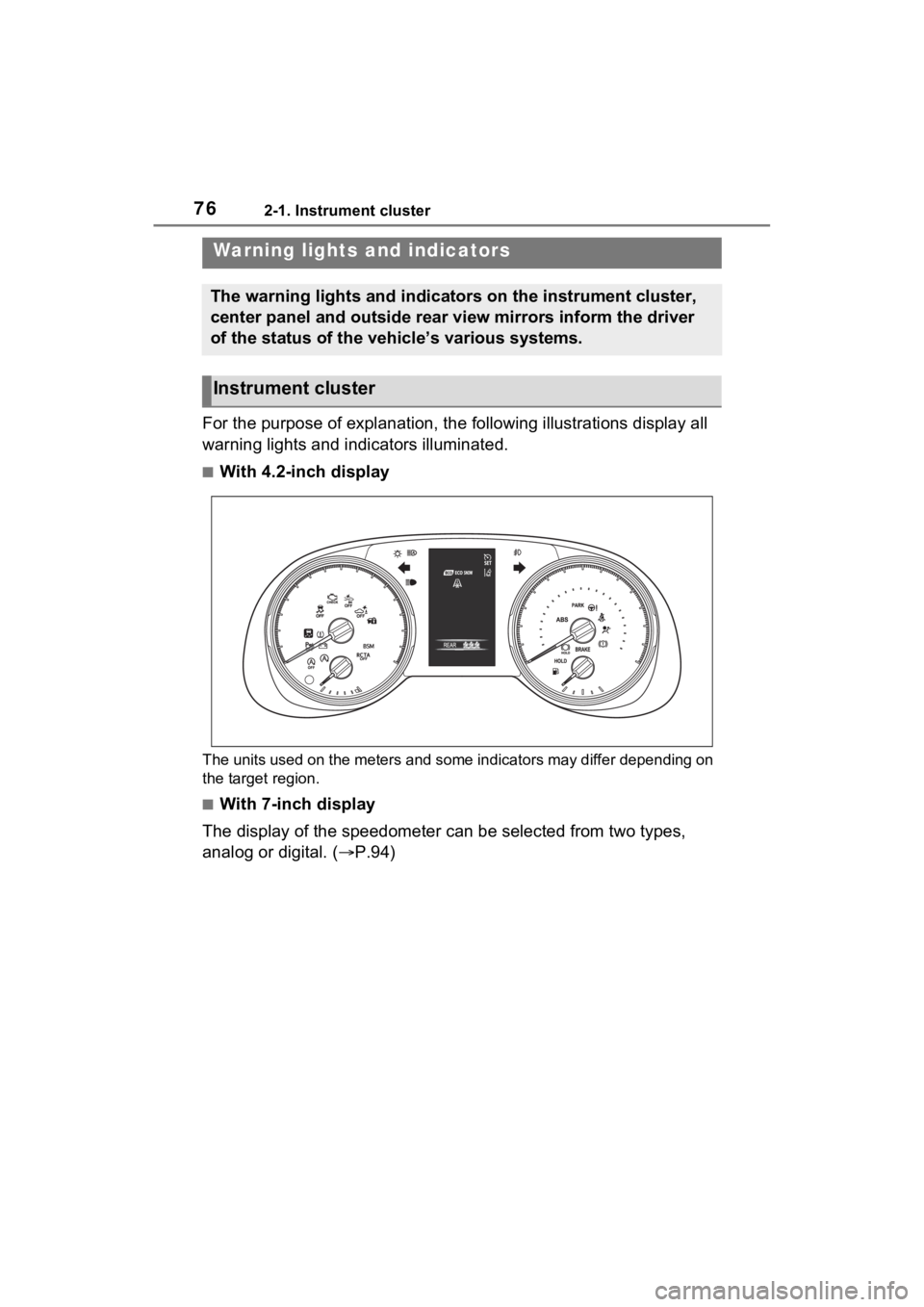
For the purpose of explanation, the following illustrations display all
warning lights and indicators illuminated.
■With 4.2-inch display
The units used on the meters and some indicators may differ dep ending on
the target region.
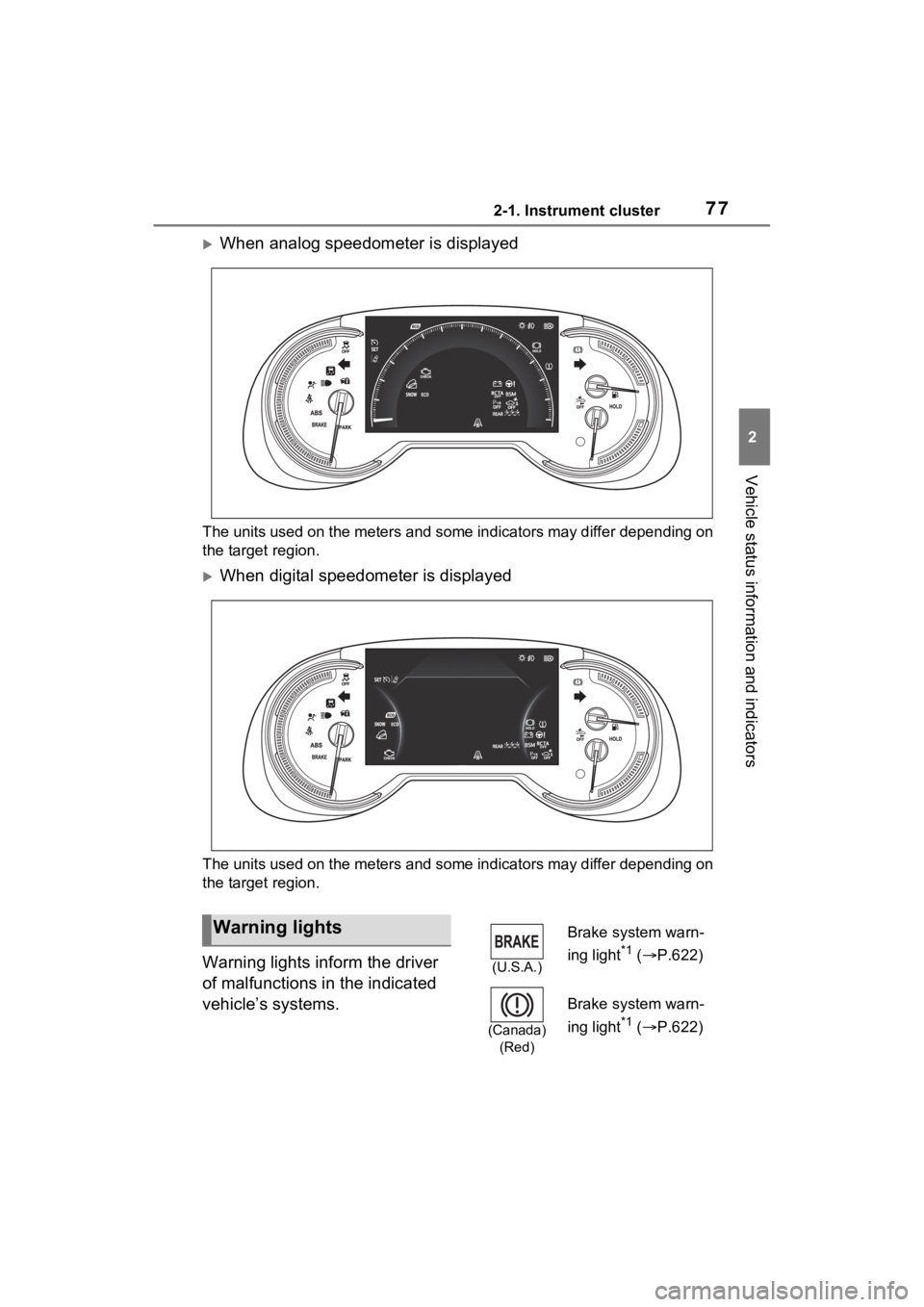
■With 7-inch display
The display of the speedometer can be selected from two types,
analog or digital. ( P.94)
Warning lights and indicators
The warning lights and indicators on the instrument cluster,
center panel and outside rear view mirrors inform the driver
of the status of the vehicle’s various systems.
Instrument cluster
Page 77 of 748
772-1. Instrument cluster
2
Vehicle status information and indicators
When analog speedometer is displayed
The units used on the meters and some indicators may differ depending on
the target region.
When digital speedometer is displayed
The units used on the meters and some indicators may differ dep ending on
the target region.
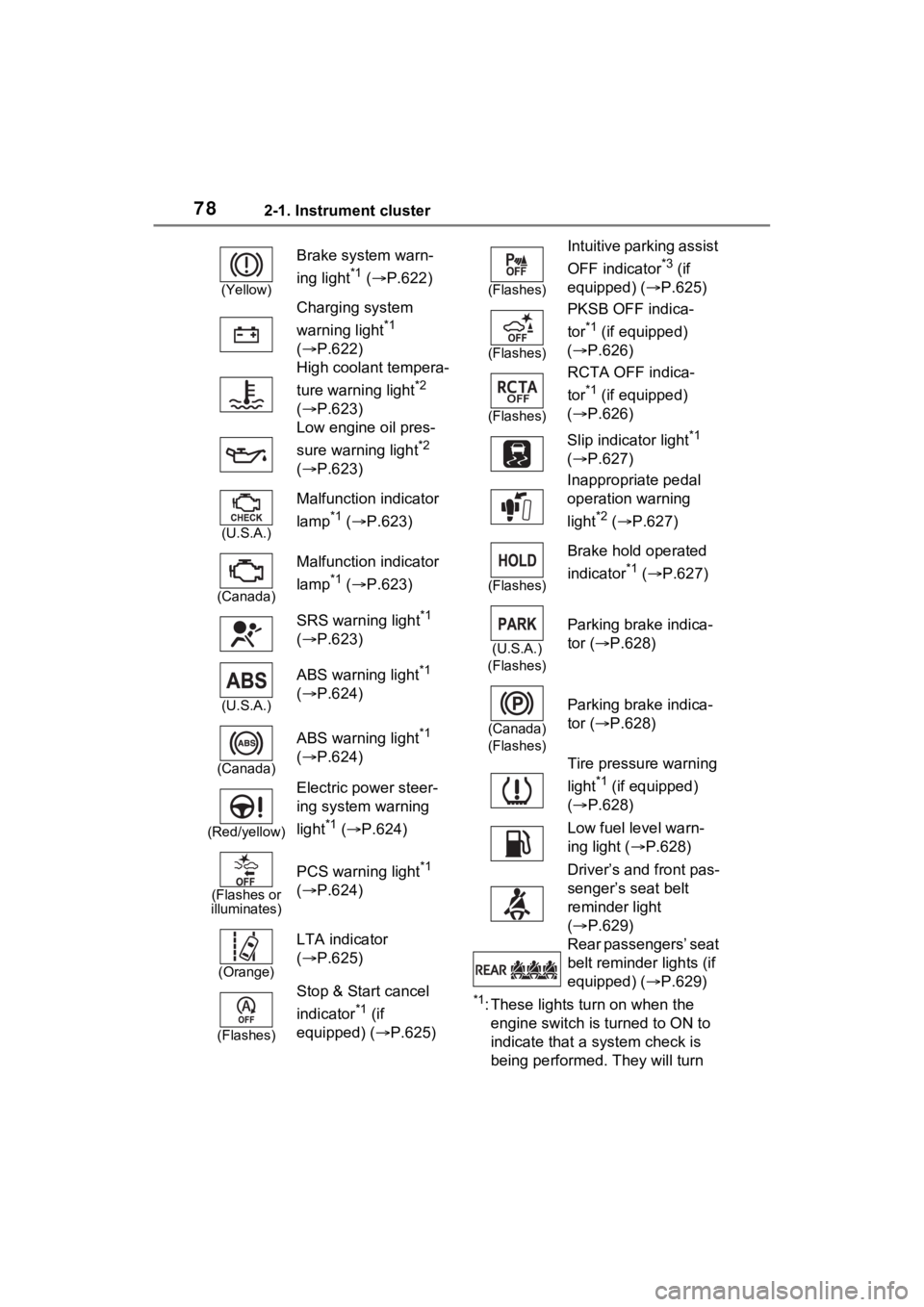
Warning lights inform the driver
of malfunctions in the indicated
vehicle’s systems.
Warning lights
(U.S.A.)
Brake system warn-
ing light
*1 ( P.622)
(Canada)
(Red)
Brake system warn-
ing light
*1 ( P.622)
Page 78 of 748
782-1. Instrument cluster
*1: These lights turn on when the
engine switch is turned to ON to
indicate that a system check is
being performed. They will turn
(Yellow)
Brake system warn-
ing light
*1 ( P.622)
Charging system
warning light
*1
( P.622)
High coolant tempera-
ture warning light
*2
( P.623)
Low engine oil pres-
sure warning light
*2
( P.623)
(U.S.A.)
Malfunction indicator
lamp
*1 ( P.623)
(Canada)
Malfunction indicator
lamp
*1 ( P.623)
SRS warning light
*1
( P.623)
(U.S.A.)
ABS warning light*1
( P.624)
(Canada)
ABS warning light*1
( P.624)
(Red/yellow)
Electric power steer-
ing system warning
light
*1 ( P.624)
(Flashes or
illuminates)
PCS warning light*1
( P.624)
(Orange)
LTA indicator
( P.625)
(Flashes)
Stop & Start cancel
indicator
*1 (if
equipped) (P.625)
(Flashes)
Intuitive parking assist
OFF indicator
*3 (if
equipped) ( P.625)
(Flashes)
PKSB OFF indica-
tor
*1 (if equipped)
( P.626)
(Flashes)
RCTA OFF indica-
tor
*1 (if equipped)
( P.626)
Slip indicator light
*1
( P.627)
Inappropriate pedal
operation warning
light
*2 ( P.627)
(Flashes)
Brake hold operated
indicator
*1 ( P.627)
(U.S.A.)
(Flashes)
Parking brake indica-
tor ( P.628)
(Canada)
(Flashes)
Parking brake indica-
tor ( P.628)
Tire pressure warning
light
*1 (if equipped)
( P.628)
Low fuel level warn-
ing light ( P.628)
Driver’s and front pas-
senger’s seat belt
reminder light
( P.629)
Rear passengers’ seat
belt reminder lights (if
equipped) ( P.629)
Page 80 of 748
802-1. Instrument cluster
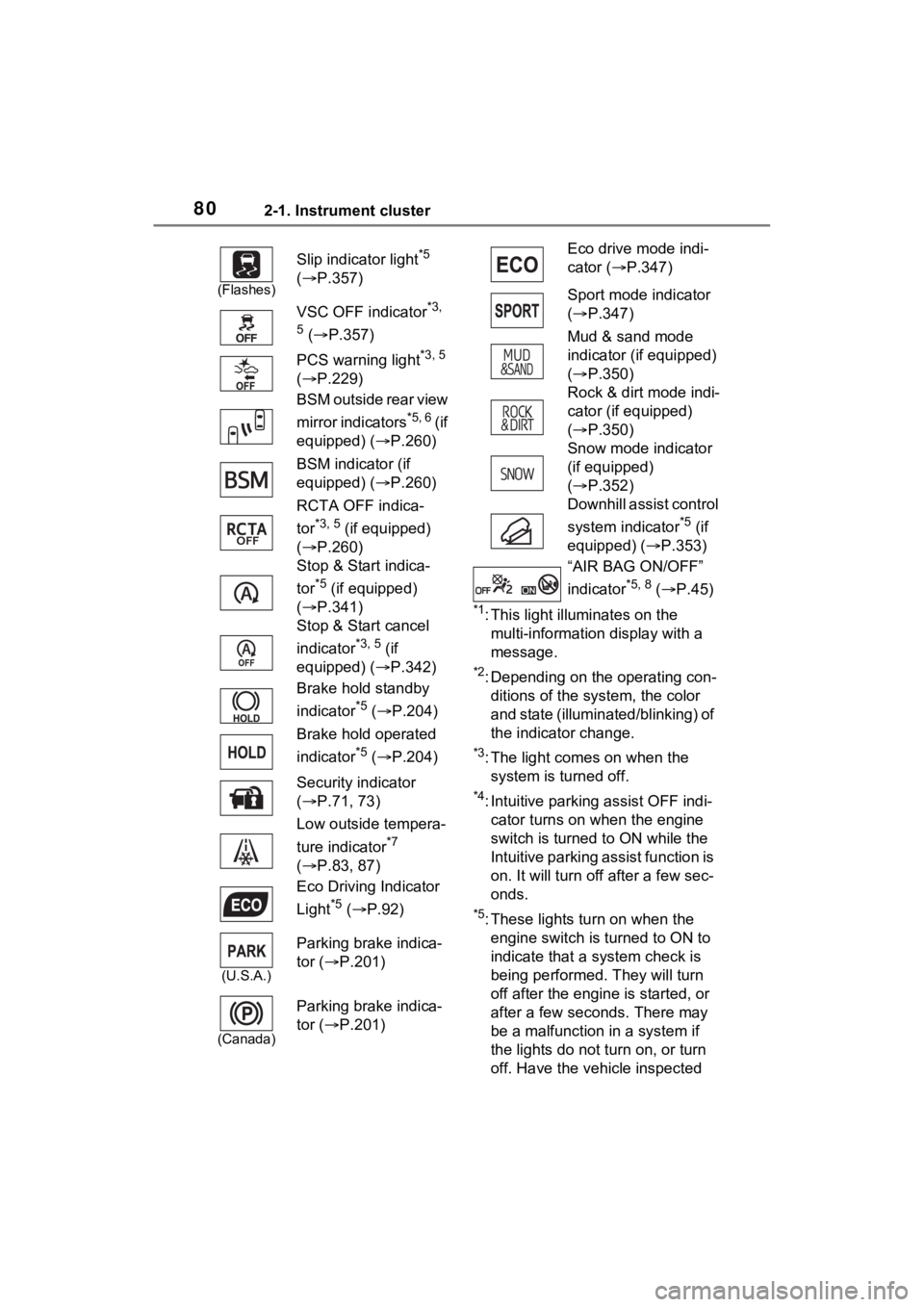
*1: This light illuminates on the multi-information display with a
message.
*2: Depending on the operating con-ditions of the system, the color
and state (illuminat ed/blinking) of
the indicator change.
*3: The light comes on when the system is turned off.
*4: Intuitive parking assist OFF indi-cator turns on wh en the engine
switch is turned t o ON while the
Intuitive parking assist function is
on. It will turn off after a few sec-
onds.
*5: These lights tu rn on when the
engine switch is turned to ON to
indicate that a system check is
being performed. They will turn
off after the engine is started, or
after a few seconds. There may
be a malfunction in a system if
the lights do not turn on, or turn
off. Have the vehicle inspected
(Flashes)
Slip indicator light*5
( P.357)
VSC OFF indicator
*3,
5
( P.357)
PCS warning light
*3, 5
( P.229)
BSM outside rear view
mirror indicators
*5, 6 ( i f
equipped) ( P.260)
BSM indicator (if
equipped) ( P.260)
RCTA OFF indica-
tor
*3, 5 (if equipped)
( P.260)
Stop & Start indica-
tor
*5 (if equipped)
( P.341)
Stop & Start cancel
indicator
*3, 5 (if
equipped) ( P.342)
Brake hold standby
indicator
*5 ( P.204)
Brake hold operated
indicator
*5 ( P.204)
Security indicator
( P.71, 73)
Low outside tempera-
ture indicator
*7
( P.83, 87)
Eco Driving Indicator
Light
*5 ( P.92)
(U.S.A.)
Parking brake indica-
tor ( P.201)
(Canada)
Parking brake indica-
tor ( P.201)
Eco drive mode indi-
cator (P.347)
Sport mode indicator
( P.347)
Mud & sand mode
indicator (if equipped)
( P.350)
Rock & dirt mode indi-
cator (if equipped)
( P.350)
Snow mode indicator
(if equipped)
( P.352)
Downhill assist control
system indicator
*5 (if
equipped) ( P.353)
“AIR BAG ON/OFF”
indicator
*5, 8 ( P.45)
Page 84 of 748
842-1. Instrument cluster
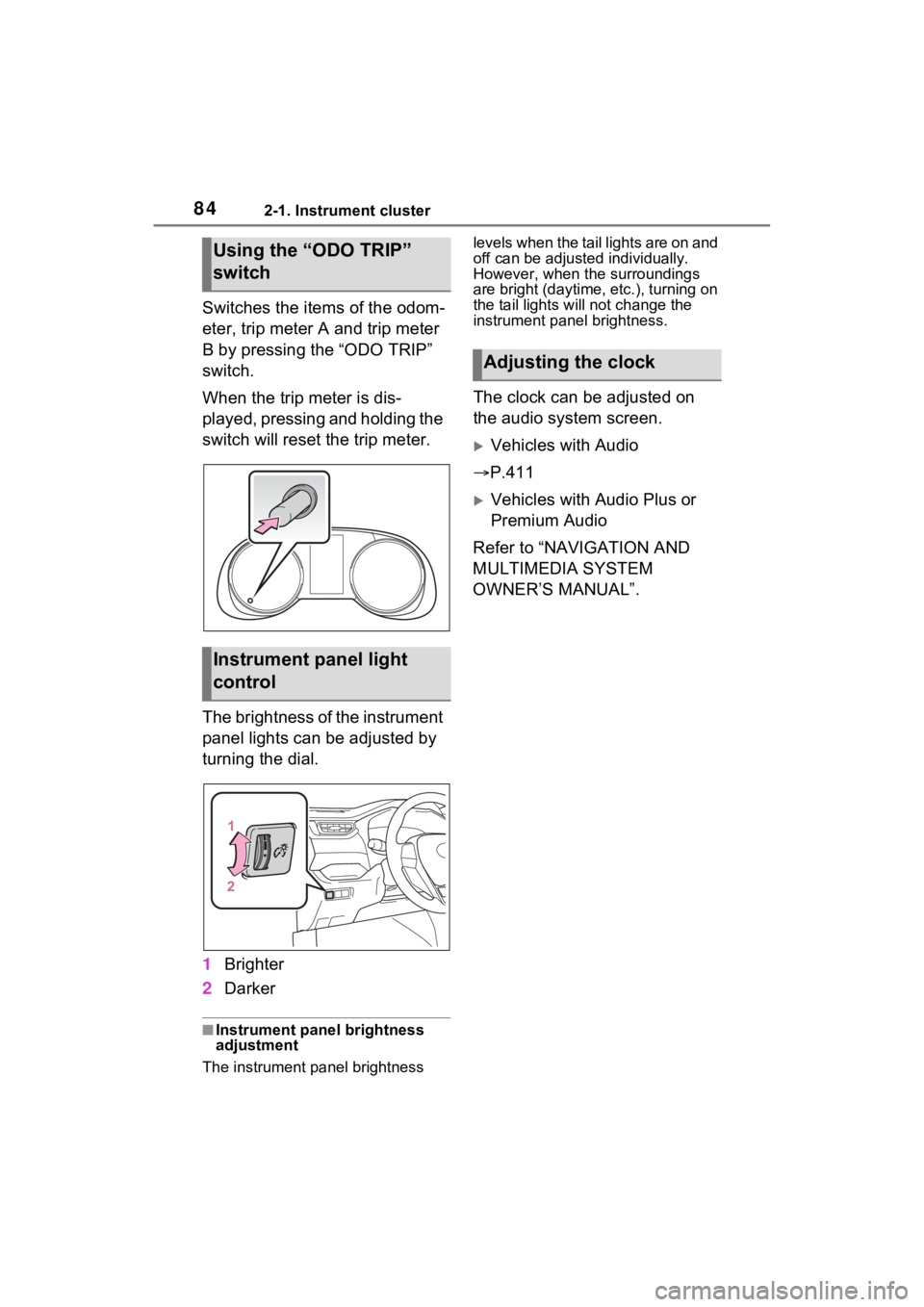
Switches the items of the odom-
eter, trip meter A and trip meter
B by pressing the “ODO TRIP”
switch.
When the trip meter is dis-
played, pressing and holding the
switch will reset the trip meter.
The brightness of the instrument
panel lights can be adjusted by
turning the dial.
1Brighter
2 Darker
■Instrument panel brightness
adjustment
The instrument panel brightness levels when the tail lights are on and
off can be adjusted individually.
However, when the surroundings
are bright (daytime, etc.), turning on
the tail lights will not change the
instrument panel brightness.
The clock can be adjusted on
the audio system screen.
Vehicles with Audio
P.411
Vehicles with Audio Plus or
Premium Audio
Refer to “NAVIGATION AND
MULTIMEDIA SYSTEM
OWNER’S MANUAL”.
Using the “ODO TRIP”
switch
Instrument panel light
control
Adjusting the clock
Page 88 of 748
882-1. Instrument cluster
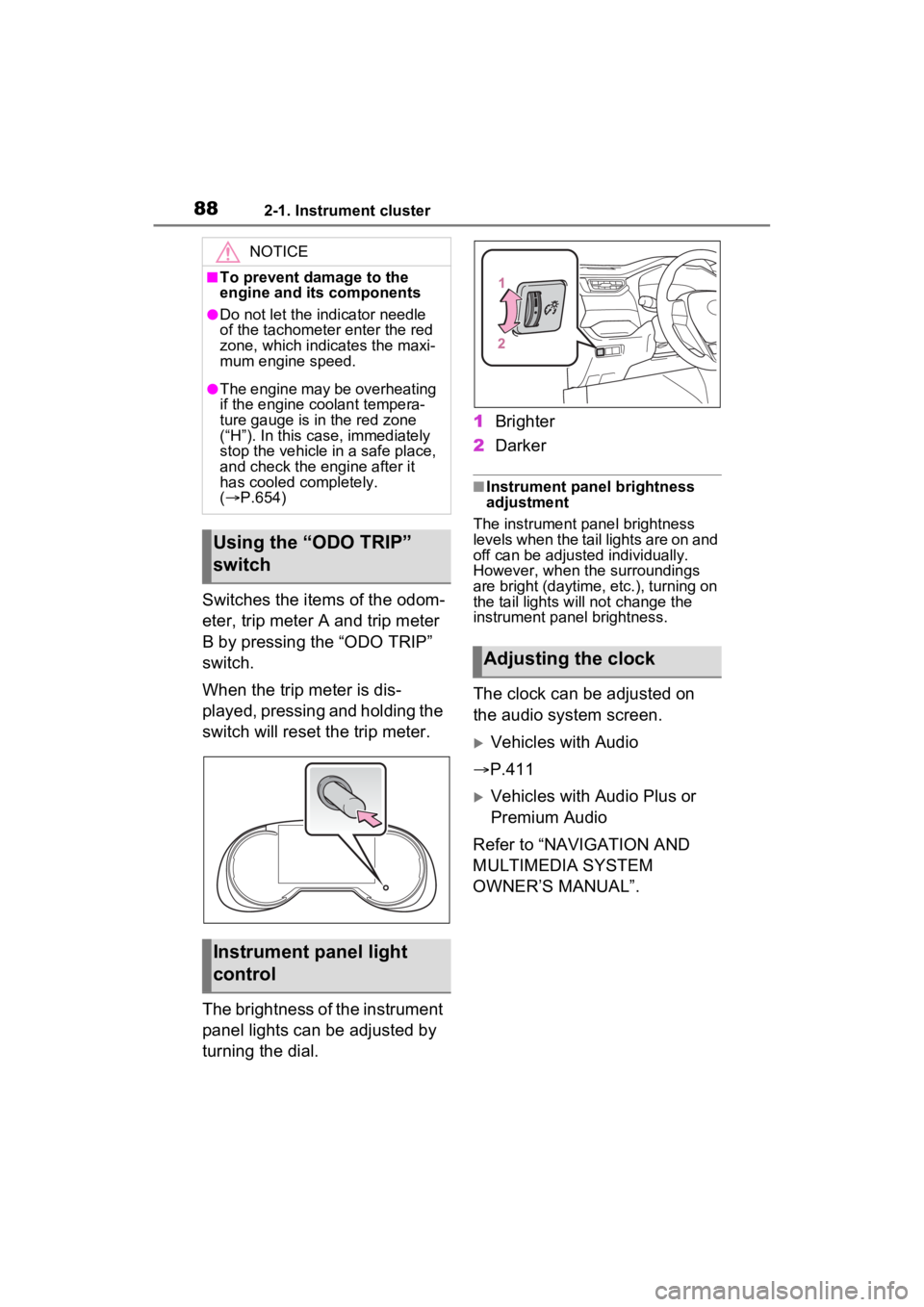
Switches the items of the odom-
eter, trip meter A and trip meter
B by pressing the “ODO TRIP”
switch.
When the trip meter is dis-
played, pressing and holding the
switch will reset the trip meter.
The brightness of the instrument
panel lights can be adjusted by
turning the dial.1
Brighter
2 Darker
■Instrument panel brightness
adjustment
The instrument panel brightness
levels when the tail lights are on and
off can be adjusted individually.
However, when the surroundings
are bright (daytime, etc.), turning on
the tail lights will not change the
instrument panel brightness.
The clock can be adjusted on
the audio system screen.
Vehicles with Audio
P.411
Vehicles with Audio Plus or
Premium Audio
Refer to “NAVIGATION AND
MULTIMEDIA SYSTEM
OWNER’S MANUAL”.
NOTICE
■To prevent damage to the
engine and its components
●Do not let the i ndicator needle
of the tachomete r enter the red
zone, which indicates the maxi-
mum engine speed.
●The engine may be overheating
if the engine coolant tempera-
ture gauge is in the red zone
(“H”). In this case, immediately
stop the vehicle in a safe place,
and check the engine after it
has cooled completely.
( P.654)
Using the “ODO TRIP”
switch
Instrument panel light
control
Adjusting the clock