warning lights TOYOTA RAV4 2022 User Guide
[x] Cancel search | Manufacturer: TOYOTA, Model Year: 2022, Model line: RAV4, Model: TOYOTA RAV4 2022Pages: 748, PDF Size: 22.93 MB
Page 77 of 748
772-1. Instrument cluster
2
Vehicle status information and indicators
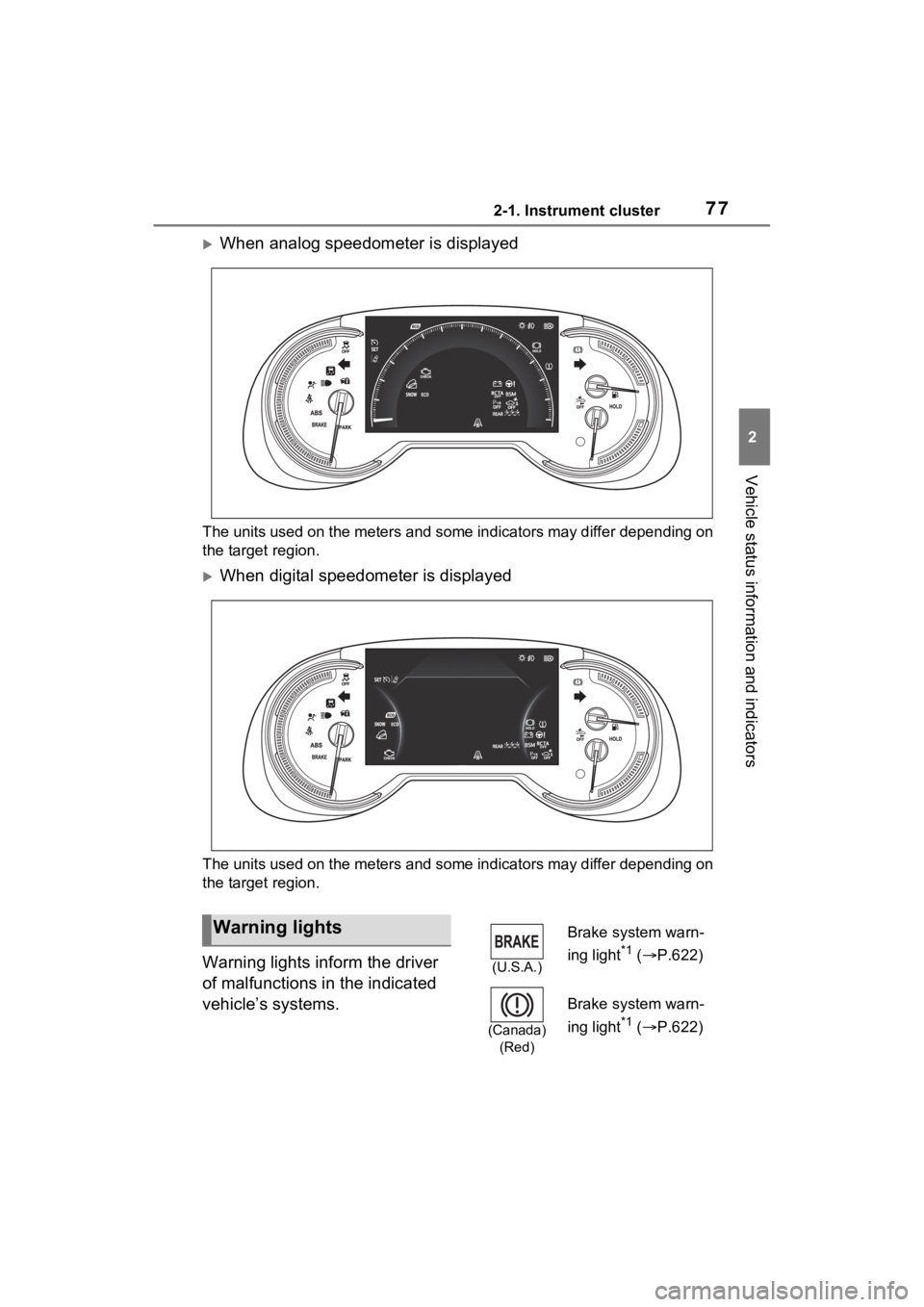
When analog speedometer is displayed
The units used on the meters and some indicators may differ depending on
the target region.
When digital speedometer is displayed
The units used on the meters and some indicators may differ dep ending on
the target region.
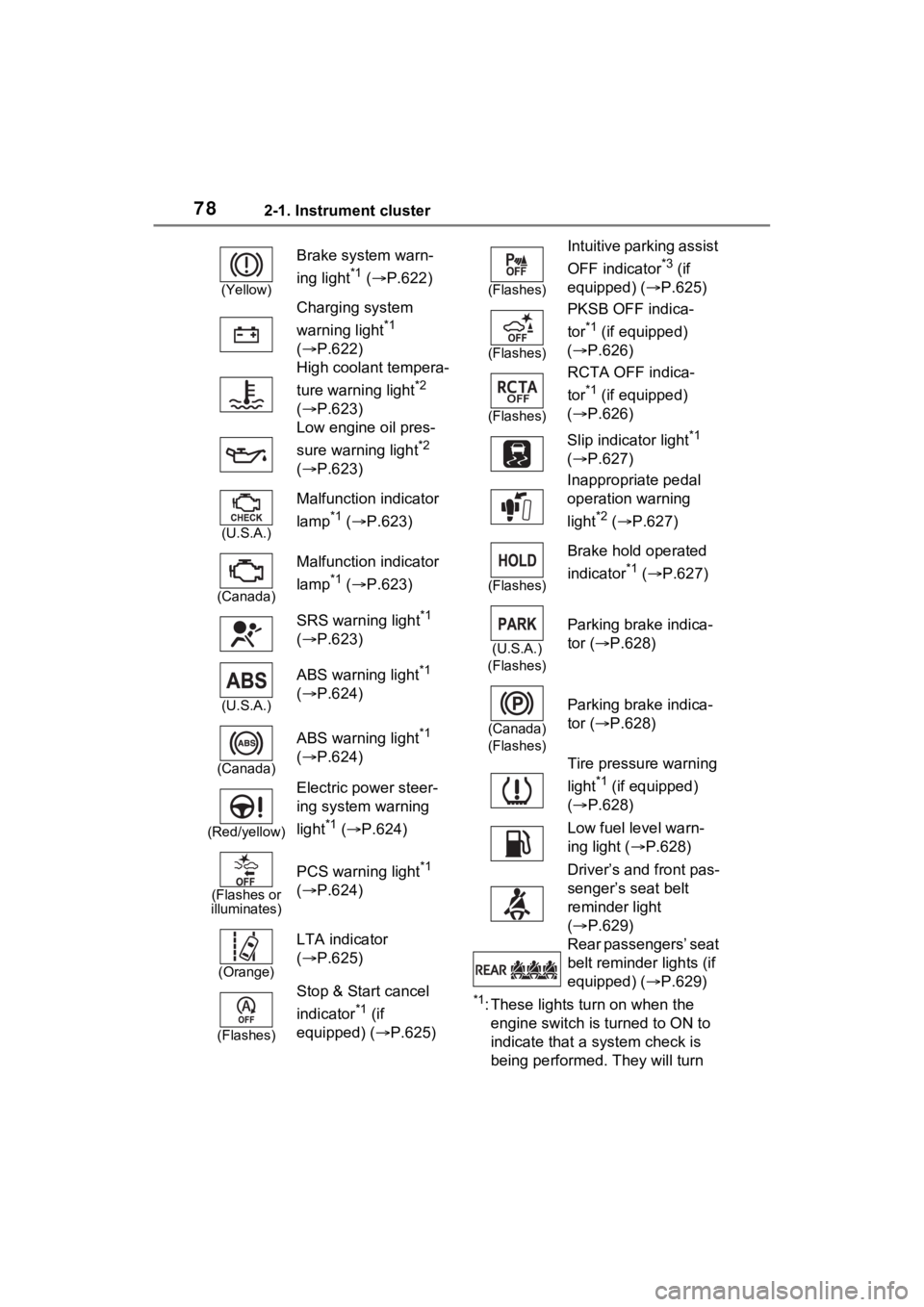
Warning lights inform the driver
of malfunctions in the indicated
vehicle’s systems.
Warning lights
(U.S.A.)
Brake system warn-
ing light
*1 ( P.622)
(Canada)
(Red)
Brake system warn-
ing light
*1 ( P.622)
Page 78 of 748
782-1. Instrument cluster
*1: These lights turn on when the
engine switch is turned to ON to
indicate that a system check is
being performed. They will turn
(Yellow)
Brake system warn-
ing light
*1 ( P.622)
Charging system
warning light
*1
( P.622)
High coolant tempera-
ture warning light
*2
( P.623)
Low engine oil pres-
sure warning light
*2
( P.623)
(U.S.A.)
Malfunction indicator
lamp
*1 ( P.623)
(Canada)
Malfunction indicator
lamp
*1 ( P.623)
SRS warning light
*1
( P.623)
(U.S.A.)
ABS warning light*1
( P.624)
(Canada)
ABS warning light*1
( P.624)
(Red/yellow)
Electric power steer-
ing system warning
light
*1 ( P.624)
(Flashes or
illuminates)
PCS warning light*1
( P.624)
(Orange)
LTA indicator
( P.625)
(Flashes)
Stop & Start cancel
indicator
*1 (if
equipped) (P.625)
(Flashes)
Intuitive parking assist
OFF indicator
*3 (if
equipped) ( P.625)
(Flashes)
PKSB OFF indica-
tor
*1 (if equipped)
( P.626)
(Flashes)
RCTA OFF indica-
tor
*1 (if equipped)
( P.626)
Slip indicator light
*1
( P.627)
Inappropriate pedal
operation warning
light
*2 ( P.627)
(Flashes)
Brake hold operated
indicator
*1 ( P.627)
(U.S.A.)
(Flashes)
Parking brake indica-
tor ( P.628)
(Canada)
(Flashes)
Parking brake indica-
tor ( P.628)
Tire pressure warning
light
*1 (if equipped)
( P.628)
Low fuel level warn-
ing light ( P.628)
Driver’s and front pas-
senger’s seat belt
reminder light
( P.629)
Rear passengers’ seat
belt reminder lights (if
equipped) ( P.629)
Page 80 of 748
802-1. Instrument cluster
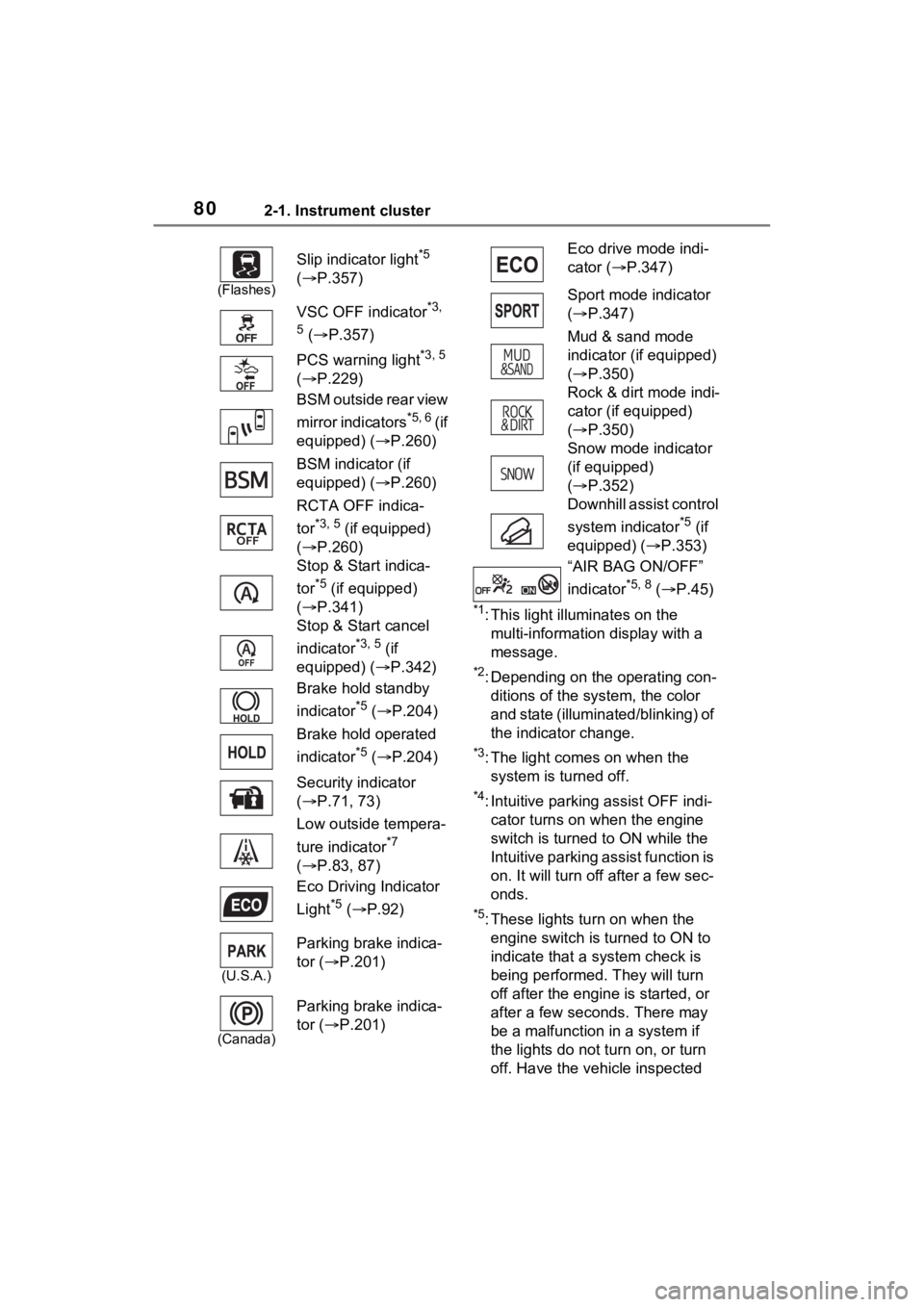
*1: This light illuminates on the multi-information display with a
message.
*2: Depending on the operating con-ditions of the system, the color
and state (illuminat ed/blinking) of
the indicator change.
*3: The light comes on when the system is turned off.
*4: Intuitive parking assist OFF indi-cator turns on wh en the engine
switch is turned t o ON while the
Intuitive parking assist function is
on. It will turn off after a few sec-
onds.
*5: These lights tu rn on when the
engine switch is turned to ON to
indicate that a system check is
being performed. They will turn
off after the engine is started, or
after a few seconds. There may
be a malfunction in a system if
the lights do not turn on, or turn
off. Have the vehicle inspected
(Flashes)
Slip indicator light*5
( P.357)
VSC OFF indicator
*3,
5
( P.357)
PCS warning light
*3, 5
( P.229)
BSM outside rear view
mirror indicators
*5, 6 ( i f
equipped) ( P.260)
BSM indicator (if
equipped) ( P.260)
RCTA OFF indica-
tor
*3, 5 (if equipped)
( P.260)
Stop & Start indica-
tor
*5 (if equipped)
( P.341)
Stop & Start cancel
indicator
*3, 5 (if
equipped) ( P.342)
Brake hold standby
indicator
*5 ( P.204)
Brake hold operated
indicator
*5 ( P.204)
Security indicator
( P.71, 73)
Low outside tempera-
ture indicator
*7
( P.83, 87)
Eco Driving Indicator
Light
*5 ( P.92)
(U.S.A.)
Parking brake indica-
tor ( P.201)
(Canada)
Parking brake indica-
tor ( P.201)
Eco drive mode indi-
cator (P.347)
Sport mode indicator
( P.347)
Mud & sand mode
indicator (if equipped)
( P.350)
Rock & dirt mode indi-
cator (if equipped)
( P.350)
Snow mode indicator
(if equipped)
( P.352)
Downhill assist control
system indicator
*5 (if
equipped) ( P.353)
“AIR BAG ON/OFF”
indicator
*5, 8 ( P.45)
Page 98 of 748
982-1. Instrument cluster
Select to display warning mes-
sages and measures to be
taken if a malfunction is
detected. (P.633)
Displays suggestions to the
driver in the following situations.
To select a response to a dis-
played suggestion, use the
meter control switches.
■Suggestion to turn on the
headlights
If the headlight switch is in other
than or , and the vehicle
speed is 3 mph (5 km/h) or
higher for a certain amount of
time when the surroundings are
dark, a suggestion message will
be displayed.
■Suggestion to turn off the
headlights
If the headlights are left on for a
certain amount of time after the
engine switch has been turned
off, a suggestion message will
be displayed.
When the headlight switch is in
the AUTO position: The mes-
sage asking if you wish to turn
the headlights off is displayed.
To turn the headlights off, select
“Yes”.
If the driver’s door is opened after the engine switch is turned off, this
suggestion message will not be dis-
played.
■Customization
Convenience Services (Suggestion
function) can be tur ned on/off. (Cus-
tomizable features: P.685)
Warning message display
Convenience Services
(Suggestion function)
Page 142 of 748
1423-4. Adjusting the steering wheel and mirrors
*: If equipped
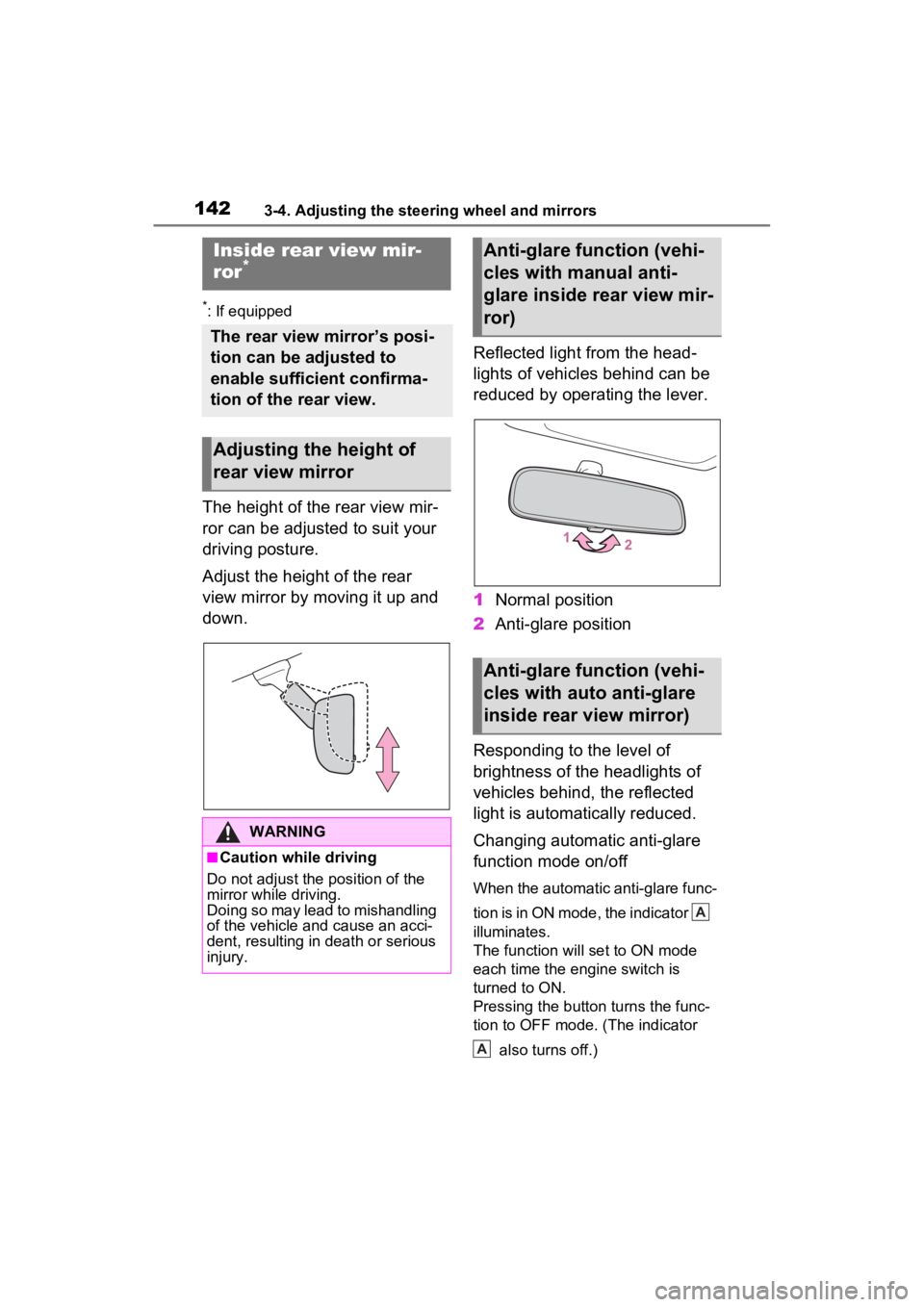
The height of the rear view mir-
ror can be adjusted to suit your
driving posture.
Adjust the height of the rear
view mirror by moving it up and
down.Reflected light from the head-
lights of vehicles behind can be
reduced by operating the lever.
1
Normal position
2 Anti-glare position
Responding to the level of
brightness of the headlights of
vehicles behind, the reflected
light is automatically reduced.
Changing automatic anti-glare
function mode on/off
When the automatic anti-glare func-
tion is in ON mode, the indicator
illuminates.
The function will set to ON mode
each time the engine switch is
turned to ON.
Pressing the button turns the func-
tion to OFF mode. (The indicator also turns off.)
Inside rear view mir-
ror*
The rear view mirror’s posi-
tion can be adjusted to
enable sufficient confirma-
tion of the rear view.
Adjusting the height of
rear view mirror
WARNING
■Caution while driving
Do not adjust the position of the
mirror while driving.
Doing so may lead to mishandling
of the vehicle and cause an acci-
dent, resulting in death or serious
injury.
Anti-glare function (vehi-
cles with manual anti-
glare inside rear view mir-
ror)
Anti-glare function (vehi-
cles with auto anti-glare
inside rear view mirror)
A
A
Page 178 of 748
1784-1. Before driving
■Before towing
Check that the following conditions
are met:
●Ensure that your vehicle’s tires
are properly inflated. ( P.667)
●Trailer tires are inflated according
to the trailer manufacturer’s rec-
ommendation.
●All trailer lights work as required
by law.
●All lights work each time you con-
nect them.
●The trailer ball is set at the proper
height for the coupler on the
trailer.
●The trailer is level when it is
hitched.
Do not drive if the trailer is not
level, and check for improper
tongue weight, overloading, worn
suspension, or other possible
causes.
●The trailer cargo is securely
loaded.
●The rear view mirrors conform to
all applicable federal, state/provin-
cial or local regu lations. If they do
not, install rear view mirrors
appropriate for towing purposes.
Toyota warranties do not
apply to damage or mal-
function caused by towing a
trailer for commercial pur-
poses.
Contact your Toyota dealer for
further information about addi-
tional requirements such as a
towing kit, etc.WARNING
■Trailer towing precautions
To tow a trailer safely, use
extreme care and drive the vehi-
cle in accordance with the trailer’s
characteristics and operating con-
ditions. Failure to do so could
cause an accident resulting in
death or serious injury. Vehicle
stability and brak ing performance
are affected by trailer stability,
brake setting and performance,
and the hitch. Yo ur vehicle will
handle differently when towing a
trailer.
■To avoid accident or injury
●Do not exceed the TWR,
unbraked TWR, GCWR, GVWR
or GAWR.
●Vehicles with towing package: If
the gross trailer weight is over
2000 lb. (907 kg), a sway con-
trol device with sufficient capac-
ity is required.
●Adjust the tongue weight within
the appropriate range. Place
heavier loads as close to the
trailer axle as possible.
●Do not exceed 65 mph (104
km/h), the posted towing speed
limit or the spee d limit for your
trailer as set forth in your trailer
owner’s manual, whichever is
lowest. Slow down sufficiently
before making a turn, in cross
winds, on wet or slippery sur-
face, etc. to help avoid an acci-
dent. If you experience a
vehicle-trailer instability from
reducing a certain speed, slow
down and make sure you keep
your vehicle speed under the
speed of which you experience
the instability.
●Do not make jer ky, abrupt or
sharp turns.
Page 210 of 748
2104-3. Operating the lights and wipers
1With the headlights on, push
the lever away from you to
turn on the high beams.
Pull the lever toward you to the
center position to turn the high
beams off.
2Pull the lever toward you and
release it to flash the high
beams once.
You can flash the high beams with
the headlights on or off.
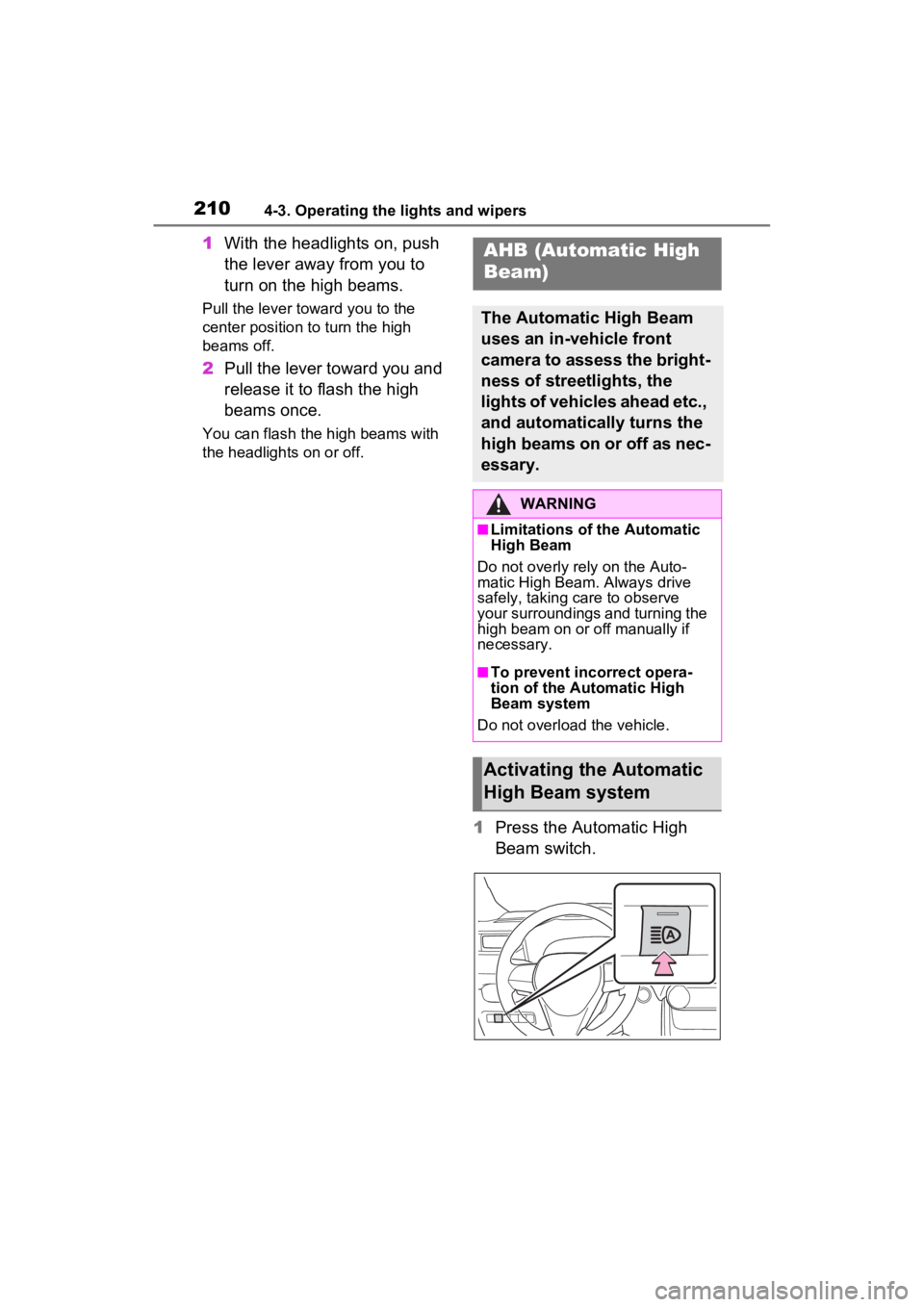
1 Press the Automatic High
Beam switch.
AHB (Automatic High
Beam)
The Automatic High Beam
uses an in-vehicle front
camera to assess the bright-
ness of streetlights, the
lights of vehicles ahead etc.,
and automatically turns the
high beams on or off as nec-
essary.
WARNING
■Limitations of the Automatic
High Beam
Do not overly rely on the Auto-
matic High Beam. Always drive
safely, taking care to observe
your surroundings and turning the
high beam on or off manually if
necessary.
■To prevent incorrect opera-
tion of the Automatic High
Beam system
Do not overload the vehicle.
Activating the Automatic
High Beam system
Page 217 of 748
2174-3. Operating the lights and wipers
4
Driving
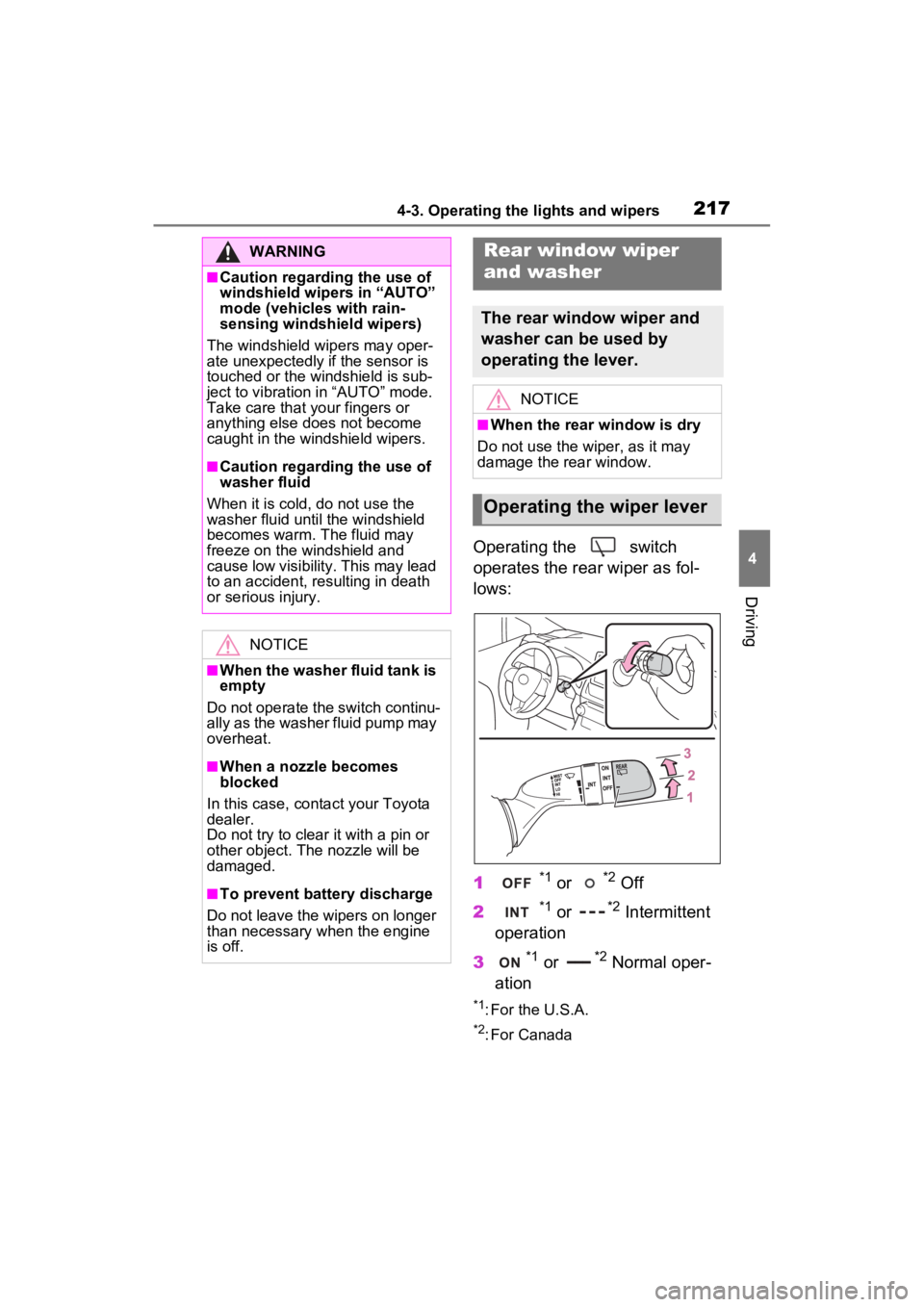
Operating the switch
operates the rear wiper as fol-
lows:
1
*1 or *2 Off
2
*1 or *2 Intermittent
operation
3
*1 or *2 Normal oper-
ation
*1: For the U.S.A.
*2: For Canada
WARNING
■Caution regarding the use of
windshield wipers in “AUTO”
mode (vehicles with rain-
sensing windshield wipers)
The windshield wipers may oper-
ate unexpectedly if the sensor is
touched or the windshield is sub-
ject to vibration in “AUTO” mode.
Take care that y our fingers or
anything else does not become
caught in the windshield wipers.
■Caution regarding the use of
washer fluid
When it is cold, do not use the
washer fluid until the windshield
becomes warm. The fluid may
freeze on the windshield and
cause low visibility. This may lead
to an accident, resulting in death
or serious injury.
NOTICE
■When the washer fluid tank is
empty
Do not operate the switch continu-
ally as the washer fluid pump may
overheat.
■When a nozzle becomes
blocked
In this case, conta ct your Toyota
dealer.
Do not try to clear it with a pin or
other object. The nozzle will be
damaged.
■To prevent battery discharge
Do not leave the wipers on longer
than necessary when the engine
is off.
Rear window wiper
and washer
The rear window wiper and
washer can be used by
operating the lever.
NOTICE
■When the rear window is dry
Do not use the wiper, as it may
damage the rear window.
Operating the wiper lever
Page 224 of 748
2244-5. Using the driving support systems
WARNING
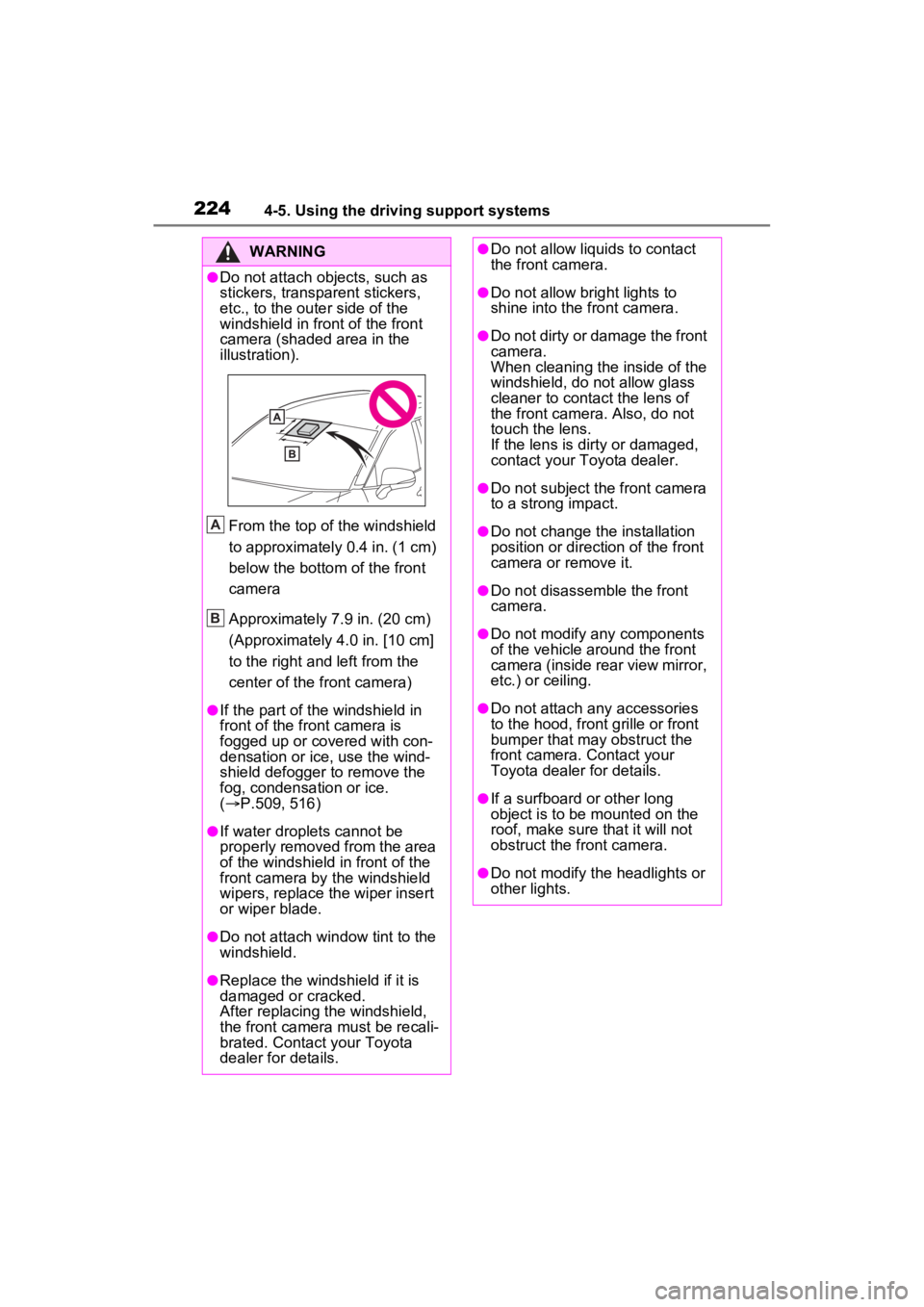
●Do not attach objects, such as
stickers, transparent stickers,
etc., to the outer side of the
windshield in fr ont of the front
camera (shaded area in the
illustration).
From the top of the windshield
to approximately 0.4 in. (1 cm)
below the bottom of the front
camera
Approximately 7.9 in. (20 cm)
(Approximately 4.0 in. [10 cm]
to the right and left from the
center of the front camera)
●If the part of the windshield in
front of the front camera is
fogged up or covered with con-
densation or ice, use the wind-
shield defogger to remove the
fog, condensation or ice.
( P.509, 516)
●If water droplets cannot be
properly removed from the area
of the windshield in front of the
front camera by the windshield
wipers, replace the wiper insert
or wiper blade.
●Do not attach win dow tint to the
windshield.
●Replace the windshield if it is
damaged or cracked.
After replacing the windshield,
the front camera must be recali-
brated. Contact your Toyota
dealer for details.
A
B
●Do not allow liquids to contact
the front camera.
●Do not allow bright lights to
shine into the front camera.
●Do not dirty or damage the front
camera.
When cleaning the inside of the
windshield, do not allow glass
cleaner to contact the lens of
the front camera . Also, do not
touch the lens.
If the lens is dirty or damaged,
contact your Toyota dealer.
●Do not subject the front camera
to a strong impact.
●Do not change the installation
position or direction of the front
camera or remove it.
●Do not disassemble the front
camera.
●Do not modify any components
of the vehicle around the front
camera (inside rear view mirror,
etc.) or ceiling.
●Do not attach any accessories
to the hood, front grille or front
bumper that may obstruct the
front camera. Contact your
Toyota dealer for details.
●If a surfboard or other long
object is to be mounted on the
roof, make sure that it will not
obstruct the front camera.
●Do not modify the headlights or
other lights.
Page 236 of 748
2364-5. Using the driving support systems
WARNING
●Vehicle is driven in a construc-
tion zone.
●A spare tire, tire chains, etc. are
equipped.
●When the tires have been
excessively worn, or when the
tire inflation pressure is low.
●When your vehicle is towing a
trailer or during emergency tow-
ing
■Preventing LTA system mal-
functions and operations per-
formed by mistake
●Do not modify the headlights or
place stickers, etc. on the sur-
face of the lights.
●Do not modify the suspension
etc. If the suspension etc. needs
to be replaced, contact your
Toyota dealer.
●Do not install or place anything
on the hood or grille. Also, do
not install a grille guard (bull
bars, kangaroo bar, etc.).
●If your windshield needs
repairs, contact your Toyota
dealer.
■Conditions in which functions
may not operate properly
In the following situations, the
functions may not operate prop-
erly and the vehicle may depart
from its lane. Drive safely by
always paying careful attention to
your surroundings and operate
the steering wheel to correct the
path of the vehicle without relying
solely on the functions.
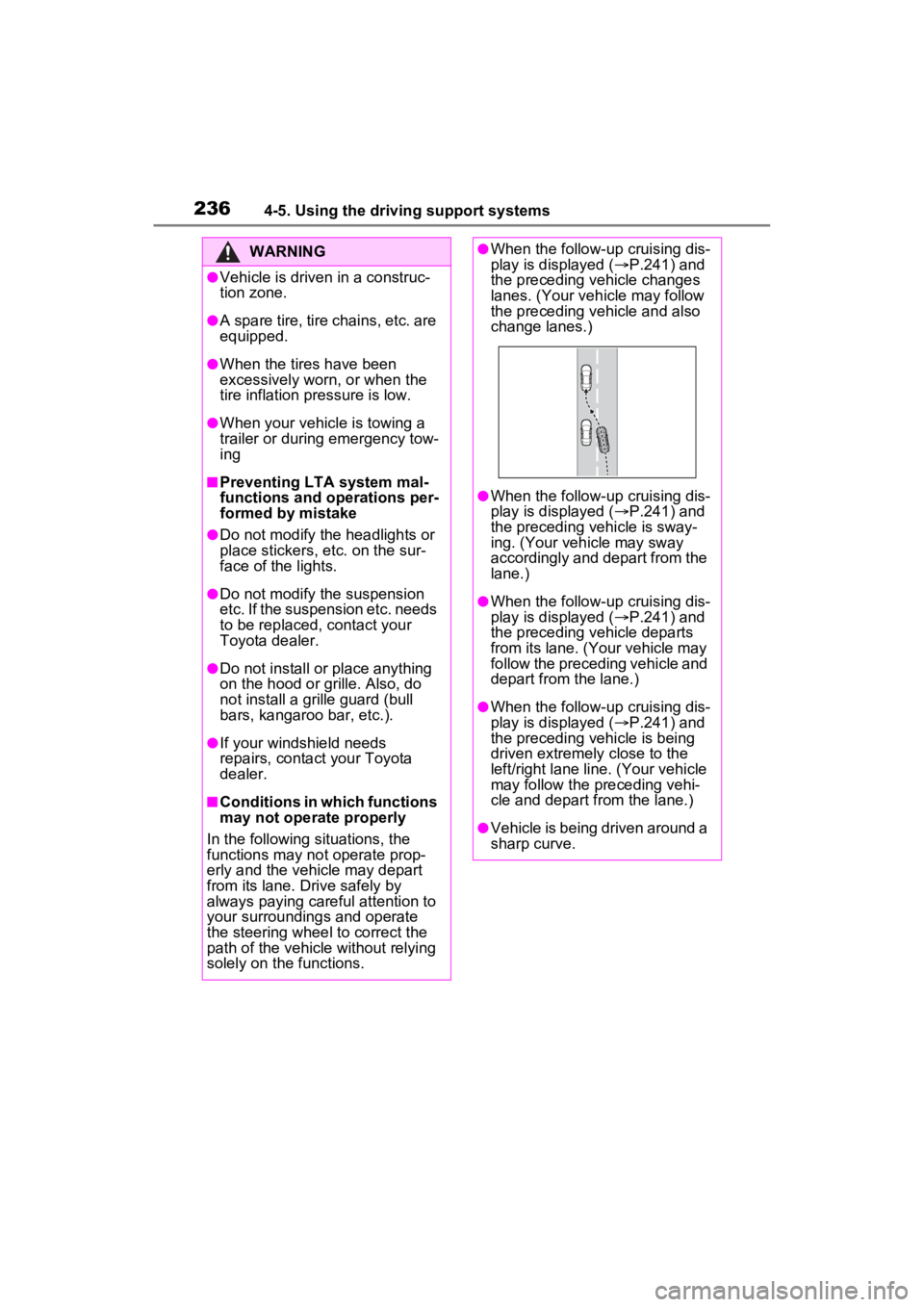
●When the follow-up cruising dis-
play is displayed ( P.241) and
the preceding vehicle changes
lanes. (Your veh icle may follow
the preceding vehicle and also
change lanes.)
●When the follow-up cruising dis-
play is displayed ( P.241) and
the preceding vehicle is sway-
ing. (Your vehicle may sway
accordingly and depart from the
lane.)
●When the follow-up cruising dis-
play is displayed ( P.241) and
the preceding vehicle departs
from its lane. (Your vehicle may
follow the preceding vehicle and
depart from the lane.)
●When the follow-up cruising dis-
play is displayed ( P.241) and
the preceding vehicle is being
driven extremely close to the
left/right lane line. (Your vehicle
may follow the preceding vehi-
cle and depart from the lane.)
●Vehicle is being driven around a
sharp curve.