battery TOYOTA RAV4 2022 Owner's Manual
[x] Cancel search | Manufacturer: TOYOTA, Model Year: 2022, Model line: RAV4, Model: TOYOTA RAV4 2022Pages: 748, PDF Size: 22.93 MB
Page 196 of 748
1964-2. Driving procedures
for long periods of time when the
engine is not running.
If the engine is stopped with the
shift lever in a position other
than P, the engine switch will
not be turned to OFF but instead
be turned to ACC. Perform the
following procedure to turn the
switch to OFF:
1Check that the parking brake
is set.
2 Shift the shift lever to P.
3 Check that “ACCESSORY” is
displayed on the multi-infor-
mation display and then
press the engine switch
shortly and firmly.
4 Check that “ACCESSORY”
or “IGNITION ON” on the
multi-information display is
off.
NOTICE
■To prevent battery discharge
●Do not leave the engine switch
in ACC or ON for long periods of
time without the engine running.
●If “ACCESSORY” or “IGNITION
ON” is displayed on the multi-
information display, the engine
switch is not in OFF. Exit the
vehicle after turning the engine
switch to OFF.
When stopping the engine
with the shift lever in a
position other than P
NOTICE
■To prevent battery discharge
Do not stop the engine when the
shift lever is in a position other
than P. If the engine is stopped in
another shift lever position, the
engine switch will not be turned to
OFF but instead be turned to
ACC. If the vehicle is left in ACC,
battery dischar ge may occur.
Page 209 of 748
2094-3. Operating the lights and wipers
4
Driving
■Automatic light off system
●When the headlights are on: The
lights turn off 30 seconds after the
engine switch is turned to ACC or
OFF and a door is opened and
closed. (The lights turn off imme-
diately if on the key is
pressed after all the doors are
closed.)
●When only the tail lights are on:
The tail lights turn off automati-
cally if the engine switch is turned
to ACC or OFF and the driver’s
door is opened.
To turn the lights on again, turn the
engine switch to ON, or turn the light
switch to the , or posi-
tion once and then back to or
position.
■Light reminder buzzer
A buzzer sounds when the engine
switch is turned to OFF and the
driver’s door is opened while the
lights are turned on.
■Windshield wiper linked head-
light illumination (if equipped)
When driving during daytime with
the headlight switch turned to , if
the windshield wipers are used, the
headlights will turn on automatically
after several seconds to help
enhance the visibility of your vehi-
cle.
■Battery-saving function
In order to prevent the battery of the
vehicle from discharging, if the
headlights and/or t ail lights are on when the engine switch is turned to
OFF, the battery saving function will
operate and automatically turn off all
the lights after approximately 20
minutes.
When any of the following are per-
formed, the battery-saving function
is canceled once and then reacti-
vated. All the light
s will turn off auto-
matically 20 minutes after the
battery-saving function has been
reactivated:
●When the headlight switch is oper-
ated
●When a door is opened or closed
■If “Headlight System Malfunc-
tion Visit Your Dealer” is dis-
played on the multi-information
display
The system may be malfunctioning.
Have the vehicle inspected by your
Toyota dealer.
■Customization
Settings (e.g. light sensor sensitiv-
ity) can be changed.
(Customizable features: P.691)
NOTICE
■To prevent battery discharge
Do not leave the lights on longer
than necessary w hen the engine
is not running.
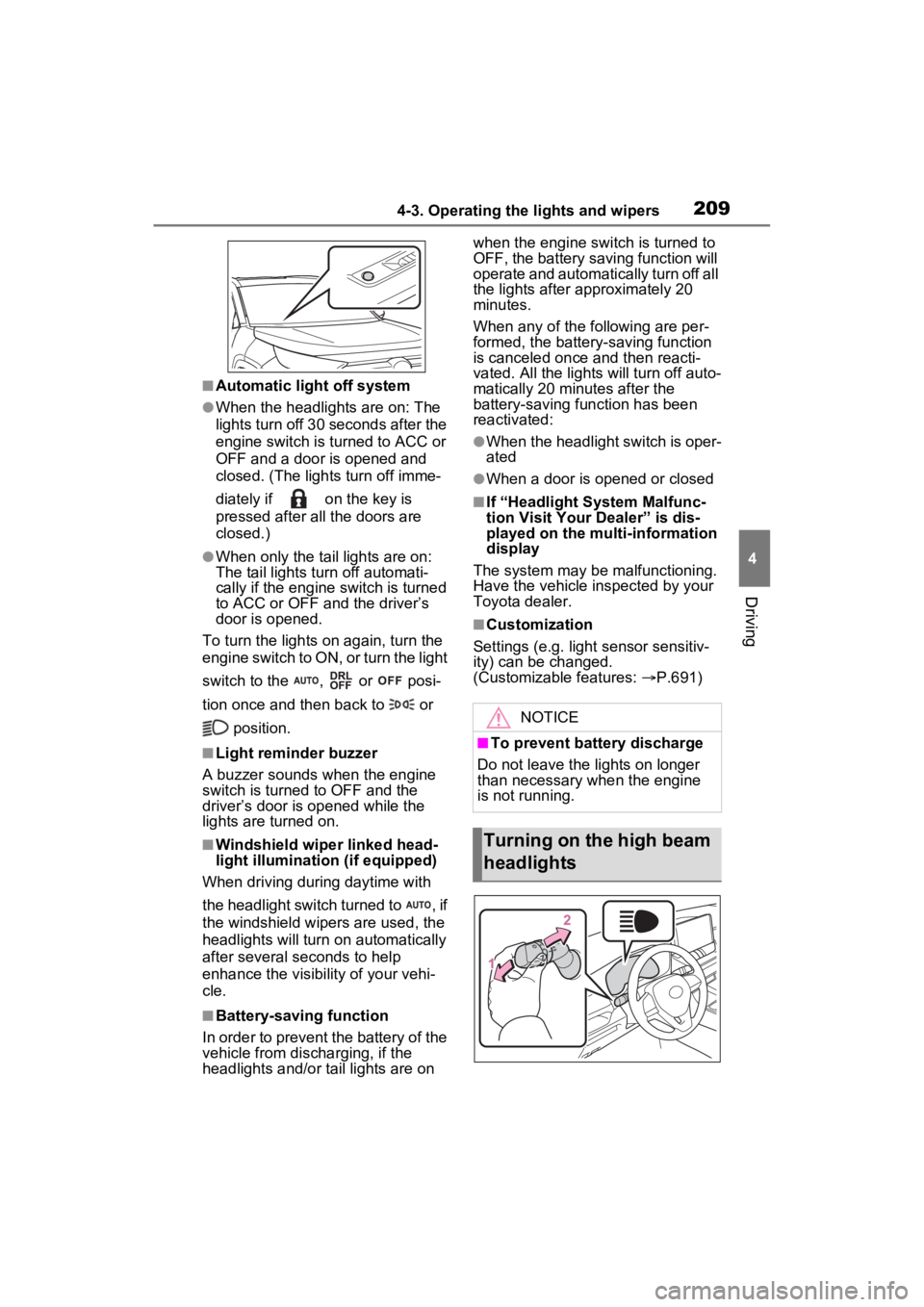
Turning on the high beam
headlights
Page 217 of 748
2174-3. Operating the lights and wipers
4
Driving
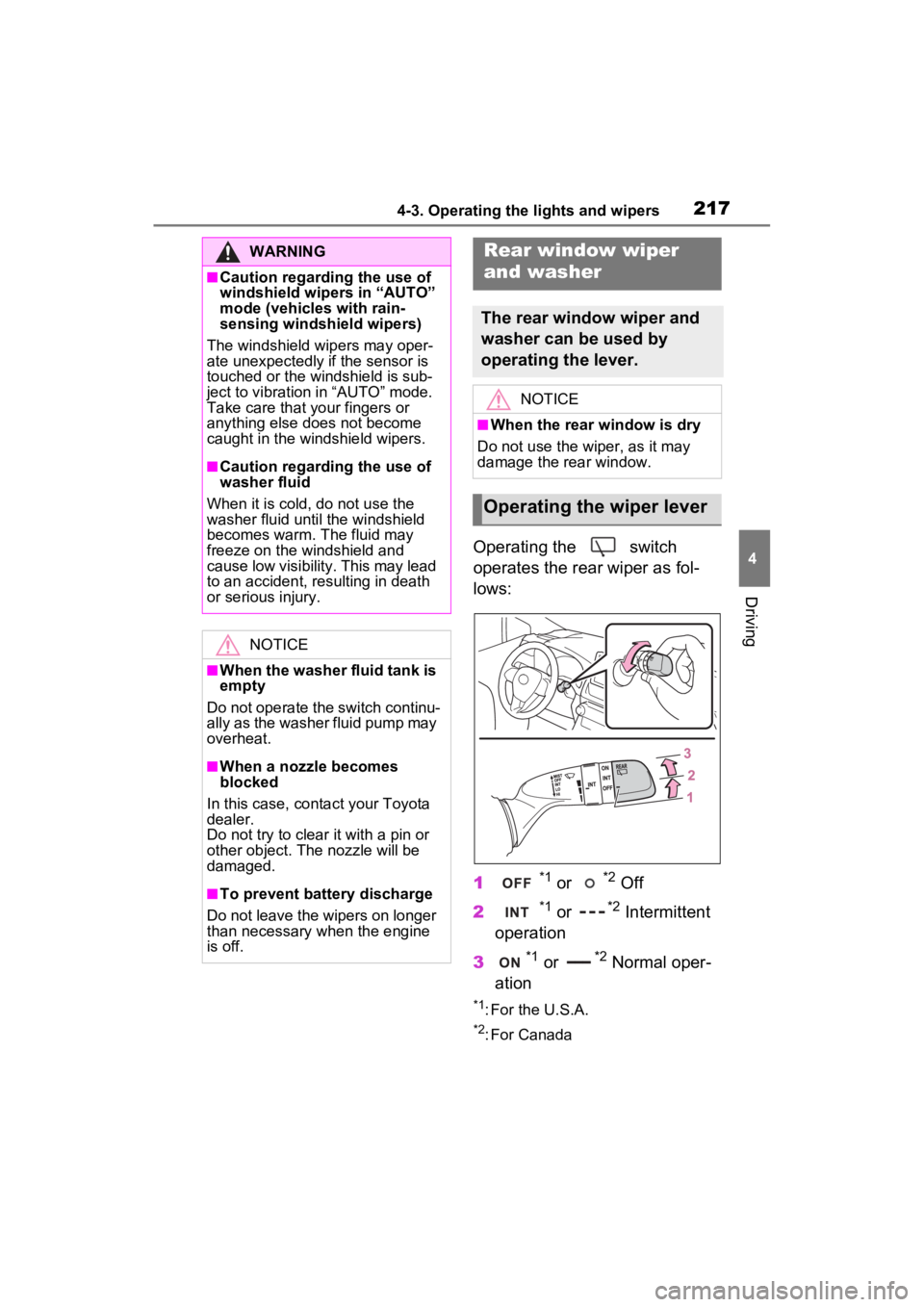
Operating the switch
operates the rear wiper as fol-
lows:
1
*1 or *2 Off
2
*1 or *2 Intermittent
operation
3
*1 or *2 Normal oper-
ation
*1: For the U.S.A.
*2: For Canada
WARNING
■Caution regarding the use of
windshield wipers in “AUTO”
mode (vehicles with rain-
sensing windshield wipers)
The windshield wipers may oper-
ate unexpectedly if the sensor is
touched or the windshield is sub-
ject to vibration in “AUTO” mode.
Take care that y our fingers or
anything else does not become
caught in the windshield wipers.
■Caution regarding the use of
washer fluid
When it is cold, do not use the
washer fluid until the windshield
becomes warm. The fluid may
freeze on the windshield and
cause low visibility. This may lead
to an accident, resulting in death
or serious injury.
NOTICE
■When the washer fluid tank is
empty
Do not operate the switch continu-
ally as the washer fluid pump may
overheat.
■When a nozzle becomes
blocked
In this case, conta ct your Toyota
dealer.
Do not try to clear it with a pin or
other object. The nozzle will be
damaged.
■To prevent battery discharge
Do not leave the wipers on longer
than necessary when the engine
is off.
Rear window wiper
and washer
The rear window wiper and
washer can be used by
operating the lever.
NOTICE
■When the rear window is dry
Do not use the wiper, as it may
damage the rear window.
Operating the wiper lever
Page 218 of 748
2184-3. Operating the lights and wipers
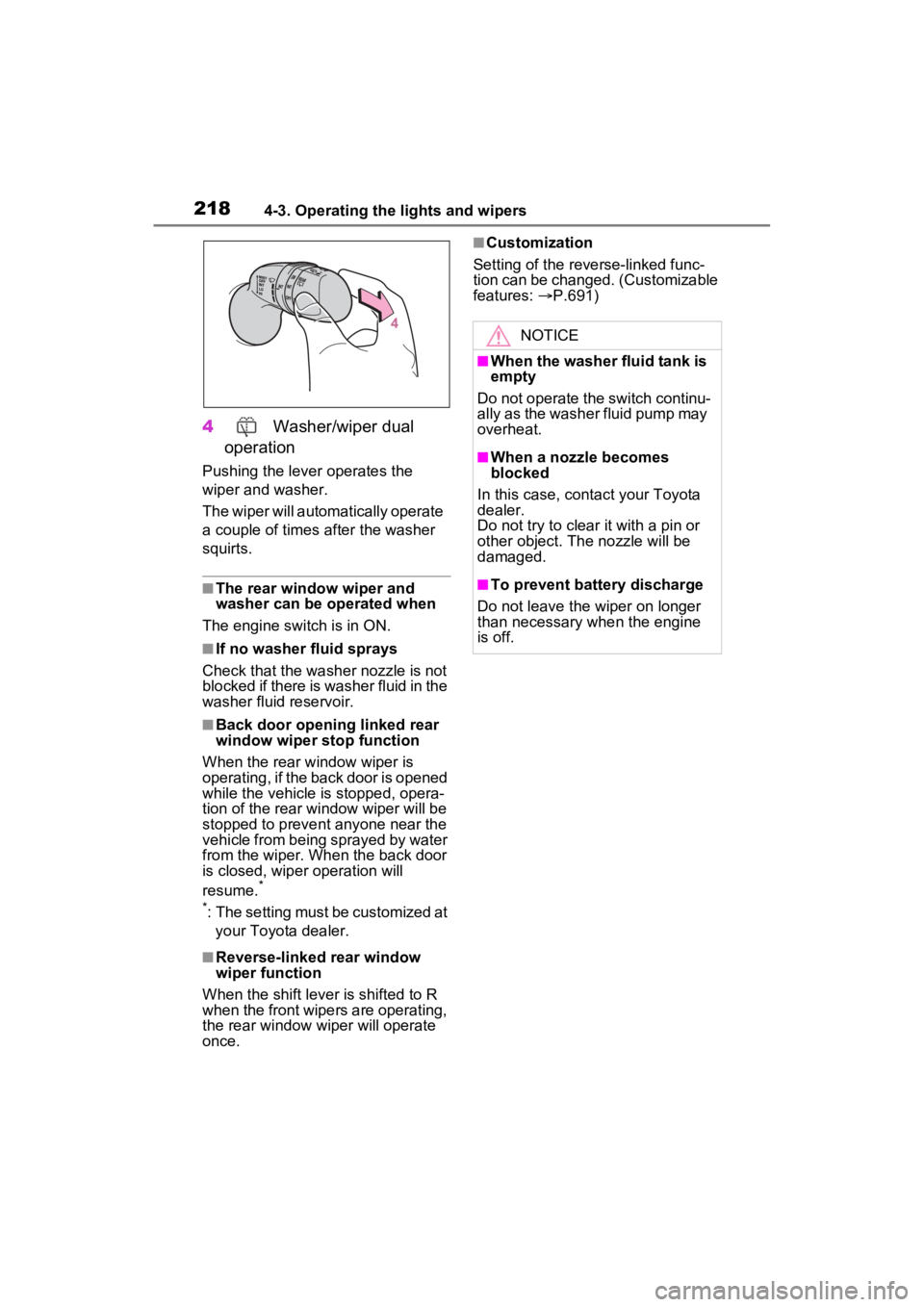
4 Washer/wiper dual
operation
Pushing the lever operates the
wiper and washer.
The wiper will automatically operate
a couple of times after the washer
squirts.
■The rear window wiper and
washer can be operated when
The engine switch is in ON.
■If no washer fluid sprays
Check that the washer nozzle is not
blocked if there is washer fluid in the
washer fluid reservoir.
■Back door opening linked rear
window wiper stop function
When the rear w indow wiper is
operating, if the back door is opened
while the vehicle is stopped, opera-
tion of the rear window wiper will be
stopped to prevent anyone near the
vehicle from being sprayed by water
from the wiper. When the back door
is closed, wiper operation will
resume.
*
*
: The setting must be customized at your Toyota dealer.
■Reverse-linked rear window
wiper function
When the shift lever is shifted to R
when the front wipers are operating,
the rear window wiper will operate
once.
■Customization
Setting of the reverse-linked func-
tion can be changed. (Customizable
features: P.691)
NOTICE
■When the washer fluid tank is
empty
Do not operate the switch continu-
ally as the washer fluid pump may
overheat.
■When a nozzle becomes
blocked
In this case, contact your Toyota
dealer.
Do not try to clear it with a pin or
other object. The nozzle will be
damaged.
■To prevent battery discharge
Do not leave the wiper on longer
than necessary w hen the engine
is off.
Page 230 of 748
2304-5. Using the driving support systems
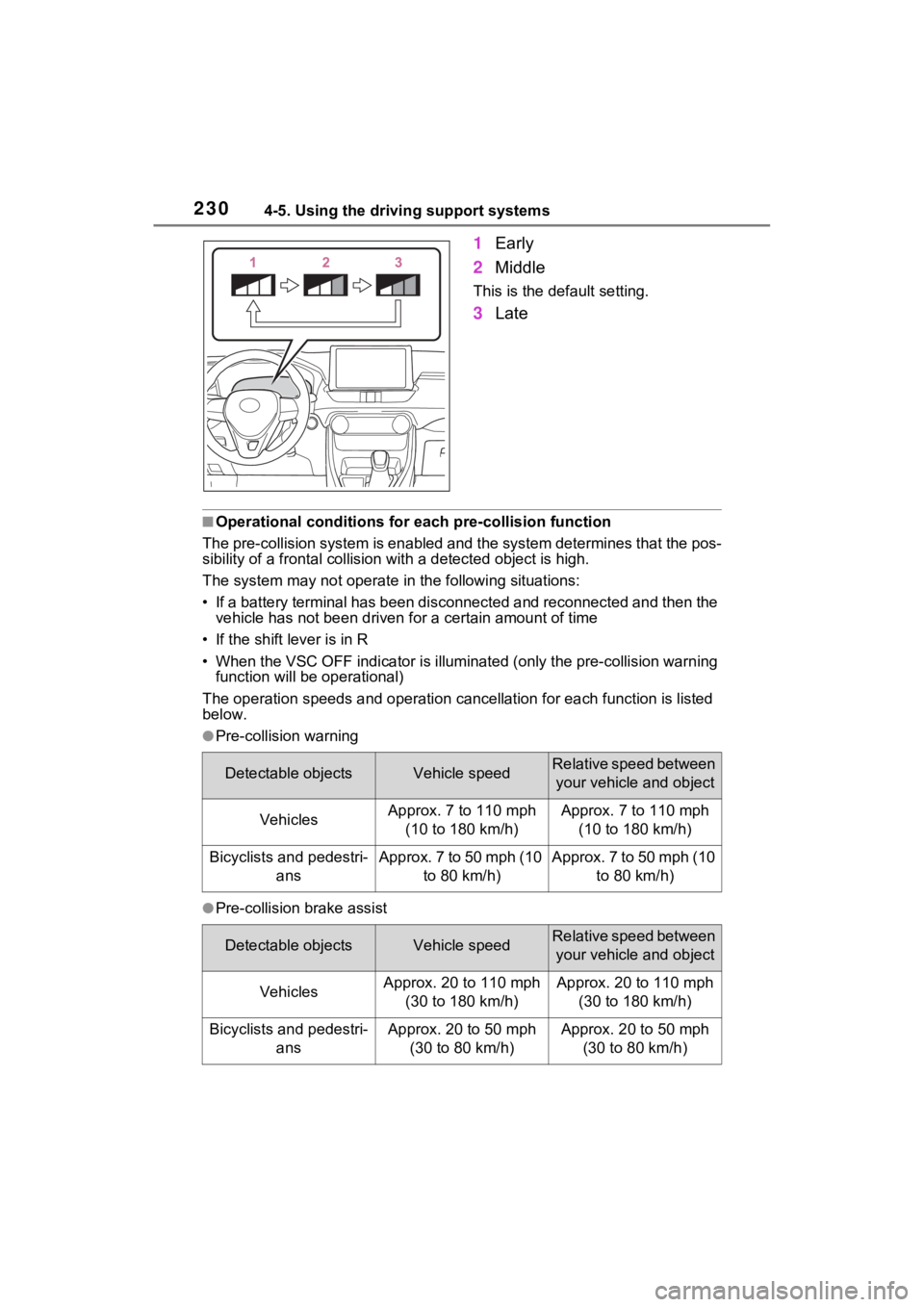
1Early
2 Middle
This is the default setting.
3Late
■Operational conditions for e ach pre-collision function
The pre-collision syst em is enabled and the system determines t hat the pos-
sibility of a frontal c ollision with a detected object is high.
The system may not operate in the following situations:
• If a battery terminal has been disconnected and reconnected an d then the
vehicle has not been driven for a certain amount of time
• If the shift lever is in R
• When the VSC OFF indicator is illuminated (only the pre-collision warning
function will be operational)
The operation speeds and operati on cancellation for each function is listed
below.
●Pre-collision warning
●Pre-collision brake assist
Detectable objectsVehicle speedRelative speed between
your vehicle and object
VehiclesApprox. 7 to 110 mph (10 to 180 km/h)Approx. 7 to 110 mph (10 to 180 km/h)
Bicyclists and pedestri- ansApprox. 7 to 50 mph (10 to 80 km/h)Approx. 7 to 50 mph (10 to 80 km/h)
Detectable objectsVehicle speedRelative speed between your vehicle and object
VehiclesApprox. 20 to 110 mph (30 to 180 km/h)Approx. 20 to 110 mph (30 to 180 km/h)
Bicyclists and pedestri- ansApprox. 20 to 50 mph (30 to 80 km/h)Approx. 20 to 50 mph (30 to 80 km/h)
Page 273 of 748
2734-5. Using the driving support systems
4
Driving
●Initialization may not have been
performed after a battery terminal
was disconnected and recon-
nected. Initialize the system.
( P.273)
If this message continues to be
displayed even after initialization,
have the vehicle inspected by
your Toyota dealer.
■If a battery terminal has been
disconnected and reconnected
The system needs to be initialized.
To initialize the system, drive the
vehicle straight ahead for 5 seconds
or more at a speed of approximately
22 mph (35 km/h) or more.
■Sensor detection information
●The sensor’s detection areas are
limited to the areas around the
vehicle’s front and rear bumpers.
●The following situations may occur
during use.
• Depending on the shape of the
object and other factors, the
detection distance may shorten,
or detection may be impossible.
• Detection may be impossible if static objects draw too close to the
sensor.
• There will be a short delay
between static object detection
and display (warning buzzer
sounds). Even at low speeds,
there is a possibilit y that the object
will come within 11. 9 in. (30 cm)
before the display is shown and
the warning buzzer sounds.
• It might be difficult to hear the
buzzer due to the volume of the
audio system or air flow noise of
the air conditioning system.
• It may be difficult to hear the sound of this system due to the
buzzers of other systems.
■Objects which the system may
not properly detect
The shape of the object may pre-
vent the sensor from detecting it.
Pay particular attention to the fol-
lowing objects:
●Wires, fences, ropes, etc.
●Cotton, snow and other materials
that absorb sound waves
●Sharply-angled objects
●Low objects
●Tall objects with upper sections
projecting outwards in the direc-
tion of your vehicle
People may not be detected if they
are wearing certain types of cloth-
ing.
■Situations in which the system
may not operate properly
Certain vehicle conditions and the
surrounding environment may affect
the ability of a sensor to correctly
detect objects. Part icular instances
where this may occur are listed
below.
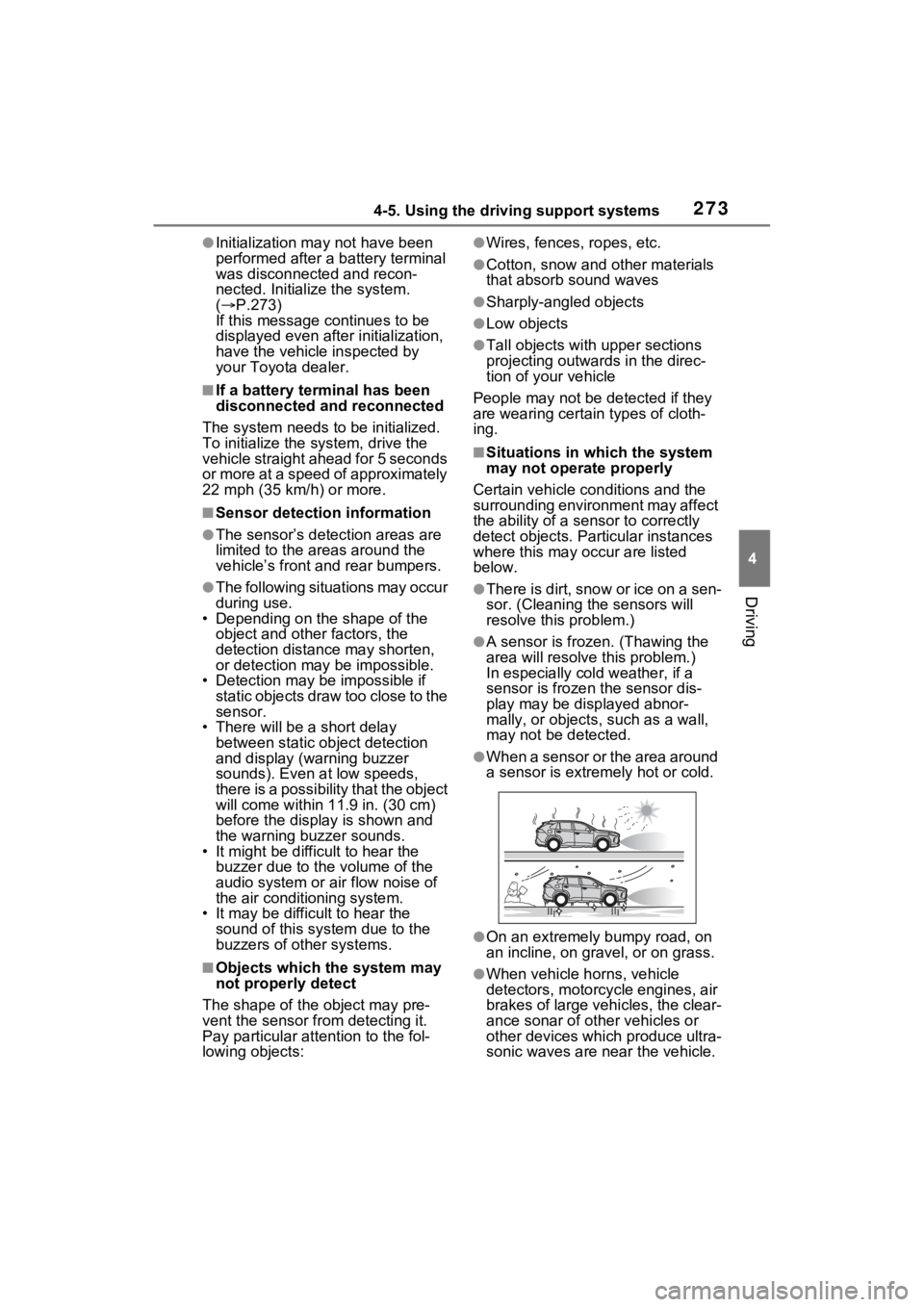
●There is dirt, snow or ice on a sen-
sor. (Cleaning th e sensors will
resolve this problem.)
●A sensor is froz en. (Thawing the
area will resolve this problem.)
In especially cold weather, if a
sensor is frozen the sensor dis-
play may be displayed abnor-
mally, or objects, such as a wall,
may not be detected.
●When a sensor or the area around
a sensor is extremely hot or cold.
●On an extremely bumpy road, on
an incline, on gravel, or on grass.
●When vehicle horns, vehicle
detectors, motorcycle engines, air
brakes of large vehicles, the clear-
ance sonar of ot her vehicles or
other devices which produce ultra-
sonic waves are near the vehicle.
Page 282 of 748

2824-5. Using the driving support systems
ing for approximately 2 seconds for
it to automatically be canceled.
Then, the vehicle can be operated
by depressing the accelerator pedal.
■Re-enabling the Parking Sup-
port Brake
To re-enable the Parking Support
Brake when it is disabled due to
operation of the Parking Support
Brake, either enable the system
again ( P.279), or turn the engine
switch to OFF and then back to ON.
Additionally, if the object becomes
no longer in the traveling direction of
the vehicle or if the traveling direc-
tion of the vehicle changes (such as
changing from moving forward to
backing up, or from backing up to
moving forward) , the system will be
re-enabled automatically.
■If “PKSB Unavailable” is dis-
played on the multi-information
display and the PKSB OFF indi-
cator is flashing
If this message is displayed, a sen-
sor on the front or rear bumper may
be dirty. Clean the sensors and their
surrounding area on the bumpers.
■If “PKSB Unavailable” and
“Parking Assist Unavailable
Clean Parking Assist Sensor”
are displayed on the multi-infor-
mation display and the PKSB
OFF indicator is flashing
●A sensor may be covered with ice,
snow, dirt, etc. In this case,
remove the ice, s now, dirt, etc.,
from the sensor to return the sys-
tem to normal. If this message is
shown even after removing dirt
from the sensor, or shown when
the sensor was not dirty to begin
with, have the vehicle inspected at
your Toyota dealer.
●A sensor may be frozen. Once the
ice melts, the sys tem will return to
normal.
●Water may be continuously flow-
ing over the sensor surface, such
as in a heavy rain. When the sys- tem determines that it is normal,
the system will retu
rn to normal.
■If a battery terminal has been
disconnected and reconnected
The system needs to be initialized.
To initialize the system, drive the
vehicle straight ahead for 5 seconds
or more at a speed of approximately
22 mph (35 km/h) or more.
Page 308 of 748
3084-5. Using the driving support systems
The estimated course
lines move even
though the steering
wheel is straightThere is a malfunction in
the signals being output
by the steering sensor.Have the vehicle
inspected by your
Toyota dealer.
Guide lines are not dis-
playedThe back door is open.
Close the back door.
If this does not resolve
the symptom, have the
vehicle inspected by
your Toyota dealer.
The estimated course
lines are not displayed
Battery has been rein-
stalled.
The steering wheel
has been moved while
the battery was being
reinstalled.
Battery power is low.
The steering sensor
has been reinstalled.
There is a malfunction
in the signals being
output by the steering
sensor.
Stop the vehicle, and
turn the steering wheel
as far as it will go to the
left and right.
If this does not resolve
the symptom, have the
vehicle inspected by
your Toyota dealer.
SymptomLikely causeSolution
Page 340 of 748
3404-5. Using the driving support systems
The estimated course
lines move even though
the steering wheel is
straightThere is a malfunction
in the signals being out-
put by the steering sen-
sor.Have the vehicle
inspected by your
Toyota dealer.
Guide lines are not dis-
playedThe back door is open.
Close the back door.
If this does not resolve
the symptom, have the
vehicle inspected by
your Toyota dealer.
The estimated course
lines are not displayed
Battery has been rein-
stalled.
The steering wheel
has been moved while
the battery was being
reinstalled.
Battery power is low.
The steering sensor
has been reinstalled.
There is a malfunction
in the signals being
output by the steering
sensor.
Have the vehicle
inspected by your
Toyota dealer.
The panoramic view dis-
play cannot be magni-
fied
The intuitive parking
assist may be malfunc-
tioning or dirty.
Follow the correction
procedures for malfunc-
tions of the intuitive
parking assist.
( P.270)
The see-through
view/moving view can-
not be displayed
Product license
SymptomLikely causeSolution
Page 343 of 748

3434-5. Using the driving support systems
4
Driving
the vehicle is stopped by the
dynamic radar cruise control with
full-speed range when in vehicle-
to-vehicle distance control mode)
• The D shift position is selected.
• The driver’s seat belt is fastened.
• The driver’s door is closed.
• The selected driv ing mode is not
snow mode (AWD models).
• Mud & Sand or Rock & Dirt mode is not selected for Multi-terrain
Select (AWD models).
• The windshield defogger is off. (vehicles without a manual air
conditioning system)
• The accelerator pedal is not being depressed.
• The engine is adequately warmed
up.
• The outside temperature is 23°F (- 5°C) or higher.
• The hood is closed. ( P.344)
●In the following situations, the
engine may not be stopped by the
Stop & Start syste m. This is not a
malfunction of the Stop & Start
system.
• When the air conditioning system is being used.
• When the battery is undergoing a periodic recharge.
• When the battery is not sufficiently
charged, such as if the vehicle
has been parked for a long time
and the battery charge has
decreased, the e lectric load is
large, the battery fluid tempera-
ture is excessively low or the bat-
tery has deteriorated.
• When the brake booster vacuum is low.
• When the elapsed time since the engine was restarted is short.
• When the vehicle is stopped fre-
quently, such as when in a traffic
jam.
• When the engine coolant tem- perature or transmission fluid tem-
perature is extremely low or high.
• When the vehicle is stopped on a steep incline.
• When the steering wheel is being operated.
• When the vehicle is being driven in a high altitude area.
• When the battery fluid tempera- ture is extremely low or high.
• For a while after the battery termi- nals have been disconnected and
reconnected.
●When the engine is stopped by
the Stop & Star t system, the
engine will be restarted automati-
cally if any of the following condi-
tions are met:
(To enable the engine to be
stopped by the Stop & Start sys-
tem again, drive the vehicle.)
• The air conditioning system is turned on. (vehicles without a
manual air conditioning system)
• The windshield defogger is turned on. (vehicles without a manual air
conditioning system)
• The shift lever is shifted from D or P.
• The shift lever is shifted from P.
(When the engine is stopped by
the Stop & Start system when the
shift lever is in P.)
• The driver’s seat belt is unfas- tened.
• The driver’s door is opened.
• The driving mode is changed to
snow mode (AWD models).
• Mud & Sand or Rock & Dirt mode
is selected for Mult i-terrain Select
(AWD models).
• The Stop & Start cancel switch is
pressed.
• The steering wheel is operated.
• The accelerator pedal is depressed.
• The vehicle starts to roll on an incline.
●When the engine is stopped by
the Stop & Star t system, the
engine may restart automatically
in the following situations: (To
enable the engine to be stopped
by the Stop & Start system again,
drive the vehicle.)
• When the brake pedal is pumped
or strongly depressed.
• When the air conditioning system is being used.
• When a switch of the air condition-