key battery TOYOTA RAV4 2022 Owner's Manual
[x] Cancel search | Manufacturer: TOYOTA, Model Year: 2022, Model line: RAV4, Model: TOYOTA RAV4 2022Pages: 748, PDF Size: 22.93 MB
Page 597 of 748
5977-3. Do-it-yourself maintenance
7
Maintenance and care
■If the key battery is depleted
The following symptoms may occur:
●The smart key system (if
equipped) and wireless remote
control will not function properly.
●The operational range will be
reduced.
Prepare the following before
replacing the battery:
Flathead screwdriver
Small flathead screwdriver
Lithium battery CR2032
■Use a CR2032 lithium battery
●Batteries can be purchased at
your Toyota dealer, local electrical
appliance shops or camera stores.
●Replace only with the same or
equivalent type recommended by
the manufacturer.
●Dispose of used batteries accord-
ing to the local laws.
Vehicles without smart key
system
1 Remove the cover.
Use a screwdriver of an appropriate
size. Forcedly prying may cause
the cover damaged.
NOTICE
■To prevent damage
●Be careful not to damage the
claws when replacing the wiper
insert.
●After the wiper blade is removed
from the wiper arm, place a
cloth, etc., between the rear
window and wiper arm to pre-
vent damage to the rear win-
dow.
●Be sure not to pull excessively
on the wiper insert or deform its
metal plates.
Wireless remote con-
trol/electron ic key bat-
tery
Replace the battery with a
new one if it is depleted.
Items to prepare
Replacing the battery
Page 598 of 748
5987-3. Do-it-yourself maintenance
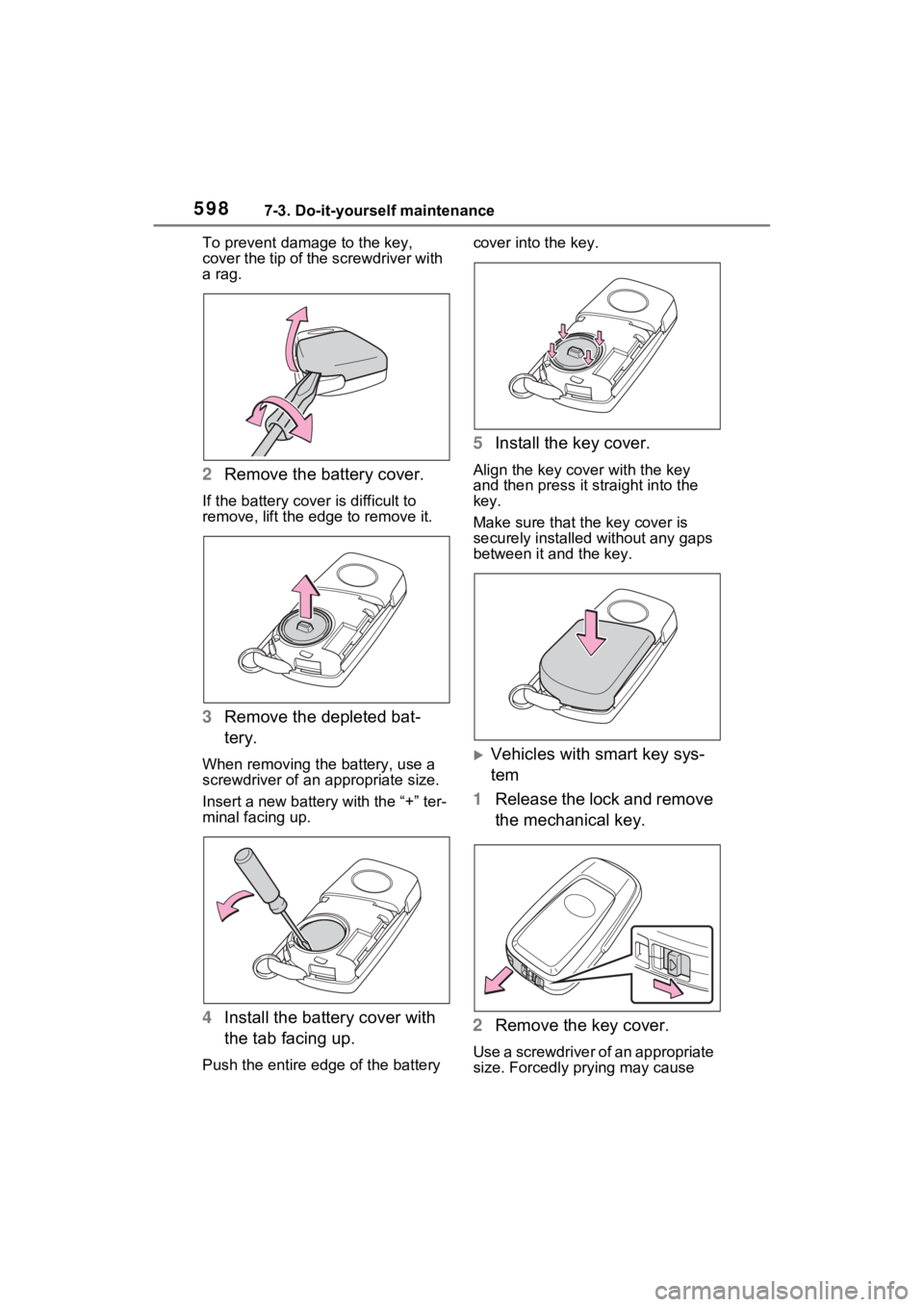
To prevent damag e to the key,
cover the tip of the screwdriver with
a rag.
2 Remove the battery cover.
If the battery cover is difficult to
remove, lift the ed ge to remove it.
3Remove the depleted bat-
tery.
When removing the battery, use a
screwdriver of an appropriate size.
Insert a new battery with the “+” ter-
minal facing up.
4Install the battery cover with
the tab facing up.
Push the entire edge of the battery cover into the key.
5
Install the key cover.
Align the key co ver with the key
and then press it straight into the
key.
Make sure that the key cover is
securely installed without any gaps
between it and the key.
Vehicles with smart key sys-
tem
1 Release the lock and remove
the mechanical key.
2 Remove the key cover.
Use a screwdriver of an appropriate
size. Forcedly prying may cause
Page 599 of 748
5997-3. Do-it-yourself maintenance
7
Maintenance and care
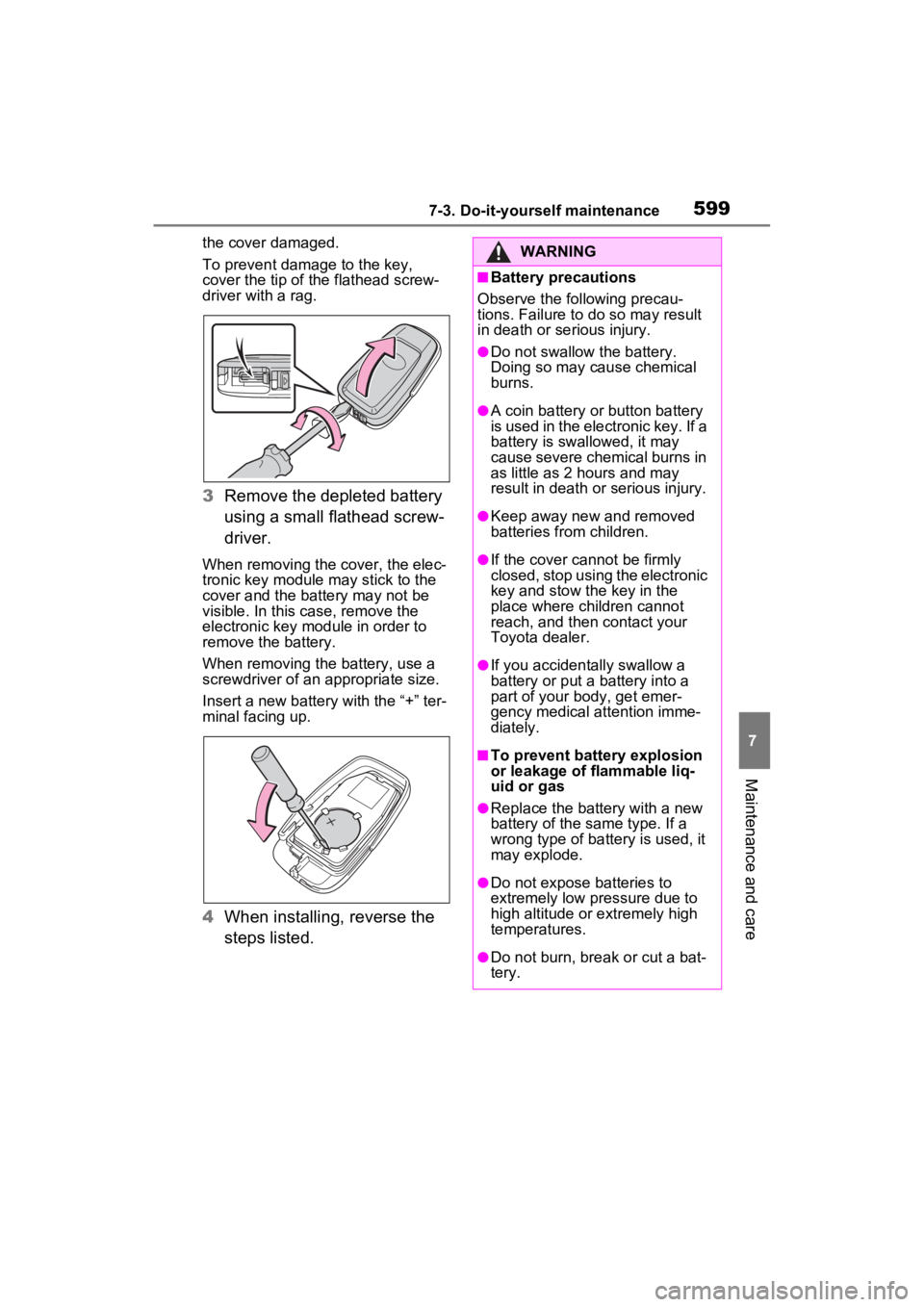
the cover damaged.
To prevent damage to the key,
cover the tip of the flathead screw-
driver with a rag.
3 Remove the depleted battery
using a small flathead screw-
driver.
When removing the cover, the elec-
tronic key module may stick to the
cover and the battery may not be
visible. In this case, remove the
electronic key module in order to
remove the battery.
When removing the battery, use a
screwdriver of an appropriate size.
Insert a new battery with the “+” ter-
minal facing up.
4When installing, reverse the
steps listed.
WARNING
■Battery precautions
Observe the following precau-
tions. Failure to do so may result
in death or serious injury.
●Do not swallow the battery.
Doing so may cause chemical
burns.
●A coin battery or button battery
is used in the electronic key. If a
battery is swa llowed, it may
cause severe chemical burns in
as little as 2 hours and may
result in death or serious injury.
●Keep away new and removed
batteries from children.
●If the cover cannot be firmly
closed, stop using the electronic
key and stow the key in the
place where children cannot
reach, and then contact your
Toyota dealer.
●If you accidentally swallow a
battery or put a battery into a
part of your b ody, get emer-
gency medical attention imme-
diately.
■To prevent battery explosion
or leakage of flammable liq-
uid or gas
●Replace the battery with a new
battery of the same type. If a
wrong type of battery is used, it
may explode.
●Do not expose batteries to
extremely low pr essure due to
high altitude or extremely high
temperatures.
●Do not burn, bre ak or cut a bat-
tery.
Page 611 of 748
611
8
8
When trouble arises
When trouble arises
8-1. Essential informationEmergency flashers .... 612
If your vehicle has to be stopped in an emergency.................................. 612
If the vehicle is submerged or water on the road is ris-
ing ............................. 613
8-2. Steps to take in an emer- gency
If your vehicle needs to be towed......................... 615
If you think something is wrong ........................ 620
Fuel pump shut off system .................................. 621
If a warning light turns on or a warning buzzer sounds.................................. 622
If a warning message is dis- played........................ 633
If you have a flat tire.... 637
If the engine will not start .................................. 646
If you lose your keys ... 648
If the electronic key does not operate properly (vehi-
cles with smart key sys-
tem) ........................... 648
If the vehicle battery is dis- charged ..................... 650
If your vehicle overheats .................................. 654If the vehicle becomes stuck
.................................. 656
Page 612 of 748
6128-1. Essential information
8-1.Essential information
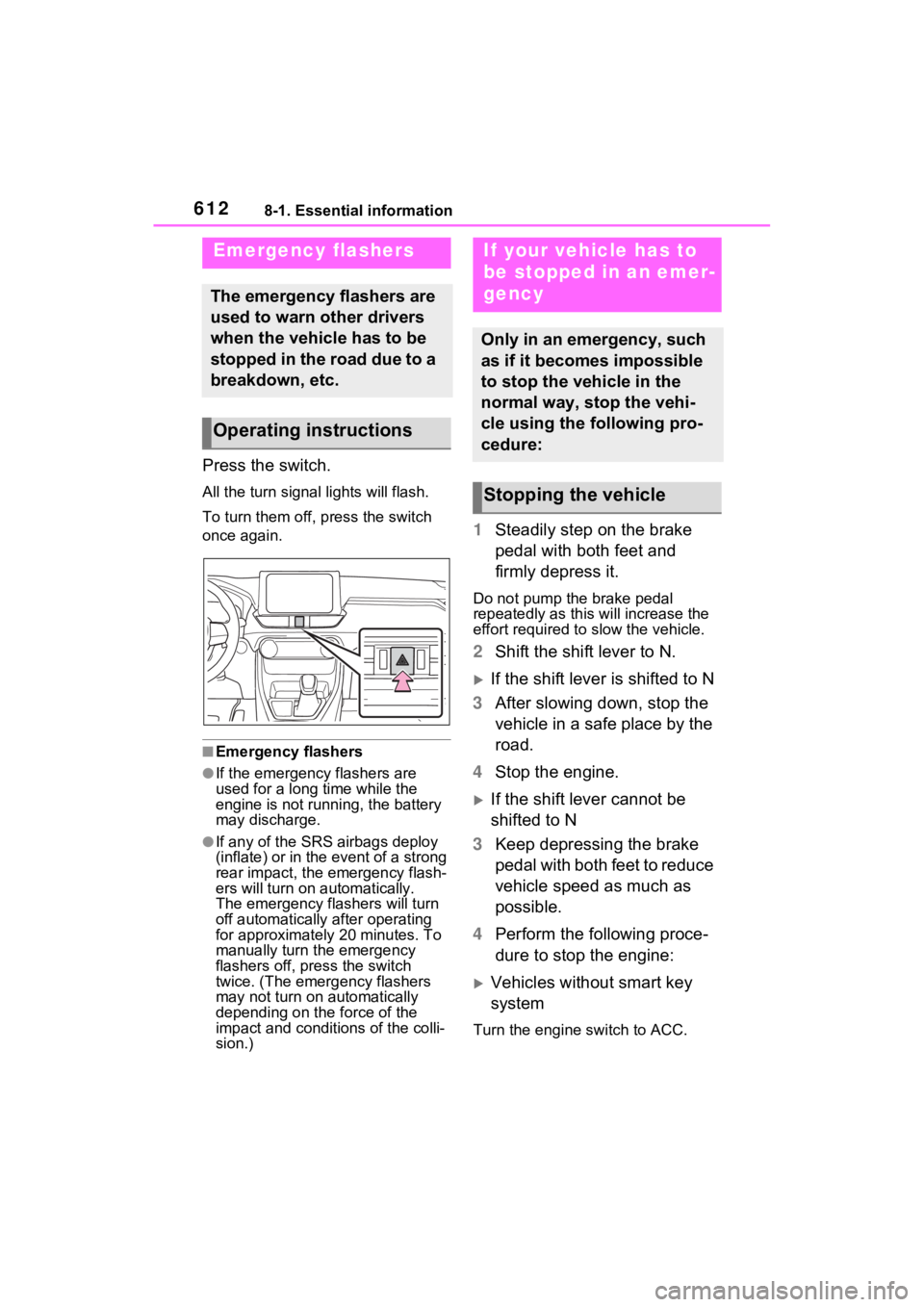
Press the switch.
All the turn signal lights will flash.
To turn them off, press the switch
once again.
■Emergency flashers
●If the emergency flashers are
used for a long time while the
engine is not running, the battery
may discharge.
●If any of the SRS airbags deploy
(inflate) or in the event of a strong
rear impact, the emergency flash-
ers will turn on automatically.
The emergency flashers will turn
off automatically after operating
for approximatel y 20 minutes. To
manually turn t he emergency
flashers off, press the switch
twice. (The emergency flashers
may not turn on automatically
depending on the force of the
impact and conditions of the colli-
sion.)
1 Steadily step on the brake
pedal with both feet and
firmly depress it.
Do not pump the brake pedal
repeatedly as this will increase the
effort required to slow the vehicle.
2Shift the shift lever to N.
If the shift lever is shifted to N
3 After slowing down, stop the
vehicle in a safe place by the
road.
4 Stop the engine.
If the shift lever cannot be
shifted to N
3 Keep depressing the brake
pedal with both feet to reduce
vehicle speed as much as
possible.
4 Perform the following proce-
dure to stop the engine:
Vehicles without smart key
system
Turn the engine switch to ACC.
Emergency flashers
The emergency flashers are
used to warn other drivers
when the vehicle has to be
stopped in the road due to a
breakdown, etc.
Operating instructions
If your vehicle has to
be stopped in an emer-
gency
Only in an emergency, such
as if it becomes impossible
to stop the vehicle in the
normal way, stop the vehi-
cle using the following pro-
cedure:
Stopping the vehicle
Page 634 of 748

6348-2. Steps to take in an emergency
port systems such as PCS (Pre-
Collision system) or the dynamic
radar cruise control with full-speed
range is operating. If a warning
message is shown, be sure to
decelerate the vehicle or follow an
instruction show n on the multi-
information display.
• A warning message is shown
when Brake Override System
operates. ( P.168)
• A warning message is shown
when Drive-Start Control or Park-
ing Support Brake (if equipped)
( P.172, 278) operates. Follow
the instructions o n the multi-infor-
mation display.
●If a message about an operation
of the engine switch is shown (if
equipped)
An instruction for operation of the
engine switch is shown when the
incorrect procedure for starting the
engine is performed or the engine
switch is operated incorrectly. Fol-
low the instructi ons shown on the
multi-information display to operate
the engine switch again.
●If a message abou t a shift lever
operation is shown
To prevent the shift lever from being
operated incorrectly or the vehicle
from moving unexpectedly, a mes-
sage that requires shifting the shift
lever may be sho wn on the multi-
information display. In that case, fol-
low the instruction of the message
and shift the shift lever.
●If a message or image about an
open/close state of a part or
replenishment of a consumable is
shown
Confirm the part indicated by the
multi-information display or a warn-
ing light, and then perform the cop-
ing method such as closing the
open door or replenishing a con- sumable.
■If a message that indicates the
need for visiting your Toyota
dealer is displayed
The system or part shown on the
multi-information di splay is malfunc-
tioning. Have the vehicle inspected
by your Toyota dea ler immediately.
■If a message that indicates the
need for referring to Owner’s
Manual is displayed
●If “Engine Coolant Temp High” is
shown, follow the instructions
( P.654).
●If the following messages are
shown, there may be a malfunc-
tion.
Immediately have the vehicle
inspected by your Toyota dealer.
• “Charging System Malfunction”
• “High Transmission Fluid Temp”
• “Smart Key System Malfunction”
●If the following messages are
shown, there may be a malfunc-
tion.
Immediately stop the vehicle in a
safe place and contact your
Toyota dealer. Continuing to drive
the vehicle may be dangerous.
• “Oil Pressure Low”
• “Braking Power Low”
■If “Shift to P when Parked” is
shown (if equipped)
Message is displayed when the
driver’s door is opened without turn-
ing the engine s witch to OFF with
the shift lever in any position other
than P.
Shift the shift lever to P.
■If “Auto Power OFF to Conserve
Battery” is shown (if equipped)
Power was turned off due to the
automatic power off function.
Next time when starting the engine,
increase the engine speed slightly
and maintain that level for approxi-
mately 5 minutes t o recharge the
battery.
Page 647 of 748
6478-2. Steps to take in an emergency
8
When trouble arises
The battery terminal connec-
tions may be loose or cor-
roded.
The engine starting system may
be malfunctioning due to an
electrical problem such as elec-
tronic key battery depletion or a
blown fuse. However, an interim
measure is available to start the
engine. ( P.647)
One of the following may be the
cause of the problem:
The battery may be dis-
charged. ( P.650)
One or both of the battery ter-
minals may be disconnected.
Contact your Toyota dealer if
the problem cannot be repaired,
or if repair procedures are
unknown.
When the engine does not start,
the following steps can be used as an interim measure to start
the engine if the engine switch is
functioning normally:
1
Pull the parking brake switch
to check that the parking
brake is set. ( P.201)
Parking brake indicator will come
on.
2 Shift the shift lever to P.
3 Turn the engine switch to
ACC.
4 Press and hold the engine
switch for about 15 seconds
while depressing the brake
pedal firmly.
Even if the engine can be
started using the above steps,
the system may be malfunction-
ing. Have the vehicle inspected
by your Toyota dealer.
The starter motor does
not turn over (vehicles
with smart key system)
The starter motor does
not turn over, the interior
lights and headlights do
not turn on, or the horn
does not sound
Emergency start function
(vehicles with smart key
system)
Page 648 of 748
6488-2. Steps to take in an emergency
■When the electronic key does
not work properly
●Make sure that the smart key sys-
tem has not been deactivated in
the customization setting. If it is
off, turn the function on.
(Customizable features: P.688)
●Check if battery-saving mode is
set. If it is set, cancel the function.
( P.128)
●The electronic key function may
have stopped. ( P.128)
If you lose your keys
New genuine keys can be
made by your Toyota dealer
using the other key and the
key number stamped on
your key number plate.
Keep the plate in a safe
place such as your wallet,
not in the vehicle.
NOTICE
■When an electronic key is lost
(if equipped)
If the electronic key remains lost,
the risk of vehicle theft increases
significantly. Visit your Toyota
dealer immediately with all
remaining electronic keys that
were provided wit h your vehicle.
If the electronic key
does not operate prop-
erly (vehicles with
smart key system)
If communication between
the electronic key and vehi-
cle is interrupted ( P.128)
or the electronic key cannot
be used because the battery
is depleted, the smart key
system and wireless remote
control cannot be used. In
such cases, the doors can
be opened and the engine
can be started by following
the procedure below.
NOTICE
■In case of a smart key system
malfunction, o r other key
related problems
Take your vehicle with all the
electronic keys provided with your
vehicle to your Toyota dealer.
Page 650 of 748
6508-2. Steps to take in an emergency
3Firmly depress the brake
pedal and check that is
displayed on the multi-infor-
mation display.
4 Press the engine switch
shortly and firmly.
In the event that the engine still
cannot be started, contact your
Toyota dealer.
■Stopping the engine
Shift the shift lever to P, set the
parking brake and press the engine
switch as you no rmally do when
stopping the engine.
■Replacing the key battery
As the above proc edure is a tempo-
rary measure, it is recommended
that the electronic key battery be
replaced immediate ly when the bat-
tery is depleted. ( P.597)
■Alarm (if equipped) (for Canada)
Using the mechanical key to lock
the doors will not set the alarm sys-
tem.
If a door is unlocked using the
mechanical key when the alarm sys-
tem is set, the alarm may be trig-
gered.
■Changing engine switch modes
Release the brake pedal and press
the engine switch in step 3 above.
The engine does not start and
modes will be cha nged each time
the switch is pressed. ( P.195)
If you have a set of jumper (or
booster) cables and a second
vehicle with a 12-volt battery,
you can jump start your vehicle
by following the steps below.
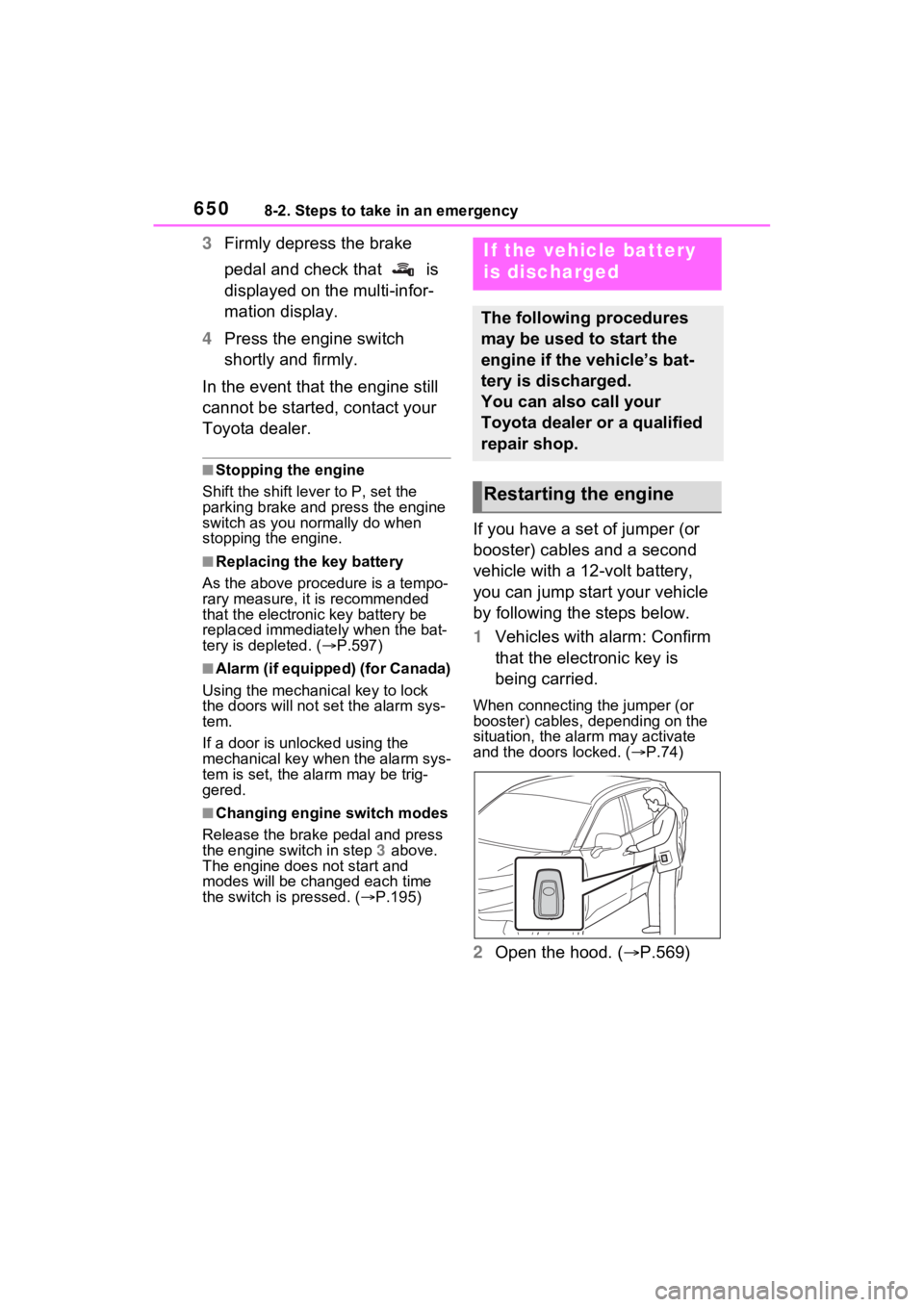
1Vehicles with alarm: Confirm
that the electronic key is
being carried.
When connecting the jumper (or
booster) cables, depending on the
situation, the alarm may activate
and the doors locked. ( P.74)
2 Open the hood. ( P.569)
If the vehicle battery
is discharged
The following procedures
may be used to start the
engine if the vehicle’s bat-
tery is discharged.
You can also call your
Toyota dealer or a qualified
repair shop.
Restarting the engine
Page 651 of 748
6518-2. Steps to take in an emergency
8
When trouble arises
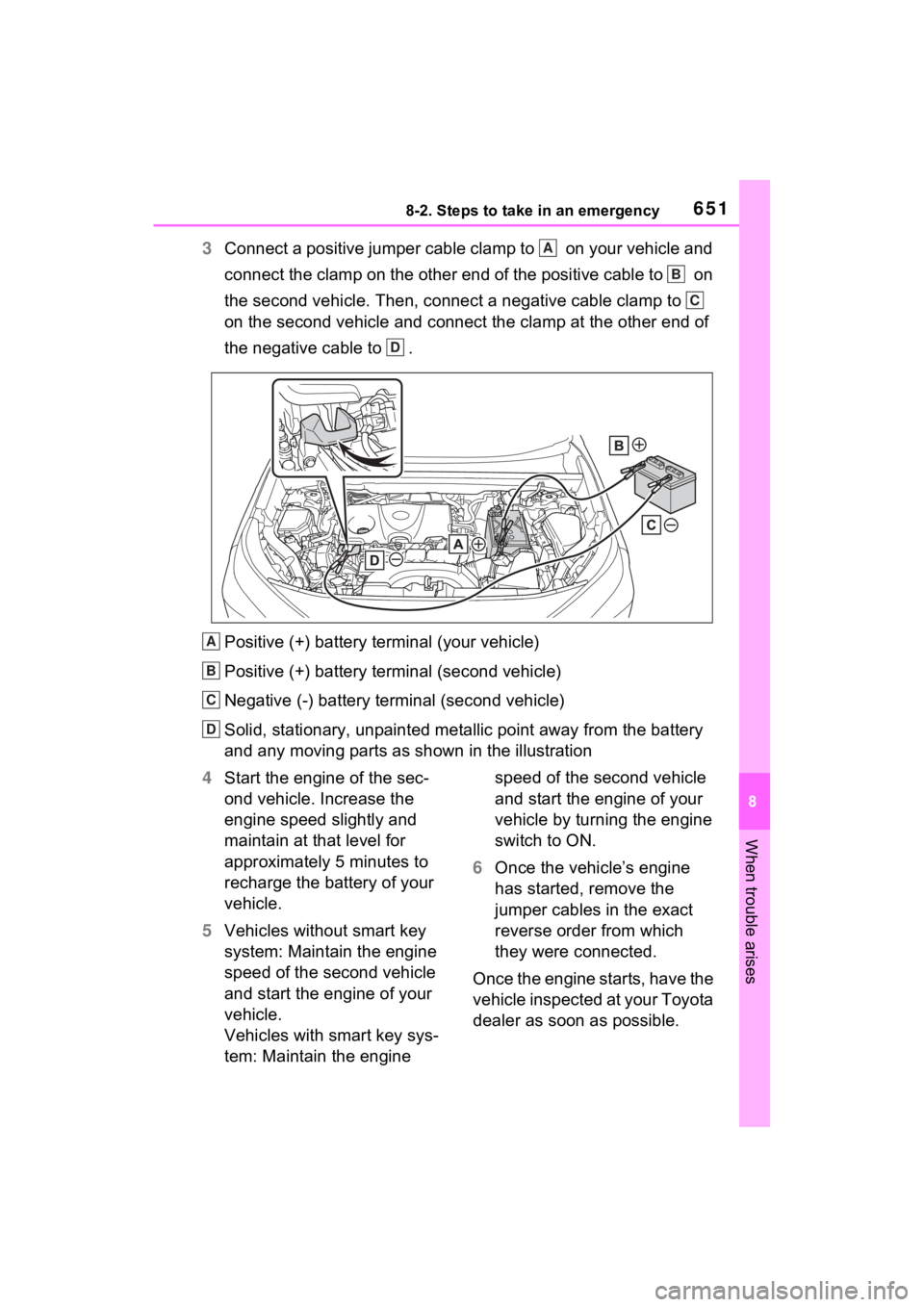
3Connect a positive jumper cable clamp to on your vehicle and
connect the clamp on the other end of the positive cable to on
the second vehicle. Then, connect a negative cable clamp to
on the second vehicle and connect the clamp at the other end of
the negative cable to .
Positive (+) battery terminal (your vehicle)
Positive (+) battery terminal (second vehicle)
Negative (-) battery term inal (second vehicle)
Solid, stationary, unpainted metallic point away from the batte ry
and any moving parts as shown in the illustration
4 Start the engine of the sec-
ond vehicle. Increase the
engine speed slightly and
maintain at that level for
approximately 5 minutes to
recharge the battery of your
vehicle.
5 Vehicles without smart key
system: Maintain the engine
speed of the second vehicle
and start the engine of your
vehicle.
Vehicles with smart key sys-
tem: Maintain the engine speed of the second vehicle
and start the engine of your
vehicle by turning the engine
switch to ON.
6 Once the vehicle’s engine
has started, remove the
jumper cables in the exact
reverse order from which
they were connected.
Once the engine starts, have the
vehicle inspected at your Toyota
dealer as soon as possible.A
B
C
D
A
B
C
D