lock TOYOTA RAV4 2022 Owner's Manual
[x] Cancel search | Manufacturer: TOYOTA, Model Year: 2022, Model line: RAV4, Model: TOYOTA RAV4 2022Pages: 748, PDF Size: 22.93 MB
Page 84 of 748
842-1. Instrument cluster
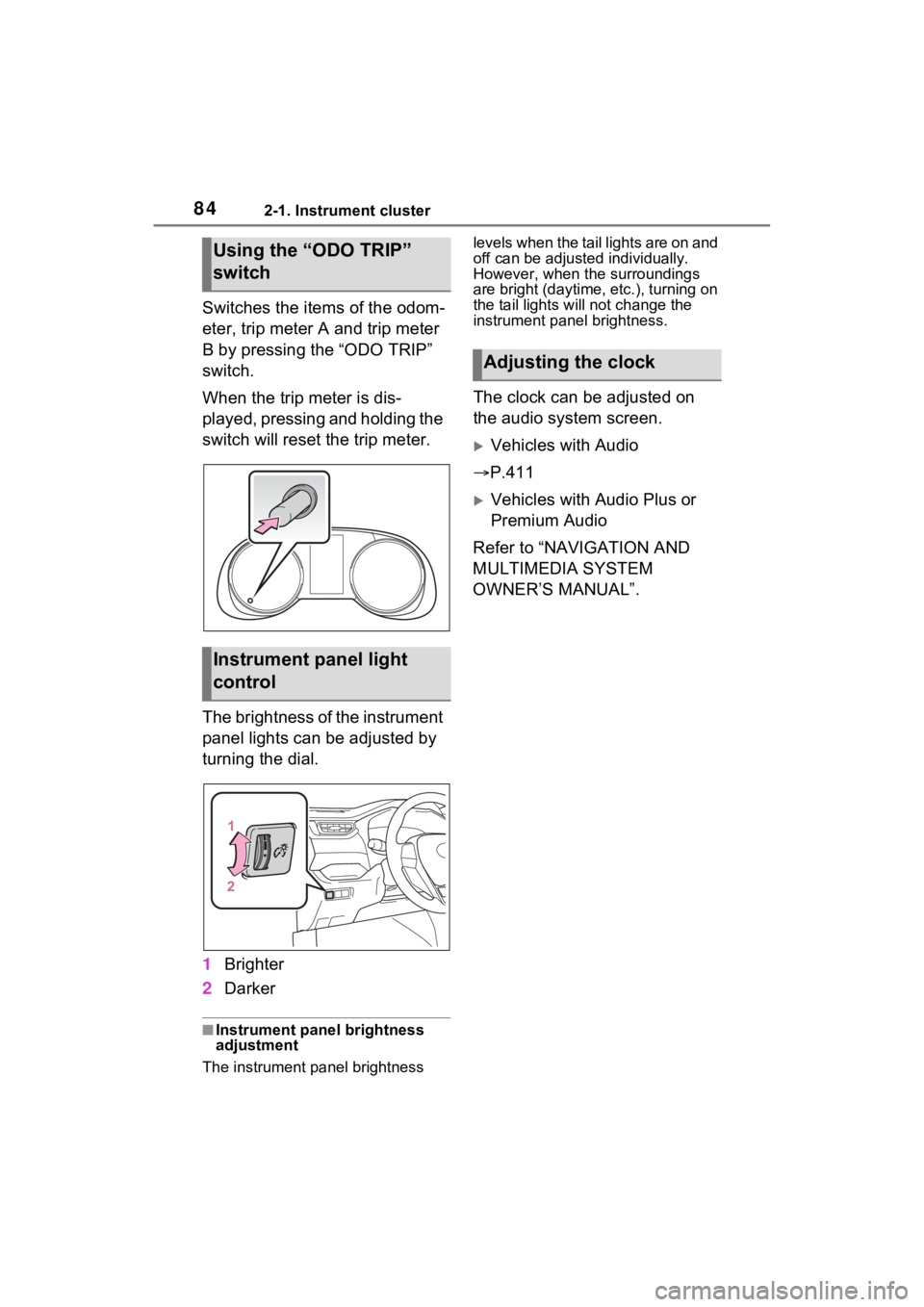
Switches the items of the odom-
eter, trip meter A and trip meter
B by pressing the “ODO TRIP”
switch.
When the trip meter is dis-
played, pressing and holding the
switch will reset the trip meter.
The brightness of the instrument
panel lights can be adjusted by
turning the dial.
1Brighter
2 Darker
■Instrument panel brightness
adjustment
The instrument panel brightness levels when the tail lights are on and
off can be adjusted individually.
However, when the surroundings
are bright (daytime, etc.), turning on
the tail lights will not change the
instrument panel brightness.
The clock can be adjusted on
the audio system screen.
Vehicles with Audio
P.411
Vehicles with Audio Plus or
Premium Audio
Refer to “NAVIGATION AND
MULTIMEDIA SYSTEM
OWNER’S MANUAL”.
Using the “ODO TRIP”
switch
Instrument panel light
control
Adjusting the clock
Page 85 of 748
852-1. Instrument cluster
2
Vehicle status information and indicators
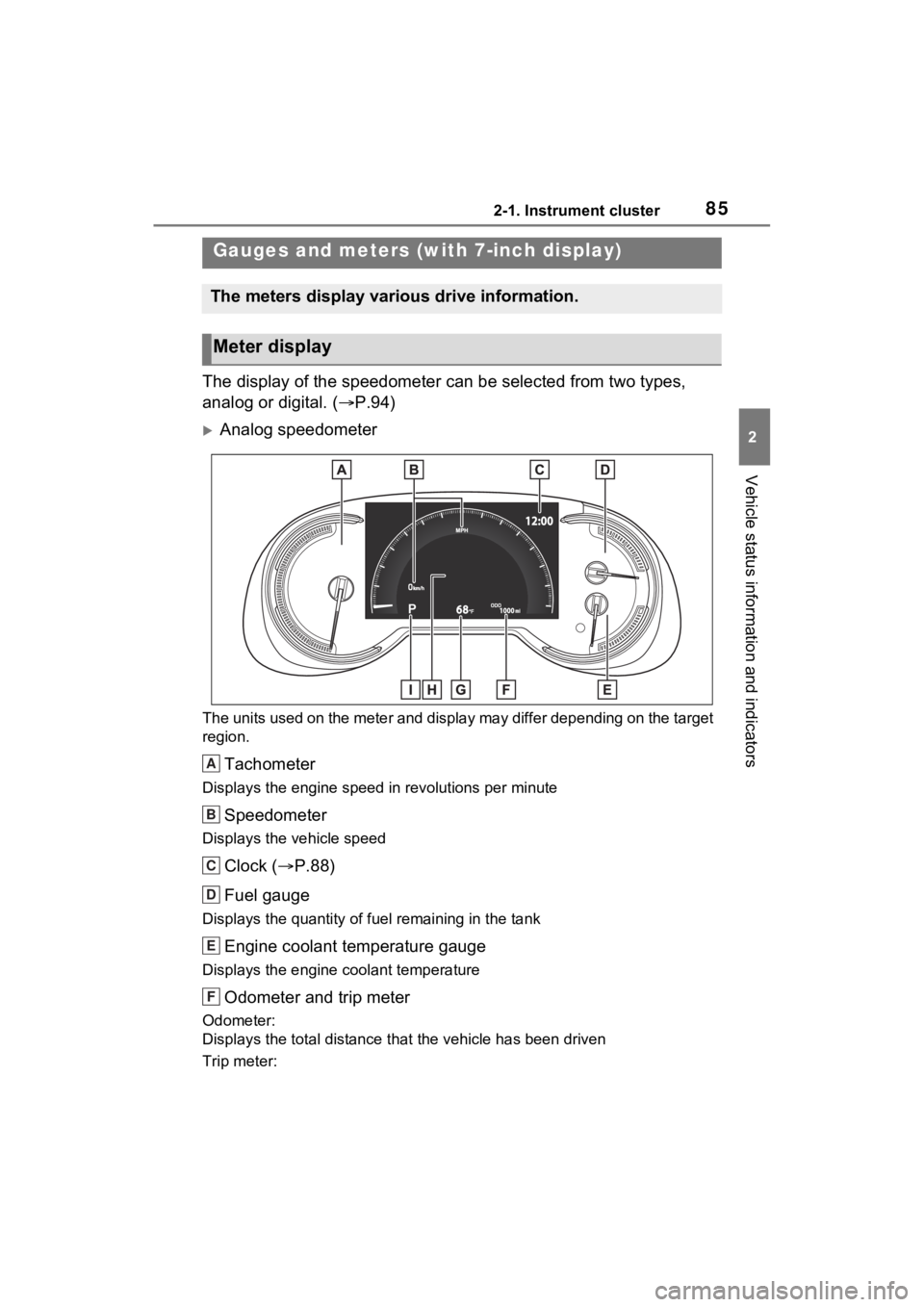
The display of the speedometer can be selected from two types,
analog or digital. (P.94)
Analog speedometer
The units used on the meter and display may differ depending on the target
region.
Tachometer
Displays the engine speed in revolutions per minute
Speedometer
Displays the vehicle speed
Clock ( P.88)
Fuel gauge
Displays the quantity of fu el remaining in the tank
Engine coolant temperature gauge
Displays the engine coolant temperature
Odometer and trip meter
Odometer:
Displays the total distance th at the vehicle has been driven
Trip meter:
Gauges and meters (with 7-inch display)
The meters display various drive information.
Meter display
A
B
C
D
E
F
Page 86 of 748
862-1. Instrument cluster
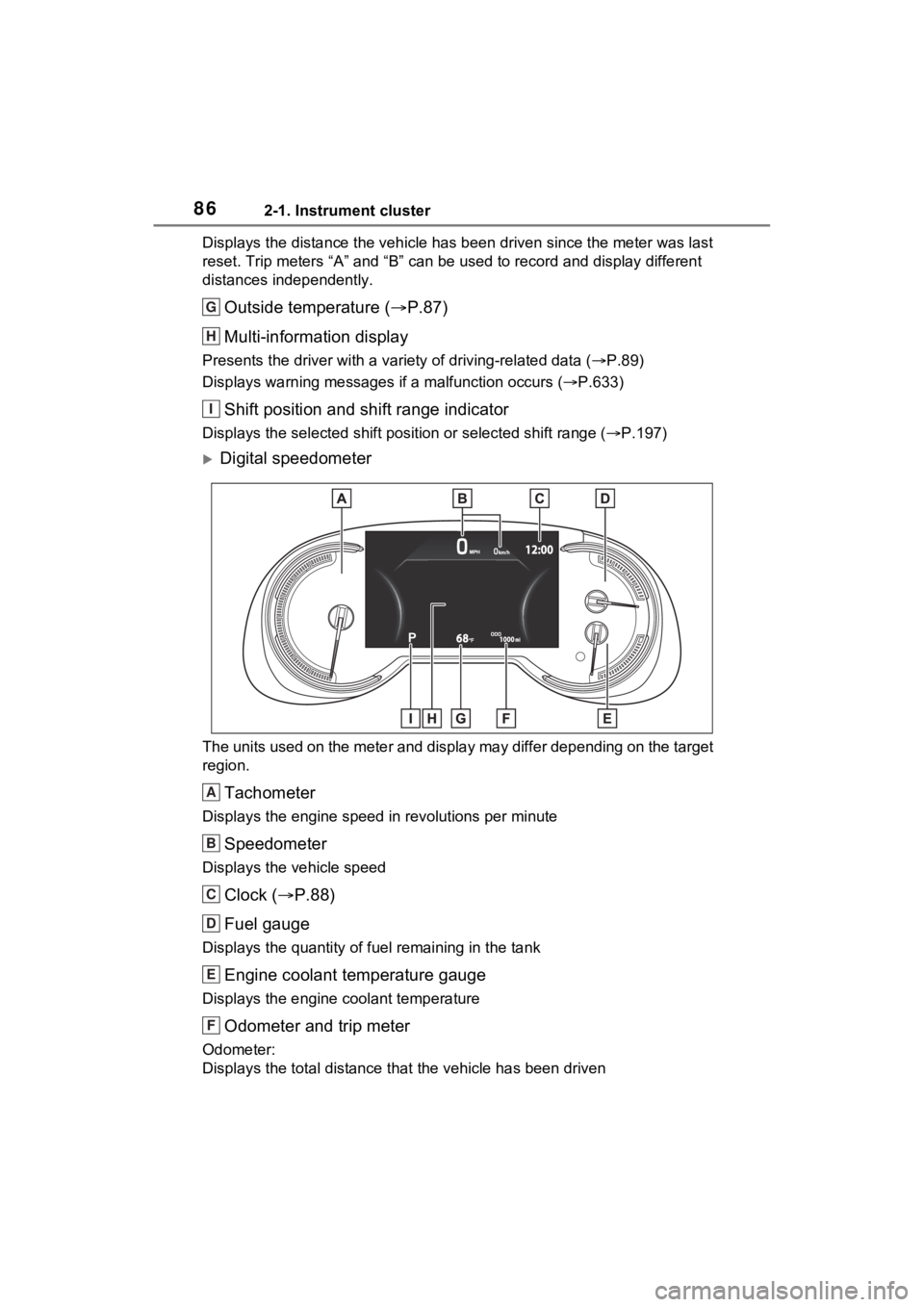
Displays the distance the vehicle has been driven since the meter was last
reset. Trip meters “A” and “B” c an be used to record and display different
distances independently.
Outside temperature ( P.87)
Multi-information display
Presents the driver with a variety of driving-related data ( P.89)
Displays warning messages if a malfunction occurs (P.633)
Shift position and shift range indicator
Displays the selected shift posit ion or selected shift range (P.197)
Digital speedometer
The units used on the meter and display may differ depending on the target
region.
Tachometer
Displays the engine speed in revolutions per minute
Speedometer
Displays the vehicle speed
Clock ( P.88)
Fuel gauge
Displays the quantity of fu el remaining in the tank
Engine coolant temperature gauge
Displays the engine coolant temperature
Odometer and trip meter
Odometer:
Displays the total distance th at the vehicle has been driven
G
H
I
A
B
C
D
E
F
Page 88 of 748
882-1. Instrument cluster
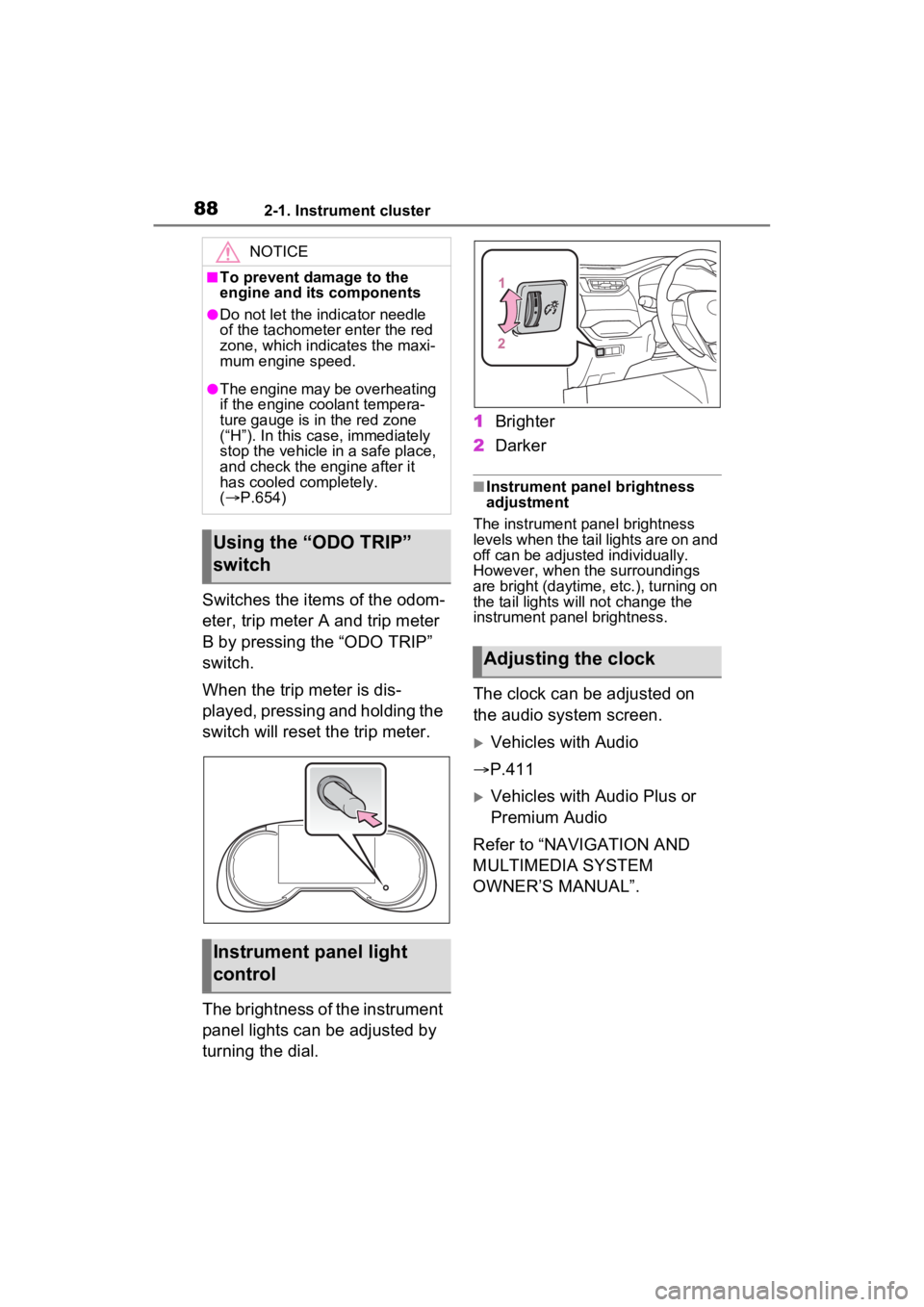
Switches the items of the odom-
eter, trip meter A and trip meter
B by pressing the “ODO TRIP”
switch.
When the trip meter is dis-
played, pressing and holding the
switch will reset the trip meter.
The brightness of the instrument
panel lights can be adjusted by
turning the dial.1
Brighter
2 Darker
■Instrument panel brightness
adjustment
The instrument panel brightness
levels when the tail lights are on and
off can be adjusted individually.
However, when the surroundings
are bright (daytime, etc.), turning on
the tail lights will not change the
instrument panel brightness.
The clock can be adjusted on
the audio system screen.
Vehicles with Audio
P.411
Vehicles with Audio Plus or
Premium Audio
Refer to “NAVIGATION AND
MULTIMEDIA SYSTEM
OWNER’S MANUAL”.
NOTICE
■To prevent damage to the
engine and its components
●Do not let the i ndicator needle
of the tachomete r enter the red
zone, which indicates the maxi-
mum engine speed.
●The engine may be overheating
if the engine coolant tempera-
ture gauge is in the red zone
(“H”). In this case, immediately
stop the vehicle in a safe place,
and check the engine after it
has cooled completely.
( P.654)
Using the “ODO TRIP”
switch
Instrument panel light
control
Adjusting the clock
Page 101 of 748
101
3
3
Before driving
Before driving
3-1. Key informationKeys ............................ 102
3-2. Opening, closing and locking the doors
Side doors ................... 107
Back door .................... 113
Smart key system ....... 127
3-3. Adjusting the seats Front seats .................. 132
Rear seats................... 133
Driving position memory .................................. 135
Head restraints............ 138
3-4. Adjusting the steering wheel and mirrors
Steering wheel ............ 141
Inside rear view mirror 142
Digital Rear-view Mirror 144
Outside rear view mirrors .................................. 153
3-5. Opening, closing the win- dows and moon roof
Power windows ........... 155
Moon roof .................... 158
Panoramic moon roof.. 161
Page 103 of 748
1033-1. Key information
3
Before driving
when necessary.
• The smart key system or the wire- less remote control does not oper-
ate.
• The detection area becomes smaller.
• The LED indicator on the key sur- face does not turn on.
You can replace the battery by your-
self ( P.597). However, as there is
a danger that the electronic key may
be damaged, it is recommended
that replacement is carried out by
your Toyota dealer.
●To avoid serious deterioration, do
not leave the electronic key within
3 ft. (1 m) of the following electri-
cal appliances t hat produce a
magnetic field:
• TVs
• Personal computers
• Cellular phones, cordless phones and battery chargers
• Table lamps
• Induction cookers
■If a message regarding the state
of the electronic key or engine
switch mode, etc. is shown
(vehicles with smart key sys-
tem)
To prevent trapping the electronic
key inside the vehicle, leaving the
vehicle carrying the electronic key
on your person without turning the
engine switch to OFF or other pas-
sengers from unintentionally taking
the key out of the vehicle, etc., a
message that prompts the user to
confirm the state of the electronic
key or engine switch mode may be
shown on the multi -information dis-
play. In those cases, follow the
instructions on the display immedi-
ately.
■If “Key Battery Low Replace
Key Battery” is displayed on
the multi-information display
(vehicles with smart key sys-
tem)
The electronic key has a low bat- tery. Replace the electronic key bat-
tery. (
P.597)
■Replacing the battery
P.597
■Confirmation of the registered
key number
The number of keys already regis-
tered to the vehi cle can be con-
firmed. Ask your Toyota dealer for
details.
■If “A New Key has been Regis-
tered Contact Your Dealer for
Details” is dis played on the
multi-information display (vehi-
cles with smart key system)
This message will be displayed
each time the driver’s door is
opened when the doors are
unlocked from the outside for
approximately 10 days after a new
electronic key has been registered.
If this message is displayed but you
have not had a new electronic key
registered, ask your Toyota dealer
to check if an unknown electronic
key (other than those in your pos-
session) has been registered.
NOTICE
■To prevent key damage
●Do not drop the keys, subject
them to strong shocks or bend
them.
●Do not expose the keys to high
temperatures for long periods of
time.
●Do not get the keys wet or wash
them in an ultrasonic washer,
etc.
●Do not attach m etallic or mag-
netic materials to the keys or
place the keys close to such
materials.
●Do not disassemble the keys.
Page 104 of 748
1043-1. Key information
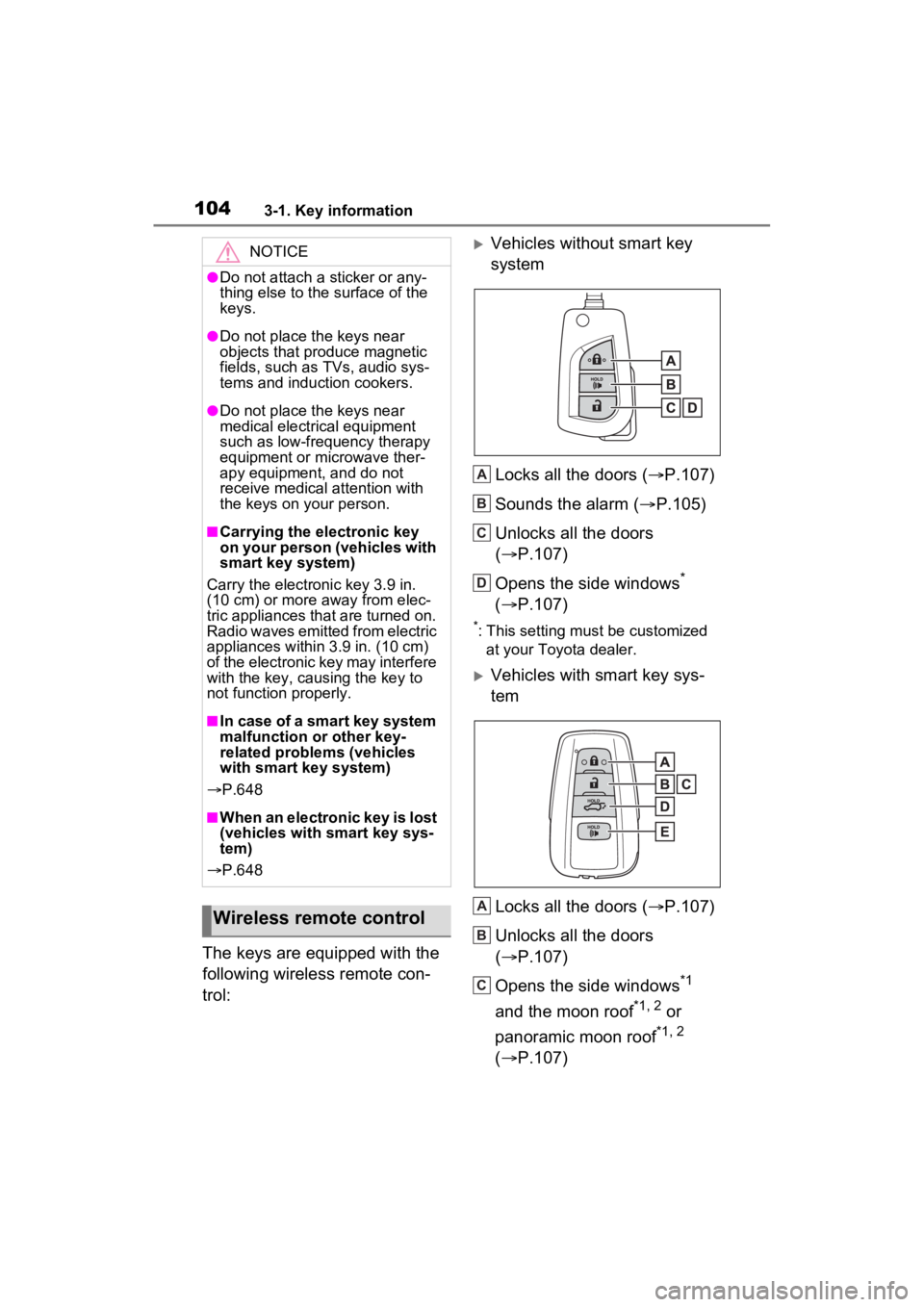
The keys are equipped with the
following wireless remote con-
trol:
Vehicles without smart key
systemLocks all the doors ( P.107)
Sounds the alarm ( P.105)
Unlocks all the doors
( P.107)
Opens the side windows
*
( P.107)
*: This setting must be customized
at your Toyota dealer.
Vehicles with smart key sys-
tem
Locks all the doors ( P.107)
Unlocks all the doors
( P.107)
Opens the side windows
*1
and the moon roof
*1, 2 or
panoramic moon roof
*1, 2
( P.107)
NOTICE
●Do not attach a sticker or any-
thing else to the surface of the
keys.
●Do not place th e keys near
objects that produce magnetic
fields, such as TVs, audio sys-
tems and induction cookers.
●Do not place th e keys near
medical electrical equipment
such as low-frequency therapy
equipment or microwave ther-
apy equipment, and do not
receive medical attention with
the keys on your person.
■Carrying the electronic key
on your person (vehicles with
smart key system)
Carry the electronic key 3.9 in.
(10 cm) or more away from elec-
tric appliances that are turned on.
Radio waves emitted from electric
appliances within 3.9 in. (10 cm)
of the electronic key may interfere
with the key, causing the key to
not function properly.
■In case of a smart key system
malfunction or other key-
related proble ms (vehicles
with smart key system)
P.648
■When an electronic key is lost
(vehicles with smart key sys-
tem)
P.648
Wireless remote control
A
B
C
D
A
B
C
Page 106 of 748
1063-1. Key information
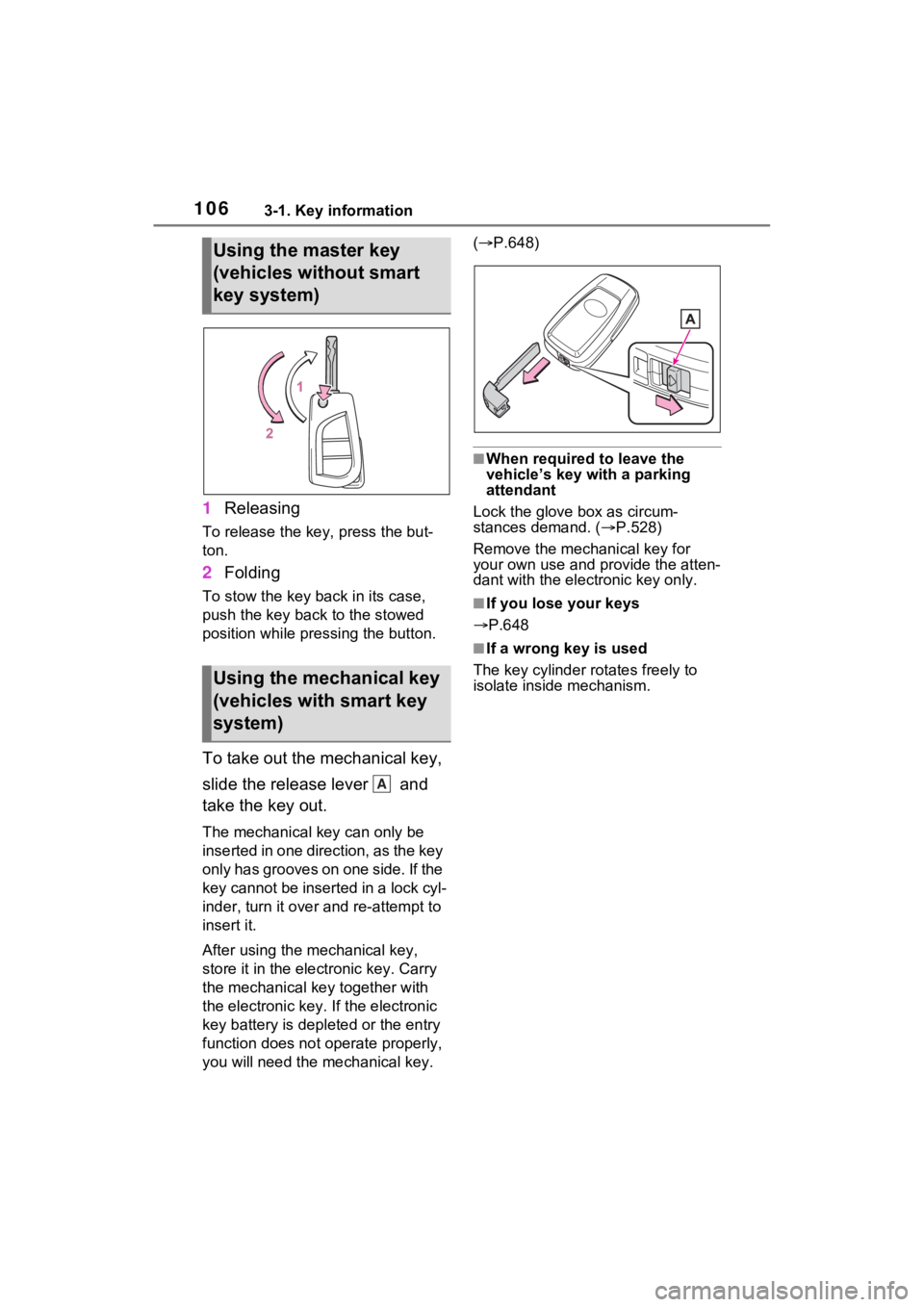
1Releasing
To release the key, press the but-
ton.
2Folding
To stow the key back in its case,
push the key back to the stowed
position while pre ssing the button.
To take out the mechanical key,
slide the release lever and
take the key out.
The mechanical key can only be
inserted in one direction, as the key
only has grooves on one side. If the
key cannot be inserted in a lock cyl-
inder, turn it over and re-attempt to
insert it.
After using the mechanical key,
store it in the electronic key. Carry
the mechanical key together with
the electronic key. If the electronic
key battery is dep leted or the entry
function does not operate properly,
you will need the m echanical key. (
P.648)
■When required to leave the
vehicle’s key wi th a parking
attendant
Lock the glove box as circum-
stances demand. ( P.528)
Remove the mechanical key for
your own use and p rovide the atten-
dant with the elec tronic key only.
■If you lose your keys
P.648
■If a wrong key is used
The key cylinder rotates freely to
isolate inside mechanism.
Using the master key
(vehicles without smart
key system)
Using the mechanical key
(vehicles with smart key
system)
A
Page 107 of 748
1073-2. Opening, closing and locking the doors
3
Before driving
3-2.Opening, closing and locking the doors
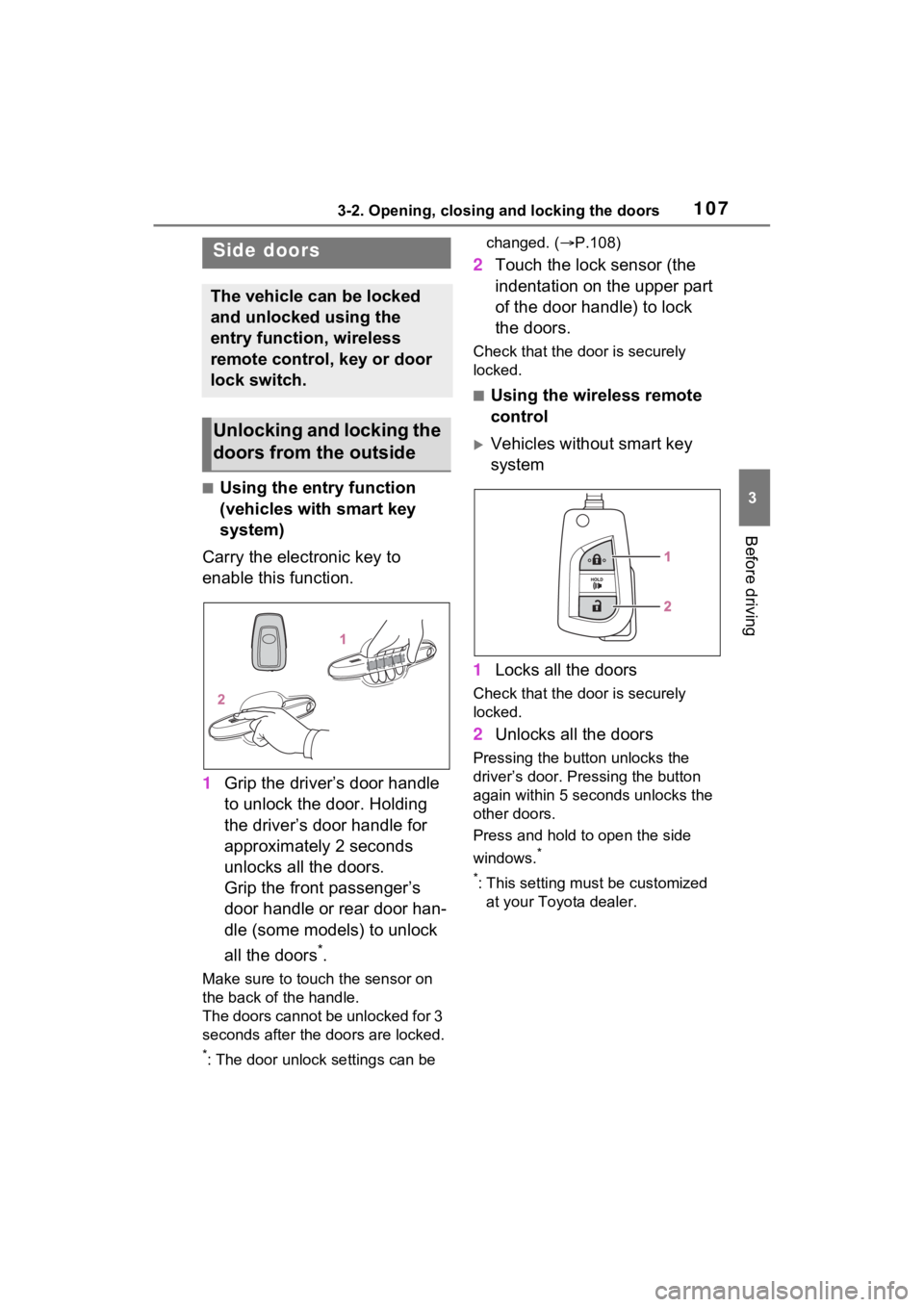
■Using the entry function
(vehicles with smart key
system)
Carry the electronic key to
enable this function.
1 Grip the driver’s door handle
to unlock the door. Holding
the driver’s door handle for
approximately 2 seconds
unlocks all the doors.
Grip the front passenger’s
door handle or rear door han-
dle (some models) to unlock
all the doors
*.
Make sure to touch the sensor on
the back of the handle.
The doors cannot be unlocked for 3
seconds after the doors are locked.
*: The door unlock settings can be changed. (
P.108)
2 Touch the lock sensor (the
indentation on the upper part
of the door handle) to lock
the doors.
Check that the d oor is securely
locked.
■Using the wireless remote
control
Vehicles without smart key
system
1 Locks all the doors
Check that the d oor is securely
locked.
2 Unlocks all the doors
Pressing the button unlocks the
driver’s door. Pressing the button
again within 5 seconds unlocks the
other doors.
Press and hold to open the side
windows.
*
*
: This setting must be customized at your Toyota dealer.
Side doors
The vehicle can be locked
and unlocked using the
entry function, wireless
remote control, key or door
lock switch.
Unlocking and locking the
doors from the outside
Page 108 of 748
1083-2. Opening, closing and locking the doors
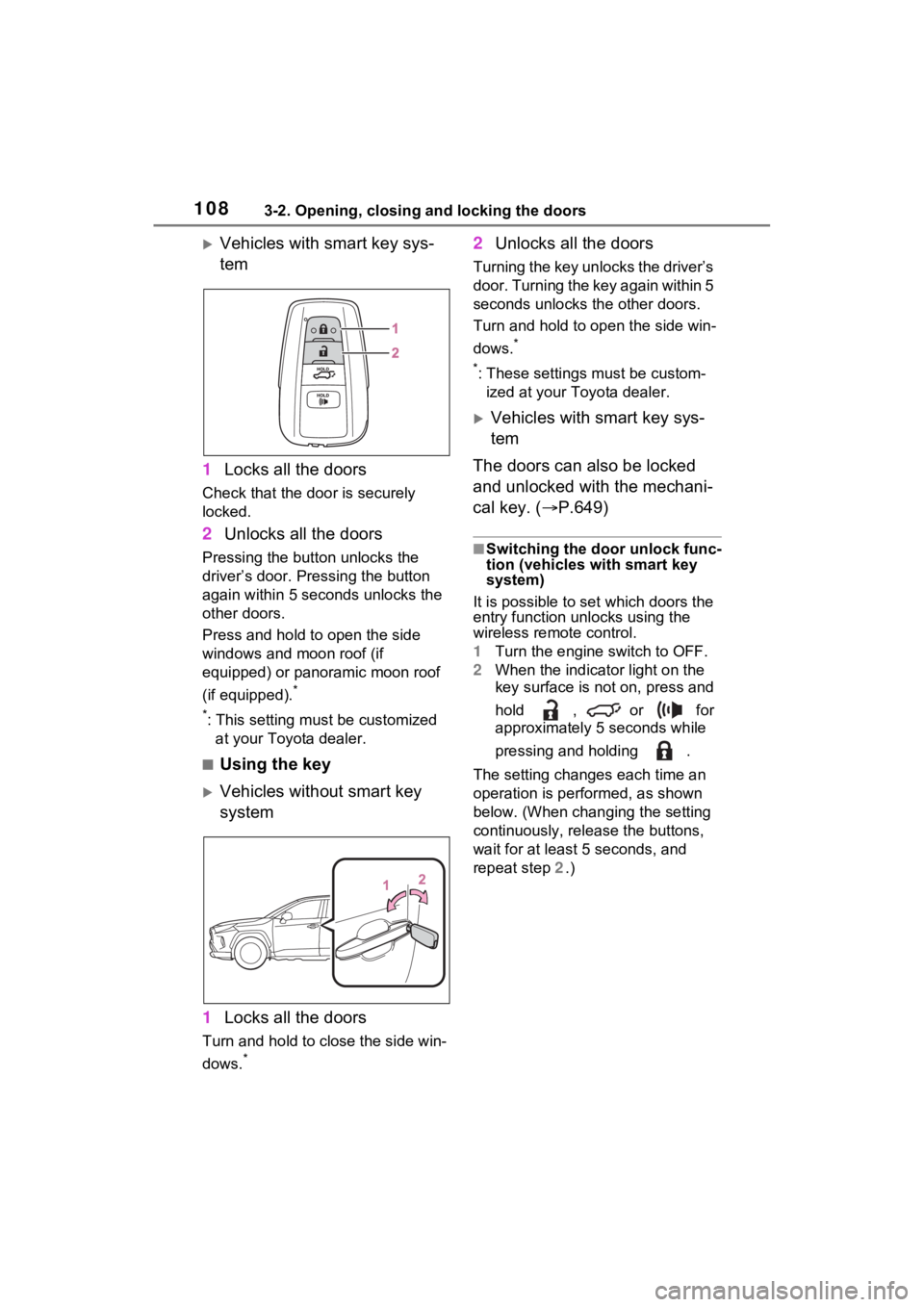
Vehicles with smart key sys-
tem
1 Locks all the doors
Check that the door is securely
locked.
2Unlocks all the doors
Pressing the button unlocks the
driver’s door. Pressing the button
again within 5 seconds unlocks the
other doors.
Press and hold to open the side
windows and moon roof (if
equipped) or panoramic moon roof
(if equipped).
*
*
: This setting must be customized at your Toyota dealer.
■Using the key
Vehicles without smart key
system
1 Locks all the doors
Turn and hold to close the side win-
dows.
*
2Unlocks all the doors
Turning the key unlocks the driver’s
door. Turning the key again within 5
seconds unlocks th e other doors.
Turn and hold to open the side win-
dows.
*
*
: These settings must be custom- ized at your Toyota dealer.
Vehicles with smart key sys-
tem
The doors can also be locked
and unlocked with the mechani-
cal key. ( P.649)
■Switching the door unlock func-
tion (vehicles with smart key
system)
It is possible to set which doors the
entry function unlocks using the
wireless remote control.
1 Turn the engine switch to OFF.
2 When the indicator light on the
key surface is not on, press and
hold , or for
approximately 5 seconds while
pressing and holding .
The setting changes each time an
operation is per formed, as shown
below. (When changing the setting
continuously, release the buttons,
wait for at least 5 seconds, and
repeat step 2 .)