roof TOYOTA RAV4 2022 Owner's Guide
[x] Cancel search | Manufacturer: TOYOTA, Model Year: 2022, Model line: RAV4, Model: TOYOTA RAV4 2022Pages: 748, PDF Size: 22.93 MB
Page 291 of 748

2914-5. Using the driving support systems
4
Driving
The distance guide lines and
the vehicle width guide lines may not actually be parallel
with the dividing lines of the
parking space, even when
they appear to be so. Be sure
to check visually.
The distances between the
vehicle width guide lines and
the left and right dividing lines
of the parking space may not
be equal, even when they
appear to be so. Be sure to
check visually.
The distance guide lines give
a distance guide for flat road
surfaces. In any of the follow-
ing situations, there is a mar-
gin of error between the guide
lines on the screen and the
actual distance/course on the
road.
■When the ground behind
the vehicle slopes up
sharply
The distance guide lines will
appear to be closer to the vehi-
cle than the actual distance.
Because of this, objects will
appear to be farther away than
they actually are. In the same
way, there will be a margin of
error between the fixed guide
lines and the actual dis-
tance/course on the road.
NOTICE
●The rear view monitor system
may not operate properly in the
following cases.
• If the back of the vehicle is hit, the position and mounting angle
of the camera may change.
• As the camera has a water proof construction, do not
detach, disassemble or modify
it. This may cause incorrect
operation.
• When cleaning the camera lens, flush the camera with a large
quantity of water and wipe it
with a soft and wet cloth.
Strongly rubbing the camera
lens may cause the camera lens
to be scratched and unable to
transmit a clear image.
• Do not allow organic solvent, car wax, window cleaner or a
glass coating to adhere to the
camera. If this happens, wipe it
off as soon as possible.
• If the temperature changes rap- idly, such as when hot water is
poured on the vehicle in cold
weather, the system may not
operate normally.
• When washing the vehicle, do not apply intensive bursts of
water to the camera or camera
area. Doing so may result in the
camera malfunctioning.
●Do not expose the camera to
strong impact as this could
cause a malfunction. If this hap-
pens, have the vehicle
inspected by your Toyota dealer
as soon as possible.
Differences between the
screen and the actual road
Page 303 of 748
3034-5. Using the driving support systems
4
Driving
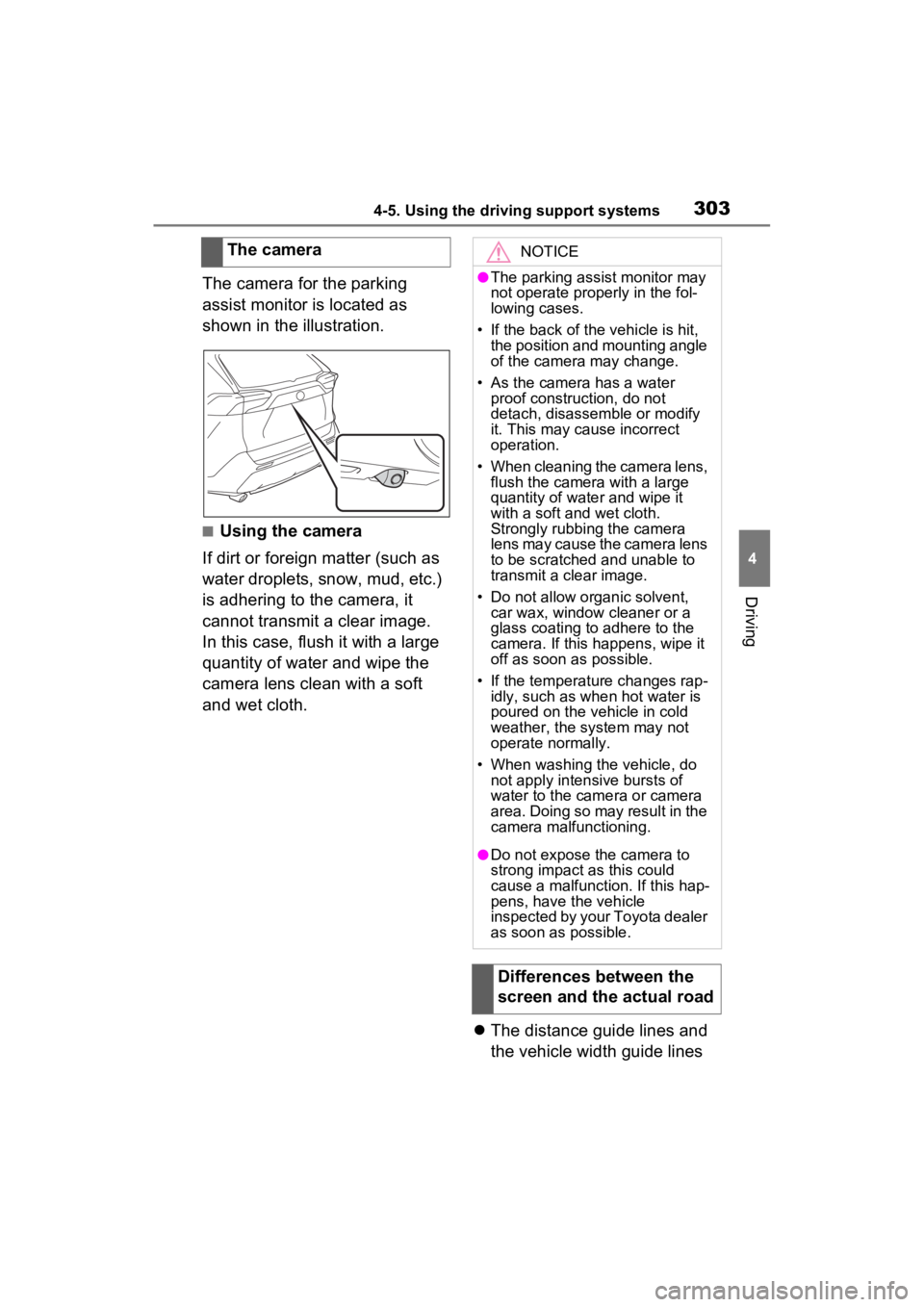
The camera for the parking
assist monitor is located as
shown in the illustration.
■Using the camera
If dirt or foreign matter (such as
water droplets, snow, mud, etc.)
is adhering to the camera, it
cannot transmit a clear image.
In this case, flush it with a large
quantity of water and wipe the
camera lens clean with a soft
and wet cloth.
The distance guide lines and
the vehicle width guide lines
The camera
NOTICE
●The parking assist monitor may
not operate properly in the fol-
lowing cases.
• If the back of the vehicle is hit, the position and mounting angle
of the camera may change.
• As the camera has a water proof construction, do not
detach, disassemble or modify
it. This may cause incorrect
operation.
• When cleaning the camera lens, flush the camera with a large
quantity of water and wipe it
with a soft and wet cloth.
Strongly rubbing the camera
lens may cause the camera lens
to be scratched and unable to
transmit a clear image.
• Do not allow organic solvent, car wax, window cleaner or a
glass coating to adhere to the
camera. If this happens, wipe it
off as soon as possible.
• If the temperature changes rap- idly, such as when hot water is
poured on the vehicle in cold
weather, the system may not
operate normally.
• When washing the vehicle, do not apply intensive bursts of
water to the came ra or camera
area. Doing so may result in the
camera malfunctioning.
●Do not expose the camera to
strong impact as this could
cause a malfunction. If this hap-
pens, have the vehicle
inspected by your Toyota dealer
as soon as possible.
Differences between the
screen and the actual road
Page 333 of 748
3334-5. Using the driving support systems
4
Driving
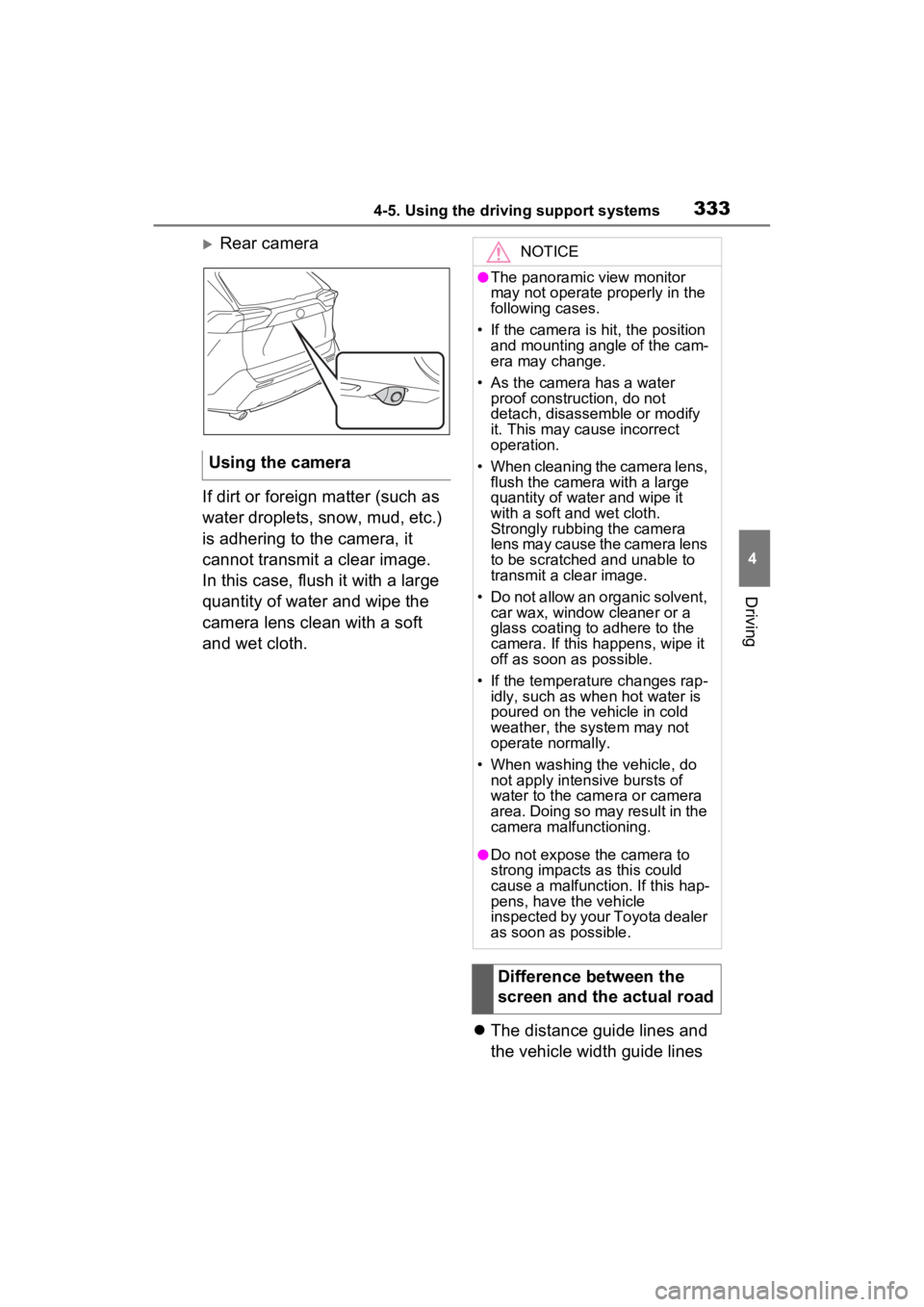
Rear camera
If dirt or foreign matter (such as
water droplets, snow, mud, etc.)
is adhering to the camera, it
cannot transmit a clear image.
In this case, flush it with a large
quantity of water and wipe the
camera lens clean with a soft
and wet cloth.
The distance guide lines and
the vehicle width guide lines
Using the cameraNOTICE
●The panoramic view monitor
may not operate properly in the
following cases.
• If the camera is hit, the position and mounting angle of the cam-
era may change.
• As the camera has a water proof construction, do not
detach, disassemble or modify
it. This may cause incorrect
operation.
• When cleaning the camera lens, flush the camera with a large
quantity of water and wipe it
with a soft and wet cloth.
Strongly rubbing the camera
lens may cause the camera lens
to be scratched and unable to
transmit a clear image.
• Do not allow an organic solvent, car wax, window cleaner or a
glass coating to adhere to the
camera. If this happens, wipe it
off as soon as possible.
• If the temperature changes rap- idly, such as when hot water is
poured on the vehicle in cold
weather, the system may not
operate normally.
• When washing the vehicle, do not apply intensive bursts of
water to the came ra or camera
area. Doing so may result in the
camera malfunctioning.
●Do not expose the camera to
strong impacts as this could
cause a malfunction. If this hap-
pens, have the vehicle
inspected by your Toyota dealer
as soon as possible.
Difference between the
screen and the actual road
Page 363 of 748
3634-6. Driving tips
4
Driving
Perform the following according
to the driving conditions:
Do not try to forcibly open a
window or move a wiper that
is frozen. Pour warm water
over the frozen area to melt
the ice. Wipe away the water
immediately to prevent it from
freezing.
To ensure proper operation of
the climate control system
fan, remove any snow that
has accumulated on the air
inlet vents in front of the wind-
shield.
Check for and remove any
excess ice or snow that may
have accumulated on the
exterior lights, vehicle’s roof,
chassis, around the tires or on
the brakes.
Remove any snow or mud
from the bottom of your shoes
before getting in the vehicle.
Accelerate the vehicle slowly,
keep a safe distance between
you and the vehicle ahead, and
drive at a reduced speed suit-
able to road conditions.
Park the vehicle and move
the shift lever to P without set- ting the parking brake. The
parking brake may freeze up,
preventing it from being
released. If the vehicle is
parked without setting the
parking brake, make sure to
block the wheels.
Failure to do so may be dan-
gerous because it may cause
the vehicle to move unexpect-
edly, possibly leading to an
accident.
When the parking brake is in
automatic mode, release the
parking brake after shifting
the shift lever to P. (
P.201)
If the vehicle is left parked
with the brakes damp in cold
temperatures, there is a pos-
sibility of the brakes freezing.
If the vehicle is parked without
setting the parking brake,
confirm that the shift lever
cannot be moved out of P
*.
*: The shift lever will be locked if it is
attempted to be sh ifted from P to
any other position without
depressing the brake pedal. If the
shift lever can be shifted from P,
there may be a problem with the
shift lock system. Have the vehi-
cle inspected by your Toyota
dealer immediately.
Before driving the vehicle
When driving the vehicle
When parking the vehicle
Page 365 of 748
3654-6. Driving tips
4
Driving
Specific design characteris-
tics give it a higher center of
gravity than ordinary passen-
ger cars. This vehicle design
feature causes this type of
vehicle to be more likely to
rollover. And, utility vehicles
have a significantly higher
rollover rate than other types
of vehicles.
An advantage of the higher
ground clearance is a better
view of the road allowing you
to anticipate problems.
It is not designed for corner-
ing at the same speeds as
ordinary passenger cars any
more than low-slung sports
cars are designed to perform
satisfactorily under off-road
conditions. Therefore, sharp
turns at excessive speeds
may cause the vehicle to roll-
over.
When driving your vehicle off-
Utility vehicle precau-
tions
This vehicle belongs to the
utility vehicle class, which
has higher ground clear-
ance and narrower tread in
relation to the height of its
center of gravity to make it
capable of performing in a
wide variety of off-road
applications.
Utility vehicle feature
WARNING
■Utility vehicle precautions
Always observe t he following pre-
cautions to minim ize the risk of
death, serious injury or damage to
your vehicle:
●In a rollover crash, an unbelted
person is significantly more
likely to die than a person wear-
ing a seat belt. Therefore, the
driver and all passengers
should always fasten their seat
belts.
●Avoid sharp turns or abrupt
maneuvers, if at all possible.
Failure to operat e this vehicle
correctly may result in loss of
control or vehicle rollover caus-
ing death or serious injury.
●Loading cargo on the roof lug-
gage carrier (if equipped) will
make the center of the vehicle
gravity higher. Avoid high
speeds, sudden starts, sharp
turns, sudden braking or abrupt
maneuvers, otherwise it may
result in loss of control or vehi-
cle rollover du e to failure to
operate this vehicle correctly.
●Always slow down in gusty
crosswinds. Because of its pro-
file and higher ce nter of gravity,
your vehicle is more sensitive to
side winds than an ordinary
passenger car. Slowing down
will allow you to have better
control.
●Do not drive horizontally across
steep slopes. Driving straight up
or straight down is preferred.
Your vehicle (or any similar off-
road vehicle) can tip over side-
ways much more easily than
forward or backward.
Off-road driving
Page 443 of 748
4435-11. Tips for operating the audio/visual system
5
Audio
Station interference: When a
reflected signal and a signal
received directly from a radio
station are very nearly the same
frequency, they can interfere
with each other, making it diffi-
cult to hear the broadcast.
Static: AM is easily affected by
external sources of electrical
noise, such as high tension
power lines, lightening or electri-
cal motors. This results in static.
■SiriusXM*
Cargo loaded on the roof lug-
gage carrier, especially metal
objects, may adversely affect
the reception of SiriusXM Sat-
ellite Radio.
Alternation or modifications
carried out without appropri-
ate authorization may invali-
date the user’s right to
operate the equipment.
*: This function is not made avail-
able in some countries or areas.
■Certification
Use of the Made for Apple
badge means that an acces-
sory has been designed to
connect specifically to the
Apple product(s) identified in
the badge, and has been cer-
tified by the developer to meet
Apple performance stan-
dards. Apple is not responsi-
ble for the operation of this
device or its compliance with
safety and regulatory stan-
dards. Please note that the
use of this accessory with an
Apple product may affect
wireless performance.
iPhone, iPod, iPod classic,
iPod nano, iPod touch, and
Lightning are trademarks of
Apple Inc., registered in the
U.S. and other countries.
■Compatible models
The following iPod touch
® and
iPhone
® devices can be used
with this system.
Made for
• iPhone X
• iPhone 8
• iPhone 8 Plus
• iPhone 7
• iPhone 7 Plus
• iPhone SE
iPod/iPhone
Page 454 of 748
4545-12. Voice command system operation
5-12.Voice command system operation
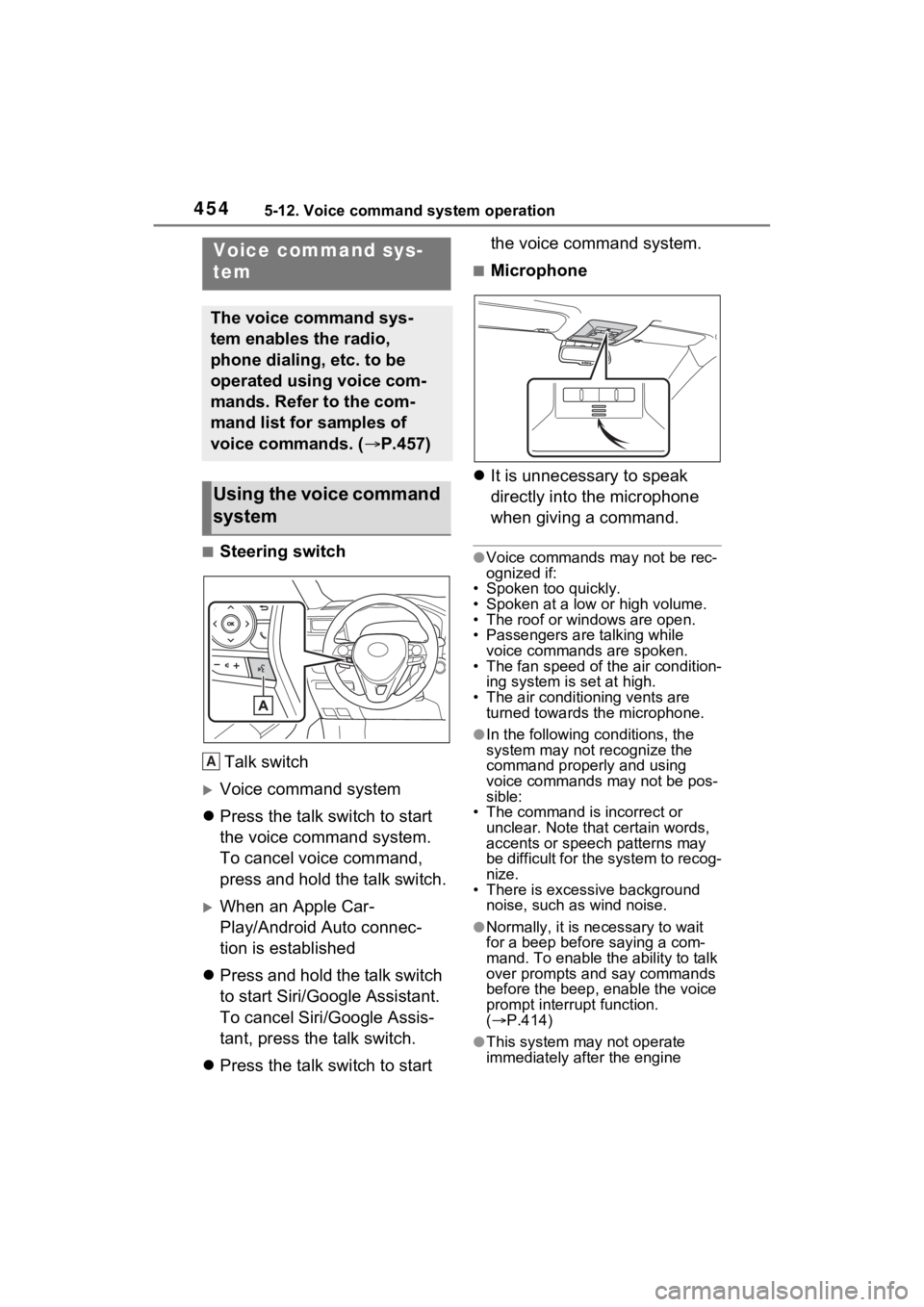
■Steering switchTalk switch
Voice command system
Press the talk switch to start
the voice command system.
To cancel voice command,
press and hold the talk switch.
When an Apple Car-
Play/Android Auto connec-
tion is established
Press and hold the talk switch
to start Siri/Google Assistant.
To cancel Siri/Google Assis-
tant, press the talk switch.
Press the talk switch to start the voice command system.
■Microphone
It is unnecessary to speak
directly into the microphone
when giving a command.
●Voice commands may not be rec-
ognized if:
• Spoken too quickly.
• Spoken at a low or high volume.
• The roof or windows are open.
• Passengers are talking while voice commands are spoken.
• The fan speed of the air condition-
ing system is set at high.
• The air conditioning vents are turned towards the microphone.
●In the following c onditions, the
system may not recognize the
command properly and using
voice commands may not be pos-
sible:
• The command is incorrect or unclear. Note that certain words,
accents or speech patterns may
be difficult for the system to recog-
nize.
• There is excessive background
noise, such as wind noise.
●Normally, it is n ecessary to wait
for a beep before saying a com-
mand. To enable the ability to talk
over prompts and say commands
before the beep, enable the voice
prompt interrupt function.
( P.414)
●This system may not operate
immediately after the engine
Voice command sys-
tem
The voice command sys-
tem enables the radio,
phone dialing, etc. to be
operated using voice com-
mands. Refer to the com-
mand list for samples of
voice commands. ( P.457)
Using the voice command
system
A
Page 462 of 748

4625-13. Mobile Assistant operation
feature will automatically end to
complete the requested action.
The volume of the Mobile
Assistant can be adjusted
using the “POWER VOLUME”
knob or steering wheel vol-
ume control switches. The
Mobile Assistant and phone
call volumes are synchro-
nized.
●While a phone call is active, the
Mobile Assistan t cannot be used.
●If using the navig ation feature of
the cellular phone, ensure the
active audio source is Bluetooth
®
audio or iPod in order to hear turn
by turn direction prompts.
●Wait for the listening beeps before
using the Mobile Assistant.
●The Mobile Assistant may not rec-
ognize commands in the following
situations:
• Spoken too quickly.
• Spoken at a low or high volume.
• The roof or windows are open.
• Passengers are talking while the Mobile Assistan t is being used.
• The fan speed of the air condition-
ing system is set at high.
• The air conditioning vents are
turned toward the microphone.
Page 466 of 748
4665-14. Phone operation (Hands-free system for cellular phones)
(P.374)
■Steering switch
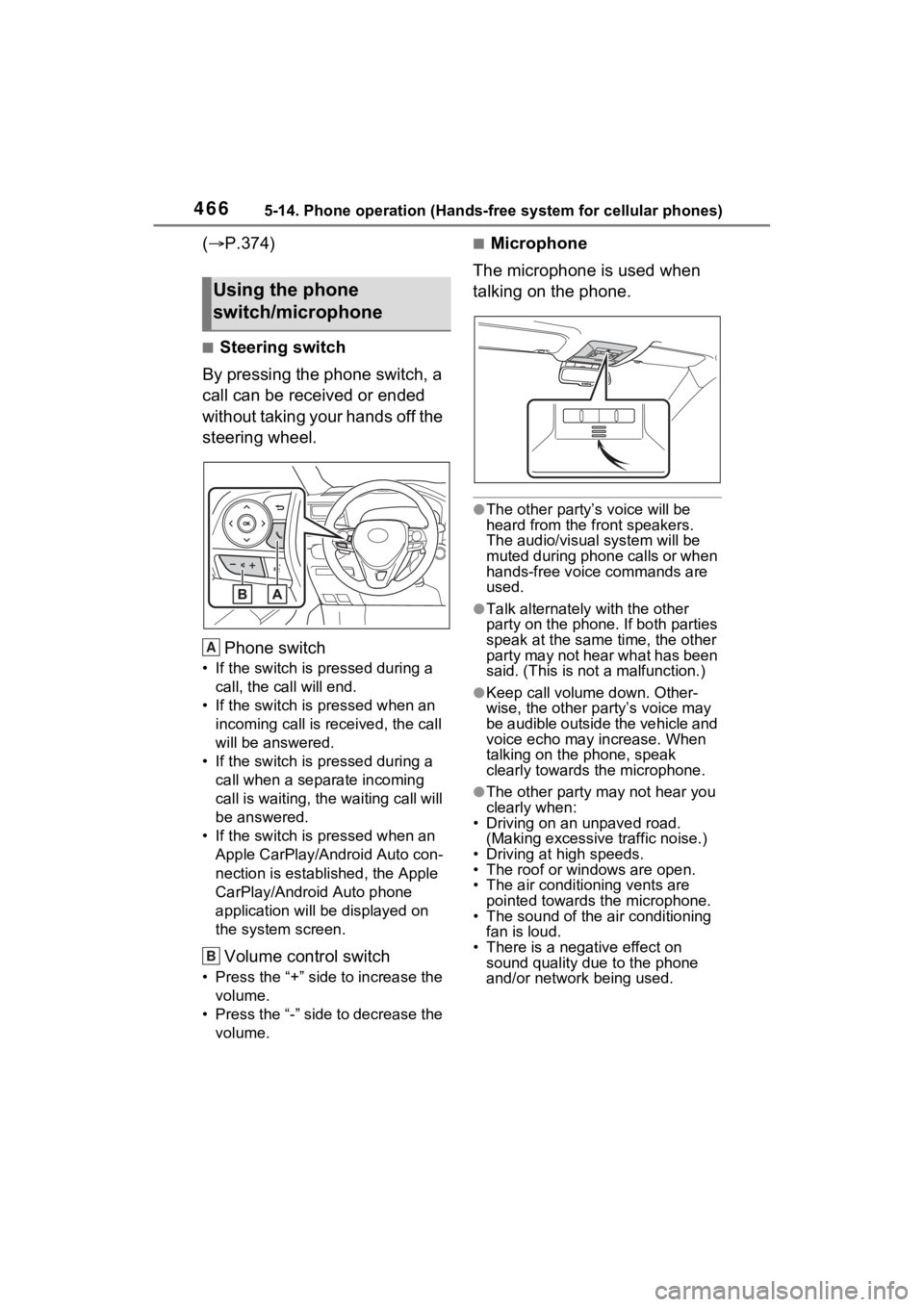
By pressing the phone switch, a
call can be received or ended
without taking your hands off the
steering wheel.
Phone switch
• If the switch is pressed during a call, the call will end.
• If the switch is pressed when an incoming call is r eceived, the call
will be answered.
• If the switch is pressed during a call when a separate incoming
call is waiting, the waiting call will
be answered.
• If the switch is pressed when an Apple CarPlay/Android Auto con-
nection is established, the Apple
CarPlay/Android Auto phone
application will be displayed on
the system screen.
Volume control switch
• Press the “+” side to increase the volume.
• Press the “-” side to decrease the volume.
■Microphone
The microphone is used when
talking on the phone.
●The other party’s voice will be
heard from the front speakers.
The audio/vis ual system will be
muted during phone calls or when
hands-free voice commands are
used.
●Talk alternately with the other
party on the phone. If both parties
speak at the same time, the other
party may not hear what has been
said. (This is not a malfunction.)
●Keep call volume down. Other-
wise, the other party’s voice may
be audible outside the vehicle and
voice echo may increase. When
talking on the phone, speak
clearly towards the microphone.
●The other party may not hear you
clearly when:
• Driving on an unpaved road.
(Making excessive traffic noise.)
• Driving at high speeds.
• The roof or windows are open.
• The air conditioning vents are pointed towards the microphone.
• The sound of the air conditioning fan is loud.
• There is a negative effect on
sound quality due to the phone
and/or network being used.
Using the phone
switch/microphone
A
B
Page 556 of 748
5567-1. Maintenance and care
7-1.Maintenance and care
Working from top to bottom,
liberally apply water to the
vehicle body, wheel wells and
underside of the vehicle to
remove any dirt and dust.
Wash the vehicle body using
a sponge or soft cloth, such
as a chamois.
For hard-to-remove marks,
use car wash soap and rinse
thoroughly with water.
Wipe away any water.
Wax the vehicle when the
waterproof coating deterio-
rates.
If water does not bead on a clean
surface, apply wax when the vehi-
cle body is cool.
■Automatic car washes
●Before washing the vehicle:
• Fold the mirrors
• Turn off the power back door (if equipped)
Start washing from the front of the
vehicle. Make sure to extend the
mirrors before driving.
●Brushes used in automatic car washes may scratch the vehicle
surface, parts (wheel, etc.) and
harm your vehicle’s paint.
●Rear spoiler may not be washable
in some automatic car washes.
There may also be an increased
risk of damage to vehicle.
■High pressure car washes
As water may enter the cabin, do
not bring the nozzle tip near the
gaps around the doors or perimeter
of the windows, or spray these
areas continuously.
■Note for a smart key system (if
equipped)
If the door handle becomes wet
while the electronic key is within the
effective range, t he door may lock
and unlock repeatedly. In that case,
follow the following correction pro-
cedures to wash the vehicle:
●Place the key in a position 6 ft. (2
m) or more separate from the
vehicle while the vehicle is being
washed. (Take care to ensure that
the key is not stolen.)
●Set the electronic key to battery-
saving mode to disable the smart
key system. ( P.128)
■Wheels and wheel ornaments (if
equipped)
●Remove any dirt immediately by
using a neutral detergent.
●Wash detergent off with water
immediately after use.
●To protect the paint from damage,
make sure to obs erve the follow-
ing precautions.
• Do not use acidic, alkaline or abrasive detergent.
• Do not use hard brushes.
• Do not use detergent on the wheels when they are hot, such
as after driving or parking in hot
weather.
●For vehicles with matte painted
wheels: The wheels are not main-
tained in the same way as normal
aluminum wheels. For details,
Cleaning a nd protect-
ing the vehicle exte-
rior
Perform the following to
protect the vehicle and
maintain it in prime condi-
tion:
Cleaning instructions