ECO mode TOYOTA RAV4 2022 Repair Manual
[x] Cancel search | Manufacturer: TOYOTA, Model Year: 2022, Model line: RAV4, Model: TOYOTA RAV4 2022Pages: 748, PDF Size: 22.93 MB
Page 517 of 748

5176-1. Using the air conditioning system and defogger
6
Interior features
the temperature setting or the
inside temperature.
■When the outside temperature
exceeds 75°F (24°C) and the air
conditioning system is on
●In order to reduce the air condi-
tioning power consumption, the air
conditioning system may switch to
recirculated air mode automati-
cally. This may also reduce fuel
consumption.
●Recirculated air mode is selected
as a default mode when the
engine switch is turned to ON.
●It is possible to switch to outside
air mode at any time by pressing
the outside/recirculated air mode
switch.
■Operation of the air condition-
ing system in Eco drive mode
●In Eco drive mode, the air condi-
tioning system is controlled as fol-
lows to prioritize fuel efficiency:
• Engine speed and compressor operation controlled to restrict
heating/cooling capacity
• Fan speed restr icted when auto-
matic mode is selected
●To improve air conditioning perfor-
mance, perform the following
operations:
• Adjust the fan speed
• Turn off Eco drive mode ( P.347)
• Turn off Eco air conditioning mode
●When the driving mode is set to
Eco driving mode, the Eco air con-
ditioning mode will be turned on
automatically. Even in this case,
the Eco air conditioning mode can
be turned off by pressing the Eco
air conditioning mode switch.
■When the outside temperature
falls to nearly 32°F (0°C)
The dehumidification function may
not operate even when “A/C” switch
is pressed.
■Ventilation and air conditioning
odors
●To let fresh air in, set the air condi- tioning system to the outside air
mode.
●During use, various odors from
inside and outside the vehicle may
enter into and accumulate in the
air conditioning system. This may
then cause odor
to be emitted
from the vents.
●To reduce potential odors from
occurring:
• It is recommended that the air conditioning system be set to out-
side air mode prior to turning the
vehicle off.
• The start timing of the blower may be delayed for a short period of
time immediately after the air con-
ditioning system is started in auto-
matic mode.
●When parking, the system auto-
matically switches to outside air
mode to encourage better air cir-
culation throughout the vehicle,
helping to reduce odors that occur
when starting the vehicle.
■Air conditioning system opera-
tions when the engine is
stopped due to the Stop & Start
system (vehicles with Stop &
Start system)
When the engine is stopped due to
Stop & Start system operations, the
automatic air conditioning cooling,
heating and dehumidification func-
tions turn off and the fan speed is
decreased according to the outside
temperature etc. or air blowing
stops. To stop the air conditioning
system from turning off, press the
Stop & Start cancel switch and
refrain from using the Stop & Start
system.
■When the windshield is fogged
up and the engine is stopped
due to the Stop & Start system
(vehicles with Stop & Start sys-
tem)
Press the windshield defogger
switch to restart the engine and
defog the windshield.
If the windshield continuously fogs
Page 541 of 748
5416-4. Using the other interior features
6
Interior features
will stop. Switch again to the
rapid charging function to use
rapid charging again.
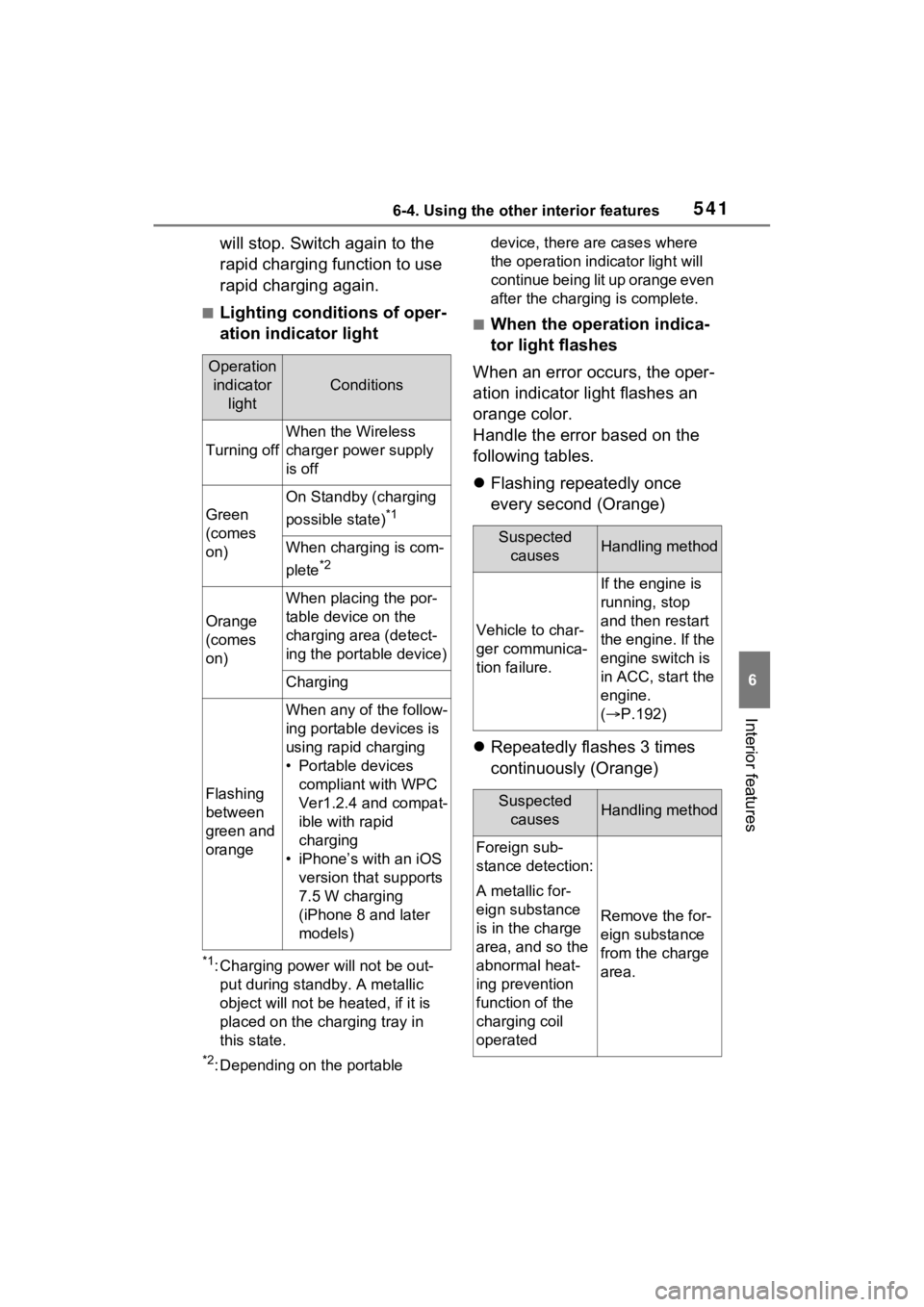
■Lighting conditions of oper-
ation indicator light
*1: Charging power will not be out-put during stan dby. A metallic
object will not be heated, if it is
placed on the charging tray in
this state.
*2: Depending on the portable device, there are cases where
the operation indicator light will
continue being lit up orange even
after the charging is complete.
■When the operation indica-
tor light flashes
When an error occurs, the oper-
ation indicator light flashes an
orange color.
Handle the error based on the
following tables.
Flashing repeatedly once
every second (Orange)
Repeatedly flashes 3 times
continuously (Orange)
Operation
indicator light
Conditions
Turning off
When the Wireless
charger power supply
is off
Green
(comes
on)
On Standby (charging
possible state)
*1
When charging is com-
plete
*2
Orange
(comes
on)
When placing the por-
table device on the
charging area (detect-
ing the portable device)
Charging
Flashing
between
green and
orange
When any of the follow-
ing portable devices is
using rapid charging
• Portable devices compliant with WPC
Ver1.2.4 and compat-
ible with rapid
charging
• iPhone’s with an iOS version that supports
7.5 W charging
(iPhone 8 and later
models)
Suspected causesHandling method
Vehicle to char-
ger communica-
tion failure.
If the engine is
running, stop
and then restart
the engine. If the
engine switch is
in ACC, start the
engine.
( P.192)
Suspected
causesHandling method
Foreign sub-
stance detection:
A metallic for-
eign substance
is in the charge
area, and so the
abnormal heat-
ing prevention
function of the
charging coil
operated
Remove the for-
eign substance
from the charge
area.
Page 556 of 748
5567-1. Maintenance and care
7-1.Maintenance and care
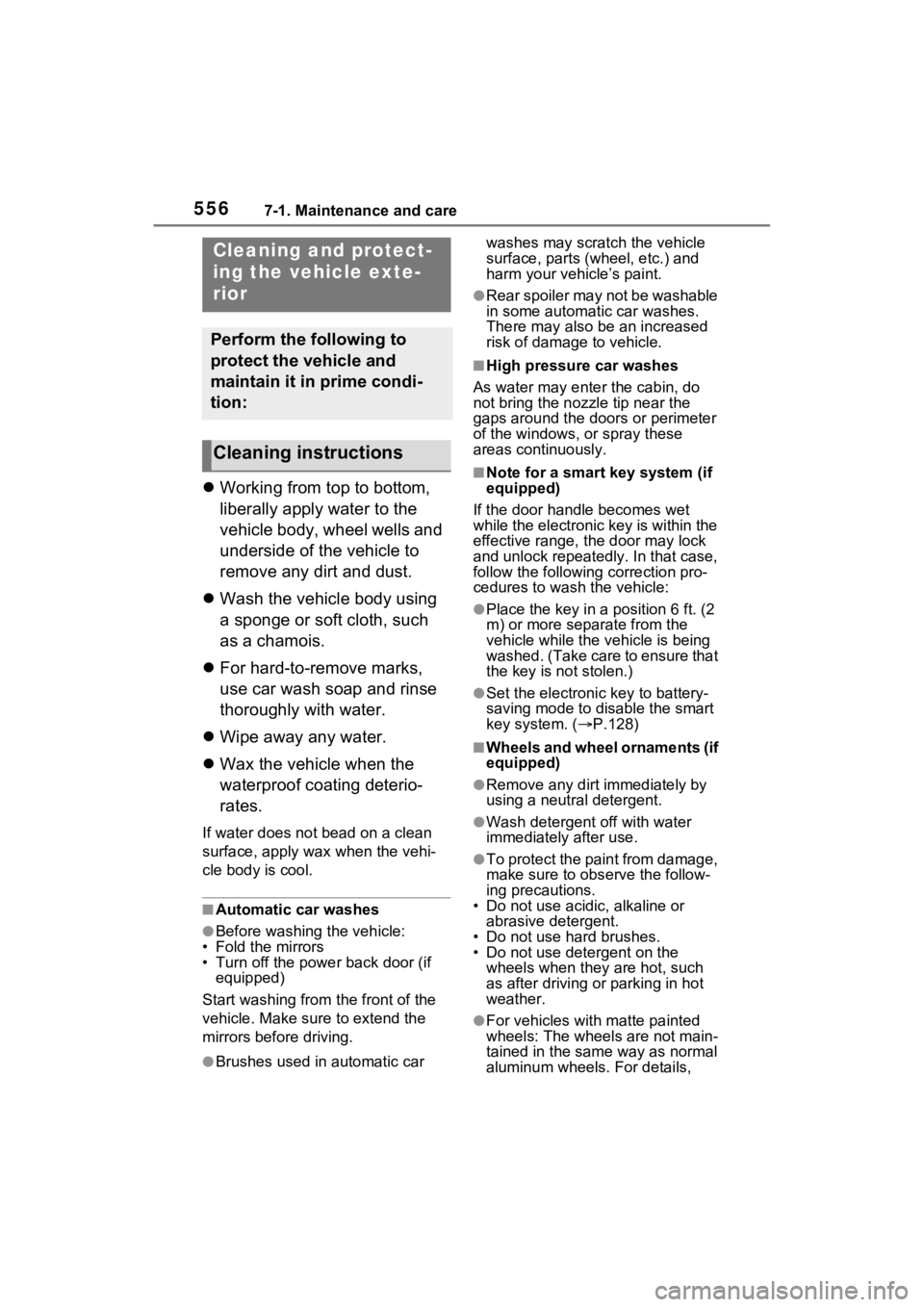
Working from top to bottom,
liberally apply water to the
vehicle body, wheel wells and
underside of the vehicle to
remove any dirt and dust.
Wash the vehicle body using
a sponge or soft cloth, such
as a chamois.
For hard-to-remove marks,
use car wash soap and rinse
thoroughly with water.
Wipe away any water.
Wax the vehicle when the
waterproof coating deterio-
rates.
If water does not bead on a clean
surface, apply wax when the vehi-
cle body is cool.
■Automatic car washes
●Before washing the vehicle:
• Fold the mirrors
• Turn off the power back door (if equipped)
Start washing from the front of the
vehicle. Make sure to extend the
mirrors before driving.
●Brushes used in automatic car washes may scratch the vehicle
surface, parts (wheel, etc.) and
harm your vehicle’s paint.
●Rear spoiler may not be washable
in some automatic car washes.
There may also be an increased
risk of damage to vehicle.
■High pressure car washes
As water may enter the cabin, do
not bring the nozzle tip near the
gaps around the doors or perimeter
of the windows, or spray these
areas continuously.
■Note for a smart key system (if
equipped)
If the door handle becomes wet
while the electronic key is within the
effective range, t he door may lock
and unlock repeatedly. In that case,
follow the following correction pro-
cedures to wash the vehicle:
●Place the key in a position 6 ft. (2
m) or more separate from the
vehicle while the vehicle is being
washed. (Take care to ensure that
the key is not stolen.)
●Set the electronic key to battery-
saving mode to disable the smart
key system. ( P.128)
■Wheels and wheel ornaments (if
equipped)
●Remove any dirt immediately by
using a neutral detergent.
●Wash detergent off with water
immediately after use.
●To protect the paint from damage,
make sure to obs erve the follow-
ing precautions.
• Do not use acidic, alkaline or abrasive detergent.
• Do not use hard brushes.
• Do not use detergent on the wheels when they are hot, such
as after driving or parking in hot
weather.
●For vehicles with matte painted
wheels: The wheels are not main-
tained in the same way as normal
aluminum wheels. For details,
Cleaning a nd protect-
ing the vehicle exte-
rior
Perform the following to
protect the vehicle and
maintain it in prime condi-
tion:
Cleaning instructions
Page 577 of 748
5777-3. Do-it-yourself maintenance
7
Maintenance and care
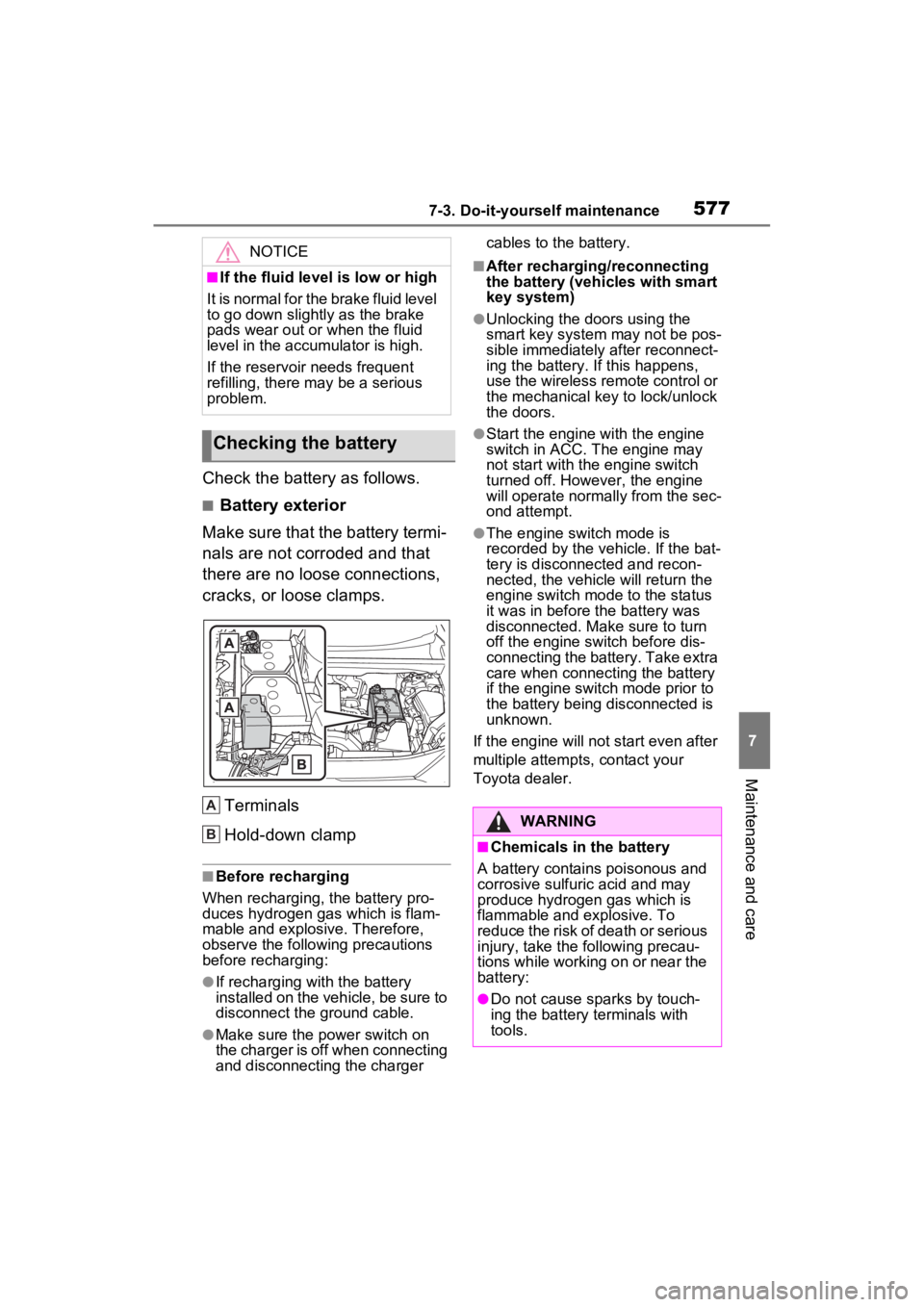
Check the battery as follows.
■Battery exterior
Make sure that the battery termi-
nals are not corroded and that
there are no loose connections,
cracks, or loose clamps.
Terminals
Hold-down clamp
■Before recharging
When recharging, t he battery pro-
duces hydrogen ga s which is flam-
mable and explosive. Therefore,
observe the following precautions
before recharging:
●If recharging wi th the battery
installed on the vehicle, be sure to
disconnect the ground cable.
●Make sure the power switch on
the charger is off when connecting
and disconnecting the charger cables to the battery.
■After recharging/reconnecting
the battery (vehicles with smart
key system)
●Unlocking the doors using the
smart key system may not be pos-
sible immediately
after reconnect-
ing the battery. If this happens,
use the wireless remote control or
the mechanical key to lock/unlock
the doors.
●Start the engine with the engine
switch in ACC. T he engine may
not start with th e engine switch
turned off. However, the engine
will operate normally from the sec-
ond attempt.
●The engine switch mode is
recorded by the vehicle. If the bat-
tery is disconnected and recon-
nected, the vehicle will return the
engine switch mode to the status
it was in before t he battery was
disconnected. Make sure to turn
off the engine switch before dis-
connecting the battery. Take extra
care when connecting the battery
if the engine switch mode prior to
the battery being disconnected is
unknown.
If the engine will no t start even after
multiple attempts, contact your
Toyota dealer.
NOTICE
■If the fluid level is low or high
It is normal for the brake fluid level
to go down slightly as the brake
pads wear out or when the fluid
level in the accumulator is high.
If the reservoir needs frequent
refilling, there may be a serious
problem.
Checking the battery
A
B:$51,1*
■Chemicals in the battery
A battery contains poisonous and
corrosive sulfur ic acid and may
produce hydrogen gas which is
flammable and explosive. To
reduce the risk of death or serious
injury, take the following precau-
tions while working on or near the
battery:
●Do not cause sparks by touch-
ing the battery terminals with
tools.
Page 581 of 748
5817-3. Do-it-yourself maintenance
7
Maintenance and care
■If the tread on snow tires wears
down below 0.16 in. (4 mm)
The effectiveness of the tires as
snow tires is lost.
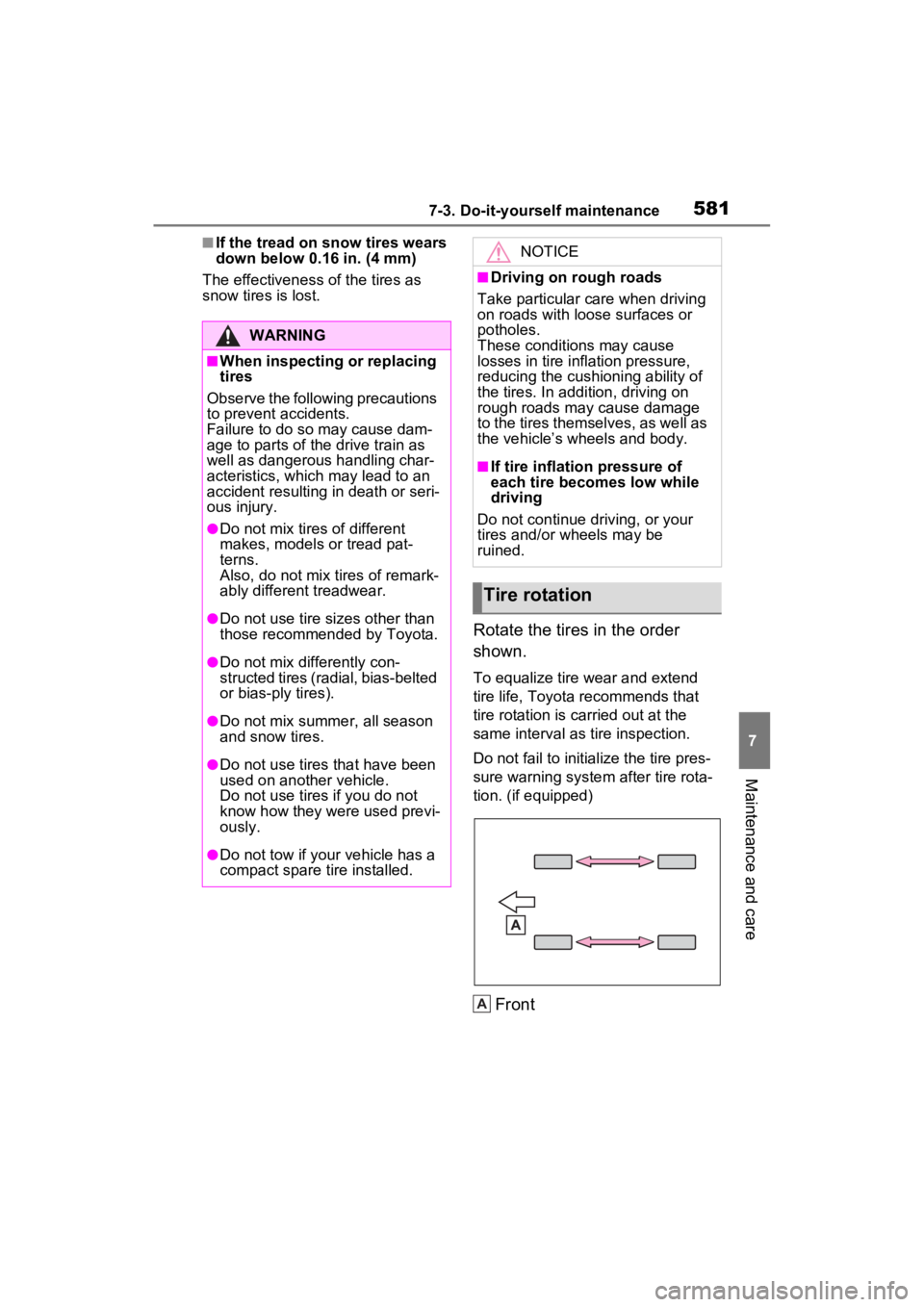
Rotate the tires in the order
shown.
To equalize tire wear and extend
tire life, Toyota recommends that
tire rotation is carried out at the
same interval as tire inspection.
Do not fail to initialize the tire pres-
sure warning system after tire rota-
tion. (if equipped)
Front
WARNING
■When inspecting or replacing
tires
Observe the following precautions
to prevent accidents.
Failure to do so may cause dam-
age to parts of t he drive train as
well as dangerous handling char-
acteristics, which may lead to an
accident resulting in death or seri-
ous injury.
●Do not mix tires of different
makes, models or tread pat-
terns.
Also, do not mix tires of remark-
ably different treadwear.
●Do not use tire sizes other than
those recommende d by Toyota.
●Do not mix differently con-
structed tires (radial, bias-belted
or bias-ply tires).
●Do not mix summer, all season
and snow tires.
●Do not use tires that have been
used on another vehicle.
Do not use tires if you do not
know how they were used previ-
ously.
●Do not tow if your vehicle has a
compact spare tire installed.
NOTICE
■Driving on rough roads
Take particular care when driving
on roads with loose surfaces or
potholes.
These conditions may cause
losses in tire inflation pressure,
reducing the cushioning ability of
the tires. In addition, driving on
rough roads may cause damage
to the tires themselves, as well as
the vehicle’s wheels and body.
■If tire inflation pressure of
each tire becomes low while
driving
Do not continue driving, or your
tires and/or wheels may be
ruined.
Tire rotation
A
Page 615 of 748
6158-2. Steps to take in an emergency
8
When trouble arises
8-2.Steps to take in an emergency
If your vehicle needs
to be towed
If towing is necessary, we
recommend having your
vehicle towed by your
Toyota dealer or commer-
cial towing service, using a
wheel-lift type truck or flat-
bed truck.
Use a safety chain system
for all towing, and abide by
all state/provincial and local
laws.
2WD models: If towing your
vehicle with a wheel-lift type
truck from the front, the
vehicle’s rear wheels and
axles must be in good con-
ditions. (P.615, 617)
If they are damaged, use a
towing dolly or flatbed
truck.
AWD models: If towing your
vehicle with a wheel-lift type
truck, use a towing dolly.
( P.615, 617)
WARNING
Observe the following precau-
tions. Failure to do so may result
in death or serious injury.
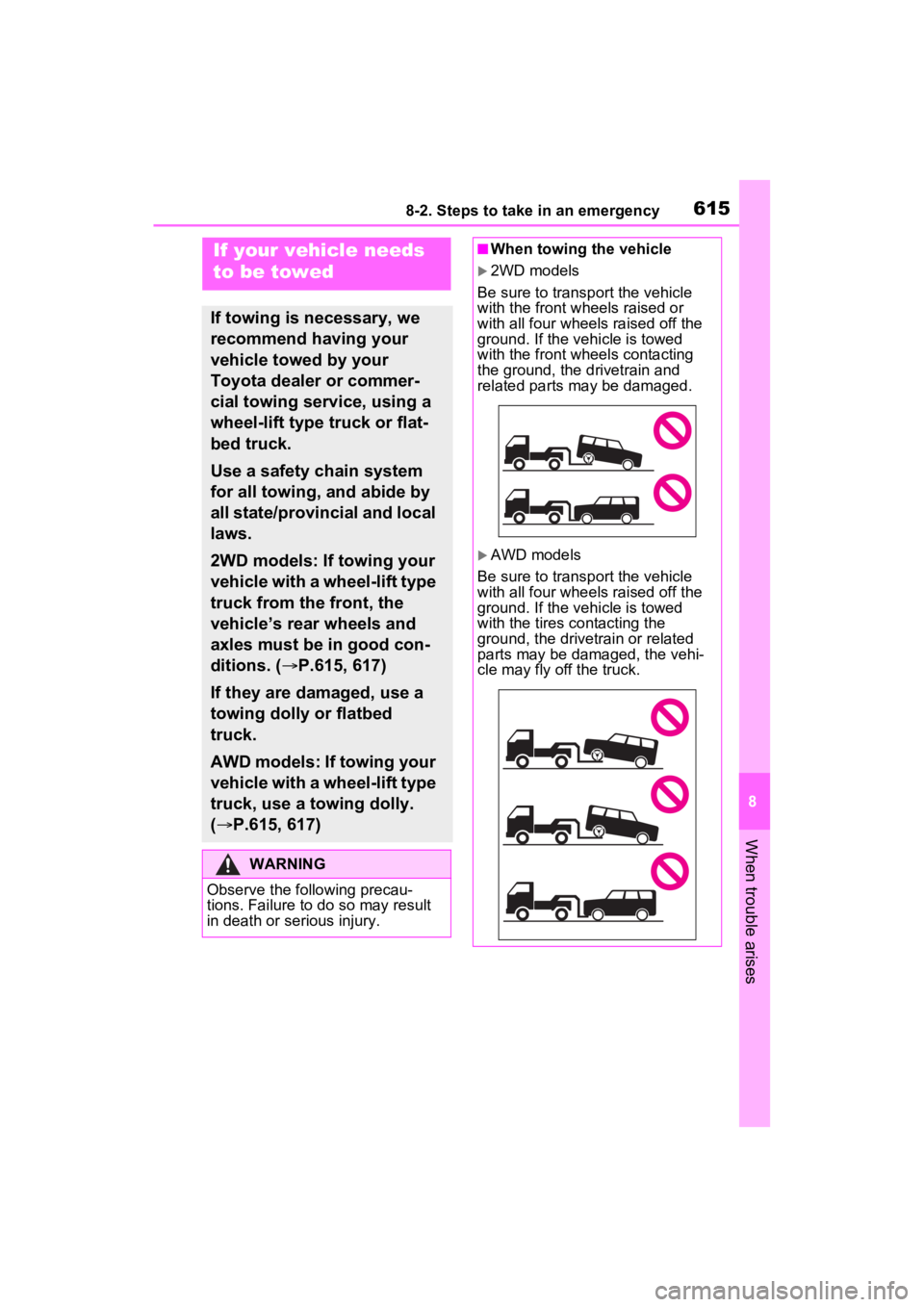
■When towing the vehicle
2WD models
Be sure to transp ort the vehicle
with the front wheels raised or
with all four wheels raised off the
ground. If the vehicle is towed
with the front wheels contacting
the ground, the drivetrain and
related parts may be damaged.
AWD models
Be sure to transp ort the vehicle
with all four wheels raised off the
ground. If the vehicle is towed
with the tires co ntacting the
ground, the drivetrain or related
parts may be damaged, the vehi-
cle may fly off the truck.
Page 644 of 748
6448-2. Steps to take in an emergency
installed on the compact spare
tire.
6Stow the flat tire, tire jack and
all tools.
■The compact spare tire
●The compact spare tire is identi-
fied by the label “TEMPORARY
USE ONLY” on the tire sidewall.
Use the compact s pare tire tem-
porarily, and only in an emer-
gency.
●Make sure to check the tire infla-
tion pressure of the compact
spare tire. ( P.667)
■When using the compact spare
tire
As the compact sp are tire is not
equipped with a tire pressure warn-
ing valve and transmitter (if
equipped), low inflation pressure of
the spare tire will not be indicated by
the tire pressure warning system.
Also, if you replace the compact
spare tire after th e tire pressure
warning light comes on, the light
remains on.
■When the compact spare tire is
attached
The vehicle height may become
lower when driving with the compact
spare tire compared to when driving
with standard tires.
■If you have a flat front tire on a
road covered with snow or ice
Install the compact spare tire on one
of the rear wheels of the vehicle.
Perform the following steps and fit
tire chains to the front tires:
1 Replace a rear tire with the com-
pact spare tire.
2 Replace the flat front tire with the
tire removed from the rear of the
vehicle.
3 Fit tire chains to the front tires.
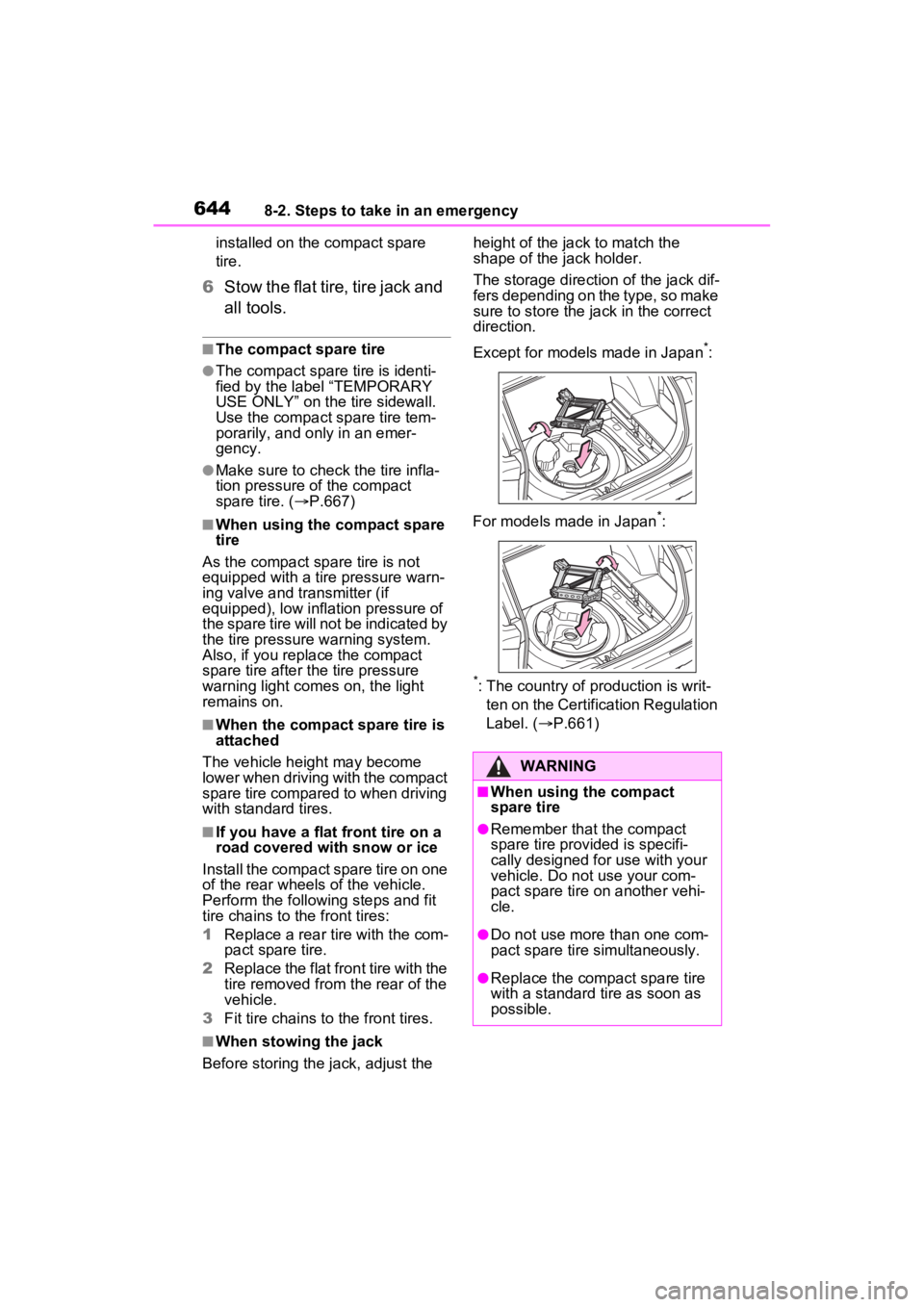
■When stowing the jack
Before storing the jack, adjust the height of the ja
ck to match the
shape of the jack holder.
The storage direction of the jack dif-
fers depending on the type, so make
sure to store the ja ck in the correct
direction.
Except for models made in Japan
*:
For models made in Japan
*:
*: The country of production is writ- ten on the Certification Regulation
Label. ( P.661)
WARNING
■When using the compact
spare tire
●Remember that the compact
spare tire provided is specifi-
cally designed for use with your
vehicle. Do not use your com-
pact spare tire on another vehi-
cle.
●Do not use more than one com-
pact spare tire simultaneously.
●Replace the comp act spare tire
with a standard tire as soon as
possible.
Page 650 of 748
6508-2. Steps to take in an emergency
3Firmly depress the brake
pedal and check that is
displayed on the multi-infor-
mation display.
4 Press the engine switch
shortly and firmly.
In the event that the engine still
cannot be started, contact your
Toyota dealer.
■Stopping the engine
Shift the shift lever to P, set the
parking brake and press the engine
switch as you no rmally do when
stopping the engine.
■Replacing the key battery
As the above proc edure is a tempo-
rary measure, it is recommended
that the electronic key battery be
replaced immediate ly when the bat-
tery is depleted. ( P.597)
■Alarm (if equipped) (for Canada)
Using the mechanical key to lock
the doors will not set the alarm sys-
tem.
If a door is unlocked using the
mechanical key when the alarm sys-
tem is set, the alarm may be trig-
gered.
■Changing engine switch modes
Release the brake pedal and press
the engine switch in step 3 above.
The engine does not start and
modes will be cha nged each time
the switch is pressed. ( P.195)
If you have a set of jumper (or
booster) cables and a second
vehicle with a 12-volt battery,
you can jump start your vehicle
by following the steps below.
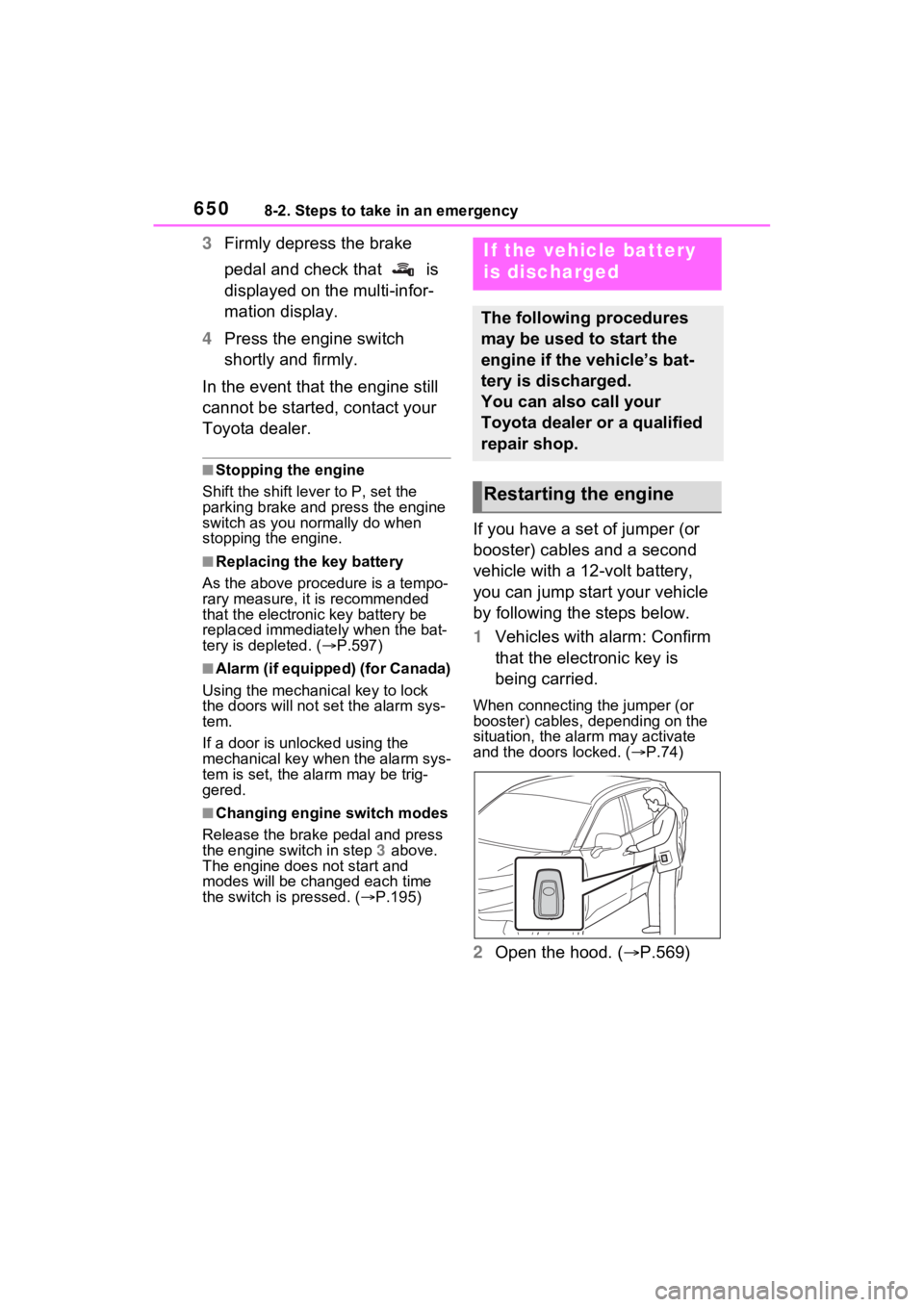
1Vehicles with alarm: Confirm
that the electronic key is
being carried.
When connecting the jumper (or
booster) cables, depending on the
situation, the alarm may activate
and the doors locked. ( P.74)
2 Open the hood. ( P.569)
If the vehicle battery
is discharged
The following procedures
may be used to start the
engine if the vehicle’s bat-
tery is discharged.
You can also call your
Toyota dealer or a qualified
repair shop.
Restarting the engine
Page 652 of 748

6528-2. Steps to take in an emergency
■Starting the engine when the
battery is discharged
The engine cannot be started by
push-starting.
■To prevent battery discharge
●Turn off the headlights and the
audio system while the engine is
stopped.
(Vehicles with Stop & Start system:
Except when the engine is stopped
due to the Stop & Start system)
●Turn off any unnec essary electri-
cal components when the vehicle
is running at a low speed for an
extended period, such as in heavy
traffic.
■When the battery is removed or
discharged
●Information stor ed in the ECU is
cleared. When the battery is
depleted, have the vehicle
inspected at your Toyota dealer.
●Some systems may require initial-
ization. ( P.696)
■When removing the battery ter-
minals
When the battery terminals are
removed, the information stored in
the ECU is cleared . Before remov-
ing the battery terminals, contact
your Toyota dealer.
■Charging the battery
The electricity stor ed in the battery
will discharge gradu ally even when
the vehicle is not i n use, due to nat-
ural discharge and the draining
effects of certain electrical appli-
ances. If the vehicle is left for a long
time, the battery may discharge,
and the engine ma y be unable to
start. (The battery recharges auto-
matically during driving.)
■When recharging or replacing
the battery (vehicles without
smart key start system)
The engine may not start on the first
attempt after the battery has recharged but will start normally
after the second attempt. This is not
a malfunction.
■When recharging or replacing
the battery (vehicles with smart
key system)
●In some cases, it may not be pos-
sible to unlock the doors using the
smart key system when the bat-
tery is discharged. Use the wire-
less remote control or the
mechanical key to lock or unlock
the doors.
●The engine may not start on the
first attempt after
the battery has
recharged but will start normally
after the second attempt. This is
not a malfunction.
●The engine switch mode is memo-
rized by the vehicle. When the
battery is reconnected, the system
will return to the mode it was in
before the bat tery was dis-
charged. Before disconnecting the
battery, turn the engine switch to
OFF.
If you are unsure what mode the
engine switch wa s in before the
battery discharged, be especially
careful when reconnecting the
battery.
■When the battery is removed or
discharged (vehicles with Stop
& Start system)
The Stop & Start system may not
automatically stop the engine for up
to an hour.
■When replacing the battery
●Vehicles with Stop & Start system:
Use a genuine battery specifically
designed for use with the Stop &
Start system or a battery with equiv-
alent specifications to a genuine
battery. If an unsup ported battery is
used, Stop & Start system functions
may be restricted to protect the bat-
tery. Also, battery performance may
decrease and the engine may not
be able to restart. Contact your
Toyota dealer for details.
Page 681 of 748
6819-1. Specifications
9
Vehicle specifications
Intended outboard side-
wall
(a)The sidewall that contains a whitewall, bears
white lettering, or bear s manufacturer, brand,
and/or model name molding that is higher or
deeper than the same molding on the other
sidewall of the tire, or
(b)The outward facing sidewall of an asymmetri-
cal tire that has a par ticular side that must
always face outward whe n mounted on a vehi-
cle
Light truck (LT) tire
A tire designated by its manufacturer as primar-
ily intended for use on lightweight trucks or mul-
tipurpose passenger vehicles
Load ratingThe maximum load that a tire is rated to carry
for a given inflation pressure
Maximum load ratingThe load rating for a tire at the maximum per-
missible inflation pressure for that tire
Maximum permissible
inflation pressureThe maximum cold inflation pressure to which a
tire may be inflated
Measuring rimThe rim on which a tire is fitted for physical
dimension requirements
Open spliceAny parting at any junction of tread, sidewall, or
innerliner that extends to cord material
Outer diameterThe overall diameter o f an inflated new tire
Overall width
The linear distance between the exteriors of the
sidewalls of an inflated ti re, including elevations
due to labeling, decorations, or protective bands
or ribs
Passenger car tire
A tire intended for use on passenger cars, multi-
purpose passenger vehicles, and trucks, that
have a gross vehicle weight rating (GVWR) of
10,000 lb. or less.
PlyA layer of rubber-coated parallel cords
Ply separationA parting of rubber compound between adjacent
plies
Tire related termMeaning