maintenance TOYOTA RAV4 2022 Repair Manual
[x] Cancel search | Manufacturer: TOYOTA, Model Year: 2022, Model line: RAV4, Model: TOYOTA RAV4 2022Pages: 748, PDF Size: 22.93 MB
Page 606 of 748
6067-3. Do-it-yourself maintenance
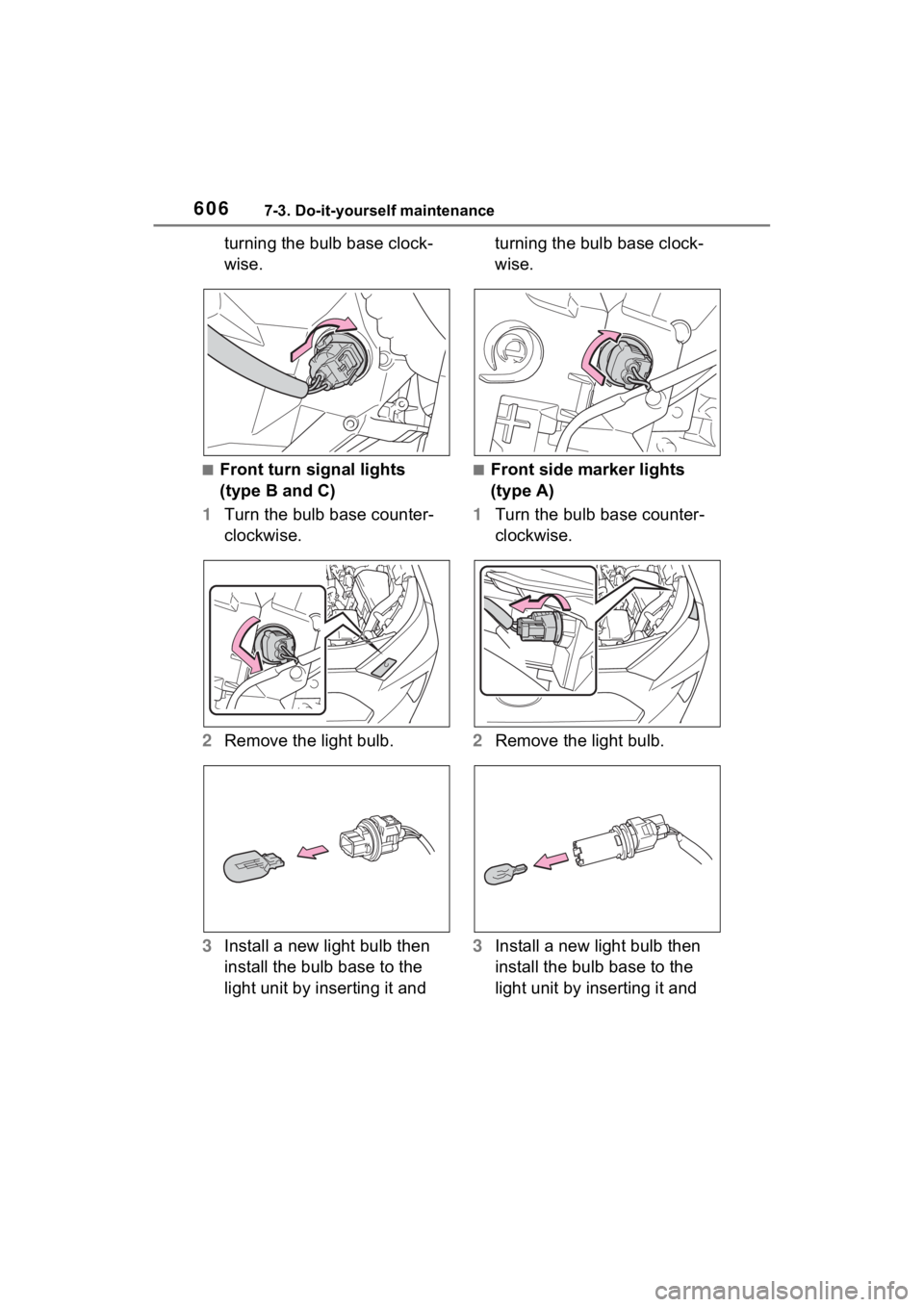
turning the bulb base clock-
wise.
■Front turn signal lights
(type B and C)
1 Turn the bulb base counter-
clockwise.
2 Remove the light bulb.
3 Install a new light bulb then
install the bulb base to the
light unit by inserting it and turning the bulb base clock-
wise.■Front side marker lights
(type A)
1 Turn the bulb base counter-
clockwise.
2 Remove the light bulb.
3 Install a new light bulb then
install the bulb base to the
light unit by inserting it and
Page 607 of 748
6077-3. Do-it-yourself maintenance
7
Maintenance and care
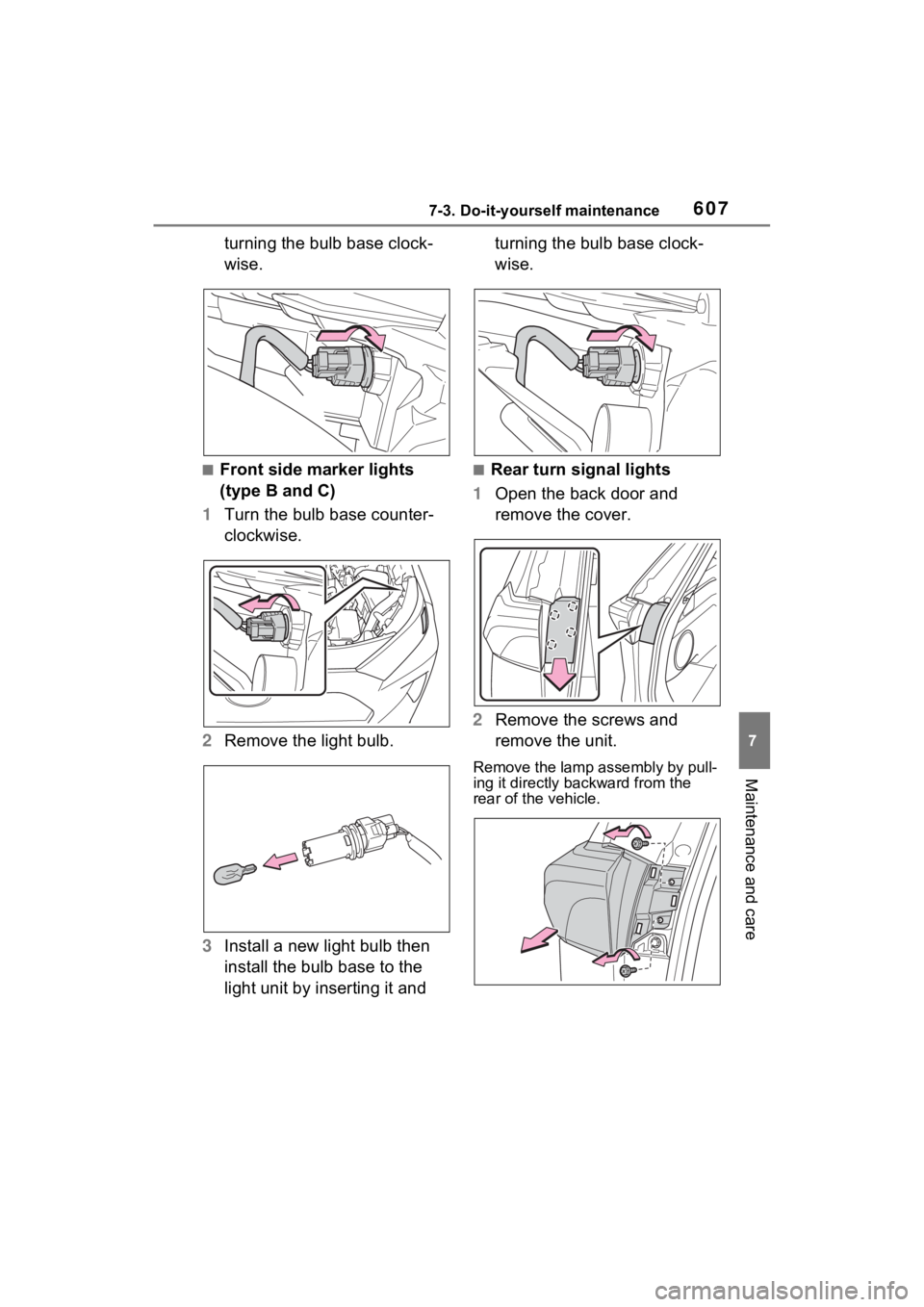
turning the bulb base clock-
wise.
■Front side marker lights
(type B and C)
1 Turn the bulb base counter-
clockwise.
2 Remove the light bulb.
3 Install a new light bulb then
install the bulb base to the
light unit by inserting it and turning the bulb base clock-
wise.■Rear turn signal lights
1 Open the back door and
remove the cover.
2 Remove the screws and
remove the unit.
Remove the lamp assembly by pull-
ing it directly ba ckward from the
rear of the vehicle.
Page 608 of 748
6087-3. Do-it-yourself maintenance
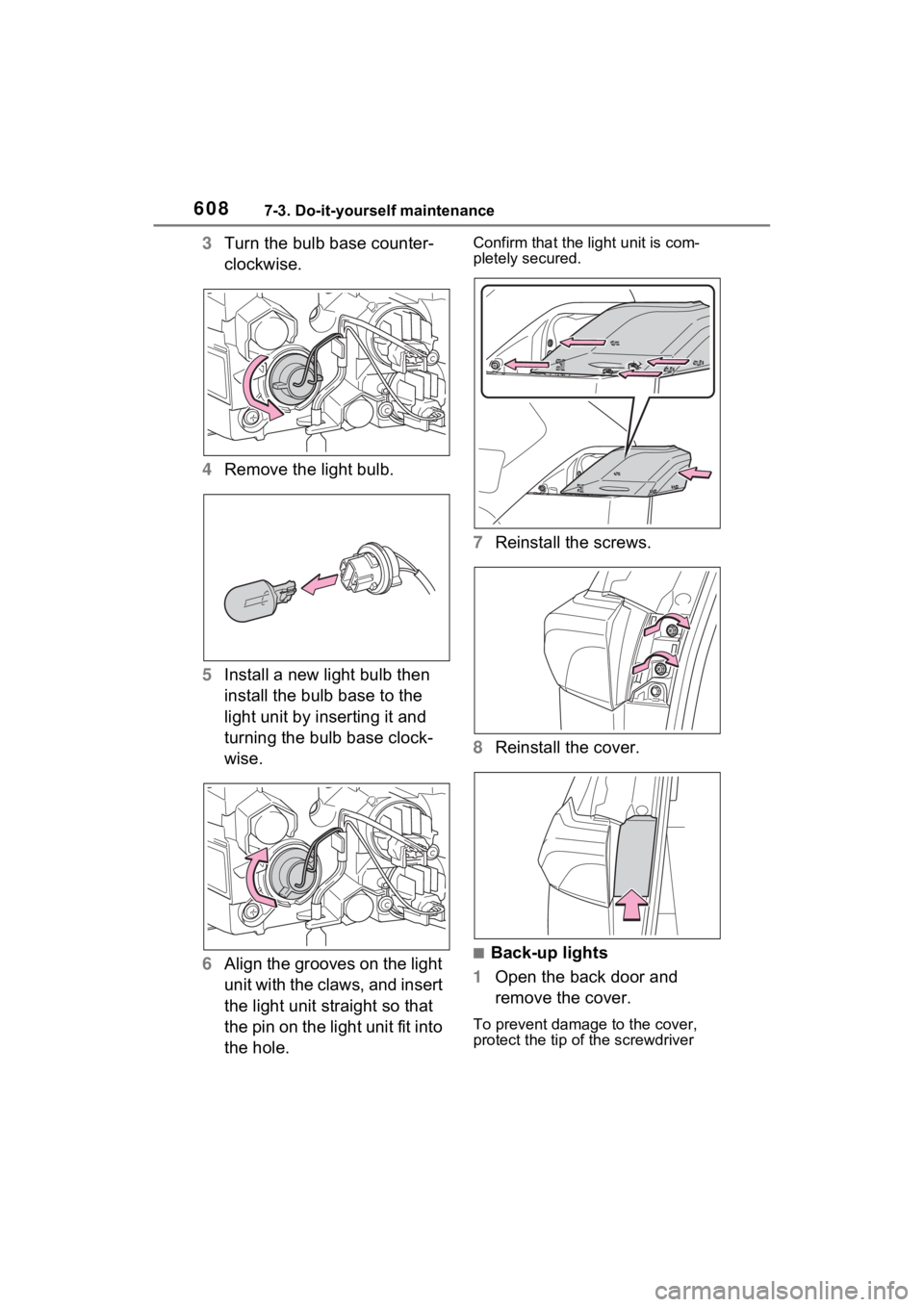
3Turn the bulb base counter-
clockwise.
4 Remove the light bulb.
5 Install a new light bulb then
install the bulb base to the
light unit by inserting it and
turning the bulb base clock-
wise.
6 Align the grooves on the light
unit with the claws, and insert
the light unit straight so that
the pin on the light unit fit into
the hole.Confirm that the light unit is com-
pletely secured.
7Reinstall the screws.
8 Reinstall the cover.
■Back-up lights
1 Open the back door and
remove the cover.
To prevent damage to the cover,
protect the tip of the screwdriver
Page 609 of 748
6097-3. Do-it-yourself maintenance
7
Maintenance and care
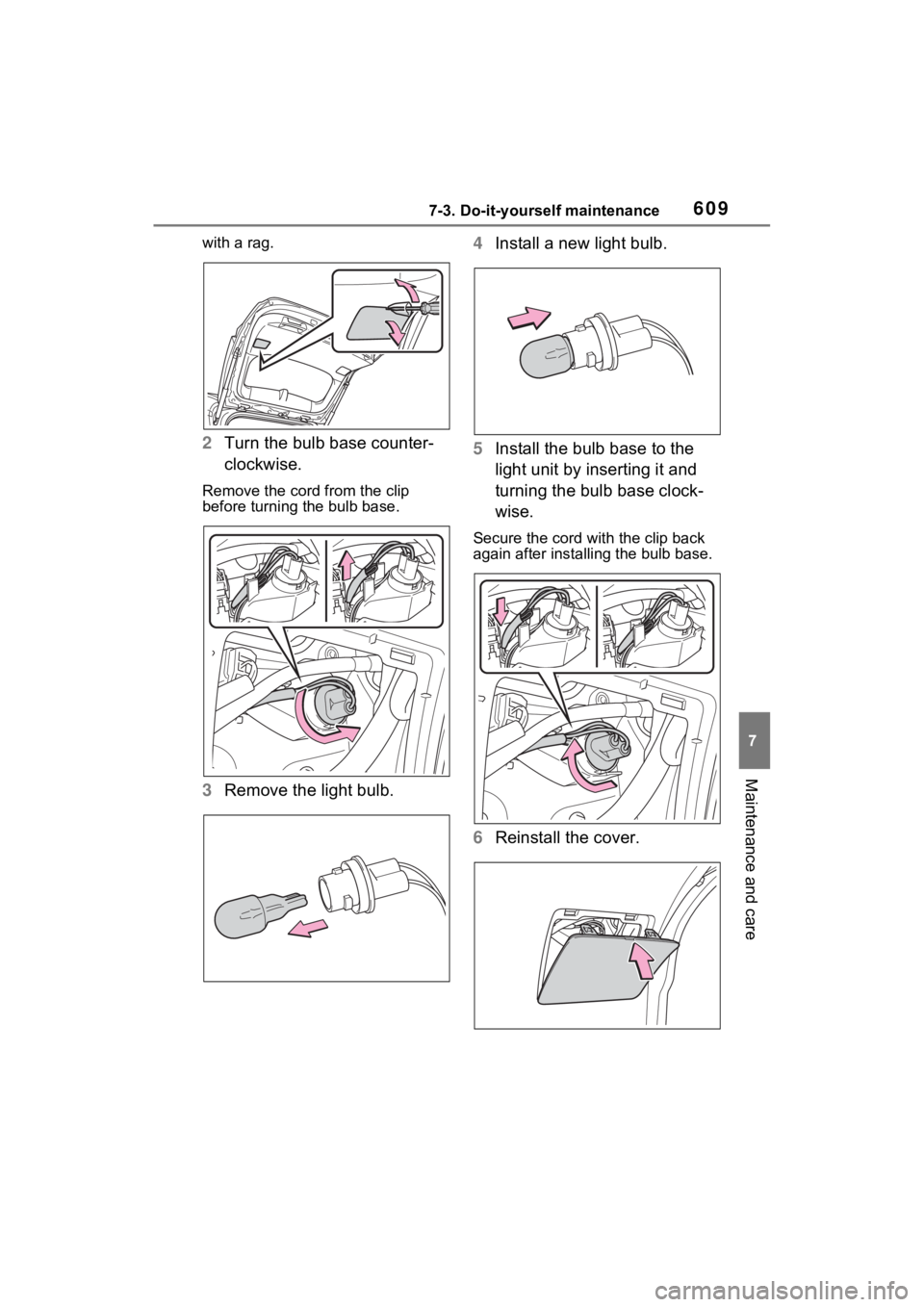
with a rag.
2Turn the bulb base counter-
clockwise.
Remove the cord from the clip
before turning the bulb base.
3Remove the light bulb. 4
Install a new light bulb.
5 Install the bulb base to the
light unit by inserting it and
turning the bulb base clock-
wise.
Secure the cord wit h the clip back
again after installing the bulb base.
6 Reinstall the cover.
Page 610 of 748
6107-3. Do-it-yourself maintenance
WARNING
■Replacing light bulb
●Turn off the light. Do not attempt
to replace the bulb immediately
after turning off the light.
The bulb become very hot and
may cause burns.
●Do not touch the glass portion
of the light bulb with bare
hands. When it is unavoidable
to hold the glass portion, use
and hold with a clean dry cloth
to avoid getting moisture and
oils on the bulb.
Also, if the bulb is scratched or
dropped, it may blow out or
crack.
●Fully install light bulb and any
parts used to secure it. Failure
to do so may result in heat dam-
age, fire, or water entering the
light unit. This may damage the
light or cause condensation to
build up on the lens.
●Do not attempt t o repair or dis-
assemble light bulbs, connec-
tors, electric circuits or
component parts.
Doing so may result in death or
serious injury due to electric
shock.
■To prevent damage or fire
●Make sure bulb is fully seated
and locked.
●Check the wattage of the bulb
before installing to prevent heat
damage.
Page 632 of 748
6328-2. Steps to take in an emergency
WARNING
■Maintenance of the tires
(vehicles with tire pressure
warning system)
Each tire, including the spare (if
provided), should be checked
monthly when cold and inflated to
the inflation pressure recom-
mended by the vehicle manufac-
turer on the vehicle placard or tire
inflation pressure label (tire and
load information label). (If your
vehicle has tires of a different size
than the size indicated on the
vehicle placard or tire inflation
pressure label [tire and load infor-
mation label], you should deter-
mine the proper tire inflation
pressure for those tires.)
As an added safe ty feature, your
vehicle has been equipped with a
tire pressure m onitoring system
(TPMS-tire pressure warning sys-
tem) that illuminates a low tire
pressure telltale (tire pressure
warning light) when one or more
of your tires is significantly under-
inflated. Accordingly, when the
low tire pressure telltale (tire pres-
sure warning light) illuminates,
you should stop and check your
tires as soon as possible, and
inflate them to the proper pres-
sure. Driving on a significantly
under-inflated tire causes the tire
to overheat and can lead to tire
failure. Under-inflation also
reduces fuel efficiency and tire
tread life, and may affect the vehi-
cle’s handling and stopping abil-
ity.
Please note that the TPMS (tire
pressure warning system) is not a
substitute for proper tire mainte-
nance, and it is the driver’s
responsibility to m aintain correct
tire pressure, even if under-infla-
tion has not reached the level to
trigger illumination of the TPMS
low tire pressure te lltale (tire pres-
sure warning light).
Your vehicle has also been
equipped with a TPMS (tire pres-
sure warning system) malfunc-
tion indicator to indicate when the
system is not operating properly.
The TPMS (tire pressure warning
system) malfunction indicator is
combined with the low tire pres-
sure telltale (tire pressure warning
light). When the system detects a
malfunction, the te lltale will flash
for approximately one minute and
then remain continuously illumi-
nated. This sequence will con-
tinue upon subsequent vehicle
start-ups as long as the malfunc-
tion exists. When the malfunction
indicator is illuminated, the sys-
tem may not be ab le to detect or
signal low tire pressure as
intended.
TPMS (tire pressure warning sys-
tem) malfunctions may occur for a
variety of reasons, including the
installation of replacement or
alternate tires or wheels on the
vehicle that prevent the TPMS
(tire pressure warning system)
from functioning properly. Always
check the TPMS (tire pressure
warning system) malfunction tell-
tale after replacing one or more
tires or wheels on your vehicle to
ensure that the replacement or
alternate tires and wheels allow
the TPMS (tire pressure warning
system) to continue to function
properly.
Page 635 of 748
6358-2. Steps to take in an emergency
8
When trouble arises
■If “Engine Oil Level Low Add or
Replace” is displayed
The engine oil level may be low.
Check the level of the engine oil,
and add engine oil if necessary.
This message may be displayed if
the vehicle is sto pped on a slope.
Move the vehicle to a level surface
and check if the message disap-
pears.
■If “Maintenance Required
Soon” is shown
Indicates that all maintenance
according to the dr iven distance on
the maintenance schedule
* should
be performed soon.
Comes on approximately 4500
miles (7200 km) after the message
has been reset.
If necessary, perf orm maintenance.
Please reset the message after the
maintenance is performed.
( P.563)
*: Refer to the separate “Scheduled
Maintenance Guide” or “Owner’
Manual Supplement” for the main-
tenance interval applicable to your
vehicle.
■If “Maintenance Required Visit
Your Dealer” is shown
Indicates that all maintenance is
required to correspond to the driven
distance on the maintenance sched-
ule
*.
Comes on approximately 5000
miles (8000 km) after the message
has been reset. (The indicator will
not work properly unless the mes-
sage has been reset.)
Perform the necessary mainte-
nance. Please reset the message
after the maintenance is performed.
( P.563)
*: Refer to the separate “Scheduled
Maintenance Guide” or “Owner’
Manual Supplement” for the main-
tenance interval applicable to your vehicle.
■If a message that indicates the
malfunction of front camera is
displayed
The following systems may be sus-
pended until the problem shown in
the message is resolved. (P.225,
622)
●PCS (Pre-Collision System)
●LTA (Lane Tracing Assist)
●AHB (Automatic High Beam)
●RSA (Road Sign Assist)*
●Dynamic radar cruise control with
full-speed range
*: If equipped
■If a message that indicates the
malfunction of radar sensor is
displayed
The following systems may be sus-
pended until the problem shown in
the message is resolved. (P.225,
622)
●PCS (Pre-Collision System)
●LTA (Lane Tracing Assist)
●Dynamic radar cruise control with
full-speed range
■If “Radar Cruise Control
Unavailable See Owner’s Man-
ual” is shown
The dynamic radar cruise control
with full-speed range system is sus-
pended temporarily or until the prob-
lem shown in the message is
resolved. (causes and coping meth-
ods: P.225)
■If “Radar Cruise Control
Unavailable” is shown
The dynamic radar cruise control
with full-speed range system cannot
be used temporarily. Use the sys-
tem when it becomes available
again.
■Warning buzzer
P.629
Page 659 of 748
659
9
9
Vehicle specifications
Vehicle specifications
9-1. SpecificationsMaintenance data (fuel, oil level, etc.) .................. 660
Fuel information .......... 672
Tire information ........... 674
9-2. Customization Customizable features 684
9-3. Initialization Items to initialize ......... 696
Page 660 of 748
6609-1. Specifications
9-1.Specifications
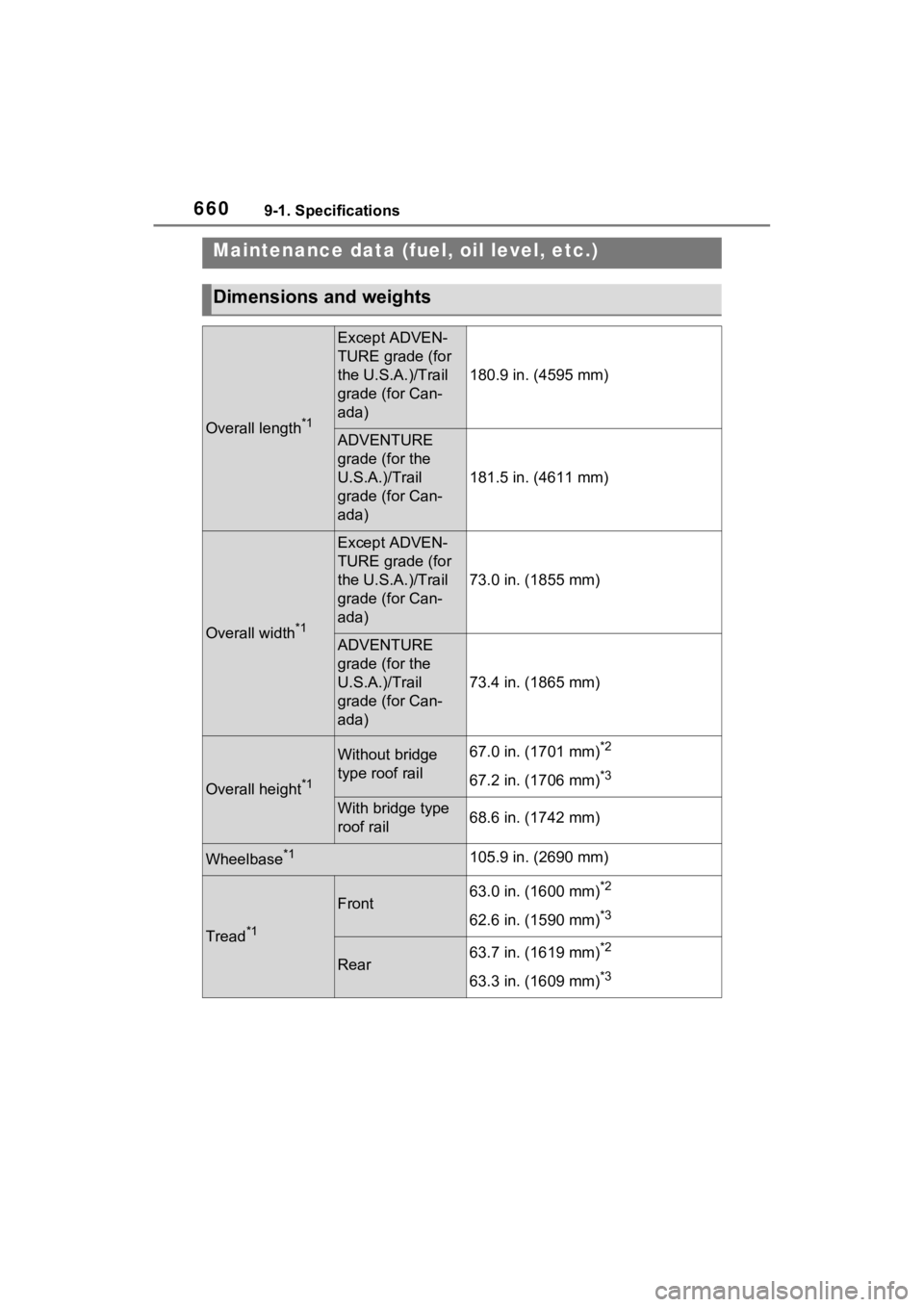
Maintenance data (fuel, oil level, etc.)
Dimensions and weights
Overall length*1
Except ADVEN-
TURE grade (for
the U.S.A.)/Trail
grade (for Can-
ada)
180.9 in. (4595 mm)
ADVENTURE
grade (for the
U.S.A.)/Trail
grade (for Can-
ada)
181.5 in. (4611 mm)
Overall width*1
Except ADVEN-
TURE grade (for
the U.S.A.)/Trail
grade (for Can-
ada)
73.0 in. (1855 mm)
ADVENTURE
grade (for the
U.S.A.)/Trail
grade (for Can-
ada)
73.4 in. (1865 mm)
Overall height*1
Without bridge
type roof rail67.0 in. (1701 mm)*2
67.2 in. (1706 mm)*3
With bridge type
roof rail68.6 in. (1742 mm)
Wheelbase*1105.9 in. (2690 mm)
Tread*1
Front63.0 in. (1600 mm)*2
62.6 in. (1590 mm)*3
Rear63.7 in. (1619 mm)*2
63.3 in. (1609 mm)*3
Page 696 of 748
6969-3. Initialization
9-3.Initialization
*1: If equipped
*2: Vehicles with Audio Plus or Premium Audio, refer to “NAVIGATION AND
MULTIMEDIA SYSTEM OWNER’S MANUAL”.
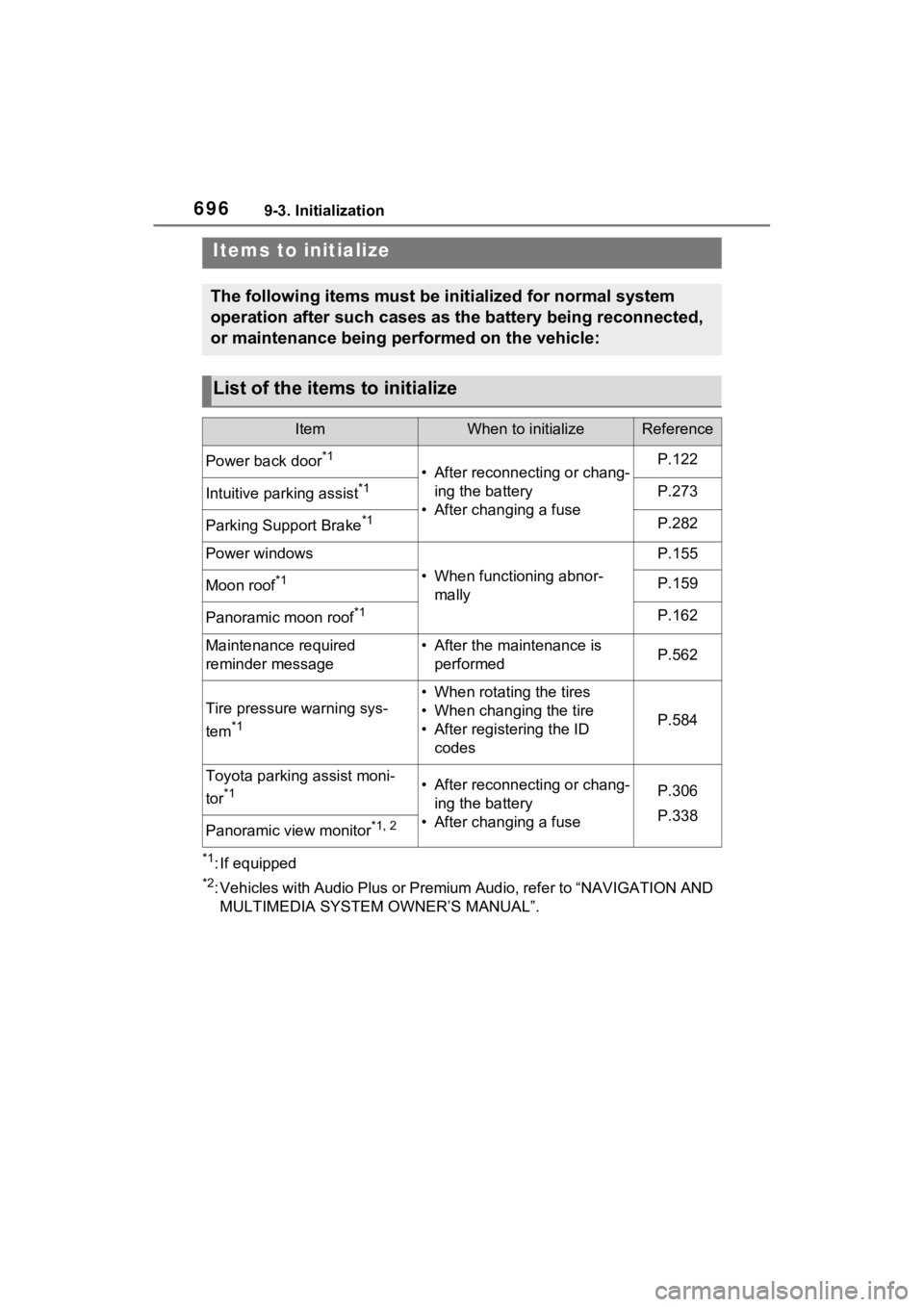
Items to initialize
The following items must be initialized for normal system
operation after such cases as the battery being reconnected,
or maintenance being performed on the vehicle:
List of the items to initialize
ItemWhen to initializeReference
Power back door*1
• After reconnecting or chang- ing the battery
• After changing a fuseP.122
Intuitive parking assist*1P.273
Parking Support Brake*1P.282
Power windows
• When functioning abnor- mally
P.155
Moon roof*1P.159
Panoramic moon roof*1P.162
Maintenance required
reminder message• After the maintenance is performedP.562
Tire pressure warning sys-
tem
*1
• When rotating the tires
• When changing the tire
• After registering the ID codes
P.584
Toyota parking assist moni-
tor
*1• After reconnecting or chang-ing the battery
• After changing a fuseP.306
P.338
Panoramic view monitor*1, 2