Snow TOYOTA RAV4 2022 Owners Manual
[x] Cancel search | Manufacturer: TOYOTA, Model Year: 2022, Model line: RAV4, Model: TOYOTA RAV4 2022Pages: 748, PDF Size: 22.93 MB
Page 3 of 748
3TABLE OF CONTENTS
1
2
3
4
5
6
7
8
9
10
Trailer towing ................177
Dinghy towing ............... 189
4-2. Driving procedures Engine (ignition) switch (vehi-cles without smart key sys-
tem) ............................. 191
Engine (ignition) switch (vehi- cles with smart key system)
.................................... 192
Automatic transmission . 197
Turn signal lever ........... 200
Parking brake ................ 201
Brake Hold .................... 204
4-3. Operating the lights and wipers
Headlight switch ............ 207
AHB (Automatic High Beam) .................................... 210
Fog light switch ............. 214
Windshield wipers and washer......................... 214
Rear window wiper and washer......................... 217
4-4. Refueling Opening the fuel tank cap.................................... 219
4-5. Using the driving support
systems
Toyota Safety Sense 2.0 222
PCS (Pre-Collision System) .................................... 227
LTA (Lane Tracing Assist) .................................... 235
RSA (Road Sign Assist) 245
Dynamic radar cruise control with full-speed range ... 248BSM (Blind Spot Monitor)
.................................... 259
Intuitive parking assist ... 270
PKSB (Parking Support Brake) .......................... 278
Parking Support Brake func- tion (static objects) ...... 283
Parking Support Brake func- tion (rear-crossing vehicles)
.................................... 286
Rear view monitor system .................................... 288
Toyota parking assist monitor .................................... 296
Panoramic view monitor 309
Stop & Start system....... 341
Driving mode s elect switch
.................................... 347
Multi-terrain Select (AWD vehicles) ...................... 349
Snow mode switch (AWD vehicles) ...................... 352
Downhill assist control sys- tem .............................. 353
Driving assist systems ... 355
4-6. Driving tips Winter driving tips .......... 362
Utility vehicle precautions .... ...
............................. 365
5-1. Basic function Buttons overview ........... 371
Menu screen.................. 373
Status icon..................... 374
“Setup” screen ............... 376
5Audio
Page 23 of 748
23Pictorial index
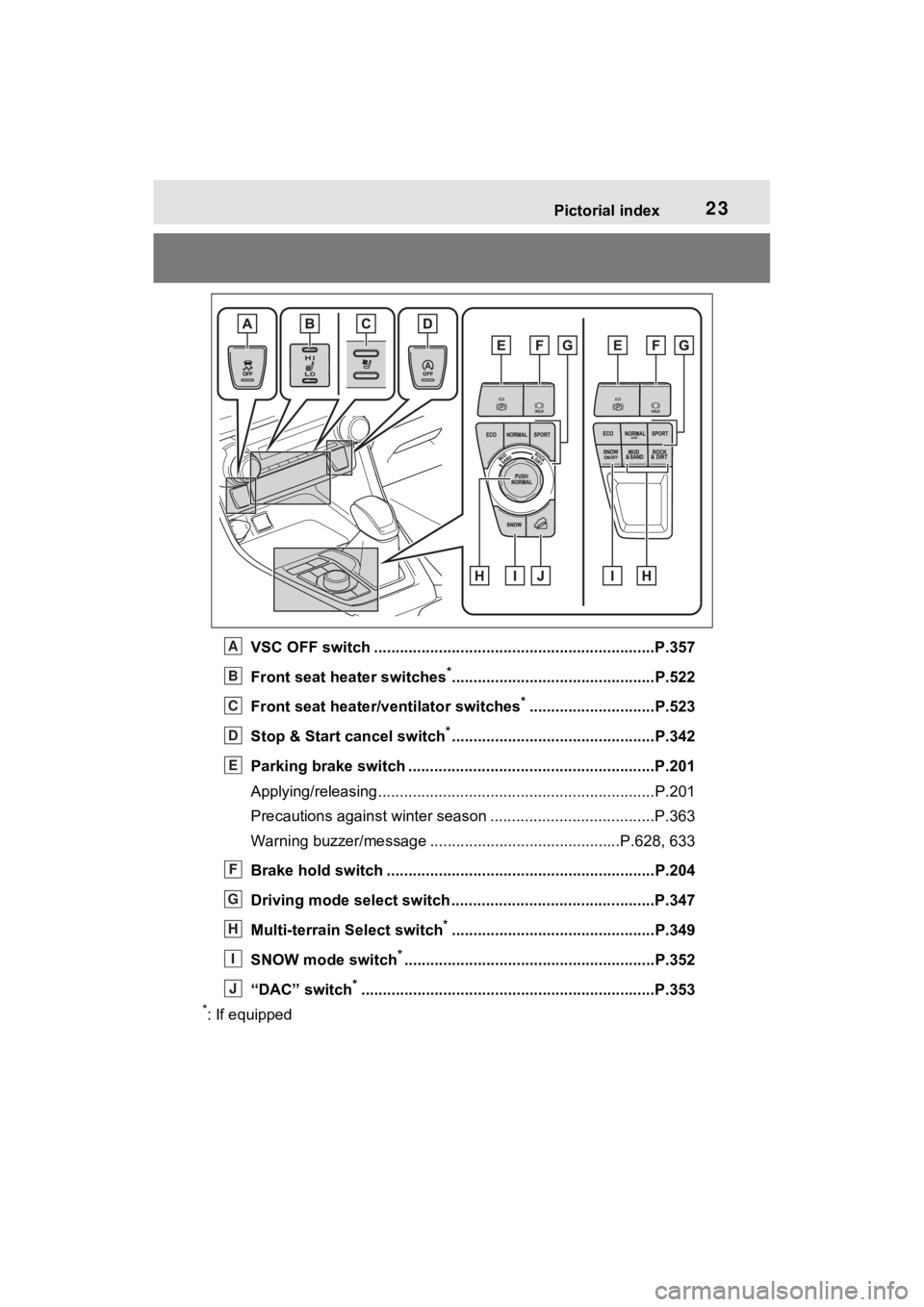
VSC OFF switch .................................................................P.357
Front seat heater switches
*...............................................P.522
Front seat heater/ventilator switches
*.............................P.523
Stop & Start cancel switch
*...............................................P.342
Parking brake switch ........................................... ..............P.201
Applying/releasing............................................. ...................P.201
Precautions against winter season .............................. ........P.363
Warning buzzer/message ... .........................................P.628, 633
Brake hold switch .............................................. ................P.204
Driving mode select switch ..................................... ..........P.347
Multi-terrain Select switch
*...............................................P.349
SNOW mode switch
*..........................................................P.352
“DAC” switch
*............................................................... .....P.353
*: If equipped
A
B
C
D
E
F
G
H
I
J
Page 44 of 748
441-1. For safe use
WARNING
■Modification and disposal of
SRS airbag system compo-
nents
Do not dispose of your vehicle or
perform any of the following modi-
fications without consulting your
Toyota dealer. The SRS airbags
may malfunction or deploy
(inflate) accidentally, causing
death or serious injury.
●Installation, removal, disassem-
bly and repair of the SRS air-
bags
●Repairs, modifications, removal
or replacement of the steering
wheel, instrument panel, dash-
board, seats or seat upholstery,
front, side and rear pillars, roof
side rails, front door panels,
front door trims or front door
speakers
●Modifications to the front door
panel (such as making a hole in
it)
●Repairs or modifications of the
front fender, front bumper, or
side of the occ upant compart-
ment
●Installation of a grille guard (bull
bars, kangaroo bar, etc.), snow
plows, winches or roof luggage
carrier
●Modifications to the vehicle’s
suspension system
●Installation of electronic devices
such as mobile two-way radios
and CD players
●Modifications to your vehicle for
a person with a physical disabil-
ity
Page 50 of 748
501-1. For safe use
Exhaust gas precau-
tions
Harmful substance to the
human body is included in
exhaust gases if inhaled.
WARNING
Exhaust gases contain harmful
carbon monoxide (CO), which is
colorless and odorless. Observe
the following precautions.
Failure to do so may cause
exhaust gases to enter the vehicle
and may lead to an accident
caused by light-headedness, or
may lead to death or a serious
health hazard.
■Important points while driving
●Keep the back door closed.
●If you smell exhaust gases in
the vehicle even when the back
door is closed, open the side
windows and have the vehicle
inspected at your Toyota dealer
as soon as possible.
■When parking
●If the vehicle is in a poorly venti-
lated area or a closed area,
such as a garage, stop the
engine.
●Do not leave the vehicle with
the engine running for a long
time.
If such a situation cannot be
avoided, park the vehicle in an
open space and ensure that
exhaust fumes do not enter the
vehicle interior.
●Do not leave the engine running
in an area with snow build-up,
or where it is snowing. If snow-
banks build up around the vehi-
cle while the engine is running,
exhaust gases may collect and
enter the vehicle.
■Exhaust pipe
The exhaust system needs to be
checked periodically. If there is a
hole or crack caused by corro-
sion, damage to a joint or abnor-
mal exhaust noise, be sure to
have the vehicle inspected and
repaired by your Toyota dealer.
Page 80 of 748
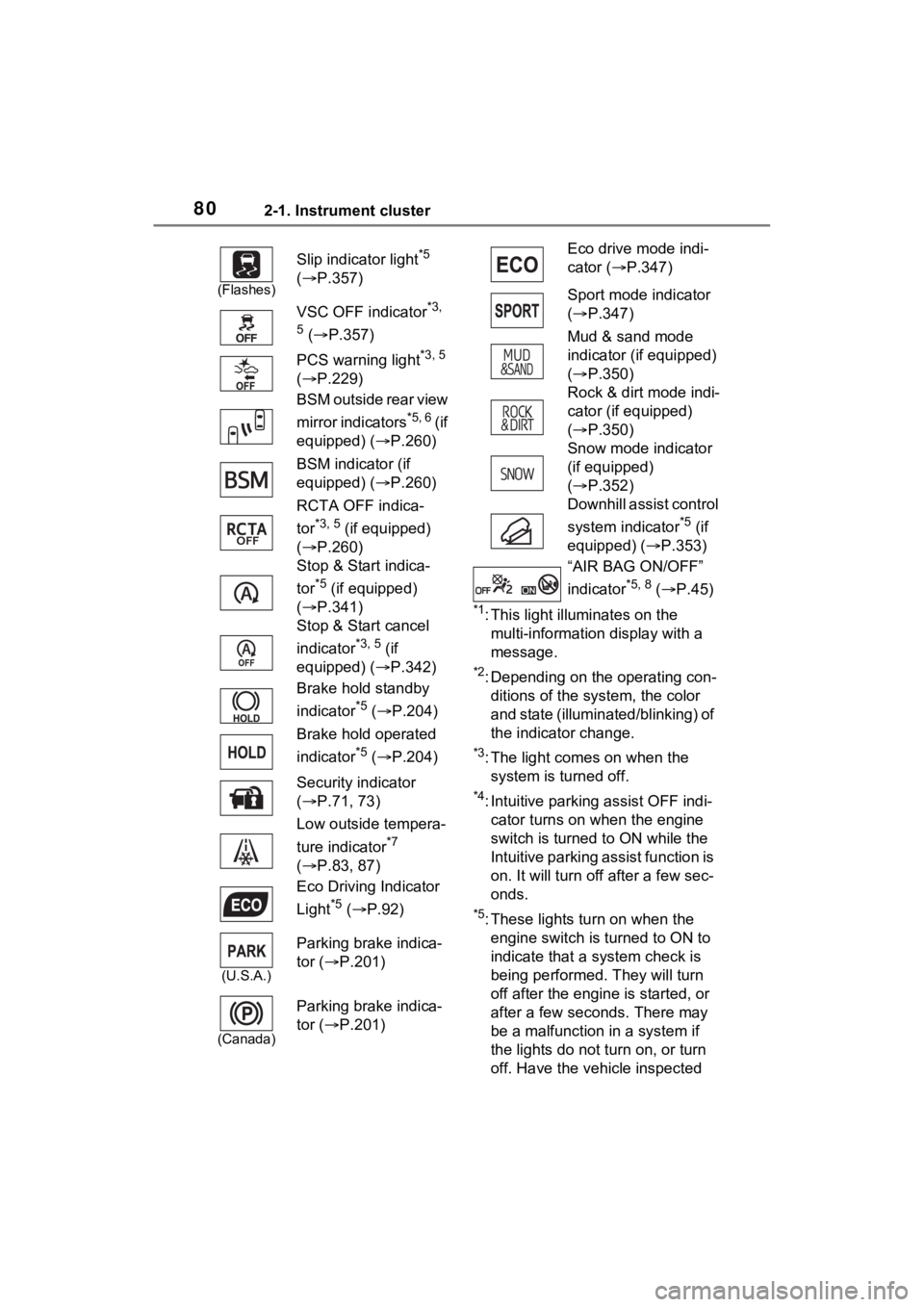
802-1. Instrument cluster
*1: This light illuminates on the multi-information display with a
message.
*2: Depending on the operating con-ditions of the system, the color
and state (illuminat ed/blinking) of
the indicator change.
*3: The light comes on when the system is turned off.
*4: Intuitive parking assist OFF indi-cator turns on wh en the engine
switch is turned t o ON while the
Intuitive parking assist function is
on. It will turn off after a few sec-
onds.
*5: These lights tu rn on when the
engine switch is turned to ON to
indicate that a system check is
being performed. They will turn
off after the engine is started, or
after a few seconds. There may
be a malfunction in a system if
the lights do not turn on, or turn
off. Have the vehicle inspected
(Flashes)
Slip indicator light*5
( P.357)
VSC OFF indicator
*3,
5
( P.357)
PCS warning light
*3, 5
( P.229)
BSM outside rear view
mirror indicators
*5, 6 ( i f
equipped) ( P.260)
BSM indicator (if
equipped) ( P.260)
RCTA OFF indica-
tor
*3, 5 (if equipped)
( P.260)
Stop & Start indica-
tor
*5 (if equipped)
( P.341)
Stop & Start cancel
indicator
*3, 5 (if
equipped) ( P.342)
Brake hold standby
indicator
*5 ( P.204)
Brake hold operated
indicator
*5 ( P.204)
Security indicator
( P.71, 73)
Low outside tempera-
ture indicator
*7
( P.83, 87)
Eco Driving Indicator
Light
*5 ( P.92)
(U.S.A.)
Parking brake indica-
tor ( P.201)
(Canada)
Parking brake indica-
tor ( P.201)
Eco drive mode indi-
cator (P.347)
Sport mode indicator
( P.347)
Mud & sand mode
indicator (if equipped)
( P.350)
Rock & dirt mode indi-
cator (if equipped)
( P.350)
Snow mode indicator
(if equipped)
( P.352)
Downhill assist control
system indicator
*5 (if
equipped) ( P.353)
“AIR BAG ON/OFF”
indicator
*5, 8 ( P.45)
Page 113 of 748
1133-2. Opening, closing and locking the doors
3
Before driving
Back door
The back door can be
locked/unlocked and
opened/closed by the fol-
lowing procedures.
WARNING
Observe the following precau-
tions.
Failure to do so may result in
death or serious injury.
■Before driving
●Make sure that the back door is
fully closed.
If the back door is not fully
closed, it may open unexpect-
edly while driving and hit near-
by objects or luggage in the lug-
gage compartment may be
thrown out, causing an acci-
dent.
●Do not allow child ren to play in
the luggage compartment.
If a child is accidentally locked
in the luggage compartment,
they could get heat exhaustion
or other injuries.
●Do not allow a child to open or
close the back door.
Doing so may cause the back
door to operate unexpectedly,
or cause the child’s hands,
head, or neck to be caught by
the closing back door.
■Important points while driving
●Keep the back door closed
while driving.
If the back door is left open, it
may hit near-by objects or lug-
gage in the luggage compart-
ment may be thrown out,
causing an accident.
●Never let anyone sit in the lug-
gage compartment.
In the event of sudden braking,
sudden swerving or a collision,
they are susceptible to death or
serious injury.
■Back door handles
Do not hang any object to the
back door handles.
If any object is hung, the back
door may suddenly shut, causing
parts of the body to be caught,
resulting in dea th or serious
injury.
■Operating the back door
Observe the following precau-
tions.
Failure to do so may cause parts
of the body to be caught, resulting
in death or serious injury.
●Remove any heavy loads, such
as snow and ice, from the back
door before opening it. Failure
to do so may cause the back
door to suddenly shut again
after it is opened.
●When opening or closing the
back door, thoroughly check to
make sure the surrounding area
is safe.
●If anyone is in the vicinity, make
sure they are safe and let them
know that the back door is
about to open or close.
●Use caution when opening or
closing the back door in windy
weather as it may move
abruptly in strong wind.
Page 121 of 748
1213-2. Opening, closing and locking the doors
3
Before driving
■Hands Free Power Back Door
operating conditions (vehicles
with Hands Free Power Back
Door)
The Hands Free Power Back Door
will open/close automatically when
the following cond itions are met:
●The Hands Free Power Back Door
operation is enabled ( P.94)
●The engine switch is in OFF.
●The electronic key is within the
operational range. ( P.127)
●A foot is put near the lower center
part of the rear bumper and
moved away from the rear
bumper.
The power back door may also be
operated by putting a hand, an
elbow, a knee, etc. near the lower
center part of the rear bumper and
moving it away from the rear
bumper. Make sure to put it close
enough to the center part of the
rear bumper.
■Situations in which the Hands
Free Power Back Door may not
operate properly (vehicles with
Hands Free Powe r Back Door)
In the following situations, the
Hands Free Power Back Door may
not operate properly:
●When a foot remains under the
rear bumper
●If the rear bumper is strongly hit
with a foot or is touched for a while
If the rear bumper has been touched
for a while, wait for a short time
before attempting to operate the
Hands Free Power Back Door
again.
●When operated while a person is
too close to the rear bumper
●When an external radio wave
source interferes with the commu-
nication between the electronic
key and the vehicle ( P.128)
●When the vehicle is parked near
an electrical noise source which affects the sensitivity of the Hands
Free Power Back Door, such as a
pay parking spot, gas station,
electrically heated road, or fluo-
rescent light
●When the vehicle is near a TV
tower, electric po
wer plant, radio
station, large display, airport or
other facility that generates strong
radio waves or electrical noise
●When a large amount of water is
applied to the rea r bumper, such
as when the vehicle is being
washed or in heavy rain
●When mud, snow, ice, etc. is
attached to the rear bumper
●When the vehicle has been
parked for a while near objects
that may move and contact the
rear bumper, such as plants
●When an accessory i s installed to
the rear bumper
If an accessory has been installed,
turn the Hands F ree Power Back
Door operation setting off.
■Preventing unintentional opera-
tion of the Hands Free Power
Back Door (vehicles with Hands
Free Power Back Door)
When an electronic key is in the
operation range, the Hands Free
Power Back Door may operate unin-
tentionally, so be careful in the fol-
lowing situations.
●When a large amount of water is
applied to the rea r bumper, such
as when the vehicle is being
washed or in heavy rain
●When dirt is wip ed off the rear
bumper
●When a small animal or small
object, such as a ball, moves
under the rear bumper
●When an object is moved from
under the rear bumper
●If someone is swinging their legs
while sitting on the rear bumper
●If the legs or another part of some-
Page 125 of 748
1253-2. Opening, closing and locking the doors
3
Before driving
NOTICE
■To prevent damage to the
power back door
●Make sure that there is no ice
between the back door and
frame that would prevent move-
ment of the back door. Operat-
ing the power back door when
excessive load is present on the
back door may cause a mal-
function.
●Do not apply excessive force to
the back door while the power
back door is operating.
●Take care not to damage the
sensors (installed on the right
and left edges of the power
back door) with a knife or other
sharp object. If the sensor is
disconnected, the power back
door will not close automati-
cally.
■Hands Free Power Back Door
precautions (if equipped)
The kick sensor is located behind
lower center part of the rear
bumper. Observe the following to
ensure that the Hands Free
Power Back Door function oper-
ates properly:
●Keep the lower center part of
the rear bumper clean at all
times.
If the lower center part of the
rear bumper is dirty or covered
with snow, the kick sensor may
not operate. In this situation,
clean off the dirt or snow, move
the vehicle from the current
position and then check if the
kick sensor operates.
If it does not operate, have the
vehicle inspected by your
Toyota dealer.
●Do not apply coatings that have
a rain clearin g (hydrophilic)
effect, or other coatings, to the
lower center part of the rear
bumper.
●Do not park the vehicle near
objects that may move and con-
tact the lower center part of the
rear bumper, such as grass or
trees.
If the vehicle has been parked
for a while near objects that
may move and contact the
lower center part of the rear
bumper, such as grass or trees,
the kick sensor may not oper-
ate. In this situation, move the
vehicle from the current position
and then check if the kick sen-
sor operates. If it does not oper-
ate, have the vehicle inspected
by your Toyo ta dealer.
●Do not subject the kick sensor
or its surroundi ng area to a
strong impact.
If the kick sensor or its sur-
rounding area has been sub-
jected to a strong impact, the
kick sensor may not operate
properly. If the kick sensor does
not operate in the following situ-
ations, have the vehicle
inspected by your Toyota
dealer.
• The kick sensor or its surround- ing area has been subjected to
a strong impact.
• The lower center part of the rear bumper is scratched or dam-
aged.
●Do not disassemble the rear
bumper.
●Do not attach stickers to the
rear bumper.
●Do not paint the rear bumper.
Page 130 of 748

1303-2. Opening, closing and locking the doors
prevent lock operation. Remove
the gloves and touch the lock sen-
sor again.
●When the lock operation is per-
formed using the lock sensor, rec-
ognition signals will be shown up
to two consecutive times. After
this, no recogniti on signals will be
given.
●If the door handle becomes wet
while the electronic key is within
the effective ran ge, the door may
lock and unlock repeatedly. In that
case, follow the fo llowing correc-
tion procedures to wash the vehi-
cle:
• Place the electronic key in a loca- tion 6 ft. (2 m) or more away from
the vehicle. (Take care to ensure
that the key is not stolen.)
• Set the electronic key to battery- saving mode to disable the smart
key system. ( P.128)
●If the electronic key is inside the
vehicle and a door handle
becomes wet during a car wash, a
message may be shown on the
multi-informatio n display and a
buzzer will sound outside the vehi-
cle. To turn off the alarm, lock all
the doors.
●The lock sensor may not work
properly if it com es into contact
with ice, snow, mud, etc. Clean
the lock sensor and attempt to
operate it again, or use the lock
sensor on the lower part of the
door handle.
●A sudden approac h to the effec-
tive range or door handle may pre-
vent the doors from being
unlocked. In this case, return the
door handle to the original position
and check that the doors unlock
before pulling the door handle
again.
●If there is another electronic key in
the detection area, it may take
slightly longer to unlock the doors
after the door handle is gripped.
■When the vehicle is not driven
for extended periods
●To prevent theft of the vehicle, do
not leave the electronic key within
6 ft. (2 m) of the vehicle.
●The smart key system can be
deactivated in advance. ( P.688)
●Battery-saving mode can reduce
the power consumption of elec-
tronic keys. ( P.128)
■To operate the system properly
Make sure to carry the electronic
key when operating the system. Do
not get the electronic key too close
to the vehicle when operating the
system from the out side of the vehi-
cle.
Depending on the position and hold-
ing condition of the electronic key,
the key may not be detected cor-
rectly and the system may not oper-
ate properly. (The alarm may go off
accidentally, or the door lock pre-
vention may not operate.)
■If the smart key system does
not operate properly
●Locking and unlocking the doors:
Use the mechanical key.
( P.649)
●Starting the engine: P.649
■Customization
Settings (e.g. smart key system)
can be changed.
(Customizable features: P.687)
If the smart key system has been
deactivated in a customized setting,
refer to the explanations for the fol-
lowing operations.
●Locking and unlocking the doors:
Use the wireless remote control or
mechanical key. ( P.107, 649)
●Starting the engi ne and changing
engine switch modes: P.649
●Stopping the engine: P.194
Page 166 of 748

166
Multi-terrain Select (AWD
vehicles) .................... 349
Snow mode switch (AWD vehicles) .................... 352
Downhill assist control sys- tem ............................ 353
Driving assist systems 355
4-6. Driving tips Winter driving tips ....... 362
Utility vehicle precautions .................................. 365