warning TOYOTA RAV4 2023 Owners Manual
[x] Cancel search | Manufacturer: TOYOTA, Model Year: 2023, Model line: RAV4, Model: TOYOTA RAV4 2023Pages: 574, PDF Size: 17.31 MB
Page 239 of 574
2394-5. Using the driving support systems
4
Driving
The system can detect the fol-
lowing (The detectable objects
differs depending on the func-
tion.):
Vehicles
Bicyclists
Pedestrians
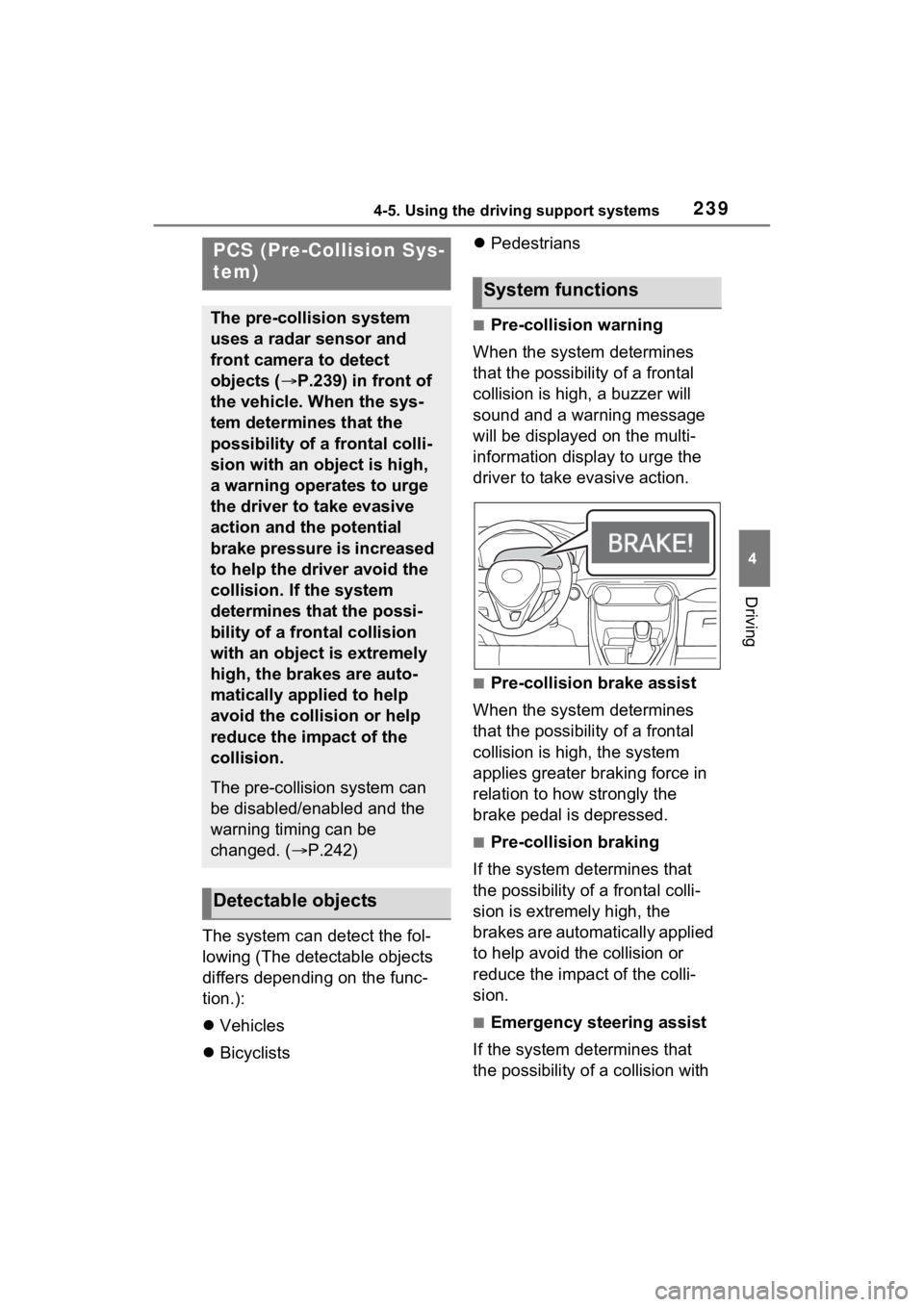
■Pre-collision warning
When the system determines
that the possibility of a frontal
collision is high, a buzzer will
sound and a warning message
will be displayed on the multi-
information display to urge the
driver to take evasive action.
■Pre-collision brake assist
When the system determines
that the possibility of a frontal
collision is high, the system
applies greater braking force in
relation to how strongly the
brake pedal is depressed.
■Pre-collision braking
If the system determines that
the possibility of a frontal colli-
sion is extremely high, the
brakes are automatically applied
to help avoid the collision or
reduce the impact of the colli-
sion.
■Emergency steering assist
If the system determines that
the possibility of a collision with
PCS (Pre-Collision Sys-
tem)
The pre-collision system
uses a radar sensor and
front camera to detect
objects ( P.239) in front of
the vehicle. When the sys-
tem determines that the
possibility of a frontal colli-
sion with an object is high,
a warning operates to urge
the driver to take evasive
action and the potential
brake pressure is increased
to help the driver avoid the
collision. If the system
determines that the possi-
bility of a frontal collision
with an object is extremely
high, the brakes are auto-
matically applied to help
avoid the collision or help
reduce the impact of the
collision.
The pre-collision system can
be disabled/enabled and the
warning timing can be
changed. ( P.242)
Detectable objects
System functions
Page 240 of 574
2404-5. Using the driving support systems
a pedestrian is high and that
there is sufficient space for the
vehicle to be steered into within
its lane, and the driver has
begun evasive maneuver or
steering, emergency steering
assist will assist the steering
movements to help enhance the
vehicle stability and for lane
departure prevention. During
operation, the indicator will illu-
minate in green.
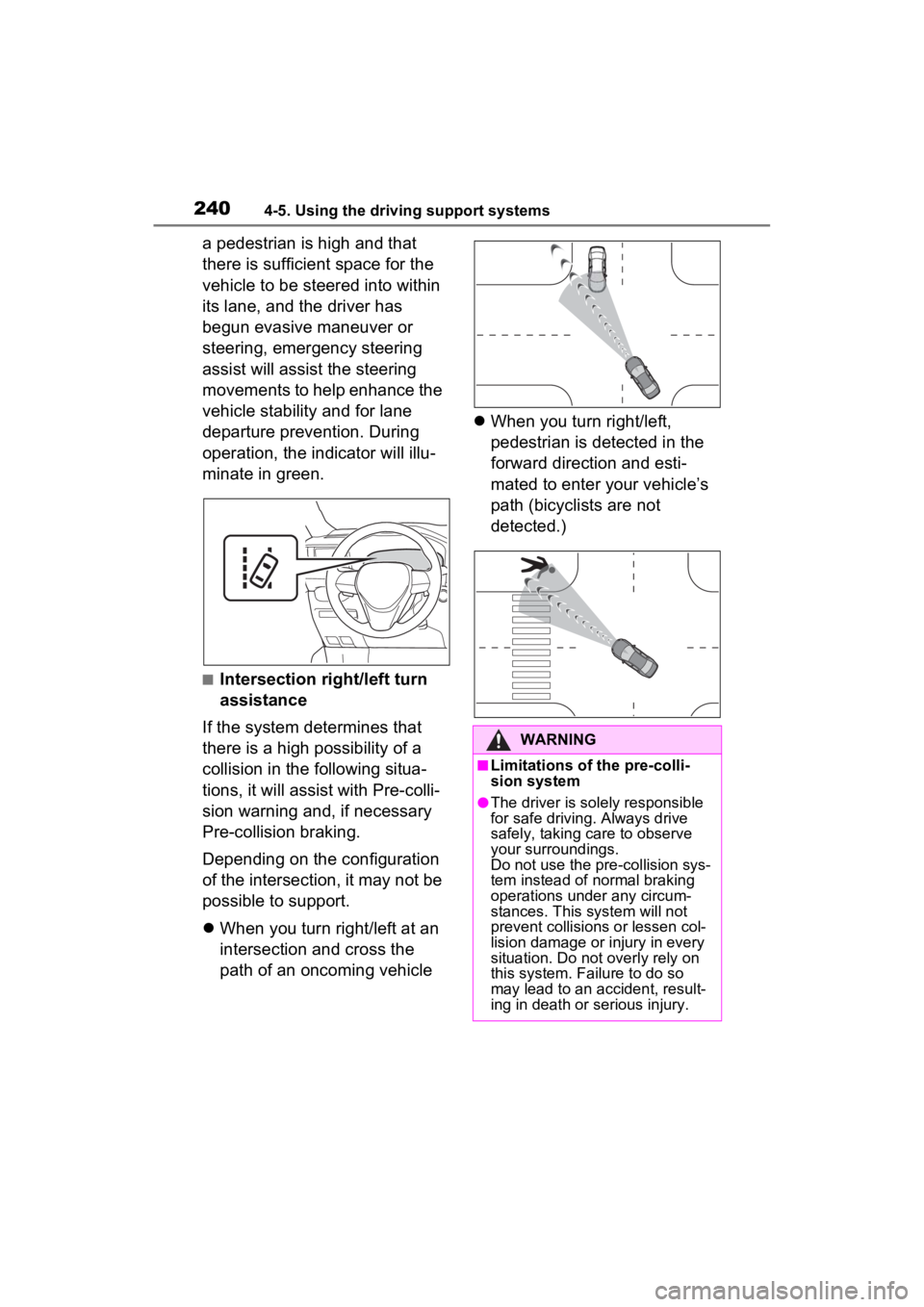
■Intersection right/left turn
assistance
If the system determines that
there is a high possibility of a
collision in the following situa-
tions, it will assist with Pre-colli-
sion warning and, if necessary
Pre-collision braking.
Depending on the configuration
of the intersection, it may not be
possible to support.
When you turn right/left at an
intersection and cross the
path of an oncoming vehicle
When you turn right/left,
pedestrian is detected in the
forward direction and esti-
mated to enter your vehicle’s
path (bicyclists are not
detected.)
WARNING
■Limitations of the pre-colli-
sion system
●The driver is solely responsible
for safe driving. Always drive
safely, taking care to observe
your surroundings.
Do not use the pre-collision sys-
tem instead of normal braking
operations under any circum-
stances. This system will not
prevent collisions or lessen col-
lision damage or injury in every
situation. Do not overly rely on
this system. Failure to do so
may lead to an accident, result-
ing in death or serious injury.
Page 241 of 574
2414-5. Using the driving support systems
4
Driving
WARNING
●Although this system is
designed to help avoid a colli-
sion or help reduce the impact
of the collision, its effectiveness
may change according to vari-
ous conditions, therefore the
system may not always be able
to achieve the same level of
performance.
Read the following conditions
carefully. Do not overly rely on
this system and always drive
carefully.
• Conditions under which the sys- tem may operate even if there is
no possibility of a collision:
P.245
• Conditions under which the sys- tem may not operate properly:
P.247
●Do not attempt to test the oper-
ation of the pre-collision system
yourself.
Depending on the objects used
for testing (dummies, card-
board objects imitating detect-
able objects, etc.), the system
may not operate properly, pos-
sibly leading to an accident.
■Pre-collision braking
●When the pre-collision braking
function is operating, a large
amount of braking force will be
applied.
●If the vehicle is stopped by the
operation of the pre-collision
braking function, the pre-colli-
sion braking function operation
will be canceled after approxi-
mately 2 second s. Depress the
brake pedal as necessary.
●The pre-collision braking func-
tion may not operate if certain
operations are performed by the
driver. If the accelerator pedal is
being depressed strongly or the
steering wheel is being turned,
the system may determine that
the driver is taking evasive
action and possibly prevent the
pre-collision braking function
from operating.
●In some situations, while the
pre-collision brak ing function is
operating, operation of the func-
tion may be canceled if the
accelerator pedal is depressed
strongly or the steering wheel is
turned and the system deter-
mines that the driver is taking
evasive action.
●If the brake pedal is being
depressed, the system may
determine that t he driver is tak-
ing evasive action and possibly
delay the operation timing of the
pre-collision braking function.
■Emergency steering assist
●As emergency steering assist
operation will be canceled when
the system determines that lane
departure prevention function
has been completed.
●Emergency steering assist may
not operate or may be cancel in
the following cases as the sys-
tem may determine the driver is
taking actions.
• If the accelerator pedal is being depressed strongly, the steering
wheel is being operated
sharply, the brake pedal is
being depressed or the turn sig-
nal lever is being operated. In
this case, the system may
determine that t he driver is tak-
ing evasive action and the
emergency steering assist may
not operate.
Page 242 of 574
2424-5. Using the driving support systems
■Enabling/disabling the pre-
collision system
The pre-collision system can be
enabled/disabled on the
screen ( P.98, 107) of the
multi-information display.
The system is automatically
enabled each time the engine
switch is turned to ON.
If the system is disabled, the
PCS warning light will turn on
and a message will be displayed
on the multi-information display.
WARNING
Page 243 of 574
2434-5. Using the driving support systems
4
Driving
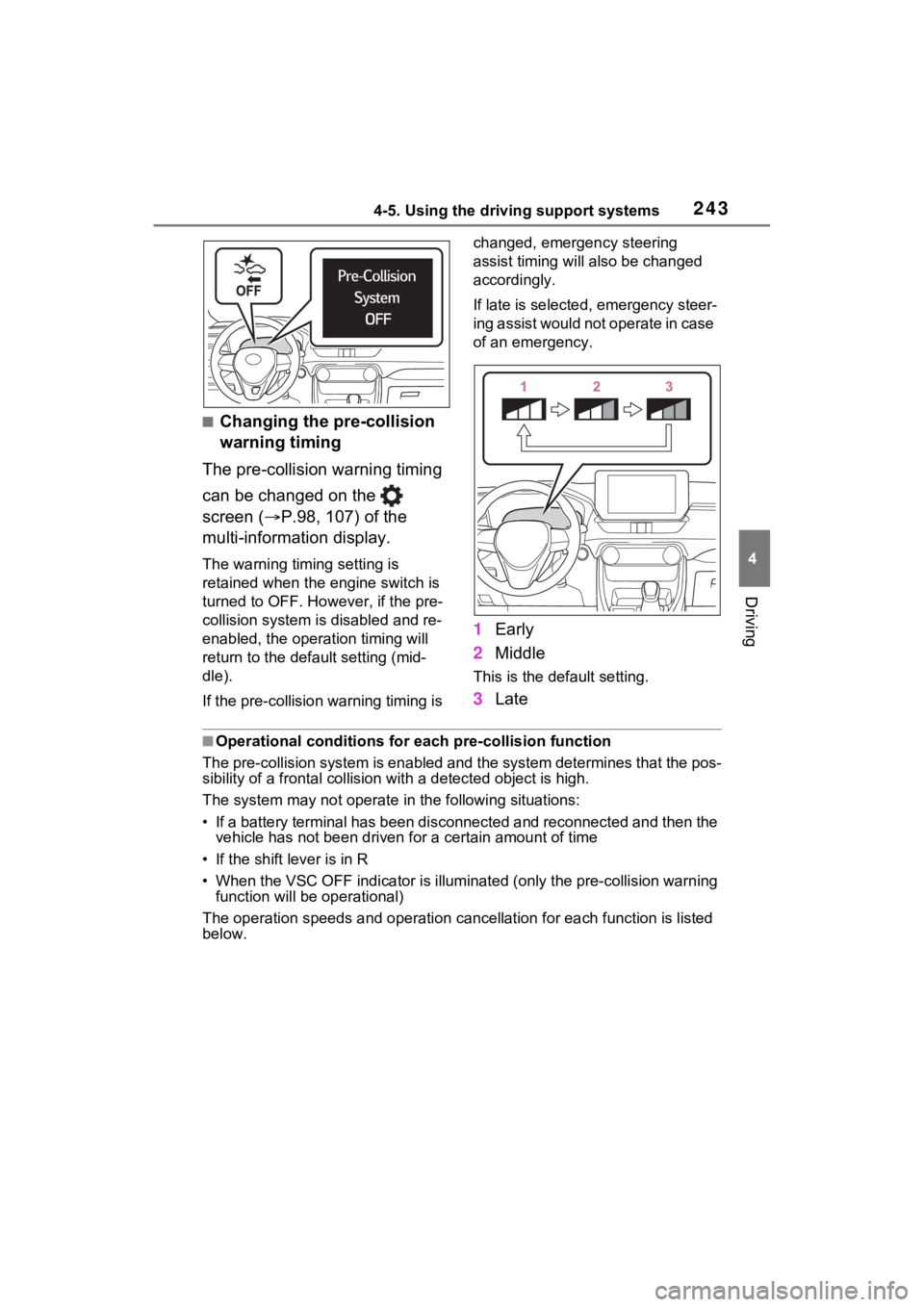
■Changing the pre-collision
warning timing
The pre-collision warning timing
can be changed on the
screen ( P.98, 107) of the
multi-information display.
The warning timing setting is
retained when the engine switch is
turned to OFF. Howe ver, if the pre-
collision system is disabled and re-
enabled, the operation timing will
return to the default setting (mid-
dle).
If the pre-collision warning timing is changed, emergency steering
assist timing will also be changed
accordingly.
If late is selected, emergency steer-
ing assist would not
operate in case
of an emergency.
1 Early
2 Middle
This is the default setting.
3Late
■Operational conditions for e ach pre-collision function
The pre-collision syst em is enabled and the system determines t hat the pos-
sibility of a frontal c ollision with a detected object is high.
The system may not operate in the following situations:
• If a battery terminal has been disconnected and reconnected an d then the
vehicle has not been driven for a certain amount of time
• If the shift lever is in R
• When the VSC OFF indicator is illuminated (only the pre-collision warning
function will be operational)
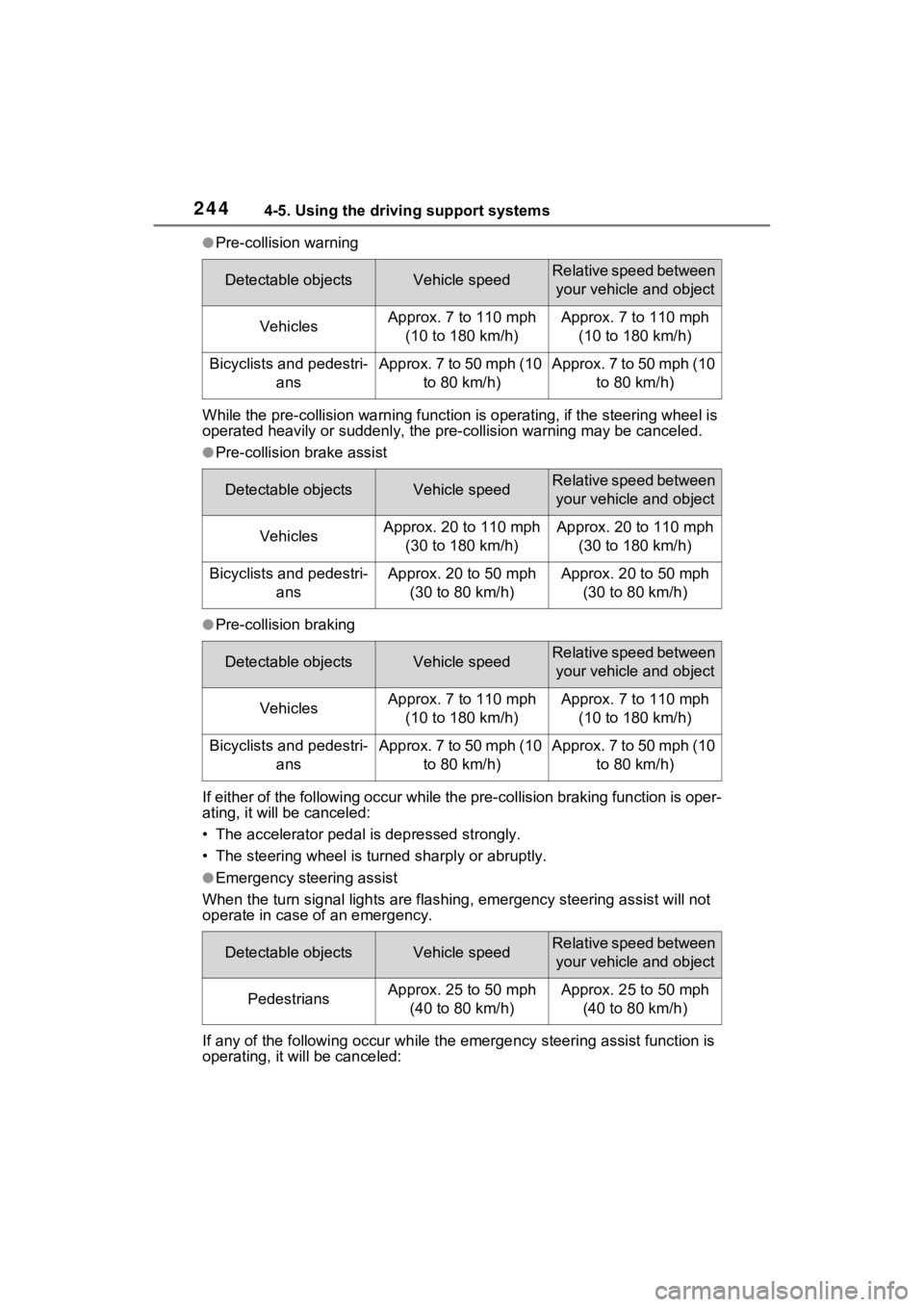
The operation speeds and operati on cancellation for each function is listed
below.
Page 244 of 574
2444-5. Using the driving support systems
●Pre-collision warning
While the pre-collision warning function is operating, if the steering wheel is
operated heavily or suddenly, the pre -collision warning may be canceled.
●Pre-collision brake assist
●Pre-collision braking
If either of the following occur while the pre-collision braking function is oper-
ating, it will be canceled:
• The accelerator pedal is depressed strongly.
• The steering wheel is turned sharply or abruptly.
●Emergency steering assist
When the turn signal lights are flashing, emergency steering as sist will not
operate in case of an emergency.
If any of the following occur wh ile the emergency steering assi st function is
operating, it will be canceled:
Detectable objectsVehicle speedRelative speed between
your vehicle and object
VehiclesApprox. 7 to 110 mph (10 to 180 km/h)Approx. 7 to 110 mph (10 to 180 km/h)
Bicyclists and pedestri- ansApprox. 7 to 50 mph (10 to 80 km/h)Approx. 7 to 50 mph (10 to 80 km/h)
Detectable objectsVehicle speedRelative speed between your vehicle and object
VehiclesApprox. 20 to 110 mph (30 to 180 km/h)Approx. 20 to 110 mph (30 to 180 km/h)
Bicyclists and pedestri- ansApprox. 20 to 50 mph (30 to 80 km/h)Approx. 20 to 50 mph (30 to 80 km/h)
Detectable objectsVehicle speedRelative speed between your vehicle and object
VehiclesApprox. 7 to 110 mph (10 to 180 km/h)Approx. 7 to 110 mph (10 to 180 km/h)
Bicyclists and pedestri- ansApprox. 7 to 50 mph (10 to 80 km/h)Approx. 7 to 50 mph (10 to 80 km/h)
Detectable objectsVehicle speedRelative speed between your vehicle and object
PedestriansApprox. 25 to 50 mph (40 to 80 km/h)Approx. 25 to 50 mph (40 to 80 km/h)
Page 245 of 574
2454-5. Using the driving support systems
4
Driving
• The accelerator pedal is depressed strongly.
• The steering wheel is turned sharply or abruptly.
• The brake pedal is depressed.
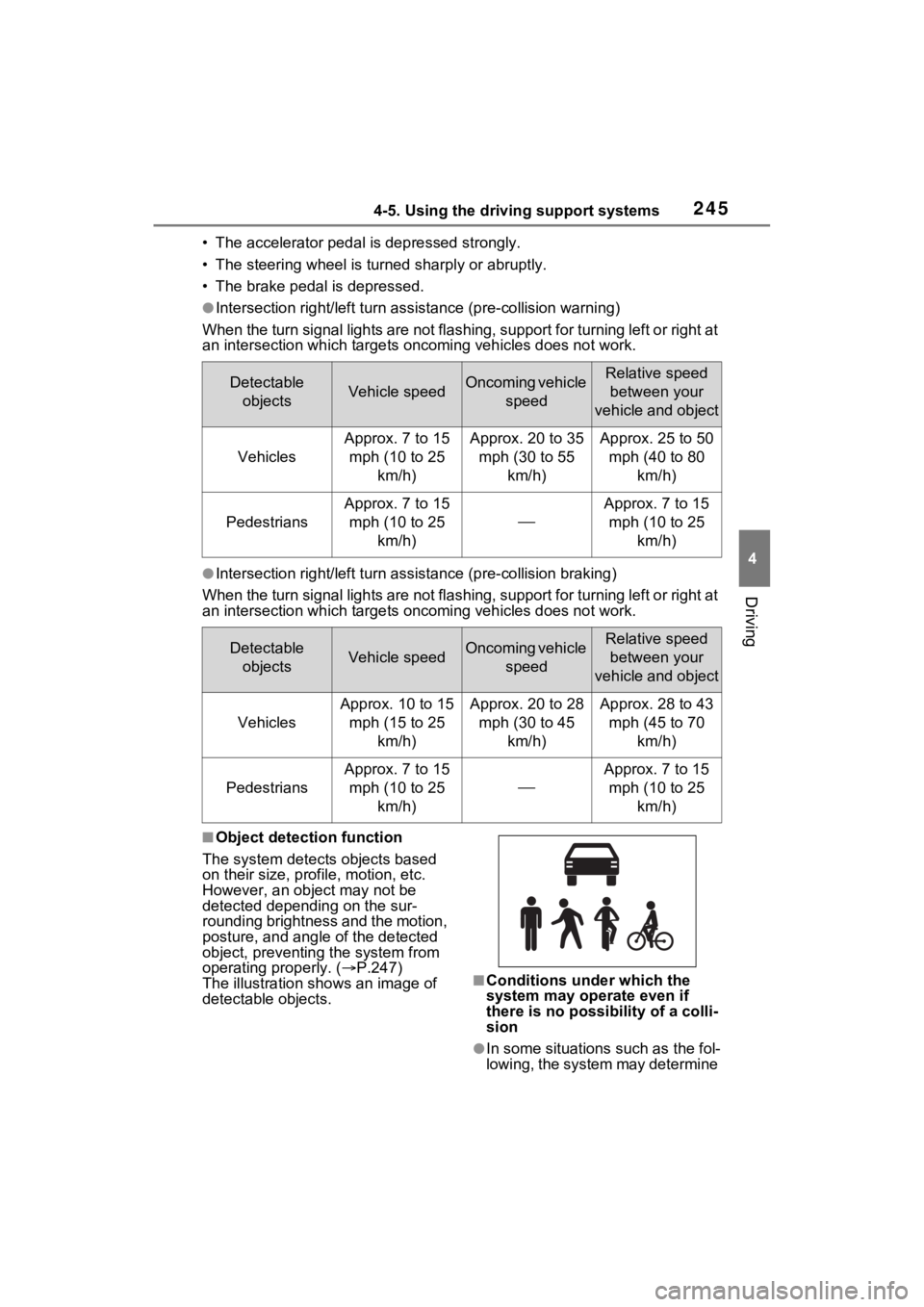
●Intersection right/left turn assistance (pre-collision warning)
When the turn signal lights are not flashing, support for turning left or right at
an intersection which targets on coming vehicles does not work.
●Intersection right/left turn assistance (pre-collision braking)
When the turn signal lights are not flashing, support for turning left or right at
an intersection which targets on coming vehicles does not work.
■Object detection function
The system detects objects based
on their size, profile, motion, etc.
However, an object may not be
detected depending on the sur-
rounding brightness and the motion,
posture, and angle of the detected
object, preventing the system from
operating properly. ( P.247)
The illustration sh ows an image of
detectable objects.
■Conditions under which the
system may operate even if
there is no possibility of a colli-
sion
●In some situations such as the fol-
lowing, the system may determine
Detectable
objectsVehicle speedOncoming vehicle speedRelative speed between your
vehicle and object
Vehicles
Approx. 7 to 15 mph (10 to 25 km/h)Approx. 20 to 35 mph (30 to 55 km/h)Approx. 25 to 50 mph (40 to 80 km/h)
Pedestrians
Approx. 7 to 15 mph (10 to 25 km/h)
Approx. 7 to 15 mph (10 to 25 km/h)
Detectable objectsVehicle speedOncoming vehicle speedRelative speed between your
vehicle and object
Vehicles
Approx. 10 to 15 mph (15 to 25 km/h)Approx. 20 to 28 mph (30 to 45 km/h)Approx. 28 to 43 mph (45 to 70 km/h)
Pedestrians
Approx. 7 to 15 mph (10 to 25 km/h)
Approx. 7 to 15 mph (10 to 25 km/h)
Page 249 of 574
2494-5. Using the driving support systems
4
Driving
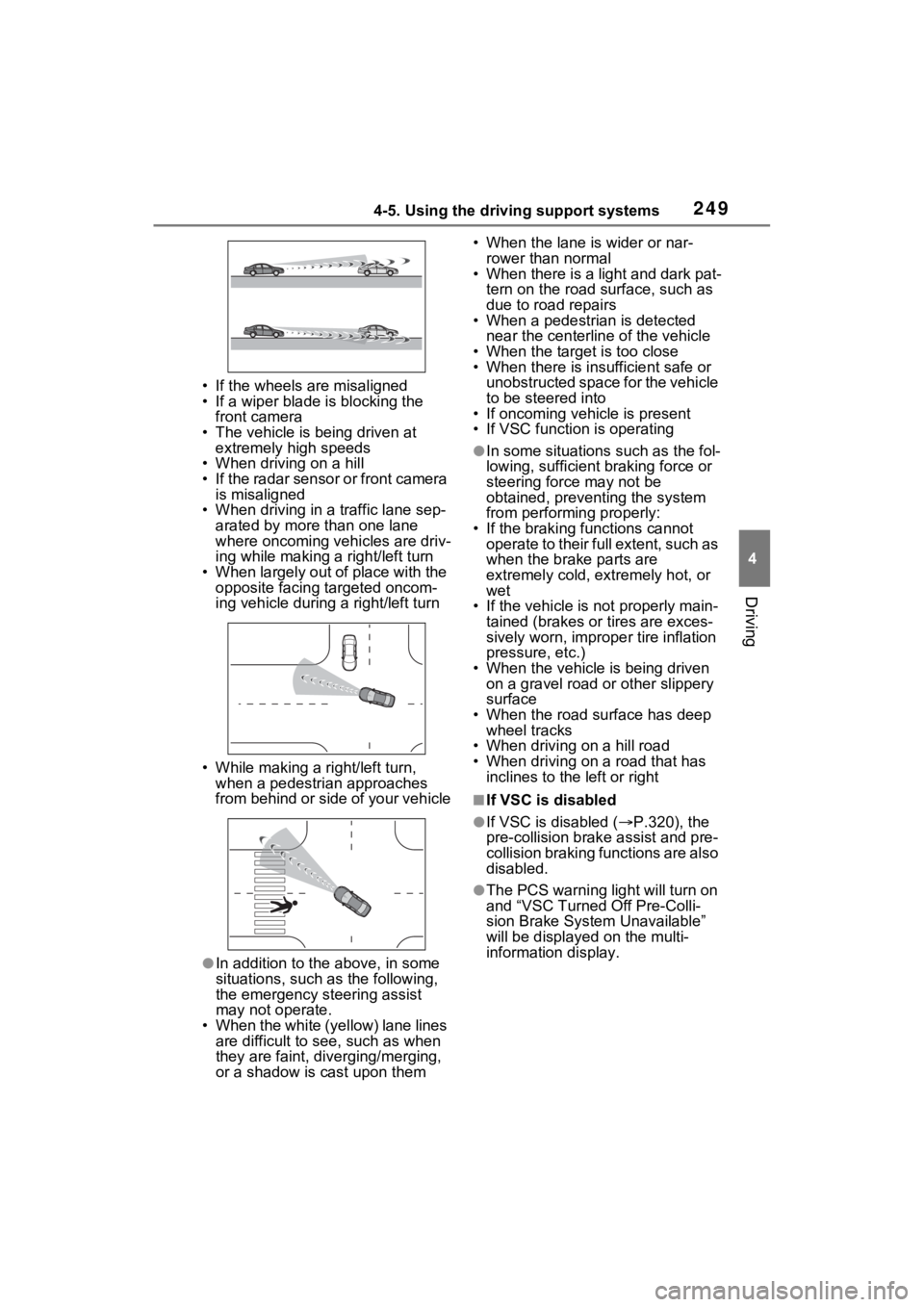
• If the wheels are misaligned
• If a wiper blade is blocking the front camera
• The vehicle is being driven at extremely high speeds
• When driving on a hill
• If the radar sensor or front camera
is misaligned
• When driving in a traffic lane sep-
arated by more t han one lane
where oncoming vehicles are driv-
ing while making a right/left turn
• When largely out of place with the opposite facing targeted oncom-
ing vehicle during a right/left turn
• While making a right/left turn, when a pedestrian approaches
from behind or side of your vehicle
●In addition to the above, in some
situations, such as the following,
the emergency steering assist
may not operate.
• When the white (yellow) lane lines are difficult to see, such as when
they are faint, di verging/merging,
or a shadow is cast upon them • When the lane is wider or nar-
rower than normal
• When there is a light and dark pat-
tern on the road surface, such as
due to road repairs
• When a pedestrian is detected
near the centerline of the vehicle
• When the target is too close
• When there is insufficient safe or unobstructed space for the vehicle
to be steered into
• If oncoming vehicle is present
• If VSC function is operating
●In some situations such as the fol-
lowing, sufficient braking force or
steering force may not be
obtained, preventing the system
from performing properly:
• If the braking functions cannot operate to their full extent, such as
when the brake parts are
extremely cold, ext remely hot, or
wet
• If the vehicle is not properly main- tained (brakes or tires are exces-
sively worn, imprope r tire inflation
pressure, etc.)
• When the vehicle is being driven on a gravel road or other slippery
surface
• When the road surface has deep wheel tracks
• When driving on a hill road
• When driving on a road that has inclines to the left or right
■If VSC is disabled
●If VSC is disabled ( P.320), the
pre-collision brak e assist and pre-
collision braking functions are also
disabled.
●The PCS warning light will turn on
and “VSC Turned Off Pre-Colli-
sion Brake System Unavailable”
will be displayed on the multi-
information display.
Page 250 of 574
2504-5. Using the driving support systems
LTA (Lane Tracing
Assist)
While driving on a road with
clear white (yellow) lane
lines, the LTA system warns
the driver if the vehicle may
deviate from the current
lane or course
*, and also
can slightly operate the
steering wheel to help avoid
deviation from the lane or
course
*. Also, while the
dynamic radar cruise con-
trol with full-speed range
( P.264) is operating, this
system will operate the
steering wheel to maintain
the vehicle’s lane position.
The LTA system recognizes
white (yellow) lane lines or a
course
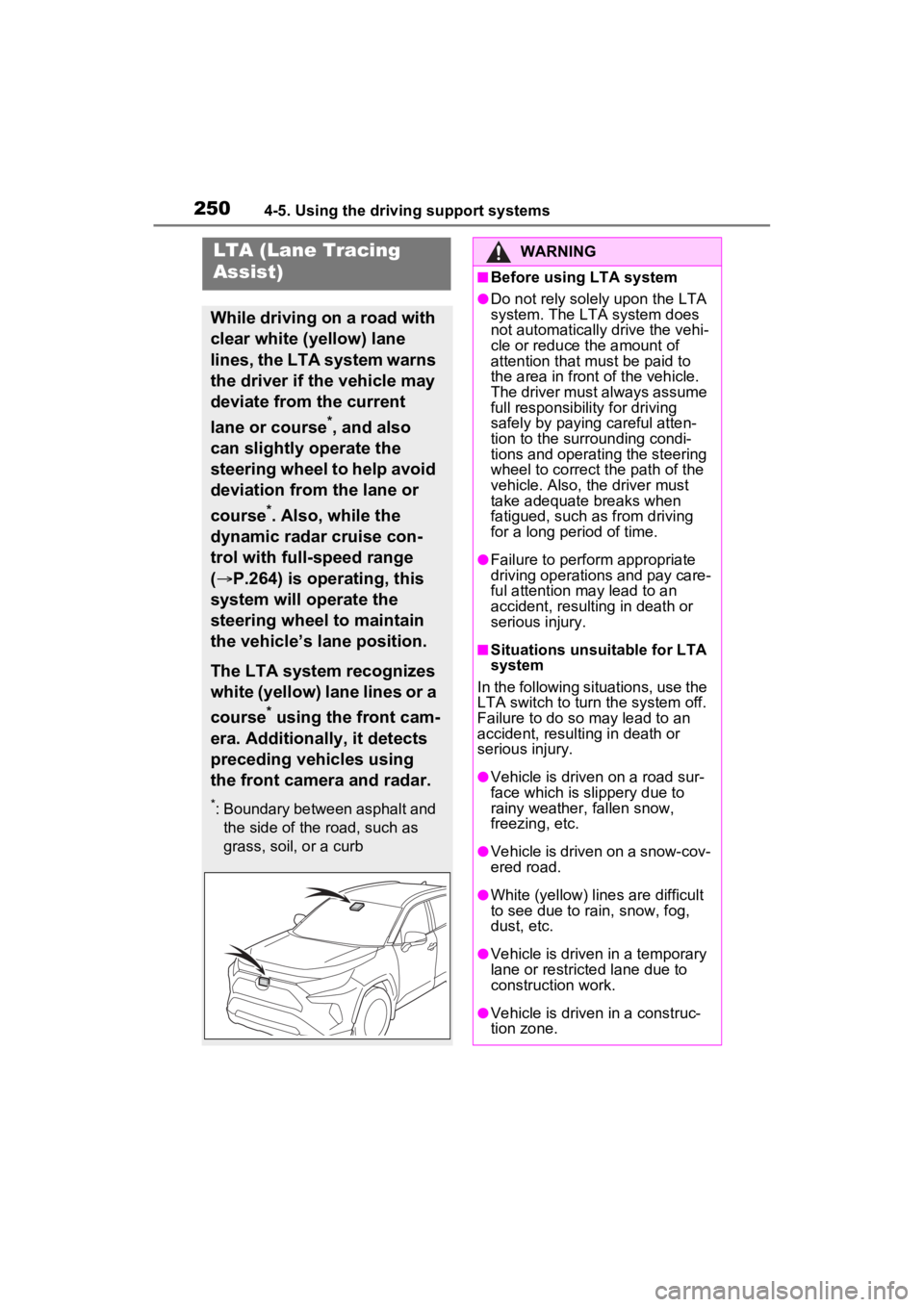
* using the front cam-
era. Additionally, it detects
preceding vehicles using
the front camera and radar.
*: Boundary between asphalt and the side of the road, such as
grass, soil, or a curb
WARNING
■Before using LTA system
●Do not rely solely upon the LTA
system. The LTA system does
not automatically drive the vehi-
cle or reduce the amount of
attention that m ust be paid to
the area in front of the vehicle.
The driver must always assume
full responsibilit y for driving
safely by paying careful atten-
tion to the surrounding condi-
tions and operating the steering
wheel to correct the path of the
vehicle. Also, the driver must
take adequate breaks when
fatigued, such as from driving
for a long period of time.
●Failure to perform appropriate
driving operations and pay care-
ful attention may lead to an
accident, resulting in death or
serious injury.
■Situations unsuitable for LTA
system
In the following situations, use the
LTA switch to turn the system off.
Failure to do so may lead to an
accident, resulting in death or
serious injury.
●Vehicle is driven on a road sur-
face which is slippery due to
rainy weather, fallen snow,
freezing, etc.
●Vehicle is driven on a snow-cov-
ered road.
●White (yellow) lin es are difficult
to see due to rain, snow, fog,
dust, etc.
●Vehicle is driven in a temporary
lane or restricted lane due to
construction work.
●Vehicle is driven in a construc-
tion zone.
Page 251 of 574
2514-5. Using the driving support systems
4
Driving
WARNING
●A spare tire, tire chains, etc. are
equipped.
●When the tires have been
excessively worn, or when the
tire inflation pressure is low.
●When your vehicle is towing a
trailer or during emergency tow-
ing
■Preventing LTA system mal-
functions and operations per-
formed by mistake
●Do not modify the headlights or
place stickers, etc. on the sur-
face of the lights.
●Do not modify the suspension
etc. If the suspension etc. needs
to be replaced, contact your
Toyota dealer.
●Do not install or place anything
on the hood or grille. Also, do
not install a grille guard (bull
bars, kangaroo bar, etc.).
●If your windshield needs
repairs, contact your Toyota
dealer.
■Conditions in which functions
may not operate properly
In the following situations, the
functions may not operate prop-
erly and the vehicle may depart
from its lane. Drive safely by
always paying careful attention to
your surroundings and operate
the steering wheel to correct the
path of the vehicle without relying
solely on the functions.
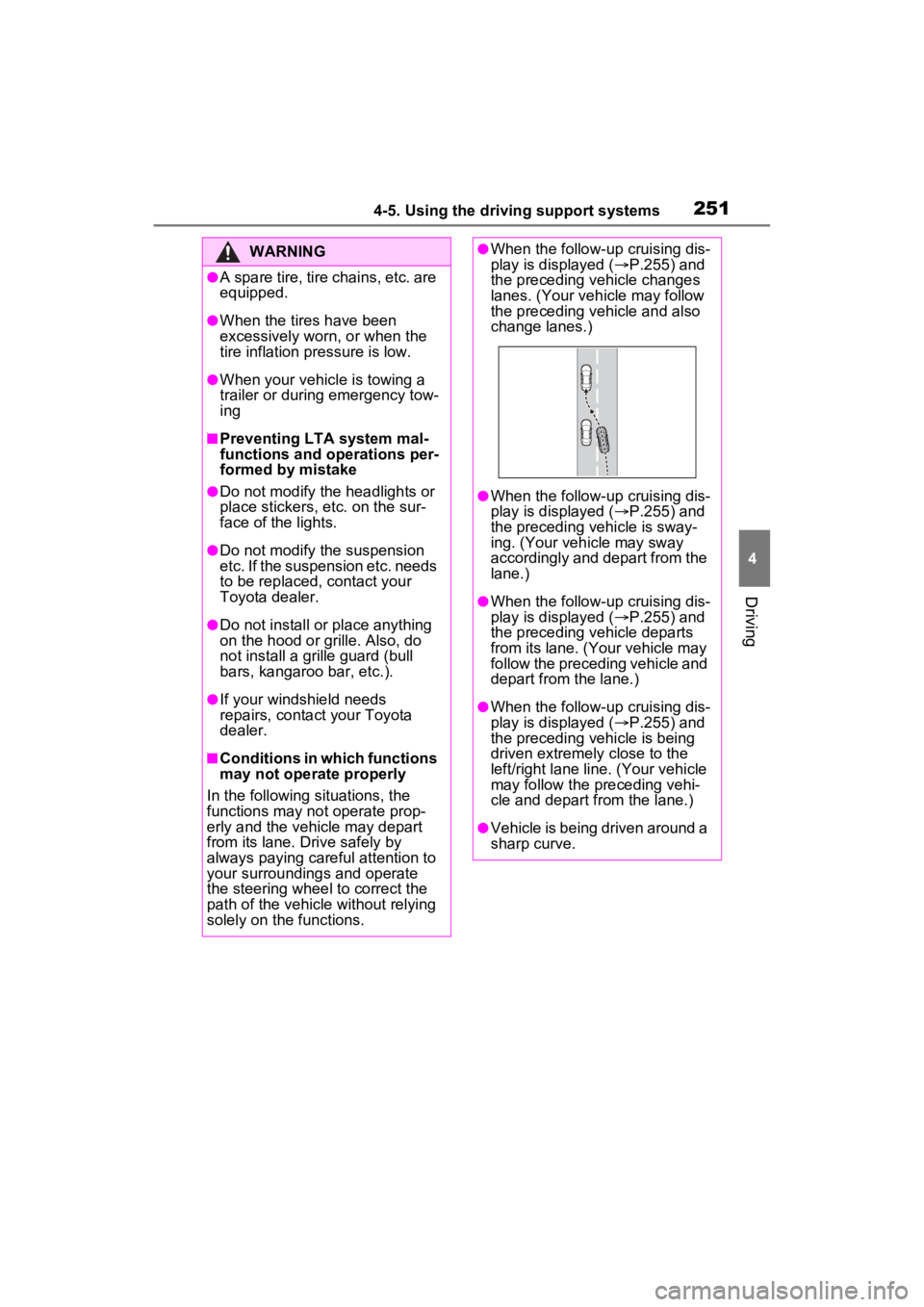
●When the follow-up cruising dis-
play is displayed ( P.255) and
the preceding vehicle changes
lanes. (Your veh icle may follow
the preceding vehicle and also
change lanes.)
●When the follow-up cruising dis-
play is displayed ( P.255) and
the preceding vehicle is sway-
ing. (Your vehicle may sway
accordingly and depart from the
lane.)
●When the follow-up cruising dis-
play is displayed ( P.255) and
the preceding vehicle departs
from its lane. (Your vehicle may
follow the preceding vehicle and
depart from the lane.)
●When the follow-up cruising dis-
play is displayed ( P.255) and
the preceding vehicle is being
driven extremely close to the
left/right lane line. (Your vehicle
may follow the preceding vehi-
cle and depart from the lane.)
●Vehicle is being driven around a
sharp curve.