tow TOYOTA RAV4 2023 User Guide
[x] Cancel search | Manufacturer: TOYOTA, Model Year: 2023, Model line: RAV4, Model: TOYOTA RAV4 2023Pages: 574, PDF Size: 17.31 MB
Page 141 of 574
1413-2. Opening, closing and locking the doors
3
Before driving
mechanical key, to unlock the
doors.
■Turning an electronic key to
battery-saving mode
●When battery-saving mode is set,
battery depletion is minimized by
stopping the electronic key from
receiving radio waves.
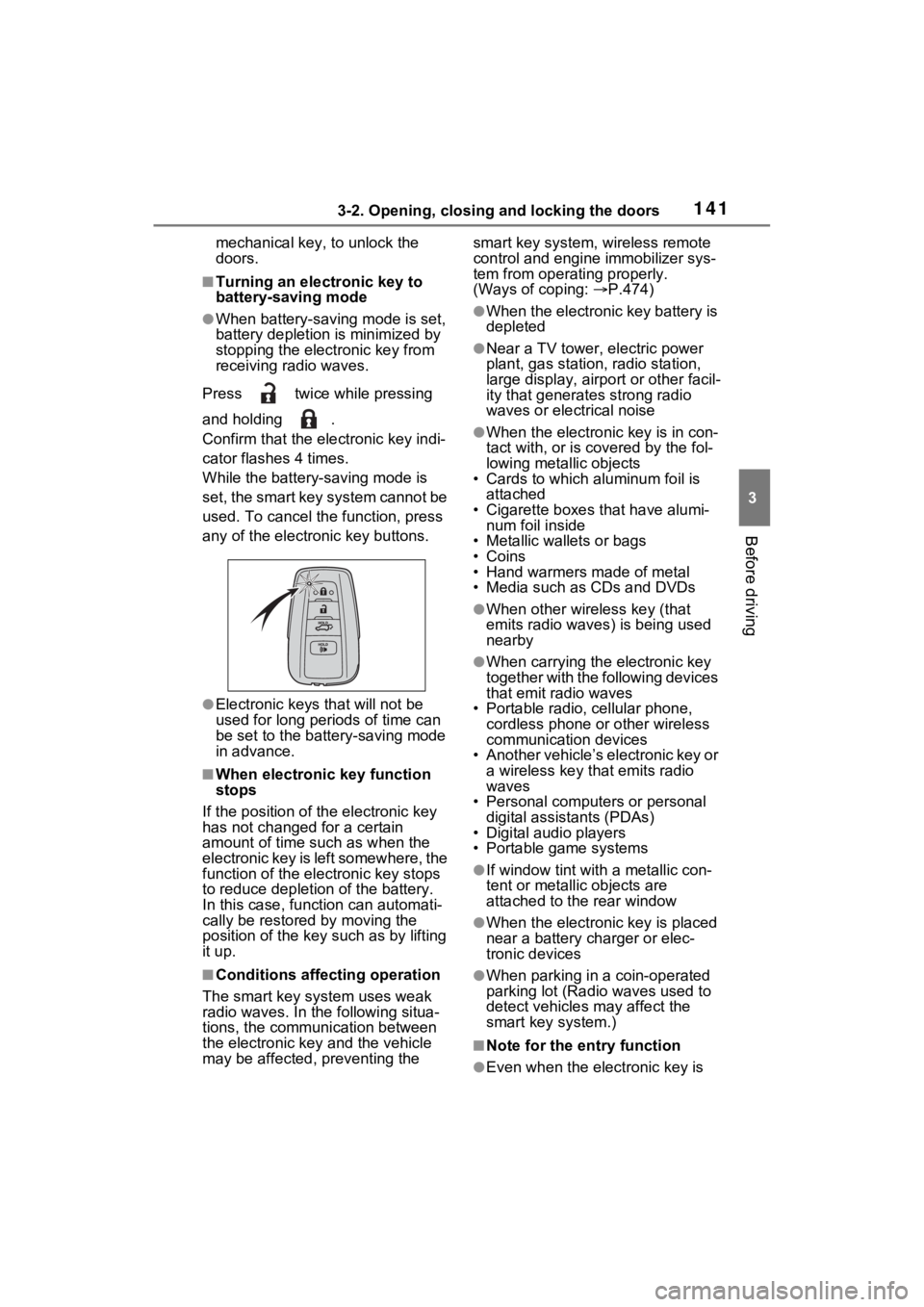
Press twice while pressing
and holding .
Confirm that the electronic key indi-
cator flashes 4 times.
While the battery-saving mode is
set, the smart key system cannot be
used. To cancel the function, press
any of the electronic key buttons.
●Electronic keys that will not be
used for long periods of time can
be set to the battery-saving mode
in advance.
■When electronic key function
stops
If the position of the electronic key
has not changed for a certain
amount of time such as when the
electronic key is left somewhere, the
function of the electronic key stops
to reduce depletio n of the battery.
In this case, function can automati-
cally be restored by moving the
position of the key such as by lifting
it up.
■Conditions affecting operation
The smart key system uses weak
radio waves. In the following situa-
tions, the communication between
the electronic key and the vehicle
may be affected, preventing the smart key system, wireless remote
control and engi
ne immobilizer sys-
tem from operating properly.
(Ways of coping: P.474)
●When the electronic key battery is
depleted
●Near a TV tower, electric power
plant, gas station, radio station,
large display, airpo rt or other facil-
ity that generates strong radio
waves or electrical noise
●When the electronic key is in con-
tact with, or is c overed by the fol-
lowing metallic objects
• Cards to which aluminum foil is
attached
• Cigarette boxes that have alumi- num foil inside
• Metallic wallets or bags
•Coins
• Hand warmers made of metal
• Media such as CDs and DVDs
●When other wireless key (that
emits radio waves) is being used
nearby
●When carrying the electronic key
together with the following devices
that emit radio waves
• Portable radio, cellular phone, cordless phone or other wireless
communication devices
• Another vehicle’s electronic key or a wireless key that emits radio
waves
• Personal computers or personal digital assistants (PDAs)
• Digital audio players
• Portable game systems
●If window tint wit h a metallic con-
tent or metallic objects are
attached to the rear window
●When the electronic key is placed
near a battery charger or elec-
tronic devices
●When parking in a coin-operated
parking lot (Radio waves used to
detect vehicles may affect the
smart key system.)
■Note for the entry function
●Even when the electronic key is
Page 146 of 574
1463-3. Adjusting the seats
■Before folding down the
seatbacks
1 Park the vehicle in a safe
place.
Apply the parking brake ( P.213)
and shift the shift lever to P.
( P.210)
2 Adjust the position of the
front seat and the angle of
the seatback. ( P.144)
Depending on the position of the
front seat, if the seatback is folded
backward, it may interfere with the
operation of the rear seat.
3 Lift up and push down the
head restraints of the rear
outboard seats, and lower
the head restraint of the rear
center seat. ( P.150)
4 Stow the armrest of the rear
seat if it is pulled out.
( P.369)
This step is not necessary when
operating the left side seat only.
■Folding down the seat-
backs
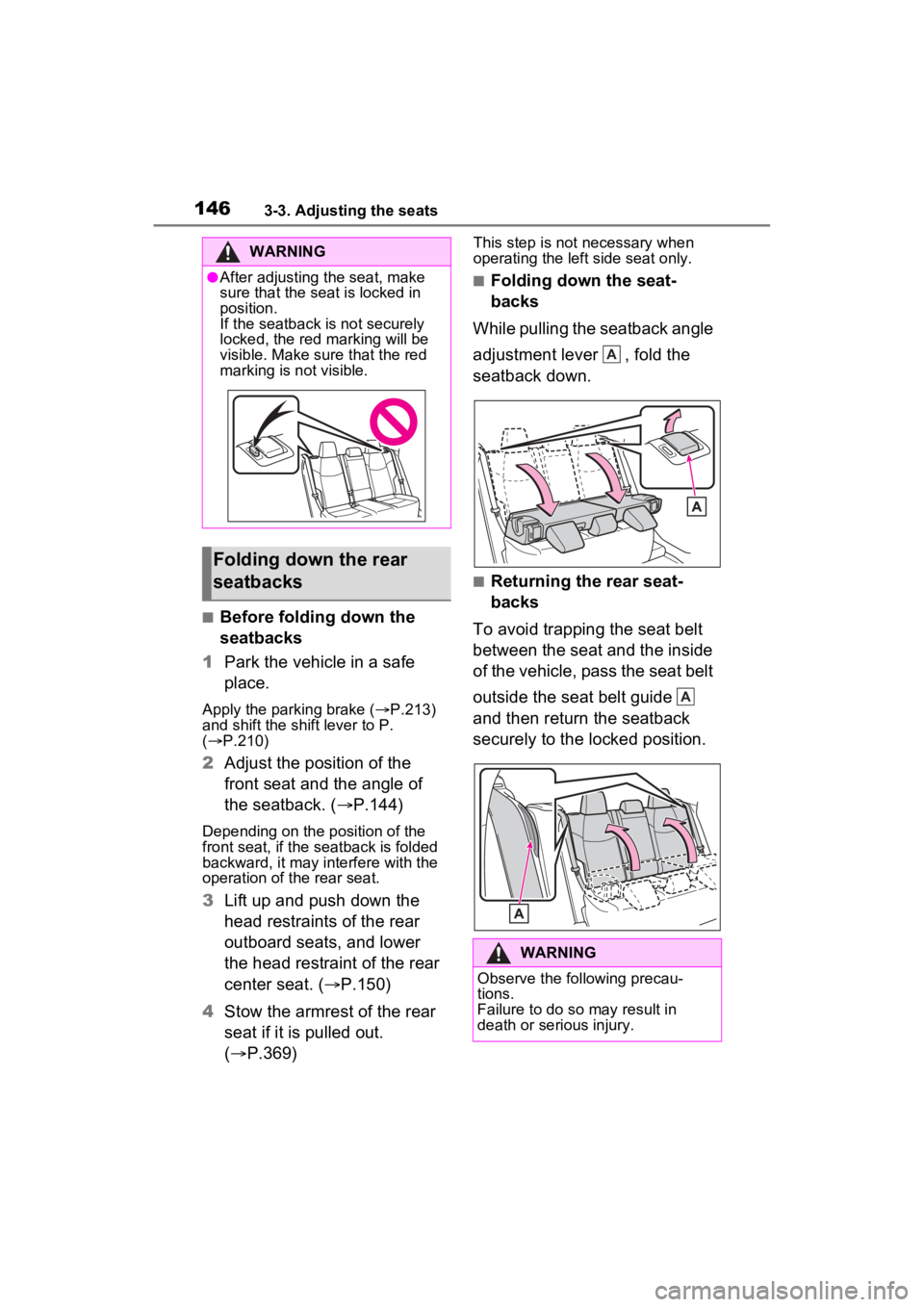
While pulling the seatback angle
adjustment lever , fold the
seatback down.
■Returning the rear seat-
backs
To avoid trapping the seat belt
between the seat and the inside
of the vehicle, pass the seat belt
outside the seat belt guide
and then return the seatback
securely to the locked position.
WARNING
●After adjusting the seat, make
sure that the seat is locked in
position.
If the seatback is not securely
locked, the red marking will be
visible. Make sure that the red
marking is not visible.
Folding down the rear
seatbacks
WARNING
Observe the following precau-
tions.
Failure to do so may result in
death or serious injury.
A
A
Page 151 of 574
1513-3. Adjusting the seats
3
Before driving
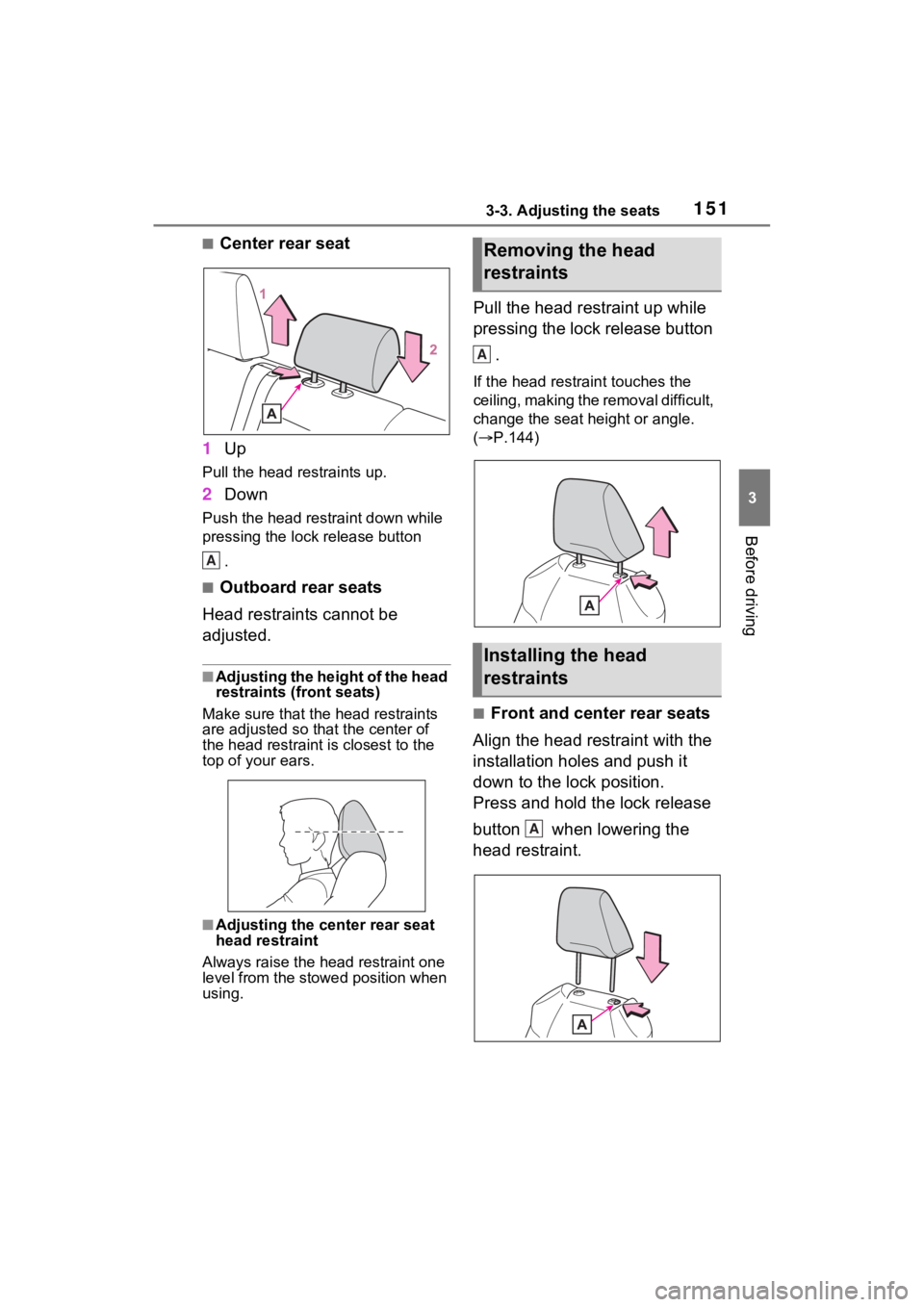
■Center rear seat
1 Up
Pull the head restraints up.
2Down
Push the head restraint down while
pressing the lock release button
.
■Outboard rear seats
Head restraints cannot be
adjusted.
■Adjusting the height of the head
restraints (front seats)
Make sure that the head restraints
are adjusted so that the center of
the head restraint is closest to the
top of your ears.
■Adjusting the center rear seat
head restraint
Always raise the head restraint one
level from the stowed position when
using.
Pull the head restraint up while
pressing the lock release button
.
If the head restrai nt touches the
ceiling, making the removal difficult,
change the seat height or angle.
( P.144)
■Front and center rear seats
Align the head restraint with the
installation holes and push it
down to the lock position.
Press and hold the lock release
button when lowering the
head restraint.
A
Removing the head
restraints
Installing the head
restraints
A
A
Page 162 of 574
1623-4. Adjusting the steering wheel and mirrors
If the symptom is not resolved by the solution, have the vehicle
inspected by your Toyota dealer.
SymptomLikely causeSolution
The image is
difficult to see.
The mirror surface is dirty.
Clean the mirror surface
gently, using a soft dry
cloth.
Sunlight or headlights are shin-
ing directly into the Digital Rear-
view Mirror.
Change to optical mirror
mode.
(If the light is coming
through the moon roof [if
equipped] or panoramic
moon roof [if equipped],
close the sunshade or
electronic sunshade.)
• The vehicle is in a dark area.
• The vehicle is near a TV tower, broadcasting station,
electric power plant, or other
location where strong radio
waves or electrical noise may
be present.
• The temperature around the camera is extremely high/low.
• The ambient te mperature is
extremely low.
• It is raining or humid.
• Sunlight or headlights are shining directly into the cam-
era lens.
• The vehicle is under fluores- cent lights, sodium lights,
mercury lights, etc.
• Exhaust gas is obstructing the camera.
Change to optical mirror
mode.
(Change back to digital
mirror mode when the
conditions have
improved.)
Foreign matters such as water
droplets or dust is on the cam-
era lens.Wipe the camera lens
with a damp soft cloth.
Page 177 of 574
177
4
4
Driving
Driving
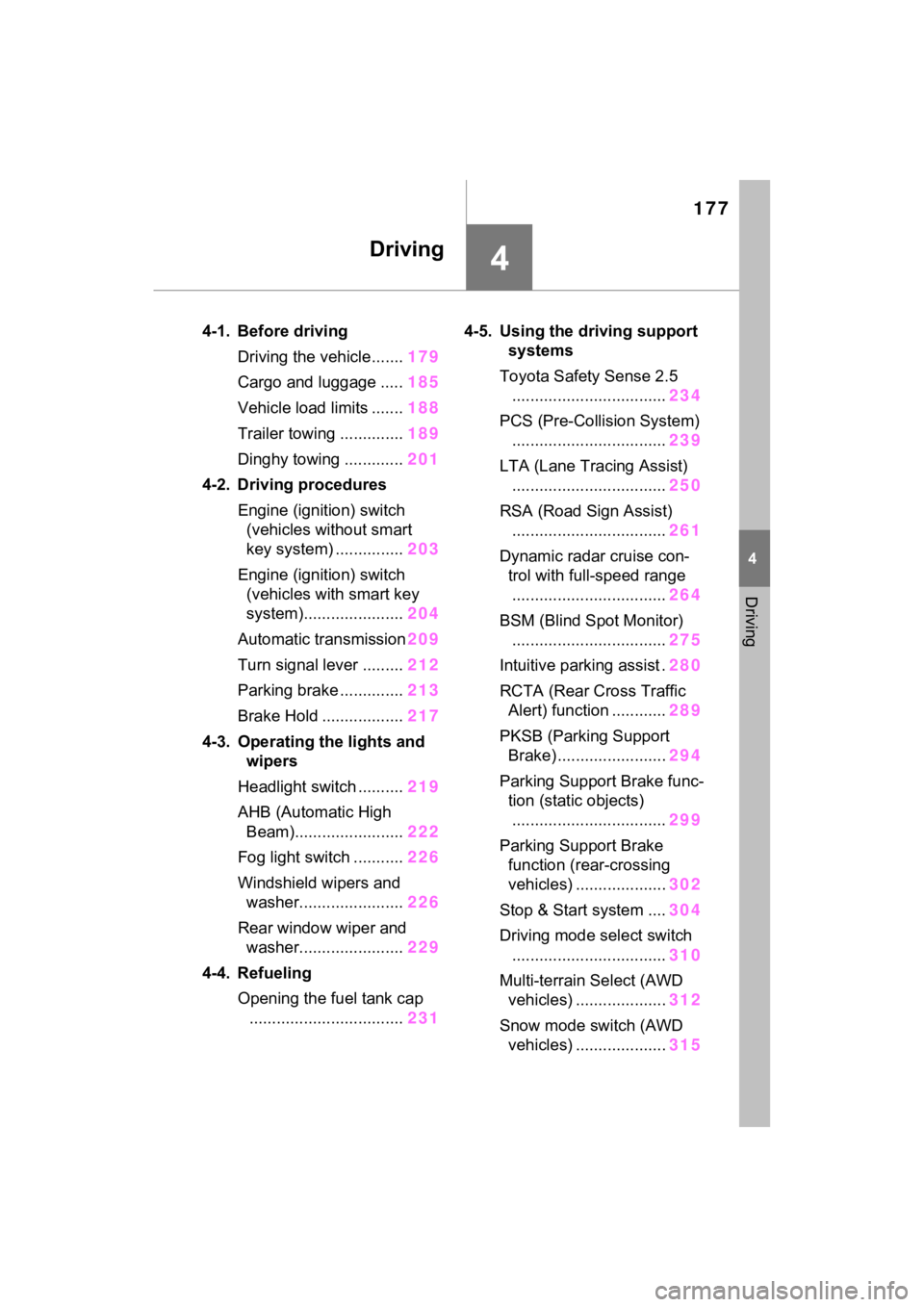
4-1. Before drivingDriving the vehicle....... 179
Cargo and luggage ..... 185
Vehicle load limits ....... 188
Trailer towing .............. 189
Dinghy towing ............. 201
4-2. Driving procedures Engine (ignition) switch (vehicles without smart
key system) ............... 203
Engine (ignition) switch (vehicles with smart key
system)...................... 204
Automatic transmission 209
Turn signal lever ......... 212
Parking brake .............. 213
Brake Hold .................. 217
4-3. Operating the lights and wipers
Headlight switch .......... 219
AHB (Automatic High Beam)........................ 222
Fog light switch ........... 226
Windshield wipers and washer....................... 226
Rear window wiper and washer....................... 229
4-4. Refueling Opening the fuel tank cap.................................. 2314-5. Using the dr
iving support
systems
Toyota Safety Sense 2.5 .................................. 234
PCS (Pre-Collision System) .................................. 239
LTA (Lane Tracing Assist) .................................. 250
RSA (Road Sign Assist) .................................. 261
Dynamic radar cruise con- trol with full-speed range
.................................. 264
BSM (Blind Spot Monitor) .................................. 275
Intuitive parking assist . 280
RCTA (Rear Cross Traffic Alert) function ............ 289
PKSB (Parking Support Brake) ........................ 294
Parking Support Brake func- tion (static objects)
.................................. 299
Parking Support Brake function (rear-crossing
vehicles) .................... 302
Stop & Start system .... 304
Driving mode select switch .................................. 310
Multi-terrain Select (AWD vehicles) .................... 312
Snow mode switch (AWD vehicles) .................... 315
Page 180 of 574
1804-1. Before driving
rain, because there may be a
layer of water between the tires
and the road surface, preventing
the steering and brakes from
operating properly.
■Engine speed while driving
In the following conditions, the
engine speed may become high
while driving. This is due to auto-
matic up-shifting control or down-
shifting implementation to meet driv-
ing conditions. It does not indicate
sudden acceleration.
●The vehicle is judged to be driving
uphill or downhill
●When the accelerator pedal is
released
●When the brake pedal is
depressed while sport mode is
selected
■Restraining the engine output
(Brake Override System)
●When the accelerator and brake
pedals are depressed at the same
time, the engine output may be
restrained.
●A warning message is displayed
on the multi-information display
while the system is operating.
■Breaking in your new Toyota
To extend the life of the vehicle,
observing the following precautions
is recommended:
●For the first 200 miles (300 km):
Avoid sudden stops.
●For the first 500 miles (800 km):
Do not tow a trailer.
●For the first 600 miles (1000 km):
• Do not drive at extremely high speeds.
• Avoid sudden acceleration.
• Do not drive continuously in low gears.
• Do not drive at a constant speed for extended periods.
■Operating your vehicle in a for-
eign country
Comply with the relevant vehicle registration laws and confirm the
availability of the correct fuel.
(
P.488)
WARNING
Observe the following precau-
tions.
Failure to do so may result in
death or serious injury.
■When starting the vehicle
Always keep your foot on the
brake pedal while stopped with
the engine running. This prevents
the vehicle from creeping.
■When driving the vehicle
●Do not drive if you are unfamil-
iar with the location of the brake
and accelerator pedals to avoid
depressing the wrong pedal.
• Accidentally depressing the accelerator pedal instead of the
brake pedal will result in sudden
acceleration that may lead to an
accident.
• When backing up, you may twist your body around, leading to a
difficulty in operating the pedals.
Make sure to operate the pedals
properly.
• Make sure to keep a correct driving posture even when mov-
ing the vehicle only slightly. This
allows you to depress the brake
and accelerator pedals properly.
• Depress the brake pedal using your right foot. Depressing the
brake pedal using your left foot
may delay response in an emer-
gency, resulting in an accident.
●Do not drive the vehicle over or
stop the vehicle near flammable
materials such as leaves, paper
or rags.
The exhaust system and
exhaust gases can be
extremely hot. These hot parts
may cause a fire i f there is any
flammable material nearby.
Page 185 of 574
1854-1. Before driving
4
Driving
to R*.
When the shift lever is shifted
from P or R to forward drive
shift position such as D
*.
When the system op erates, a mes-
sage appears on the multi-informa-
tion display. Read the message
and follow the instruction.
*: Depending on the situation, the shift position may not be
changed.
■Drive-Start Control (DSC)
●When the TRAC is turned off
( P.320), sudden start restraint
control also does not operate. If
your vehicle have trouble escap-
ing from the mud or fresh snow
due to sudden start restraint con-
trol operation, deactivate TRAC
( P.320) so that the vehicle may
become able to e scape from the
mud or fresh snow.
Also, sudden start restraint control
will not operate in the following con-
dition:
• When Multi-terrain Select is selected (AWD vehicles)
Cargo and luggage
Take notice of the following
information about storage
precautions, cargo capacity
and load.
WARNING
■Things that must not be car-
ried in the luggage compart-
ment
The following things may cause a
fire if loaded in the luggage com-
partment:
●Receptacles containing gaso-
line
●Aerosol cans
■Storage precautions
Observe the following precau-
tions.
Failure to do so may prevent the
pedals from being depressed
properly, may block the driver’s
vision, or may res ult in items hit-
ting the driver or passengers, pos-
sibly causing an accident.
●Stow cargo and luggage in the
luggage compartment when-
ever possible.
●Do not stack anything in the lug-
gage compartment higher than
the seatbacks.
●Do not place cargo or luggage
in or on the follo wing locations.
• At the feet of the driver
• On the front passenger or rear seats (when stacking items)
• On the luggage cover (if equipped)
• On the instrument panel
• On the dashboard
Page 186 of 574
1864-1. Before driving
Cargo capacity depends on the
total weight of the occupants.
(Cargo capacity) = (Total load
capacity) - (Total weight of occu-
pants)
Steps for Determining Correct
Load Limit
(1) Locate the statement “The
combined weight of occupants
and cargo should never exceed
XXX kg or XXX lbs.” on your
vehicle’s placard.
(2) Determine the combined
weight of the driver and passen-
gers that will be riding in your
vehicle.
(3) Subtract the combined
weight of the driver and passen-
gers from XXX kg or XXX lbs.
(4) The resulting figure equals the available amount of cargo
and luggage load capacity.
For example, if the “XXX”
amount equals 1400 lbs. and
there will be five 150 lb passen-
gers in your vehicle, the amount
of available cargo and luggage
load capacity is 650 lbs. (1400 -
750 (5
150) = 650 lbs.)
(5) Determine the combined
weight of luggage and cargo
being loaded on the vehicle.
That weight may not safely
exceed the available cargo and
luggage load capacity calcu-
lated in Step 4.
(6) If your vehicle will be towing
a trailer, load from your trailer
will be transferred to your vehi-
cle. Consult this manual to
determine how this reduces the
available cargo and luggage
load capacity of your vehicle.
( P.188)
WARNING
●Secure all items in the occupant
compartment.
●When you fold down the rear
seats, long items should not be
placed directly behind the front
seats.
●Never allow anyone to ride in
the luggage compartment. It is
not designed for passengers.
They should ride in their seats
with their seat belts properly
fastened. Otherwise, they are
much more likely to suffer death
or serious bodily injury, in the
event of sudden braking, sud-
den swerving or an accident.
Capacity and distribution
WARNING
■Capacity and distribution
●Do not exceed the maximum
axle weight rating or the total
vehicle weight rating.
●Even if the total load of occu-
pant’ weight and the cargo load
is less than the total load capac-
ity, do not apply the load
unevenly. Improper loading may
cause deterioration of steering
or braking control which may
cause death or serious injury.
Page 188 of 574
1884-1. Before driving
■Total load capacity and seating
capacity
These details are also described on
the tire and loading information
label. ( P.416)
WARNING
●If driving for a long distance, on
rough roads, or at high speeds,
stop the vehicle now and then
during the trip to make sure the
cargo remains in its place.
●Do not exceed 176.4 lb. (80 kg)
cargo weight on the roof lug-
gage carrier.
NOTICE
■When loading cargo on the
roof luggage carrier (if
equipped)
Be careful not to scratch the sur-
face of the moon roof (if
equipped) or the panoramic moon
roof (if equipped).
Vehicle load limits
Vehicle load limits include
total load capacity, seating
capacity, TWR (Trailer
Weight Rating) and cargo
capacity.
Total load capacity (vehicle
capacity weight): P.486
Total load capacity means the
combined weight of occu-
pants, cargo and luggage.
Seating capacity: P.487
Seating capacity means the
maximum number of occu-
pants whose estimated aver-
age weight is 150 lb. (68 kg)
per person.
TWR (Trailer Weight Rat-
ing): P.195, 486
TWR means the maximum
gross trailer weight (trailer
weight plus its cargo weight)
that your vehicle is able to
tow.
Cargo capacity
Cargo capacity may increase
or decrease depending on the
weight and the number of
occupants.
Page 189 of 574
1894-1. Before driving
4
Driving
WARNING
■Overloading the vehicle
Do not overload the vehicle. It
may not only cause damage to
the tires, but also degrade steer-
ing and braking ability, resulting in
an accident.
Trailer towing
Your vehicle is designed
primarily as a passenger-
and-load-carrying vehicle.
Towing a trailer can have an
adverse impact on handling,
performance, braking, dura-
bility, and fuel consump-
tion. For your safety and the
safety of others, you must
not overload your vehicle or
trailer. You must also
ensure that you are using
appropriate towing equip-
ment, that the towing equip-
ment has been installed
correctly and used properly,
and that you employ the
requisite driving habits.
Vehicle-trailer stability and
braking performance are
affected by trailer stability,
brake performance and set-
ting, trailer brakes, the hitch
and hitch systems (if
equipped).
To tow a trailer safely, use
extreme care and drive the
vehicle in accordance with
your trailer’s characteris-
tics and operating condi-
tions.