windshield wipers TOYOTA RAV4 2023 User Guide
[x] Cancel search | Manufacturer: TOYOTA, Model Year: 2023, Model line: RAV4, Model: TOYOTA RAV4 2023Pages: 574, PDF Size: 17.31 MB
Page 228 of 574
2284-3. Operating the lights and wipers
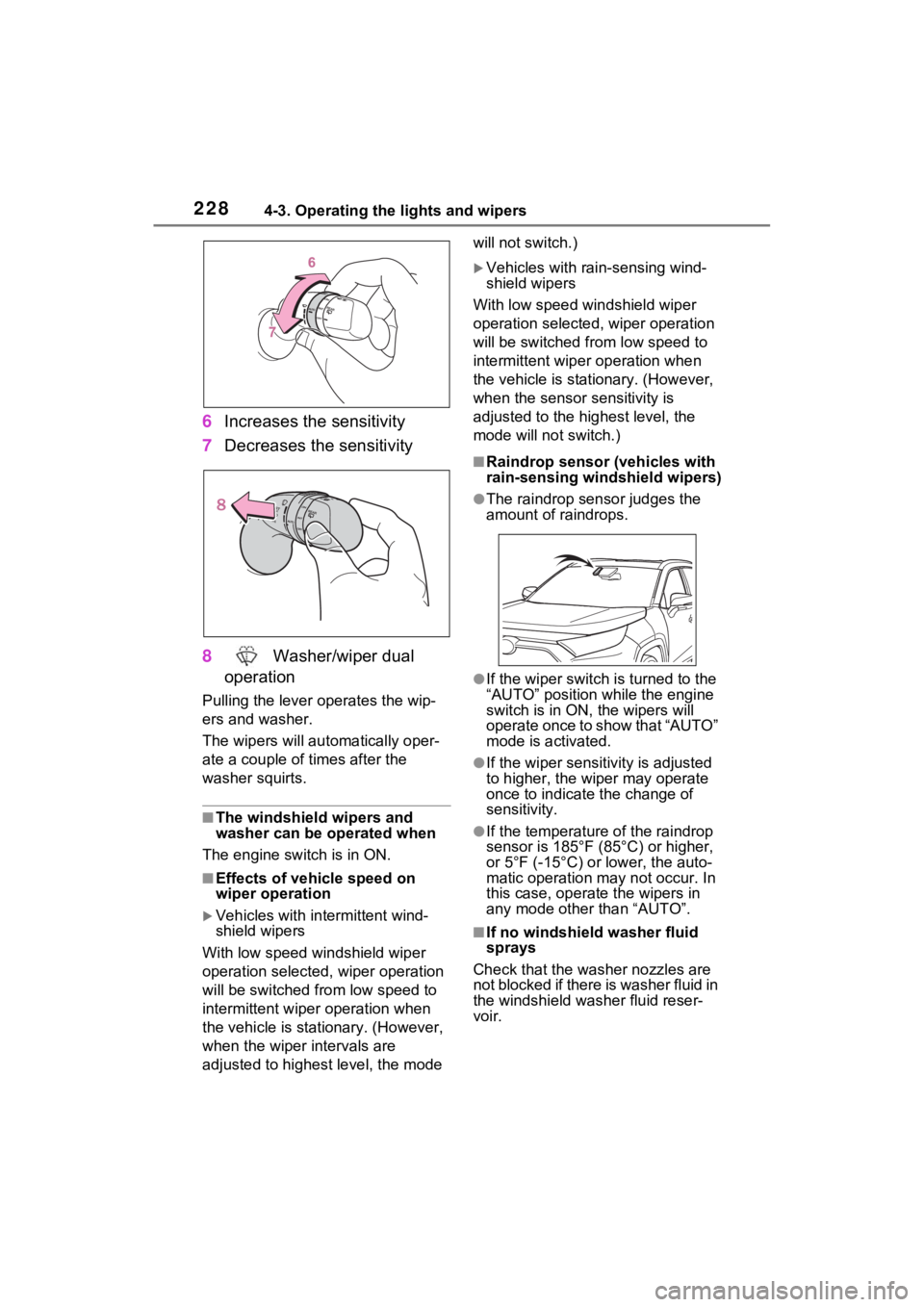
6Increases the sensitivity
7 Decreases the sensitivity
8 Washer/wiper dual
operation
Pulling the lever o perates the wip-
ers and washer.
The wipers will au tomatically oper-
ate a couple of times after the
washer squirts.
■The windshield wipers and
washer can be operated when
The engine switch is in ON.
■Effects of vehicle speed on
wiper operation
Vehicles with in termittent wind-
shield wipers
With low speed windshield wiper
operation selected, wiper operation
will be switched from low speed to
intermittent wiper operation when
the vehicle is stationary. (However,
when the wiper intervals are
adjusted to highest level, the mode will not switch.)
Vehicles with ra
in-sensing wind-
shield wipers
With low speed windshield wiper
operation selected, wiper operation
will be switched fro m low speed to
intermittent wiper operation when
the vehicle is stationary. (However,
when the sensor sensitivity is
adjusted to the highest level, the
mode will not switch.)
■Raindrop sensor (vehicles with
rain-sensing windshield wipers)
●The raindrop sensor judges the
amount of raindrops.
●If the wiper switch i s turned to the
“AUTO” position while the engine
switch is in ON, the wipers will
operate once to show that “AUTO”
mode is activated.
●If the wiper sensitivity is adjusted
to higher, the wiper may operate
once to indicate the change of
sensitivity.
●If the temperature of the raindrop
sensor is 185°F (85°C) or higher,
or 5°F (-15°C) or lower, the auto-
matic operation ma y not occur. In
this case, operate the wipers in
any mode other than “AUTO”.
■If no windshield washer fluid
sprays
Check that the washer nozzles are
not blocked if there is washer fluid in
the windshield washer fluid reser-
voir.
Page 229 of 574
2294-3. Operating the lights and wipers
4
Driving
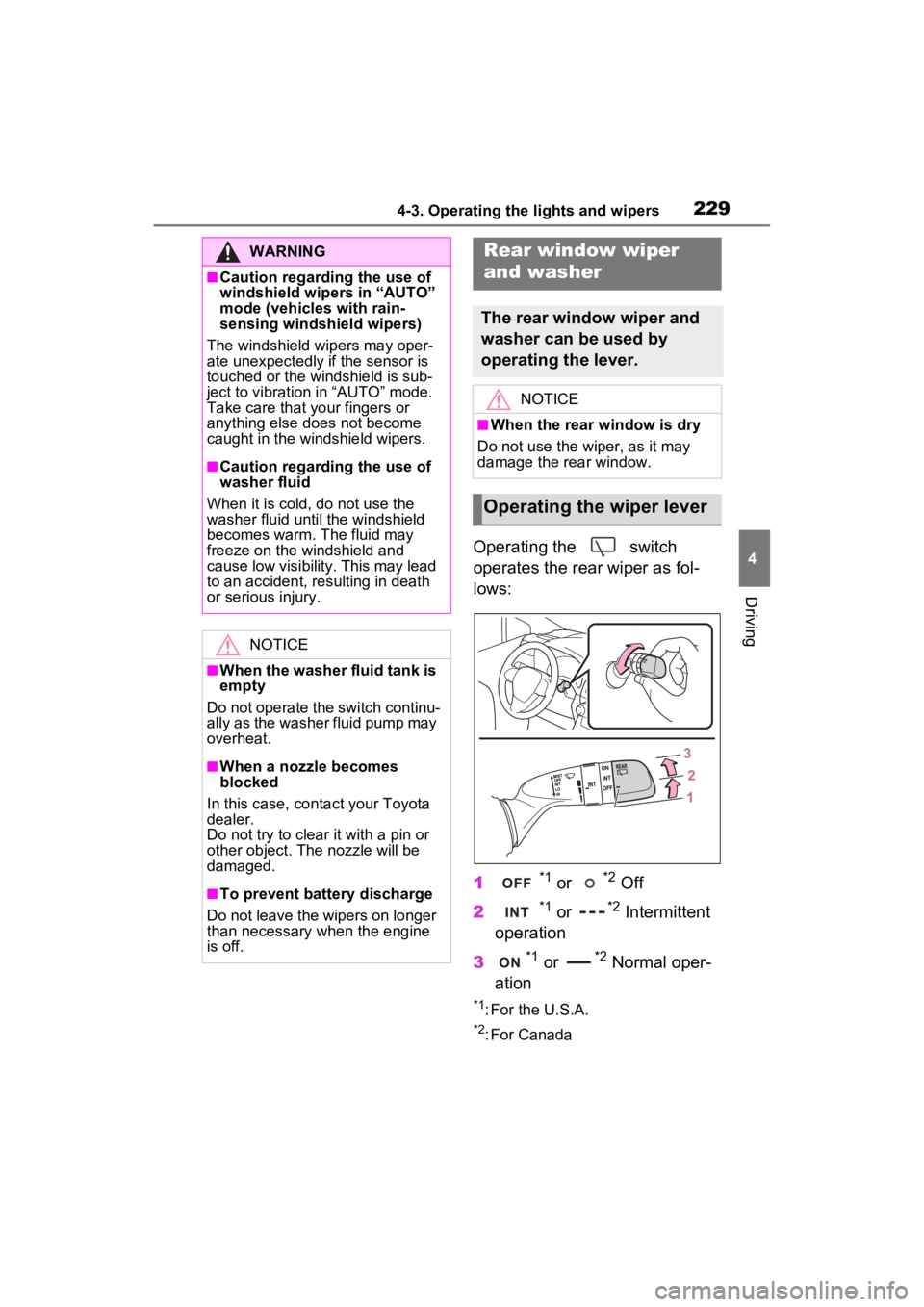
Operating the switch
operates the rear wiper as fol-
lows:
1
*1 or *2 Off
2
*1 or *2 Intermittent
operation
3
*1 or *2 Normal oper-
ation
*1: For the U.S.A.
*2: For Canada
WARNING
■Caution regarding the use of
windshield wipers in “AUTO”
mode (vehicles with rain-
sensing windshield wipers)
The windshield wipers may oper-
ate unexpectedly if the sensor is
touched or the windshield is sub-
ject to vibration in “AUTO” mode.
Take care that y our fingers or
anything else does not become
caught in the windshield wipers.
■Caution regarding the use of
washer fluid
When it is cold, do not use the
washer fluid until the windshield
becomes warm. The fluid may
freeze on the windshield and
cause low visibility. This may lead
to an accident, resulting in death
or serious injury.
NOTICE
■When the washer fluid tank is
empty
Do not operate the switch continu-
ally as the washer fluid pump may
overheat.
■When a nozzle becomes
blocked
In this case, conta ct your Toyota
dealer.
Do not try to clear it with a pin or
other object. The nozzle will be
damaged.
■To prevent battery discharge
Do not leave the wipers on longer
than necessary when the engine
is off.
Rear window wiper
and washer
The rear window wiper and
washer can be used by
operating the lever.
NOTICE
■When the rear window is dry
Do not use the wiper, as it may
damage the rear window.
Operating the wiper lever
Page 235 of 574
2354-5. Using the driving support systems
4
Driving
WARNING
■To avoid malfunction of the
radar sensor
Observe the following precau-
tions.
Otherwise, the radar sensor may
not operate properly, possibly
leading to an accident resulting in
death or serious injury.
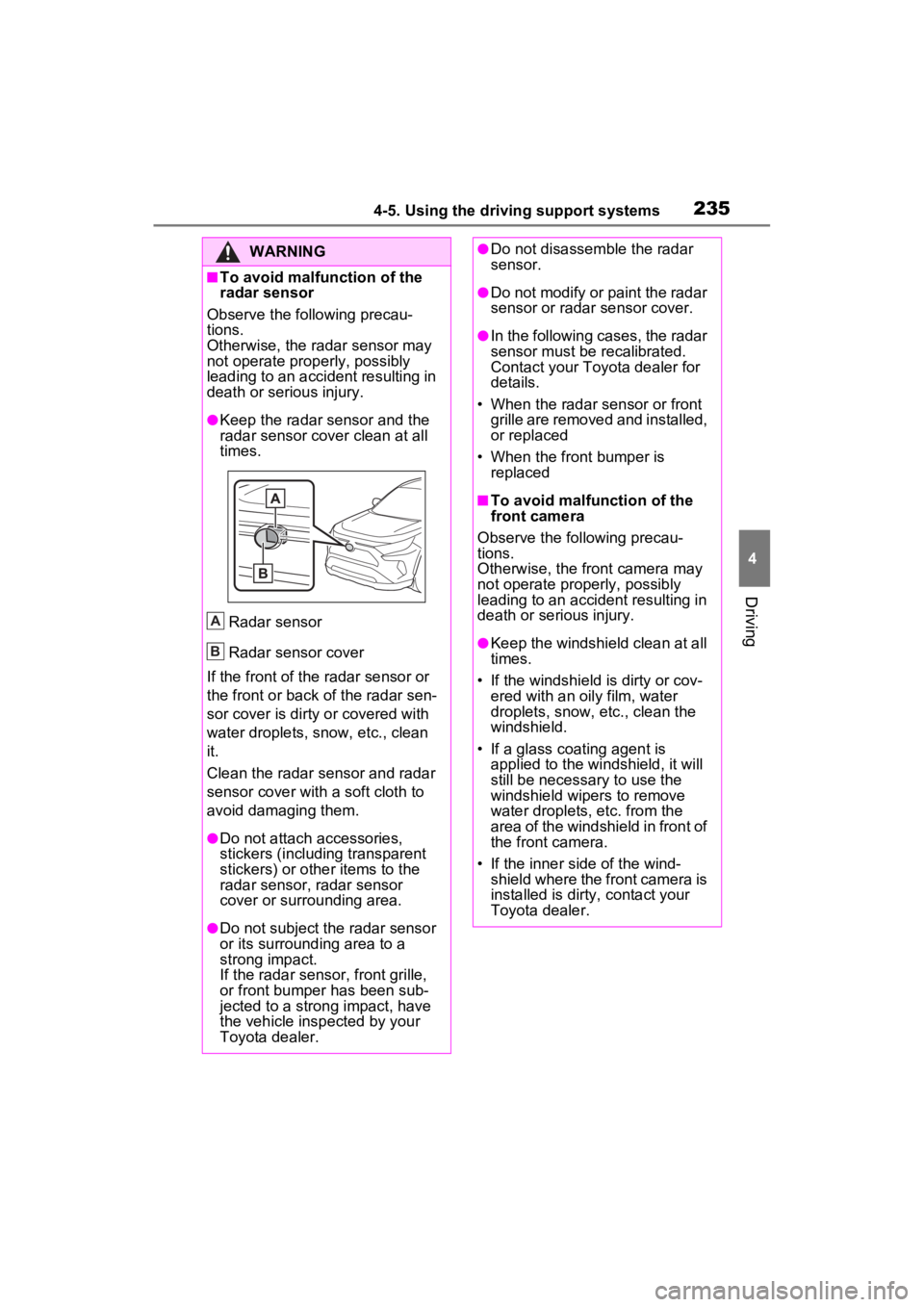
●Keep the radar sensor and the
radar sensor cover clean at all
times.
Radar sensor
Radar sensor cover
If the front of the r adar sensor or
the front or back of the radar sen-
sor cover is dirty or covered with
water droplets, snow, etc., clean
it.
Clean the radar sensor and radar
sensor cover with a soft cloth to
avoid damaging them.
●Do not attach accessories,
stickers (including transparent
stickers) or other items to the
radar sensor, radar sensor
cover or surrounding area.
●Do not subject the radar sensor
or its surrounding area to a
strong impact.
If the radar sensor, fron t grille,
or front bumper has been sub-
jected to a strong impact, have
the vehicle insp ected by your
Toyota dealer.
A
B
●Do not disassemble the radar
sensor.
●Do not modify or paint the radar
sensor or radar sensor cover.
●In the following cases, the radar
sensor must be recalibrated.
Contact your Toyota dealer for
details.
• When the radar s ensor or front
grille are removed and installed,
or replaced
• When the front bumper is replaced
■To avoid malfunction of the
front camera
Observe the following precau-
tions.
Otherwise, the f ront camera may
not operate properly, possibly
leading to an accident resulting in
death or serious injury.
●Keep the windshield clean at all
times.
• If the windshield is dirty or cov-
ered with an o ily film, water
droplets, snow, etc., clean the
windshield.
• If a glass coating agent is applied to the windshield, it will
still be necessary to use the
windshield wipers to remove
water droplets, etc. from the
area of the windshield in front of
the front camera.
• If the inner side of the wind- shield where the front camera is
installed is dirty, contact your
Toyota dealer.
Page 236 of 574
2364-5. Using the driving support systems
WARNING
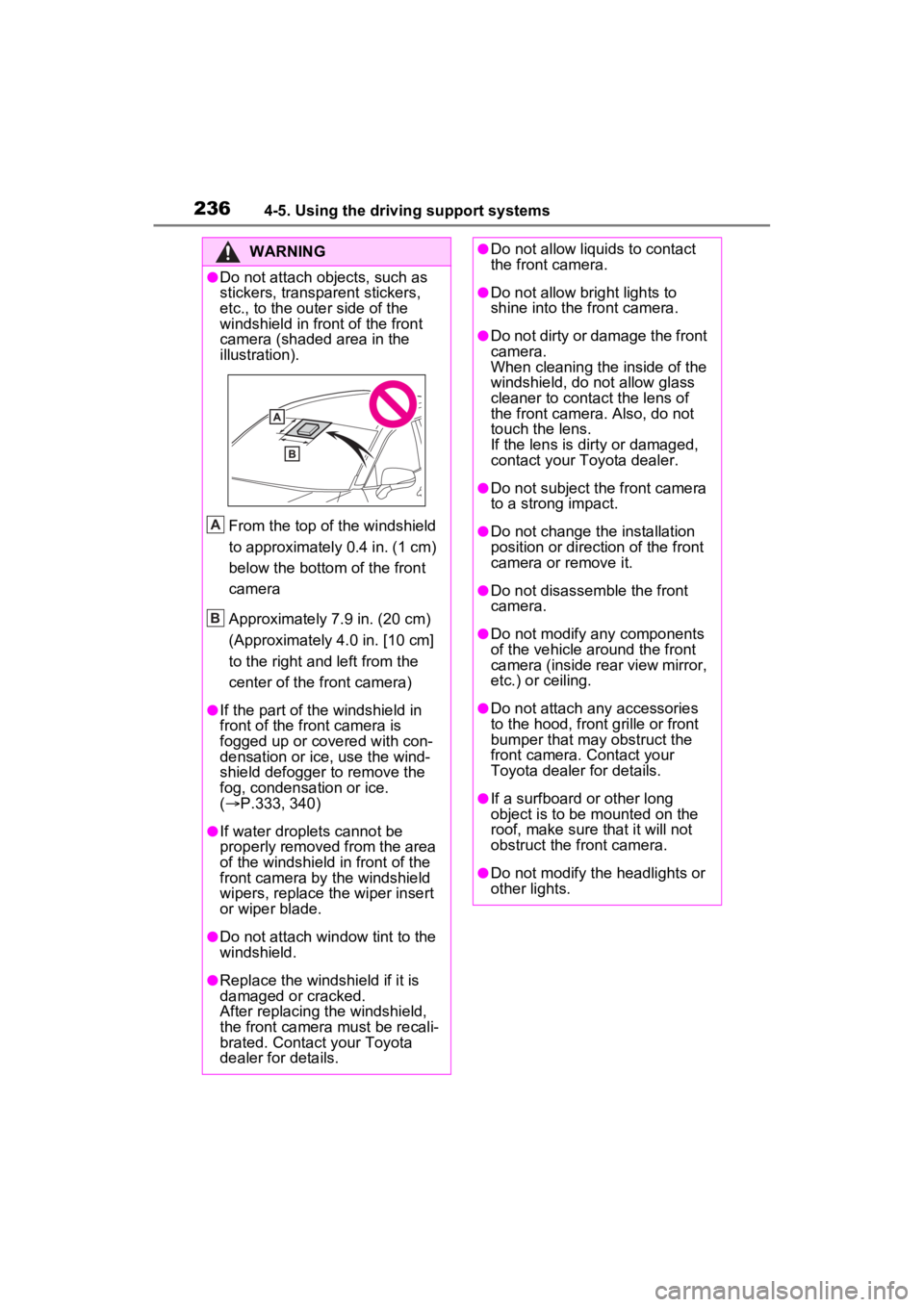
●Do not attach objects, such as
stickers, transparent stickers,
etc., to the outer side of the
windshield in fr ont of the front
camera (shaded area in the
illustration).
From the top of the windshield
to approximately 0.4 in. (1 cm)
below the bottom of the front
camera
Approximately 7.9 in. (20 cm)
(Approximately 4.0 in. [10 cm]
to the right and left from the
center of the front camera)
●If the part of the windshield in
front of the front camera is
fogged up or covered with con-
densation or ice, use the wind-
shield defogger to remove the
fog, condensation or ice.
( P.333, 340)
●If water droplets cannot be
properly removed from the area
of the windshield in front of the
front camera by the windshield
wipers, replace the wiper insert
or wiper blade.
●Do not attach win dow tint to the
windshield.
●Replace the windshield if it is
damaged or cracked.
After replacing the windshield,
the front camera must be recali-
brated. Contact your Toyota
dealer for details.
A
B
●Do not allow liquids to contact
the front camera.
●Do not allow bright lights to
shine into the front camera.
●Do not dirty or damage the front
camera.
When cleaning the inside of the
windshield, do not allow glass
cleaner to contact the lens of
the front camera . Also, do not
touch the lens.
If the lens is dirty or damaged,
contact your Toyota dealer.
●Do not subject the front camera
to a strong impact.
●Do not change the installation
position or direction of the front
camera or remove it.
●Do not disassemble the front
camera.
●Do not modify any components
of the vehicle around the front
camera (inside rear view mirror,
etc.) or ceiling.
●Do not attach any accessories
to the hood, front grille or front
bumper that may obstruct the
front camera. Contact your
Toyota dealer for details.
●If a surfboard or other long
object is to be mounted on the
roof, make sure that it will not
obstruct the front camera.
●Do not modify the headlights or
other lights.
Page 379 of 574
3816-1. Maintenance and care
6
Maintenance and care
contact your Toyota dealer.
• When washing the vehicle, use water to wash off dirt. If the vehi-
cle is particularly dirty, use a
diluted neutral detergent and a
sponge or a soft cloth and wash
off the dir t by hand.
• Wash detergent off with water immediately after use. After using
detergent, wash the detergent off
with water and wipe the vehicle
dry with a soft cloth.
●For vehicles with matte painted
wheels: Make sure to observe the
following precautions to prevent
damage to the matte paint.
• Do not polish or scrub with dry
cloths, brushes, etc.
• Do not use detergents containing coatings or abrasives.
• If using an automatic car wash, make sure it does not include ded-
icated wheel brushes.
• Do not use high-pressure spray guns or steam cleaners.
• Do not use det ergent on the
wheels when they are hot, such
as after driving or parking in hot
weather.
■Brake pads and calipers
Rust may form if the vehicle is
parked with wet brake pads or disc
rotors, causing them to stick. Before
parking the vehicle after it is
washed, drive slow ly and apply the
brakes several times to dry the
parts.
■Bumpers
Do not scrub with abrasive cleaners.
■Plated portions
If dirt cannot be removed, clean the
parts as follows:
●Use a soft cloth dampened with
an approximately 5% solution of
neutral detergent and water to
clean the dirt off.
●Wipe the surface with a dry, soft
cloth to remove any remaining
moisture.
●To remove oily deposits, use alco- hol wet wipes or a similar product.
WARNING
■When washing the vehicle
Do not apply water to the inside of
the engine compartment. Doing
so may cause the electrical com-
ponents, etc. to catch fire.
■When cleaning the windshield
(vehicles with rain-sensing
windshield wipers)
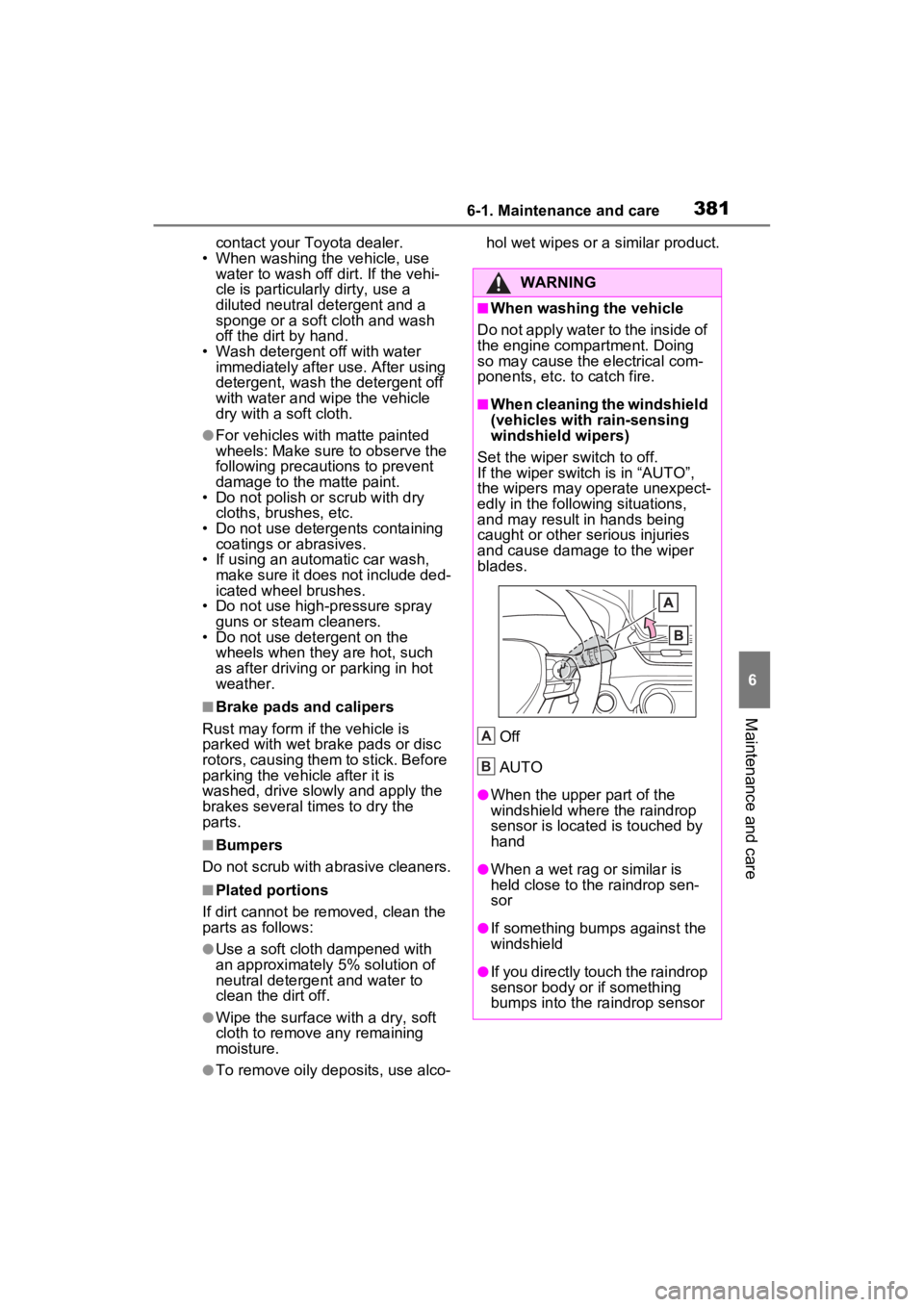
Set the wiper switch to off.
If the wiper switch is in “AUTO”,
the wipers may operate unexpect-
edly in the following situations,
and may result in hands being
caught or other serious injuries
and cause damage to the wiper
blades.
Off
AUTO
●When the upper part of the
windshield where the raindrop
sensor is located is touched by
hand
●When a wet rag or similar is
held close to the raindrop sen-
sor
●If something bumps against the
windshield
●If you directly touch the raindrop
sensor body or if something
bumps into the ra indrop sensor
A
B
Page 381 of 574
3836-1. Maintenance and care
6
Maintenance and care
NOTICE
■When using an automatic car
wash (vehicles with rain-
sensing windshield wipers)
Set the wiper switch to off posi-
tion.
If the wiper switch is in “AUTO”,
the wipers may operate and the
wiper blades may be damaged.
■When using a high pressure
car wash
●When washing the vehicle, do
not let water from the high-pres-
sure washer directly hit the
camera or the area around the
camera. Due to th e shock from
the high pressure water, it is
possible that the device may not
operate normally.
●Do not spray water directly on
the radar which is equipped
behind the radar sensor cover.
Otherwise it may cause the
device to be damaged.
●Do not bring the nozzle tip close
to boots (rubber or resin manu-
factured cover), or connectors
or the following parts.
The parts may be damaged if
they come into contact with
high-pressure water.
• Traction related parts
• Steering parts
• Suspension parts
• Brake parts
●Keep the cleaning nozzle at
least 11.9 in. (30 cm) away from
the vehicle body. Otherwise
resin section, such as moldings
and bumpers, may be deformed
and damaged. Also, do not con-
tinuously hold the nozzle in the
same place.
●Do not spray the lower part of
the windshield continuously. If
water enters the air conditioning
system intake located near the
lower part of the windshield, the
air conditioning system may not
operate correctly.
●Do not wash the underside of
the vehicle using a high pres-
sure car washer.
Page 389 of 574
3916-2. Maintenance
6
Maintenance and care
The OBD system determines
that a problem exists some-
where in the emission control
system. Your vehicle may not
pass the I/M test and may need
to be repaired. Contact your
Toyota dealer to service the
vehicle.
When the battery is discon-
nected or discharged
Readiness codes that are set
during ordinary driving are
erased.
Also, depending on your driv-
ing habits, the readiness
codes may not be completely
set.
When the fuel tank cap is
Tires
• Is the tire infla-
tion pressure
correct?
• The tires should not be damaged
or excessively
worn.
• Have the tires been rotated
according to the
maintenance
schedule?
• The wheel nuts should not be
loose.
Windshield
wipers/rear
window wiper
• The wiper blades should not show
any signs of
cracking, split-
ting, wear, con-
tamination or
deformation.
• The wiper blades should clear the
windshield with-
out streaking or
skipping.
ItemsCheck pointsEmission inspection
and maintenance (I/M)
programs
Some states have vehicle
emission inspection pro-
grams which include OBD
(On Board Diagnostics)
checks. The OBD system
monitors the operation of
the emission control sys-
tem.
If the malfunction indica-
tor lamp comes on
Your vehicle may not
pass the I/M test in the fol-
lowing situations:
Page 420 of 574
4226-3. Do-it-yourself maintenance
■Windshield wiper blade
removal and installation
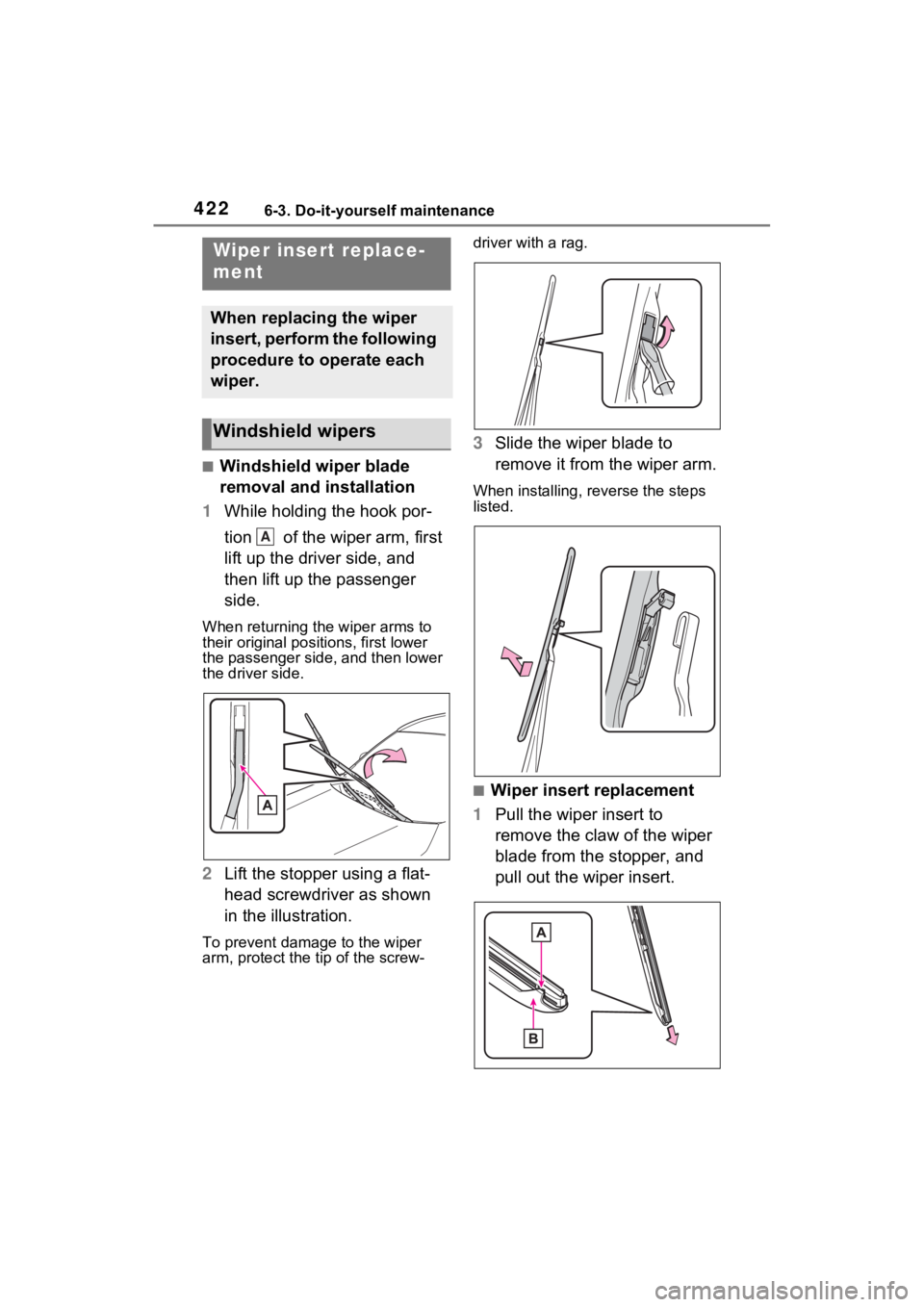
1 While holding the hook por-
tion of the wiper arm, first
lift up the driver side, and
then lift up the passenger
side.
When returning the wiper arms to
their original positions, first lower
the passenger side, and then lower
the driver side.
2Lift the stopper using a flat-
head screwdriver as shown
in the illustration.
To prevent damag e to the wiper
arm, protect the t ip of the screw- driver with a rag.
3
Slide the wiper blade to
remove it from the wiper arm.
When installing, reverse the steps
listed.
■Wiper insert replacement
1 Pull the wiper insert to
remove the claw of the wiper
blade from the stopper, and
pull out the wiper insert.
Wiper insert replace-
ment
When replacing the wiper
insert, perform the following
procedure to operate each
wiper.
Windshield wipers
A
Page 422 of 574
4246-3. Do-it-yourself maintenance
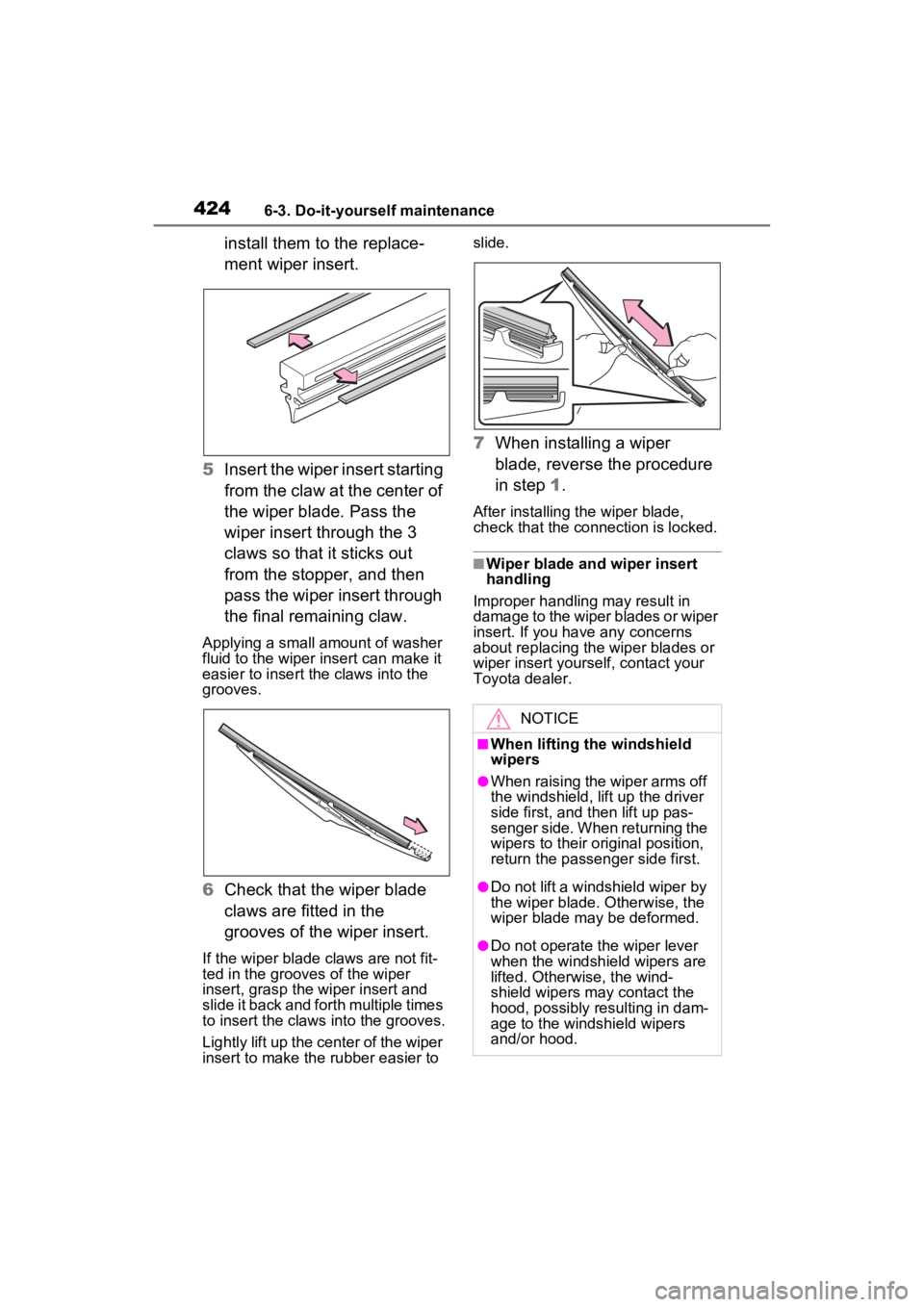
install them to the replace-
ment wiper insert.
5 Insert the wiper insert starting
from the claw at the center of
the wiper blade. Pass the
wiper insert through the 3
claws so that it sticks out
from the stopper, and then
pass the wiper insert through
the final remaining claw.
Applying a small amount of washer
fluid to the wiper insert can make it
easier to insert the claws into the
grooves.
6Check that the wiper blade
claws are fitted in the
grooves of the wiper insert.
If the wiper blade claws are not fit-
ted in the grooves of the wiper
insert, grasp the wiper insert and
slide it back and fo rth multiple times
to insert the claws into the grooves.
Lightly lift up the center of the wiper
insert to make the rubber easier to slide.
7
When installing a wiper
blade, reverse the procedure
in step 1.
After installing the wiper blade,
check that the connection is locked.
■Wiper blade and wiper insert
handling
Improper handling may result in
damage to the wiper blades or wiper
insert. If you have any concerns
about replacing the wiper blades or
wiper insert yourself, contact your
Toyota dealer.
NOTICE
■When lifting the windshield
wipers
●When raising the wiper arms off
the windshield, lift up the driver
side first, and then lift up pas-
senger side. When returning the
wipers to their original position,
return the passenger side first.
●Do not lift a windshield wiper by
the wiper blade. Otherwise, the
wiper blade may be deformed.
●Do not operate the wiper lever
when the windshield wipers are
lifted. Otherwise, the wind-
shield wipers may contact the
hood, possibly resulting in dam-
age to the windshield wipers
and/or hood.
Page 550 of 574

552Alphabetical Index
Electronic key battery ........... 425
Fuses ................................... 428
Light bulbs ............................ 432
Tires ..................................... 463
Wiper insert .......................... 422
Wireless remote control battery........................................... 425
Reporting safety defects for Canadian owners ................. 527
Reporting safety defects for U.S. owners................................... 526
Resetting the message indicat- ing maintenance is required 388
Road Sign Assist .................... 261
Rock & Dirt mode ................... 312
RSA (Road Sign Assist) ......... 261
S
Seat belt reminder light . 455, 456
Seat belts .................................. 29 Adjusting the seat belt shoulder anchor height ....................... 31
Automatic Locking Retractor .. 31
Child restraint system installation ............................................. 54
Cleaning and maintaining the seat belt.............................. 384
Emergency Locking Retractor 31
How to wear your seat belt..... 30
How your child should wear the seat belt................................ 30
Pregnant women, proper seat belt use................................. 29
Reminder light and buzzer . 455, 456
Seat belt extender .................. 30
Seat belt instructions for Cana- dian owners ........................ 527
Seat belt pretensioners .......... 32
SRS warning light................. 450
Seat heaters ............................ 345
Seating capacity ..................... 188 Seat position memory ............147
Seats
Adjustment precautions 144, 145
Adjustment ...................144, 145
Child restraint sys tem installation
.............................................50
Cleaning ...............................384
Driving position memory .......147
Folding down the rear seatbacks ...........................................146
Head restraint .......................150
Properly sitting in the seat ......27
Seat heaters ....... ..................345
Seat position memory...........147
Seat ventilators.....................345
Seat ventilators .. .....................345
Secondary Collision Brake ....319
Sensor Automatic headlight system .220
Automatic High Beam system...........................................222
BSM (Blind Spot M onitor) .....276
Digital Rear-view Mirror ........160
Inside rear view mirror ..........155
Intuitive parking assist ..........280
LTA (Lane Traci ng Assist) ....250
Parking Support Brake function (rear-crossing vehicles) ......276
Parking Support Brake function (static objects) ....................280
Rain-sensing windshield wipers ...........................................228
RCTA (Rear Cross Traffic Alert) ...........................................276
Toyota Safety Sense 2.5 ......234
Service reminder message ....388
Shift lever ................................209 Automatic transm ission ........209
If th e s hif t le ver ca n no t b e s hif te d from P .................................210
Shift lock system ....................210
Side airbags ..............................33