ECU TOYOTA RAV4 2023 Owner's Guide
[x] Cancel search | Manufacturer: TOYOTA, Model Year: 2023, Model line: RAV4, Model: TOYOTA RAV4 2023Pages: 574, PDF Size: 17.31 MB
Page 69 of 574

691-3. Emergency assistance
1
For safety and security
entific literature. Over 120 scien-
tists, engineers, and physicians
from universities, and govern-
ment health agencies and
industries reviewed the avail-
able body of research to
develop the ANSI Standard
(C95.1).
The design of Safety Connect
complies with the FCC guide-
lines in addition to those stan-
dards.
■Free/Open Source Software
Information
This product contains Free/Open
Source Software (FOSS). The
license information and/or the
source code of such FOSS can be
found at the following URL.
https://opensource.lge.com/osSch/
list?types=ALL&search=TL21BNU
Page 70 of 574
701-4. Theft deterrent system
1-4.Theft deterrent system
Vehicles without smart key
system
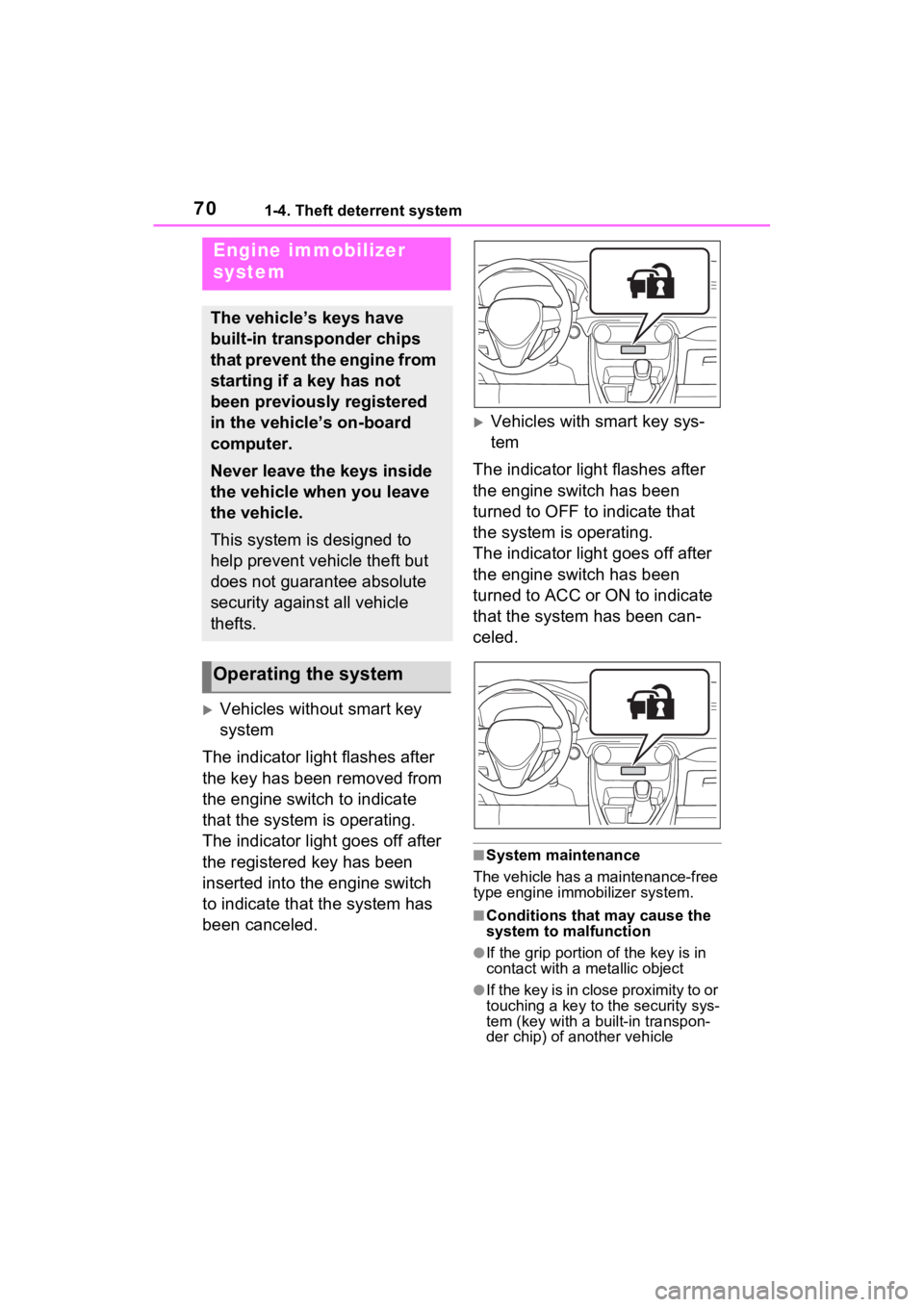
The indicator light flashes after
the key has been removed from
the engine switch to indicate
that the system is operating.
The indicator light goes off after
the registered key has been
inserted into the engine switch
to indicate that the system has
been canceled.
Vehicles with smart key sys-
tem
The indicator light flashes after
the engine switch has been
turned to OFF to indicate that
the system is operating.
The indicator light goes off after
the engine switch has been
turned to ACC or ON to indicate
that the system has been can-
celed.
■System maintenance
The vehicle has a maintenance-free
type engine immo bilizer system.
■Conditions that may cause the
system to malfunction
●If the grip portion of the key is in
contact with a metallic object
●If the key is in close proximity to or
touching a key to the security sys-
tem (key with a built-in transpon-
der chip) of another vehicle
Engine immobilizer
system
The vehicle’s keys have
built-in transponder chips
that prevent the engine from
starting if a key has not
been previously registered
in the vehicle’s on-board
computer.
Never leave the keys inside
the vehicle when you leave
the vehicle.
This system is designed to
help prevent vehicle theft but
does not guarantee absolute
security against all vehicle
thefts.
Operating the system
Page 71 of 574
711-4. Theft deterrent system
1
For safety and security
*: If equipped
NOTICE
■To ensure the system oper-
ates correctly
Do not modify or remove the sys-
tem. If modified or removed, the
proper operation of the system
cannot be guaranteed.
Alarm*
The alarm uses light and
sound to give an alert when
an intrusion is detected.
The alarm is triggered in the
following situations when
the alarm is set:
Vehicles without smart key
system: A locked door is
unlocked or opened in any
way other than using the
wireless remote control or
key. (The doors will lock
again automatically.)
Vehicles with smart key
system: A locked door is
unlocked or opened in any
way other than using the
entry function, wireless
remote control or mechani-
cal key. (The doors will lock
again automatically.)
For Canada: A locked door
is unlocked or opened in
any way other than using
the entry function (if
equipped) or wireless
remote control. (The doors
will lock again automati-
cally.)
The hood is opened.
Page 72 of 574
721-4. Theft deterrent system
■Items to check before lock-
ing the vehicle
To prevent unexpected trigger-
ing of the alarm and vehicle
theft, make sure of the following:
Nobody is in the vehicle.
The side windows and moon
roof (if equipped) or pan-
oramic moon roof (if
equipped) are closed before
the alarm is set.
No valuables or other per-
sonal items are left in the
vehicle.
■Setting
Close the doors and hood, and
lock all the doors. The system
will be set automatically after 30
seconds.
Except for Canada, the alarm
can also be set using the
mechanical key.
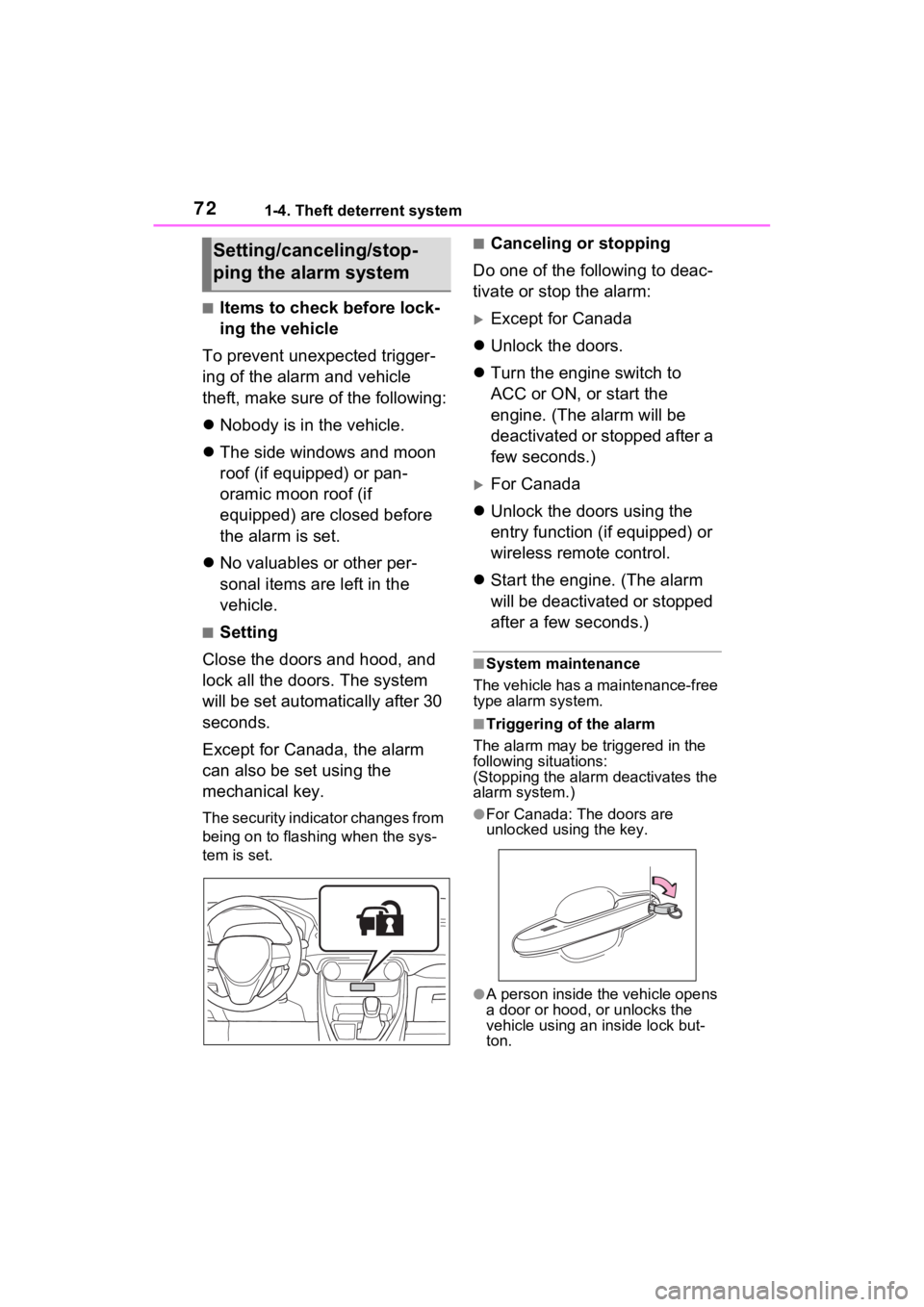
The security indicator changes from
being on to flashing when the sys-
tem is set.
■Canceling or stopping
Do one of the following to deac-
tivate or stop the alarm:
Except for Canada
Unlock the doors.
Turn the engine switch to
ACC or ON, or start the
engine. (The alarm will be
deactivated or stopped after a
few seconds.)
For Canada
Unlock the doors using the
entry function (if equipped) or
wireless remote control.
Start the engine. (The alarm
will be deactivated or stopped
after a few seconds.)
■System maintenance
The vehicle has a maintenance-free
type alarm system.
■Triggering of the alarm
The alarm may be triggered in the
following situations:
(Stopping the alarm deactivates the
alarm system.)
●For Canada: The doors are
unlocked using the key.
●A person inside the vehicle opens
a door or hood, or unlocks the
vehicle using an inside lock but-
ton.
Setting/canceling/stop-
ping the alarm system
Page 73 of 574
731-4. Theft deterrent system
1
For safety and security
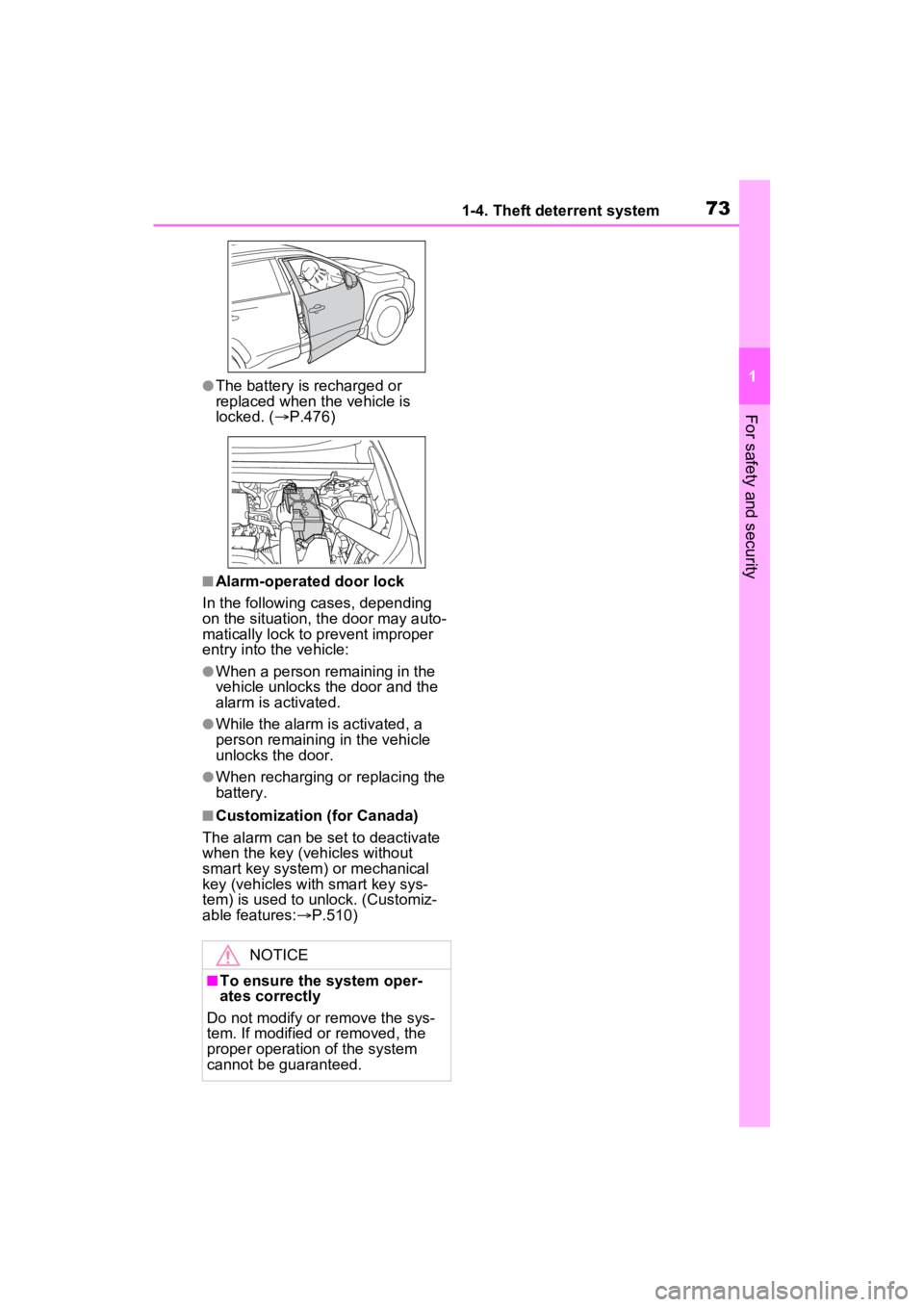
●The battery is recharged or
replaced when the vehicle is
locked. (P.476)
■Alarm-operated door lock
In the following cases, depending
on the situation, th e door may auto-
matically lock to p revent improper
entry into the vehicle:
●When a person remaining in the
vehicle unlocks the door and the
alarm is activated.
●While the alarm is activated, a
person remaining in the vehicle
unlocks the door.
●When recharging or replacing the
battery.
■Customization (for Canada)
The alarm can be set to deactivate
when the key (vehicles without
smart key system) or mechanical
key (vehicles with smart key sys-
tem) is used to unlock. (Customiz-
able features: P.510)
NOTICE
■To ensure the system oper-
ates correctly
Do not modify or remove the sys-
tem. If modified or removed, the
proper operation of the system
cannot be guaranteed.
Page 81 of 574
812-1. Instrument cluster
2
Vehicle status information and indicators
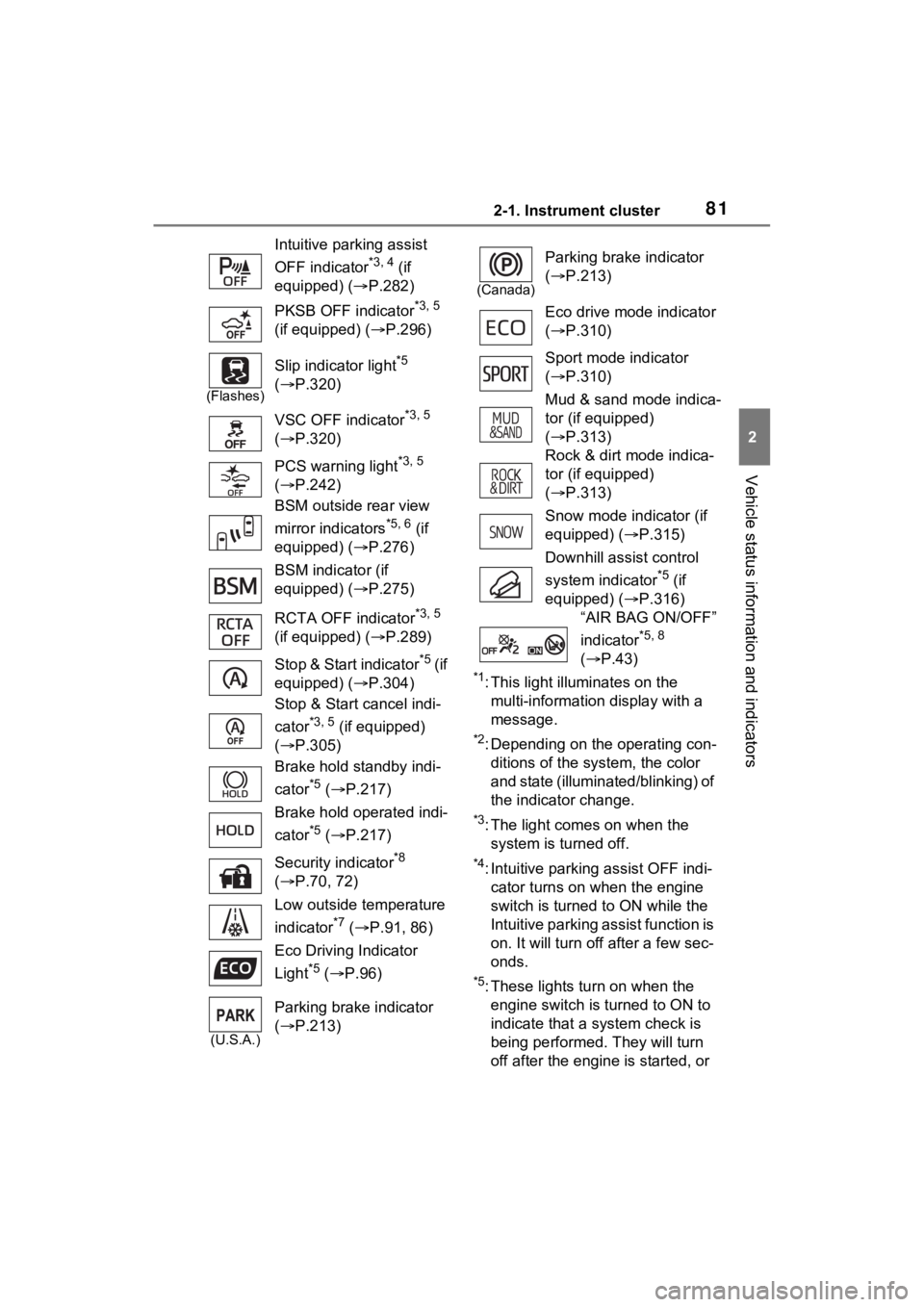
*1: This light illuminates on the multi-information display with a
message.
*2: Depending on the operating con-ditions of the system, the color
and state (illuminat ed/blinking) of
the indicator change.
*3: The light comes on when the system is turned off.
*4: Intuitive parking assist OFF indi-
cator turns on wh en the engine
switch is turned t o ON while the
Intuitive parking assist function is
on. It will turn off after a few sec-
onds.
*5: These lights tu rn on when the
engine switch is turned to ON to
indicate that a system check is
being performed. They will turn
off after the engine is started, or
Intuitive parking assist
OFF indicator
*3, 4 (if
equipped) ( P.282)
PKSB OFF indicator
*3, 5
(if equipped) ( P.296)
(Flashes)
Slip indicator light*5
( P.320)
VSC OFF indicator
*3, 5
( P.320)
PCS warning light
*3, 5
( P.242)
BSM outside rear view
mirror indicators
*5, 6 (if
equipped) ( P.276)
BSM indicator (if
equipped) ( P.275)
RCTA OFF indicator
*3, 5
(if equipped) ( P.289)
Stop & Start indicator
*5 (if
equipped) ( P.304)
Stop & Start cancel indi-
cator
*3, 5 (if equipped)
( P.305)
Brake hold standby indi-
cator
*5 ( P.217)
Brake hold operated indi-
cator
*5 ( P.217)
Security indicator
*8
( P.70, 72)
Low outside temperature
indicator
*7 ( P.91, 86)
Eco Driving Indicator
Light
*5 ( P.96)
(U.S.A.)
Parking brake indicator
( P.213)
(Canada)
Parking brake indicator
( P.213)
Eco drive mode indicator
( P.310)
Sport mode indicator
( P.310)
Mud & sand mode indica-
tor (if equipped)
( P.313)
Rock & dirt mode indica-
tor (if equipped)
( P.313)
Snow mode indicator (if
equipped) ( P.315)
Downhill assist control
system indicator
*5 (if
equipped) ( P.316)
“AIR BAG ON/OFF”
indicator
*5, 8
( P.43)
Page 119 of 574
1193-2. Opening, closing and locking the doors
3
Before driving
3-2.Opening, closing and locking the doors
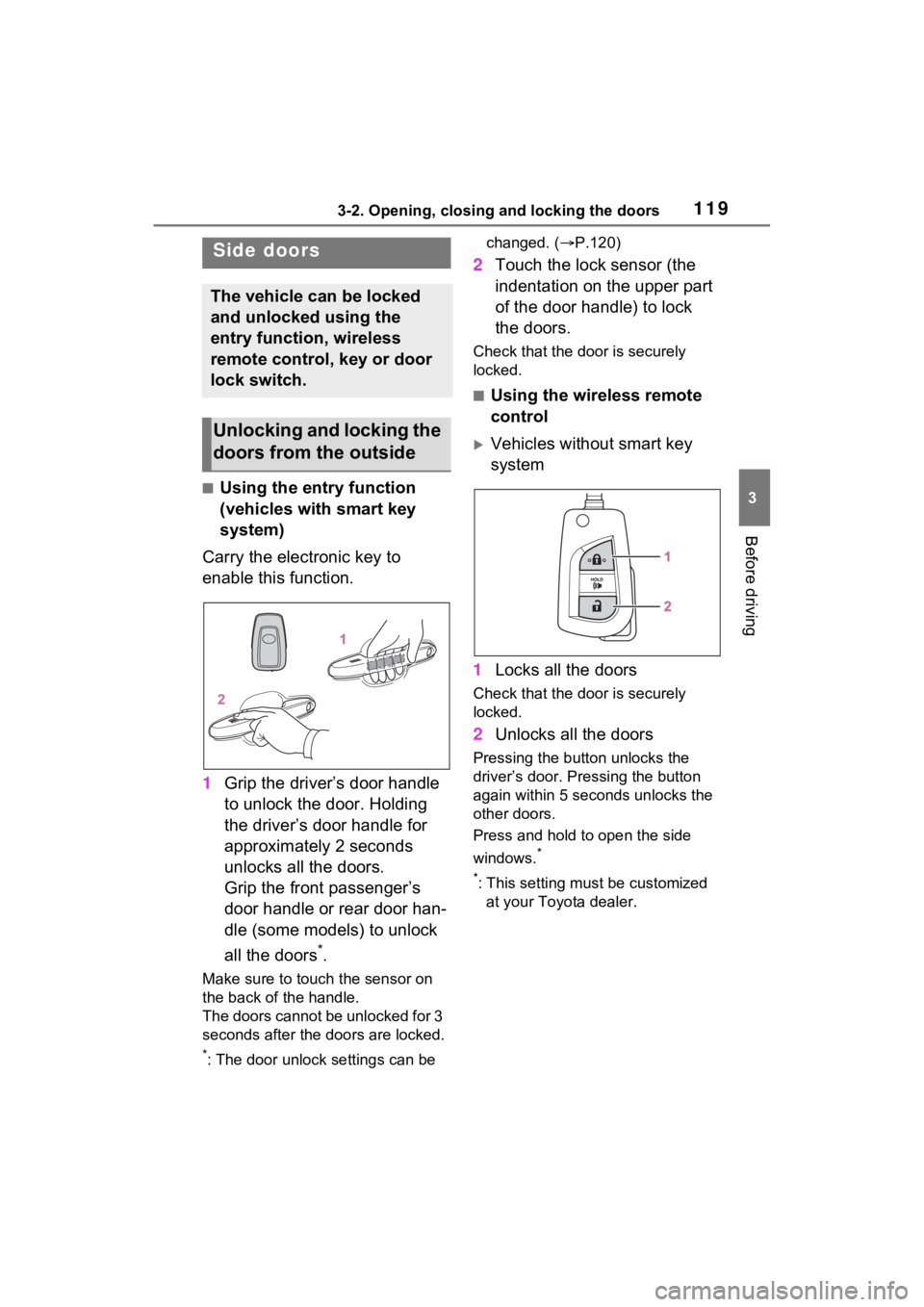
■Using the entry function
(vehicles with smart key
system)
Carry the electronic key to
enable this function.
1 Grip the driver’s door handle
to unlock the door. Holding
the driver’s door handle for
approximately 2 seconds
unlocks all the doors.
Grip the front passenger’s
door handle or rear door han-
dle (some models) to unlock
all the doors
*.
Make sure to touch the sensor on
the back of the handle.
The doors cannot be unlocked for 3
seconds after the doors are locked.
*: The door unlock settings can be changed. (
P.120)
2 Touch the lock sensor (the
indentation on the upper part
of the door handle) to lock
the doors.
Check that the d oor is securely
locked.
■Using the wireless remote
control
Vehicles without smart key
system
1 Locks all the doors
Check that the d oor is securely
locked.
2 Unlocks all the doors
Pressing the button unlocks the
driver’s door. Pressing the button
again within 5 seconds unlocks the
other doors.
Press and hold to open the side
windows.
*
*
: This setting must be customized at your Toyota dealer.
Side doors
The vehicle can be locked
and unlocked using the
entry function, wireless
remote control, key or door
lock switch.
Unlocking and locking the
doors from the outside
Page 120 of 574
1203-2. Opening, closing and locking the doors
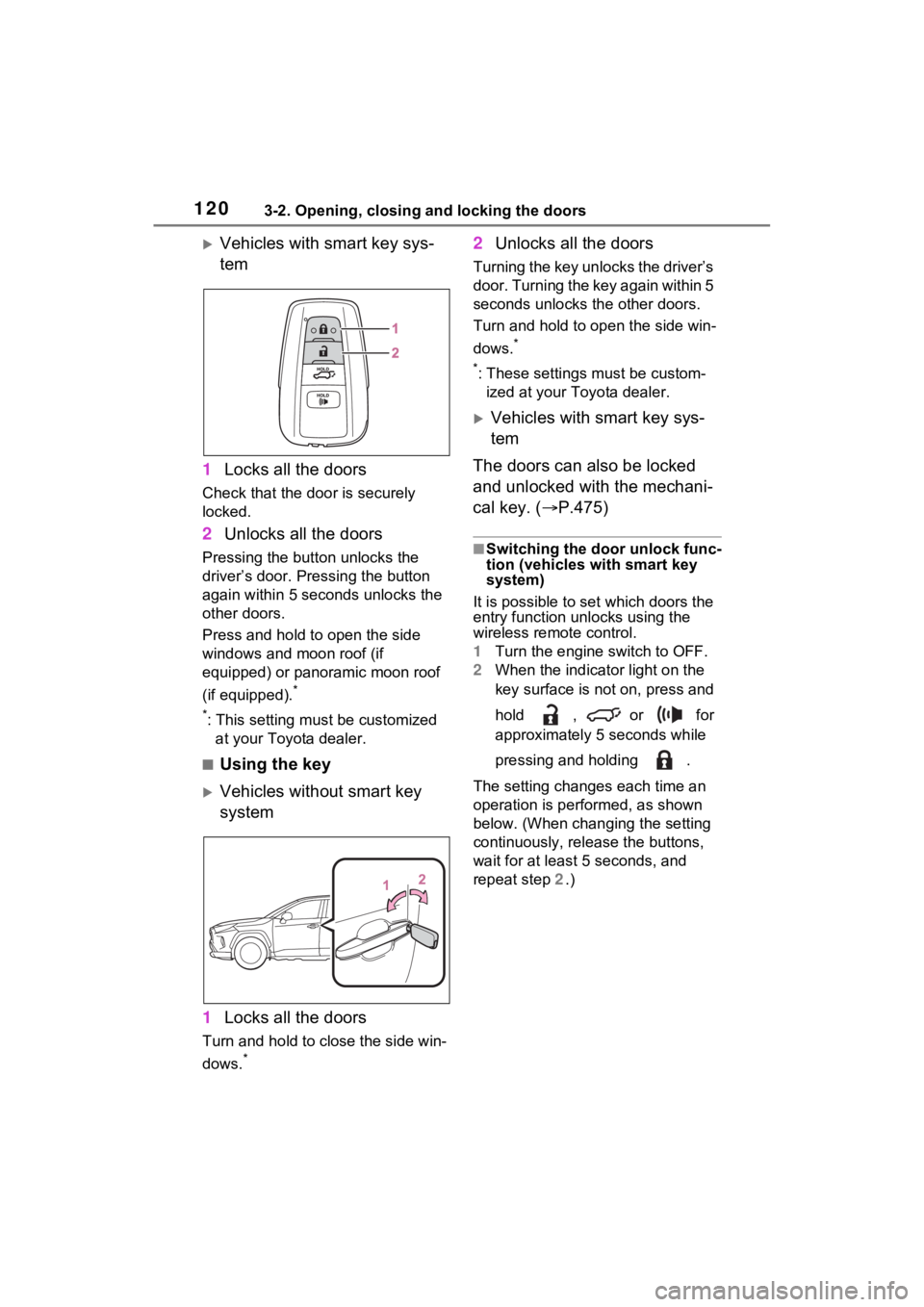
Vehicles with smart key sys-
tem
1 Locks all the doors
Check that the door is securely
locked.
2Unlocks all the doors
Pressing the button unlocks the
driver’s door. Pressing the button
again within 5 seconds unlocks the
other doors.
Press and hold to open the side
windows and moon roof (if
equipped) or panoramic moon roof
(if equipped).
*
*
: This setting must be customized at your Toyota dealer.
■Using the key
Vehicles without smart key
system
1 Locks all the doors
Turn and hold to close the side win-
dows.
*
2Unlocks all the doors
Turning the key unlocks the driver’s
door. Turning the key again within 5
seconds unlocks th e other doors.
Turn and hold to open the side win-
dows.
*
*
: These settings must be custom- ized at your Toyota dealer.
Vehicles with smart key sys-
tem
The doors can also be locked
and unlocked with the mechani-
cal key. ( P.475)
■Switching the door unlock func-
tion (vehicles with smart key
system)
It is possible to set which doors the
entry function unlocks using the
wireless remote control.
1 Turn the engine switch to OFF.
2 When the indicator light on the
key surface is not on, press and
hold , or for
approximately 5 seconds while
pressing and holding .
The setting changes each time an
operation is per formed, as shown
below. (When changing the setting
continuously, release the buttons,
wait for at least 5 seconds, and
repeat step 2 .)
Page 121 of 574
1213-2. Opening, closing and locking the doors
3
Before driving
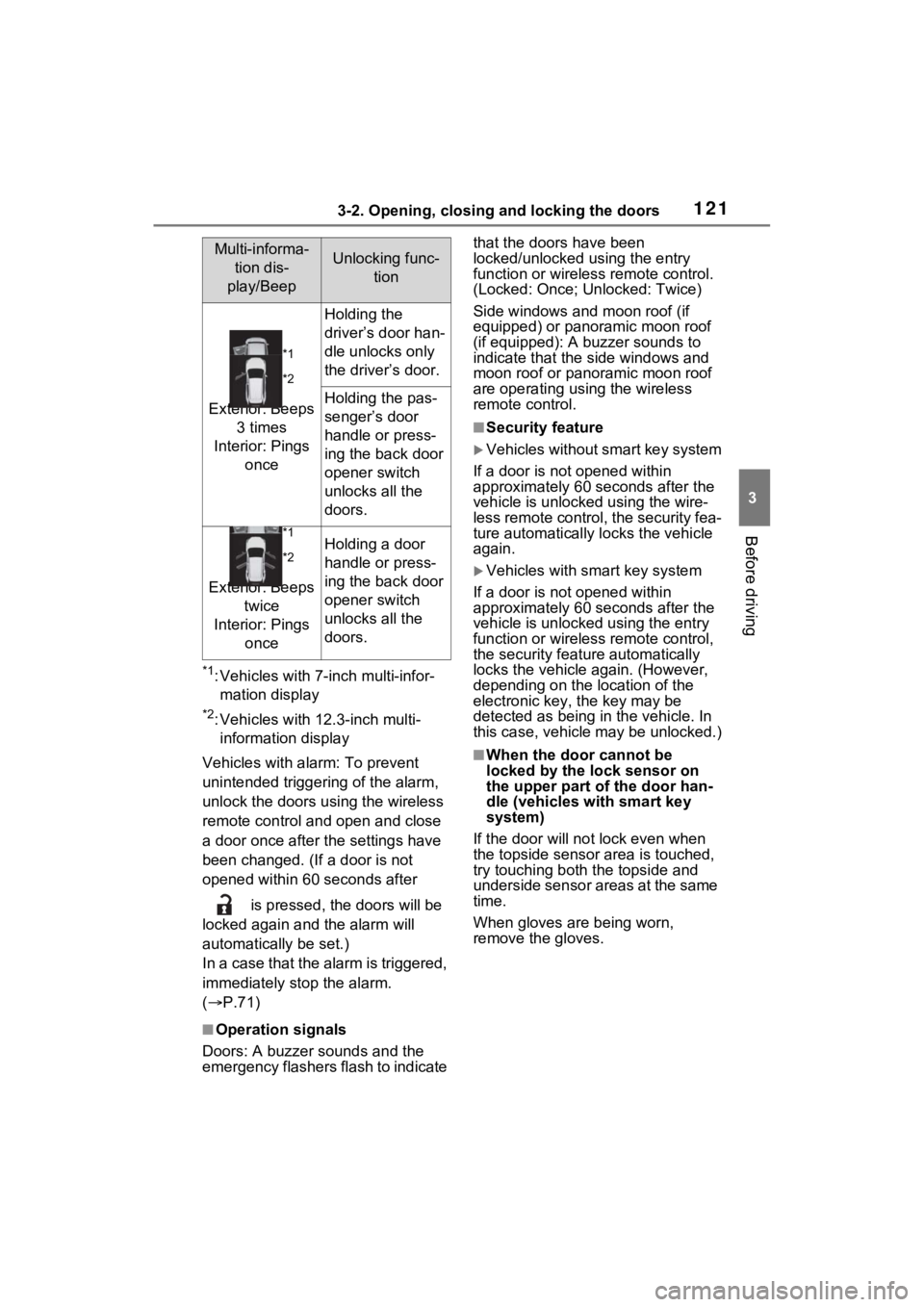
*1: Vehicles with 7-inch multi-infor-
mation display
*2: Vehicles with 12.3-inch multi-information display
Vehicles with alarm: To prevent
unintended triggering of the alarm,
unlock the doors us ing the wireless
remote control and open and close
a door once after t he settings have
been changed. (If a door is not
opened within 60 seconds after
is pressed, the doors will be
locked again a nd the alarm will
automatically be set.)
In a case that the alarm is triggered,
immediately stop the alarm.
( P.71)
■Operation signals
Doors: A buzzer sounds and the
emergency flashers flash to indicate that the doors have been
locked/unlocked using the entry
function or wireles
s remote control.
(Locked: Once; Unlocked: Twice)
Side windows and moon roof (if
equipped) or panoramic moon roof
(if equipped): A buzzer sounds to
indicate that the side windows and
moon roof or panoramic moon roof
are operating us ing the wireless
remote control.
■Security feature
Vehicles without smart key system
If a door is not opened within
approximately 60 s econds after the
vehicle is unlocked using the wire-
less remote control, the security fea-
ture automatically locks the vehicle
again.
Vehicles with smart key system
If a door is not opened within
approximately 60 s econds after the
vehicle is unlocked using the entry
function or wireles s remote control,
the security featur e automatically
locks the vehicle again. (However,
depending on the location of the
electronic key, the key may be
detected as being in the vehicle. In
this case, vehicle may be unlocked.)
■When the door cannot be
locked by the lock sensor on
the upper part of the door han-
dle (vehicles with smart key
system)
If the door will not lock even when
the topside sensor area is touched,
try touching both the topside and
underside sensor areas at the same
time.
When gloves are being worn,
remove the gloves.
Multi-informa-
tion dis-
play/BeepUnlocking func- tion
*1
*2
Exterior: Beeps 3 times
Interior: Pings once
Holding the
driver’s door han-
dle unlocks only
the driver’s door.
Holding the pas-
senger’s door
handle or press-
ing the back door
opener switch
unlocks all the
doors.
*1
*2
Exterior: Beeps twice
Interior: Pings once
Holding a door
handle or press-
ing the back door
opener switch
unlocks all the
doors.
Page 126 of 574

1263-2. Opening, closing and locking the doors
WARNING
●Never let anyone sit in the lug-
gage compartment.
In the event of sudden braking,
sudden swerving or a collision,
they are susceptible to death or
serious injury.
■Back door handles
Do not hang any object to the
back door handles.
If any object is hung, the back
door may suddenly shut, causing
parts of the body to be caught,
resulting in dea th or serious
injury.
■Operating the back door
Observe the following precau-
tions.
Failure to do so may cause parts
of the body to be caught, resulting
in death or serious injury.
●Remove any heavy loads, such
as snow and ice, from the back
door before opening it. Failure
to do so may cause the back
door to suddenly shut again
after it is opened.
●When opening or closing the
back door, thoroughly check to
make sure the surrounding area
is safe.
●If anyone is in the vicinity, make
sure they are safe and let them
know that the back door is
about to open or close.
●Use caution when opening or
closing the back door in windy
weather as it may move
abruptly in strong wind.
●Vehicles without power back
door: The back door may sud-
denly shut if it is not opened
fully. It is more difficult to open
or close the back door on an
incline than on a level surface,
so beware of the back door
unexpectedly opening or closing
by itself. Make sure that the
back door is fully open and
secure before using the luggage
compartment.
●Vehicles with power back door:
The back door may suddenly
shut if it is not opened fully,
while on a steep incline. Make
sure that the back door is
secured before using the lug-
gage compartment.
●When closing the back door,
take extra care to prevent your
fingers, etc. from being caught.
●Vehicles without power back
door: When closing the back
door, make sure to press it
lightly on its outer surface. If the
back door handle is used to fully
close the back door, it may
result in hands or arms being
caught.