warning light TOYOTA RAV4 2023 Workshop Manual
[x] Cancel search | Manufacturer: TOYOTA, Model Year: 2023, Model line: RAV4, Model: TOYOTA RAV4 2023Pages: 574, PDF Size: 17.31 MB
Page 232 of 574
2324-4. Refueling
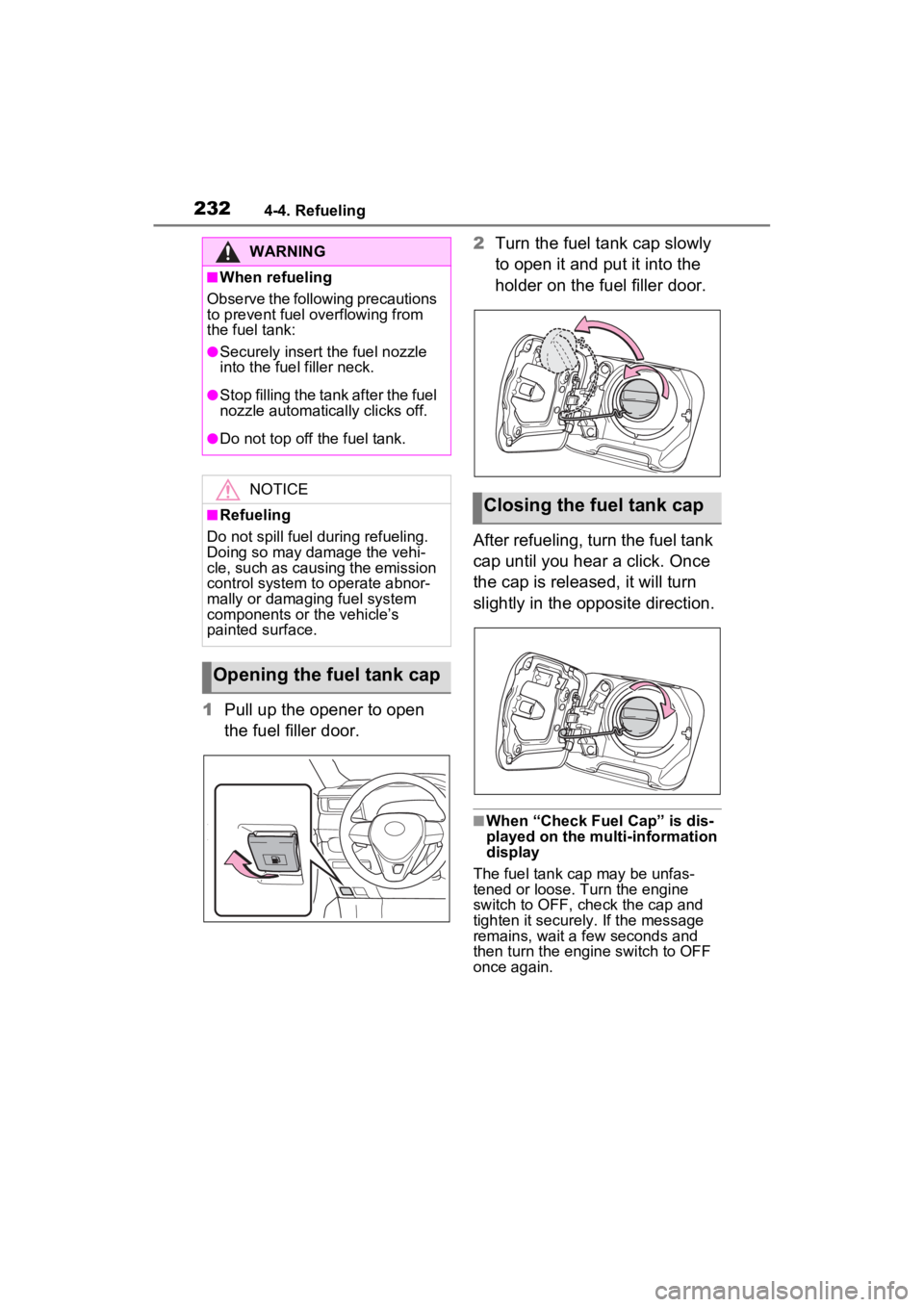
1Pull up the opener to open
the fuel filler door. 2
Turn the fuel tank cap slowly
to open it and put it into the
holder on the fuel filler door.
After refueling, turn the fuel tank
cap until you hear a click. Once
the cap is released, it will turn
slightly in the opposite direction.
■When “Check Fuel Cap” is dis-
played on the multi-information
display
The fuel tank cap may be unfas-
tened or loose. Turn the engine
switch to OFF, check the cap and
tighten it securely. If the message
remains, wait a few seconds and
then turn the engine switch to OFF
once again.
WARNING
■When refueling
Observe the following precautions
to prevent fuel overflowing from
the fuel tank:
●Securely insert the fuel nozzle
into the fuel filler neck.
●Stop filling the tank after the fuel
nozzle automatically clicks off.
●Do not top off the fuel tank.
NOTICE
■Refueling
Do not spill fuel during refueling.
Doing so may damage the vehi-
cle, such as causing the emission
control system to operate abnor-
mally or damaging fuel system
components or the vehicle’s
painted surface.
Opening the fuel tank cap
Closing the fuel tank cap
Page 236 of 574
2364-5. Using the driving support systems
WARNING
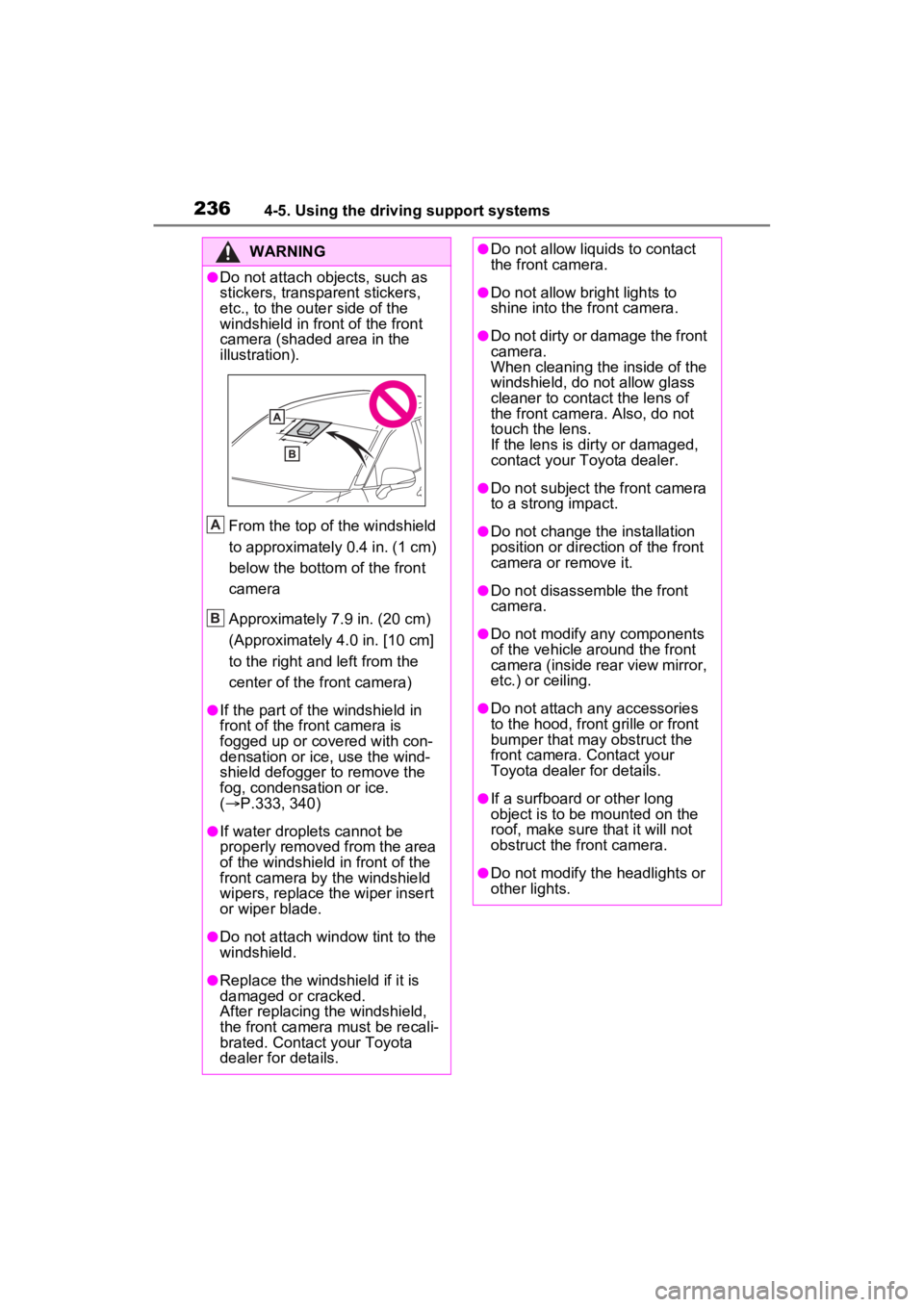
●Do not attach objects, such as
stickers, transparent stickers,
etc., to the outer side of the
windshield in fr ont of the front
camera (shaded area in the
illustration).
From the top of the windshield
to approximately 0.4 in. (1 cm)
below the bottom of the front
camera
Approximately 7.9 in. (20 cm)
(Approximately 4.0 in. [10 cm]
to the right and left from the
center of the front camera)
●If the part of the windshield in
front of the front camera is
fogged up or covered with con-
densation or ice, use the wind-
shield defogger to remove the
fog, condensation or ice.
( P.333, 340)
●If water droplets cannot be
properly removed from the area
of the windshield in front of the
front camera by the windshield
wipers, replace the wiper insert
or wiper blade.
●Do not attach win dow tint to the
windshield.
●Replace the windshield if it is
damaged or cracked.
After replacing the windshield,
the front camera must be recali-
brated. Contact your Toyota
dealer for details.
A
B
●Do not allow liquids to contact
the front camera.
●Do not allow bright lights to
shine into the front camera.
●Do not dirty or damage the front
camera.
When cleaning the inside of the
windshield, do not allow glass
cleaner to contact the lens of
the front camera . Also, do not
touch the lens.
If the lens is dirty or damaged,
contact your Toyota dealer.
●Do not subject the front camera
to a strong impact.
●Do not change the installation
position or direction of the front
camera or remove it.
●Do not disassemble the front
camera.
●Do not modify any components
of the vehicle around the front
camera (inside rear view mirror,
etc.) or ceiling.
●Do not attach any accessories
to the hood, front grille or front
bumper that may obstruct the
front camera. Contact your
Toyota dealer for details.
●If a surfboard or other long
object is to be mounted on the
roof, make sure that it will not
obstruct the front camera.
●Do not modify the headlights or
other lights.
Page 237 of 574
2374-5. Using the driving support systems
4
Driving
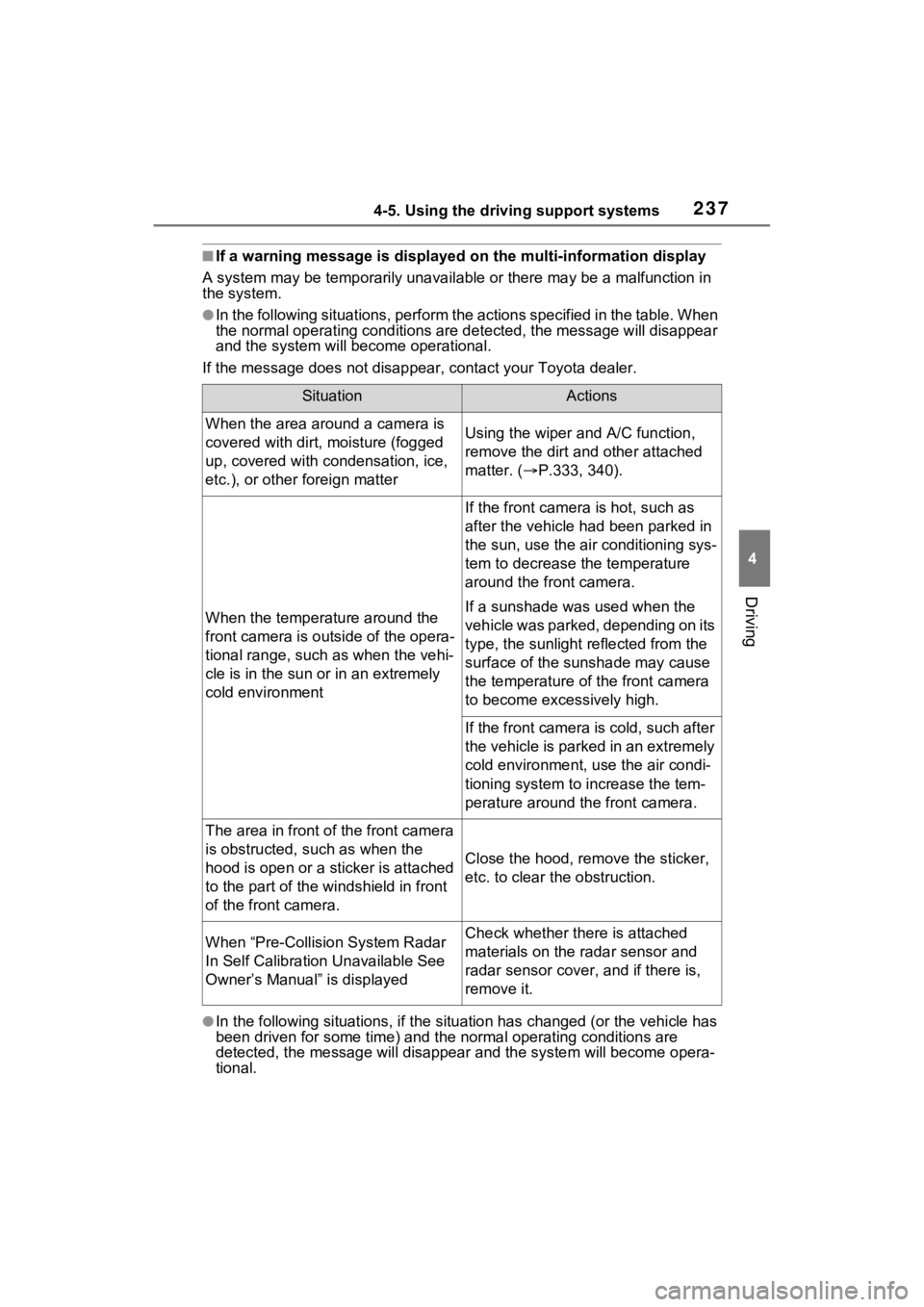
■If a warning message is displayed on the multi-information display
A system may be temporarily unava ilable or there may be a malfunction in
the system.
●In the following situations, perform the actions specified in t he table. When
the normal operating conditions are detected, the message will disappear
and the system will be come operational.
If the message does not disapp ear, contact your Toyota dealer.
●In the following situations, if the situation has changed (or the vehicle has
been driven for some time) and the normal operating conditions are
detected, the message will disappear and the system will become opera-
tional.
SituationActions
When the area around a camera is
covered with dirt, moisture (fogged
up, covered with condensation, ice,
etc.), or other foreign matterUsing the wiper and A/C function,
remove the dirt and other attached
matter. ( P.333, 340).
When the temperature around the
front camera is outside of the opera-
tional range, such as when the vehi-
cle is in the sun or in an extremely
cold environment
If the front camera is hot, such as
after the vehicle had been parked in
the sun, use the air conditioning sys-
tem to decrease the temperature
around the front camera.
If a sunshade was used when the
vehicle was parked, depending on its
type, the sunlight reflected from the
surface of the sunshade may cause
the temperature of the front camera
to become excessively high.
If the front camera is cold, such after
the vehicle is parked in an extremely
cold environment, use the air condi-
tioning system to increase the tem-
perature around the front camera.
The area in front o f the front camera
is obstructed, such as when the
hood is open or a sticker is attached
to the part of the win dshield in front
of the front camera.
Close the hood, rem ove the sticker,
etc. to clear the obstruction.
When “Pre-Collisio n System Radar
In Self Calibration Unavailable See
Owner’s Manual” is displayedCheck whether there is attached
materials on the radar sensor and
radar sensor cover , and if there is,
remove it.
Page 242 of 574
2424-5. Using the driving support systems
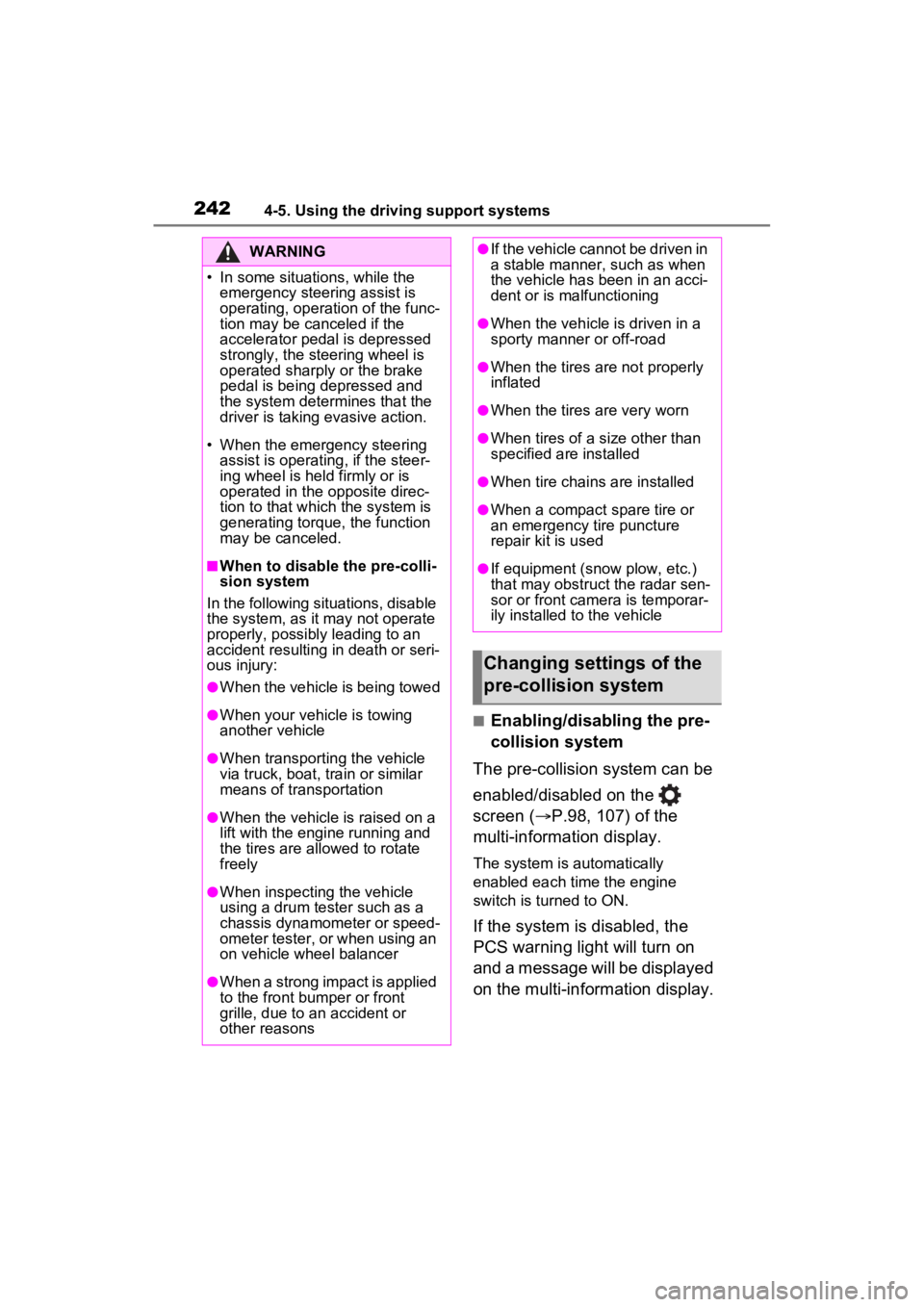
■Enabling/disabling the pre-
collision system
The pre-collision system can be
enabled/disabled on the
screen ( P.98, 107) of the
multi-information display.
The system is automatically
enabled each time the engine
switch is turned to ON.
If the system is disabled, the
PCS warning light will turn on
and a message will be displayed
on the multi-information display.
WARNING
Page 244 of 574
2444-5. Using the driving support systems
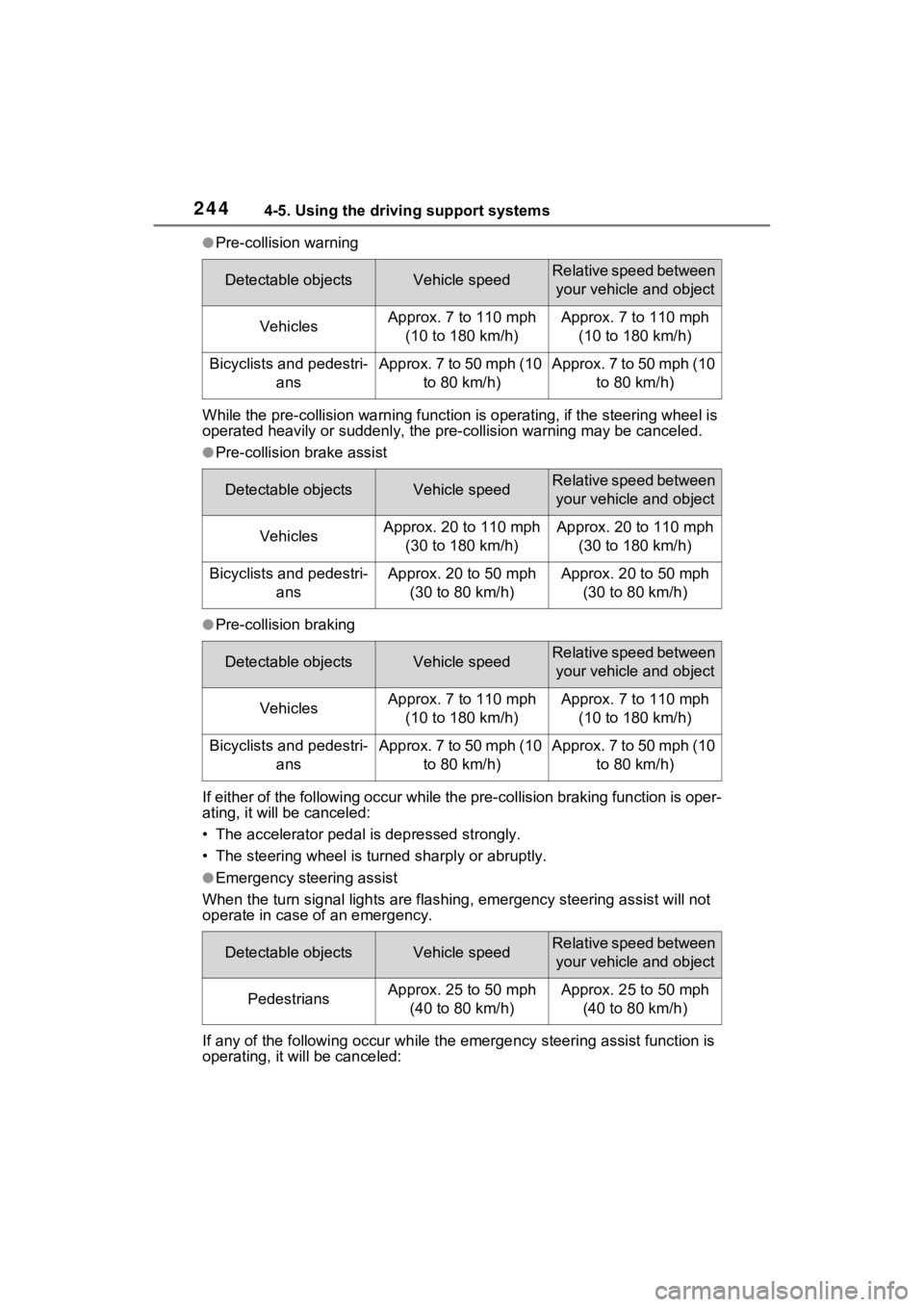
●Pre-collision warning
While the pre-collision warning function is operating, if the steering wheel is
operated heavily or suddenly, the pre -collision warning may be canceled.
●Pre-collision brake assist
●Pre-collision braking
If either of the following occur while the pre-collision braking function is oper-
ating, it will be canceled:
• The accelerator pedal is depressed strongly.
• The steering wheel is turned sharply or abruptly.
●Emergency steering assist
When the turn signal lights are flashing, emergency steering as sist will not
operate in case of an emergency.
If any of the following occur wh ile the emergency steering assi st function is
operating, it will be canceled:
Detectable objectsVehicle speedRelative speed between
your vehicle and object
VehiclesApprox. 7 to 110 mph (10 to 180 km/h)Approx. 7 to 110 mph (10 to 180 km/h)
Bicyclists and pedestri- ansApprox. 7 to 50 mph (10 to 80 km/h)Approx. 7 to 50 mph (10 to 80 km/h)
Detectable objectsVehicle speedRelative speed between your vehicle and object
VehiclesApprox. 20 to 110 mph (30 to 180 km/h)Approx. 20 to 110 mph (30 to 180 km/h)
Bicyclists and pedestri- ansApprox. 20 to 50 mph (30 to 80 km/h)Approx. 20 to 50 mph (30 to 80 km/h)
Detectable objectsVehicle speedRelative speed between your vehicle and object
VehiclesApprox. 7 to 110 mph (10 to 180 km/h)Approx. 7 to 110 mph (10 to 180 km/h)
Bicyclists and pedestri- ansApprox. 7 to 50 mph (10 to 80 km/h)Approx. 7 to 50 mph (10 to 80 km/h)
Detectable objectsVehicle speedRelative speed between your vehicle and object
PedestriansApprox. 25 to 50 mph (40 to 80 km/h)Approx. 25 to 50 mph (40 to 80 km/h)
Page 245 of 574
2454-5. Using the driving support systems
4
Driving
• The accelerator pedal is depressed strongly.
• The steering wheel is turned sharply or abruptly.
• The brake pedal is depressed.
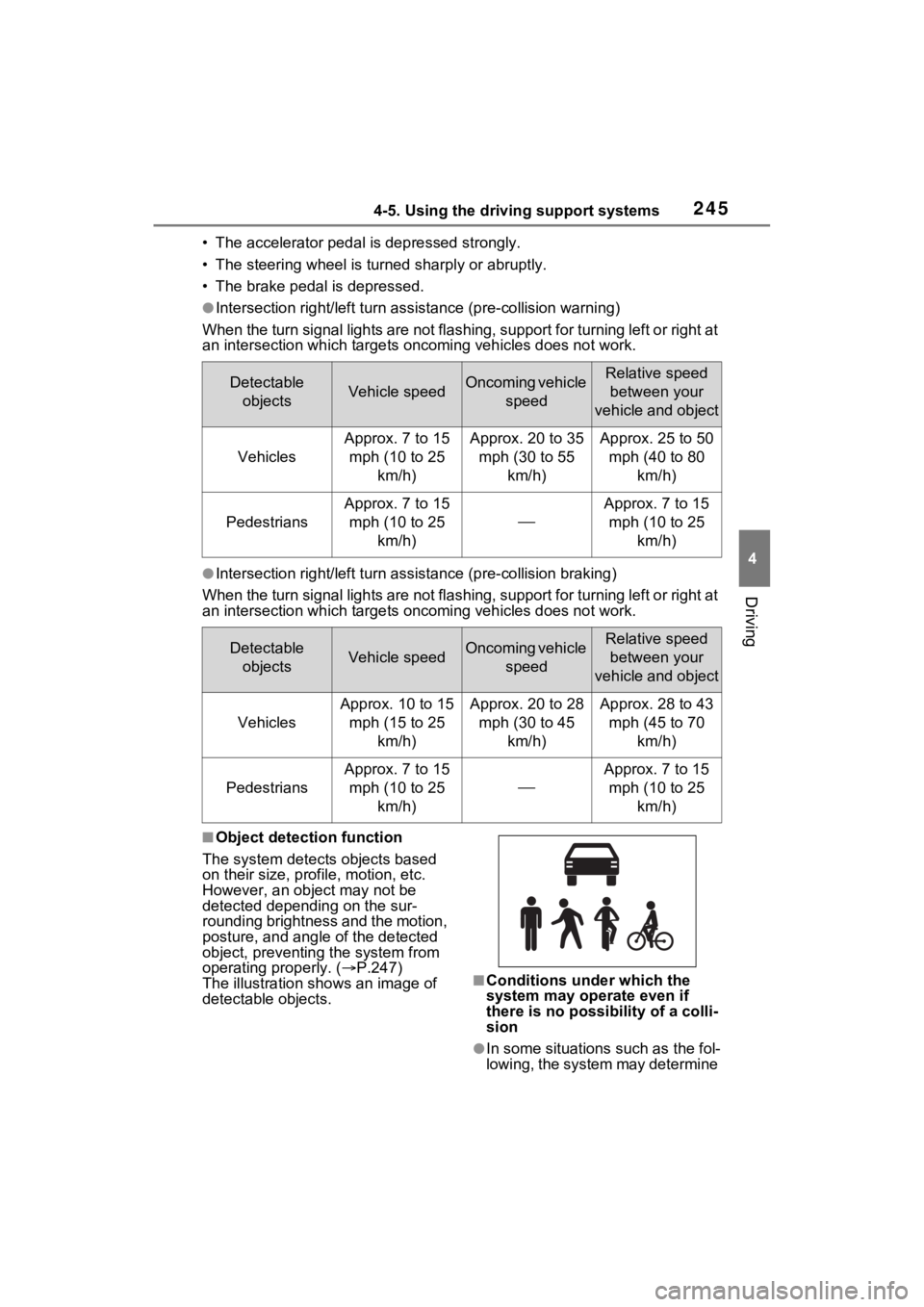
●Intersection right/left turn assistance (pre-collision warning)
When the turn signal lights are not flashing, support for turning left or right at
an intersection which targets on coming vehicles does not work.
●Intersection right/left turn assistance (pre-collision braking)
When the turn signal lights are not flashing, support for turning left or right at
an intersection which targets on coming vehicles does not work.
■Object detection function
The system detects objects based
on their size, profile, motion, etc.
However, an object may not be
detected depending on the sur-
rounding brightness and the motion,
posture, and angle of the detected
object, preventing the system from
operating properly. ( P.247)
The illustration sh ows an image of
detectable objects.
■Conditions under which the
system may operate even if
there is no possibility of a colli-
sion
●In some situations such as the fol-
lowing, the system may determine
Detectable
objectsVehicle speedOncoming vehicle speedRelative speed between your
vehicle and object
Vehicles
Approx. 7 to 15 mph (10 to 25 km/h)Approx. 20 to 35 mph (30 to 55 km/h)Approx. 25 to 50 mph (40 to 80 km/h)
Pedestrians
Approx. 7 to 15 mph (10 to 25 km/h)
Approx. 7 to 15 mph (10 to 25 km/h)
Detectable objectsVehicle speedOncoming vehicle speedRelative speed between your
vehicle and object
Vehicles
Approx. 10 to 15 mph (15 to 25 km/h)Approx. 20 to 28 mph (30 to 45 km/h)Approx. 28 to 43 mph (45 to 70 km/h)
Pedestrians
Approx. 7 to 15 mph (10 to 25 km/h)
Approx. 7 to 15 mph (10 to 25 km/h)
Page 249 of 574
2494-5. Using the driving support systems
4
Driving
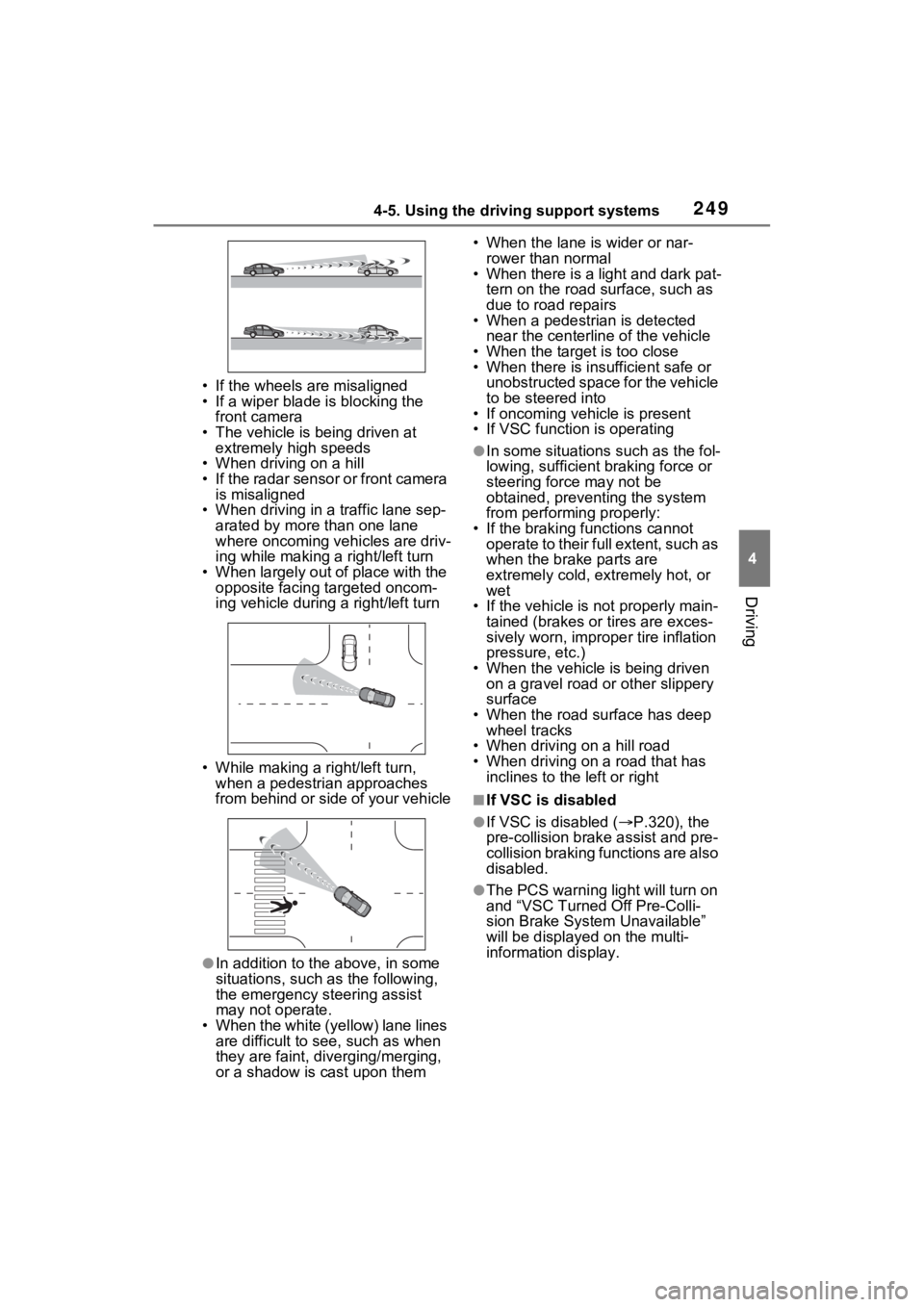
• If the wheels are misaligned
• If a wiper blade is blocking the front camera
• The vehicle is being driven at extremely high speeds
• When driving on a hill
• If the radar sensor or front camera
is misaligned
• When driving in a traffic lane sep-
arated by more t han one lane
where oncoming vehicles are driv-
ing while making a right/left turn
• When largely out of place with the opposite facing targeted oncom-
ing vehicle during a right/left turn
• While making a right/left turn, when a pedestrian approaches
from behind or side of your vehicle
●In addition to the above, in some
situations, such as the following,
the emergency steering assist
may not operate.
• When the white (yellow) lane lines are difficult to see, such as when
they are faint, di verging/merging,
or a shadow is cast upon them • When the lane is wider or nar-
rower than normal
• When there is a light and dark pat-
tern on the road surface, such as
due to road repairs
• When a pedestrian is detected
near the centerline of the vehicle
• When the target is too close
• When there is insufficient safe or unobstructed space for the vehicle
to be steered into
• If oncoming vehicle is present
• If VSC function is operating
●In some situations such as the fol-
lowing, sufficient braking force or
steering force may not be
obtained, preventing the system
from performing properly:
• If the braking functions cannot operate to their full extent, such as
when the brake parts are
extremely cold, ext remely hot, or
wet
• If the vehicle is not properly main- tained (brakes or tires are exces-
sively worn, imprope r tire inflation
pressure, etc.)
• When the vehicle is being driven on a gravel road or other slippery
surface
• When the road surface has deep wheel tracks
• When driving on a hill road
• When driving on a road that has inclines to the left or right
■If VSC is disabled
●If VSC is disabled ( P.320), the
pre-collision brak e assist and pre-
collision braking functions are also
disabled.
●The PCS warning light will turn on
and “VSC Turned Off Pre-Colli-
sion Brake System Unavailable”
will be displayed on the multi-
information display.
Page 250 of 574
2504-5. Using the driving support systems
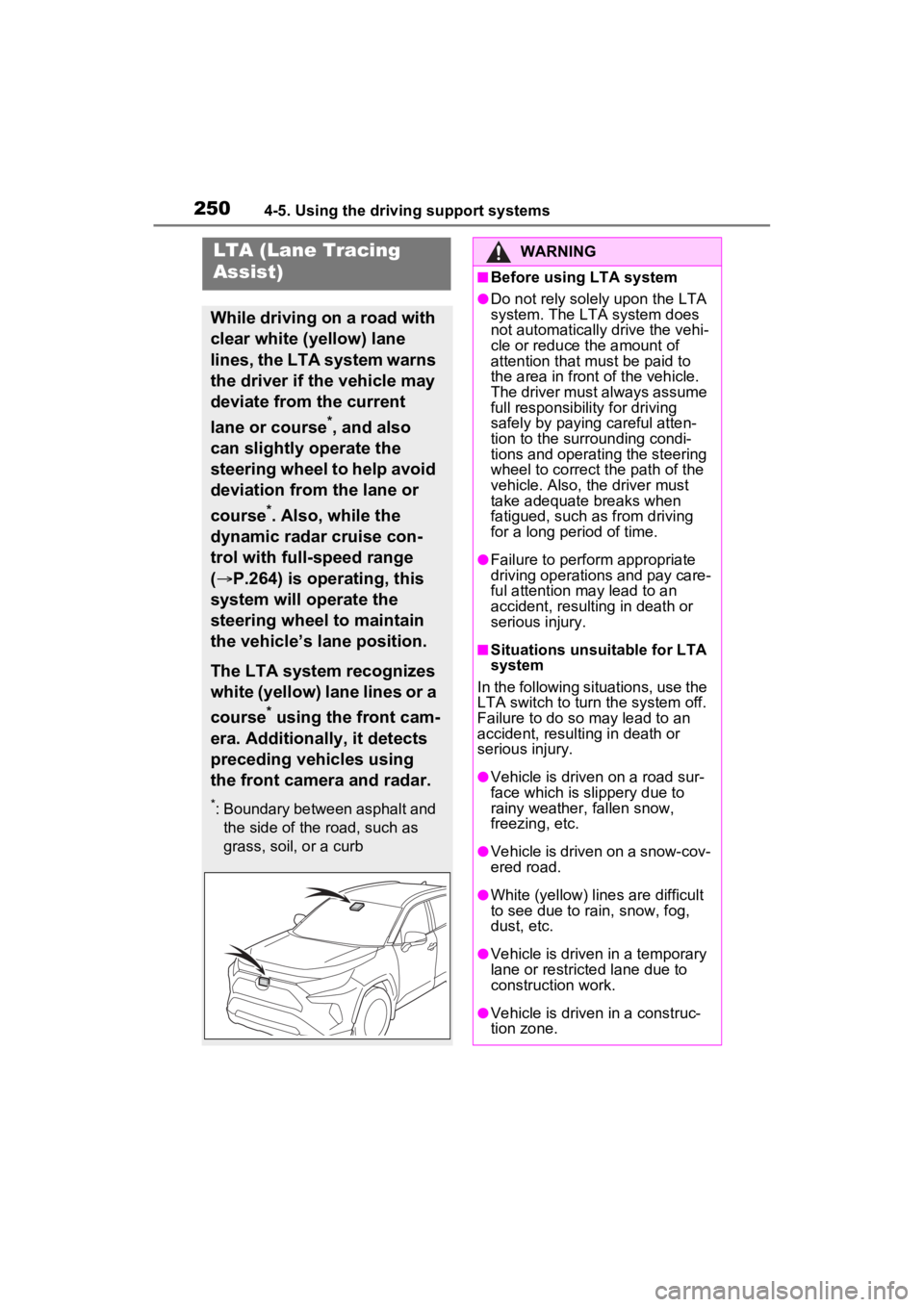
LTA (Lane Tracing
Assist)
While driving on a road with
clear white (yellow) lane
lines, the LTA system warns
the driver if the vehicle may
deviate from the current
lane or course
*, and also
can slightly operate the
steering wheel to help avoid
deviation from the lane or
course
*. Also, while the
dynamic radar cruise con-
trol with full-speed range
( P.264) is operating, this
system will operate the
steering wheel to maintain
the vehicle’s lane position.
The LTA system recognizes
white (yellow) lane lines or a
course
* using the front cam-
era. Additionally, it detects
preceding vehicles using
the front camera and radar.
*: Boundary between asphalt and the side of the road, such as
grass, soil, or a curb
WARNING
■Before using LTA system
●Do not rely solely upon the LTA
system. The LTA system does
not automatically drive the vehi-
cle or reduce the amount of
attention that m ust be paid to
the area in front of the vehicle.
The driver must always assume
full responsibilit y for driving
safely by paying careful atten-
tion to the surrounding condi-
tions and operating the steering
wheel to correct the path of the
vehicle. Also, the driver must
take adequate breaks when
fatigued, such as from driving
for a long period of time.
●Failure to perform appropriate
driving operations and pay care-
ful attention may lead to an
accident, resulting in death or
serious injury.
■Situations unsuitable for LTA
system
In the following situations, use the
LTA switch to turn the system off.
Failure to do so may lead to an
accident, resulting in death or
serious injury.
●Vehicle is driven on a road sur-
face which is slippery due to
rainy weather, fallen snow,
freezing, etc.
●Vehicle is driven on a snow-cov-
ered road.
●White (yellow) lin es are difficult
to see due to rain, snow, fog,
dust, etc.
●Vehicle is driven in a temporary
lane or restricted lane due to
construction work.
●Vehicle is driven in a construc-
tion zone.
Page 251 of 574
2514-5. Using the driving support systems
4
Driving
WARNING
●A spare tire, tire chains, etc. are
equipped.
●When the tires have been
excessively worn, or when the
tire inflation pressure is low.
●When your vehicle is towing a
trailer or during emergency tow-
ing
■Preventing LTA system mal-
functions and operations per-
formed by mistake
●Do not modify the headlights or
place stickers, etc. on the sur-
face of the lights.
●Do not modify the suspension
etc. If the suspension etc. needs
to be replaced, contact your
Toyota dealer.
●Do not install or place anything
on the hood or grille. Also, do
not install a grille guard (bull
bars, kangaroo bar, etc.).
●If your windshield needs
repairs, contact your Toyota
dealer.
■Conditions in which functions
may not operate properly
In the following situations, the
functions may not operate prop-
erly and the vehicle may depart
from its lane. Drive safely by
always paying careful attention to
your surroundings and operate
the steering wheel to correct the
path of the vehicle without relying
solely on the functions.
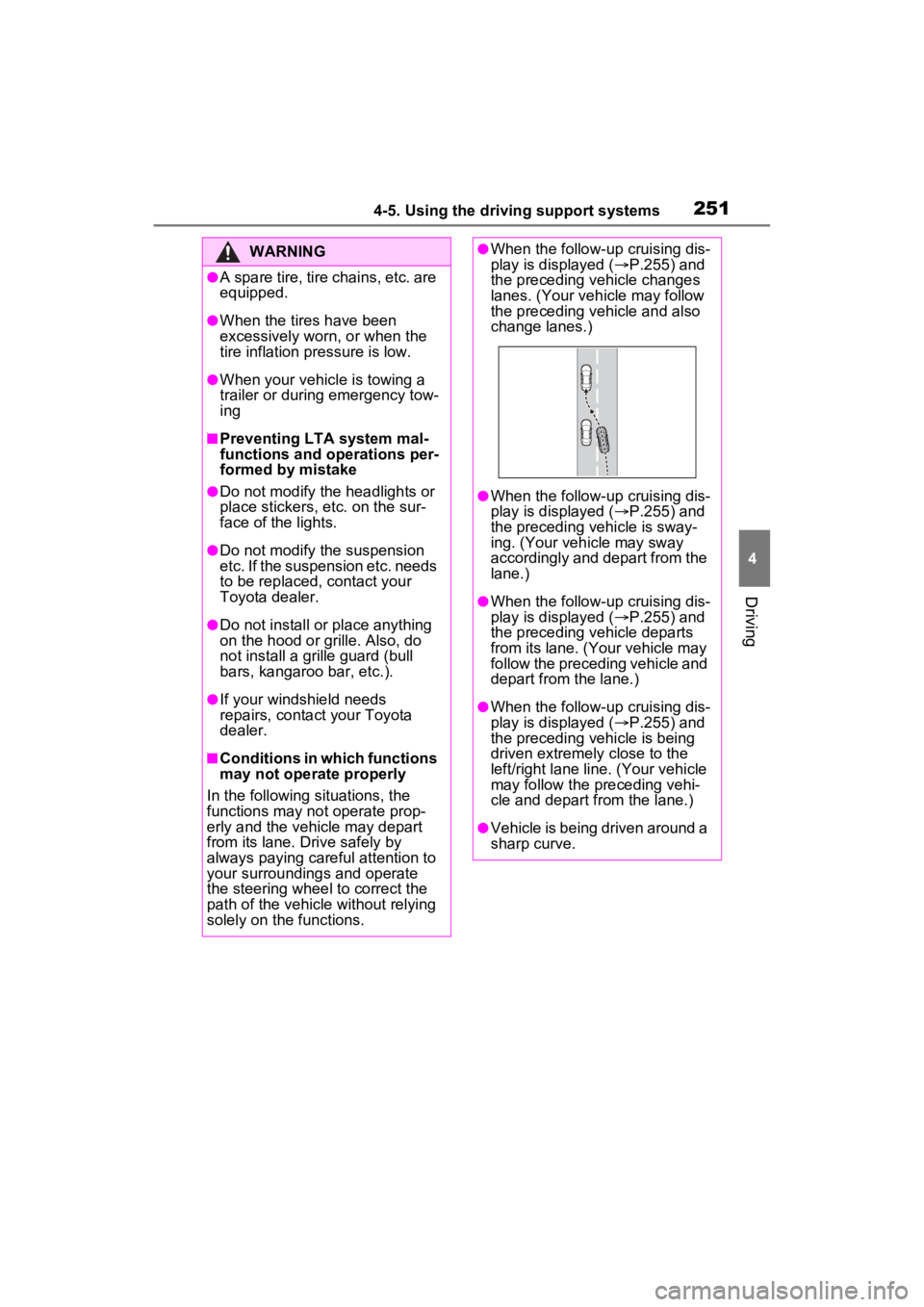
●When the follow-up cruising dis-
play is displayed ( P.255) and
the preceding vehicle changes
lanes. (Your veh icle may follow
the preceding vehicle and also
change lanes.)
●When the follow-up cruising dis-
play is displayed ( P.255) and
the preceding vehicle is sway-
ing. (Your vehicle may sway
accordingly and depart from the
lane.)
●When the follow-up cruising dis-
play is displayed ( P.255) and
the preceding vehicle departs
from its lane. (Your vehicle may
follow the preceding vehicle and
depart from the lane.)
●When the follow-up cruising dis-
play is displayed ( P.255) and
the preceding vehicle is being
driven extremely close to the
left/right lane line. (Your vehicle
may follow the preceding vehi-
cle and depart from the lane.)
●Vehicle is being driven around a
sharp curve.
Page 252 of 574
2524-5. Using the driving support systems
WARNING
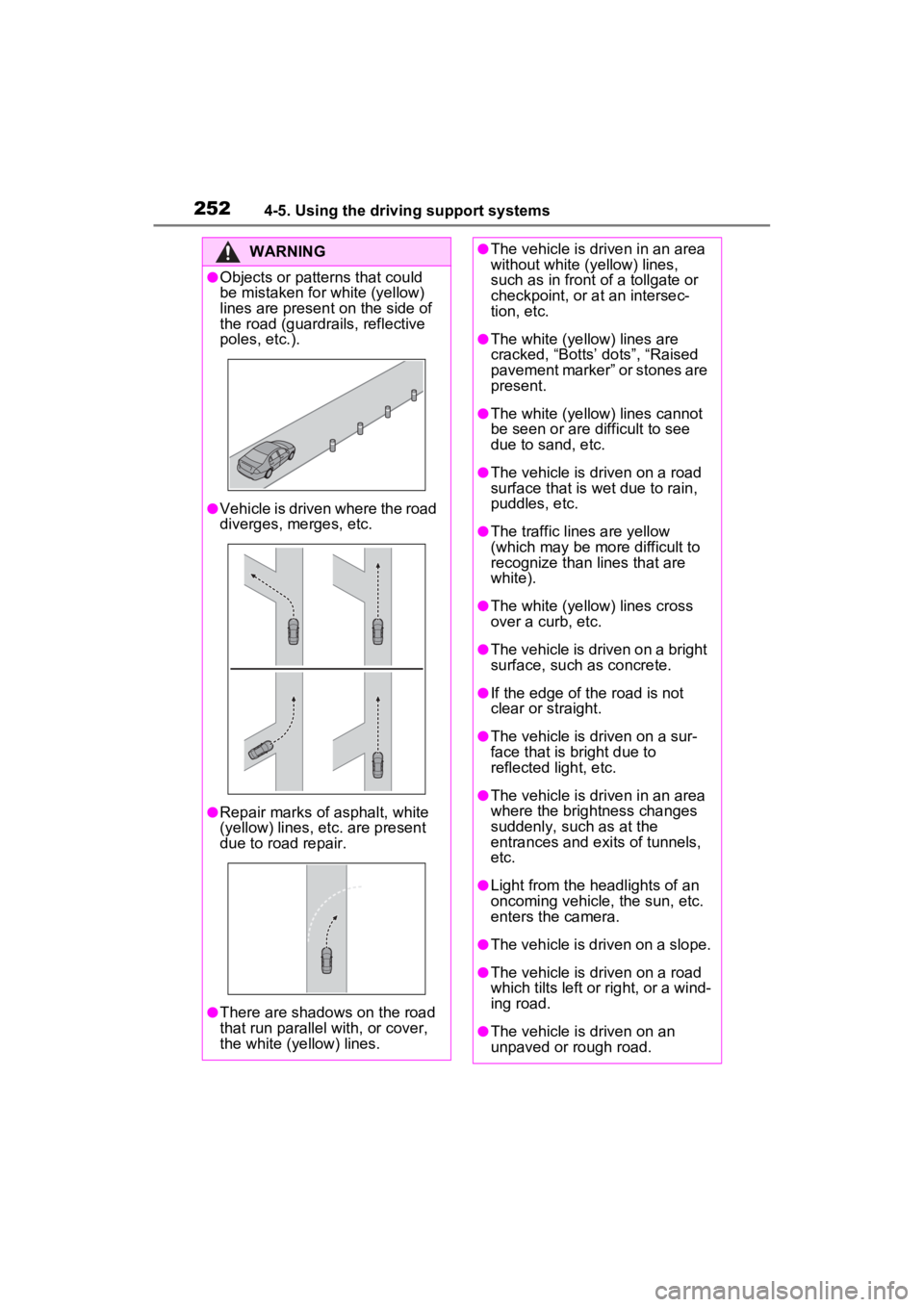
●Objects or patterns that could
be mistaken for white (yellow)
lines are present on the side of
the road (guardrails, reflective
poles, etc.).
●Vehicle is driven where the road
diverges, merges, etc.
●Repair marks of asphalt, white
(yellow) lines, etc. are present
due to road repair.
●There are shadows on the road
that run parallel with, or cover,
the white (ye llow) lines.
●The vehicle is driven in an area
without white (yellow) lines,
such as in front of a tollgate or
checkpoint, or at an intersec-
tion, etc.
●The white (yellow) lines are
cracked, “Botts’ dots”, “Raised
pavement marker” or stones are
present.
●The white (yellow) lines cannot
be seen or are difficult to see
due to sand, etc.
●The vehicle is driven on a road
surface that is wet due to rain,
puddles, etc.
●The traffic lines are yellow
(which may be more difficult to
recognize than lines that are
white).
●The white (yellow) lines cross
over a curb, etc.
●The vehicle is driven on a bright
surface, such as concrete.
●If the edge of the road is not
clear or straight.
●The vehicle is driven on a sur-
face that is bright due to
reflected light, etc.
●The vehicle is driven in an area
where the brightness changes
suddenly, such as at the
entrances and ex its of tunnels,
etc.
●Light from the headlights of an
oncoming vehicle, the sun, etc.
enters the camera.
●The vehicle is driven on a slope.
●The vehicle is driven on a road
which tilts left or right, or a wind-
ing road.
●The vehicle is driven on an
unpaved or rough road.