light TOYOTA RAV4 EV 2012 1.G User Guide
[x] Cancel search | Manufacturer: TOYOTA, Model Year: 2012, Model line: RAV4 EV, Model: TOYOTA RAV4 EV 2012 1.GPages: 520, PDF Size: 8.29 MB
Page 34 of 520

34 1-1. EV system
■If a warning light comes on, a warn ing message is displayed, or the 12-
volt battery has been disconnected
The EV system may not start. In that case, try to start the system again. If
the “READY” indicator does not come on, contact your Toyota dealer.
■ Electromagnetic waves
●High voltage parts and cables on electric vehicles incorporate electro-
magnetic shielding, and therefore emit approximately the same amount
of electromagnetic waves as conventional gasoline powered vehicles or
home electronic appliances.
● Your vehicle may cause sound interference in some third party-produced
radio parts.
■ Traction battery (Lithium-ion battery)
The traction battery has a limited service life.
The traction battery capacity (the ability to store energy) reduces with time
and use in the same way as other rechargeable batteries. The extent at
which capacity reduces changes drastically depending on the environment
(ambient temperature, etc.) and usage conditions, such as how the vehicle
is driven and how the traction battery is charged. This is a natural character-
istic of lithium-ion batteries, and is not a malfunction. In order to reduce the
possibility of the capacity decreasing, follow the directions listed on P. 80,
“Capacity reduction of the traction battery”.
Page 39 of 520
39
1-1. EV system
1
Before driving
■
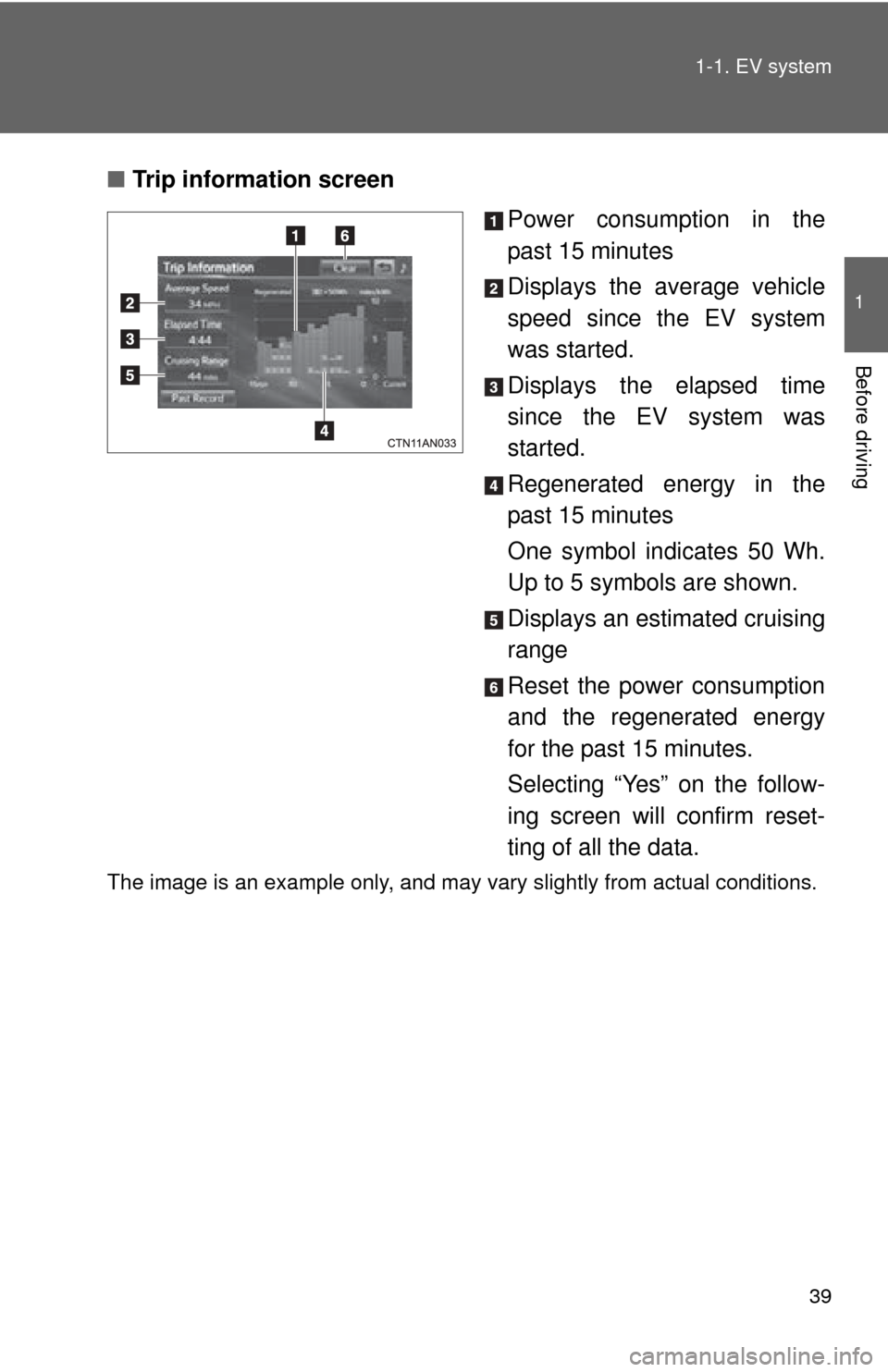
Trip information screen
Power consumption in the
past 15 minutes
Displays the average vehicle
speed since the EV system
was started.
Displays the elapsed time
since the EV system was
started.
Regenerated energy in the
past 15 minutes
One symbol indicates 50 Wh.
Up to 5 symbols are shown.
Displays an estimated cruising
range
Reset the power consumption
and the regenerated energy
for the past 15 minutes.
Selecting “Yes” on the follow-
ing screen will confirm reset-
ting of all the data.
The image is an example only, and may vary slightly from actual conditions.
Page 40 of 520
40 1-1. EV system
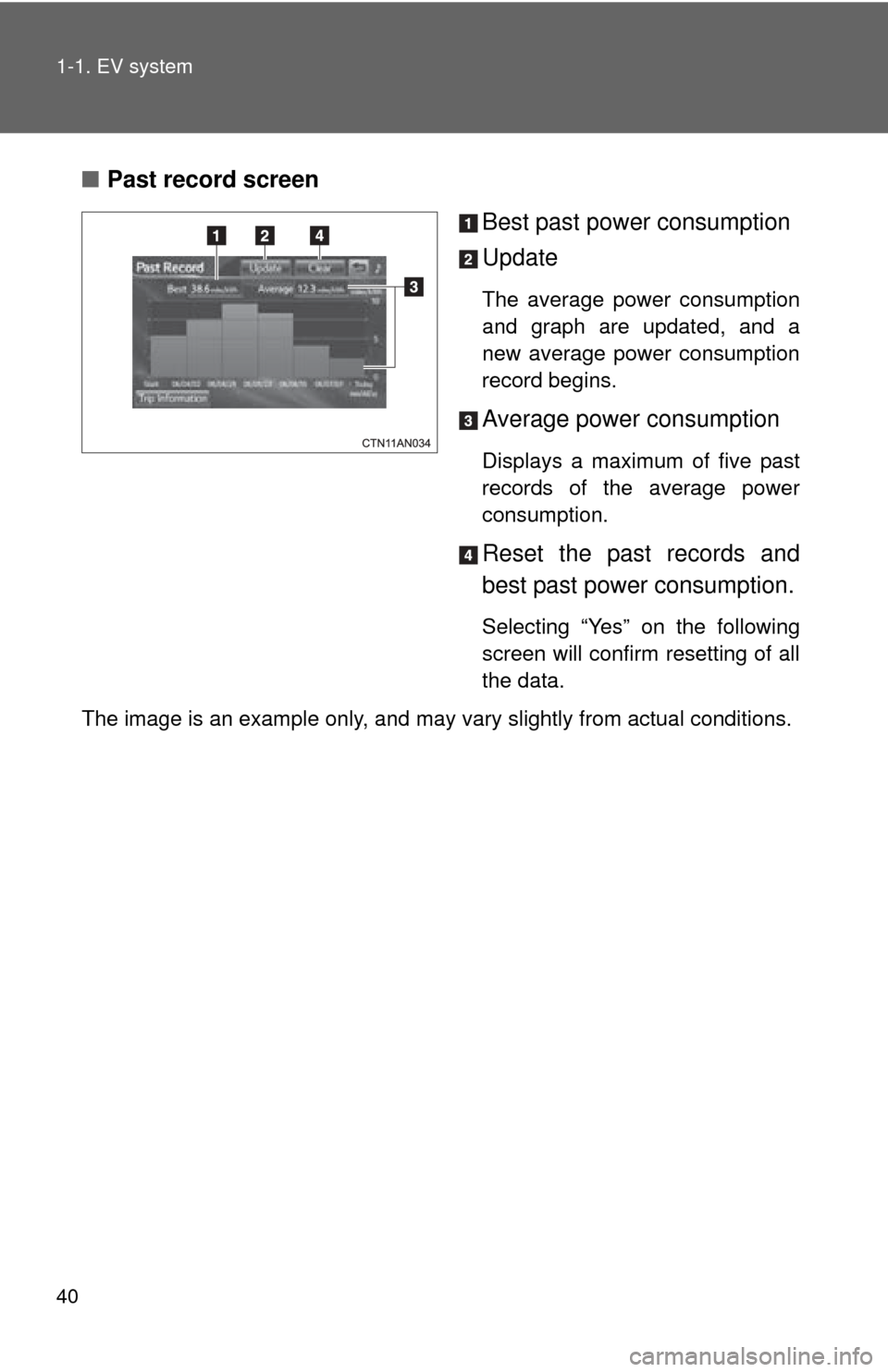
■Past record screen
Best past power consumption
Update
The average power consumption
and graph are updated, and a
new average power consumption
record begins.
Average power consumption
Displays a maximum of five past
records of the average power
consumption.
Reset the past records and
best past power consumption.
Selecting “Yes” on the following
screen will confirm resetting of all
the data.
The image is an example only, and may vary slightly from actual conditions.
Page 41 of 520
41
1
1-1. EV system
Before driving
EV (Electric Vehicle) driving tips
Observe the following to reduce traction battery consumption and
increase driving range.
■ Driving in normal mode:
Normal mode (when compared with sport mode) allows the most effi-
cient driving. ( P. 208)
■Route selection
In addition to a driving style of repeated acceleration and deceleration,
driving on routes that have steep inclines and long waits at traffic lights
will lead to poor power consumption. Check traffic reports before leav-
ing, avoid delays and drive on flat roads as much as possible. When
encountering a delay, gently release the brake pedal to allow the vehi-
cle to move forward slightly while avoiding overuse of the accelerator
pedal. Doing so can help control excessive energy consumption.
■Use of EV System Indicator
Keeping the EV System Indicator needle within ECO area can help
improve Eco-friendly driving. ( P. 221)
■When braking the vehicle
Make sure to operate the brakes gently and in good time. A greater
amount of electrical energy can be retained when slowing down.
■Highway driving
Control your speed, keep at a constant speed and obey speed limits.
Also, before stopping at a toll booth or similar, allow plenty of time to
release the accelerator and slowly stop the vehicle using regenerative
braking and the brake pedal. A greater amount of electrical energy can
be retained while slowing down.
Page 54 of 520
54 1-3. Charging
*: By using a smart phone, pre-climate operations and so forth can
be performed from a distant location. ( P. 58)
■ Important things to check be fore charging and pre-climate
operations (Remote Climate Control)
Before charging and pre-climate operations, always check that:
● The parking brake is securely set ( P. 216)
● The shift position is in P ( P. 206)
● All windows and doors are closed
● The motor compartment hood is securely closed
If the hood is open the electric cooling fans will not operate, raising
the temperature of the charger and traction battery. This may
increase charging time or cause charging to be aborted.
●All lights are turned off (For example, the headlights, emer-
gency flashers, interior lights, etc.)
If any lights are turned on, then these features will consume electric-
ity, and charging time will increase.
SystemDetails
Pre-climate
(Remote Climate
Control)*
The time when pre-climate operations are to be
completed by can be set for each day of the
week. Cabin temperature is adjusted before depar-
ture by performing climate control operations,
thereby reducing traction battery consumption
after departure. If these operations are per-
formed while the vehicle is plugged in, the
traction battery's power consumption is
reduced, increasing driving range. ( P. 66)
If the amount of charge remaining in the trac-
tion battery is 50% or less at the time pre-cli-
mate operations begin, pre-climate operations
will not be performed in order to preserve driv-
ing range.
Page 55 of 520
55
1-3. Charging
1
Before driving
■
Items to be regularly inspected
P. 9 2
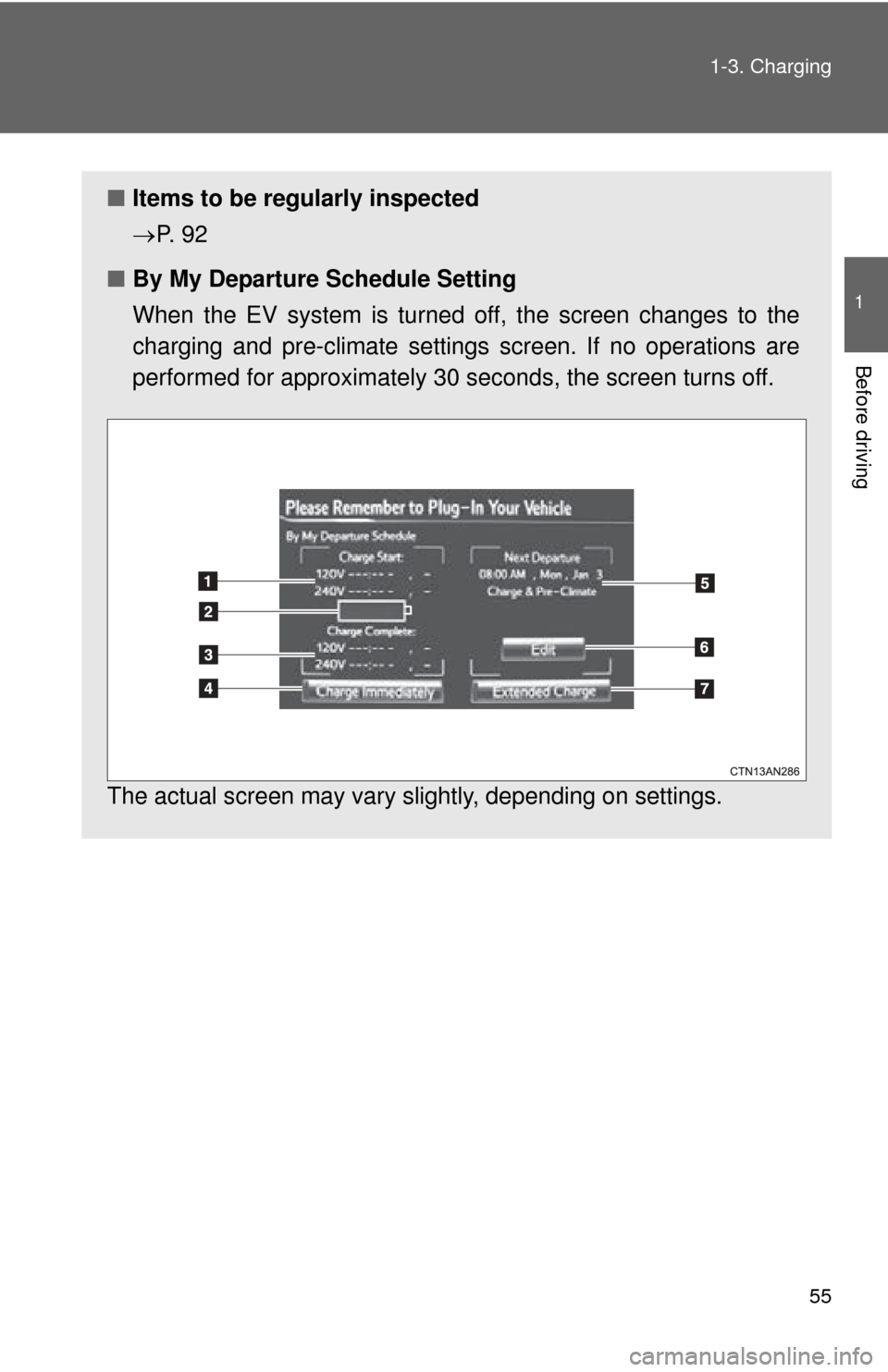
■ By My Departure Schedule Setting
When the EV system is turned off, the screen changes to the
charging and pre-climate settings screen. If no operations are
performed for approximately 30 seconds, the screen turns off.
The actual screen may vary slightly, depending on settings.
Page 57 of 520
57
1-3. Charging
1
Before driving
■
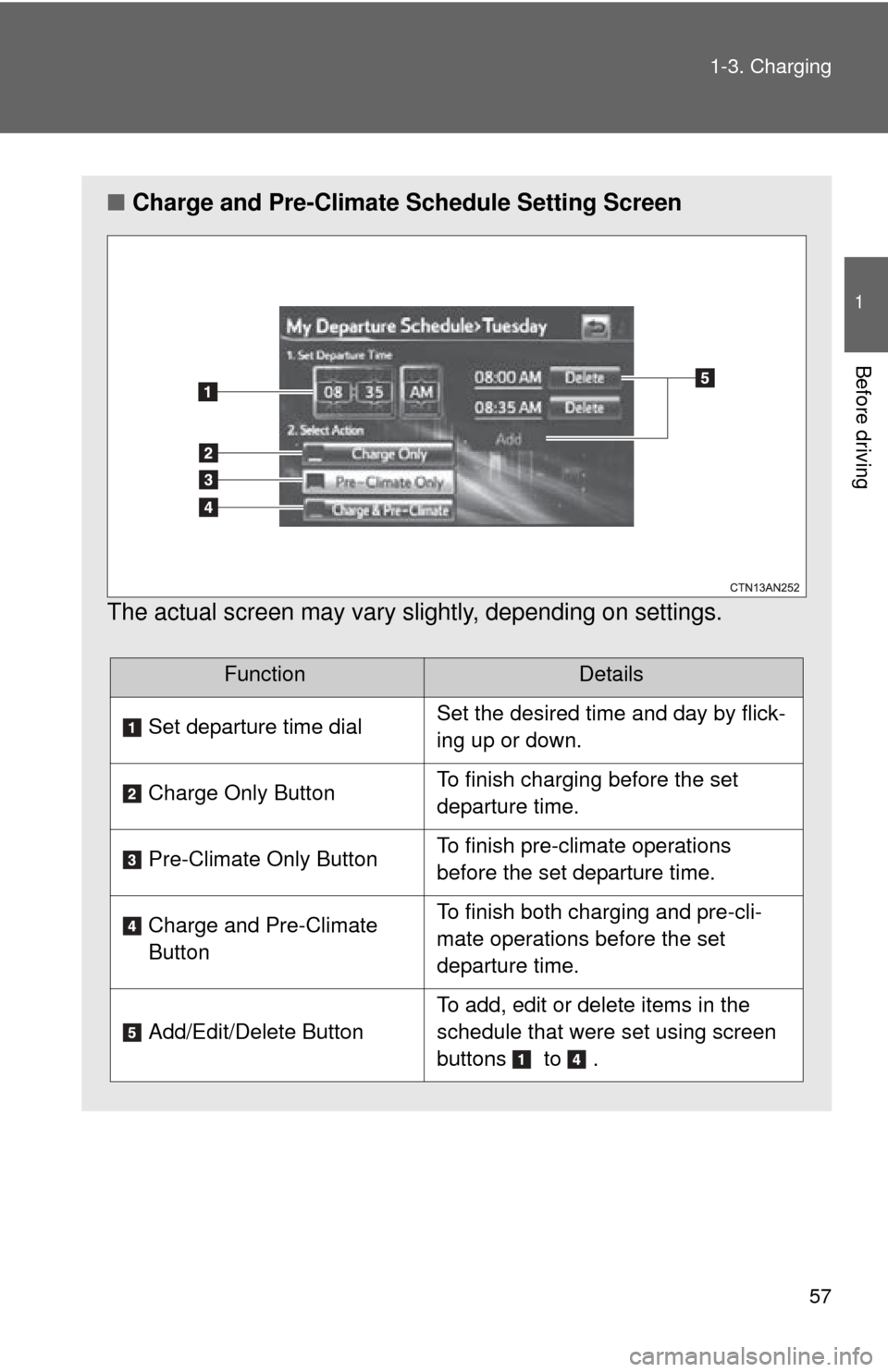
Charge and Pre-Climate Schedule Setting Screen
The actual screen may vary slightly, depending on settings.
FunctionDetails
Set departure time dial Set the desired time and day by flick-
ing up or down.
Charge Only Button To finish charging before the set
departure time.
Pre-Climate Only Button To finish pre-climate operations
before the set departure time.
Charge and Pre-Climate
Button To finish both charging and pre-cli-
mate operations before the set
departure time.
Add/Edit/Delete Button
To add, edit or delete items in the
schedule that were set using screen
buttons to .
Page 63 of 520
63
1-3. Charging
1
Before driving
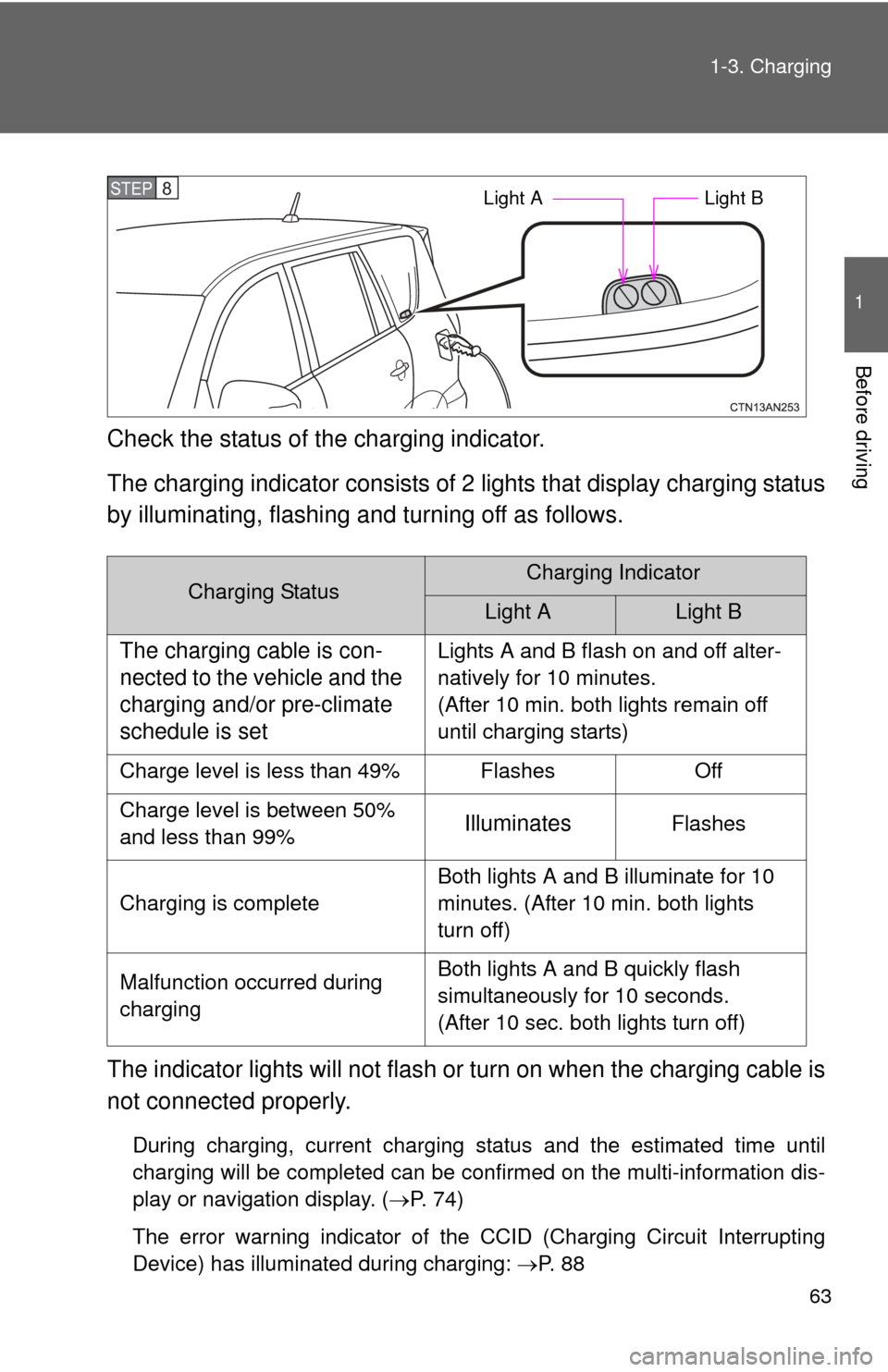
Check the status of the charging indicator.
The charging indicator consists of
2 lights that display charging status
by illuminating, flashing a nd turning off as follows.
The indicator lights will not flash or turn on when the charging cable is
not connected properly.
During charging, current charging status and the estimated time until
charging will be completed can be confirmed on the multi-information dis-
play or navigation display. ( P. 74)
The error warning indicator of the CCID (Charging Circuit Interrupting
Device) has illuminated during charging: P. 8 8
Charging StatusCharging Indicator
Light ALight B
The charging cable is con-
nected to the vehicle and the
charging and/or pre-climate
schedule is setLights A and B flash on and off alter-
natively for 10 minutes.
(After 10 min. both lights remain off
until charging starts)
Charge level is less than 49% Flashes Off
Charge level is between 50%
and less than 99%
IlluminatesFlashes
Charging is complete Both lights A and B illuminate for 10
minutes. (After 10 min. both lights
turn off)
Malfunction occurred during
charging Both lights A and B quickly flash
simultaneously for 10 seconds.
(After 10 sec. both lights turn off)
STEP 8 Light A
Light B
Page 79 of 520
79
1-3. Charging
1
Before driving
■
During charging
●The surface of the CCID (Charging Circuit Interrupting Device) may
become hot, but this does not indicate a malfunction.
● Depending on radio wave conditions, interference may be heard on the
radio.
■ If charging has been interrupted
If charging is interrupted before the traction battery is fully charged (before
both charging indicator lights illuminate), the EV system cannot be started
and the shift position cannot be shifted from P for approximately 6 seconds.
Start the EV system after 6 seconds have elapsed.
■ Charging time may increase
In the following situations, charging time may become longer than normal:
●In very hot or very cold temperatures.
● The vehicle is consuming a lot of electricity, for example, when pre-cli-
mate is used.
● There is a power outage during charging.
● There is an interruption in the electrical supply.
● There is a drop in the voltage of your panel’s AC supply.
● The charge in the 12-volt battery is low, for example due to the vehicle
being left unused for a long period of time.
Page 80 of 520

80 1-3. Charging
■Capacity reduction of the traction battery
The capacity of the traction battery will decline gradually with normal use
over the life of the vehicle. The rate at which it declines is dependant on a
number of factors, including environmental conditions and the way the vehi-
cle is used. By observing the following precautions, battery capacity decline
can be suppressed.
●Avoid parking the vehicle for prolonged periods in areas with a high tem-
perature under direct sunlight when the traction battery is fully charged.
When storing the vehicle for prolonged periods, it is recommended to
park the vehicle in a shaded area or a cool garage. This helps minimize
traction battery capacity decline.
● When not driving long distances, it is recommended to charge using nor-
mal charge mode to help minimize traction battery capacity decline.
( P. 58, 72)
● Regular use of the scheduled charging function helps mitigate battery
capacity decline by avoiding storage at high SOC.