light TOYOTA RAV4 EV 2012 1.G Owner's Manual
[x] Cancel search | Manufacturer: TOYOTA, Model Year: 2012, Model line: RAV4 EV, Model: TOYOTA RAV4 EV 2012 1.GPages: 520, PDF Size: 8.29 MB
Page 81 of 520

81
1-3. Charging
1
Before driving
■
When not using the vehicle for an extended period of time
In order to preserve the traction battery, Toyota recommends plugging in the
vehicle whenever it is not in use.
Pre-climate operations will occur while the amount of charge remaining in
the traction battery is more than 50% at the time pre-climate operations
begin. If the schedule is left set, pre-climate operations will continue to func-
tion up to the maximum of 15 minutes even if the vehicle is not used for
extended periods of time. Because this uses energy from the traction bat-
tery, temporarily suspend the pre-climate schedule (smart phone exclusive
setting P. 58) or delete the pre-climate schedule, if the vehicle is not being
regularly used.
When using navigation screen operations, only canceling the schedule is
available. Because the schedule will need to be set once again when it is
used next time, Toyota recommends using a smart phone and temporarily
suspending the schedule.
■ If the amount of charge remaining in the traction battery becomes low
while driving
The driving power restriction output control warning light illuminates and
driving range is extended by automatically restricting driving power and air
conditioning system operations. Using the navigation system, promptly
search for the closest charging station and charge the vehicle. If the traction
battery fully discharges, driving will not be possible.
For information on how to search for a charging station, refer to the “Naviga-
tion System Owner's Manual”.
■ Charging schedule confirmation disp lay after switching the EV system
off
The current charging schedule will be displayed for a while after the EV sys-
tem is turned off. To change the charging schedule, set the schedule using
the navigation system’s screen. ( P. 64, 70)
■ If the charging port door is frozen
P. 268
Page 82 of 520

82 1-3. Charging
■Pre-climate operations automatic shut-off
Pre-climate will automatically shut off under the following conditions:
●After about 15 minutes have passed since operations began
● If any one of the operating conditions are not met
● If there is only a slight difference between the air conditioning set temper-
ature and the inside temperature.
● When a door is opened.
■ While pre-climate is operating
●The effectiveness of the pre-climate operations may differ according to
outside temperature. Pre-climate operations may be unable to reach the
set temperature during very cold or very hot weather.
● Sometimes during normal operation of the pre-climate schedule, the
electric fan may spin and an operating noise may be heard. However,
this does not indicate a malfunction.
■ Safety functions
●For safety purposes, the EV system cannot be started while the charging
cable is connected to the vehicle, even if the “POWER” switch is oper-
ated. ( P. 443)
● If the charging cable is connected while the “READY” indicator light is\
illuminated, the EV system will stop automatically and driving will not be
possible. ( P. 443)
● When the charging cable is connected to the vehicle, the shift position
cannot be shifted out of P.
● For safety reasons, even if the charging cable is connected, charging will
not start while the latch release button is being pressed.
However, if the latch release button is pressed and held for a few seconds or
more while charging, charging will be canceled. To recommence charging,
reinsert the charging cable.
Page 83 of 520

83
1-3. Charging
1
Before driving
■
If charging has not been car ried out in a long time
The charging port cap's lever may get stuck and not open automatically
even if the knob is moved. If this occurs, push aside the release button and
open the cap by hand.
■ When the outside temperature is low or high
The level shown on the SOC gauge ( P. 218) may drop slightly when the
“POWER” switch is turned to ON mode, even if charging has been com-
pleted and the traction battery is fully charged. However, this does not indi-
cate a malfunction.
■ Charging in extremely cold temperatures
If the vehicle is parked in ambient temperatures below freezing, 240 V
charging is recommended.
If only a 120 V outlet is available, the following will improve your charge pro-
cess:
●Charge at mid-day (when it is warmest)
● Protect the vehicle from wind during charging.
If the vehicle is still too cold to charge, please contact your Toyota dealership
or tow it to a warmer charging location.
■ Handling the traction battery
P. 2 2
Page 85 of 520

85
1-3. Charging
1
Before driving
CAUTION
●
When charging the vehicle, make sure you observe the following precau-
tions. Failure to do so can cause an electric shock that may result in death
or serious injury.
• Check that the electrical receptacle, charging cable and charging port
do not have any areas that are damaged.
• Check that there is no snow or ice in the charging port
• Check that no water has built up in the charging port
• Do not plug in or unplug the charging cable plug with wet hands. Also, do not get the charging cable plug or electrical receptacle wet.
• Do not touch the charging connector's end terminals or short them with foreign objects.
• When the charging cable is not in use, store it in a location free from moisture.
• Do not pull, twist or bend the charging cable.
• Do not touch the charging port’s end terminals with sharp metallic objects, such as wire, needles, and so forth.
• When charging outdoors, make sure to connect to an appropriate out- door receptacle with a “While-in-use” cover.
Also, if rain falls during charging, take care that rainwater does not run
along the length of cable and wet the electrical receptacle.
• If the electrical receptacle is submerged in water or covered in snow, do not insert the charging cable’s plug. If, in this situation, the charging
cable plug is already plugged in and needs to be unplugged, first turn
off the breaker and then unplug the charging cable plug.
• To stop vehicle charging or if charging has been interrupted, discon- nect the charging connector from the vehicle first, before unplugging
the charging cable plug form the receptacle.
• Do not charge the vehicle during weather that may produce lightning.
• If you hear thunder while charging the vehicle, turn the breaker off with- out touching the vehicle or charging cable.
Page 89 of 520
89
1-3. Charging
1
Before driving
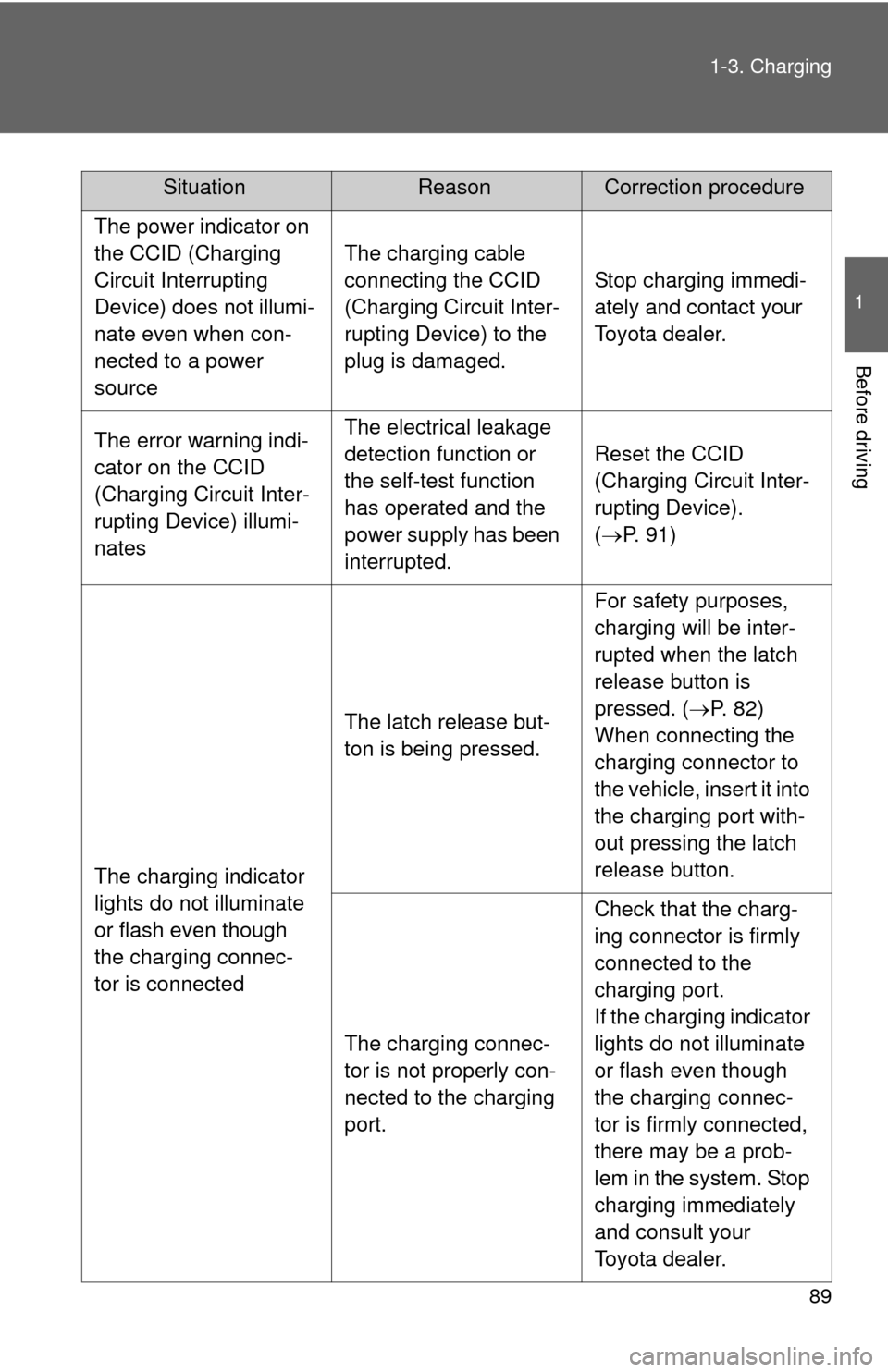
The power indicator on
the CCID (Charging
Circuit Interrupting
Device) does not illumi-
nate even when con-
nected to a power
source
The charging cable
connecting the CCID
(Charging Circuit Inter-
rupting Device) to the
plug is damaged.
Stop charging immedi-
ately and contact your
Toyota dealer.
The error warning indi-
cator on the CCID
(Charging Circuit Inter-
rupting Device) illumi-
natesThe electrical leakage
detection function or
the self-test function
has operated and the
power supply has been
interrupted.
Reset the CCID
(Charging Circuit Inter-
rupting Device).
(
P. 91)
The charging indicator
lights do not illuminate
or flash even though
the charging connec-
tor is connected
The latch release but-
ton is being pressed.
For safety purposes,
charging will be inter-
rupted when the latch
release button is
pressed. ( P. 82)
When connecting the
charging connector to
the vehicle, insert it into
the charging port with-
out pressing the latch
release button.
The charging connec-
tor is not properly con-
nected to the charging
port.
Check that the charg-
ing connector is firmly
connected to the
charging port.
If the charging indicator
lights do not illuminate
or flash even though
the charging connec-
tor is firmly connected,
there may be a prob-
lem in the system. Stop
charging immediately
and consult your
Toyota dealer.
SituationReasonCorrection procedure
Page 90 of 520
90 1-3. Charging
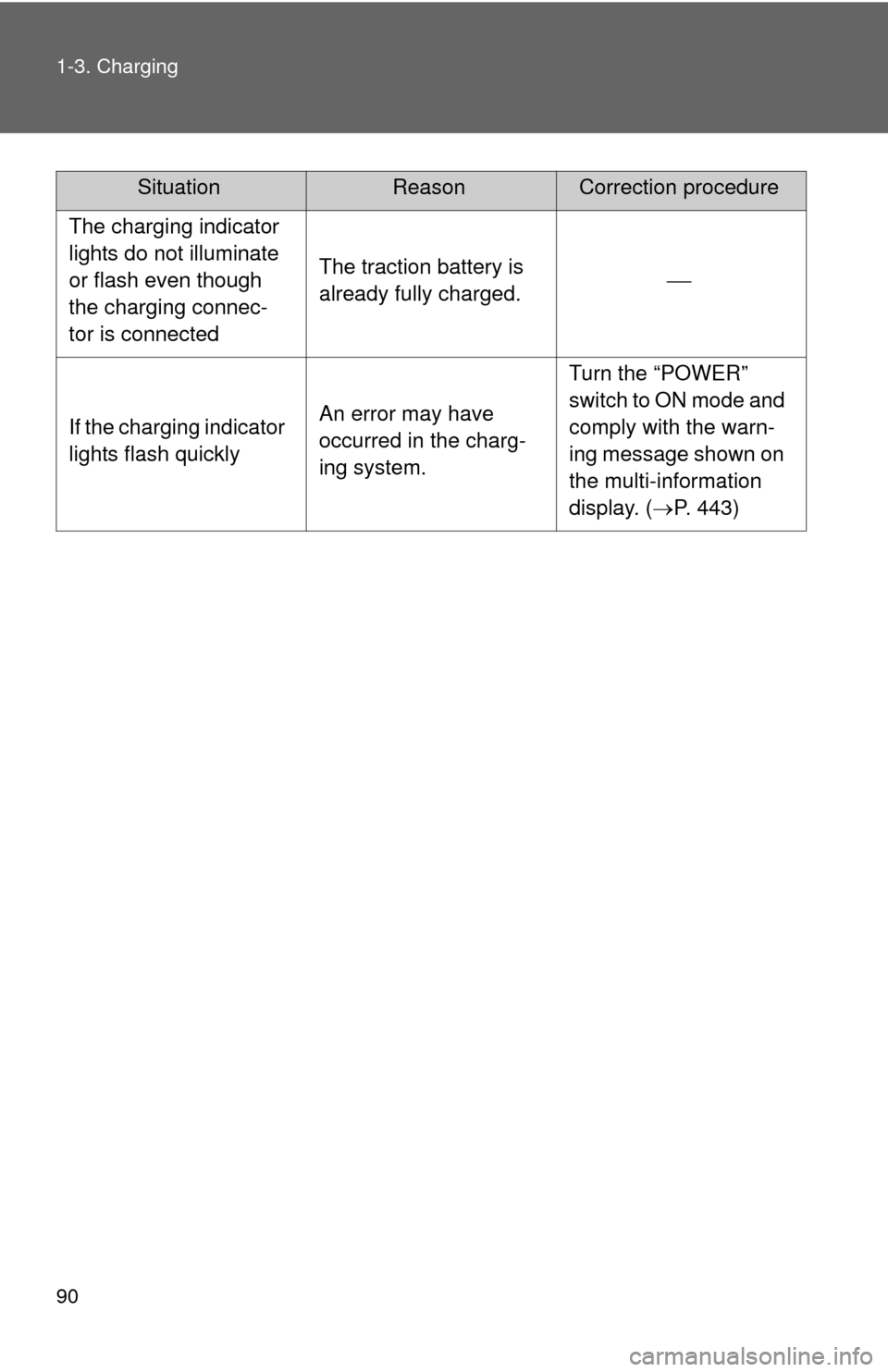
The charging indicator
lights do not illuminate
or flash even though
the charging connec-
tor is connected
The traction battery is
already fully charged.
If the charging indicator
lights flash quicklyAn error may have
occurred in the charg-
ing system.
Turn the “POWER”
switch to ON mode and
comply with the warn-
ing message shown on
the multi-information
display. (P. 443)
SituationReasonCorrection procedure
Page 95 of 520

95
1-4. Key information
1
Before driving
■
When required to leave a key to th e vehicle with a parking attendant
Lock the glove box as circumstances demand. ( P. 297)
Remove the mechanical key for your own use and provide the attendant with
the electronic key only.
■ Key number plate
Keep the plate in a safe place such as your wallet, not in the vehicle. In the
event that a key is lost, a new key can be made by your Toyota dealer using
the key number plate. ( P. 467)
■ When riding in an aircraft
When bringing a key with wireless remote control function onto an aircra\
ft,
make sure you do not press any buttons on the key while inside the aircraft
cabin. If you are carrying the key in your bag etc, ensure that the buttons are
not likely to be pressed accidentally. Pressing a button may cause the key to
emit radio waves that could interfere with the operation of the aircraft.
NOTICE
■To prevent key damage
●Do not subject the keys to strong shocks, expose them to high tempera-
tures by placing them in direct sunlight, or get them wet.
● Do not expose the keys to electromagnetic materials or attach any mate-
rial that blocks electromagnetic waves to the key surface.
● Do not disassemble the key.
Page 108 of 520
108
1-5. Opening, closing and locking the doors
Wireless remote control
■Operation signals
A buzzer sounds and the emergency flashers flash to indicate that the doors
have been locked/unlocked. (Locked: Once; Unlocked: Twice)
■ Panic mode
■ Door lock buzzer
If a door is not fully closed, a buzzer sounds continuously if an attempt to
lock the door is made. Fully close the door to stop the buzzer, and lock the
vehicle once more.
■ Key battery depletion
P. 383
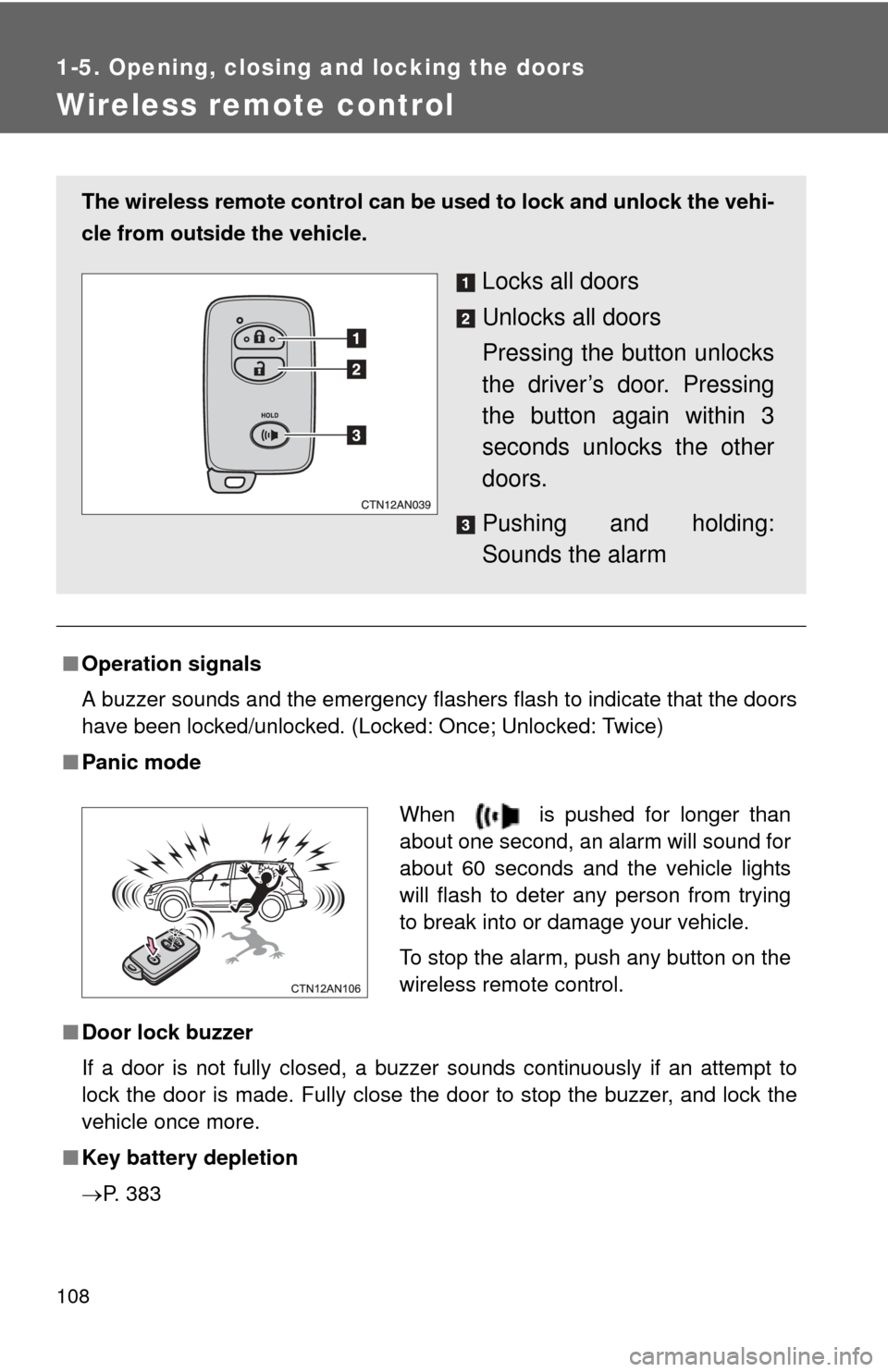
The wireless remote control can be used to lock and unlock the vehi-
cle from outside the vehicle.
Locks all doors
Unlocks all doors
Pressing the button unlocks
the driver’s door. Pressing
the button again within 3
seconds unlocks the other
doors.
Pushing and holding:
Sounds the alarm
When is pushed for longer than
about one second, an alarm will sound for
about 60 seconds and the vehicle lights
will flash to deter any person from trying
to break into or damage your vehicle.
To stop the alarm, push any button on the
wireless remote control.
Page 114 of 520
114 1-5. Opening, closing and locking the doors
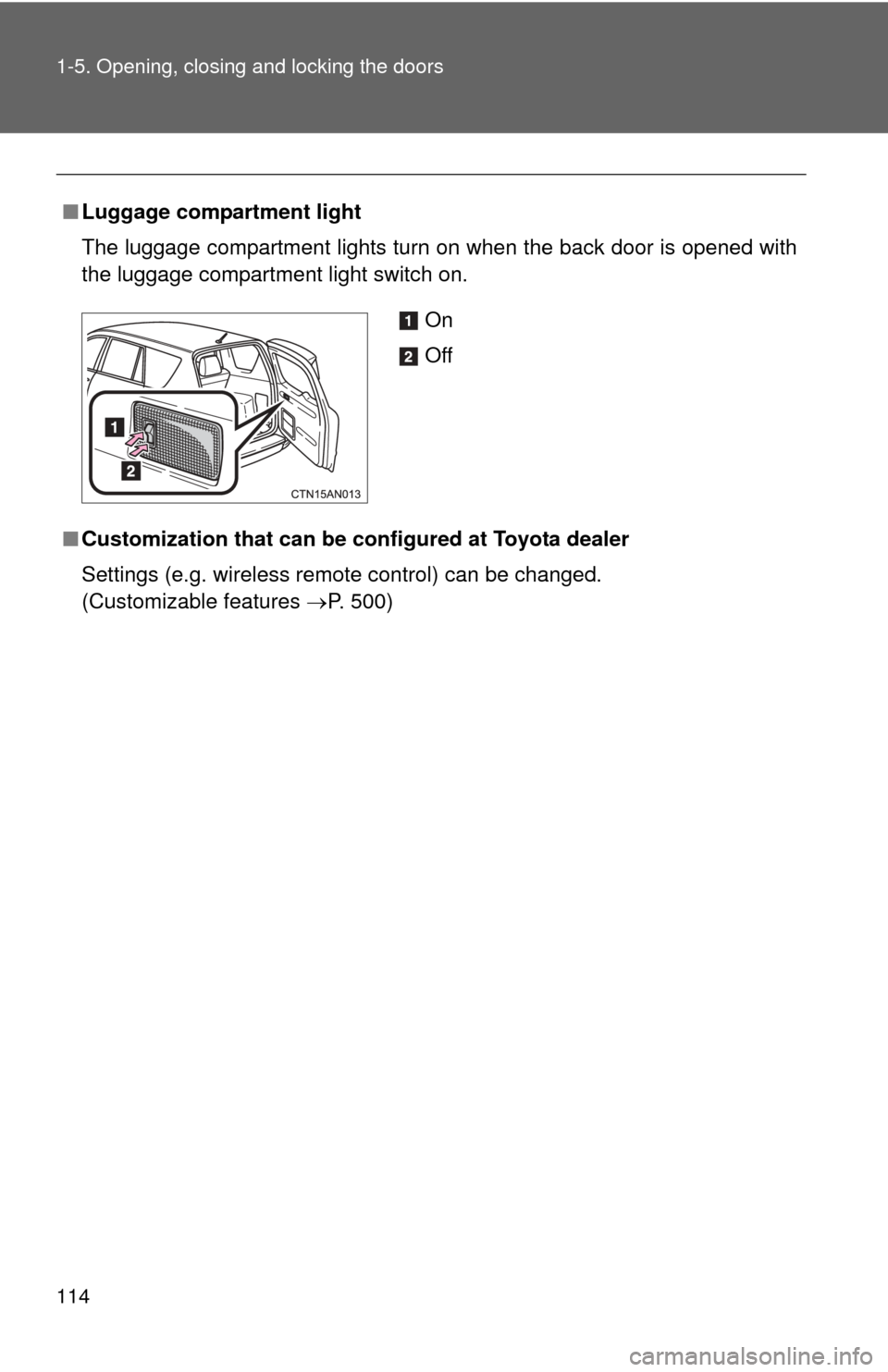
■Luggage compartment light
The luggage compartment lights turn on when the back door is opened with
the luggage compartment light switch on.
■ Customization that can be co nfigured at Toyota dealer
Settings (e.g. wireless remote control) can be changed.
(Customizable features P. 500)
On
Off
Page 115 of 520

115
1-5. Opening, closing and locking the doors
1
Before driving
CAUTION
■
Caution while driving
●Keep the back door closed while driving.
If the back door is left open, it may hit near-by objects while driving or lug-
gage may be unexpectedly thrown out, causing an accident.
● Before driving the vehicle, make sure that the back door is fully closed. If
the back door is not fully closed, it may open unexpectedly while driving,
causing an accident.
● Never let anyone sit in the luggage compartment. In the event of sudden
braking or a collision, they are susceptible to death or serious injury.
● Do not get on the rear step bumper.
■ Caution while parking
If the open back door hides the stop, tail or rear turn signal lights, other road
users must be warned of the presence of your vehicle by a warning triangle
or other device.
■ When children are in the vehicle
Observe the following precautions.
Failure to do so may result in death or serious injury.
●Do not leave children alone in the luggage compartment.
If a child is accidentally locked in the luggage compartment, they could
have heat exhaustion.
● Do not allow a child to open or close the back door.
Doing so may cause the back door to move unexpectedly, or cause the
child’s hands, head, or neck to be caught by the closing back door.