lights TOYOTA RAV4 EV 2012 1.G Owner's Manual
[x] Cancel search | Manufacturer: TOYOTA, Model Year: 2012, Model line: RAV4 EV, Model: TOYOTA RAV4 EV 2012 1.GPages: 520, PDF Size: 8.29 MB
Page 212 of 520
212 2-1. Driving procedures
■When sport mode is selected
When sport mode is selected, the “SPORT” indicator will come on and the
speed meter circumference ring and some instrument panel lights will turn
from blue to red.
In some cases, sport mode will not be available. A buzzer will sound and
“Sport Driving Mode Not Available” is shown on the multi-information display.
If already driving in sport mode, the vehicle will automatically change back to
normal mode.
■ Alarms
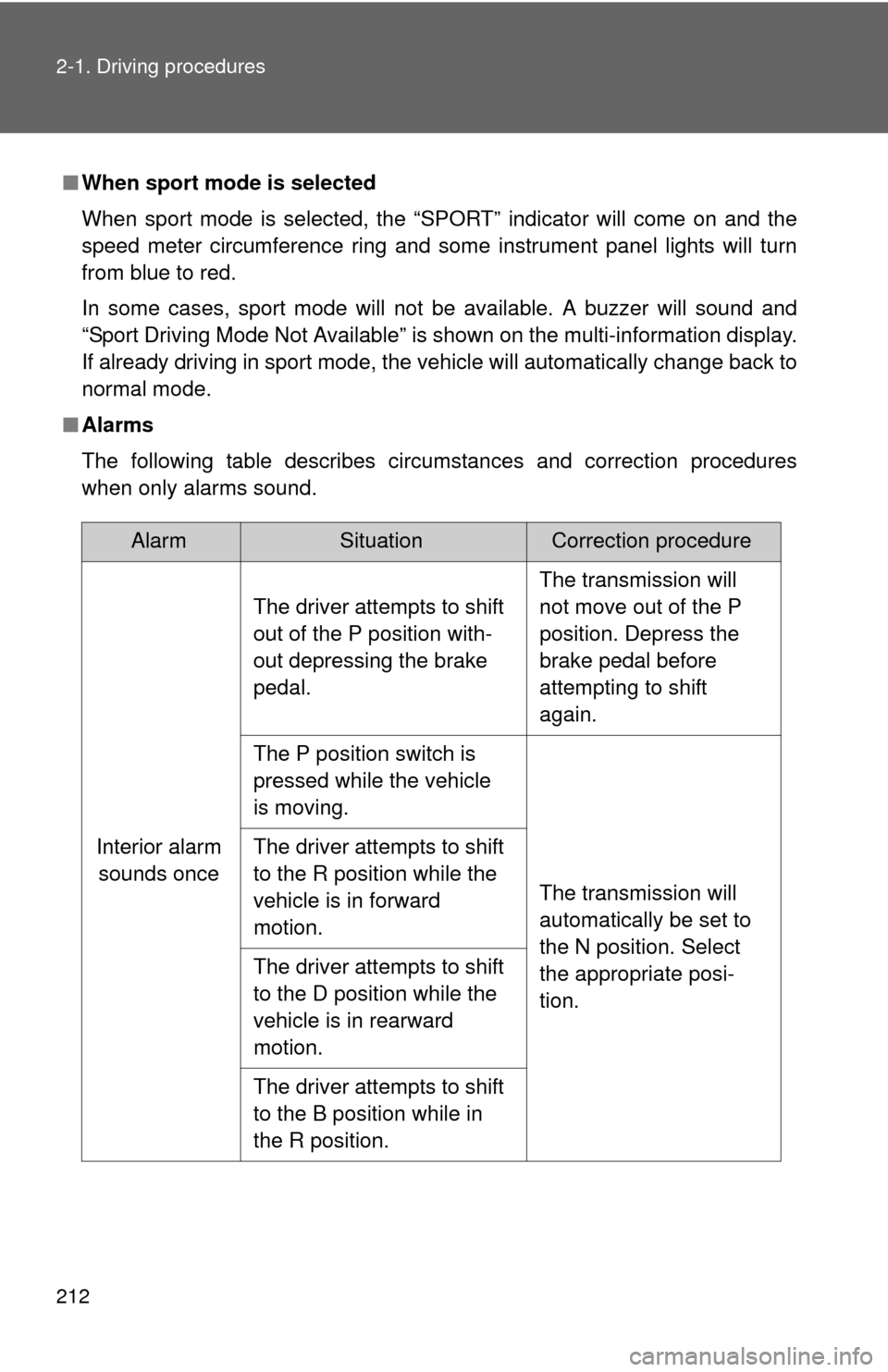
The following table describes circumstances and correction procedures
when only alarms sound.
AlarmSituationCorrection procedure
Interior alarm sounds once The driver attempts to shift
out of the P position with-
out depressing the brake
pedal.
The transmission will
not move out of the P
position. Depress the
brake pedal before
attempting to shift
again.
The P position switch is
pressed while the vehicle
is moving.
The transmission will
automatically be set to
the N position. Select
the appropriate posi-
tion.
The driver attempts to shift
to the R position while the
vehicle is in forward
motion.
The driver attempts to shift
to the D position while the
vehicle is in rearward
motion.
The driver attempts to shift
to the B position while in
the R position.
Page 215 of 520
215
2-1. Driving procedures
2
When driving
Turn signal lever
■Turn signals can be operated when
The “POWER” switch is in ON mode.
■ If the indicators flash faster than usual
Check that a light bulb in the front or rear turn signal lights has not burned
out.
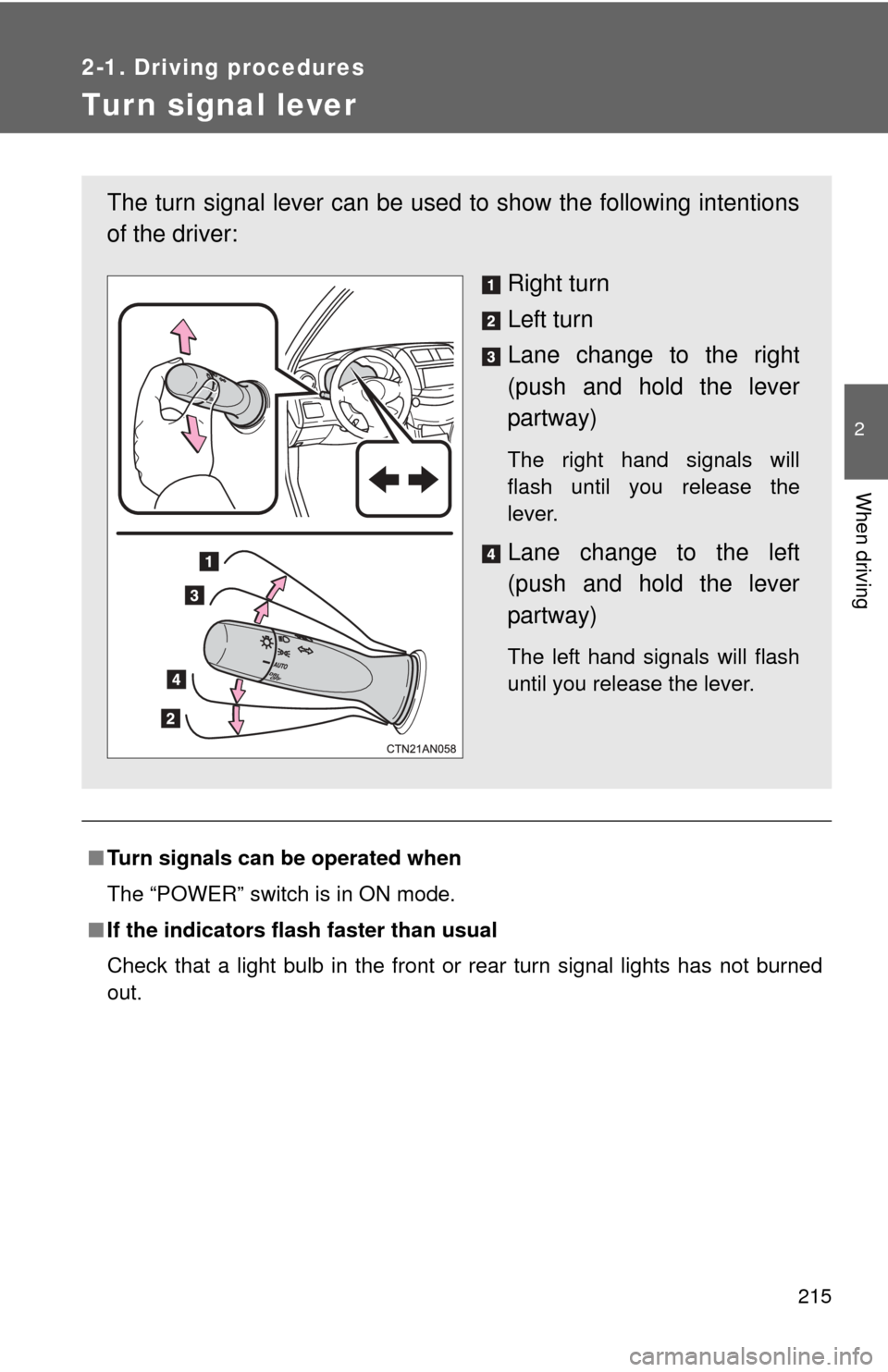
The turn signal lever can be used to show the following intentions
of the driver:
Right turn
Left turn
Lane change to the right
(push and hold the lever
partway)
The right hand signals will
flash until you release the
lever.
Lane change to the left
(push and hold the lever
partway)
The left hand signals will flash
until you release the lever.
Page 219 of 520
219
2-2. Instrument cluster
2
When driving
Instrument panel light control
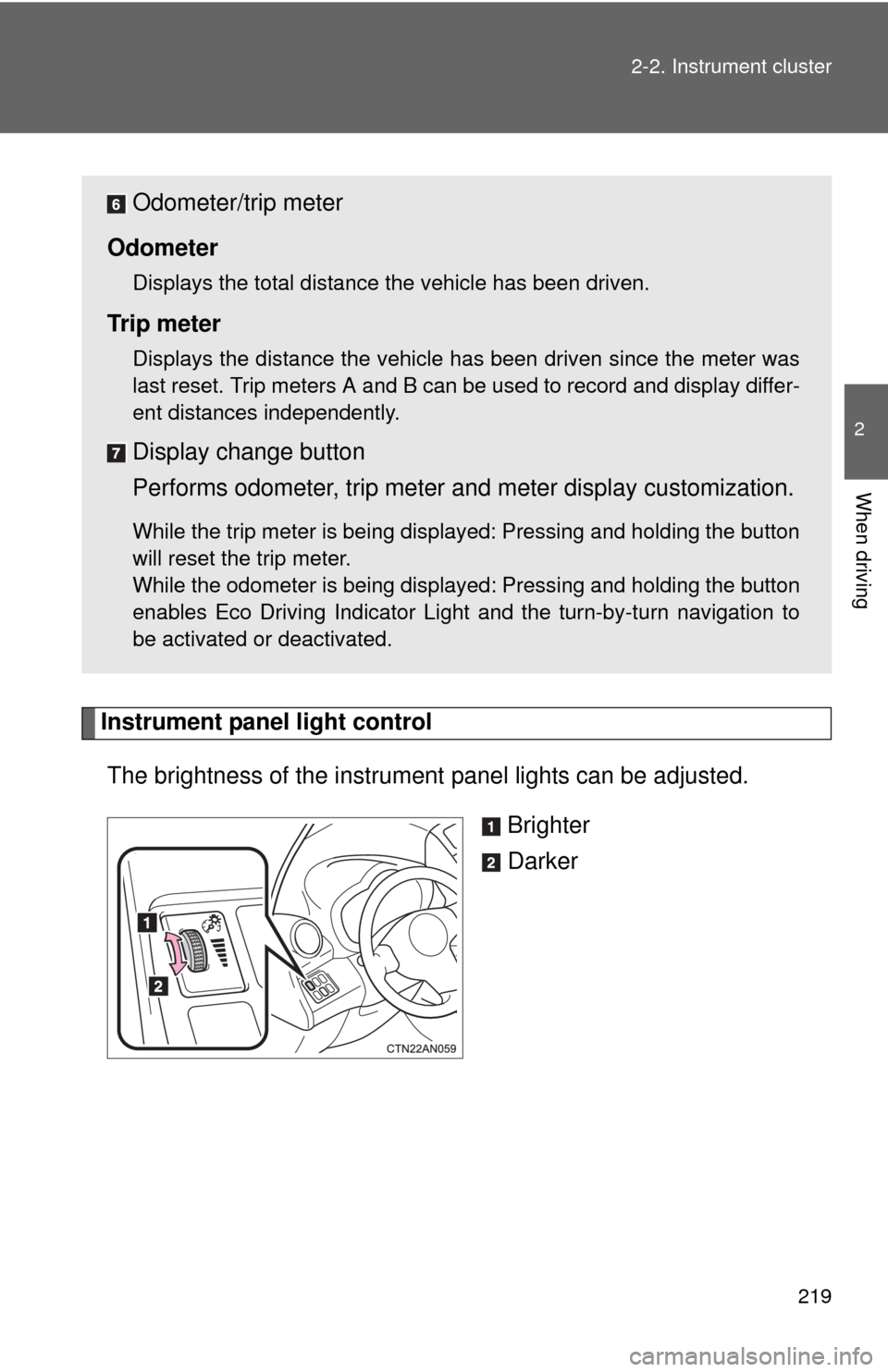
The brightness of the instrument panel lights can be adjusted.
Brighter
Darker
Odometer/trip meter
Odometer
Displays the total distance the vehicle has been driven.
Tr i p m e t e r
Displays the distance the vehicle has been driven since the meter was
last reset. Trip meters A and B can be used to record and display differ-
ent distances independently.
Display change button
Performs odometer, trip meter and meter display customization.
While the trip meter is being displayed: Pressing and holding the button
will reset the trip meter.
While the odometer is being displayed: Pressing and holding the button
enables Eco Driving Indicator Light and the turn-by-turn navigation to
be activated or deactivated.
Page 222 of 520

222 2-2. Instrument cluster
■The brightness of the instrument panel lights
When the tail lights are turned on, the meter’s brightness will be reduced
slightly unless the meter brightness level adjustment is set to the brightest
setting.
If the tail lights are turned on when the surroundings are dark, the meter’s
brightness will reduce slightly. However, when the surroundings are bright,
such as during the daytime, the meter’s brightness will not be reduced even
if the tail lights are turned on.
Page 223 of 520
223
2-2. Instrument cluster
2
When driving
Indicators and war ning lights
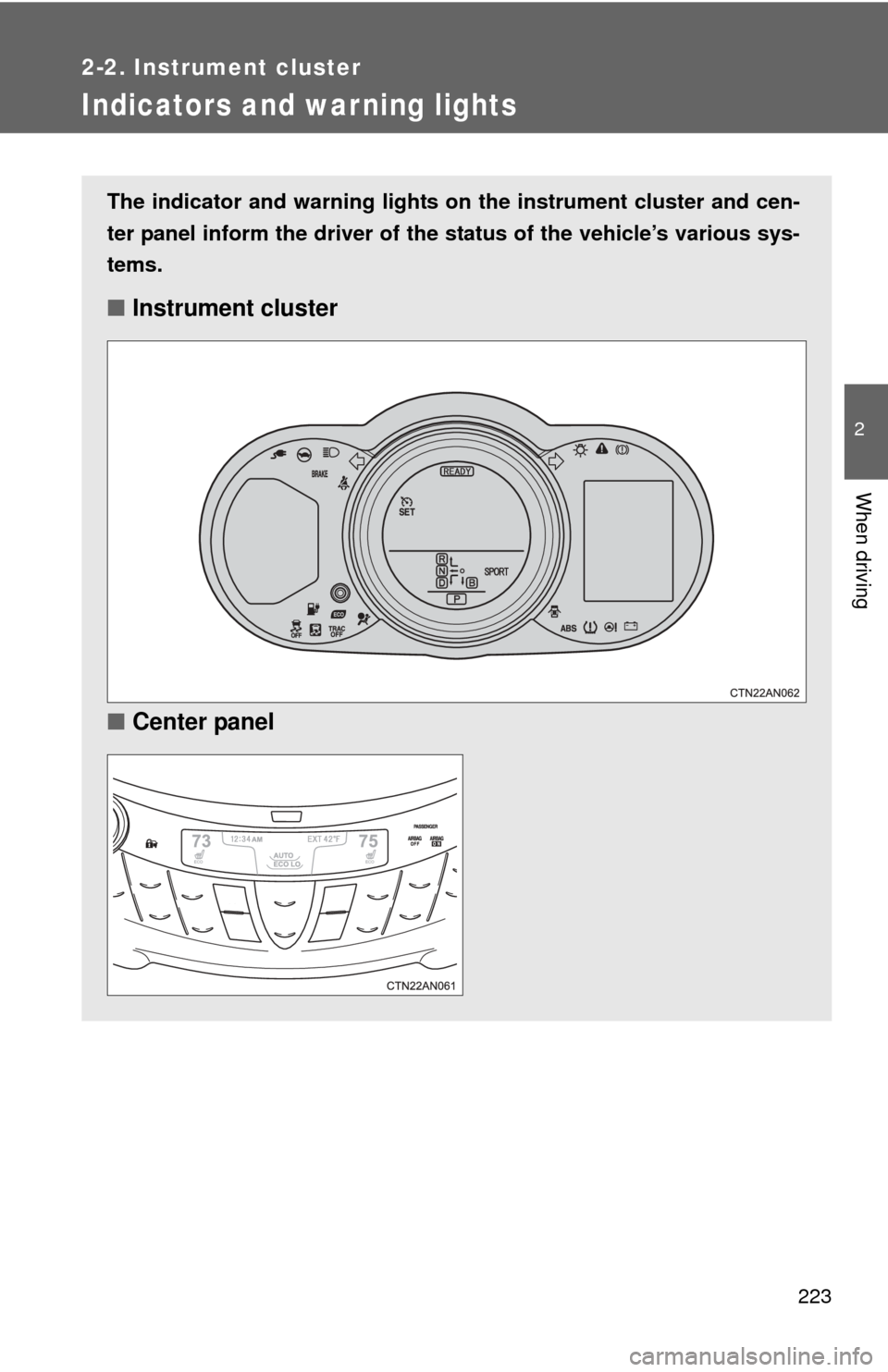
The indicator and warning lights on the instrument cluster and cen-
ter panel inform the driver of the status of the vehicle’s various sys-
tems.
■ Instrument cluster
■ Center panel
Page 225 of 520
225
2-2. Instrument cluster
2
When driving
■
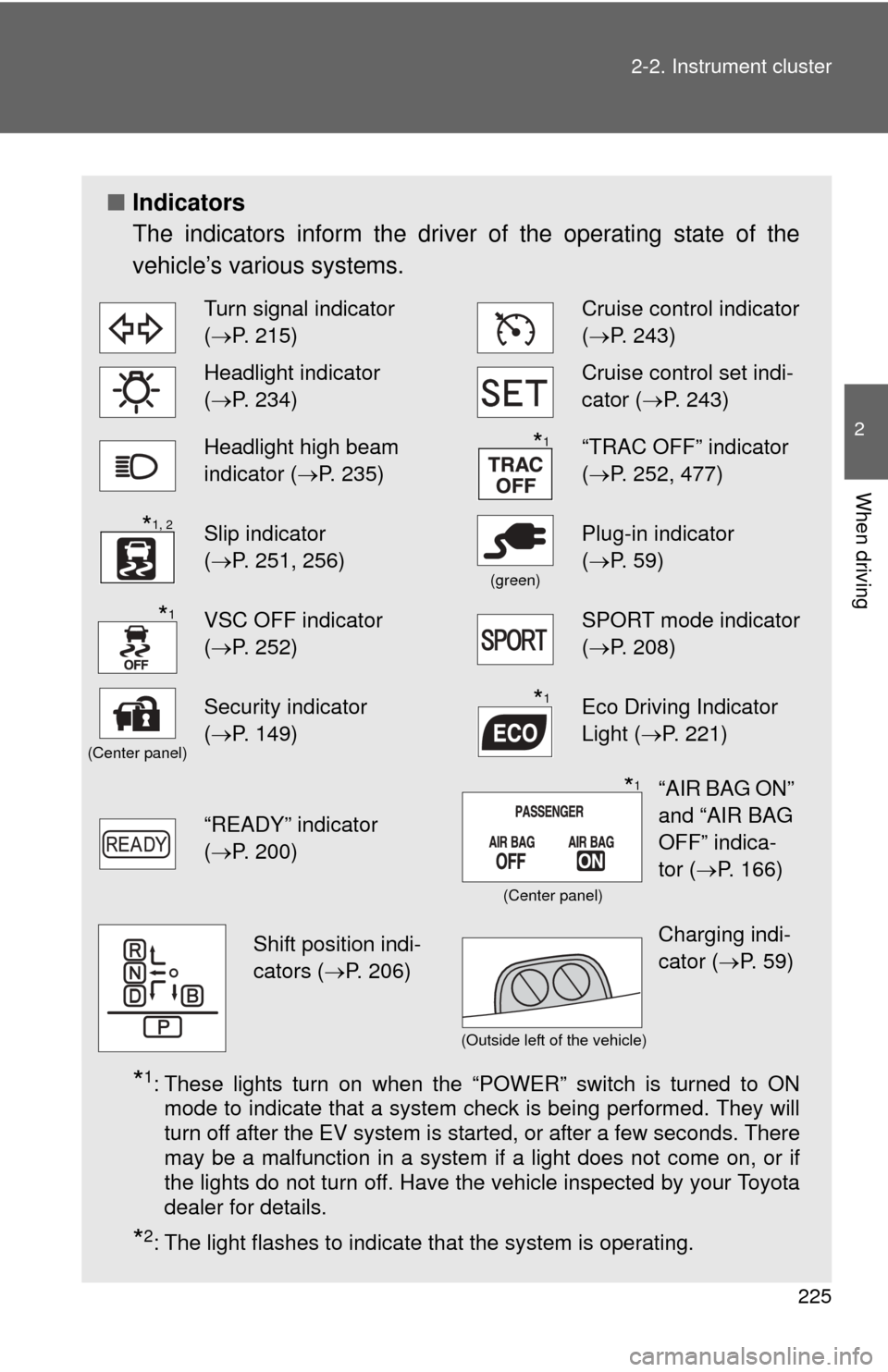
Indicators
The indicators inform the driver of the operating state of the
vehicle’s various systems.
*1: These lights turn on when the “POWER” switch is turned to ON
mode to indicate that a system check is being performed. They will
turn off after the EV system is started, or after a few seconds. There
may be a malfunction in a system if a light does not come on, or if
the lights do not turn off. Have the vehicle inspected by your Toyota
dealer for details.
*2: The light flashes to indicate that the system is operating.
Turn signal indicator
(P. 215)Cruise control indicator
( P. 243)
Headlight indicator
(P. 234)Cruise control set indi-
cator (P. 243)
Headlight high beam
indicator ( P. 235)“TRAC OFF” indicator
(P. 252, 477)
Slip indicator
(P. 251, 256)
(green)
Plug-in indicator
( P. 59)
VSC OFF indicator
(P. 252)SPORT mode indicator
( P. 208)
(Center panel)
Security indicator
(P. 149)Eco Driving Indicator
Light ( P. 221)
“READY” indicator
(P. 200)
*1
*1, 2
*1
*1
“AIR BAG ON”
and “AIR BAG
OFF” indica-
tor ( P. 166)*1
(Center panel)
Shift position indi-
cators ( P. 206)Charging indi-
cator (P. 59)
(Outside left of the vehicle)
Page 226 of 520
226 2-2. Instrument cluster
CAUTION
■If a safety system warning light does not come on
Should a safety system light such as the ABS and SRS airbag warning light
not come on when you start the EV system, this could mean that these sys-
tems are not available to help protect you in an accident, which could result
in death or serious injury. Have the vehicle inspected by your Toyota dealer
immediately if this occurs.
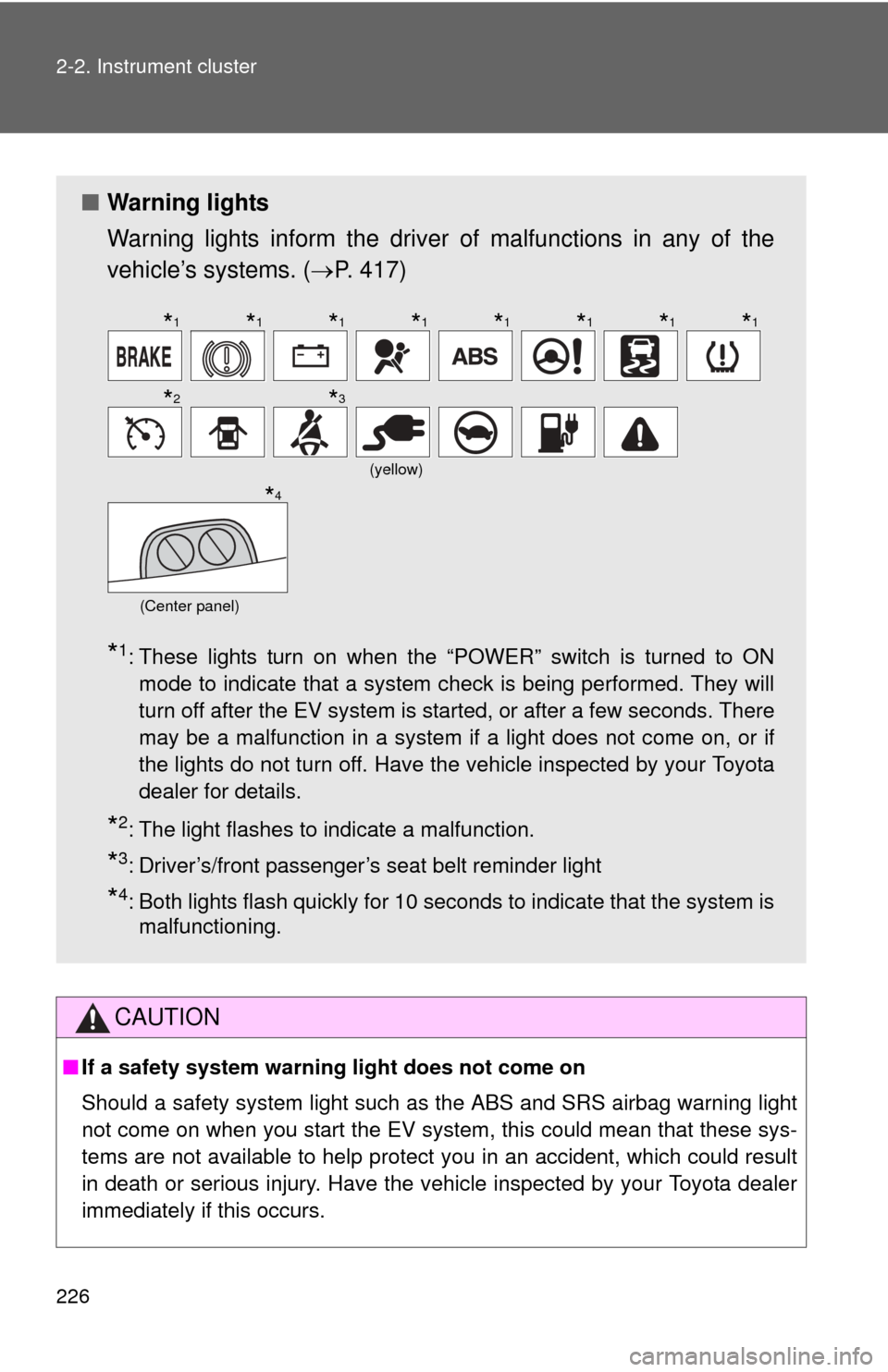
■ Warning lights
Warning lights inform the driver of malfunctions in any of the
vehicle’s systems. ( P. 417)
*1: These lights turn on when the “POWER” switch is turned to ON
mode to indicate that a system check is being performed. They will
turn off after the EV system is started, or after a few seconds. There
may be a malfunction in a system if a light does not come on, or if
the lights do not turn off. Have the vehicle inspected by your Toyota
dealer for details.
*2: The light flashes to indicate a malfunction.
*3: Driver’s/front passenger’s seat belt reminder light
*4: Both lights flash quickly for 10 seconds to indicate that the system ismalfunctioning.
(yellow)
(Center panel)
*1*1*1*1*1*1*1*1
*2*3
*4
Page 234 of 520
234
2-3. Operating the lights and wipers
Headlight switch
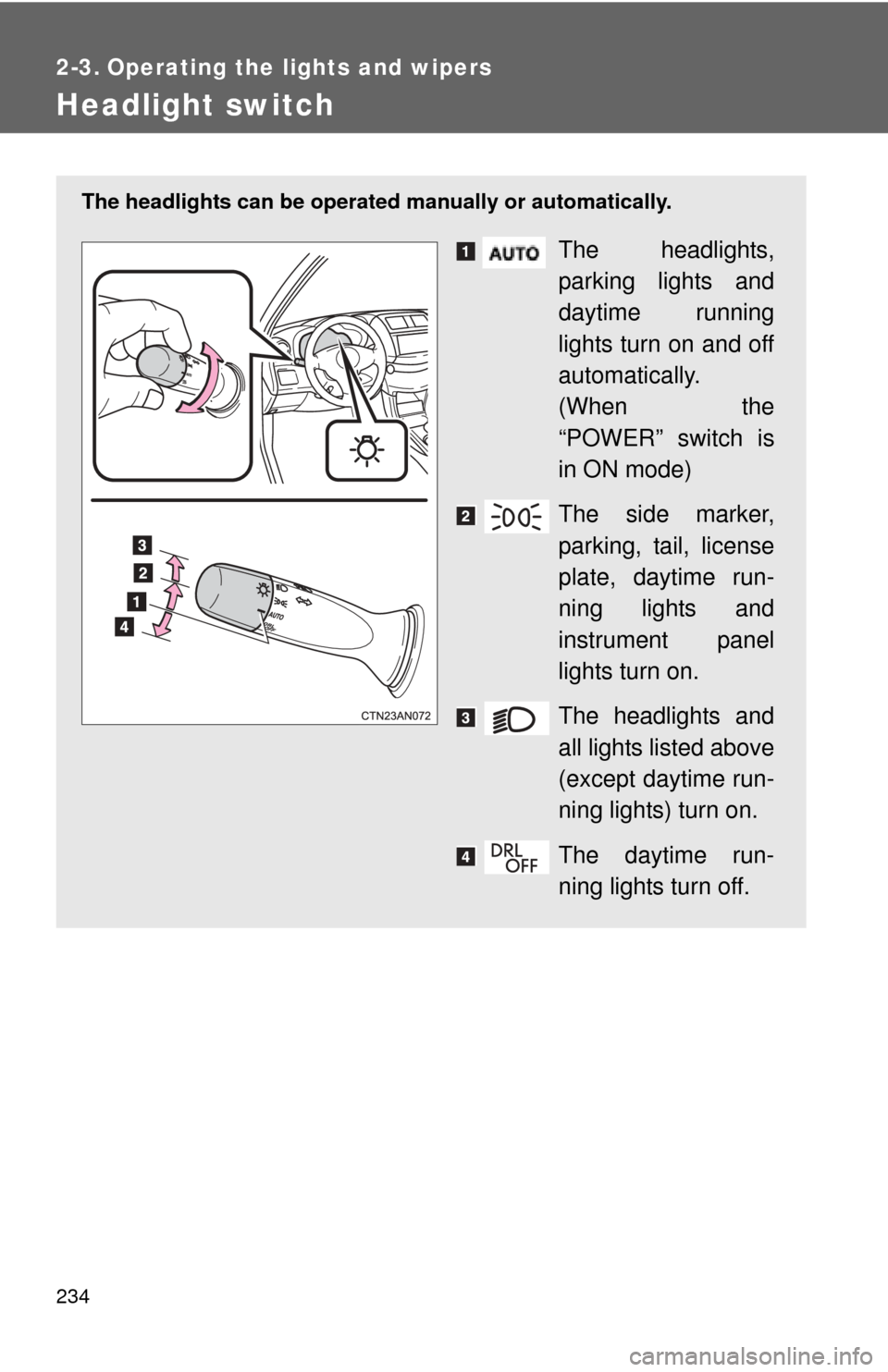
The headlights can be operated manually or automatically.
The headlights,
parking lights and
daytime running
lights turn on and off
automatically.
(When the
“POWER” switch is
in ON mode)
The side marker,
parking, tail, license
plate, daytime run-
ning lights and
instrument panel
lights turn on.
The headlights and
all lights listed above
(except daytime run-
ning lights) turn on.
The daytime run-
ning lights turn off.
Page 235 of 520
235
2-3. Operating the lights and wipers
2
When driving
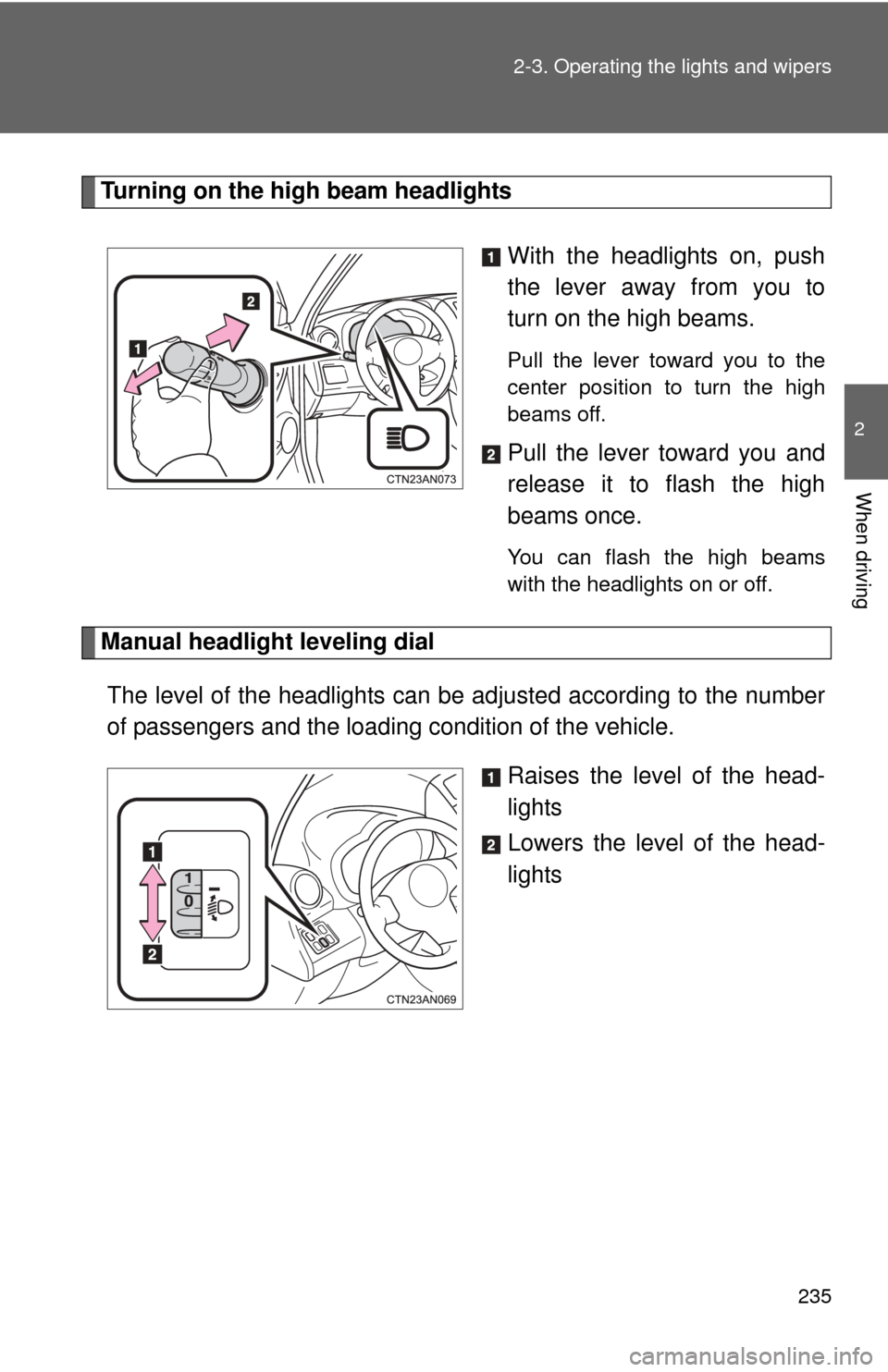
Turning on the high beam headlights
With the headlights on, push
the lever away from you to
turn on the high beams.
Pull the lever toward you to the
center position to turn the high
beams off.
Pull the lever toward you and
release it to flash the high
beams once.
You can flash the high beams
with the headlights on or off.
Manual headlight leveling dialThe level of the headlights can be adjusted according to the number
of passengers and the loading condition of the vehicle.
Raises the level of the head-
lights
Lowers the level of the head-
lights
Page 236 of 520
236 2-3. Operating the lights and wipers
■Guide to dial settings
■Daytime running light system
●To make your vehicle more visible to other drivers, the daytime running
lights turn on automatically whenever the EV system is started and the
parking brake is released. Daytim e running lights are not designed for
use at night.
● Compared to turning on the headlights, the daytime running light system
offers greater durability and consumes less electricity, so it can help
improve power consumption.
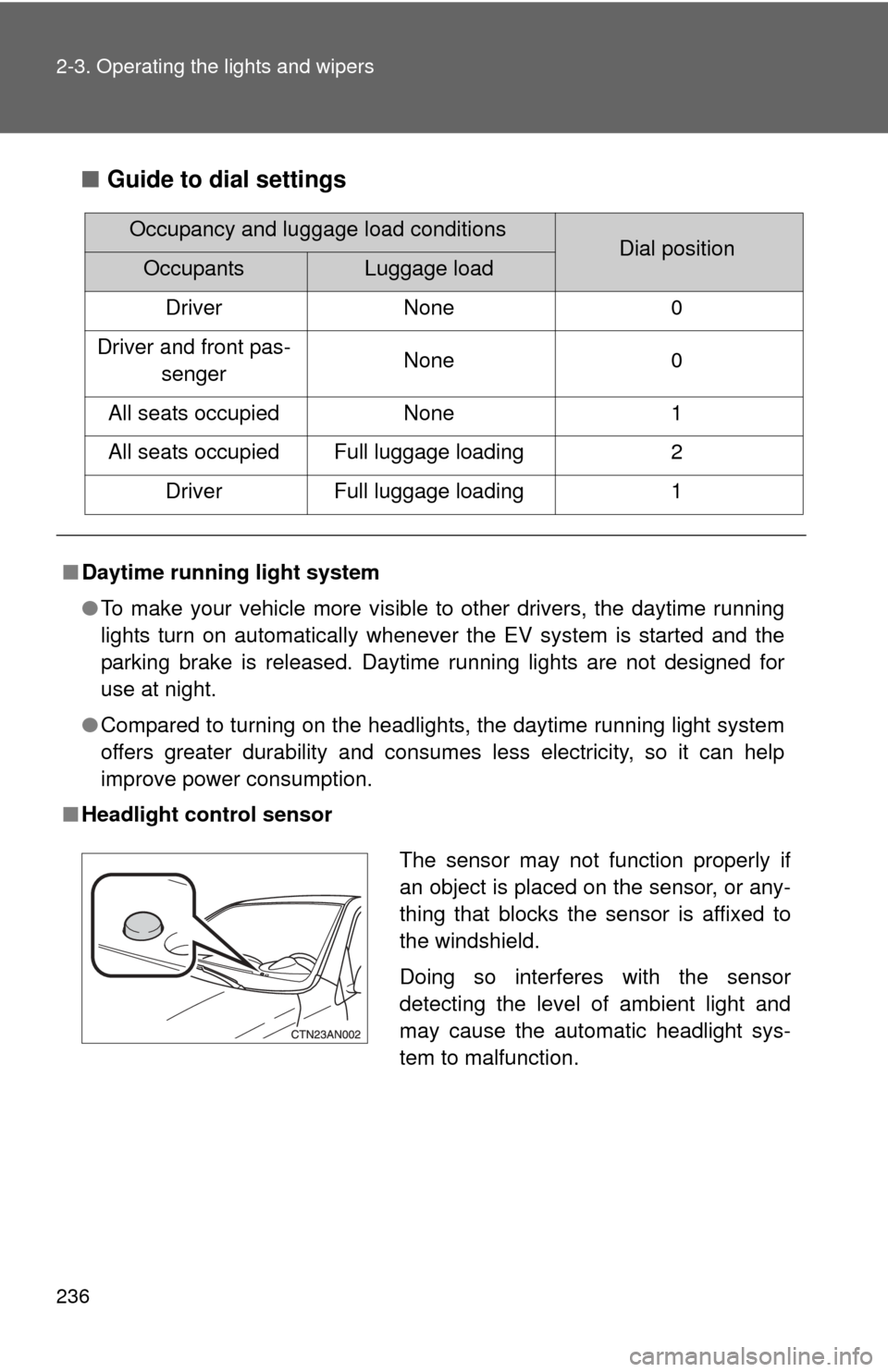
■ Headlight control sensor
Occupancy and luggage load conditionsDial positionOccupantsLuggage load
Driver None 0
Driver and front pas- senger None
0
All seats occupied None1
All seats occupied Full luggage loading 2
Driver Full luggage loading 1
The sensor may not function properly if
an object is placed on the sensor, or any-
thing that blocks the sensor is affixed to
the windshield.
Doing so interferes with the sensor
detecting the level of ambient light and
may cause the automatic headlight sys-
tem to malfunction.