battery TOYOTA RAV4 EV 2013 1.G Owner's Manual
[x] Cancel search | Manufacturer: TOYOTA, Model Year: 2013, Model line: RAV4 EV, Model: TOYOTA RAV4 EV 2013 1.GPages: 520, PDF Size: 7.4 MB
Page 58 of 520
58 1-3. Charging
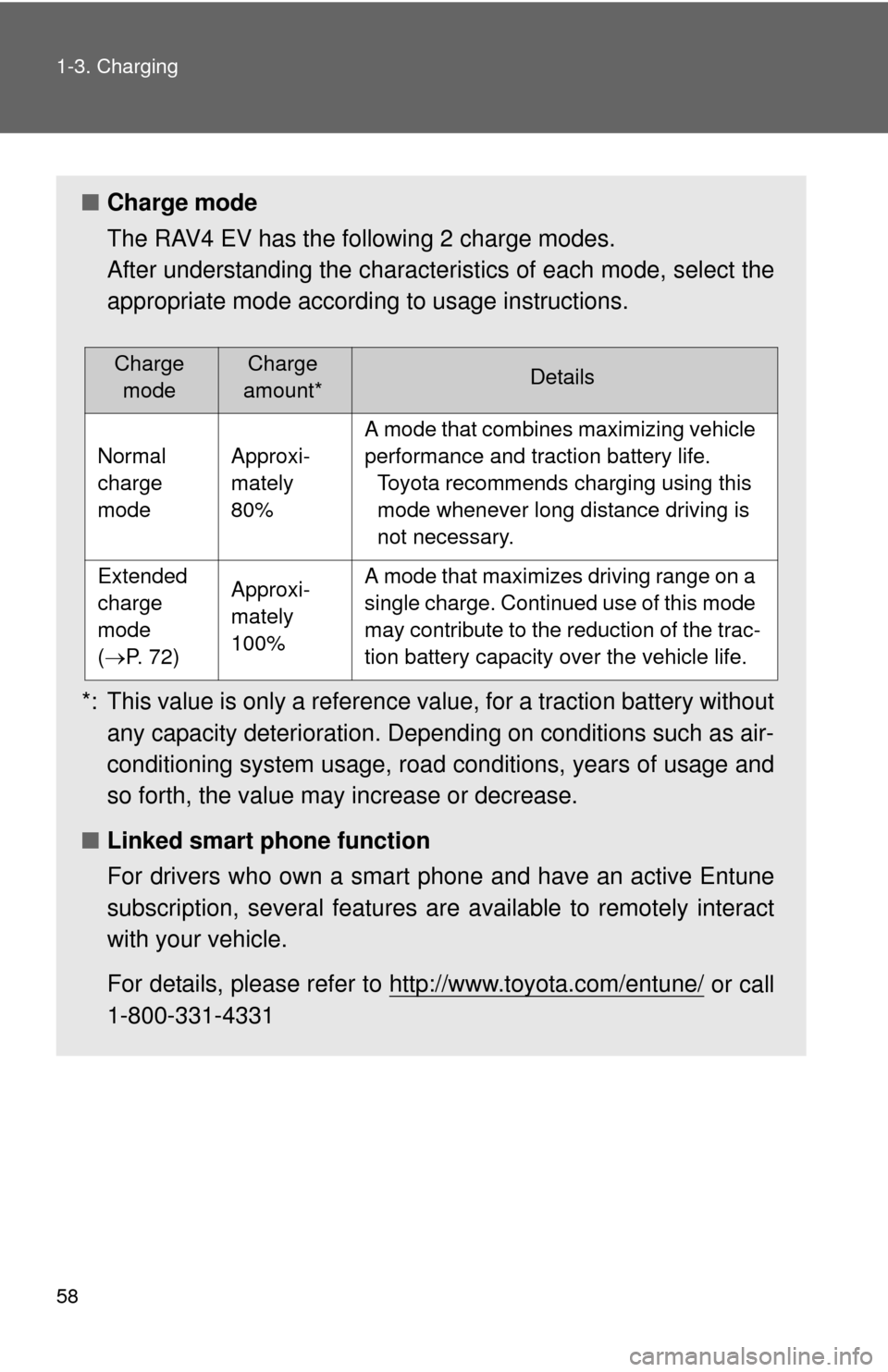
■Charge mode
The RAV4 EV has the following 2 charge modes.
After understanding the characterist ics of each mode, select the
appropriate mode according to usage instructions.
*: This value is only a reference value, for a traction battery without any capacity deterioration. Depending on conditions such as air-
conditioning system usage, road conditions, years of usage and
so forth, the value may increase or decrease.
■ Linked smart phone function
For drivers who own a smart phone and have an active Entune
subscription, several features are available to remotely interact
with your vehicle.
For details, please refer to http://www.toyota.com/entune/
or call
1-800-331-4331
Charge modeCharge
amount*Details
Normal
charge
modeApproxi-
mately
80%
A mode that combines maximizing vehicle
performance and traction battery life. Toyota recommends charging using this
mode whenever long distance driving is
not necessary.
Extended
charge
mode
(P. 72)Approxi-
mately
100%A mode that maximizes driving range on a
single charge. Continued use of this mode
may contribute to the reduction of the trac-
tion battery capacity over the vehicle life.
Page 76 of 520
76 1-3. Charging
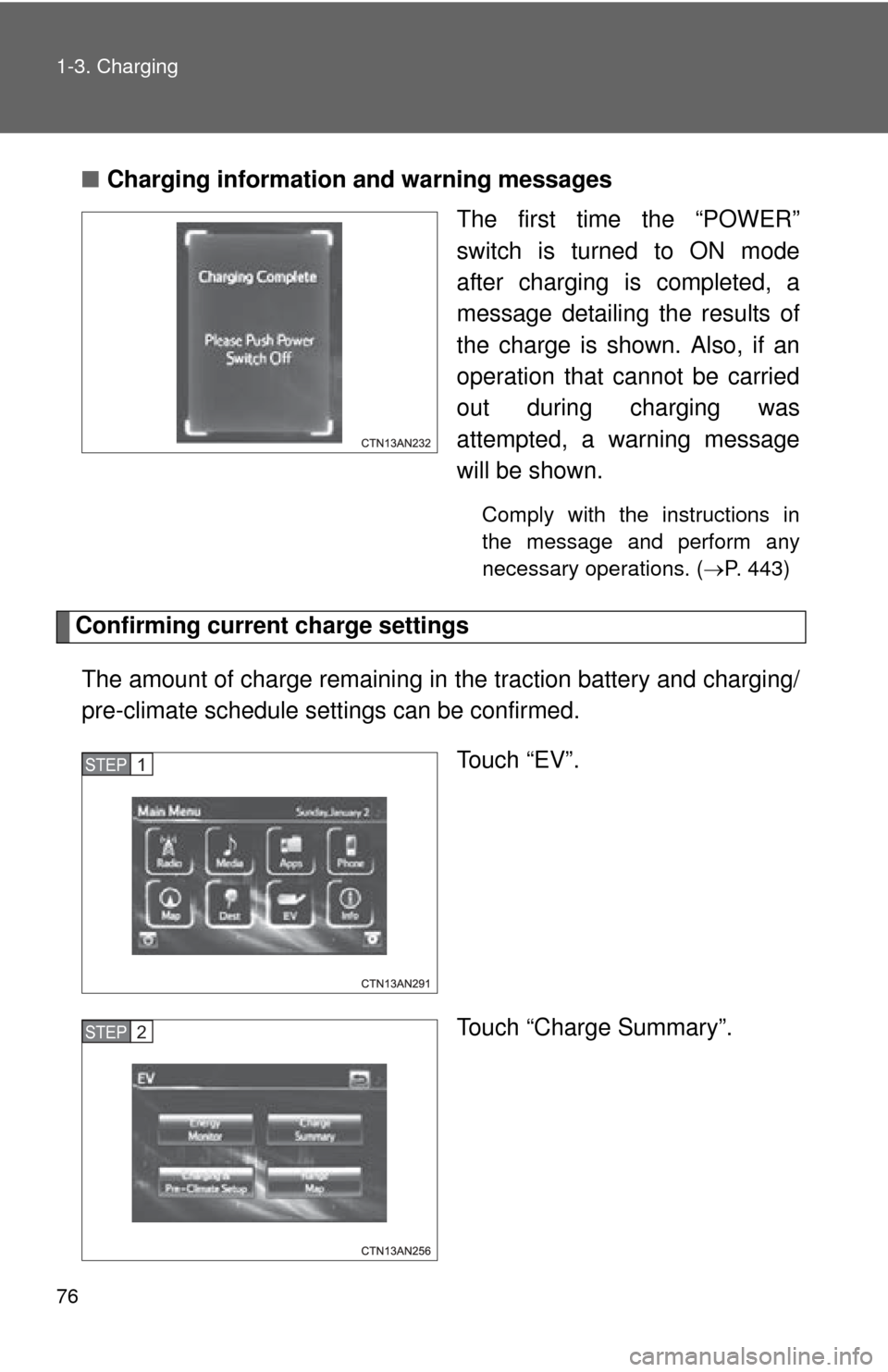
■Charging information and warning messages
The first time the “POWER”
switch is turned to ON mode
after charging is completed, a
message detailing the results of
the charge is shown. Also, if an
operation that cannot be carried
out during charging was
attempted, a warning message
will be shown.
Comply with the instructions in
the message and perform any
necessary operations. (P. 443)
Confirming current charge settings
The amount of charge remaining in the traction battery and charging/
pre-climate schedule sett ings can be confirmed.
Touch “EV”.
Touch “Charge Summary”.
STEP 1
STEP 2
Page 78 of 520
78 1-3. Charging
■When leaving the vehicle
To prevent vehicle theft and to increase the efficiency of pre-climate opera-
tion, check that all windows are closed.
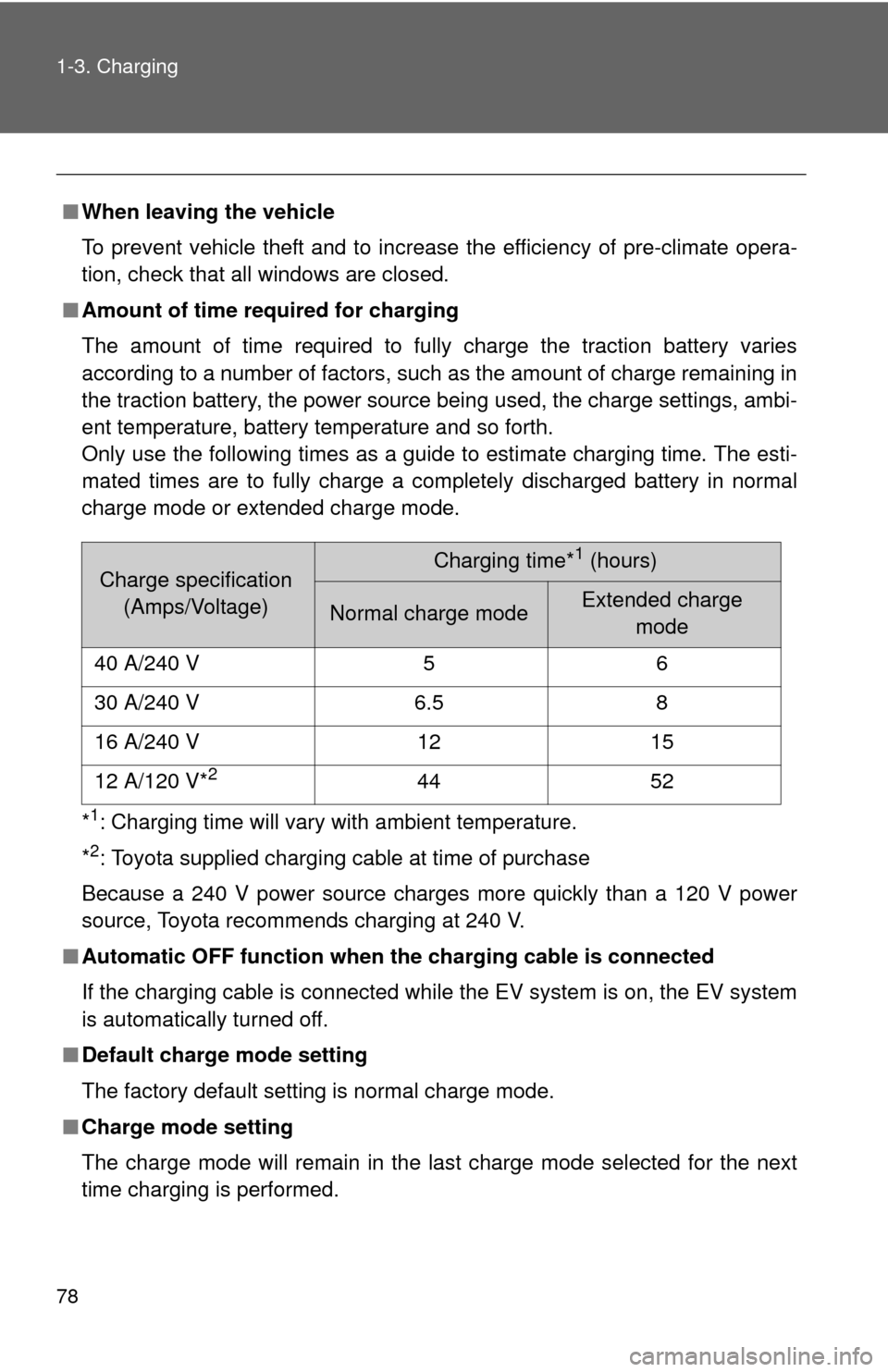
■ Amount of time required for charging
The amount of time required to fully charge the traction battery varies
according to a number of factors, such as the amount of charge remaining in
the traction battery, the power source being used, the charge settings, ambi-
ent temperature, battery temperature and so forth.
Only use the following times as a guide to estimate charging time. The esti-
mated times are to fully charge a completely discharged battery in normal
charge mode or extended charge mode.
*
1: Charging time will vary with ambient temperature.
*
2: Toyota supplied charging cable at time of purchase
Because a 240 V power source charges more quickly than a 120 V power
source, Toyota recommends charging at 240 V.
■ Automatic OFF function when th e charging cable is connected
If the charging cable is connected while the EV system is on, the EV system
is automatically turned off.
■ Default charge mode setting
The factory default setting is normal charge mode.
■ Charge mode setting
The charge mode will remain in the last charge mode selected for the next
time charging is performed.
Charge specification
(Amps/Voltage)Charging time*1 (hours)
Normal charge mode Extended charge mode
40 A/240 V 5 6
30 A/240 V 6.5 8
16 A/240 V 12 15
12 A/120 V*
244 52
Page 79 of 520
79
1-3. Charging
1
Before driving
■
During charging
●The surface of the CCID (Charging Circuit Interrupting Device) may
become hot, but this does not indicate a malfunction.
● Depending on radio wave conditions, interference may be heard on the
radio.
■ If charging has been interrupted
If charging is interrupted before the traction battery is fully charged (before
both charging indicator lights illuminate), the EV system cannot be started
and the shift position cannot be shifted from P for approximately 6 seconds.
Start the EV system after 6 seconds have elapsed.
■ Charging time may increase
In the following situations, charging time may become longer than normal:
●In very hot or very cold temperatures.
● The vehicle is consuming a lot of electricity, for example, when pre-cli-
mate is used.
● There is a power outage during charging.
● There is an interruption in the electrical supply.
● There is a drop in the voltage of your panel’s AC supply.
● The charge in the 12-volt battery is low, for example due to the vehicle
being left unused for a long period of time.
Page 80 of 520

80 1-3. Charging
■Capacity reduction of the traction battery
The capacity of the traction battery will decline gradually with normal use
over the life of the vehicle. The rate at which it declines is dependant on a
number of factors, including environmental conditions and the way the vehi-
cle is used. By observing the following precautions, battery capacity decline
can be suppressed.
●Avoid parking the vehicle for prolonged periods in areas with a high tem-
perature under direct sunlight when the traction battery is fully charged.
When storing the vehicle for prolonged periods, it is recommended to
park the vehicle in a shaded area or a cool garage. This helps minimize
traction battery capacity decline.
● When not driving long distances, it is recommended to charge using nor-
mal charge mode to help minimize traction battery capacity decline.
( P. 58, 72)
● Regular use of the scheduled charging function helps mitigate battery
capacity decline by avoiding storage at high SOC.
Page 81 of 520

81
1-3. Charging
1
Before driving
■
When not using the vehicle for an extended period of time
In order to preserve the traction battery, Toyota recommends plugging in the
vehicle whenever it is not in use.
Pre-climate operations will occur while the amount of charge remaining in
the traction battery is more than 50% at the time pre-climate operations
begin. If the schedule is left set, pre-climate operations will continue to func-
tion up to the maximum of 15 minutes even if the vehicle is not used for
extended periods of time. Because this uses energy from the traction bat-
tery, temporarily suspend the pre-climate schedule (smart phone exclusive
setting P. 58) or delete the pre-climate schedule, if the vehicle is not being
regularly used.
When using navigation screen operations, only canceling the schedule is
available. Because the schedule will need to be set once again when it is
used next time, Toyota recommends using a smart phone and temporarily
suspending the schedule.
■ If the amount of charge remaining in the traction battery becomes low
while driving
The driving power restriction output control warning light illuminates and
driving range is extended by automatically restricting driving power and air
conditioning system operations. Using the navigation system, promptly
search for the closest charging station and charge the vehicle. If the traction
battery fully discharges, driving will not be possible.
For information on how to search for a charging station, refer to the “Naviga-
tion System Owner's Manual”.
■ Charging schedule confirmation disp lay after switching the EV system
off
The current charging schedule will be displayed for a while after the EV sys-
tem is turned off. To change the charging schedule, set the schedule using
the navigation system’s screen. ( P. 64, 70)
■ If the charging port door is frozen
P. 268
Page 83 of 520

83
1-3. Charging
1
Before driving
■
If charging has not been car ried out in a long time
The charging port cap's lever may get stuck and not open automatically
even if the knob is moved. If this occurs, push aside the release button and
open the cap by hand.
■ When the outside temperature is low or high
The level shown on the SOC gauge ( P. 218) may drop slightly when the
“POWER” switch is turned to ON mode, even if charging has been com-
pleted and the traction battery is fully charged. However, this does not indi-
cate a malfunction.
■ Charging in extremely cold temperatures
If the vehicle is parked in ambient temperatures below freezing, 240 V
charging is recommended.
If only a 120 V outlet is available, the following will improve your charge pro-
cess:
●Charge at mid-day (when it is warmest)
● Protect the vehicle from wind during charging.
If the vehicle is still too cold to charge, please contact your Toyota dealership
or tow it to a warmer charging location.
■ Handling the traction battery
P. 2 2
Page 86 of 520
86 1-3. Charging
CAUTION
■Precautions for the pre-climate
Do not use pre-climate if people are in the vehicle.
Even when pre-climate is used, the temperature inside the vehicle may
become very high or very low due to features such as the automatic shut-off.
Do not leave children and/or pets inside the vehicle.
●When in the sun, the temperature inside a vehicle with all its windows
closed may rise rapidly, possibly causing heat stroke or dehydration.
● When in cold weather, the temperature inside the vehicle may drop rapidly,
possibly causing hypothermia.
Both of the above cases can lead to a serious health hazard or even deat\
h.
■ Handling the traction battery
No part of the traction battery can be repaired by you or a non-Toyota techni-
cian. Never open the traction battery or perform any modifications to it. If you
find a malfunction with the battery, always contact your Toyota dealer.
■ If the error warning indicator on the CCID (Charging Circuit Interrupt-
ing Device) stays on during charging
Press the reset button on the CCID (Charging Circuit Interrupting Device)
(P. 91). If the error warning indicator does not turn off even when the reset
button is pressed, an electrical leakage may be occurring in the path to the
power source, or there may be a problem with the charging cable or the
charging system. In this event, stop charging immediately, remove the
charging cable and contact your Toyota dealer. An accident may occur or
damage may be inflicted if charging continues.
■ When the charging cable is connected to the vehicle
Do not operate the shift lever.
In the unlikely event that the charging cable has been damaged, the shift
position may change from P to another position and the vehicle could move,
possibly leading to an accident.
Page 90 of 520
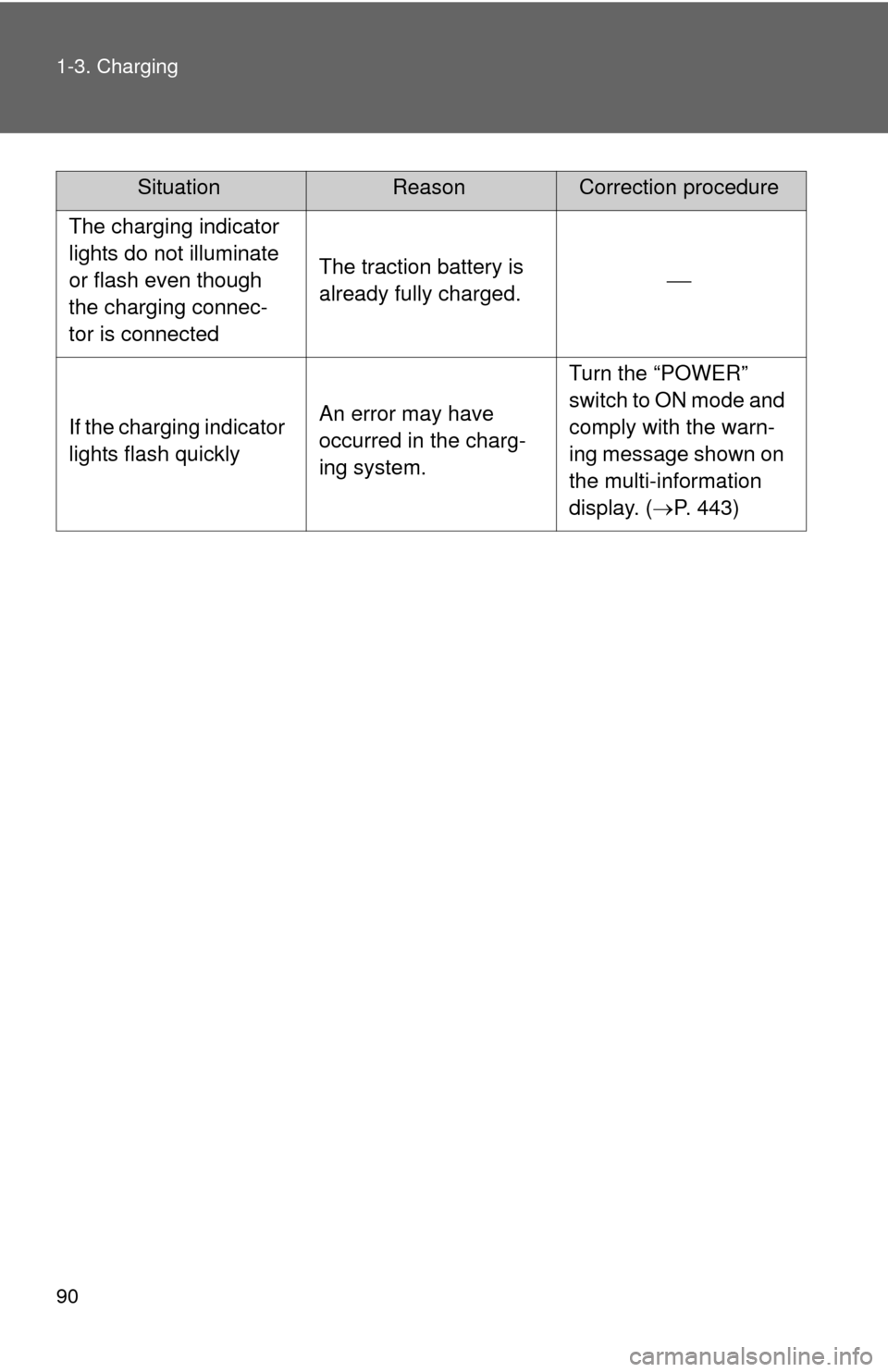
90 1-3. Charging
The charging indicator
lights do not illuminate
or flash even though
the charging connec-
tor is connected
The traction battery is
already fully charged.
If the charging indicator
lights flash quicklyAn error may have
occurred in the charg-
ing system.
Turn the “POWER”
switch to ON mode and
comply with the warn-
ing message shown on
the multi-information
display. (P. 443)
SituationReasonCorrection procedure
Page 94 of 520
94
1-4. Key information
Keys
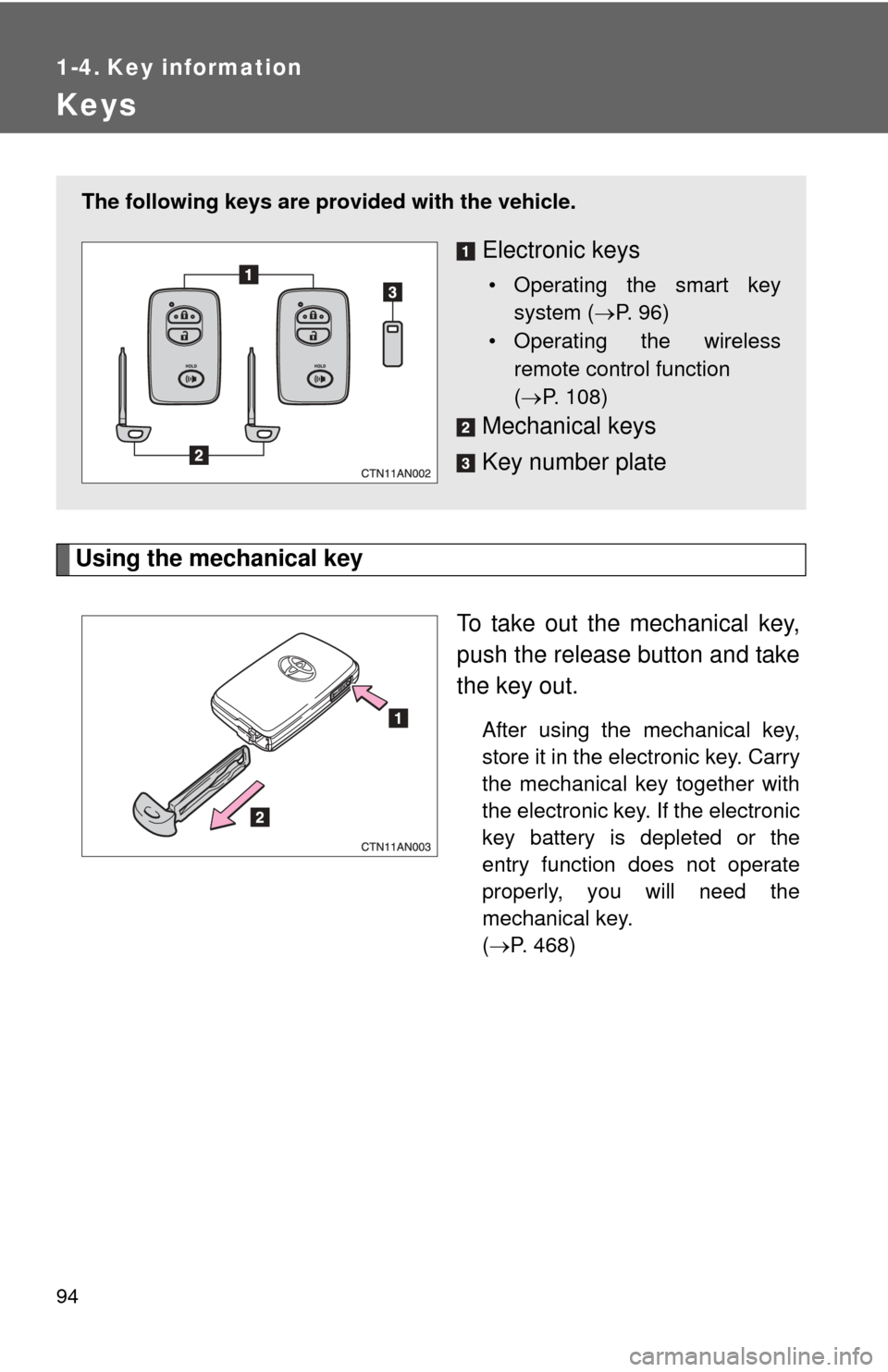
Using the mechanical keyTo take out the mechanical key,
push the release button and take
the key out.
After using the mechanical key,
store it in the electronic key. Carry
the mechanical key together with
the electronic key. If the electronic
key battery is depleted or the
entry function does not operate
properly, you will need the
mechanical key.
(P. 468)
The following keys are provid ed with the vehicle.
Electronic keys
• Operating the smart key
system ( P. 96)
• Operating the wireless remote control function
( P. 108)
Mechanical keys
Key number plate