charging TOYOTA RAV4 EV 2013 1.G Workshop Manual
[x] Cancel search | Manufacturer: TOYOTA, Model Year: 2013, Model line: RAV4 EV, Model: TOYOTA RAV4 EV 2013 1.GPages: 520, PDF Size: 7.4 MB
Page 87 of 520
87
1-3. Charging
1
Before driving
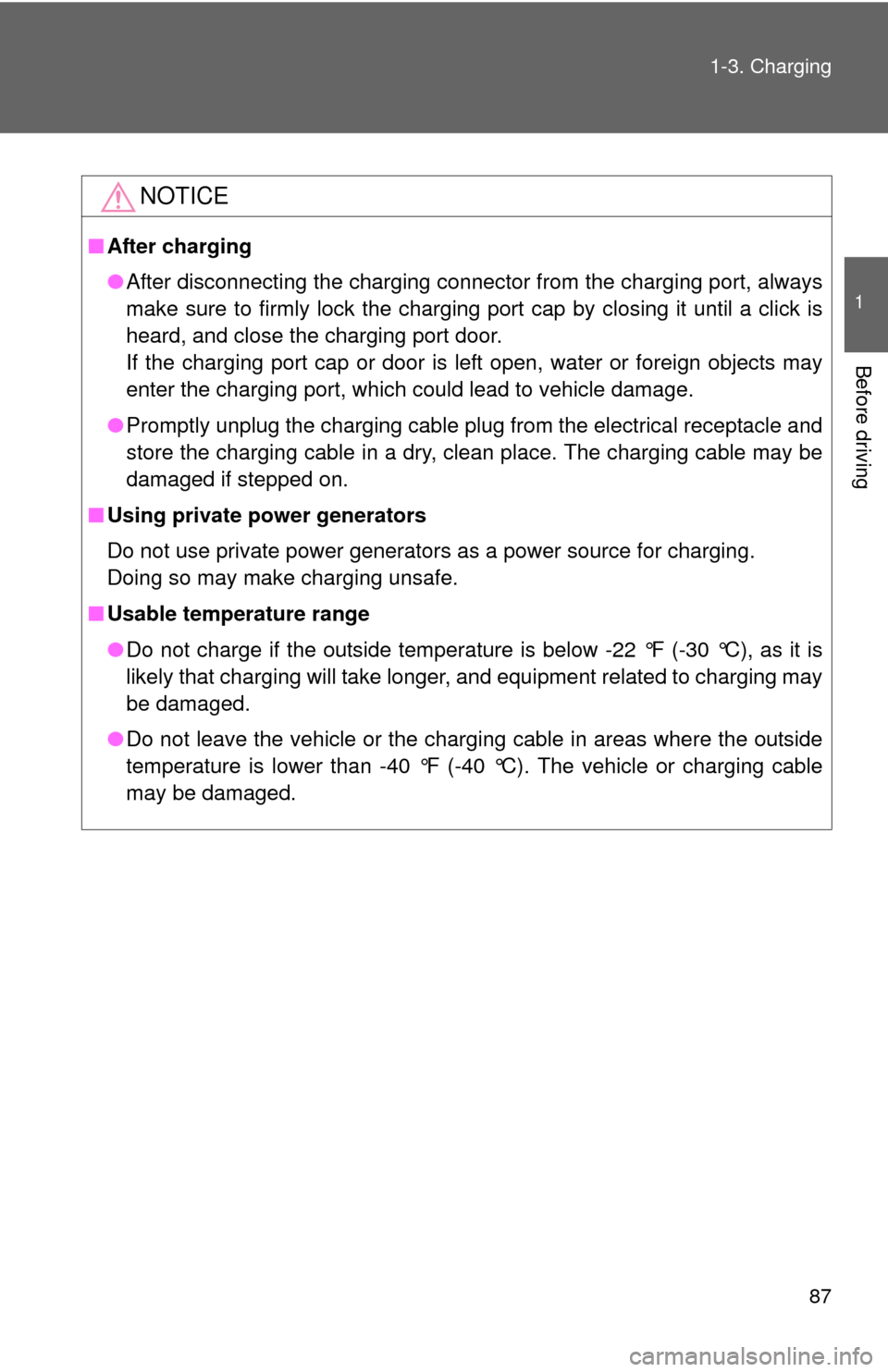
NOTICE
■
After charging
●After disconnecting the charging connector from the charging port, always
make sure to firmly lock the charging port cap by closing it until a click is
heard, and close the charging port door.
If the charging port cap or door is left open, water or foreign objects may
enter the charging port, which could lead to vehicle damage.
● Promptly unplug the charging cable plug from the electrical receptacle and
store the charging cable in a dry, clean place. The charging cable may be
damaged if stepped on.
■ Using private power generators
Do not use private power generators as a power source for charging.
Doing so may make charging unsafe.
■ Usable temperature range
●Do not charge if the outside temperatur e is below -22 °F (-30 °C), as it is
likely that charging will take longer, and equipment related to charging may
be damaged.
● Do not leave the vehicle or the charging cable in areas where the outside
temperature is lower than -40 °F (-40 °C). The vehicle or charging cable
may be damaged.
Page 88 of 520
88
1-3. Charging
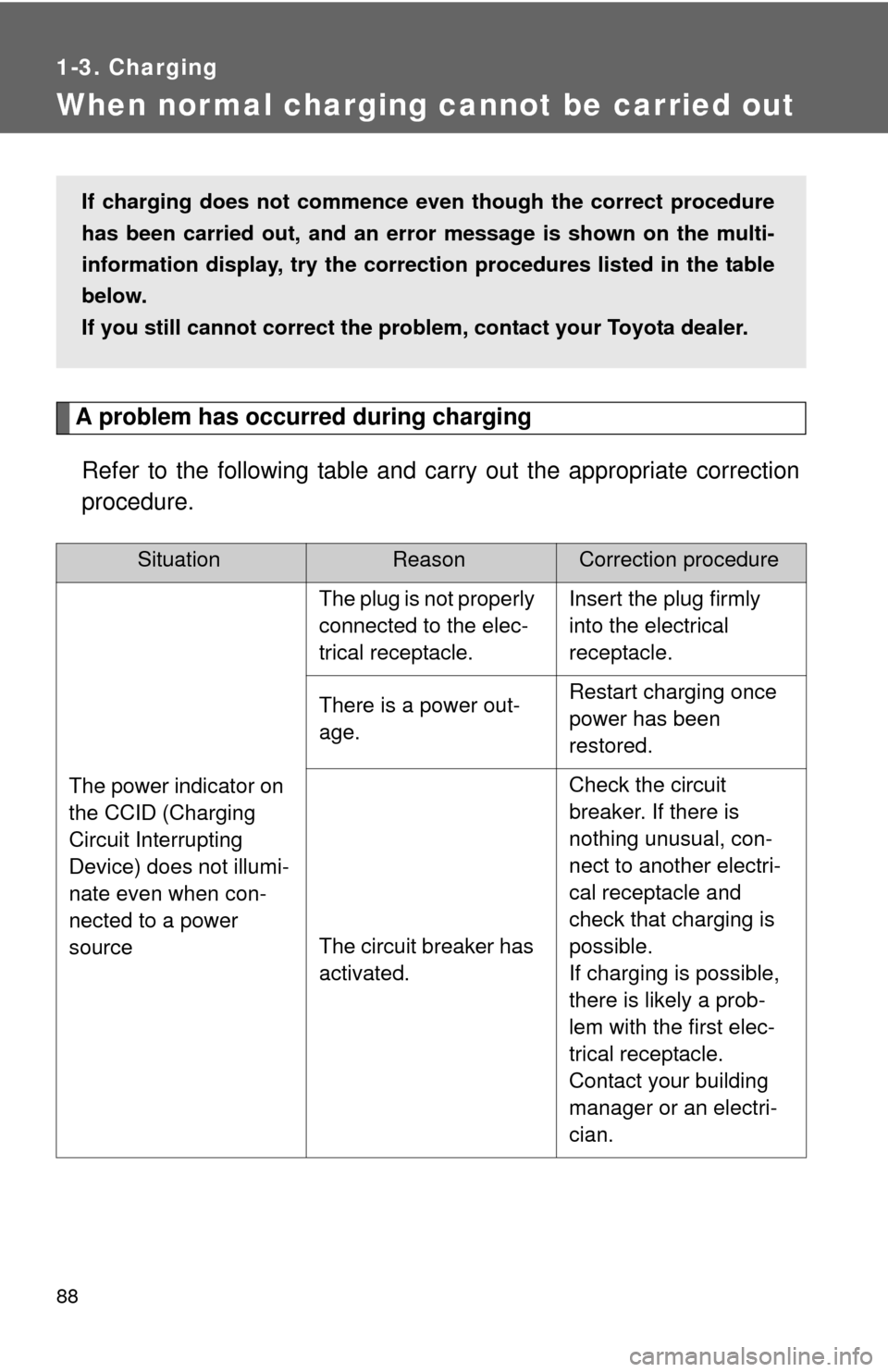
When normal charging cannot be carried out
A problem has occurred during chargingRefer to the following table and carry out the appropriate correction
procedure.
SituationReasonCorrection procedure
The power indicator on
the CCID (Charging
Circuit Interrupting
Device) does not illumi-
nate even when con-
nected to a power
source
The plug is not properly
connected to the elec-
trical receptacle.Insert the plug firmly
into the electrical
receptacle.
There is a power out-
age.Restart charging once
power has been
restored.
The circuit breaker has
activated.
Check the circuit
breaker. If there is
nothing unusual, con-
nect to another electri-
cal receptacle and
check that charging is
possible.
If charging is possible,
there is likely a prob-
lem with the first elec-
trical receptacle.
Contact your building
manager or an electri-
cian.
If charging does not commence even though the correct procedure
has been carried out, and an er ror message is shown on the multi-
information display, try the correct ion procedures listed in the table
below.
If you still cannot correct the problem, contact your Toyota dealer.
Page 89 of 520
89
1-3. Charging
1
Before driving
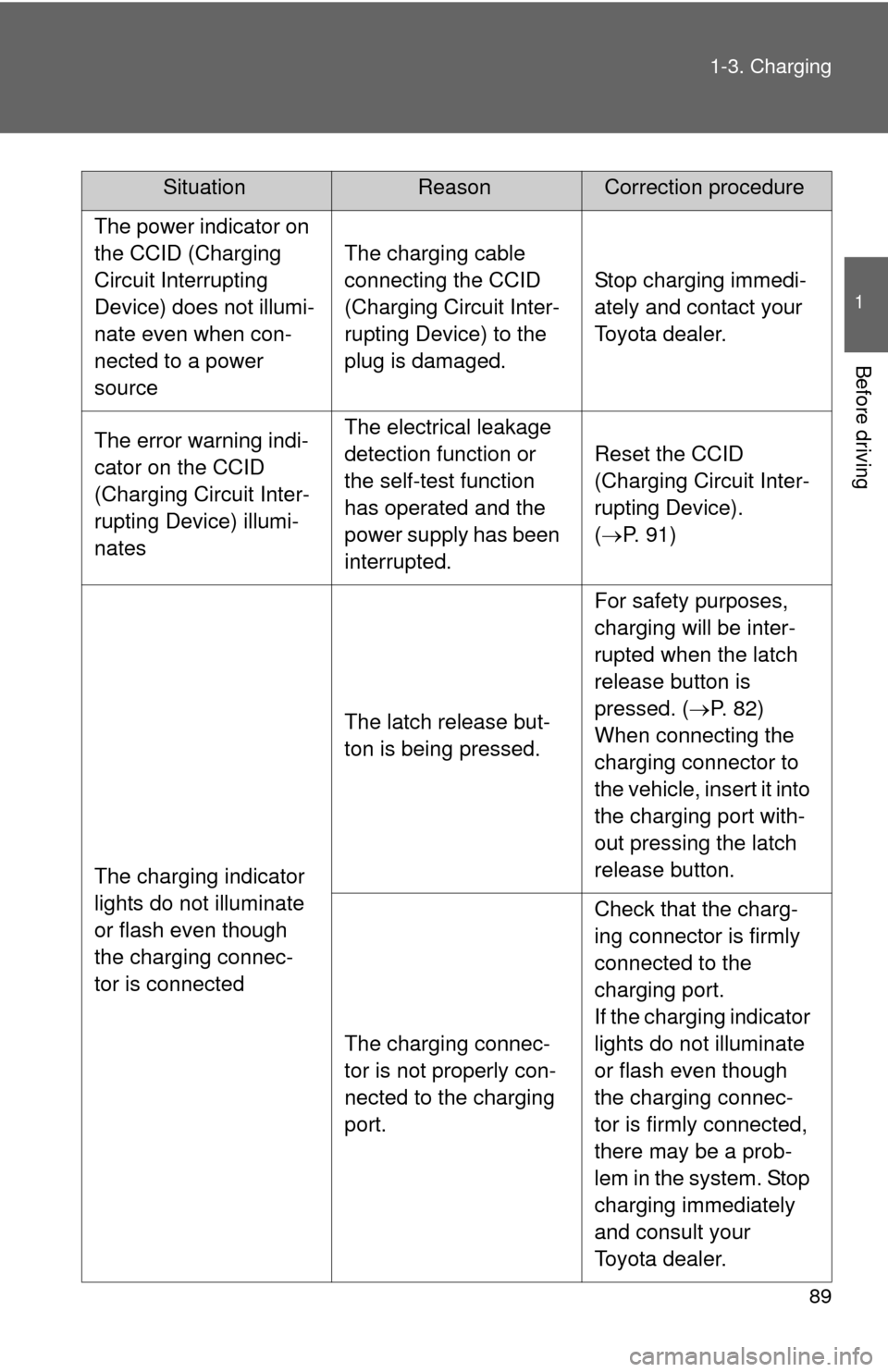
The power indicator on
the CCID (Charging
Circuit Interrupting
Device) does not illumi-
nate even when con-
nected to a power
source
The charging cable
connecting the CCID
(Charging Circuit Inter-
rupting Device) to the
plug is damaged.
Stop charging immedi-
ately and contact your
Toyota dealer.
The error warning indi-
cator on the CCID
(Charging Circuit Inter-
rupting Device) illumi-
natesThe electrical leakage
detection function or
the self-test function
has operated and the
power supply has been
interrupted.
Reset the CCID
(Charging Circuit Inter-
rupting Device).
(
P. 91)
The charging indicator
lights do not illuminate
or flash even though
the charging connec-
tor is connected
The latch release but-
ton is being pressed.
For safety purposes,
charging will be inter-
rupted when the latch
release button is
pressed. ( P. 82)
When connecting the
charging connector to
the vehicle, insert it into
the charging port with-
out pressing the latch
release button.
The charging connec-
tor is not properly con-
nected to the charging
port.
Check that the charg-
ing connector is firmly
connected to the
charging port.
If the charging indicator
lights do not illuminate
or flash even though
the charging connec-
tor is firmly connected,
there may be a prob-
lem in the system. Stop
charging immediately
and consult your
Toyota dealer.
SituationReasonCorrection procedure
Page 90 of 520
90 1-3. Charging
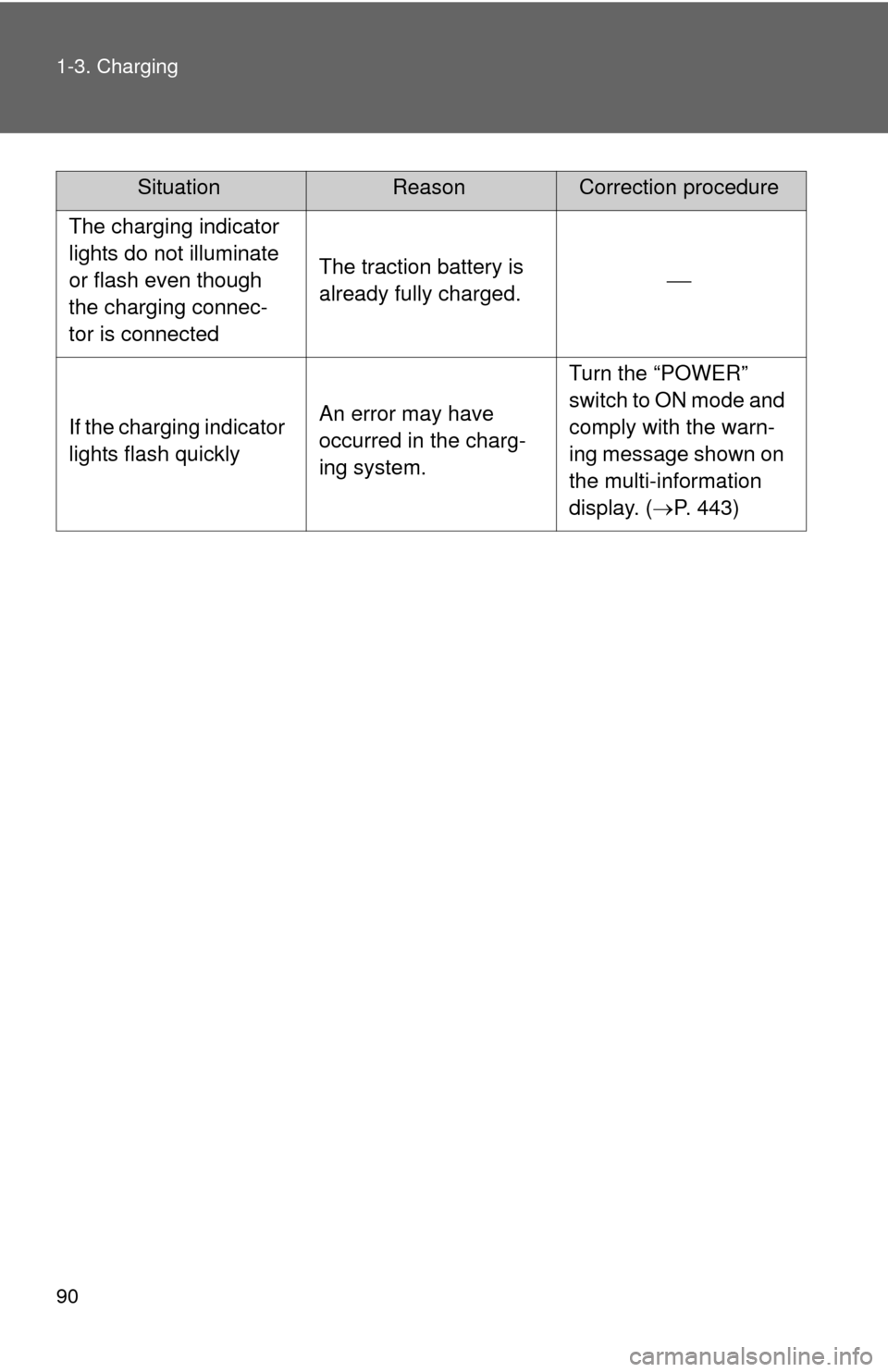
The charging indicator
lights do not illuminate
or flash even though
the charging connec-
tor is connected
The traction battery is
already fully charged.
If the charging indicator
lights flash quicklyAn error may have
occurred in the charg-
ing system.
Turn the “POWER”
switch to ON mode and
comply with the warn-
ing message shown on
the multi-information
display. (P. 443)
SituationReasonCorrection procedure
Page 91 of 520
91
1-3. Charging
1
Before driving
If a warning message is displayed after charging
If a warning message is displayed when the “POWER” switch is
turned to ON mode after charging, comply with the contents of the
message and take any necessary actions. ( P. 443)
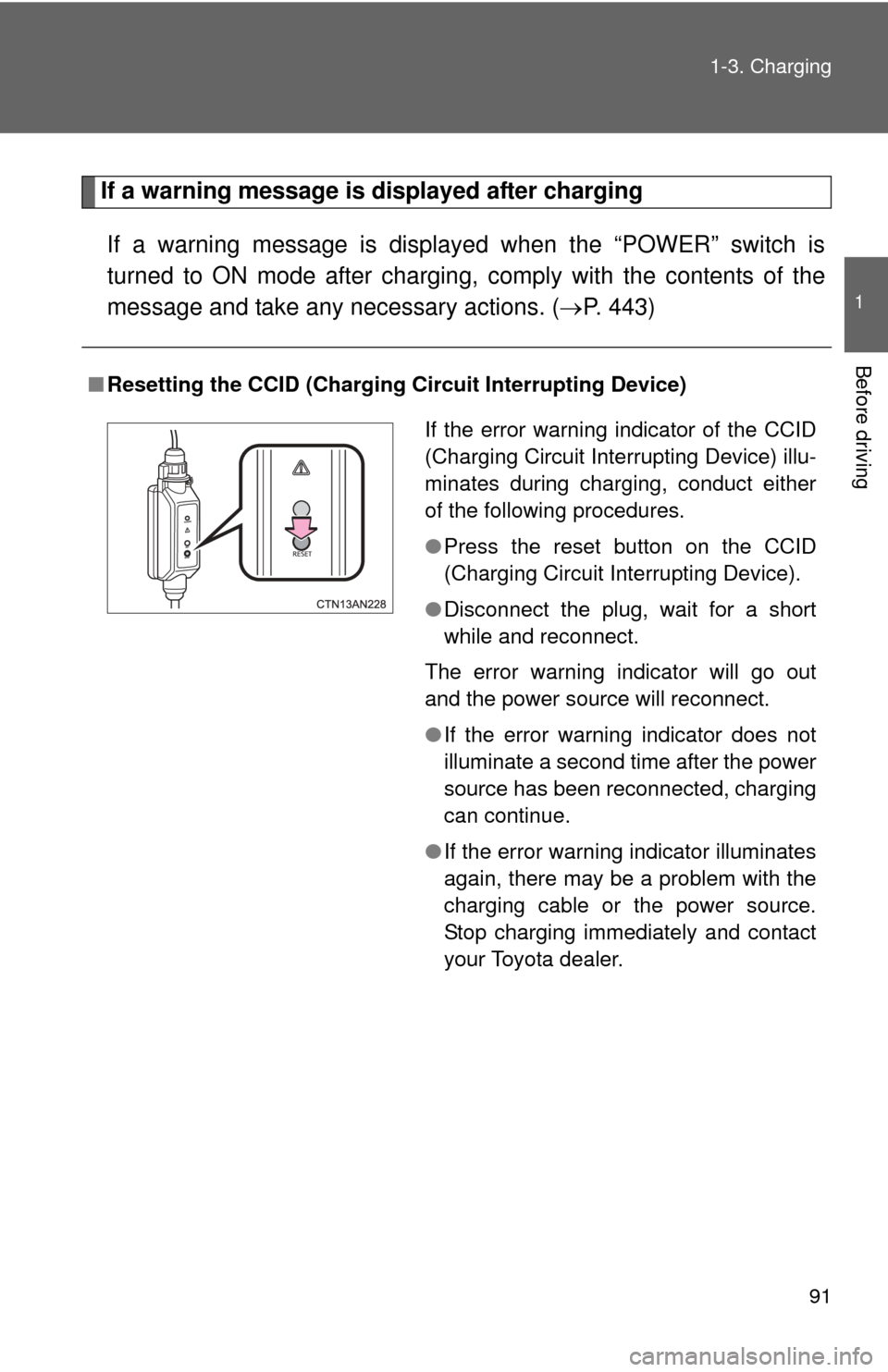
■Resetting the CCID (Charging Circuit Interrupting Device)
If the error warning indicator of the CCID
(Charging Circuit Interrupting Device) illu-
minates during charging, conduct either
of the following procedures.
●Press the reset button on the CCID
(Charging Circuit Interrupting Device).
● Disconnect the plug, wait for a short
while and reconnect.
The error warning indicator will go out
and the power source will reconnect.
● If the error warning indicator does not
illuminate a second time after the power
source has been reconnected, charging
can continue.
● If the error warning indicator illuminates
again, there may be a problem with the
charging cable or the power source.
Stop charging immediately and contact
your Toyota dealer.
Page 92 of 520
92
1-3. Charging
Inspecting the charging cable
Inspecting the electrical leakage detection function
Check that the electrical leakage detection function operates properly
by following the procedure below.
In the unlikely event that the elec trical leakage detection function
does not operate properly, contact your Toyota dealer as soon as
possible.
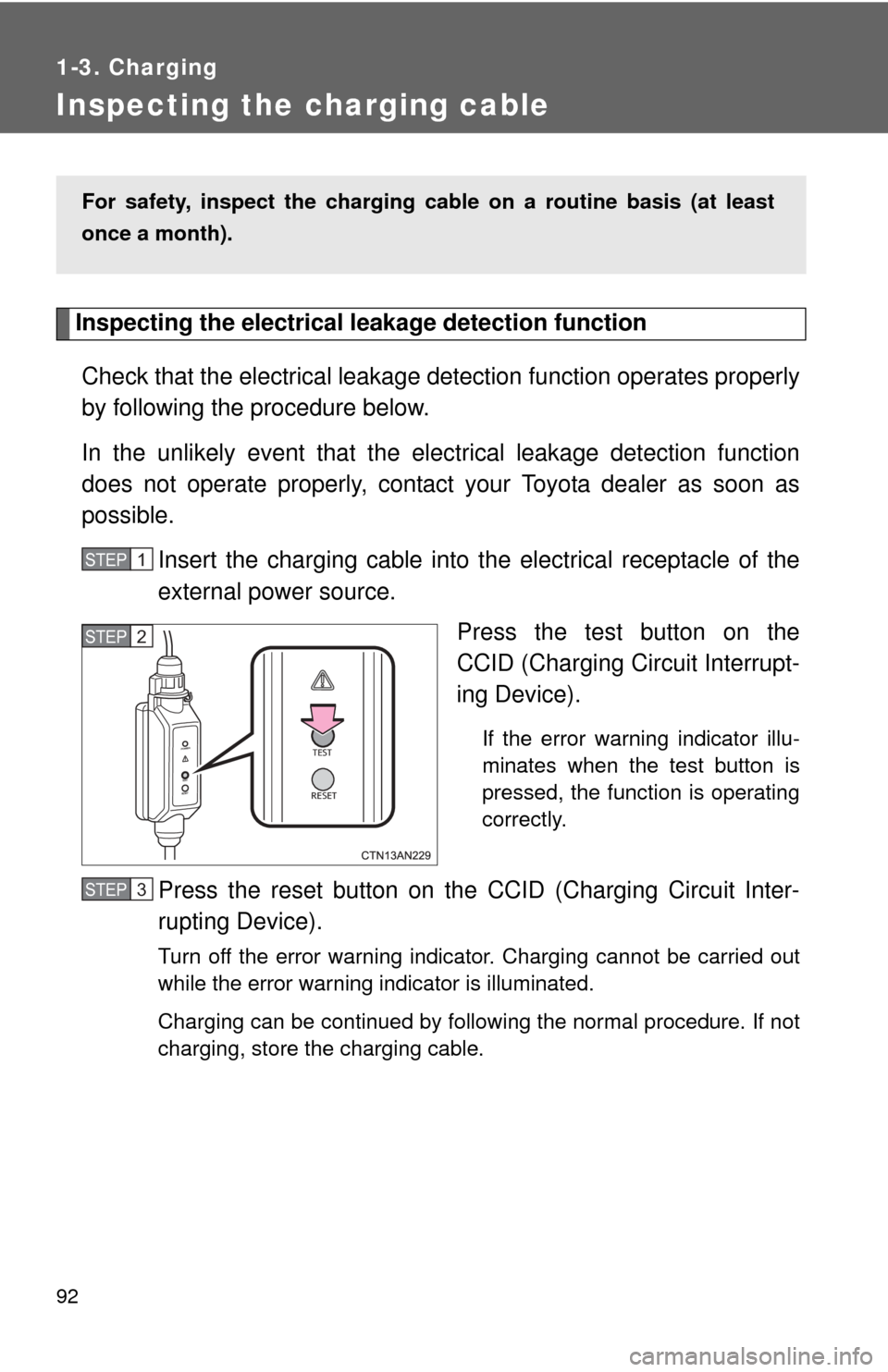
Insert the charging cable into t he electrical receptacle of the
external power source.
Press the test button on the
CCID (Charging Circuit Interrupt-
ing Device).
If the error warning indicator illu-
minates when the test button is
pressed, the function is operating
correctly.
Press the reset button on the CCID (Charging Circuit Inter-
rupting Device).
Turn off the error warning indicator. Charging cannot be carried out
while the error warning indicator is illuminated.
Charging can be continued by following the normal procedure. If not
charging, store the charging cable.
For safety, inspect the charging cable on a routine basis (at least
once a month).
STEP 1
STEP 2
STEP 3
Page 93 of 520
93
1-3. Charging
1
Before driving
CAUTION
■
Routine inspection
Check the following points regularly.
If use is continued without inspection, fire or electric shock may occur, possi-
bly resulting in death or serious injury.
●The charging cable, plug, charging connector, CCID (Charging Circuit
Interrupting Device) etc. have not been damaged
● The electrical receptacle has not been damaged
● The plug does not get extremely hot during use
● The tip of the plug has not been deformed
● The plug is not dirtied by dust etc.
Inspect the plug after removing it from the electrical receptacle.
■ Maintaining the charging cable
When the cable is dirty, first remove the dirt with a squeezed out cloth, and
then wipe the cable with a dry cloth. Do not wash with water, as doing so
could cause a fire or electrical shock when charging, which could lead to
death or serious injury.
■ When not using the char ging cable for a long time
Remove the plug from the electrical receptacle. Dust could accumulate on
the plug or in the electrical receptacle, possibly causing overheating which
could lead to a fire.
Also, keep the cable in a place free from moisture.
Page 104 of 520
104 1-5. Opening, closing and locking the doors
■Battery-saving function
In the following circumstances, the entry function is disabled in order to pre-
vent the 12-volt battery from discharging and the electronic key battery from
depleting.
●When the entry function has not been used for 2 weeks or more.
● When the electronic key has been left within approximately 3 ft. (1 m) of
the vehicle for 10 minutes or more.
The system will resume operation when
● The vehicle is locked using the door handle lock switch when carrying the
electronic key on your person.
● The vehicle is locked/unlocked using the wireless remote control.
( P. 108)
● The vehicle is locked/unlocked using the mechanical key. ( P. 468)
■ Conditions affecting operation
The smart key system uses weak radio waves. In the following situations,
the communication between the electronic key and the vehicle may be
affected, preventing the smart key system and wireless remote control from
operating properly. (Ways of coping: P. 468)
● When the electronic key battery is depleted
● Near a TV tower, electric power plant, gas station, radio station, large dis-
play, airport or other facility that generates strong radio waves or electri-
cal noise
● When carrying a portable radio, ce llular phone, cordless phone or other
wireless communication devices
● When the electronic key is in contact with, or is covered by a metallic
object
● When multiple electronic keys are in the vicinity
● When carrying or using the electronic key together with one or move of
the following devices that emit radio waves
• Another vehicle’s electronic key
• A wireless key that emits radio waves
• Personal computer
● If window tint with a metallic content or metallic objects is attached to the
rear window
Page 106 of 520
106 1-5. Opening, closing and locking the doors
■To operate the system properly
Make sure to carry the electronic key when operating the system. Do not get
the electronic key too close to the vehicle when operating the system from
the outside of the vehicle.
Depending on the position and holding condition of the electronic key, the
key may not be detected correctly and the system may not operate properly.
(The alarm may go off accidentally, or the door lock prevention may not func-
tion.)
■ If the smart key system does not operate properly
● Locking and unlocking the doors: Use the mechanical key. ( P. 468)
● Starting the EV system. ( P. 468)
■ Electronic key battery depletion
●The standard battery life is 1 to 2 years. (The battery becomes depleted
even if the electronic key is not used.) If the smart key system or the
wireless remote control function does not operate, or the detection area
becomes smaller, the battery may be depleted. Replace the battery when
necessary. ( P. 383)
● If the battery becomes low, an alarm will sound in the cabin when the EV
system stops. (P. 100)
● To avoid serious deterioration, do not leave the electronic key within 3 ft.
(1 m) of the following electrical appliances that produce a magnetic field:
•TVs
• Personal computers
• Cellular phones, cordless phones and battery chargers
• Recharging cellular phones or cordless phones
• Induction cookers
• Table lamps
■ When the electronic key battery is fully depleted
P. 383
Page 200 of 520
200
2-1. Driving procedures
Power switch
Performing the following operations when carrying the electronic
key on your person starts the EV system or changes “POWER”
switch modes.
■ Starting the EV system
Check that the charging cable is disconnected. (P. 73)
Check that the parking brake is set.
Sit in the driver’s seat and firmly depress the brake pedal.
The “POWER” switch indicator turns green.
When the shift position is in N, the EV system cannot start.
Push the P position switch when starting the EV system.
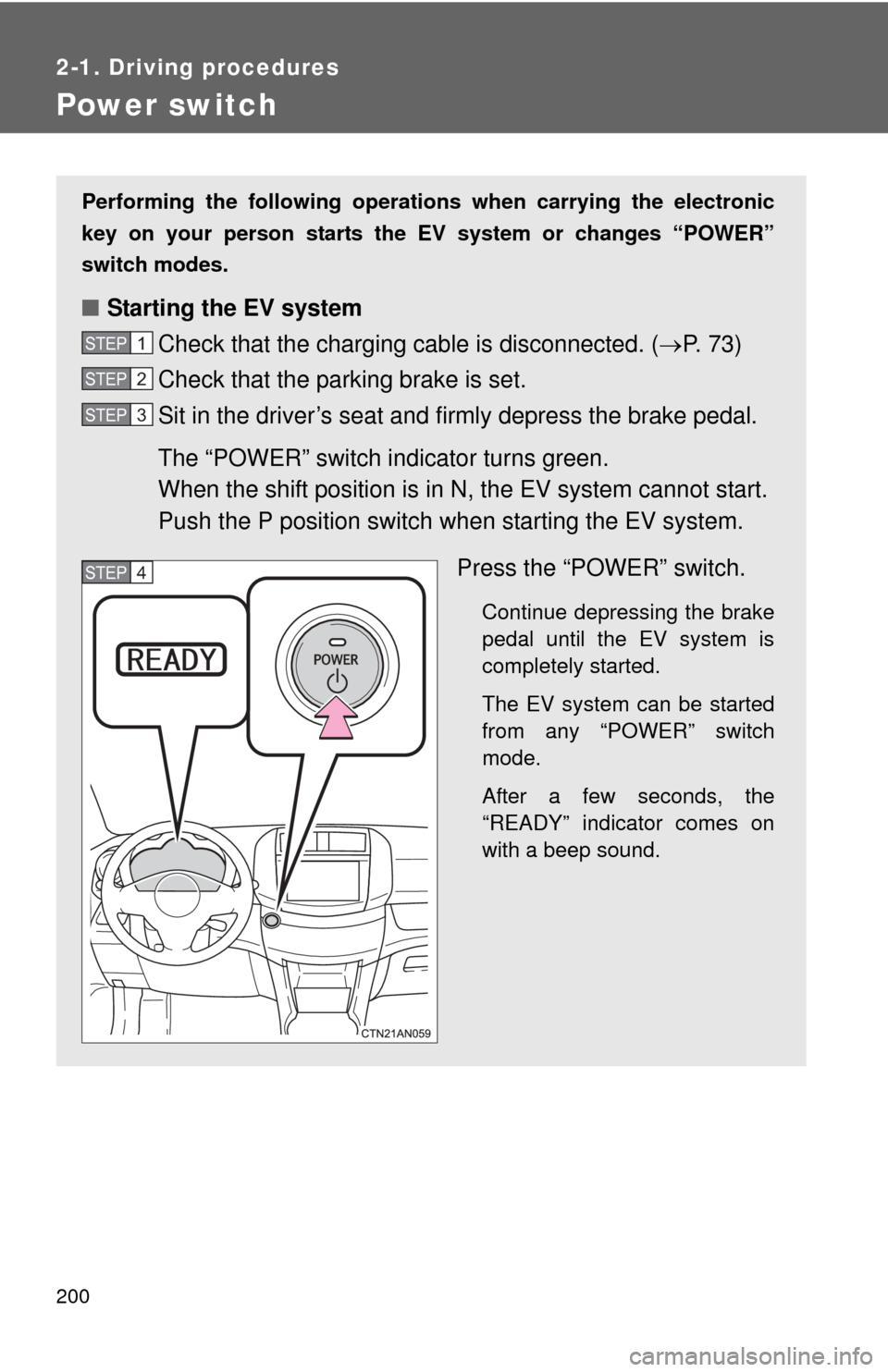
Press the “POWER” switch.
Continue depressing the brake
pedal until the EV system is
completely started.
The EV system can be started
from any “POWER” switch
mode.
After a few seconds, the
“READY” indicator comes on
with a beep sound.
STEP 1
STEP 2
STEP 3
STEP 4